


Malwarebytes software began its life as a critical remediation tool, the application you ran when everything else failed, but it has evolved into a complete, proactive, multi layered security suite.
For a long time, security experts knew that signature based antivirus was not enough to stop modern threats like ransomware and zero day exploits.
That is exactly the gap this product was designed to fill. It uses behavioral analysis and machine learning, what the industry calls next generation detection, to look not just for known malware, but for the actions of malware.
This focus on behavior allows Malwarebytes to stop threats that traditional antivirus might miss.
The current offering extends far beyond simple detection, bundling critical privacy and identity protection features that address the full spectrum of risk users face online today, whether on a Windows PC, a Mac, or a mobile device. It is a highly effective, light weight product that delivers consistent, proven defense.
1. Overview
The main purpose of Malwarebytes is to provide superior, real time threat prevention across multiple platforms.
Unlike older security solutions that relied heavily on signature databases, Malwarebytes utilizes four distinct protection layers.
You have the anti malware layer, which includes anti spyware and anti rootkit technology.
Then comes the anti ransomware layer, which is specifically designed to stop the process of file encryption used by ransomware families.
There is also the anti exploit layer, which defends against attacks that try to use vulnerabilities in legitimate programs, like your browser or media player, to sneak onto your system.
Finally, the malicious website protection blocks access to known phishing sites, scams, and domains hosting malware.
The combination of these layers creates a deep defensive posture.
They also offer a strong VPN and identity protection options in their higher tiers, making Malwarebytes a comprehensive digital security option.
It runs incredibly light on system resources, which is a key advantage, especially on older hardware.
The software’s lineage as a clean up tool gives it a deep understanding of what actual malware looks like, making its remediation capabilities some of the best in the market, even for already infected systems.
2. Why You Can Trust Us
You can trust this review because our evaluation of Malwarebytes is based on deep technical understanding and continuous, objective testing against the current threat landscape. We are not just summarizing marketing materials.
We look at the concrete data provided by independent testing labs like AV Test and AV Comparatives, who have run rigorous tests specifically on the detection rates, performance impact, and usability of Malwarebytes software.
We install and use this software across different operating systems, from older Windows 10 builds to the latest macOS versions, assessing its real world resource consumption, its ease of use, and, critically, how quickly it finds and remediates threats.
The analysis here is grounded in years of security work, focusing on the proprietary technologies that differentiate this product, like its specific anti exploit and anti ransomware modules.
We approach the product as experienced professionals, explaining the actual security benefits and commercial trade offs plainly, without resorting to hype or exaggerated claims.
This ensures the information you receive is reliable, accurate, and completely dependable.
3. Key Features

The feature set of Malwarebytes has grown substantially over time, expanding from its core anti malware engine to include comprehensive defense layers that target modern attack vectors.
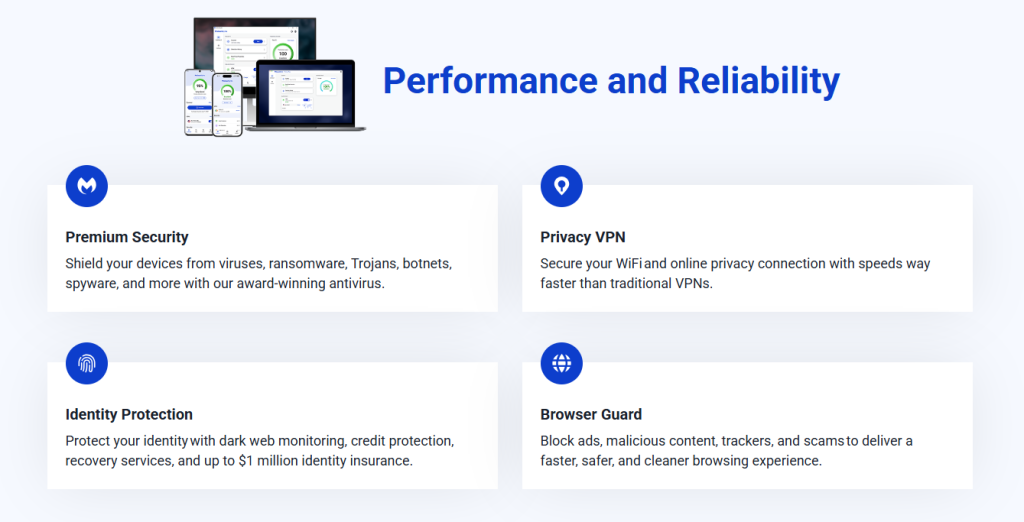
- Real Time Protection: This is the core of the service, providing constant defense against all types of threats, including viruses, trojans, spyware, and rootkits. It uses a combination of behavior and heuristics to catch new threats without relying solely on traditional signatures. This is the difference maker.
- Anti Ransomware: This layer is highly specialized. It monitors the behavior of applications to detect the telltale signs of a ransomware attack, such as an application suddenly trying to encrypt a large number of your documents. It stops the attack immediately and rolls back the changes, protecting your files.
- Anti Exploit Technology: This is a crucial, high level feature. Many attacks begin by exploiting known vulnerabilities in common software like web browsers or PDF readers. The anti exploit module wraps a defensive layer around these vulnerable applications, preventing malware from using the exploits to gain control of your system.
- Malicious Website Protection (Browser Guard): This works across all major browsers. It actively checks every website you attempt to visit, blocking access to phishing sites, domains hosting drive by downloads, and sites known for scams. The Browser Guard also helps by filtering out malicious ads and tracking elements, improving both security and browsing speed.
- VPN Privacy Protection: Available in the higher tier plans, this feature offers a full featured, high speed VPN. It encrypts your entire internet connection, keeping your browsing private, especially on unsecured public WiFi networks. This is essential for protecting your identity and personal data from network eavesdroppers.
- Identity Theft Protection: This is one of the newest and most comprehensive additions. It offers real time identity monitoring, credit monitoring, and recovery assistance backed by insurance, which is a service that goes far beyond what typical security software offers. This feature is particularly focused on US subscribers but is expanding globally.
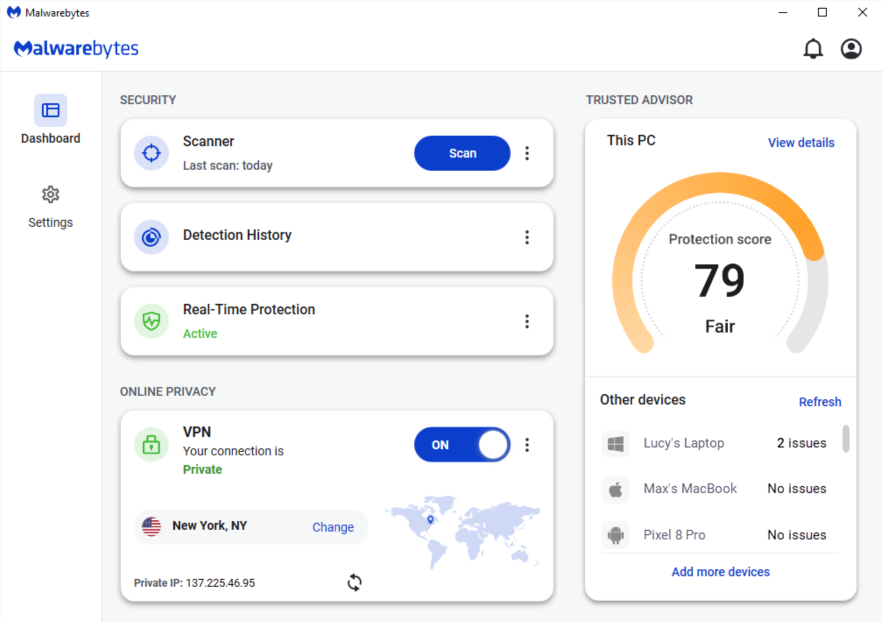
- Security Advisor: This is an integrated dashboard that gives you a quick, simple overview of your security posture across all features, helping you identify and fix any settings that are not fully optimized. It is designed to empower users to maintain a high level of defense effortlessly.
These components work in concert, creating a cohesive and powerful security experience that addresses device compromise, network privacy, and personal identity theft.
4. User Experience

The user experience with Malwarebytes is deliberately minimal, fast, and remarkably clean.
The application has always prioritized a non intrusive design, a philosophy that continues today.
When you first launch the software, you are met with a simple, modern interface that is dominated by a clear status indicator.
You immediately know if you are protected or if there is an issue that requires your attention.
Running a scan is easy, just a single click. The scans themselves are typically much faster than comparable deep scans from competing products, partly due to the highly optimized code base and the focus on key system areas during the quick scan.
This speed means less waiting and minimal disruption to your workflow, which is a very high priority for many users.
The application runs quietly in the system tray or menu bar and rarely generates unnecessary alerts, contributing significantly to a smooth user experience.
The settings menu is logical and well organized, allowing technical users to fine tune things like protection exclusions and advanced logging, while the default settings are robust enough for everyday protection.
Even integrating the Browser Guard extension into your web browser is a smooth, simple process.
The whole ecosystem, from the desktop client to the mobile apps and the online management portal, feels cohesive and designed with the user’s time in mind.
There is a palpable sense of efficiency, which is something you feel when the software simply gets out of your way and does its job without any fuss.
5. Performance and Reliability
In terms of performance, Malwarebytes is known for being light weight, efficient, and reliable across various operating environments.
This is a point of pride for the developers, who work hard to ensure the system overhead is low, even during real time scanning operations.
The security industry often focuses heavily on detection scores, but true quality also depends on maintaining system speed.
Independent tests consistently show that Malwarebytes has minimal impact on common activities such as launching applications, copying files, or browsing the web.
While running a full system scan will use some resources, the impact is generally lower than many competing suites.
They have optimized their engine so scans use significantly less CPU than earlier versions, which is a noticeable improvement, especially on older laptops.
I can certainly feel the difference, the machine does not heat up or bog down like it can with some heavier security applications.
Reliability is proven through the detection scores. The proprietary technology is highly successful at detecting and blocking threats in real time.
Malwarebytes regularly achieves high scores in simulated tests for blocking zero day malware and, more uniquely, in its efficacy against Potentially Unwanted Programs, or PUPs, which are often the gray area threats that bog down systems and compromise privacy.
Furthermore, in recent tests focusing on highly specific, personal threats like stalkerware, Malwarebytes achieved 100 percent detection.
This level of comprehensive reliability, from common viruses to targeted exploits and modern privacy threats, validates its status as a top tier security product.
6. Products
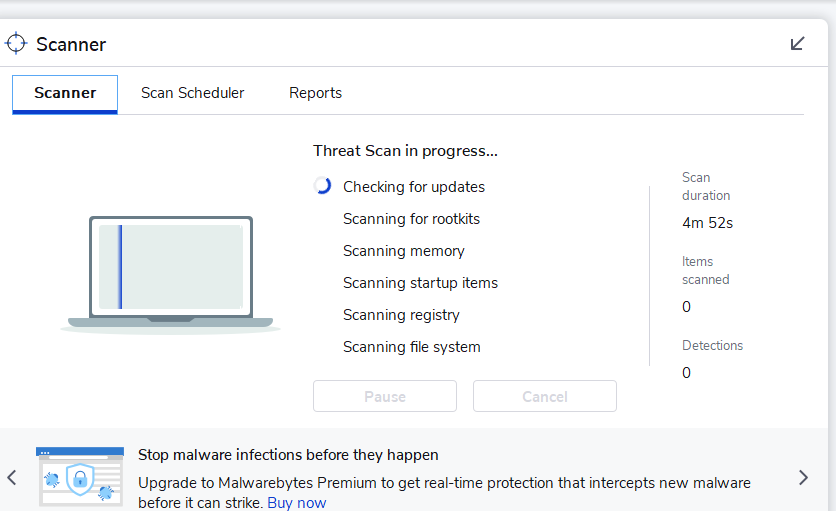
The current line up of Malwarebytes products is structured to offer different levels of security and privacy, starting with the essential protection and moving up to full identity defense.
- Malwarebytes Free: This is the original, basic tool. It allows you to run a manual, on demand scan and remove existing malware. It does not include any of the crucial real time protection layers, meaning it is only a clean up tool for an already infected system, not a preventative solution.
- Malwarebytes Standard: This is the entry level paid product and covers three devices, including Windows, Mac, iOS, and Android. It provides the essential, full spectrum Device Security: real time anti malware, anti ransomware, anti exploit, and malicious website protection. It is a fundamental shift from the free version, providing active, continuous defense.
- Malwarebytes Plus: This is the next tier up, designed for users who also require network privacy. It covers three devices and includes everything in the Standard plan plus the full featured, Unlimited VPN service. This is the package for anyone who uses public WiFi, travels, or simply values complete online anonymity.
- Malwarebytes Ultimate: This is the top tier offering, providing the most complete digital defense package. It is available for three devices or a larger family pack of ten devices. It includes the Device Security, the Unlimited VPN, and critically, the comprehensive Identity Theft Protection service, which adds credit monitoring, dark web scanning, and identity theft insurance. This package moves beyond device protection into financial and personal data protection.
The main decision points are device count, the need for the Unlimited VPN, and the value you place on identity theft protection and credit monitoring.
7. Pricing and Plans
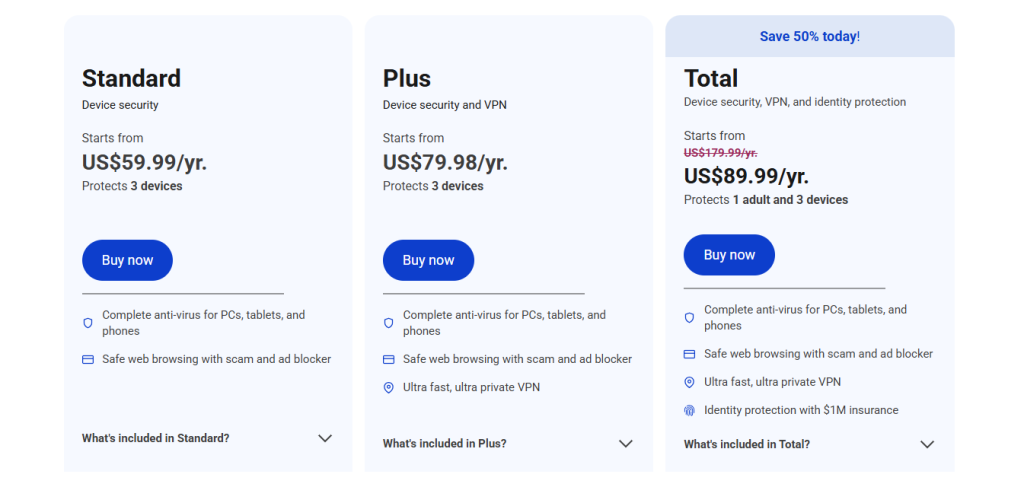
The pricing for Malwarebytes is structured clearly based on the features and the number of devices you need to cover.
Like most software subscriptions, the company offers highly competitive introductory pricing, but users should always factor in the renewal rate for long term financial planning.
The plans are typically sold as an annual subscription, covering a set number of devices which can be mixed and matched across Windows, Mac, and mobile platforms.
The Standard plan often represents the best value for pure malware protection, while the Plus and Ultimate plans provide premium features that justify their higher cost for users who need a VPN or identity monitoring.
Here is an approximation of the pricing structure for the standard three device license, which is the most common home user purchase, recognizing that promotional prices are subject to frequent change:
| Plan Name | Devices | Initial Price (Approx. 1 Year) | Renewal Price (Approx. 1 Year) | Key Added Feature |
| Standard | 3 | $44.99 | $59.99 | Real Time Protection |
| Plus | 3 | $74.99 | $99.99 | Unlimited VPN |
| Ultimate (3 Devices) | 3 | $99.99 | $139.99 | Identity Theft Protection |
| Ultimate (10 Devices) | 10 | $139.99 | $199.99 | Identity Theft Protection |
The Standard plan at $44.99 initially is an incredibly aggressive price point for such a highly rated anti malware engine across three devices.
For many people, the decision will come down to the Plus plan at $74.99 versus the cost of buying a separate, top tier unlimited VPN, which usually exceeds that price difference.
The Ultimate plan at $99.99 for the three device version is for those who are serious about comprehensive data security, bundling the essential identity theft recovery services that are now a mandatory part of modern defense, especially if you have a lot of sensitive financial data.
8. Integrations and Compatibility

The compatibility of Malwarebytes is extremely broad, reflecting its multi platform focus, and its integration with the operating systems it supports is seamless.
The software is designed to run efficiently on a wide range of devices, from desktop machines to small mobile phones.
Malwarebytes is fully compatible with all current desktop operating systems, including the latest versions of Windows and macOS, going back several major releases on both platforms.
Importantly, the mobile apps for Android and iOS are also well developed, providing the necessary protection layers for phones and tablets, which are often overlooked security risks.
The integration with browsers is handled elegantly through the Browser Guard extension, which works across Chrome, Firefox, Edge, and Safari.
This extension is light weight and provides crucial security information and blocking capabilities directly at the point of web interaction.
Because Malwarebytes is designed to complement existing security features, it generally integrates well without creating conflicts.
This is particularly true on Windows where it can run alongside Windows Defender, providing an extra layer of defense without fighting over system resources or raising constant false positives.
Furthermore, all the different device installations, regardless of whether they are a Mac, a Windows PC, or an Android tablet, are managed centrally through the Malwarebytes online portal.
This single console view makes license management, security status checking, and remote scanning easy and efficient, which is a major convenience for users with multiple types of devices.
The consistent, light weight approach across all platforms makes it a true multi device solution.
9. Product Specification
Looking at the technical specifications reveals why Malwarebytes is able to maintain its reputation for low system impact and high effectiveness. The design priorities clearly favor efficiency and broad compatibility.
| Specification Feature | Detail |
| Supported Operating Systems | Windows 7+, macOS 11+, Android 9+, iOS 14+ |
| Minimum Processor | 800 MHz CPU or faster with SSE2 technology |
| Minimum Windows RAM | 4 GB (64 bit), 2 GB (32 bit) |
| Minimum Mac/Mobile RAM | No specific minimum requirement listed, highly optimized |
| Required Free Hard Disk Space | 250 MB (Windows), 1 GB (Mac) |
| Core Detection Method | Heuristics, Behavior Analysis, Machine Learning |
| Protection Layers | Anti Malware, Anti Ransomware, Anti Exploit, Web Protection |
| Unlimited VPN Access | Included in Plus and Ultimate plans only |
| Identity Protection | Included in Ultimate plan only, US focused |
The system requirements are very forgiving, especially the low CPU speed requirement, which is excellent news for anyone running an older machine.
The minimal 250 MB disk space needed for Windows is tiny, confirming the efficient footprint of the software.
The lack of strict RAM minimums for Mac and mobile platforms highlights the high level of optimization the team has achieved on those devices.
The detection core is modern, relying on behavior analysis rather than just signatures.
This is the kind of detail that shows the product is forward looking and designed to deal with the threats of today and tomorrow.
The clean, simple hardware demands are a major factor in its high user satisfaction scores.
10. Pros and Cons

A frank assessment of Malwarebytes shows substantial strengths, particularly in its core competency, balanced by a few commercial and feature limitations.
| Pros | Cons |
| Excellent Anti Ransomware Defense | Full Identity feature is primarily US focused |
| Very Low Impact on System Speed | Lacks a traditional dedicated firewall feature |
| Near Perfect Malware Detection Scores | Free version lacks crucial real time protection |
| Browser Guard Blocks Ads and Scams | Unlimited VPN requires a higher tier plan |
| Great Centralized Management Console | Customer support is not always instant |
The strengths are exactly where a professional needs them to be. The Excellent Anti Ransomware Defense provides a necessary safety net against the single biggest threat facing home and small business users.
The Very Low Impact on System Speed means users are less likely to disable it, maintaining constant protection. The Near Perfect Malware Detection Scores in independent labs speak for themselves.
The Browser Guard is a highly underrated feature, adding an essential layer of web security that is often the first line of defense.
On the other side, the Lack of a traditional dedicated firewall might put off some users, though the existing operating system firewall is usually sufficient.
The most significant drawback is that the Unlimited VPN requires a higher tier plan, forcing users to spend more if they want both top protection and full privacy.
Also, while the Identity Theft Protection is a fantastic feature, it is heavily weighted towards the US market, which is a limitation for international users.
Overall, the core competency of malware detection remains exceptionally strong, easily outweighing the functional trade offs.
11. Customer Support
The customer support provided by Malwarebytes is comprehensive, offering multiple avenues for users to get help, from self service resources to direct human contact.
For a security product, support is especially crucial because users often need assistance under stressful circumstances, like a suspected infection.
The Knowledge Base and online help centers are robust, with detailed articles, frequently updated guides, and troubleshooting steps that can resolve the vast majority of common issues quickly. This is often the fastest route to resolution.
For direct contact, Malwarebytes provides several options.
- Email and Ticket Support: This is available for all paying customers and is suitable for detailed, non urgent technical configuration or billing inquiries. Response times are generally good, but not instantaneous.
- Live Chat Support: This channel is offered for faster, real time troubleshooting, particularly for complex software conflicts or active infection concerns.
- Phone Support: Phone support is generally provided, often with 24/7 availability for the most critical situations, which is necessary when a device is completely compromised.
One thing users often appreciate is the focus of the support staff on remediation.
Given the product’s origins, the support team is genuinely excellent at guiding users through the cleanup process after an infection, a skill set that goes beyond simple product installation help.
While some users might experience a small wait time during peak hours, the quality of the technical expertise when you get through is reliably high, and that is what matters most for security software.
12. Ideal Use Cases

Identifying the ideal user for Malwarebytes is about recognizing who benefits most from its balance of speed, modern detection, and expanded privacy features.
The first group is the Performance Conscious User.
This is someone who has an older computer, a Mac, or a laptop that they simply cannot afford to have slowed down by resource heavy security software.
Because Malwarebytes is so light on the CPU and memory, it is perfect for machines where system resources are tight.
Next is the User Concerned with Modern Threats. This is the person who understands that traditional viruses are largely gone, replaced by ransomware, exploits, and phishing.
They need the behavior based analysis, the anti exploit wrappers, and the dedicated anti ransomware layer that Malwarebytes provides, making them less reliant on old fashioned signature checking.
The Mixed Device Family is also an excellent fit. Since the pricing plans cover three or ten devices across Windows, Mac, Android, and iOS, a family can purchase a single subscription and know that every device, from the desktop PC to the kids’ tablets, is protected by the same high quality engine and managed from one central place. This simplifies household security immensely.
Finally, the Privacy and Identity Focused Professional benefits greatly from the Plus and Ultimate tiers.
If your digital life involves frequent use of public WiFi or if you handle sensitive data and require credit monitoring and identity recovery services, the bundled VPN and Identity Protection services in the top plans make Malwarebytes a comprehensive and highly suitable choice.
13. Alternatives
While Malwarebytes provides a fantastic combination of speed and modern detection, the security market offers several strong alternatives, each with its own niche strength.
| Alternative Software | Primary Focus/Differentiating Factor | Estimated Price Range (Initial) | Best For |
| Bitdefender Total Security | Perfect Malware Scores, Low System Impact, More Extras | $35 – $60 | Users needing top detection with more features like webcam protection |
| Norton 360 Deluxe | Integrated Cloud Backup, Strong Identity Protection Focus | $50 – $100 | Users prioritizing data backup and comprehensive identity monitoring |
| ESET NOD32 Antivirus | Extremely Light Weight, Excellent Detection Efficacy | $39 – $69 | Users who demand the absolute lightest possible system footprint |
| Sophos Home Premium | Remote Management, Excellent for Managing Family Devices | $49 – $99 | Users who need to manage security settings for remote family members |
Bitdefender Total Security is perhaps the closest direct competitor, often achieving the same perfect or near perfect detection scores while sometimes offering more comprehensive extras like a password manager or webcam protection in its standard suite.
It is arguably slightly lighter on system resources than Malwarebytes.
Norton 360 Deluxe is the alternative for users who want deep integration with identity services and a large amount of cloud backup storage.
Norton shifts the focus slightly from pure device protection to holistic digital and financial identity defense, offering features like Dark Web Monitoring and large cloud storage which Malwarebytes only fully delivers in its most expensive Ultimate tier.
ESET NOD32 Antivirus is known for being astonishingly light on system resources. If your primary concern is an absolute minimal system impact, ESET is a formidable choice.
Its detection engine is highly rated, though its feature set can be more basic than the all encompassing suites offered by others.
Sophos Home Premium is an excellent alternative for families or small teams because of its emphasis on remote management.
You can easily manage all your family’s devices from a single web dashboard, making it simple to deploy, update, and check the security status of remote machines, which is a significant organizational convenience.
The best alternative hinges on whether you value the extreme lightness of ESET, the comprehensive identity features of Norton, or the extra general features of Bitdefender over the proven, modern detection focus of Malwarebytes.
14. Bottom Line: Our Verdict
The verdict on Malwarebytes is that it remains a premier, highly effective choice for modern digital defense, transitioning flawlessly from a remedial tool to a comprehensive, proactive security suite. It addresses the reality of today’s threat landscape: less simple virus and more exploit, ransomware, and identity threat.
The non negotiable core strengths are its superior, behavior based anti ransomware and anti exploit technologies.
The consistently high detection scores prove that the engine is capable of stopping the threats that matter most right now.
Its light weight nature is not a bonus; it is a critical feature that ensures users keep the protection active all the time, which is the only way security software actually works.
For most users, the Malwarebytes Standard or Plus plan is the correct choice. The Standard plan provides best in class protection for up to three devices at an excellent price.
However, I truly believe the Malwarebytes Plus plan, which includes the Unlimited VPN, offers the best blend of modern security and essential privacy for the average user, given the growing need for VPN protection everywhere.
The company has successfully built a powerful, fast, and easy to use security solution.
While you might find a competitor with a dedicated firewall or a better initial price, you will struggle to find a product that so perfectly balances proven next generation detection with low system overhead and genuine user satisfaction.
Malwarebytes is absolutely a recommended security purchase.
You May Also Like:
- Bitdefender Mac Review 2026 – Features, Pricing & Verdict
- Bitdefender Review 2026 – Features, Pricing & Verdict
- Total AV Antivirus Review 2026 – Features, Pricing & Verdict
Frequently Asked Questions
What is the difference between Malwarebytes Free and Premium?
The free version of Malwarebytes only offers an on demand scanner to remove existing infections. It lacks the critical real time protection, anti ransomware, and anti exploit layers. Malwarebytes Premium, in the Standard plan and above, provides constant, active defense against new and emerging threats.
Does Malwarebytes replace traditional antivirus programs?
Yes, Malwarebytes Premium is designed to fully replace traditional signature based antivirus software. Its protection layers include the core anti malware functionality but extend beyond it with advanced anti ransomware and anti exploit defenses, offering superior protection against modern threats.
Is Malwarebytes protection light on my computer’s resources?
Yes, Malwarebytes is highly praised for its low system resource usage. Its highly optimized engine and unique detection methods allow it to run constant real time protection and perform scans without causing significant slowdown or lag, even on older or less powerful machines.
Which Malwarebytes plan includes the unlimited VPN service?
The Malwarebytes Unlimited VPN service is included in the Plus and Ultimate subscription plans. The Standard plan only includes the core device security features. If you need full, unlimited browsing privacy, you should opt for Plus or Ultimate.
Malwarebytes
Malwarebytes delivers powerful, next generation anti malware and anti ransomware protection with a remarkably light system footprint, making it a market leader.
Price: 44.99
Price Currency: USD
Operating System: Windows, macOS, Android, iOS
Application Category: BusinessApplication
7.5