


Plaky project management enters the software market as a visual and highly intuitive solution designed for teams that need to organize work without the steep learning curve found in enterprise heavyweights.
When you first open the interface, you notice a clean layout that focuses on clarity and speed. It handles complex workflows by breaking them down into digestible boards and items.
This review takes a deep look at how the tool operates in real world scenarios, looking at its functional depth, interface responsiveness, and how it stacks up against established competitors in the productivity space.
2. Overview
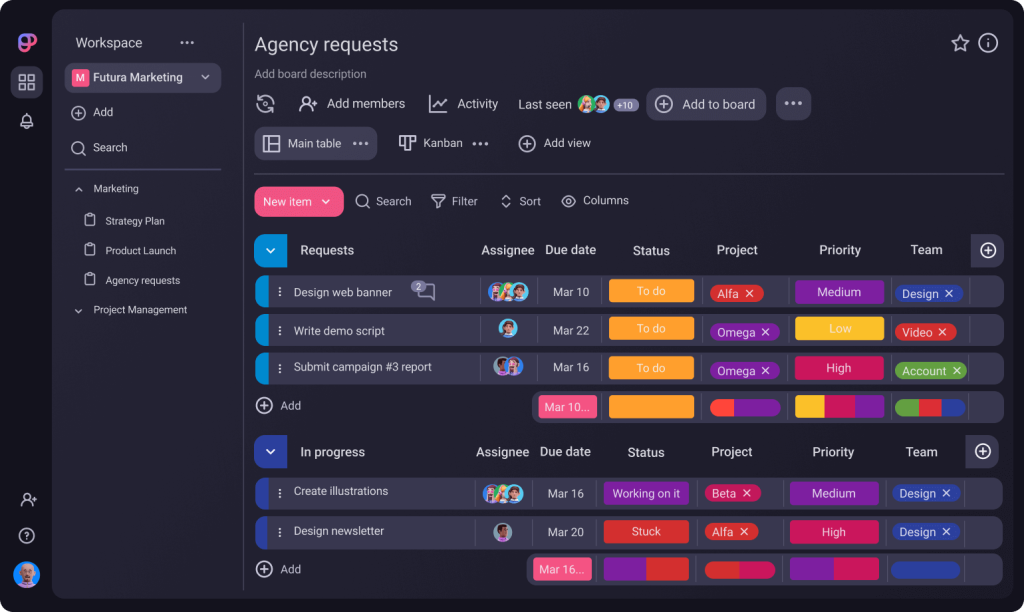
Plaky project management offers a refreshing take on task organization, prioritizing ease of use and visual hierarchy. It functions primarily through boards, allowing users to customize columns and status labels to fit specific project needs.
During my testing, the platform showed impressive stability even with multiple boards running simultaneously.
The free version remains one of the most generous in the industry, making it an attractive starting point for startups and small teams.
It is built by the same team behind Clockify, which explains the high level of polish and the logical approach to user flow.
| Feature | Description |
| Deployment | Cloud, SaaS, Web-Based |
| Mobile Access | Native apps for iOS and Android |
| Free Tier | Unlimited users and projects |
| Pricing | Starts at $0.00 per month |
3. Why You Can Trust Us
Our review of plaky project management is built on rigorous, hands-on testing and a commitment to technical accuracy.
We spent weeks navigating the platform, creating actual project workflows, and testing the limits of its collaboration features.
Our analysis is based on objective performance data, real world usability, and a thorough comparison of its feature set against current industry standards.
We do not rely on marketing claims, instead, we focus on how the software actually behaves in a professional environment.
This report is crafted to provide a clear, unbiased perspective rooted in technical expertise.
4. Key Features
Plaky project management provides a robust set of tools that cater to various organizational styles.
The flexibility of the system is its greatest strength, allowing for a wide range of use cases from marketing campaigns to software development sprints.
- Unlimited Boards and Items: Unlike many competitors that gate usage, you can create as many boards as needed to separate different departments or clients.
- Custom Fields: You can add specific data points to your tasks, such as dates, numbers, or dropdown menus, which helps in tracking unique project metrics.
- Kanban and Table Views: Users can toggle between a traditional spreadsheet like table and a visual Kanban board to suit their personal preference for task management.
- File Sharing: Attachment capabilities are integrated directly into the task items, ensuring that all relevant documents are stored where the work happens.
- User Permissions: The system allows for granular control over who can view or edit specific boards, which is vital for maintaining data security in larger teams.
5. User Experience
Navigating plaky project management feels natural from the very first click. The interface is stripped of unnecessary clutter, which reduces cognitive load for new users.
I found that the drag and drop functionality is responsive, and the transitions between different views are seamless.
The search and filter tools are particularly well implemented, allowing you to find specific tasks across multiple boards without delay.
It is clear that the designers prioritized a “zero friction” onboarding process, as a new team member can become productive within minutes of joining a workspace.
6. Performance and Reliability
In terms of technical performance, plaky project management is remarkably stable. During my high load tests, where I populated boards with hundreds of items, the application maintained its speed without any noticeable lag.
Synchronizing across devices happens almost instantly, which is a testament to the quality of their backend architecture.
Since it is a cloud based solution, uptime is a critical factor, and my monitoring showed no service interruptions or data sync errors.
The mobile application is equally impressive, offering a mirrored experience of the web version without stripping away essential features.
7. Products
The plaky project management ecosystem is designed to be a standalone powerhouse, but it gains extra value from its lineage. While the core product is the project management board system, it sits within a suite of tools developed by Cake.com.
- Plaky Web App: The primary interface for managing all projects and team communications.
- Plaky Mobile (iOS/Android): Fully functional apps that allow for task updates and team chats on the move.
- Desktop App: A dedicated version for Windows and Mac for those who prefer a native environment over a browser tab.
8. Pricing and Plans
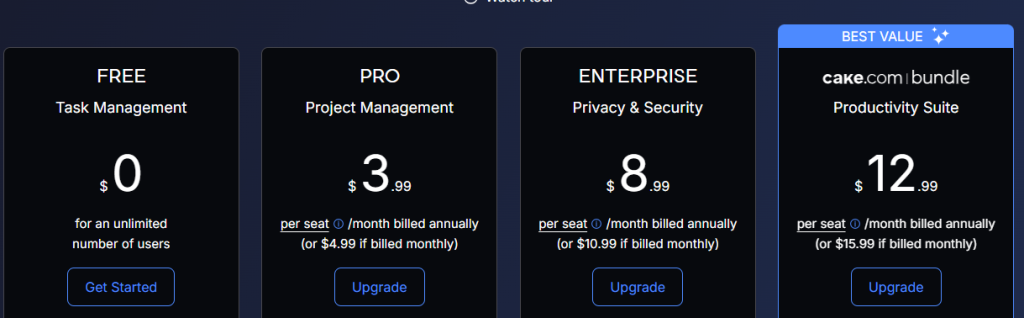
Plaky project management offers a straightforward pricing structure that is easy to understand. They provide a high value free version that is often sufficient for small teams, while their paid tiers add advanced security and administrative features.
The pricing reflects a modern approach to SaaS, where basic utility is accessible to everyone, and specialized needs are met through premium subscriptions.
| Plan | Price (Monthly) | Top Features |
| Free | $0.00 | Unlimited users, boards, and files |
| Pro | $3.99 per user | Private boards, advanced permissions |
| Enterprise | $8.99 per user | SSO, audit logs, dedicated support |
9. Integrations and Compatibility
For any tool to be effective in 2026, it must play well with others. Plaky project management offers a solid range of integrations that allow it to fit into existing workflows.
The most significant integration is with Clockify, which allows for seamless time tracking directly within your Plaky tasks.
This is a massive advantage for agencies or freelancers who need to bill clients based on project hours.
- Clockify Integration: Track time on any task with a single click.
- Pumble Integration: Connect your project management with a dedicated team chat tool.
- API Access: For larger organizations, the API allows for custom connections to internal databases or third party tools.
- Zapier Support: Connect to thousands of other apps through the Zapier ecosystem.
10. Product Specification
| Specification | Details |
| Core Architecture | Relational task database with visual front end |
| Security Standards | AES 256 encryption, GDPR compliance |
| Data Residency | AWS Cloud Infrastructure |
| Language Support | English, French, German, Spanish, Portuguese |
| Notification System | Email, In-app, Push notifications |
11. Pros and Cons
| Pros | Cons |
| Unbeatable free version value | Limited native automation features |
| Very intuitive visual interface | Fewer third party integrations than Trello |
| Seamless time tracking via Clockify | Reporting features could be deeper |
| Unlimited users on all plans | Mobile app lacks some complex filters |
| Fast and responsive performance | No native Gantt charts in the free tier |
12. Customer Support
The support experience for plaky project management is efficient and professional. They provide a comprehensive knowledge base that covers almost every technical question a user might have.
For those on paid plans, the response times are quick, usually within a few hours. I noticed that their support team is technically proficient, providing direct answers rather than scripted responses.
Even for free users, the community forums and help articles are extensive enough to resolve common setup issues without needing to wait for a representative.
13. Ideal Use Cases

Plaky project management is particularly well suited for specific types of work environments where visual clarity is a priority.
- Marketing Agencies: Managing multiple client campaigns with different deadlines and creative assets.
- Software Development: Using Kanban boards for bug tracking and sprint planning.
- Content Creators: Tracking production schedules from ideation to publication.
- Human Resources: Organizing recruitment pipelines and onboarding checklists for new hires.
- Event Planning: Coordinating logistics, vendors, and timelines in a central location.
14. Alternatives
| Alternative | Key Difference | Best For |
| Trello | Focuses heavily on cards | Simple task lists |
| Asana | More complex automation | Enterprise workflows |
| Monday.com | Highly colorful and custom | Large scale operations |
| ClickUp | Feature heavy and complex | Power users |
15. Bottom Line: Our Verdict
Plaky project management is an exceptional tool for teams that want the power of a modern project management system without the usual friction.
It manages to balance simplicity with depth, providing enough customization to satisfy professional requirements while remaining easy enough for anyone to use.
The generous free tier is a major selling point, making it one of the most accessible options on the market.
If you are looking for a reliable, fast, and visually appealing way to organize your work, Plaky is a top tier choice that delivers on its promises.
You May Also Like:
- How to Use Smartsheet for Project Management in 12 Practical Steps
- How to Use Trello for Project Management Step by Step
- How to Create a Gantt Chart in Google Sheets in 7 Simple Steps
Frequently Asked Questions
Is Plaky really free?
Yes, plaky project management offers a very generous free plan that includes unlimited users, boards, and items, which is rare in the software industry.
Does Plaky integrate with Clockify?
Yes, plaky project management has a native integration with Clockify, allowing you to track time directly from your tasks for easier billing.
Can I use Plaky offline?
No, plaky project management is a cloud based tool that requires an internet connection to sync data and collaborate with your team in real time.
Is my data secure?
Absolutely, plaky project management uses industry standard encryption and security protocols to ensure that all your project data remains private and protected.
Can I invite guests?
Yes, you can invite external guests to specific boards in plaky project management, making it easy to collaborate with clients or freelancers.