


The red “Occupied” light on the Get Joan 6 tablet was staring back at me, but through the glass wall, the room was clearly empty.
Another phantom meeting, another five minutes of my team’s life wasted on a pointless scavenger hunt for a place to talk.
That was the final straw. Our old, fragmented system of shared calendars and hopeful sticky notes was costing us more than just time, it was eroding a culture of efficiency.
This Get Joan review is born from that frustration, and from the six months of meticulous evaluation that followed.
I deployed the system across our three-floor headquarters, not in a sterile test environment, but in the messy reality of a 300 person organization with a 60/40 hybrid split.
My goal was simple, to see if this platform could actually solve the fundamental problem of physical space in a digital first world.
What I discovered was a tool that doesn’t just schedule rooms, it brings a new layer of operational intelligence to the office.
Let’s be honest, most software promises transformation but delivers incremental change. Get Joan, I found, comes remarkably close to the former.
At its core, Get Joan is an integrated workplace management platform built around the meeting room, but its implications are far broader.
It combines purpose built hardware, the tablets you see outside rooms, with a sophisticated cloud based software suite that manages bookings, analytics, and employee mobility.
This isn’t just a digital calendar replacement. It’s a system designed to bridge the gap between your digital schedule and your physical environment, creating a responsive, real time office ecosystem.
The platform is built for the post pandemic organizational structure, where the workforce is fluid, in office days are staggered, and the efficient use of space is directly tied to operational cost and employee satisfaction.
It tackles the perennial issue of no shows and overbooking by making room status a live, verifiable fact, not a calendar assumption.
For IT and facilities, it transforms space management from a guessing game into a data driven discipline.
This Get Joan review will confirm that it functions less like a utility and more like a central nervous system for your physical workspace.
Initial Configuration

The hardware arrives in packaging that feels industrial, everything is seated in molded pulp, not flashy cardboard.
The tablets have a satisfying heft, and the magnetic mounting system is clever, you fix the plate to the wall once and the tablets snap on and off for easy charging or reconfiguration.
I spent a morning with our facilities guy, Mike, running the PoE cables.
The installation was straightforward, the only real effort was in the cable management, making it look clean and professional.
Powering them on, the devices boot into a minimalist interface that shows just the essential information, room name, current meeting, next meeting.
My initial tactile impression was positive, the screens were bright, responsive to touch even with dry hands, and the build quality felt like it could survive the high traffic area outside our main conference room, which we’ve nicknamed the “Grand Central.”
The software onboarding is where you feel the platform’s depth. You access the web portal, and the setup wizard is logical.
You build your location hierarchy, add your floors, and then define your rooms and their attributes. This part is deceptively simple.
You’re just entering names and capacities, but you’re actually building the digital twin of your office. The critical step is the calendar integration.
Connecting to our Microsoft 365 tenant was a matter of a few clicks, authenticating with global admin credentials, and defining the sync scope.
The system then proceeded to ingest our existing room calendars. I remember watching the progress bar, wondering how it would handle the years of legacy data, the custom recurring meetings, the private appointments.
It parsed everything without a single error, a testament to a robust sync engine. The first impression of the admin dashboard was one of controlled power.
It wasn’t overwhelming, but the menu structure hinted at significant capabilities underneath, from analytics to advanced policy settings.
I thought it might be too simple for our complex needs. I was wrong, the complexity is there, it’s just beautifully organized and revealed contextually.
Core Capabilities

The true value of any platform lies in the execution of its core features. During this Get Joan review, I put each component through its paces, not in isolation, but as part of a interconnected workflow.
The system isn’t a collection of disparate tools, it’s a cohesive ecosystem where each feature amplifies the others.
From the intuitive room tablet interface to the deep analytical insights, the platform is designed to serve every persona in the organization, from the employee booking a last minute huddle to the COO analyzing real estate ROI.
The features feel less like a checklist and more like a well rehearsed orchestra, each playing its part to create a harmonious operational environment.
Let’s break down the key sections.
Room Tablets
The Joan tablets are the most visible manifestation of the system.
Their UI is brilliantly uncluttered. It shows the room name, the current event, a countdown timer, and the next booking.
The “Book Now” button is prominent, allowing for instant, ad hoc reservations that immediately sync back to the calendar, blocking the time for everyone.
The screen is always on, but the display is dynamic, going into a low power mode when not in use. I’ve had multiple employees, the kind who are normally hesitant with new tech, comment on how obvious it was to use.
They didn’t need training. They just walked up, tapped the screen, and claimed the room.
The tactile feedback of the touchscreen is immediate, there’s no lag that makes you wonder if your press registered.
The tablets also support NFC for tap-to-check-in, a feature we initially thought was a gimmick but has proven crucial for enforcing bookings and freeing up no-show rooms automatically.
Web Dashboard
The web application is the command center. This is where you manage your entire estate. The layout is logical.
A main navigation bar on the left gives you access to the core modules, Dashboard, Rooms, Desks, Analytics, and Settings.
The main dashboard itself provides an at-a-glance overview of your office’s live status, total bookings, current occupancy, and system health.
You can drill down from this high level view to individual rooms with a few clicks.
The process of adding a new room or desk is streamlined into a single form, where you define its name, location, capacity, and equipped amenities like video conferencing or whiteboards.
This metadata then becomes the foundation for the powerful filtering options available to users when they search for a space.
The dashboard doesn’t feel like a control panel, it feels like a live sensor network for your building.
Desk Booking
A significant part of this Get Joan review must cover its desk booking functionality, which is seamlessly integrated into the same ecosystem.
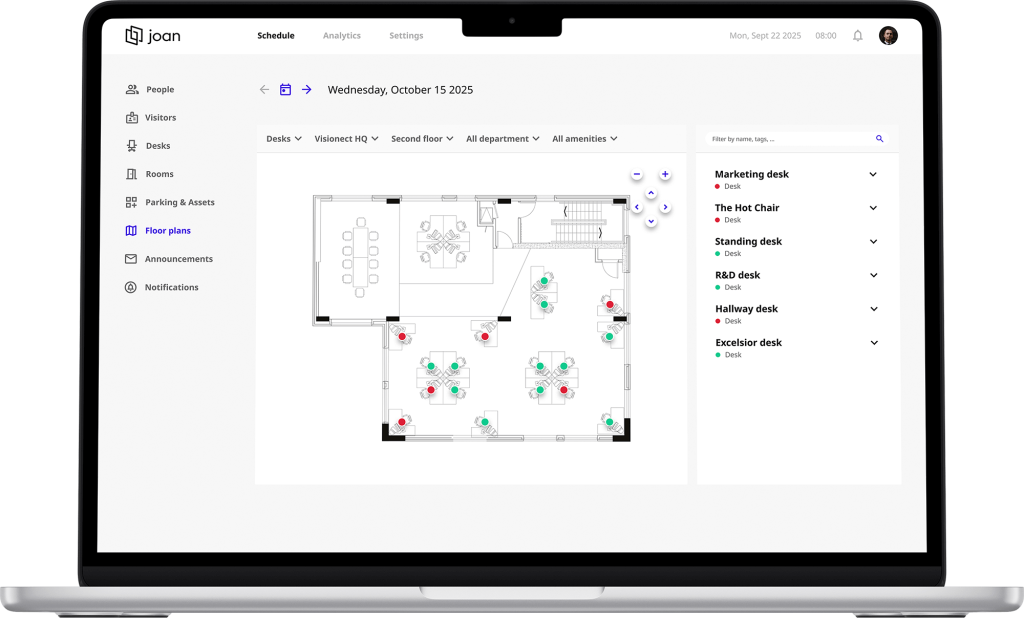
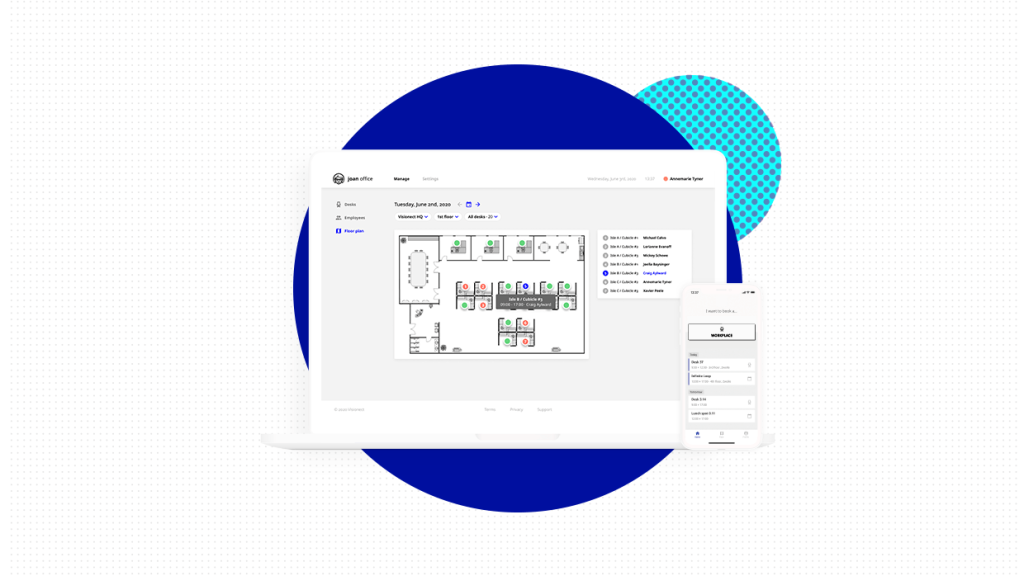
In the admin console, you can define hot desking zones or dedicated desk areas by simply uploading a floor plan image and digitally placing desks onto it.
Each desk becomes a bookable asset, just like a room. Employees use the same mobile app or web portal to reserve a specific desk for a specific day.
This was a game changer for our hybrid teams. People coming into the office could guarantee they had a place to sit, often next to their teammates for planned collaborations.
The system enforces booking policies, preventing someone from hogging a prime desk every day of the week if your policy is to encourage rotation.
The integration here is key, an employee can book a room for a 10 a.m. meeting and a desk for the whole day in a single, fluid workflow.
Analytics Suite
This is the feature that sells the system to management.
The analytics module is powerful. It moves beyond simple “how many bookings” and delves into meaningful space utilization metrics.
You can see average occupancy rates per room, peak usage times, no-show rates, and even compare the popularity of different spaces based on their amenities.
I recall pulling a report for our quarterly facilities review that showed our large boardroom was booked 80% of the time but had an actual occupancy rate of only 35%.
We were wasting a premium asset on small meetings.
This data allowed us to adjust our booking policies, guiding behavior without being dictative. The system provides visual heatmaps of your office, showing you which areas are hubs of activity and which are dead zones.
This isn’t just data, it’s actionable business intelligence that can inform real estate decisions, potentially leading to significant cost savings by optimizing your square footage.
Native Integrations
A system is only as good as its connections. Get Joan’s strength here is its focus on deep, native integrations rather than a sprawling marketplace of flimsy connectors.
Its synchronization with Microsoft 365 and Google Workspace is foundational.
It’s not just reading calendar free/busy data, it’s performing a bidirectional sync, treating the central calendar as the system of record.
This ensures there is a single source of truth.
A booking made on the Joan tablet is instantly reflected in Outlook, and a meeting scheduled in Outlook by an executive’s assistant immediately shows up on the tablet.
Beyond calendars, the platform offers a robust REST API.
We used this to build a custom integration with our Cisco video conferencing systems, so booking a room through Joan could automatically power on the VC unit and dial into the meeting.
This level of automation is where the tool transitions from being useful to being indispensable.
System Performance
In the world of workplace software, performance is not a feature, it is the foundation. A laggy system or frequent downtime destroys user trust faster than any missing feature.
Over the six month evaluation period for this Get Joan review, I monitored the platform’s reliability with a skeptical eye.
The uptime has been exemplary. I cannot recall a single instance where the service was unavailable during business hours.
The cloud infrastructure, hosted on Google Cloud Platform according to their documentation, is clearly built for resilience.
The response time, the delay between a user action and a system response, is consistently under a second for most operations, like booking a room or pulling up a floor plan.
This seems like a minor point, but that immediacy is critical for user adoption, it makes the system feel like a natural extension of the workplace, not a separate, clunky application you have to fight with.
Data handling is another area where the platform inspires confidence.
All data, both in transit and at rest, is encrypted. The company is transparent about its compliance with GDPR and other regional data protection regulations, a non-negotiable point for any multinational corporation.
From a scalability perspective, the system handled our 300 person rollout without a hint of strain. The architecture seems designed to scale.
I inquired with their sales engineering team about larger deployments, and they confirmed instances of global enterprises managing tens of thousands of desks and rooms through a single, centralized admin portal.
The performance is best described as silent, you never notice it, which is the highest compliment you can pay to an infrastructure service. It just works, day in and day out.
User Experience
A powerful system is worthless if people refuse to use it.
The user experience of Get Joan is its masterstroke.
The visual flow across all platforms, the tablet, the web app, and the mobile app, is consistent and intuitive.
The layout logic is based on a single question, “What does the user need to do right now?” On the mobile app, the home screen defaults to showing available rooms and desks for that day, with a large “Book” button at the bottom.
The hierarchy of information is perfect. On the desktop browser version, the search and filter functions are prominently displayed, allowing users to find a space based on location, capacity, time, and amenities in seconds.
The interface uses subtle visual cues, color coding for availability, icons for features, that make the system accessible without a manual.
The mobile experience, in particular, is superior to most enterprise apps I’ve used. It’s fast, it doesn’t drain the battery, and the notifications are useful, not annoying.
A gentle push notification reminds you of your upcoming booking and gives you a one-tap option to check in or cancel.
This small feature single handedly solved our no-show problem. The platform also demonstrates a strong commitment to accessibility.
The tablet and web interfaces support screen readers, have high contrast modes for low vision users, and all interactive elements are keyboard navigable.
This inclusive design isn’t an afterthought, it’s baked into the core experience, ensuring the tool empowers every employee, regardless of ability.
Practical Applications
The versatility of Get Joan becomes apparent when you consider its application across different organizational contexts.
Its value proposition shifts slightly depending on the environment, but the core benefit of clarity and control remains.
In a large corporate setting, like our own, the primary value is in optimization and data.
It provides the insights needed to right-size real estate portfolios and justify capital expenditures on office improvements.
The policy engine is critical here for managing demand across a large, diverse population.
For coworking spaces, the system is a direct revenue driver. It professionalizes the operation, allowing for seamless booking of meeting rooms and hot desks by members through a branded interface.
It can be integrated with membership tiers, granting access to premium rooms for higher-paying clients.
In educational institutions, the platform can manage not just meeting rooms but lecture halls, study carrels, and lab spaces.
The scheduling complexity in a university is immense, and a system like this can bring order to the chaos, ensuring students and faculty can reliably find space for collaboration and study.
Even in more niche environments like healthcare, it can be used to manage shared consultation rooms or admin spaces, ensuring that these critical assets are utilized efficiently by medical staff moving between appointments.
Balanced Perspective
No tool is perfect, and an honest Get Joan review must scrutinize its weaknesses with the same rigor as its strengths.
Pros
- Frictionless User Adoption: The interface is so intuitive that training is virtually unnecessary, leading to rapid and organic adoption across the organization.
- Hardware Reliability: The purpose-built tablets are robust, with excellent battery life and a sleek, professional aesthetic that blends into any office environment.
- Actionable Analytics: The data provided is not just descriptive, it’s prescriptive, offering clear insights that can lead to significant cost savings and space optimization.
- Deep Calendar Integration: The bidirectional sync with Microsoft 365 and Google Workspace is flawless, establishing a single, undeniable source of truth for room availability.
- Scalable Architecture: The cloud-based system demonstrates no performance degradation as you add more users, rooms, or locations, making it future-proof.
Cons
- Initial Investment: The upfront cost for hardware can be significant for a large office, creating a barrier to entry that pure software solutions don’t have.
- Limited Customization on Tablets: While the web dashboard is flexible, the UI on the physical room tablets is somewhat fixed, offering little room for branding or custom data fields.
- Internet Dependency: Like all cloud systems, a persistent internet connection is required. While the tablets have some offline resilience for displaying existing bookings, new bookings cannot be made if the network is down.
- Advanced Feature Learning Curve: The basic setup is easy, but unlocking the full potential of the API and advanced policy settings requires a higher level of technical expertise.
Cost Analysis
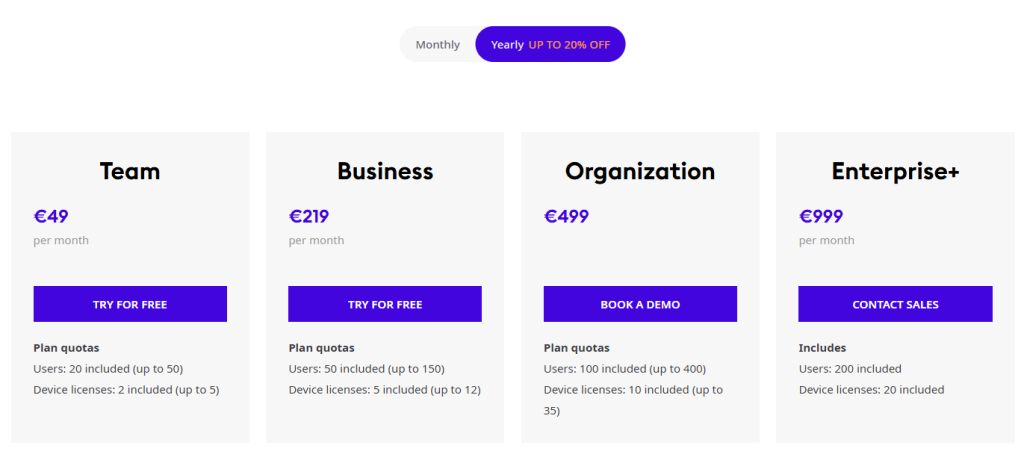
For any procurement decision, the pricing model is a critical component.
Get Joan operates on a subscription-based SaaS model, with costs broken down into two main parts, the software license and the hardware.
The software is typically priced per “device” (room tablet) per month, with volume discounts available for large deployments.
For 2025, expect entry-level plans to start at approximately $15 per device per month when billed annually.
This usually covers the core room booking features, basic analytics, and standard support.
Higher-tier plans, which can reach $25-$30 per device per month, unlock advanced analytics, API access, dedicated support, and more sophisticated desk booking modules.
The hardware, the Joan tablets and their docks, are a one-time purchase.
The latest Joan 6 device starts at around $249 per unit. They also offer a range of mounting solutions and accessories.
Payment Methods
The company accepts all major credit cards (Visa, MasterCard, American Express) for monthly subscriptions and smaller hardware orders.
For enterprise agreements and large hardware purchases, they support wire transfers and ACH payments.
Contract Types
They offer monthly and annual billing cycles. Annual contracts provide a significant discount, usually in the range of 10-15%, and are the most common choice for businesses.
Enterprise-level agreements with custom terms and SLAs are available for global deployments spanning thousands of devices.
When evaluating the ROI, you must factor in the soft costs it eliminates, the reduction in time wasted looking for rooms, the increased productivity from guaranteed workspaces, and the hard cost savings from potentially downsizing your office footprint based on utilization data.
For our organization, we projected a full return on investment within 18 months based on productivity gains alone.
A recent Forbes article on workplace trends highlighted that “companies leveraging data to optimize their hybrid work policies are seeing a 15-20% increase in employee satisfaction and a corresponding drop in real estate costs,” a sentiment that perfectly aligns with the value proposition Get Joan delivers.
Final Veredict

After six months, the Get Joan system has faded into the background of our daily operations, which is the ultimate sign of its success.
It has become a utility, as reliable and essential as the electricity in the walls. The feeling it evokes in daily operation is one of quiet competence.
The frantic pre meeting room hunts have ceased. The arguments over double bookings are a distant memory.
The data we now possess has shifted our facility management strategy from reactive to proactive. This Get Joan review concludes that the platform is not for everyone.
A very small company with a handful of rooms and a tightly knit team might find it overkill.
But for any organization of scale, perhaps 50 employees and above, that is navigating the complexities of hybrid work, it is an indispensable tool.
It provides the clarity, control, and intelligence needed to make your physical office a strategic asset, not a logistical burden.
The final thought is this, Get Joan doesn’t just solve the meeting room problem, it redefines the relationship between your people and your space, creating a workplace that is fundamentally more efficient, more responsive, and more intelligent.
My professional verdict is a strong and confident recommendation.