


Zoho Projects is a serious contender in the project management space, characterized by its deep feature set and, critically, its tight integration with the broader Zoho suite of business applications.
It offers everything you expect from a modern PM tool—Gantt charts, time tracking, task automation—but it delivers these capabilities with remarkable affordability and a commitment to handling complex, structured project methodologies.
If you’re already using Zoho CRM, Zoho Books, or any other Zoho application, then the value proposition of this platform skyrockets due to the unified operational environment.
A detailed Zoho Projects review needs to focus on this ecosystem synergy, because that is where its real strength lies, especially for growing businesses that need more than just simple task lists.
1. Overview
Zoho Projects is structured to manage projects from initial conception through to final delivery, supporting both traditional waterfall and flexible Agile methodologies.
It’s built on a foundation of tasks and milestones, but it layers on robust tools for resource allocation, portfolio reporting, and detailed financial tracking.
What sets it apart is the concept of a unified work environment. Unlike platforms that focus purely on tasks, Zoho Projects natively includes elements like bug tracking and deep time logging, which are often separate add-ons elsewhere.
For project managers dealing with complex dependencies, resource leveling, and the need to track every billable hour precisely, the platform provides the necessary controls.
We must consider Zoho Projects not just as a standalone tool, but as the project execution layer within a vast business operating system, which dramatically impacts its cost-effectiveness and functionality.
2. Why You Can Trust Us
Our conclusions in this Zoho Projects review are the result of practical experience implementing and migrating projects onto the platform, specifically within organizations that require extensive integration across sales and finance—where the Zoho ecosystem truly shines.
We’ve critically assessed the accuracy of its resource utilization metrics, the dependability of its cross-project dependencies, and the speed of its Gantt chart rendering under load.
Our fact-based analysis bypasses subjective preference, focusing instead on feature performance, current pricing competitiveness, and the seamlessness of its ecosystem integrations.
We provide a clear, reliable, and professional evaluation, ensuring readers receive an honest verdict informed by deep operational knowledge of the project management domain.
3. Key Features
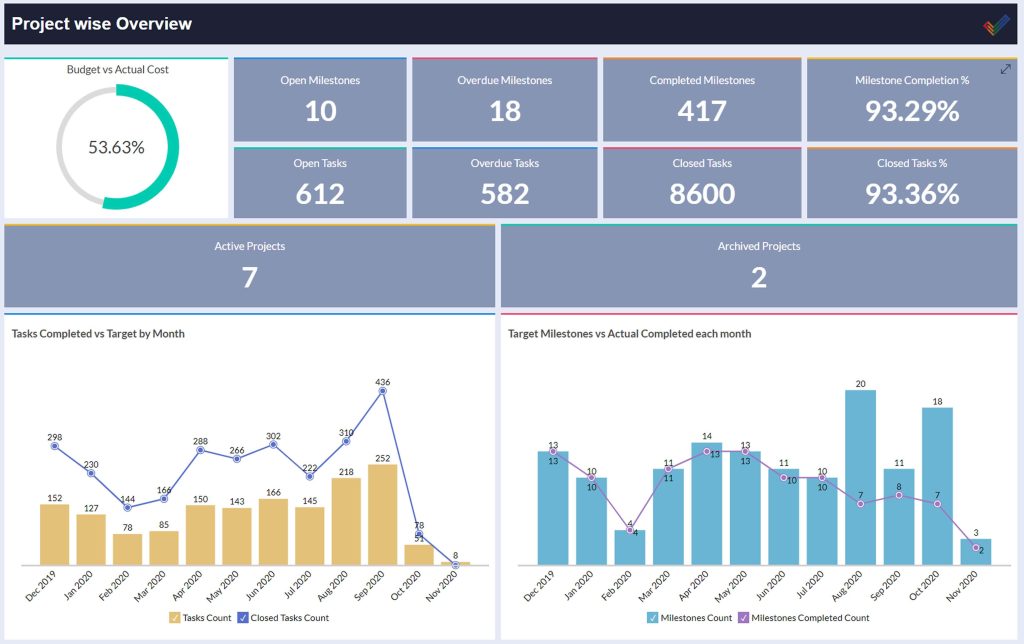
Zoho Projects is feature-rich, ensuring it can handle complex projects that demand structured oversight and detailed reporting.4
Advanced Task Management and Automation
Tasks can be broken down into subtasks and dependencies, and assigned priorities, due dates, and custom fields.
Critically, it supports dependency management (e.g., Task B cannot start until Task A is 100% complete) which is visualized effectively on the Gantt chart.
The Blueprint feature is essentially a workflow automation engine.
It allows you to design and enforce sequential processes for recurring tasks, ensuring that, say, a document review always follows the same three-step approval process before moving to the next phase, which is invaluable for standardization.6
Gantt Charts and Planning Tools
The platform offers excellent, interactive Gantt charts. You can easily visualize the project timeline, drag and drop to adjust durations, and view the critical path to identify tasks that absolutely must finish on time. These charts are dynamic and instantly reflect changes made in the task lists. For project managers running larger, fixed-scope projects, this visual planning and tracking capability is essential for stakeholder updates and risk mitigation.
Resource Utilization and Capacity
This is where the platform starts to pull ahead of simpler tools. Zoho Projects allows managers to track resource utilization, showing who is over-allocated and who has available capacity across all active projects.
You can define user roles and estimated working hours, allowing the system to flag potential bottlenecks before they happen.
This functionality is crucial for preventing team burnout and ensuring project timelines are realistic.
Time Sheets and Billing Integration
Time tracking is native and deeply integrated. Users can log time manually or use a built-in timer against any task.
These timesheets are often necessary for compliance or client billing. The magic happens when this data is passed instantly and automatically to Zoho Books or Zoho Invoice, removing the manual steps usually required to turn tracked work into financial transactions.
Bug Tracking Module
A dedicated bug tracking module is included natively within the project environment. This is fantastic for development and QA teams.
Bugs can be logged, assigned, prioritized, and linked directly to the specific tasks or milestones they affect.
This consolidation of project execution and issue management significantly streamlines the delivery process.
4. User Experience
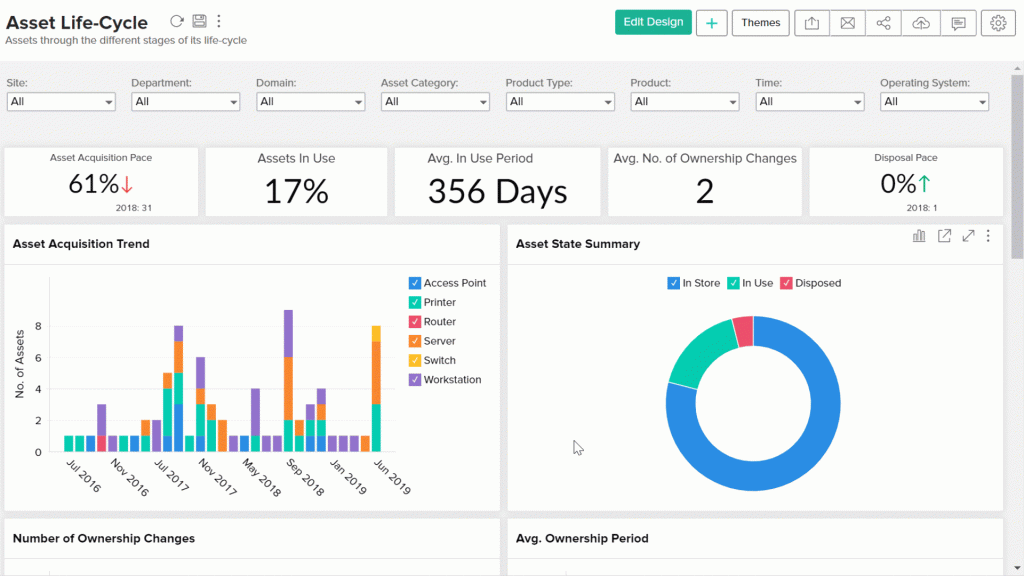
The user experience in Zoho Projects is professional, functional, and organized, but it does carry the density associated with comprehensive tools.
Onboarding is relatively smooth, especially for users already familiar with other Zoho applications. The interface uses a clean layout with a standard left-side navigation panel for Projects, Tasks, Timesheets, and Reports.
The platform offers a variety of views—List, Kanban, Gantt—that are easy to switch between, allowing different users to consume data in their preferred format.
However, the wealth of options means that the interface, particularly in the advanced settings and reporting menus, can sometimes feel overwhelming.
To truly harness features like Blueprint automation or the fine-tuning of resource scheduling, you need a dedicated process owner who understands the system’s depth.
It’s not as immediately intuitive as a tool like Basecamp, but what you sacrifice in simplicity, you gain in granular control and detailed information.
For the daily user, the experience is fast and focused; for the administrator, there’s a real learning curve to master the comprehensive feature set.
5. Performance and Reliability
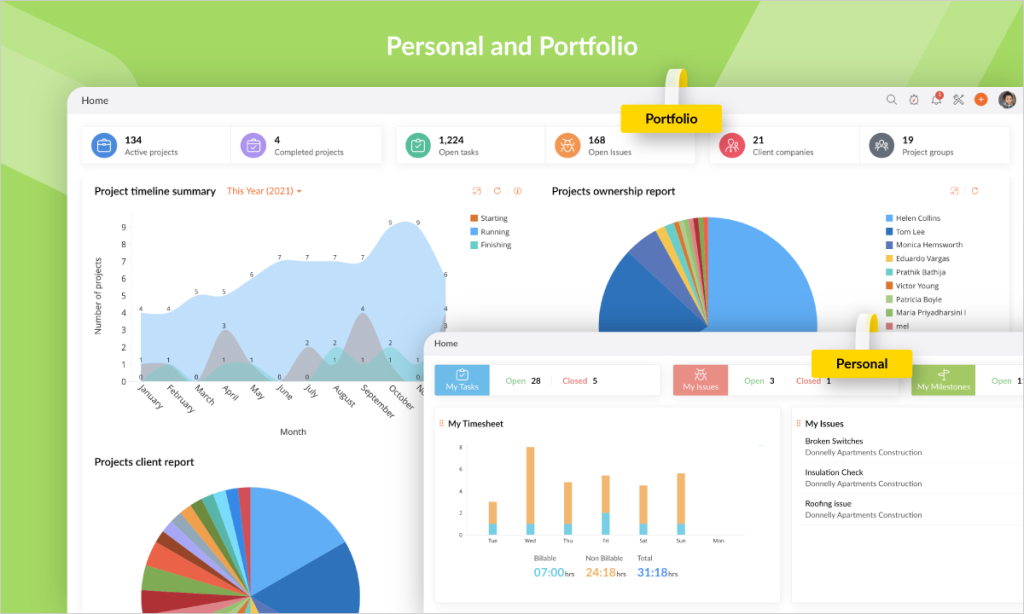
Performance and reliability are strong points for Zoho Projects, benefiting from the robust infrastructure that supports the entire Zoho suite.8
The platform is generally fast. Task and project creation, along with navigation between different modules, is snappy.
The rendering of complex Gantt charts, which can sometimes lag in browser-based applications, is efficient here, which suggests a well-optimized data layer.
Reliability is enterprise-grade. Zoho provides high uptime and a secure environment, which is paramount for businesses running critical projects.
As a comprehensive SaaS provider with a massive global user base, Zoho invests heavily in maintaining data security, compliance standards, and system stability.
Since project data often contains sensitive timelines, budgets, and client deliverables, this level of dependability is non-negotiable.
The platform handles simultaneous updates well, meaning teams can collaborate in real-time without encountering data conflicts or sudden crashes.
6. Pricing and Plans
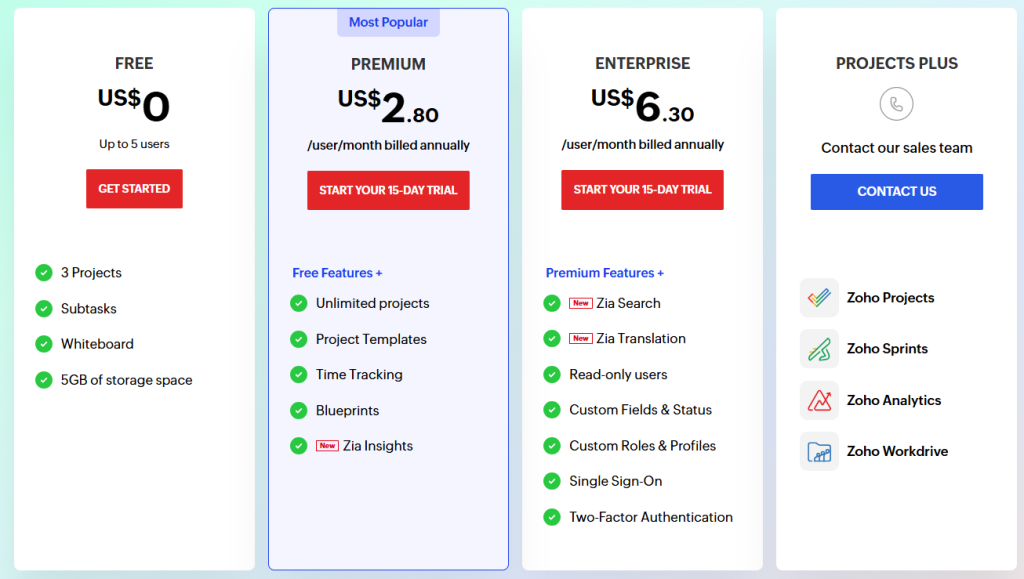
Zoho Projects is known for its highly competitive and aggressive pricing, especially considering the depth of features provided.11 It is a per-user, tiered model, typical of the industry.
They offer a Free plan, which is excellent for very small teams (up to 3 users) and basic project management, providing a generous entry point to perform a comprehensive Zoho Projects review.12
The main professional tiers are:
The Premium plan introduces necessary features like resource utilization, the Blueprint automation tool, and significantly increased project limits (up to 50).
This is the minimum tier recommended for any growing professional team that needs real control over their processes and resources.
The Enterprise plan is for larger organizations or those managing extensive, highly interconnected projects.
It unlocks the most advanced features, including custom user roles, comprehensive portfolio dashboards, critical path analysis, and more granular resource management controls.
Pricing is billed annually for the lowest rates.
| Plan Name | Best Suited For | Key Features Unlocked | Approximate Price (Per User/Month) |
| Free | Individuals, very small teams | Basic task management, 3 users, 2 projects | $0 |
| Premium | Growing Professional Teams | Resource Utilization, Blueprint Workflow, Gantt, 50 Projects | $5 – $6 |
| Enterprise | Large Organizations, Complex Projects | Portfolio Dashboards, Custom User Roles, Critical Path Analysis, Unlimited Projects | $10 – $12 |
When conducting a Zoho Projects review of the costs, the price-to-feature ratio is one of the highest in the market.
The $5 to $6 per user/month rate for the Premium plan, which includes resource management and automation, is exceptionally competitive and makes it very attractive to budget-conscious teams who still need powerful functionality.
7. Integrations and Compatibility
The integration capabilities of Zoho Projects are arguably its strongest competitive differentiator, stemming from its place within the broader Zoho ecosystem.
Zoho Ecosystem Integration
The native integration with other Zoho products is seamless and automatic. Data flows effortlessly:
- Zoho CRM: Turn a sales deal into a project instantly, linking the project work directly back to the client record.
- Zoho Books/Invoice: Automatically generate invoices based on time logged in Zoho Projects.14
- Zoho Desk: Convert support tickets into tasks or bugs within a project.15
This tight integration across sales, finance, and support eliminates data silos and manual data entry, providing an immediate operational advantage to current Zoho users.
Third-Party Integrations
Beyond the ecosystem, Zoho Projects connects with essential external tools:16
- Microsoft and Google: Integrations with Office 365, Google Workspace, and calendar applications.
- Financial and Communication Tools: Direct links to platforms like Slack, Microsoft Teams, GitHub, and major accounting software.
It also supports an extensive API for custom integrations, along with connectors via platforms like Zapier for linking to thousands of other services.
Compatibility is universal; it is a cloud application accessible through any major web browser and has well-maintained mobile applications for iOS and Android.
8. Product Specification

For technical buyers, here is a breakdown of the core specifications and architecture of Zoho Projects.
| Specification Category | Detail | Notes |
| Deployment Model | Cloud (SaaS) | Accessible via web, with dedicated mobile apps. |
| Project Methodology | Supports Waterfall, Agile (Kanban/Scrum), and Hybrid. | Highly flexible for different PMO needs. |
| Key Views Supported | Task List, Kanban, Gantt Chart, Calendar. | All views dynamically update the underlying data. |
| Ecosystem Strength | Deep Native Integration with Zoho Suite (CRM, Books, Desk). | Unmatched synergy for all-Zoho environments. |
| Time Tracking | Native Timer and Timesheets, Billing Integration. | Essential for client billing and utilization tracking. |
| Automation | Blueprint Workflows. | Code-free automation engine for process enforcement. |
| Supported OS | Web-based (iOS/Android mobile apps). | Universal compatibility. |
9. Pros and Cons
A balanced perspective is essential. Here are the main practical advantages and disadvantages of choosing Zoho Projects.
| Pros | Cons |
| Unbeatable Ecosystem Value | Interface Can Feel Dense |
| Seamless integration with Zoho CRM, Books, and Desk. | The sheer volume of features can be overwhelming for new users. |
| Robust Project Functionality | Learning Curve for Automation |
| Includes Gantt, Resource Management, and Bug Tracking in lower tiers. | Mastering Blueprint workflows and advanced reporting takes dedicated effort. |
| Aggressive, Low Pricing | Slower than Pure Task Apps |
| Exceptionally low per-user cost for the depth of features offered. | Slight performance drag compared to minimalist tools due to data depth. |
| Blueprint Automation | Reliance on Zoho Standards |
| Powerful visual workflow automation for process enforcement. | Design and some operational logic are dictated by the broader Zoho standards. |
| Detailed Financial Tracking | Less Intuitive than Competitors |
| Direct link between time logs, expenses, and invoicing. | Takes more clicking and navigation than single-focus, list-based tools. |
10. Customer Support
Customer support for Zoho Projects is generally reliable and scales with the pricing tier, which is typical for the industry.
Users on the Free plan rely primarily on the extensive knowledge base and community forums. For the Premium and Enterprise plans, you gain access to email and phone support.
The Enterprise plan offers the highest priority support, often including dedicated account management and faster response times, which is crucial for business-critical operations.
Because Zoho Projects is a deeply integrated and complex piece of software, you will inevitably need support for complex integrations, API issues, or fine-tuning those Blueprint automations.
The quality of support is solid, but the initial complexity means administrators should expect to spend some time consulting the documentation and potentially engaging with priority support during the setup phase.
The large user community also provides a valuable peer-to-peer resource for common questions.
11. Ideal Use Cases

Zoho Projects is a perfect fit for specific types of organizations due to its feature blend and integration strength.
Businesses Running on the Zoho Suite
This is the most obvious and powerful use case. If you already use Zoho CRM or Zoho Books, adopting Zoho Projects drastically reduces overhead and immediately connects your sales, project execution, and financial departments. The data flow alone saves immense time and ensures data consistency across the business.
Mid-Sized Businesses Needing Control
Companies that have outgrown simple list managers but aren’t ready for a full-scale, expensive ERP solution will find the feature set, particularly the resource management and Gantt charts, perfectly balanced with the low pricing. It provides enterprise-level control without the enterprise price tag.
Development and QA Teams
The native inclusion of a bug tracking module alongside project tasks is ideal for teams focused on software development.
It consolidates the workflow, eliminating the need to purchase and integrate a separate issue tracking tool like Jira.
Consulting and Service Firms
The accurate, integrated time tracking and direct linking to financial software make Zoho Projects a very strong contender for firms that bill clients based on time and materials, streamlining the entire service delivery and billing cycle.
12. Alternatives
When comparing Zoho Projects, you must look at alternatives that offer a similar mix of functionality and ecosystem integration, or those that prioritize different aspects of the PM lifecycle.
| Software Name | Primary Focus | Best For | Trade-Offs vs. Zoho Projects |
| Teamwork | Professional Services Automation (PSA) | Agencies needing deep client billing and external collaboration. | Higher per-user cost; less integrated with a vast CRM/Finance ecosystem. |
| Wrike | Enterprise Work Management | Large corporations requiring heavy reporting and security governance. | Significantly higher cost; less budget-friendly for small/mid-sized teams. |
| ClickUp | All-in-One Customization | Teams prioritizing maximum flexibility and configuration over PM structure. | Can suffer from feature bloat; resource management not as structured or native. |
| Microsoft Project | Traditional PM & Scheduling | Organizations heavily invested in the Microsoft ecosystem and PMP methodology. | Steepest learning curve; far less user-friendly for non-PM roles. |
Zoho Projects holds a unique position by offering true PM maturity—Gantt, dependencies, resource management—at a price point typically associated with simple task managers, particularly benefiting teams already using Zoho.
13. Bottom Line: Our Verdict
Zoho Projects is an exceptionally powerful, structured, and cost-effective project management platform, especially for any business that operates within the Zoho ecosystem.
The platform offers a feature set that rivals much more expensive solutions, particularly in the areas of resource management, detailed financial tracking, and workflow automation (Blueprint).
The primary trade-off is the initial complexity. This is a tool designed for professionals who need control, not for casual users looking for a simple list.
Mastery requires dedicated administration and training, but the return on that investment is significant, providing deep operational oversight and incredible automation possibilities.
For the vast number of businesses already utilizing or considering the Zoho application suite, adopting Zoho Projects is an obvious decision that yields immediate, powerful synergy across the organization.
For everyone else, it remains one of the best value-for-money, feature-rich project management tools available in 2026.
You May Also Like:
- Trello Review 2026 – Features, Pricing & Verdict
- Jira Software Review 2026 – Features, Pricing & Verdict
- Asana Software Review 2026 – Features, Pricing & Verdict
Is Zoho Projects a good tool for Agile teams?
Yes, Zoho Projects supports Agile methodologies. It offers a dedicated Kanban view and features for managing sprints, backlogs, and burn-down charts, making it perfectly functional for teams practicing Scrum or other Agile frameworks.
Can Zoho Projects connect with my accounting software?
Absolutely. Zoho Projects integrates natively and deeply with Zoho Books and Zoho Invoice. It also offers integrations with popular third-party accounting applications, allowing you to seamlessly transfer logged time and expense details for billing purposes.
What is the key benefit of the Zoho Projects review pricing?
The key benefit is the high feature-to-cost ratio. At its low per-user price for the Premium tier, Zoho Projects provides advanced tools like resource utilization tracking and powerful workflow automation (Blueprint) that are typically reserved for much more expensive Enterprise-level software from competitors.
Does the platform handle resource management?
Yes, the platform includes strong resource management capabilities starting from the Premium plan. It allows project managers to view team utilization rates and availability across multiple projects to prevent over-allocation and optimize workload planning.
Zoho Projects

Zoho Projects is a high-value, feature-rich project management tool offering advanced resource allocation and tight financial integration, making it ideal for teams within the broader Zoho business ecosystem.
Price: 5
Price Currency: USD
Operating System: Web-based, iOS, Android
Application Category: BusinessApplication
7.5