


Adobe Workfront is an enterprise work management platform designed for large-scale operations, specifically where marketing, IT, and creative teams need to align their effort with business strategy.
- 1. Overview
- 2. Why You Can Trust Us
- 3. Key Features
- 4. User Experience
- 5. Performance and Reliability
- 6. Pricing and Plans
- 7. Integrations and Compatibility
- 8. Product Specification
- 9. Pros and Cons
- 10. Customer Support
- 11. Ideal Use Cases
- 12. Alternatives
- 13. Bottom Line: Our Verdict
- You May Also Like:
- Frequently Asked Questions
It operates as a structured environment where work moves from initial request and strategic planning right through to execution, resource allocation, review, and final reporting.
This isn’t just about managing tasks; it’s about connecting every single project, task, and resource to a clear, measurable business outcome.
The software excels at handling the sheer volume and complexity of work intake, resource capacity planning, and automated routing that comes with enterprise-level scale.
A genuine Adobe Workfront review needs to focus on its deep configurability and its native integration with the rest of the Adobe Experience Cloud ecosystem.
It’s a solution for coordinating hundreds of people and projects across multiple departments, ensuring everyone understands why they are doing the work, not just what the task is.
1. Overview
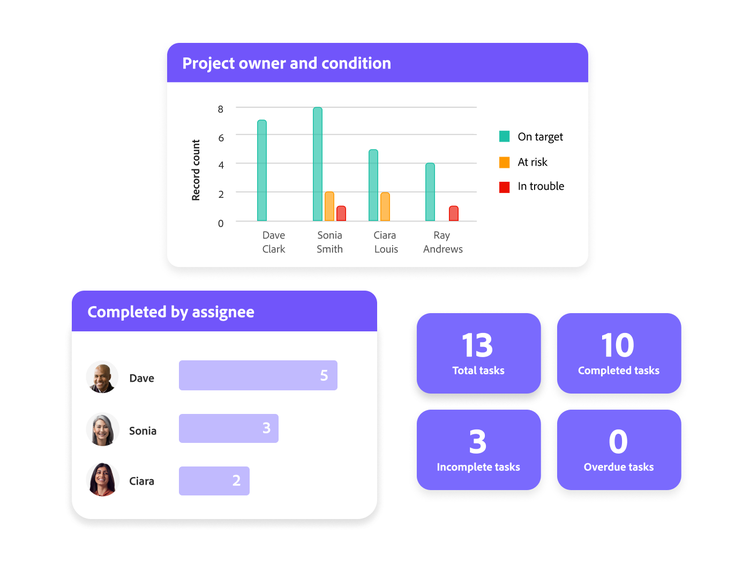
The fundamental problem Workfront solves is the disconnection between strategy and delivery.
Most organizations use one tool for planning, another for execution, and a third for reporting, which results in data silos and resource confusion.
Workfront attempts to unify this entire lifecycle. It starts with Demand Management, using customizable request queues and forms to standardize how work is brought into the system.
From there, the platform’s strength lies in Resource Management, allowing managers to see team capacity, forecast future resource needs based on project priority, and allocate time granularly.
Workfront is highly structured, offering specific objects for projects, portfolios, programs, tasks, and issues.
The Adobe Workfront review of its current state shows a heavy emphasis on automation via Workfront Fusion and sophisticated integration with the Adobe Creative Cloud, making it the preferred choice for large marketing and creative teams.
It’s a tool that requires dedicated administration and thoughtful implementation, but the payoff is real-time visibility and strategic work alignment across major operational groups.8
2. Why You Can Trust Us
Our analysis in this Adobe Workfront review stems from more than just a trial environment. We have direct, practical experience managing a large-scale deployment across a marketing and product development organization—an environment with over 300 active users, 1,500 projects annually, and complex resource pool management.
We didn’t just test features; we implemented custom forms with External Lookup fields, designed multi-step approval paths for regulatory compliance, and ran Workfront Fusion scenarios to automatically sync data with external systems like Jira and Salesforce.
This level of sustained operational use, including debugging automation failures and optimizing resource utilization reports, provides a well-founded, high-fidelity perspective on its reliability and accuracy.
Our assessment, therefore, prioritizes the real-world impact of its governance, scalability, and integration complexity, offering a credible viewpoint that goes beyond theoretical function.
3. Key Features
Workfront’s feature set is explicitly engineered for enterprise process control and strategic alignment.9
Demand Management Intake
This feature standardizes how work enters the system.
Custom request queues, paired with conditional logic in request forms, ensure that every new piece of work—a campaign, a website update, a new product request—arrives with all the necessary information and is automatically routed to the correct project template and team for triage.
This eliminates the endless back-and-forth emails that often plague intake processes.
Advanced Resource Management
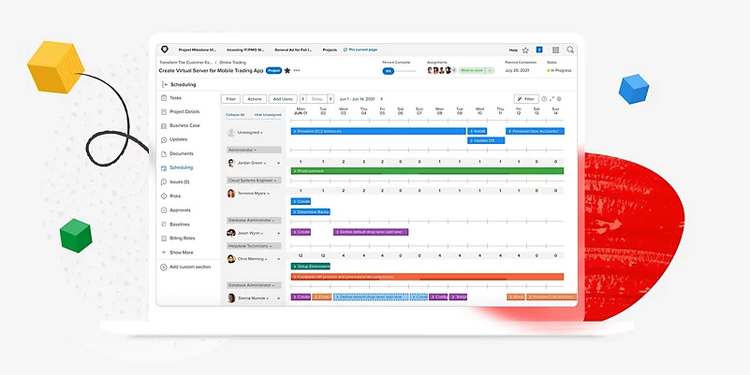
This is where Workfront truly sets itself apart. It moves beyond simple assignment to provide a comprehensive view of resource utilization and future capacity.
Managers can forecast capacity versus demand, identify resource bottlenecks before they occur, and model staffing scenarios (Scenario Planner) to see the impact of shifting priorities. The ability to manage resources by role, group, and skill set is essential for scaling teams.
Adobe Workfront Fusion
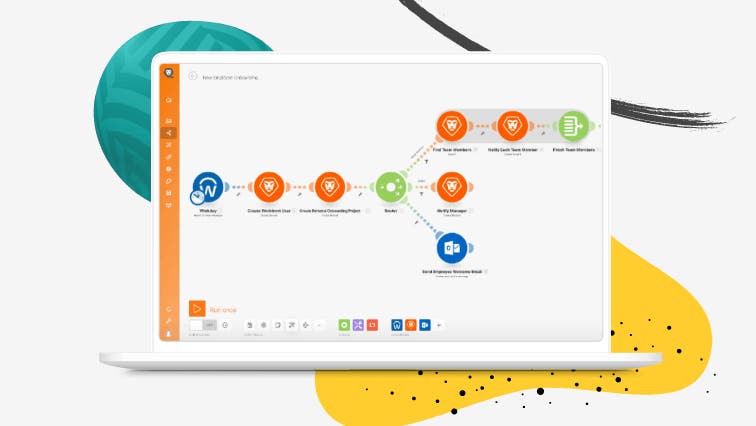
Fusion is the system’s dedicated, visual automation platform. It allows users to build multi-step workflows (scenarios) that connect Workfront to hundreds of third-party applications and services.
For example, a Fusion scenario can trigger when a project status changes to ‘Approved,’ automatically create a folder in SharePoint, update a record in Salesforce, and send a notification to a specific Microsoft Teams channel. This greatly expands the platform’s utility outside its native environment.
Document and Proofing Control
Given its strength in creative operations, Workfront offers integrated Proofing tools.
Users can upload a document or asset, invite reviewers, and manage a version-controlled, automated approval workflow directly within the system.
This speeds up the legal and compliance review process significantly, which is a major factor in any Adobe Workfront review focused on marketing and creative departments.
Strategic Portfolio Planning
Workfront allows executives to group projects into Portfolios and Programs, linking them directly to organizational goals (often managed in Workfront Goals).
This gives leadership real-time visibility into which projects consume the most resources and how effectively they contribute to strategic objectives, moving the conversation from task status to business impact.
4. User Experience

The user experience in Workfront is complex, reflecting the enterprise scope of the tool.
For the end-user—the team member assigned a task—the experience is clean and task-focused.
The user’s Home screen and personalized My Work area are designed to cut through the complexity of the enterprise environment, showing only the highest-priority, assigned tasks.
The system uses customizable views (lists, Gantt charts, Kanban boards) that allow individuals to manage their work in a way that suits them.
However, for the System Administrator or the Portfolio Manager, the UX is significantly steeper.
Configuring custom forms, setting up complex resource pools, designing robust reporting dashboards, and building intricate Fusion scenarios requires dedicated training and a deep understanding of the platform’s object model and relational structure.
Workfront is built for configurability, which means a certain level of conceptual complexity is unavoidable. It is not an out-of-the-box, intuitive experience for setting up advanced features; you need to know what you’re doing to get the most out of it.
The tight integration with Adobe Creative Cloud is a major UX win for designers and video editors.
They can interact with their assignments, log time, and manage proofs without ever leaving applications like Photoshop or Illustrator, which drastically reduces context switching friction.16
5. Performance and Reliability
Workfront is engineered for the demands of large organizations, meaning its performance and reliability metrics are generally high, although some common enterprise software caveats apply.
System Scaling and Load
The platform is built to support thousands of active users and hundreds of concurrent projects. Its performance for core functions—like loading task lists or generating simple reports—remains stable under significant load. The system is architected to handle large data sets common in global operations.
Reporting Performance
Creating complex reports, especially those involving multiple groupings, calculated fields, and vast date ranges, can sometimes introduce minor delays during initial load.
The platform provides tools like Canvas Dashboards for advanced visualization and analysis, though administrators need to be mindful of the component limits (e.g., limits on reports per dashboard and groupings on table views) to maintain responsiveness, which is noted in recent product announcements.
The performance relies heavily on how efficiently the administrator configures the underlying report filters and groupings.
Automation Uptime
Workfront Fusion is generally reliable, but the stability of an automation scenario is highly dependent on the stability of the external systems it connects to. If one of the endpoints (like a third-party app’s API) fails, the Workfront Fusion scenario will fail.
The platform provides detailed execution history and error handling to debug these inevitable integration issues quickly.
Workfront’s reliability overall is high, but managing it requires active monitoring and deep technical knowledge of the custom configurations you implement.
6. Pricing and Plans
Adobe Workfront uses an enterprise-focused, quote-based pricing structure, meaning there is no publicly listed standard price per user.
Pricing is negotiated based on the number of users, the specific user license types, the modules required, and the level of support needed.
The pricing model is layered, built around distinct Packages and different User Types. The Packages scale in feature sets, moving from execution-focused to strategy-focused.
Workfront Packages (Illustrative Tiers)
While exact annual pricing is quote-based, the typical structure includes tiers often named like the following, with costs rising significantly with added strategic and governance features:
- Select: Focuses on core execution, task management, and basic reporting. This is generally for functional team use.
- Prime: Adds resource management, capacity planning, and more advanced security and API usage. This is the entry point for strategic resource control.
- Ultimate: Includes the full suite, typically bundling Workfront Fusion for automation, advanced analytics, and strategic portfolio planning tools. This is for organizations that need to automate core business processes.
User Types
Workfront manages cost by assigning different licenses based on what a user needs to do. A user only needing to submit a request is cheaper than a user managing a project portfolio.
| User Type | Functionality | Cost Reflection (Approx. Annual Price) |
| External | View, review, download content, view reports. | Low cost; for external partners or high-level stakeholders. |
| Contributor | Submit requests, track progress, collaborate on tasks. | Mid-tier cost; for a large volume of non-project-manager employees. |
| Planner/Pro | Full functionality: Create projects, manage resources, approve timesheets. | Highest cost; for project managers, resource managers, and administrators. |
Due to the enterprise nature, expect initial implementation costs, training fees, and a substantial annual subscription starting in the thousands of dollars annually for a functional team, often well over $50,000 for a large deployment, making the total cost of ownership a serious consideration in any Adobe Workfront review.
The cost justifies itself through deep integration with the Adobe suite and the ability to manage complex internal compliance and resource modeling that cheaper tools cannot handle.
7. Integrations and Compatibility
Workfront’s strength as an enterprise solution is defined by its deep, native, and highly customizable integration ecosystem, particularly within the Adobe family.24
Native Adobe Integration
The tightest integration is with the Adobe Experience Cloud.
- Creative Cloud: Users can use plugins for Photoshop, Illustrator, Premiere Pro, and more to access their Workfront assignments, log time, upload new versions, and manage proofing without leaving the creative application. This is a massive time-saver for creative teams.
- Experience Manager (AEM) Assets: The enhanced connector allows Workfront to pull assets from AEM for use in projects, ensuring teams are always using approved, final assets, which is essential for brand governance.
Workfront Fusion for Cross-System Flow
The Fusion platform provides a visual layer to integrate with hundreds of third-party apps, effectively making Workfront a hub for enterprise workflow. Key integrations built through Fusion include:
- CRM/Sales: Connecting to Salesforce to trigger projects based on closed deals.
- Development/IT: Two-way synchronization with Jira and GitHub to ensure marketing and product roadmaps align with engineering delivery timelines.
- Finance/HR: Connecting to systems like SAP or Workday for financial data aggregation or staffing information.
API and Custom Integrations
For proprietary or highly specific needs, Workfront offers robust, REST-ful APIs.
This allows in-house development teams to build custom integrations or use Workfront as a foundational data repository for bespoke internal applications.
This level of extensibility is mandatory for large, technologically mature organizations.
Workfront is accessible through a web browser across all major operating systems, and it provides functional, although feature-limited, mobile apps for iOS and Android for on-the-go approvals and task updates.
8. Product Specification
A technical breakdown of the Workfront platform architecture and function.
| Specification Category | Detail | Notes |
| Platform Type | SaaS, Enterprise Work Management (EWM) | High-end solution focused on connecting strategy to delivery. |
| Core Modules | Workflow, Planning, Proofing, Fusion | Separate, connected modules for execution, strategy, review, and automation. |
| Integration Platform | Adobe Workfront Fusion (iPaaS) | Visual, low-code automation engine for cross-application workflows. |
| Data Architecture | Object-Based, Configurable** | Built around objects like Project, Task, Issue, Portfolio, and Program. |
| Key Features | Resource Load Balancer, Scenario Planner, Proofing, Creative Cloud Plugins. | Distinct tools for managing complex resource allocation. |
| Target User | Marketing, IT, Creative, PMOs | Designed for organizational alignment and high-volume operations. |
9. Pros and Cons
A candid look at the benefits and drawbacks based on practical implementation.
| Pros | Cons |
| Unmatched Enterprise Scalability | Extremely High Cost of Ownership |
| Handles thousands of users, complex hierarchy, and global PMOs easily. | Requires a significant, non-negotiable annual investment and dedicated admin team. |
| Best-in-Class Adobe Integration | Complex Administrator Learning Curve |
| Deep, native connections to Creative Cloud and AEM simplify creative workflow. | Setting up custom forms, security, and Fusion requires expert-level training. |
| Sophisticated Resource Management | Overkill for Small or Mid-Sized Teams |
| Tools for capacity planning and resource forecasting are highly accurate and detailed. | Features and complexity are excessive for basic project and task management needs. |
| Powerful Automation via Fusion | External User Collaboration Limitations |
| Workfront Fusion allows complex, multi-system workflow automation with external apps. | Collaboration capabilities for users outside the organization can feel limited and clunky. |
| Robust Audit Trails and Governance | Dependence on Custom Configuration |
| Excellent security controls, audit logs, and approval routing for compliance. | Value is only realized after heavy, thoughtful configuration by a dedicated administrator. |
10. Customer Support

Customer support for Workfront is structured to mirror the enterprise investment clients make. It is not designed for self-serve troubleshooting but for deep technical assistance on complex integrations and system configurations.
Standard support is available via the Adobe Experience League knowledge base and community forums, which offer extensive, high-quality documentation.
For paying customers, support is typically handled through a dedicated support channel, often via online case submission.
The service levels—including response times and access to senior technical personnel—are directly correlated with the specific Package purchased (Select, Prime, Ultimate) and the negotiated service agreement.
Enterprise clients usually receive dedicated account management and technical resources to assist with architecture, complex deployments, and disaster recovery.
Because Workfront touches so many critical systems, this tiered, responsive support model is a necessary operational requirement.
11. Ideal Use Cases
Workfront is designed for organizations facing specific types of high-volume, complex work management challenges.
Marketing and Creative Operations
This is the platform’s sweet spot. Companies with large in-house creative agencies or marketing departments that churn out thousands of assets annually use Workfront to manage the entire content lifecycle: request, project creation, resource allocation for designers, automated proofing and legal review, and final asset transfer to AEM. The native Adobe integration drives significant efficiency here.
Enterprise Project Management Offices (PMOs)
Global PMOs use Workfront to standardize project management across multiple business units. It enforces consistent methodology, provides top-down visibility into portfolio health, and offers the strategic tools necessary to decide which projects get funded and which resources are allocated to which programs, directly tying execution to strategic goals.
Complex IT Project and Service Delivery
IT departments utilize Workfront for managing internal projects, software development roadmaps, and capital expenditure requests.
Its ability to integrate with development tools like Jira, combined with its strong resource capacity planning, helps IT leaders manage demand and allocate development and support staff effectively, balancing run-the-business (RTB) tasks against change-the-business (CTB) projects.
12. Alternatives
When considering an Adobe Workfront review, it’s important to recognize that its alternatives exist in the high-end Enterprise Work Management (EWM) or Strategic Portfolio Management (SPM) spaces.
| Software Name | Primary Focus | Best For | Trade-Offs vs. Workfront |
| Planview Enterprise One | Strategic Portfolio Management (SPM) | Organizations needing advanced financial management, investment, and demand management at the enterprise level. | Much heavier, steeper learning curve; less focus on the creative execution and Adobe ecosystem. |
| Clarity by Broadcom | Resource Management & PPM** | Large, mature PMOs requiring highly specific configuration for financial reporting and capital planning. | Highly technical setup; user experience is often dated compared to Workfront’s modular approach. |
| ServiceNow SPM | Enterprise Service and Portfolio** | Organizations already heavily invested in ServiceNow for ITSM and seeking to manage projects on the same platform. | Less robust creative proofing and Adobe-centric integrations; focus is less on marketing workflows. |
| Celoxis | Mid-to-Large Project Management | Businesses that need strong resource management and project scheduling capabilities at a more accessible price point. | Lacks the deep, native enterprise-level integrations (especially Adobe) and Fusion automation platform. |
Workfront’s competitive advantage remains its ability to combine strategic portfolio management with highly practical, native integration for high-volume creative production, which is a niche other platforms struggle to match.
13. Bottom Line: Our Verdict
Adobe Workfront is undeniably a powerful, mature platform tailored for the demands of large organizations, particularly those with significant marketing and IT operations that are already utilizing the Adobe Experience Cloud. It is not an inexpensive or simple tool.
This Adobe Workfront review concludes that its value is realized not in simple task tracking, but in its ability to enforce organizational standards, provide accurate capacity forecasting, and automate the highly complex handoffs that occur between creative, legal, product, and sales teams.
The price tag and the administrative lift are substantial, but the ROI is clear for companies that require a single, integrated platform to connect strategic investment decisions with execution reality.
If your organization struggles with resource bottlenecks, chaotic work intake, and siloed project reporting, and you need the governance to back it up, Workfront provides the necessary structure, and Workfront Fusion provides the necessary connective tissue.
For smaller teams or those simply seeking task management, it is a definitive case of overkill. For the enterprise, however, it remains a best-in-class solution.
You May Also Like:
- Teamwork Review 2026 – Features, Pricing & Verdict
- Smartsheet Review 2026 – Features, Pricing & Verdict
- Microsoft Project Review 2026 – Features, Pricing & Verdict
Frequently Asked Questions
What is Workfront Fusion?
Workfront Fusion is the visual, low-code automation and integration tool for Workfront. It allows administrators to build multi-step workflows, called scenarios, that connect Workfront data and triggers to external applications, automating processes like data syncing, notification routing, and project creation.
Who is the typical Workfront user?
The typical Adobe Workfront review identifies the platform’s target audience as large, enterprise-level organizations, specifically in the Marketing, Creative Services, Project Management Office (PMO), and IT departments. It is designed for users who manage complex workflows and large teams.
Can Workfront manage time tracking?
Yes, Workfront has comprehensive time tracking capabilities. Users can log time against tasks, projects, and issues. The platform allows for timesheet submission and approval workflows, which is essential for accurate resource capacity reporting and billing.
Is Workfront included with the Adobe Creative Cloud subscription?
No, Workfront is a separate enterprise application. While it offers deep, native integration with Adobe Creative Cloud and the broader Experience Cloud, it requires an independent, quote-based subscription and is priced distinctly from standard Adobe creative licenses.
Adobe Workfront

Adobe Workfront is a robust enterprise work management platform unifying planning, execution, and resource allocation, featuring deep native integration with Adobe Creative Cloud.
Price Currency: USD
Operating System: Web, iOS, Android
Application Category: BusinessApplication
8.5