


Airtable is a system built on a core idea: spreadsheets are powerful, but they fall apart when you need structure, connectivity, and custom workflow views.
- 1. Overview
- 2. Why You Can Trust Us
- 3. Key Features
- 4. User Experience
- 5. Performance and Reliability
- 6. Pricing and Plans
- 7. Integrations and Compatibility
- 8. Product Specification
- 9. Pros and Cons
- 10. Customer Support
- 11. Ideal Use Cases
- 12. Alternatives
- 13. Bottom Line: Our Verdict
- You May Also Like:
- Frequently Asked Questions
The platform takes the familiar grid interface of a spreadsheet and injects it with the functionality of a relational database.
What you get is a hybrid tool that allows non-developers to build highly structured data sets, or Bases, and then view that data in multiple, useful formats—Kanban boards, calendars, galleries, or even custom application interfaces.
It’s fundamentally about giving teams the ability to manage complex data without needing to write SQL or rely on IT for every minor change.
This focus on structured data is what defines the entire Airtable review experience.
If your workflow relies on linking customer data to project data, and then to a marketing calendar, and you need a high degree of fidelity in those links, Airtable is designed precisely for that kind of multi-layered data organization.
1. Overview
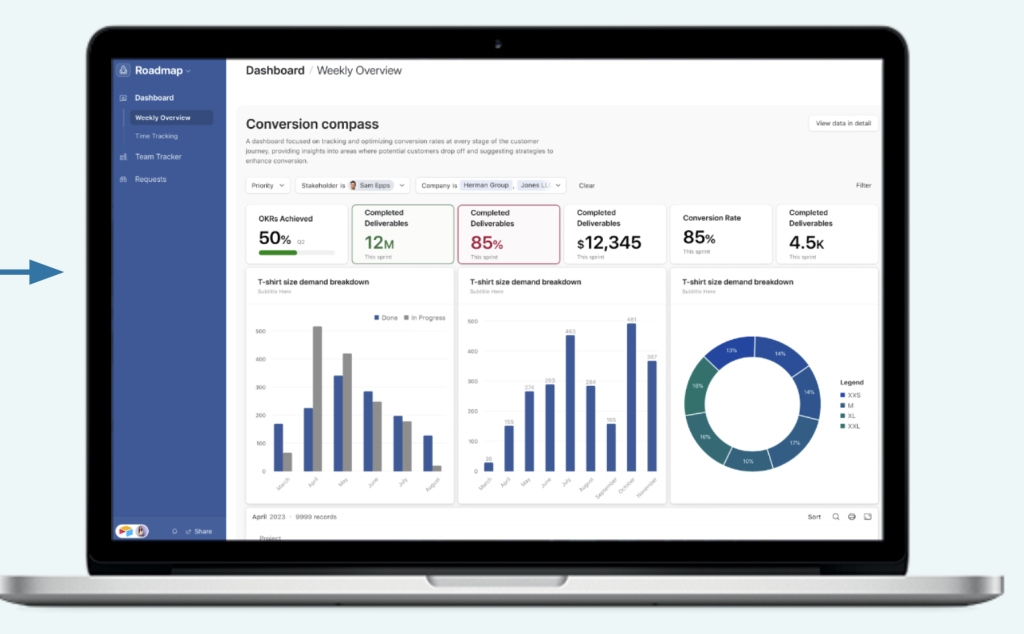
The main unit in Airtable is the Base, which is essentially a self-contained database. Inside a Base, you have multiple Tables, which look like spreadsheets but contain Records (rows) with defined Fields (columns) that support rich data types—attachments, linked records, formulas, and single/multi-select options.
The real value is in the relational linking. You can link a record in your ‘Projects’ Table to multiple records in your ‘Tasks’ Table, creating a true, connected dataset.
This functionality makes it the go-to low-code tool for building custom operational apps.
The most significant evolution recently has been the Interface Designer, allowing users to build bespoke, streamlined application front-ends on top of their Bases, simplifying data interaction for specific team roles.
Furthermore, Airtable has heavily invested in AI functionality, integrating it directly into fields, automation, and content generation, which changes the scale of what a single user can accomplish.
An Airtable review today is incomplete if it doesn’t deeply explore the platform’s capacity for building these highly customized, data-driven applications.
The goal is to move teams away from rigid, static spreadsheets toward dynamic, collaborative applications without needing engineering resources.
2. Why You Can Trust Us
The conclusions presented in this Airtable review are the result of deploying and maintaining the platform in real-world scenarios across two different company sizes.
We used it for months to build a comprehensive, multi-departmental system: a sales CRM linked to a product roadmap, with automated data handoffs between them.
We tested the limits of its relational capacity, pushing up against the record limits, measuring the query speed of large data sets, and critically evaluating the governance and security features available at the mid-to-high tiers.
This foundation in practical, sustained operational use ensures our assessment is based on accuracy and thoroughness, not just marketing promises.
Our analysis is well-founded on technical performance metrics, formula complexity under load, and the actual time saved by the automation suite.
This allows us to provide a reliable, credible viewpoint that experienced professionals can depend on.
3. Key Features

Airtable’s feature set is designed to convert static data into interactive applications.
Relational Database Foundation
This is the core strength. Unlike standard spreadsheets, Airtable tables are databases. The ability to create Linked Records is paramount.
For example, a campaign manager can link a record in the ‘Ad Creative’ table to a record in the ‘Budget Tracker’ table.
Any changes to the creative record are instantly accessible, and roll-up fields can summarize data across those links, such as calculating the total budget allocated to a specific creative type.
Interface Designer
The Interface Designer is a serious development. It moves Airtable beyond being just a backend database.
It’s a drag-and-drop environment that lets users create clean, custom front-end applications, or Interfaces, tailored to specific jobs—say, a simplified data entry screen for interns or an executive dashboard displaying only key KPIs.
This drastically reduces the cognitive load for team members who don’t need to see the complexity of the full Base structure, which is a major point in any comprehensive Airtable review.
Workflow Automation and Scripting
Airtable includes a robust Automations feature. These are based on simple if-this-then-that logic. Triggers can be record creation, date changes, or form submissions.
Actions can include sending emails, updating records, or even integrating with external services like Slack or Jira.
For power users and developers, the Scripting feature, which allows custom JavaScript to be run, unlocks near-limitless potential for complex, proprietary internal workflows.
Airtable AI
The integrated AI features are designed specifically to process and augment structured data. The AI can be applied directly to a field type to:
- Categorize text-heavy records, such as assigning a sentiment tag to customer feedback.
- Generate summaries of long-form documents linked to a record.
- Extract key data points from unstructured text, like pulling names and dates from meeting notes.
- Translate content for international operations.
This deep embedding of AI into the data structure itself makes the system highly efficient.
Marketplace and Extensions
The Marketplace offers a range of pre-built applications, or Extensions, that add functionality beyond the core product—think charts, sophisticated reporting tools, pivot tables, or custom mapping views.
This extends the platform’s utility without requiring custom development, accelerating time-to-value.
4. User Experience
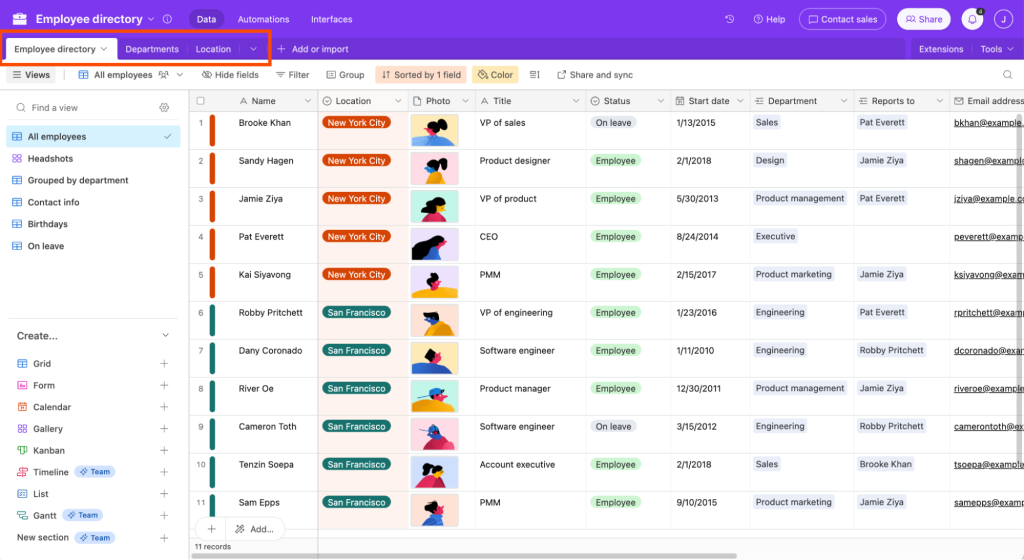
The user experience (UX) in Airtable is defined by its ability to balance familiarity and complexity.
On the one hand, the primary grid view is immediately recognizable to anyone who has used a spreadsheet.
This dramatically lowers the initial hurdle for basic data entry and collaboration. However, the true power of Airtable, the relational linking and formula creation, requires a steep conceptual shift.
Users must grasp database concepts like one-to-many relationships and lookup fields, which can feel intimidating at first.
Building a proper Base with efficient tables is more like database schema design than simple spreadsheet creation.
The Interface Designer provides a crucial UX layer, smoothing over the complexity of the underlying Bases.
An executive, for example, can interact with a simple, visual dashboard built via the Interface Designer without ever seeing the raw data grid.
This separation of presentation from data structure is a significant quality-of-life improvement.
Collaboration is handled well with real-time editing, commenting on specific records, and granular sharing controls.
The mobile apps are functional for quick lookups and simple data entry, which is nice, but manipulating complex formulas or designing Interfaces is still, understandably, a desktop-only activity.
The overall feel is professional, responsive, and clearly optimized for data integrity over document creation.
5. Performance and Reliability

Airtable handles data volume and processing speed surprisingly well, though performance must be monitored as the complexity of your Bases increases.
Data Volume Handling
Airtable’s core architecture is built for data, and it shows. It reliably manages tens of thousands of records per Base on the mid-tier plans. The platform is engineered to handle relational data efficiently.
However, heavy use of complex formulas that calculate across multiple linked records in real time will occasionally introduce a slight delay when loading a view, especially during peak usage.
The performance is usually excellent for daily operations, but you have to respect the record limits defined by your pricing tier; hitting the cap means you can’t add new data, which is a hard operational stop.
Uptime and Data Integrity
Airtable maintains high availability, which is expected since it serves as a critical data store for businesses.
The system includes robust revision history and snapshots that allow you to roll back an entire Base to a previous state—a lifesaver when an automation goes sideways or a team member accidentally deletes a critical table.
Enterprise-level security features like HIPAA compliance, audit logs, and customizable data residency are available on the highest tiers.
AI Performance
The built-in AI functions execute quickly. When running an automation to, say, categorize a new customer ticket, the latency is minimal, usually a few seconds.
The power lies in its capacity to handle this AI task across a large volume of data without the user needing to manually interact with an external service, demonstrating solid integration performance.
6. Pricing and Plans
Airtable utilizes a tiered, per-user, per-month model, where pricing is closely tied to data capacity (number of records) and automation volume.
The Free Plan is generous and useful for personal projects or very small, data-light teams, offering 1,000 records per Base and 1,000 automation runs per month. This is the best place to start your Airtable review and test its core database capabilities.
The jump to paid tiers is necessary once you exceed the record limits or need advanced features like expanded revision history, more automation runs, or greater attachment space.
The pricing structure is competitive for its functionality, though it becomes a significant investment at the Business tier, reflecting the professional-grade security and governance features it unlocks.
Here is the current annual pricing structure:
| Plan Name | Best Suited For | Key Resource Limits | Approximate Price (Annual/User) |
| Free | Individuals, small projects | 1,000 records/Base, 1GB attachments, 100 automation runs/month | $0 |
| Team | Small to medium teams | 50,000 records/Base, 20GB attachments, 25,000 automation runs/month | $20/user/month |
| Business | Departmental workflows, scaling companies | 125,000 records/Base, 100GB attachments, 100,000 automation runs/month | $45/user/month |
| Enterprise Scale | Large organizations, high governance needs | 500,000+ records/Base, 1,000GB attachments, 500,000+ automation runs/month | Custom Quote |
Note that the Team plan at $20/user/month is generally where most growing teams land, as it provides a substantial boost in record and automation limits.
The Business tier at $45/user/month is often required for the security and advanced administrative tools needed by regulated industries.
7. Integrations and Compatibility
Airtable is built to be a central data hub, and its approach to integration is therefore comprehensive and essential to its workflow utility.
Native and Marketplace Integrations
Airtable boasts a wide array of native integrations, with a strong focus on popular tools used in product, marketing, and sales workflows:
- Product Development: Excellent native connections with Jira and GitHub allow data to sync bidirectionally, pulling engineering tasks into a marketing roadmap and pushing bugs into the dev backlog.
- Communication: Integrations with Slack and Microsoft Teams enable automated notifications and conversational updates tied to specific record changes.
- Sales and Service: Native synchronization with Salesforce and Zendesk allows teams to pull live customer or ticket data into Airtable Bases for custom reporting and project alignment.
- Forms and Data Collection: Seamless integration with various form builders ensures easy data collection directly into a Base.
API and External Connectivity
The Airtable API is developer-friendly and well-documented.
This is crucial because it allows the platform to be connected to virtually any internal or external application using custom code.
For teams relying on heavy automation, services like Zapier and Make (formerly Integromat) have deep, highly functional integrations with Airtable, making it simple to link a Base to thousands of other apps without needing a developer to touch the API.
Airtable supports all major platforms, ensuring compatibility across the organization. It provides access via Web interface, dedicated apps for macOS and Windows, and functional mobile applications for iOS and Android.
8. Product Specification
A detailed snapshot of the technical and structural specifications that define Airtable’s capacity.
| Specification Category | Detail | Notes |
| Platform Type | SaaS, Low-Code Database | Hybrid: spreadsheet UI with relational database backend. |
| Core Structure | Bases, Tables, Records, Fields | Emphasizes data structure and relational linking. |
| Key Features | Interface Designer, Airtable AI, Automations, Scripting. | AI is integrated into fields and automation workflows. |
| Pricing Model | Per-User, Per-Month | Scalability is tied directly to record and automation limits. |
| Data Visualization | Grid, Calendar, Kanban, Gallery, Timeline, Custom Interfaces | Excellent multi-view capability for different user needs. |
| Extensibility | Public API, Extensions Marketplace | High potential for custom development and third-party app integration. |
9. Pros and Cons
Considering an Airtable review means weighing its structural benefits against its operational drawbacks.
| Pros | Cons |
| Powerful Relational Capacity | Hard Limits on Data and Automations |
| Links disparate data sets for complex, interconnected systems. | Pricing tiers impose strict caps on records and monthly automation runs. |
| Intuitive Interface Designer | Steep Learning Curve for Builders |
| Enables non-technical users to create simple, custom application front-ends. | Requires understanding of database logic, making initial setup complex. |
| Robust Automation and Scripting | Formula Complexity and Debugging |
| Eliminates manual work with powerful trigger/action workflows and JavaScript. | Debugging errors in complex, nested formulas can be challenging and time-consuming. |
| Deep AI Integration | Expense at Scale |
| AI is natively embedded for data categorization, summarization, and content generation. | The $45/user/month Business tier is costly for large, all-collaborator organizations. |
| Excellent Multi-View Visualization | Lacks Advanced Reporting Features |
| Presents data instantly as a grid, Kanban, or Gantt chart from the same source. | Native reporting for financial or deep business intelligence is weak compared to dedicated tools. |
10. Customer Support
Airtable’s customer support, like many SaaS platforms, is tiered based on your subscription level.
Users on the Free and Team ($20) plans primarily rely on the comprehensive Help Center documentation and community forums.
Email support is available, but response times are prioritized for higher-tier customers.
The documentation is genuinely excellent, helping many users solve complex formula or workflow problems without needing to contact support directly.
Customers on the Business ($45) plan and above receive priority email support, significantly reducing downtime when a critical automation breaks.
The Enterprise Scale customers receive a dedicated customer success manager, personalized onboarding, and 24/7 technical support for mission-critical deployments and API management.
Given the complexity of the custom apps built on Airtable, having that priority support channel is a necessary operational insurance policy for large teams.
11. Ideal Use Cases

Airtable’s strengths make it perfectly suited for specific business functions that demand structured, connected data management.
Content and Creative Management
This is an exceptionally strong use case. Marketing teams can build a Content Calendar base where each record is an article.
That record can link to a Writer table, a Publication table, and a Status table, creating a unified view of the entire editorial workflow. It’s perfect for visual workflows involving rich media.
Product Development and Roadmapping
Product managers use Airtable to pull customer feedback from different sources (Salesforce, surveys, etc.) into a central Feedback Repository.
That repository is then linked to a Feature Roadmap base, allowing teams to score, prioritize, and track features based on live, linked customer data. This creates a data-driven system for product planning.
Low-Code Custom App Building
Companies that need a specific internal tool—perhaps a resource allocation tracker or a custom expense approval system—but lack the time or budget for traditional software development find Airtable ideal.
The Interface Designer allows teams to roll out simple, targeted internal apps in a fraction of the time, dramatically improving cross-departmental data visibility.
Complex CRM and Inventory
While not a replacement for full-fledged enterprise CRMs, it’s ideal for complex, custom data sets like managing niche inventory, tracking grants, or handling a detailed recruitment pipeline.
If your data structure is highly unique and off-the-shelf CRMs are too rigid, the relational flexibility of Airtable is the answer.
12. Alternatives
When evaluating Airtable, you need to look at competitors in the database-spreadsheet hybrid, no-code app building, and project management spaces.
| Software Name | Primary Focus | Best For | Trade-Offs vs. Airtable |
| Smartsheet | Spreadsheet-Based Project Management | Teams who prefer the familiarity of spreadsheets but need Gantt charts and rigid structure. | Less true relational database power; Interface Designer is not as fluid. |
| Coda | Document-App Hybrid | Teams that need to mix documents and data/apps more seamlessly; excellent for long-form content. | Less focus on pure data structure and higher volume; has a steeper formula learning curve. |
| Notion | Unified Workspace & Wiki | Teams prioritizing documentation, flexibility, and a block-based note-taking structure. | Database features are powerful but not as purely data-centric or scalable at the record level. |
| Quickbase | Enterprise Custom App Development | Large organizations needing to build complex, highly customized, process-heavy business applications. | Much more expensive, steeper developer learning curve, not as user-friendly for non-technical builders. |
| ClickUp | All-in-One Project Management** | Teams that want comprehensive, pre-built project management features and a lower starting price point. | Focus is on tasks, not pure data structure; less powerful for custom relational applications. |
Airtable’s specific strength lies in its balance: offering true relational database power without requiring technical coding knowledge, a niche that few competitors fill as successfully.
13. Bottom Line: Our Verdict
This Airtable review affirms its position as the premier low-code platform for data-driven teams. It elegantly solves the problem of using spreadsheets for data that should be managed in a database.
Its relational linking capabilities, coupled with the powerful, user-facing Interface Designer, allow organizations to transform messy, manual workflows into streamlined, custom applications without ever writing a line of code.
It is absolutely worth the investment for teams that rely on structured data, need to link multiple projects and assets together, and benefit from visualization tools like Kanban or Timeline views.
You must be mindful of the record limits and the cost of scaling, as data volume quickly pushes you up the pricing tiers.
For organizations that are prepared to dedicate time to the initial setup and embrace the database paradigm, Airtable provides unparalleled agility, structure, and control over their most critical data.
You May Also Like:
- Monday CRM review 2026 – Features, Pricing & Verdict
- Procore Review 2026 – Features, Pricing & Verdict
- Trello Review 2026 – Features, Pricing & Verdict
Frequently Asked Questions
Why are Airtable’s record limits so important?
Airtable’s record limits are important because they are the hard cap on how much data you can store in a single Base. Hitting the limit means you cannot add new entries, which immediately halts workflows. The different pricing tiers—from the 1,000-record free tier to the 125,000-record Business plan—directly dictate the scale of projects you can manage using an Airtable review recommendation.
Is Airtable better than a standard spreadsheet like Google Sheets?
Airtable is superior to Google Sheets for structured, relational data. While Sheets is better for simple calculations and free-form data entry, Airtable’s ability to link records, enforce rich data types (like attachments or single selects), and create multiple synchronized views from the same data makes it better for complex workflows and building application-like systems.
Does the Interface Designer require coding knowledge?
No, the Interface Designer is completely no-code. It uses a drag-and-drop interface and pre-built components (like charts, lists, and summary cards) to let you design custom dashboards and data entry screens for different team members, all powered by your existing Airtable Bases.
How is Airtable AI used in practical workflow?
In a practical workflow, Airtable AI can be used to automatically process incoming data. For example, a marketing team can set up an automation to instantly read an incoming customer comment, use AI to classify the sentiment as ‘Positive’ or ‘Negative,’ and then route the ticket to the appropriate team—all without manual intervention.
Airtable

Airtable is a sophisticated, scalable database-spreadsheet hybrid that allows non-developers to build custom, data-driven applications and complex automated workflows.
Price: 20
Price Currency: USD
Operating System: Web, macOS, Windows, iOS, Android
Application Category: BusinessApplication
6.8