



How does jira work within a professional environment depends entirely on the initial configuration of issue types and the mapping of physical workflows to digital statuses.
- 1. Defining Issue Architecture
- 2. Mapping Digital Workflows
- 3. Utilizing Agile Boards
- 4. Writing JQL Queries
- 5. Integrating External Tools
- 6. Generating Performance Reports
- 7. Customizing Dashboards
- 8. Managing Project Versions
- 9. Handling Subtasks Properly
- 10. Administering User Roles
- You May Also Like:
- Frequently Asked Questions
To understand the mechanics, you must look at the database structure where every individual item exists as an issue containing metadata, comments, and history.
The software operates on a hierarchy that starts with projects, moves through versions or components, and terminates at the specific task level.
When a team triggers a transition, the underlying engine updates the state of the issue, notifies relevant subscribers, and recalculates the velocity metrics used for planning.
1. Defining Issue Architecture
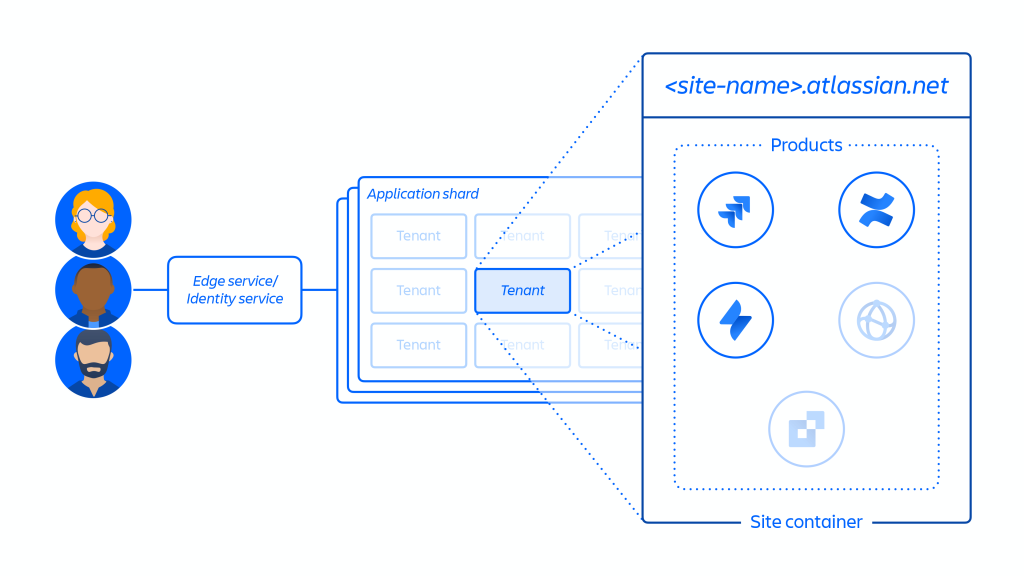
How does jira work at the foundational level starts with the issue. An issue is not just a task, it is a record in a database that holds specific fields.
These fields might be simple text strings like a summary or complex objects like a linked user account or a multi select dropdown.
The software uses different issue types to categorize work. You might have bugs, stories, or technical tasks. Each of these can have its own unique set of fields.
A bug might require a reproduction steps field, while a story might need a link to a design document.
The relationships between these issues are established through parent and child links. An epic acts as a high level container for multiple stories.
This grouping allows for high level reporting without cluttering the daily view of the individual contributor.
Data integrity at this level is vital. If the fields are not configured to capture the right information, the reporting at the end of the month will be useless.
It requires a strict approach to what is required versus what is optional during the creation phase.
2. Mapping Digital Workflows
To grasp how does jira work for daily operations, you have to look at the workflow designer. This is a visual map of every state a task can inhabit. Each state is a status, and the lines between them are transitions.
A transition is an action. It is the moment a developer moves a ticket from To Do to In Progress. During this movement, the system can be programmed to trigger post functions.
These functions might automatically assign the ticket to the person who moved it or update a resolution field.
Complex workflows often include conditions and validators. A condition might prevent a ticket from being closed if there are still open subtasks.
A validator might require a comment to be added before a ticket can be moved to a blocked status.
These rules provide a structure that prevents human error. Without these constraints, the board becomes a chaotic mess where tickets jump between states without any actual progress being made. It is about creating a logical path for the work to follow.
3. Utilizing Agile Boards
The interface most people interact with is the board. Understanding how does jira work via these boards requires looking at the filters that power them. Every board is essentially a visual representation of a JQL query.
Scrum boards are built for time boxed iterations called sprints. The team pulls work from a backlog into a sprint, and the board tracks the progress toward a specific goal. At the end of the sprint, the board is cleared, and any unfinished work returns to the backlog.
Kanban boards focus on continuous flow. There are no sprints here. Instead, work moves through columns based on capacity.
How does jira work in this context involves setting work in progress limits to ensure the team is not overwhelmed by too many active tasks.
The columns on these boards map directly to the statuses in the workflow. If you change a status in the workflow, you must update the board configuration to ensure that status has a home on the screen.
4. Writing JQL Queries
Jira Query Language or JQL is the primary way to retrieve data from the system. It functions similarly to SQL but is tailored for project management metadata.
How does jira work for advanced users often comes down to their ability to write these queries.
A simple query might look for all open bugs in a specific project. A complex query might look for issues that were resolved in the last seven days by a specific team member that also have a high priority label.
These queries power everything from the boards you see to the gadgets on your dashboard. They allow for a level of granular filtering that is impossible in simpler task management tools.
Mastering JQL means you can find exactly what you need without scrolling through endless lists. It is the technical heart of the reporting system, providing the raw data for every chart and graph generated by the software.
Managing Project Backlogs
The backlog is the staging area for all future work. How does jira work to keep this organized involves the use of ranking. You can drag and drop issues to establish a clear order of operations.
In the backlog view, you can also see the estimated effort for each task. This helps in planning how much work can actually fit into a single sprint without overextending the resources.
Configuring Issue Security
Not every issue should be visible to every user. The security schemes allow you to restrict access based on roles or groups. This is particularly useful when working with external contractors or sensitive internal data.
You can set security levels at the project level or even for individual issues. This ensures that the right people have the right access without compromising the privacy of the project.
5. Integrating External Tools
How does jira work with the rest of your technical stack is managed through the Atlassian Marketplace and native integrations. You can connect it to code repositories, documentation wikis, and communication platforms.
When a developer creates a branch in a repository and includes the Jira issue key in the name, the system automatically links the code to the ticket. You can see the status of pull reviews and builds directly inside the issue view.
This connectivity reduces the need for constant status updates. The information flows automatically from the tools where the work is actually happening. It creates a cohesive environment for the entire development lifecycle.
Documentation links are equally important. Linking a ticket to a specification page in a wiki ensures that everyone has the context they need to complete the task accurately.
6. Generating Performance Reports
The software collects a massive amount of data on how work is moving. How does jira work to turn this into insights is through the reporting tab. You can generate velocity charts, burn down charts, and cumulative flow diagrams.
Velocity charts show how much work the team completes on average per sprint. This is a critical metric for long term planning and setting realistic expectations with stakeholders.
Burn down charts track the remaining work in a sprint on a daily basis. If the line is not moving toward zero, it indicates that the team is blocked or that the scope was too large for the time allotted.
Cumulative flow diagrams are the best way to see bottlenecks. If the area representing In Testing is growing larger over time, it means you have a backup in the QA process that needs to be addressed.
7. Customizing Dashboards
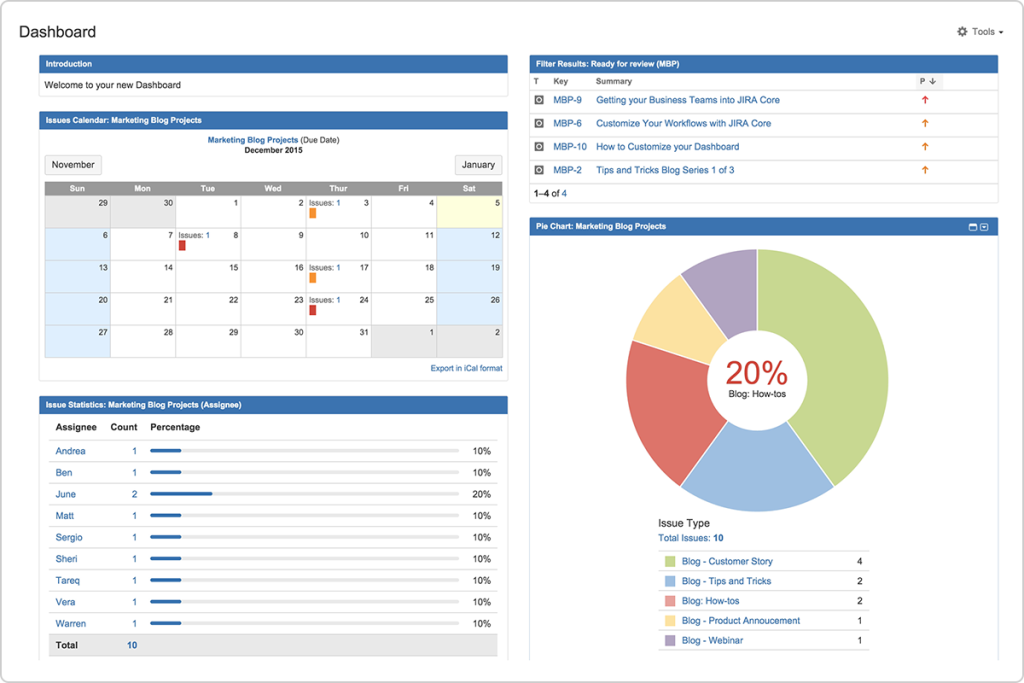
A dashboard is a collection of gadgets that provide a high level overview of project health. How does jira work for managers often centers on these screens. You can customize them to show exactly what matters for your specific role.
One gadget might show a pie chart of issue types, while another shows a list of tickets that haven’t been updated in three days. You can also include external feeds or calendars.
Dashboards can be shared with the whole team or kept private. They provide a quick way to check the status of multiple projects without having to dig into the individual boards or backlogs.
The key to a good dashboard is focus. If you put too much information on one screen, it becomes impossible to see the actual trends. It should be designed to highlight the most critical risks and blockers immediately.
Understanding Permission Schemes
Permissions are managed at a global level and a project level. How does jira work to maintain order is by separating who can create issues from who can manage the project settings.
Granting the wrong permissions can lead to accidental deletions or broken workflows. It requires a careful audit of who needs what access and a commitment to the principle of least privilege.
Automating Repetitive Tasks
The automation engine allows you to set up rules based on triggers. For instance, when a ticket is moved to Done, the system can automatically send a message to a chat channel or update a linked ticket in a different project.+1
These rules are built using a no code interface that uses logic like if this happens then do that. It significantly reduces the manual administrative burden on project leads.
Properly configured automation ensures that the system stays up to date even if a human forgets to click a button. It is about making the software work for the team rather than the team working for the software.
8. Managing Project Versions
Versions allow you to track work against specific release cycles. How does jira work to facilitate deployments involves grouping issues into a fixed version that has a start and end date.
When a version is released, the system can automatically transition all included issues to a resolved state. It also creates a permanent record of what was included in that specific update.
This is essential for maintaining a clear changelog. It allows you to look back and see exactly when a specific bug was fixed or when a new feature was introduced to the users.
Versions also help in identifying which releases are the most problematic. By tracking bug reports back to specific versions, you can identify patterns in code quality and deployment stability.
9. Handling Subtasks Properly
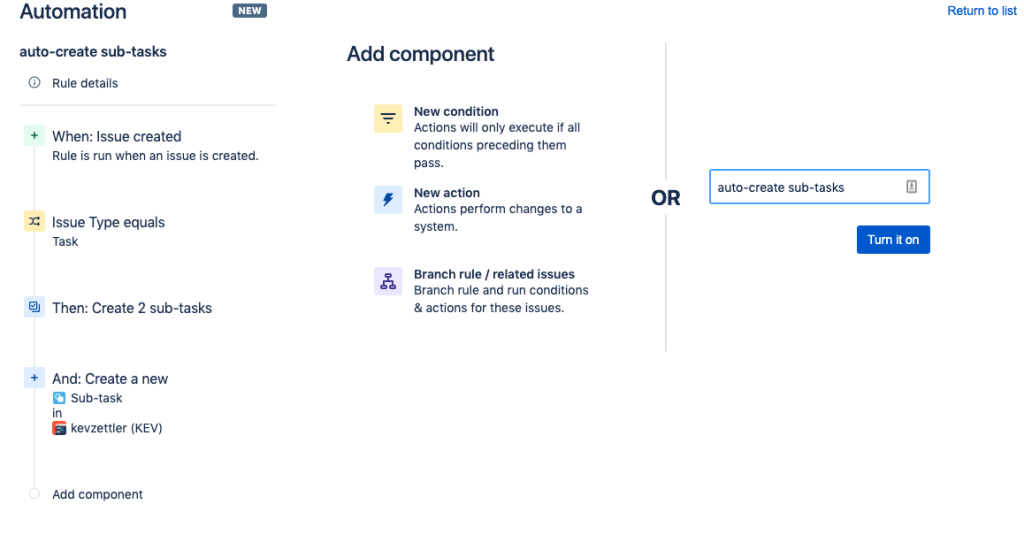
Sometimes an issue is too large for one person but too small to be its own story. How does jira work in this case is through subtasks. These are smaller units of work that live inside a parent issue.
Subtasks share the same context as the parent but can be assigned to different people. This is perfect for tasks that require collaboration between a designer and a developer.
The parent issue cannot be closed until all subtasks are finished. This ensures that no part of the requirement is forgotten during the rush to complete the work.
Using subtasks also provides a more granular view of progress. You can see exactly which parts of a feature are done and which are still being worked on at a glance.
10. Administering User Roles
User roles are the bridge between the global groups and the project permissions. How does jira work to simplify management is by allowing you to assign people to roles like Developer or Viewer within a project.
Instead of updating every permission scheme when a new person joins the team, you simply add them to the appropriate role in the project settings.
This makes it easy to scale the system as the company grows. You can have hundreds of projects all using the same permission scheme, but with different people filling the roles in each one.
It also allows for a level of autonomy. Project leads can manage their own team members without needing to contact a global administrator for every small change.
Organizing Components
Components are subsections of a project that help categorize work based on technical areas. How does jira work to route tasks involves assigning default owners to these components.
If a ticket is created with the Database component, it can automatically be assigned to the lead database engineer. This ensures that work gets to the right person as quickly as possible.
Components also allow for better reporting. You can see which parts of the system are generating the most bugs or which modules are taking the longest to develop.
You May Also Like:
- How to Use Jira for Project Management Even If You’re New
- How to Use Jira in 7 Steps That Make Project Tracking Simple
- 10 Successful Ways to Use Jira for Project Management
Frequently Asked Questions
How does jira work for non technical teams?
The software is highly customizable, allowing non technical teams like marketing or HR to create boards that track their specific processes. They can use the same issue tracking logic to manage campaigns, hiring pipelines, or legal reviews without needing to understand code.
What is the difference between Scrum and Kanban?
Scrum uses fixed length sprints to manage work and is focused on team velocity and commitment. Kanban is a continuous flow system focused on limiting work in progress and maintaining a steady output without the pressure of a sprint deadline.
How does jira work with mobile devices?
There is a dedicated mobile app that allows users to create issues, leave comments, and transition tickets on the go. While the full administrative power is reserved for the desktop version, the app is perfect for staying updated and handling quick tasks while away from a computer.
Can I track time within Jira issues?
Yes, Jira has built in time tracking fields that allow users to log time spent on a task. This data can then be used to generate reports on how much effort is being spent on different types of work and to compare actual time against original estimates.
How does jira work to prevent lost tasks?
By using a centralized backlog and mandatory fields, every task is captured with enough context to ensure it can be found and prioritized later. The use of filters and subscriptions ensures that overdue tasks are brought to the attention of the team before they are forgotten.