

How to Contact DoorDash Customer Service is a three part problem, and the solution depends entirely on which part of the system you represent.
- 1. The Customer’s Best Path
- 2. The Dasher’s Dedicated Line
- 3. The Merchant’s Channel
- 4. The Magic of the Order ID
- 6. Managing Refund and Billing Disputes
- 7. Strategic Timing and Escalation
- 8. The Dasher and Merchant Operations
- 9. Account Security and Fraud Reporting
- 10. Documenting Everything
- 11. Subscription Specific Support (DashPass)
- You May Also Like:
- Frequently Asked Questions
You might be the customer whose food is cold, the Dasher who is stuck at a closed restaurant, or the Merchant whose tablet went offline.
Each group has its own dedicated support channels, phone numbers, and escalation paths, and trying to use the wrong one will lead to immediate frustration and a lengthy transfer.
DoorDash is built around speed, and their support is engineered for high volume, transactional efficiency.
This means bypassing the generic help pages and getting straight to the specialized team that can actually resolve your specific logistics problem is everything.
Time is crucial when food is involved, and you need to know the fastest line to call or the exact sequence of clicks in the app.
1. The Customer’s Best Path

DoorDash Support
If you are the customer, the person who placed the order, your absolute best, fastest, most efficient path is almost always the DoorDash App itself. This is by design, and you should use it before attempting to call anyone.
The app ties your inquiry directly to the specific order ID, which is the most critical piece of information the support agent needs. It cuts out the 60 seconds an agent would spend asking, “What is your order number, please.”
Go to the Orders section of the app and find the problematic order. Near the top or bottom of the order status screen, you will see a link for Help or Report Issue.
Clicking that link brings up context specific options: “Order was incorrect,” “Missing item,” “Dasher was late,” or “Issue with payment.” Select the most accurate category.
Choosing the right category is essential because the app is often designed to provide an automated resolution for simple issues.
If you report a missing item under a certain dollar value, the system might issue a proportional refund instantly without human intervention. This is the fastest possible resolution.
If the issue is more complex, such as a large order completely missing, the app will offer a Live Chat option or, occasionally, a Call option that is directly connected to the support agent who has your order details already loaded onto their screen.
Use this embedded contact method. It is highly prioritized, and far more effective than dialing a general number.
2. The Dasher’s Dedicated Line
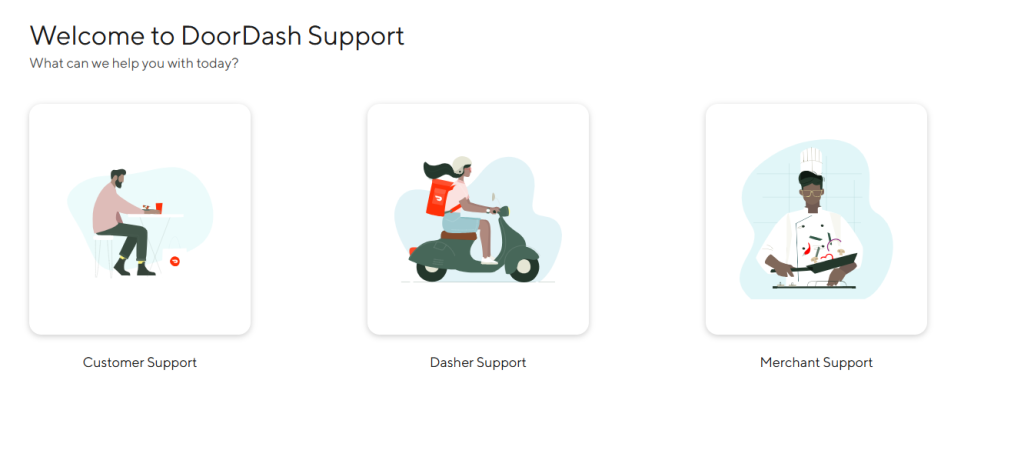
If you are a Dasher, the person actively completing the delivery, the rules for How to Contact DoorDash Customer Service are entirely different.
Your needs are urgent, often related to safety, navigation, or immediate problems at the pickup location. Time is money, literally, and you cannot afford to wait in a general queue.
The most critical tool for Dashers is the Dasher App. Within the app, there is a dedicated Help section, usually accessible during an active dash.
This section contains the direct phone number for Dasher Support.
The number for Dasher Support is different from the customer support line and is meant to be used for time sensitive, in flight issues:
- Restaurant is closed when you arrive.
- You were involved in an accident or safety incident.
- The customer provided the wrong address and is unreachable.
- The app is stuck and you cannot confirm pickup or dropoff.
The dedicated Dasher Support phone number is your fastest option for these emergencies.
When you call, the system often recognizes your phone number and prompts you to enter your Dasher ID, ensuring you are routed to a team trained in logistics and dispatch.
Avoid using the email support channels for active delivery issues. Email is for background administrative problems like weekly pay discrepancies or document upload failures.
When you are on the clock, always use the dedicated Dasher phone support or the in app chat feature, which is typically also prioritized for Dasher safety and speed.
3. The Merchant’s Channel

Merchants, the restaurants and stores using the platform, have their own set of specific operational challenges: tablet errors, missing order details, or dispatch problems.
Their support needs are distinct, focusing on integration and operational uptime.
Merchants should use the dedicated Merchant Portal or the Store Tablet for accessing their primary support channels.
Within the portal, there is often a specialized Help section that provides a dedicated Merchant Support phone number.
This number connects to a team trained in technical troubleshooting for the order receiving devices, menu management, and financial reconciliation.
A Merchant should not call the customer line or the Dasher line. They will be immediately transferred, which wastes time and can disrupt a busy kitchen.
Using the correct, specialized line is essential for fixing issues like a menu item showing the wrong price or the tablet failing to connect to the DoorDash system.
For simple, non urgent issues, the Merchant Portal often features a robust Help Center with articles on payment statements and menu updates.
However, for a system outage, always use the dedicated Merchant phone line.
This is a business to business support channel and is generally staffed with higher level technical troubleshooting expertise than the consumer line.
4. The Magic of the Order ID

Regardless of whether you are a customer, a Dasher, or a Merchant, the single most important piece of information you can provide to speed up your resolution is the Order ID.
The Order ID is the unique transaction identifier that links the customer, the Dasher, the Merchant, and the exact payment. It is the key to the entire transaction history.
If you are a customer calling from a general phone number because you cannot access the app, your first words after authentication should be, “My order ID is 54321.”
If you are a Dasher, and the app is glitching, calling Dasher Support and immediately providing the Order ID for the current dash lets the agent instantly pull up the coordinates, the restaurant status, and the customer’s last known location.
This saves several minutes of back and forth explanation while you are standing outside.
Always locate and write down the Order ID before you initiate contact with any part of DoorDash Customer Service. It is the most powerful tool you have to bypass generic questioning.
Agents are trained to solve problems using this ID, and providing it upfront is a massive courtesy to the agent, which almost always results in a faster, more focused interaction.
5. Using the Direct Phone Number
While the app is the primary method, sometimes you just need to talk to a person directly because the app is failing, or your battery died, or the issue is high stakes and requires nuance.
DoorDash does not heavily publicize one single 1-800 number. They want you to authenticate through the app first. However, there are separate, often rotating, direct contact numbers based on the support type.
- Customer Support Line (General Inquiry/Complex Issue): For consumers who cannot use the app, there is a number you can call. It is often 1 (855) 431 0459 or similar variants. These lines are subject to long wait times, especially during peak dinner hours, so only use them if the app fails.
- Dasher Emergency/Active Order Line: This is time sensitive. This number should only be sourced from the Dasher App itself for the highest priority and accuracy.
- Merchant Support Line: This number is found within the Merchant Portal.
If you must dial one of the general customer numbers, expect the IVR to ask for the phone number associated with your account.
Then, it will immediately ask for the Order ID. Again, have that ID ready. If you cannot provide an Order ID, the system will route you to the lowest priority queue.
Mastering How to Contact DoorDash Customer Service means respecting the system’s need for that ID.
6. Managing Refund and Billing Disputes
Refunds and billing disputes are the most common reason for needing How to Contact DoorDash Customer Service, and this process is where the paper trail matters most.
For a full refund or a credit adjustment, especially for an expensive or completely failed order, you should always start with the App’s Help Section. If the app provides an immediate, automated resolution, take it. That is the quickest path.
If the automated resolution is insufficient, or the app denies your request, that is when you escalate to a live agent, preferably through the app’s chat feature.
When interacting with the agent, be factual and attach evidence if possible. Did you receive a completely incorrect order? Take a picture of the wrong food and offer to send it to the agent via a support email.
When disputing a payment, reference the specific transaction date and the last four digits of the card used. Use clear language: “The charge on my statement dated November 1st for $45.99 is a duplicate charge, and I require a credit to my original payment method.”
Keep the interaction focused on the dollar value and the failure of service. If a refund is promised, ask for a Case ID and confirm the expected timeframe for the funds to reflect in your bank account, which can vary based on your bank’s processing speed.
Do not accept a DoorDash credit if you would prefer a refund to your original payment method, unless you are satisfied with the offer.
You have the right to request the original form of payment back, and often you need to be firm but polite in your insistence.
7. Strategic Timing and Escalation

Like any large logistics operation, DoorDash support volume spikes dramatically during specific times. Calling or initiating a chat at these times means guaranteed long waits.
Peak Hours to Avoid:
- Dinner Rush: 6:00 PM to 8:30 PM local time, especially Friday and Saturday. This is when the most orders are happening, and thus, the most problems.
- Weekend Lunch: Saturday and Sunday, 12:00 PM to 2:00 PM.
Best Times for Low Wait:
- Mid Morning: 9:00 AM to 11:30 AM on weekdays. This is often the quietest window.
- Late Night: After 9:30 PM on a weekday.
If you are facing a severe, unresolved issue, and multiple agents have failed to help, the final internal step is Escalation.
Ask the agent for an Internal Ticket Number and specifically request to speak with a Supervisor or to have your case forwarded to the Executive Escalation Team.
Using the term Executive Escalation often signals to the Tier 1 agent that you have a persistent problem and that the solution requires a higher level of authorization than they possess.
This is a common and appropriate step for issues that affect account stability, large financial losses, or sustained service failures.
For persistent account or safety issues, remember that you also have the external option of filing a formal complaint with the Better Business Bureau (BBB) or your local consumer protection agency, which often forces a response from the company’s dedicated corporate relations department, but this is a slow, methodical process.
8. The Dasher and Merchant Operations
The complexity of How to Contact DoorDash Customer Service really hits home when you consider the intricate logistics involved. Dashers are dealing with problems on the street, in real time.
If a Dasher is stuck waiting for an order that is delayed by 30 minutes, they need to know if they should unassign and move on.
The Dasher Support agent has access to the restaurant’s actual preparation time, not just the customer’s estimate. They can advise the Dasher on the best course of action to maintain their earnings and completion rate.
Merchants need assurance that when they report a technical problem with the tablet, a specialized technician is engaged immediately.
If their ordering system is down, it means lost revenue for them and a massive service disruption for DoorDash itself. Their support line is a direct link to IT and operations support, reflecting the B2B relationship.
The support model reflects the decentralized nature of the gig economy. The support agent is essentially a remote dispatcher and mediator, juggling the needs of three separate parties simultaneously.
They need the Order ID to immediately establish the relationship between those three parties—customer, Dasher, and Merchant—and identify the source of the breakdown in the chain.
9. Account Security and Fraud Reporting
Account security and potential fraud are highly sensitive issues that require a specialized approach beyond the standard support channels.
If you believe your account has been hacked, or your payment information has been compromised, you should not waste time in the general queue.
While on the DoorDash website, look for the dedicated Security or Fraud Reporting page.
They often provide a specific email address or an online form that bypasses general customer support and routes the complaint directly to the internal fraud and compliance team.
When reporting a security issue, provide precise details:
- The last known successful login date and time.
- The date and amount of any unauthorized charges.
- Whether you have changed your password since the suspected breach.
For unauthorized charges, you also have the option to contact your bank immediately to stop the payment and initiate a chargeback.
However, doing this often leads to a temporary suspension of your DoorDash account until the matter is resolved, so weigh the urgency of the fraud against the need to access the service.
For these high stakes issues, the priority in learning How to Contact DoorDash Customer Service shifts from speed of resolution to security of data, and the dedicated fraud channels are the most appropriate.
10. Documenting Everything

Every single interaction with DoorDash support must be documented. The platform is complex and turnover in the support center can be high. Your documentation is the only constant.
If you use the Live Chat in the app, the conversation transcript is often saved within the app itself, which is great. If you call, you must take notes.
Write down:
- Date and Time of Call: When exactly the conversation occurred.
- Agent’s Name or ID: Usually provided at the start or end of the call.
- Case ID/Reference Number: The internal ticket number for the issue.
- The Promise: What the agent explicitly agreed to do (e.g., “A refund for $15 will be processed in 3-5 business days”).
If you have to call back, you start the conversation by saying, “I am following up on Case ID 98765. Agent Sarah confirmed a refund was initiated last Thursday. Can you please confirm the current status of that refund?”
This forces the new agent to use the old ticket and prevents them from starting the whole process over again.
Without that Case ID, you are starting from zero every single time, and that is a major cause of consumer frustration with any high volume transactional service.
11. Subscription Specific Support (DashPass)
If your issue relates specifically to the DashPass subscription, which provides lower delivery fees and service fees, the support required might be slightly different.
DashPass issues often involve:
- A promised fee reduction not being applied.
- A charge appearing for a trial that was cancelled.
- Questions about promotional offers linked to DashPass.
For these billing specific queries related to the subscription model, use the in app chat and specify that the issue is with DashPass Billing. This often routes you to an agent who is cross trained on subscription logic and recurring payments.
The critical difference here is the need to confirm that your account is properly provisioned for the service.
The agent will check the back end systems to ensure the correct subscription flag is applied. Using the generic “Order Issue” path will lead to delays.
The language of the problem should reflect the service being managed: DashPass.
You May Also Like:
- How to Call Verizon Customer Service and Solve Issues on the First Try
- How to contact Peacock TV Customer Service
- Definitive Guide | How to contact customer service Amazon
Frequently Asked Questions
What is the fastest way to get a refund for a missing item?
The fastest way to get a resolution for a missing or incorrect item is to use the DoorDash App itself. Go to your recent order and select Help or Report Issue. For simple issues, the system often provides an immediate, automated credit or refund without needing to speak to a person.
Does DoorDash have a direct phone number for customers?
DoorDash does not heavily promote one main consumer phone number, preferring the app’s embedded Live Chat feature. The customer phone line, often found in the app, should only be used if the in app chat or reporting feature fails, as it is often subject to longer wait times during peak dinner hours.
What should a Dasher do if the restaurant is closed?
A Dasher should immediately contact Dasher Support using the dedicated phone number or chat feature found within the Dasher App. This is a high priority logistics issue, and the support agent can advise the Dasher on the next steps, such as confirming the closure and unassigning the order without a penalty.
How do I get an agent to quickly solve my complex issue?
To get an agent to solve a complex issue quickly, always locate and provide the Order ID immediately after authenticating your identity. If the first agent cannot resolve the issue, politely request a Case ID and ask for the matter to be escalated to a supervisor or the next tier of support. This organized approach streamlines How to Contact DoorDash Customer Service.