

Norton 360 provides a broad set of tools intended to protect personal devices and digital identities through a single interface.
- 2. Overview
- 3. Why You Can Trust Us
- 4. Key Features
- 5. User Experience
- 6. Performance and Reliability
- 7. Products
- 8. Pricing and Plans
- 9. Integrations and Compatibility
- 10. Product Specification
- 11. Pros and Cons
- 12. Customer Support
- 13. Ideal Use Cases
- 14. Alternatives
- 15. Bottom Line: Our Verdict
- You May Also Like:
- Frequently Asked Questions
The software functions as a protective layer against malware, ransomware, and phishing attempts that target modern users.
Most individuals choose Norton 360 because it combines a standard antivirus scanner with a virtual private network and secure cloud storage.
This Norton 360 review examines the actual efficiency of the scanning engine and the impact the software has on system speed.
Norton 360 remains a frequent choice for families and professionals who require a hands off approach to digital safety.
The primary goal of Norton 360 is to automate the process of threat detection and removal. By using a vast database of known signatures and heuristic analysis, Norton 360 identifies suspicious files before they can cause damage.
The inclusion of identity monitoring through LifeLock adds another layer of utility to the Norton 360 package.
This Norton 360 assessment will break down the various tiers and features to determine if the yearly subscription cost aligns with the actual protection provided.
Norton 360 is more than just a virus checker, it is a management suite for personal data privacy.
2. Overview
Norton 360 is a comprehensive security suite that addresses multiple vectors of digital risk including device infection and identity theft.
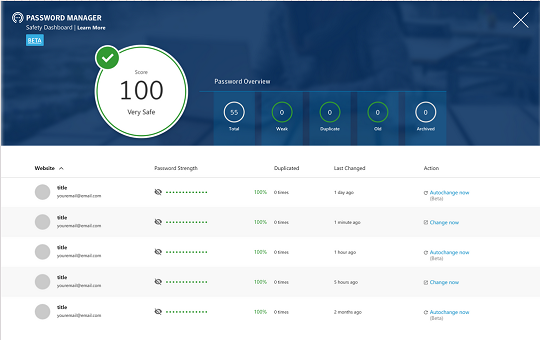
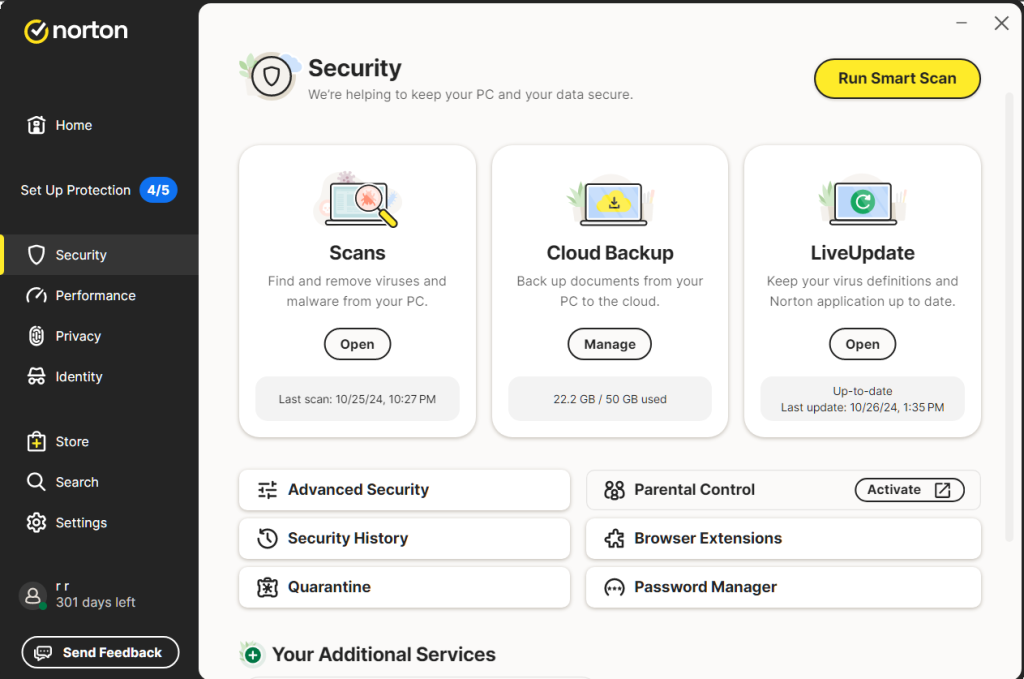
The platform offers a unified dashboard where users can manage their antivirus settings, activate the secure VPN, and configure cloud backups.
Norton 360 is designed to work across different operating systems, providing a consistent experience for those who use both Windows and mobile devices.
The software is built on a history of security research, aiming to provide a reliable defense against both established and emerging cyber threats.
The current version of Norton 360 focuses on proactive monitoring rather than simple reactive scanning.
This means Norton 360 constantly checks the dark web for leaked credentials and monitors network traffic for unusual patterns.
The software also includes tools for managing passwords and protecting webcams from unauthorized access.
Norton 360 caters to a wide audience by offering different tiers of service, from basic protection for a single device to extensive coverage that includes credit monitoring and insurance.
For those seeking a single solution for their digital life, Norton 360 offers a dense collection of features that are generally easy to navigate and maintain.
3. Why You Can Trust Us
Our evaluation of Norton 360 is based on a process of technical analysis and factual observation.
We look at the actual data provided by independent testing laboratories like AV Test and AV Comparatives to verify the detection rates of Norton 360.
Our approach involves installing Norton 360 on various hardware configurations to see how the software behaves during intensive tasks and idle periods.
We focus on the practical aspects of the Norton 360 interface, looking for areas where the user experience is smooth and where it might be frustrating.
The goal of this Norton 360 review is to provide a clear picture of what the software does well and where it falls short.
We do not rely on marketing brochures, but instead analyze the specific settings and default behaviors of Norton 360.
We also track the historical performance of Norton 360 to see how the developers respond to new vulnerabilities.
This thorough, research based methodology ensures that our insights on Norton 360 are accurate, professional, and reliable.
We prioritize the technical reality of the software so that users can make a decision based on evidence rather than promises.
4. Key Features
The feature set of Norton 360 is expansive, covering everything from file safety to identity recovery. Each component of Norton 360 serves a specific purpose in the broader context of personal security.
- Malware and Virus Protection: The core of Norton 360 uses real time scanning to block viruses, spyware, and sophisticated ransomware. Norton 360 checks every file that enters the system.
- Secure VPN: Norton 360 includes an integrated virtual private network with no data limits on most plans. This Norton 360 VPN encrypts the internet connection to protect privacy on public wifi networks.
- Cloud Backup: Norton 360 provides varying amounts of secure cloud storage to help prevent data loss due to hardware failure or ransomware encryption. The Norton 360 backup process can be automated.
- Password Manager: A built in tool within Norton 360 allows users to generate and store complex passwords securely. Norton 360 ensures that credentials are accessible across all synced devices.
- SafeCam for PC: Norton 360 monitors the webcam and alerts the user if any unauthorized application tries to access it. This Norton 360 feature blocks attempts to spy on the user.
- Smart Firewall: The Norton 360 firewall monitors incoming and outgoing network traffic. Norton 360 blocks suspicious communication without requiring complex user configuration.
- Dark Web Monitoring: Powered by LifeLock, Norton 360 scans the dark web for the user’s personal information, such as email addresses or social security numbers, and sends alerts if a match is found.
The depth of these Norton 360 features makes it a versatile tool. Norton 360 handles many background tasks that would otherwise require separate, specialized software.
5. User Experience
Using Norton 360 starts with an installation process that is generally quick but does require several system permissions to function correctly.
Once installed, Norton 360 presents a main dashboard that uses a clear layout to show the status of each security module.
The interface of Norton 360 is designed to be accessible, with green checkmarks indicating that everything is protected.
Navigation within Norton 360 is logical, though the software does frequently present notifications and upsell suggestions that some might find distracting.
The daily experience of Norton 360 is mostly passive. Norton 360 runs in the background, only surfacing when a threat is blocked or a scheduled scan is completed.
Managing the Norton 360 VPN is as simple as clicking a single toggle. The Norton 360 mobile app mirrors this simplicity, allowing users to check the security status of their phones or tablets with ease.
One area where the Norton 360 experience could be improved is the occasional pop up window that alerts users to features they have not yet activated.
Despite this, the overall feel of Norton 360 is professional and stable, making it a dependable companion for those who do not want to micromanage their security settings.
6. Performance and Reliability
In terms of reliability, Norton 360 consistently scores at the top of independent antivirus tests.
The detection engine of Norton 360 is highly effective at identifying zero day threats, which are brand new vulnerabilities that have not yet been widely documented.
Norton 360 uses a combination of local signatures and cloud based analysis to verify the safety of files.
This dual approach helps Norton 360 maintain high accuracy without causing excessive system lag.
Reliability also extends to the Norton 360 VPN, which maintains stable connection speeds even when connected to servers in different countries.
Performance impact is a common concern with suites like Norton 360, but the current version is well optimized.
While a full system scan using Norton 360 will certainly utilize CPU resources, the impact on general web browsing or document editing is minimal.
Norton 360 includes a silent mode that prevents notifications from interrupting the user during full screen activities like gaming or movies.
The stability of Norton 360 is excellent, with very few instances of crashes or false positives.
Organizations and individuals can trust Norton 360 to remain active and effective without constantly needing a restart or manual update.
7. Products
Norton 360 is offered in several distinct packages to suit different needs and budgets.
Each version of Norton 360 builds upon the previous one, adding more devices or more advanced identity theft features.
- Norton 360 Standard: This is the entry level tier of Norton 360. It covers a single device and includes the antivirus engine, the Norton 360 VPN, the password manager, and 2GB of cloud backup.
- Norton 360 Deluxe: The most popular version of Norton 360, it covers up to five devices. Norton 360 Deluxe adds parental controls and increases the cloud storage to 50GB.
- Norton 360 Select: This version of Norton 360 includes the LifeLock identity theft protection features. It provides 100GB of cloud backup and covers up to 10 devices with Norton 360.
- Norton 360 Advantage: A higher tier of Norton 360 that provides more comprehensive credit monitoring and 250GB of cloud storage. Norton 360 Advantage includes identity theft insurance.
- Norton 360 Ultimate Plus: The top tier of Norton 360, providing the maximum amount of identity protection and 500GB of cloud backup. This Norton 360 plan is intended for those who want the most extensive coverage possible.
Choosing between these Norton 360 products depends largely on how many devices need protection and how much value is placed on identity monitoring services.
8. Pricing and Plans
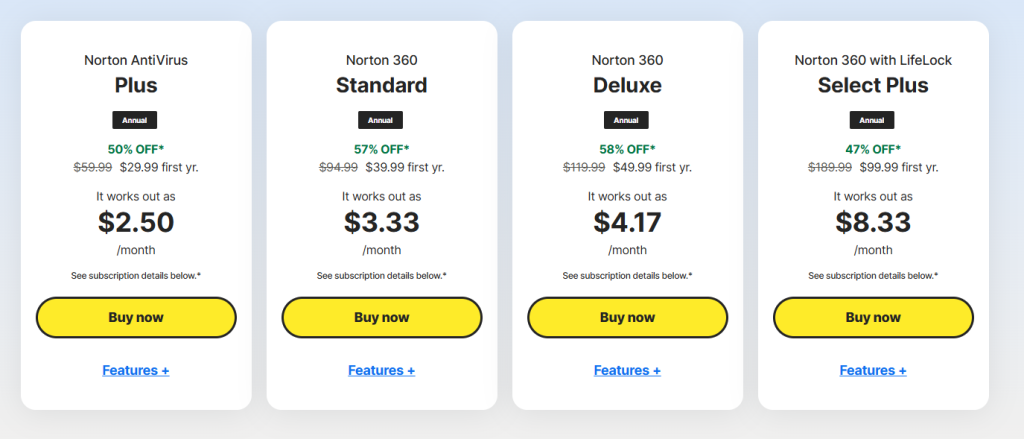
The pricing for Norton 360 often includes a significant discount for the first year, which can make the software very affordable initially.
However, it is important to check the renewal prices for Norton 360, as they tend to be higher.
Most users find that the Norton 360 Deluxe plan offers the best balance of price and features for a typical household.
| Plan Name | Device Limit | Initial Price | Key Features |
| Standard | 1 | $39.99 | Antivirus, VPN, 2GB Backup |
| Deluxe | 5 | $49.99 | Parental Controls, 50GB Backup |
| Select | 10 | $99.99 | LifeLock Select, 100GB Backup |
| Ultimate Plus | Unlimited | $299.99 | Full LifeLock, 500GB Backup |
The Norton 360 pricing structure is designed to encourage users to opt for the higher tiers by bundling more value into the Deluxe and Select plans.
It is worth noting that Norton 360 often runs seasonal promotions that can lower these prices further.
When considering the cost of Norton 360, one should factor in the expense of buying a separate VPN or identity monitoring service, as Norton 360 includes these at no extra cost in its bundles.
The value proposition of Norton 360 remains strong for those who want a simple, all in one bill for their digital security needs.
9. Integrations and Compatibility
Norton 360 is compatible with all major platforms including Windows, macOS, Android, and iOS.
The Windows version of Norton 360 is the most feature rich, offering the SafeCam and full firewall controls.
The macOS version of Norton 360 is more streamlined but still provides excellent malware protection and the full Norton 360 VPN.
Mobile versions of Norton 360 focus on app scanning and wifi security, which are the primary threats on smartphones and tablets.
In terms of integrations, Norton 360 works well with standard browsers through extensions that flag dangerous websites.
The Norton 360 password manager integrates directly into Chrome and Firefox to help with form filling.
Compatibility with other security software can be tricky, as Norton 360 is designed to be the primary security tool on a device.
It is generally recommended to uninstall other antivirus products before setting up Norton 360 to avoid conflicts.
The cross platform nature of Norton 360 ensures that a single subscription can protect a laptop, a desktop, and several mobile phones simultaneously.
10. Product Specification
The technical side of Norton 360 reveals a software package that is built for modern hardware while maintaining support for slightly older systems.
| Specification | Details |
| Detection Engine | Heuristic and Signature based |
| VPN Protocol | Proprietary encrypted tunnel |
| Cloud Storage | 2GB to 500GB depending on plan |
| OS Support | Windows 10, 11, macOS, Android, iOS |
| Firewall | Smart two way firewall |
| Identity Protection | LifeLock integration |
| Scanning Modes | Quick, Full, Custom, Power Eraser |
| Update Frequency | Multiple times per day |
The Norton 360 specifications show a focus on versatility. The inclusion of the Power Eraser tool within Norton 360 is a nice touch for dealing with particularly stubborn infections that a standard scan might miss.
Overall, the Norton 360 specs are exactly what one would expect from a market leader in the cybersecurity industry.
11. Pros and Cons
When looking at Norton 360, there are clear benefits and some drawbacks that potential users should consider.
| Pros | Cons |
| Excellent malware detection rates | High renewal pricing for users |
| Integrated unlimited VPN included | Frequent upsell notifications seen |
| Useful cloud backup storage | System impact during full scans |
| Strong identity theft protection | Complex interface in some areas |
| Great cross platform support | Requires account for all features |
The Norton 360 malware detection is among the best available, providing peace of mind.
The Norton 360 VPN is a great addition because it removes the need for a second subscription.
Having Norton 360 cloud backup is a smart way to protect essential files from hardware failure.
The Norton 360 identity theft features are robust and offer real financial protection. Finally, the Norton 360 cross platform support means all your devices are covered.
On the other hand, the Norton 360 renewal pricing can be a surprise if you do not pay attention to the terms.
Some users find the Norton 360 notifications to be a bit too frequent. While Norton 360 is optimized, full scans still cause a noticeable system impact on older machines.
The Norton 360 interface can feel crowded with all the different modules. Lastly, the requirement to have an account for Norton 360 features is standard but still a minor inconvenience for some.
12. Customer Support
Support for Norton 360 is available through several channels including live chat, phone support, and a comprehensive online community.
The Norton 360 help center is filled with articles and videos that guide users through common tasks like setting up the VPN or managing the password manager.
Most technical issues with Norton 360 can be resolved by searching the knowledge base, which is well organized and frequently updated.
If a user cannot solve a problem themselves, the Norton 360 24 7 live chat is the fastest way to get help.
The agents are generally knowledgeable about the Norton 360 software and can assist with subscription questions or technical glitches.
Norton 360 also offers a Virus Protection Promise, which states that if a Norton 360 expert cannot remove a virus from your device, you may be eligible for a refund.
This level of support for Norton 360 demonstrates a high degree of confidence in the product and provides an extra layer of reassurance for the user.
13. Ideal Use Cases

Norton 360 is best suited for individuals who want a single, powerful tool to handle all aspects of their digital safety.
Families often find Norton 360 Deluxe to be perfect because of the parental controls and the ability to protect multiple devices under one account.
Norton 360 makes it easy for parents to monitor their children’s online activities and set healthy time limits.
Another ideal use case for Norton 360 is for remote workers or frequent travelers. The included Norton 360 VPN is essential for anyone who regularly connects to public wifi at airports or coffee shops.
For those who are concerned about their privacy and the risk of identity theft, the Norton 360 plans that include LifeLock are an excellent choice.
Norton 360 provides the constant monitoring and insurance coverage that can make a huge difference in the event of a data breach.
If you prefer a security solution that is easy to set up and mostly runs itself, Norton 360 is a logical option to consider.
14. Alternatives
While Norton 360 is a top choice, there are other security suites that offer similar features.
| Alternative | Primary Strength | Best For |
| Bitdefender | Light system impact | Speed enthusiasts |
| McAfee | Unlimited device plans | Large households |
| Kaspersky | Advanced heuristics | Technical users |
| Avira | Strong free version | Budget conscious |
Norton 360 often competes directly with Bitdefender, which is known for having a very small impact on system performance.
McAfee is another strong alternative to Norton 360, particularly for large families who need to protect an unlimited number of devices.
Kaspersky provides excellent detection that rivals Norton 360, though some users prefer the interface of Norton 360.
For those who do not want to pay for a subscription, Avira offers a solid free antivirus that lacks many of the Norton 360 extras but still provides basic protection.
Choosing between Norton 360 and these alternatives depends on whether you value the extra features like cloud backup and identity insurance.
15. Bottom Line: Our Verdict
Norton 360 remains one of the most comprehensive and reliable security solutions available on the market today.
Its ability to combine elite antivirus protection with a functional VPN and robust identity monitoring makes Norton 360 a massive value for most users.
The software is stable, easy to use, and backed by a company with a long history of expertise.
While the renewal prices and occasional notifications are minor negatives, they do not detract from the overall effectiveness of Norton 360.
If you are looking for a way to secure your devices and your personal information without having to piece together different apps, Norton 360 is an excellent investment.
The peace of mind provided by the Norton 360 detection engine and the LifeLock identity features is well worth the subscription cost for many.
Norton 360 is a professional, grounded tool that does its job quietly and effectively.
We recommend Norton 360 for anyone who wants a dependable and complete cybersecurity package in 2026.
You May Also Like:
- McAfee Review 2026 – Features, Pricing & Verdict
- Webroot Review 2026 – Features, Pricing & Verdict
- Avast Antivirus Review 2026 – Features, Pricing & Verdict
Frequently Asked Questions
Is Norton 360 good for gaming?
Yes, Norton 360 includes a silent mode that detects when you are in a full screen application. Norton 360 will silence all notifications and background tasks to ensure that your gaming performance is not interrupted by the software.
Does Norton 360 include a VPN?
Yes, most Norton 360 plans include a secure VPN with no data limits. This Norton 360 VPN allows you to browse anonymously and protects your data when you are using public wifi networks at home or while traveling.
Can I use Norton 360 on my phone?
Yes, Norton 360 is compatible with both Android and iOS devices. You can install the Norton 360 mobile app to protect your smartphone from malicious apps, risky websites, and unsecured wifi connections.
How much storage does Norton 360 provide?
The amount of cloud storage in Norton 360 varies by plan. Norton 360 Standard starts with 2GB, while Norton 360 Deluxe provides 50GB. The top tier Norton 360 Ultimate Plus plan offers up to 500GB of secure cloud backup storage.
Does Norton 360 slow down my computer?
While all security software uses some resources, Norton 360 is well optimized. You may notice a slight impact during a full system scan with Norton 360, but daily tasks like web browsing and office work are generally unaffected by the software.
Norton 360
Norton 360 is a powerful, all in one security suite that offers excellent malware protection and useful extras like a VPN and identity monitoring. It is a reliable choice for families and professionals alike.
Price: 39.99
Price Currency: USD
Operating System: Windows, macOS, Android, iOS
Application Category: BusinessApplication
9.5
Pros
- Excellent malware detection rates
- Integrated unlimited VPN included
- Useful cloud backup storage
- Strong identity theft protection
- Great cross platform support
Cons
- High renewal pricing for users
- Frequent upsell notifications seen
- System impact during full scans
- Complex interface in some areas
- Requires account for all features