

OfficeSpace app functions as a comprehensive technical environment designed to manage the physical layout and daily operations of modern corporate facilities.
- 1. Overview – OfficeSpace app Review
- 2. Why You Can Trust Us
- 3. Key Features
- 4. User Experience
- 5. Performance and Reliability
- 6. Products
- 7. Pricing and Plans
- 8. Integrations and Compatibility
- 9. Product Specification
- 10. Pros and Cons
- 11. Customer Support
- 12. Ideal Use Cases
- 13. Alternatives
- 14. Bottom Line: Our Verdict
- You May Also Like:
- Frequently Asked Questions
It provides a digital interface where employees can reserve desks and meeting rooms while administrators handle move management and space optimization through real time data.
By creating a detailed digital twin of a physical office, the platform allows organizations to visualize their seating arrangements and track occupancy patterns without relying on outdated floor plans or manual entry.
This visibility is essential for companies aiming to reduce real estate costs or reorganize departments with minimal operational friction.
The software also offers a suite of tools for facility managers to simulate relocation scenarios and evaluate the impact of different floor plan configurations.
Employees benefit from a streamlined mobile experience that simplifies finding teammates and securing workspaces in a hybrid environment.
By consolidating facility requests, guest management, and desk booking into a single platform, the system aims to eliminate the fragmentation common in workplace operations.
Its focus on practical utility and data accuracy makes it a primary choice for organizations looking to turn their physical office into a flexible, measurable asset that supports both operational efficiency and employee productivity.
1. Overview – OfficeSpace app Review
OfficeSpace app is a robust workplace management solution engineered to simplify the complexities of facility operations and employee space reservations.
It provides a centralized hub where staff can use interactive floor plans to book desks, rooms, or specialized resources through a web browser or mobile device.
The software focuses on providing a high degree of visual clarity, allowing everyone in the organization to see exactly how the office is laid out and where colleagues are located.
This is particularly useful for large scale enterprises where navigating multiple floors or buildings can be a logistical challenge for both new and existing employees.
For the administrative team, the platform serves as a powerful engine for space planning and move management.
It includes advanced features for scenario planning, allowing managers to drag and drop teams into new layouts to see how they fit before any physical furniture is moved.
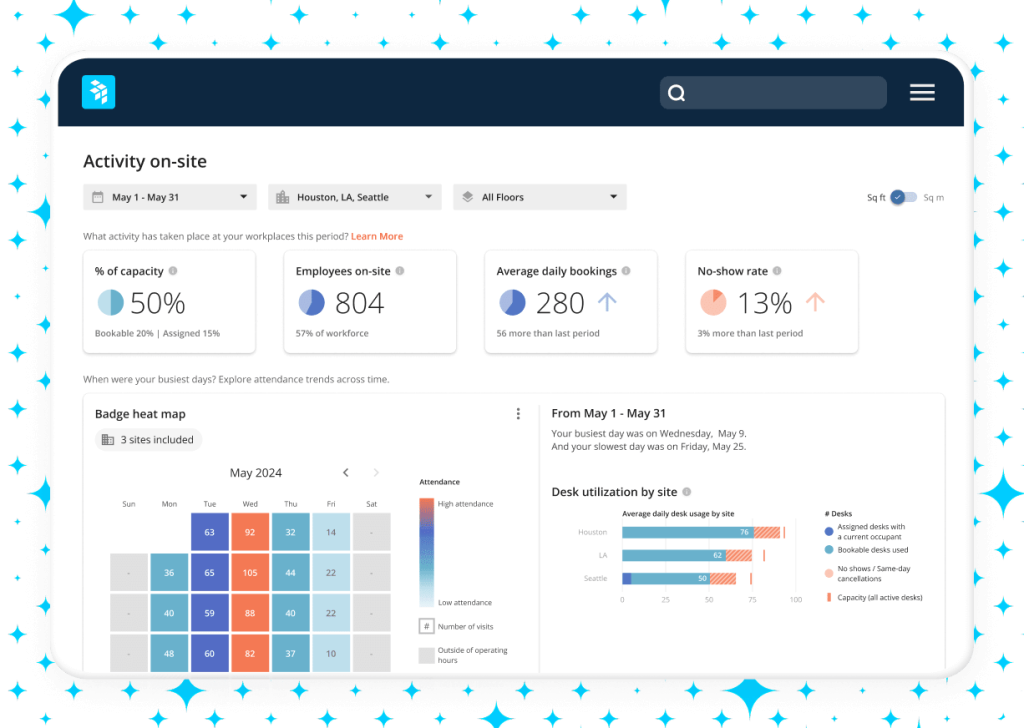
The software also provides deep analytics on how the office is actually used, tracking everything from desk occupancy rates to meeting room popularity.
By integrating with existing workplace tools like Slack and Microsoft Teams, the platform ensures that managing the office environment is a natural extension of the digital workday.
Its ability to scale across global portfolios makes it a versatile tool for any organization seeking to optimize its physical workspace.
2. Why You Can Trust Us
The conclusions in this OfficeSpace app review are based on a rigorous evaluation process that prioritizes functional performance and technical accuracy.
We analyze the software by examining its deployment success across diverse industries and assessing its reliability in high pressure corporate environments.
Our methodology involves a deep dive into the platform’s data visualization capabilities, the security of its cloud infrastructure, and the actual time savings reported by facilities professionals.
We pay close attention to the development cycle of the product, ensuring that the features we discuss are current and supported by the vendor.
We also examine the platform from the perspective of an end user, testing the speed of the mobile interface and the clarity of the interactive maps.
Our research includes a thorough comparison of the software against its primary competitors in the facility management market, evaluating specific metrics such as implementation complexity and user adoption rates.
We do not rely on marketing claims, but instead look at the granular details of the reporting engine and the flexibility of the administrative controls.
This evidence based, professional approach ensures that the information we provide is dependable, thorough, and grounded in the practical realities of managing modern workplace environments.
3. Key Features
The functionality of the platform is designed to handle both the daily needs of employees and the long term strategic goals of facility managers.
- Interactive Visual Directory: Users can search for colleagues and find their exact location on a digital floor plan, making it easy to navigate large or unfamiliar office layouts.
- Desk and Room Booking: The system allows for quick reservations of various assets, including hot desks, assigned workstations, and conference rooms, with support for specific equipment filters.
- Move Management Tools: Administrators can use a drag and drop interface to plan individual moves or large scale departmental relocations, complete with automated notifications for affected staff.
- Scenario Planning: This advanced tool allows managers to create and test multiple floor plan configurations in a sandbox environment to see how they impact space utilization before implementation.
- Workplace Analytics: Detailed reports provide insights into occupancy trends, peak usage times, and underutilized areas, helping organizations make data driven real estate decisions.
- Visitor Management: A dedicated module handles guest check ins, prints badges, and notifies hosts, ensuring a secure and professional experience for office visitors.
- Facility Requests: Employees can submit maintenance or service requests directly through the platform, allowing facility teams to track and resolve issues efficiently from a central dashboard.
These features work together to create a unified system where the physical workspace is as easy to manage and navigate as a digital folder, providing value to everyone from the front desk to the executive suite.
4. User Experience
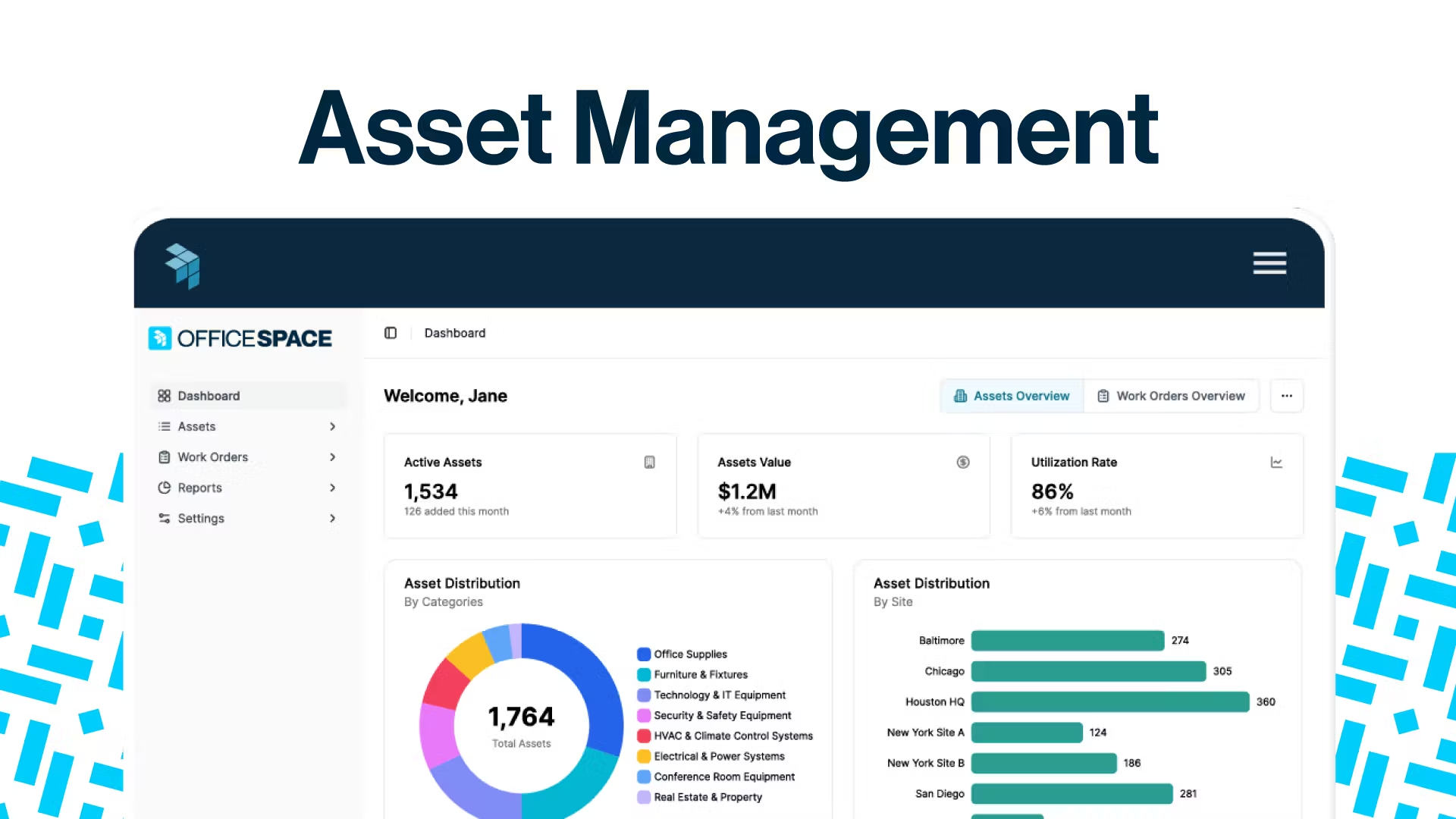
The user experience within the OfficeSpace app is centered on visual clarity and ease of navigation.
For the average employee, the ability to see a live map of the office is the most valuable aspect of the software.
The interface is clean and intuitive, allowing users to find a desk near a specific team member or book a room with just a few clicks.
The mobile app is designed for speed, ensuring that workers who are on the go can secure a spot or locate a colleague without having to navigate through complex menus or load slow graphics.
On the administrative side, the experience is built for efficiency and precision.
The move management tools are particularly well designed, replacing the need for confusing spreadsheets with a visual interface that reflects the actual office layout.
Setting up new floor plans is a straightforward process, and the ability to simulate changes before they happen significantly reduces the stress of facility management.
One of the most effective aspects of the experience is the seamless integration with daily communication tools.
By allowing users to book desks through Slack or Microsoft Teams, the platform reduces the friction of adopting new software, leading to higher accuracy in the occupancy data that administrators rely on for planning.
5. Performance and Reliability
When evaluating a facility management tool, reliability is critical because a system failure can lead to chaos during moves or double booked meeting rooms.
The software maintains high uptime standards, utilizing a cloud based architecture that ensures the office map and booking database are always available.
The synchronization between the mobile app and the web interface is consistently fast, with updates to desk status or room availability reflecting across the entire system in near real time.
This technical stability is essential for maintaining trust among employees who rely on the platform to plan their workdays.
In terms of performance, the visual elements of the software are well optimized. Even complex floor plans with hundreds of desks load quickly on both desktop and mobile devices.
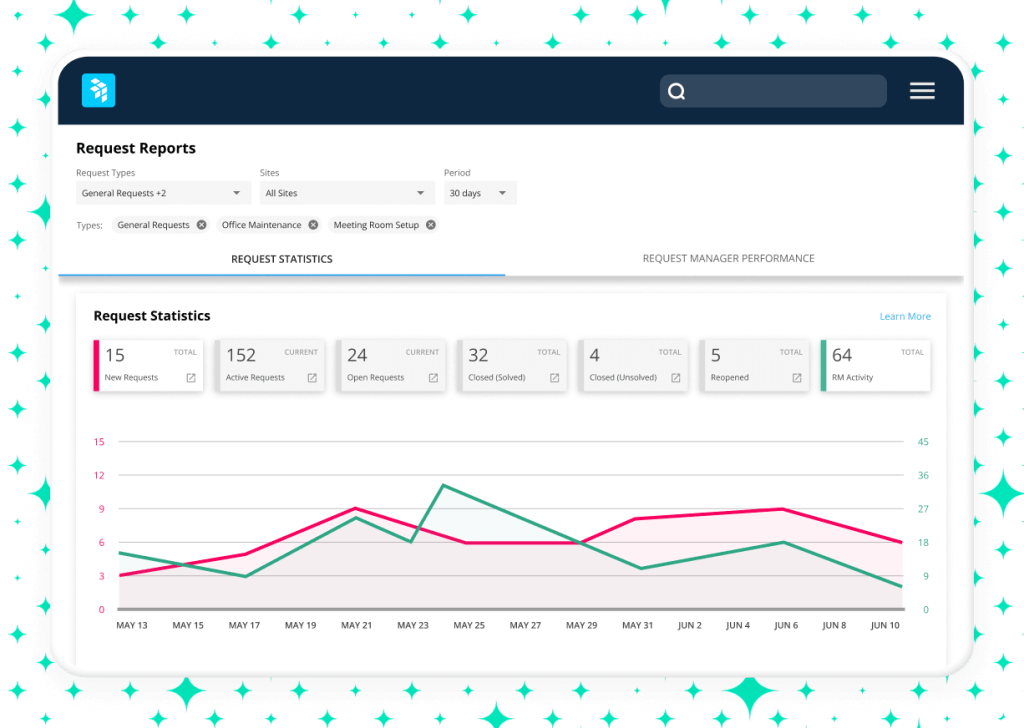
The backend analytics engine is capable of processing large volumes of data without noticeable lag, allowing managers to generate complex utilization reports instantly.
Security is also a strong point, with the platform offering robust Single Sign On options and meeting high standards for data encryption and privacy compliance.
While no system is perfect, the platform’s history of stability and its proactive approach to technical maintenance make it a reliable choice for organizations that cannot afford downtime in their workplace operations.
6. Products
The platform offers a suite of integrated products that allow organizations to customize their facility management strategy based on their specific needs.
- Desk Booking: This product focuses on the hybrid work experience, providing the tools needed for hot desking, hoteling, and permanent seat assignments.
- Room Booking: A specialized module for managing meeting spaces, including integration with digital room displays and calendar systems like Outlook and Google.
- Move Management: This product is designed for facility teams, offering a visual way to handle everything from single desk swaps to massive corporate relocations.
- Space Planning: An advanced tool for strategic real estate planning, allowing managers to optimize floor plans and simulate various growth or consolidation scenarios.
- Visitor Management: This module streamlines the guest entry process, providing a secure and professional way to track everyone who enters and exits the facility.
The modular nature of the software means that a company can start with basic desk booking and add more advanced move management or space planning tools as their organizational complexity grows.
This prevents the platform from feeling bloated for smaller teams while providing the depth required by global enterprises with millions of square feet to manage.
7. Pricing and Plans
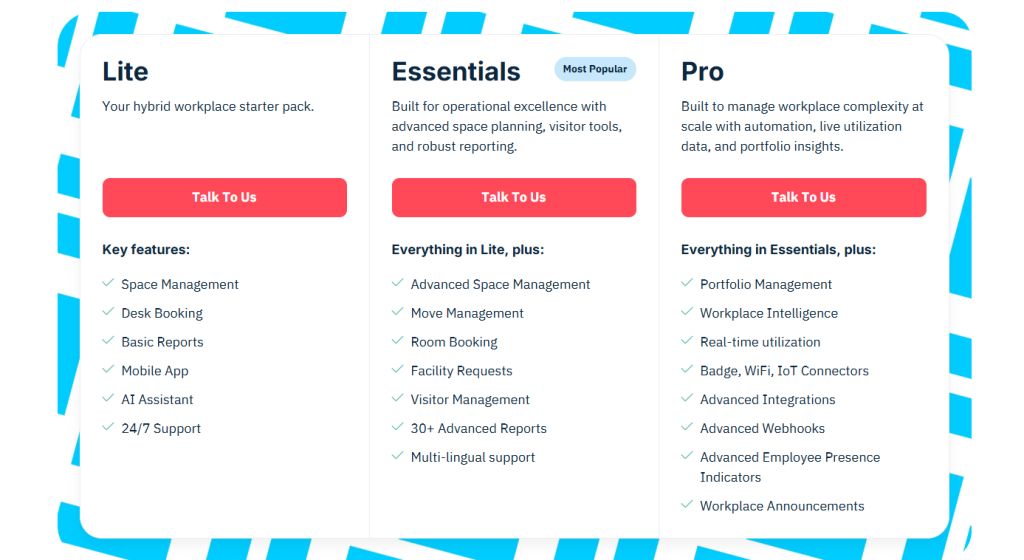
The pricing model for the OfficeSpace app is generally based on the size of the organization and the specific modules required.
While the company does not publish a single flat rate, the initial price for a standard implementation typically starts at approximately $3.00 per user per month when billed annually, though this can vary significantly based on the total square footage and number of seats being managed.
| Plan Name | Best For | Estimated Price (Per User) | Key Features |
| Core | Growing Companies | $3.00 / month | Desk booking, Visual directory, Basic maps |
| Professional | Large Enterprises | Contact Sales | Move management, Advanced analytics, SSO |
| Enterprise | Global Portfolios | Bespoke Pricing | Scenario planning, Custom API, Dedicated support |
The Core plan provides the essential tools for managing a hybrid office, focusing on employee experience and basic space visibility.
The Professional plan is where the software truly excels for facility teams, adding the powerful move management and reporting tools needed to run large offices efficiently.
For organizations with complex global needs, the Enterprise plan offers the full suite of simulation and planning tools, along with custom integrations and priority support.
While the initial investment might be higher than simpler booking tools, the value is found in the operational efficiencies and real estate savings that the platform enables for facilities departments.
8. Integrations and Compatibility
One of the primary technical advantages of the software is its ability to sit at the center of a company’s workplace ecosystem. It is designed to work with the tools that employees and IT departments already use.
- Communication Tools: Deep integration with Slack and Microsoft Teams allows users to find colleagues and book spaces directly from their chat interface.
- Calendar Systems: Bidirectional sync with Microsoft Outlook and Google Calendar ensures that meeting room bookings are always accurate across all platforms.
- Identity Management: Support for Single Sign On through providers like Okta and Azure AD ensures secure and easy access for all employees.
- Building Systems: The platform can integrate with badge readers and wifi systems to provide more accurate, automated data on actual office occupancy.
- IT Service Desks: Integration with tools like Jira or ServiceNow allows facility requests made in the app to flow directly into existing IT or maintenance workflows.
This high level of compatibility reduces the administrative burden on IT teams and ensures that the data in the OfficeSpace app stays current without manual intervention.
By connecting with the hardware and software already in place, the platform becomes a more reliable source of truth for how the office is functioning.
The open API also allows larger organizations to build custom connections to their own proprietary systems, ensuring long term technical flexibility as the workplace evolves.
9. Product Specification
The technical specifications of the platform reflect its enterprise grade focus, ensuring that it can handle the demands of large organizations with complex facilities.
| Specification | Detail |
| Deployment Model | Cloud based SaaS |
| Mobile Access | iOS, Android, Mobile Web |
| Browser Compatibility | Chrome, Edge, Safari, Firefox |
| Security Standards | SOC2 Type II, GDPR, ISO 27001 |
| Data Sync | Real time updates across all devices |
| Reporting Formats | CSV, PDF, In app visual dashboards |
| User Authentication | SAML 2.0, OAuth, Multi Factor |
| Mapping Support | High resolution SVG floor plans |
The cloud based nature of the software means that there is no on site server maintenance required, and updates are delivered automatically to all users.
The mobile applications are optimized for performance, ensuring that floor plans remain interactive and responsive even on smaller screens.
The commitment to security standards like SOC2 and GDPR compliance is a critical requirement for enterprise clients who are handling sensitive employee and facility data.
This technical profile makes the platform a safe and scalable choice for organizations that need a professional tool for long term workplace management.
10. Pros and Cons
Evaluating the OfficeSpace app requires a balanced look at where it provides the most value and where there might be challenges for certain types of users.
| Pros | Cons |
| Superior visual move management tools | Initial setup requires high effort |
| Advanced scenario planning capabilities | Premium features carry a higher cost |
| Seamless Teams and Slack integration | Interface has a learning curve |
| Robust enterprise grade security | Mobile app focuses mainly on booking |
| Accurate and deep utilization data | Mapping updates need admin support |
The most significant benefit is the superior visual move management tools, which save facility teams countless hours during reorganizations.
The advanced scenario planning capabilities allow for strategic decisions that can save millions in real estate costs.
Employees appreciate the seamless Teams and Slack integration, which makes the software easy to adopt.
Furthermore, the robust enterprise grade security and the accurate and deep utilization data provide the peace of mind and insights that large organizations require.
On the other hand, the initial setup requires high effort, particularly when creating the digital floor plans for multiple buildings.
The premium features carry a higher cost than simple desk booking apps, which might not suit smaller budgets.
New administrators may find that the interface has a learning curve due to the sheer number of features available.
Additionally, the mobile app focuses mainly on booking, meaning some advanced facility tasks still require a desktop.
Finally, making mapping updates need admin support, which can slow down small changes to the office layout.
11. Customer Support

The support structure for the OfficeSpace app is designed to handle the complex needs of facility managers and IT departments.
Because workplace management is a critical function, the company provides several layers of assistance to ensure its clients are successful.
- Implementation Specialists: Every new client is assigned a specialist who helps with the initial mapping of the office and the configuration of the system to match the company’s specific rules and workflows.
- Dedicated Account Managers: For larger enterprise clients, a dedicated manager provides ongoing strategic advice on how to use the software’s data to optimize their facility operations.
- Knowledge Base and Training: A comprehensive library of articles and video tutorials allows users and admins to solve common issues and learn new features at their own pace.
- Technical Support Team: A responsive support team is available to handle bugs or technical glitches, with various service level agreements available based on the chosen plan.
The feedback regarding the support team is generally high, with users frequently mentioning the helpfulness of the staff during the initial rollout.
For a tool as complex as an enterprise facility manager, having a partner who understands the nuances of move management and space planning is a significant advantage.
The investment in human support ensures that the software remains a productive tool rather than a technical burden for the facility team.
12. Ideal Use Cases

The specific design and deep feature set of the platform make it particularly effective for a few distinct organizational profiles.
The primary use case is the Large Scale Enterprise with Multiple Floors. When a company manages thousands of employees across several buildings, a simple list of desks is not enough.
The high resolution visual maps and directory in the OfficeSpace app are essential for helping people find their way and for managers to see the “big picture” of their real estate holdings.
Another ideal scenario is the Company Undergoing Frequent Reorganizations. If a business is constantly moving teams around or growing rapidly, the move management and scenario planning tools are indispensable.
They allow for complex changes to be planned and executed with a level of precision that spreadsheets simply cannot provide.
The Data Driven Real Estate Team also finds significant value here. For organizations looking to justify the cost of their office space or decide which leases to let go, the deep utilization analytics provide the objective proof needed for executive decisions.
The ability to see exactly which floors are at capacity and which are ghosts towns is a major financial advantage.
Finally, Organizations with Strict Compliance Needs benefit from the visitor management and secure directory features.
In industries like finance or healthcare, knowing exactly who is in the building and where they are seated is not just a convenience, but a security and safety requirement that the platform handles with professional rigor.
13. Alternatives
While the OfficeSpace app is a top tier solution for facility management, there are other platforms that might be better suited for different organizational priorities or smaller scales.
| Alternative | Primary Strength | Best For |
| Envoy | Visitor and workplace security | Front desk focused offices |
| Robin | Meeting room scheduling | Teams with high meeting volume |
| Kadence | Employee social coordination | Teams prioritizing collaboration |
| Skedda | Simple and affordable booking | Small teams on a tight budget |
Envoy is a strong competitor that originally focused on visitor management and has expanded into a full workplace suite.
It is an excellent choice for companies that prioritize a sleek front desk experience and high security visitor logs.
Robin is often cited for its user friendly interface and its particularly strong features for meeting room scheduling and management.
If an organization’s main problem is room conflicts rather than move management, Robin might be a more targeted solution.
Kadence focuses heavily on the social aspect of hybrid work, using AI to suggest the best days for teams to be in the office together.
It is a great alternative for companies where the primary goal of the office is culture and connection rather than facility optimization.
Skedda offers a much simpler, list based approach to booking that is far more affordable for small organizations.
It lacks the advanced mapping and move management of the OfficeSpace app, but for a team of 50 people who just need to reserve a desk, it is a very cost effective alternative.
14. Bottom Line: Our Verdict

The OfficeSpace app is a premier workplace management platform that excels in providing the deep, visual tools required for professional facility and space planning.
It successfully bridges the gap between the daily needs of employees who just want to find a desk and the long term strategic needs of organizations that must manage millions of square feet of real estate.
Its move management and scenario planning features are among the best in the industry, offering a level of precision that significantly reduces the complexity of organizational changes.
While the software may be more than what a tiny startup requires, its ability to scale and its robust enterprise security make it a reliable partner for mid sized and large corporations.
The initial effort required for setup is a worthwhile investment for the high quality data and operational control it provides over the long term.
By integrating with existing communication and identity tools, it ensures that the physical office is managed as efficiently as any other modern digital asset.
Our final verdict is that for any facility manager or real estate executive looking to professionalize their office operations, this platform is a top tier recommendation.
It is a serious tool for serious workplace management, providing the visual clarity and data driven insights necessary to navigate the complexities of modern, flexible work environments.
The combination of employee convenience and administrative power makes it a comprehensive solution that delivers clear value in both operational efficiency and real estate optimization.
You May Also Like:
- Kadence Review 2026 – Features, Pricing & Verdict
- Deskbird Review 2026 – Features, Pricing & Verdict
- Top 10 Hot Desking Software Tools for 2025
Frequently Asked Questions
Is the OfficeSpace app easy for employees?
Yes, for the average user, the software is very straightforward. It provides a simple visual map of the office where employees can search for colleagues and book desks or rooms in a few seconds, either through a browser or the mobile app.
Does the OfficeSpace app help with moving?
Yes, one of its strongest features is the move management tool. It allows facility managers to plan departmental moves visually on a digital floor plan, ensuring that everyone has a seat and generating automated notifications for the employees involved.
Can I integrate it with Microsoft Teams?
Yes, the OfficeSpace app integrates directly with both Microsoft Teams and Slack. This allows your team to search for people and book their workspaces without ever leaving the communication apps they use for their daily work.
Does it track actual office occupancy?
Yes, the platform provides detailed analytics on how your office is used. It can even integrate with badge systems and wifi sensors to provide automated data on exactly how many people are in the building at any given time.
Is the software secure for enterprises?
Yes, it is built with enterprise security in mind. The platform is SOC2 Type II compliant and offers robust Single Sign On (SSO) integrations, ensuring that your facility and employee data is protected by industry standard security protocols.
OfficeSpace

The OfficeSpace app is a high power facility management solution that provides superior visual floor plans, move management, and strategic space planning for enterprise organizations.
Price: 3.00
Price Currency: USD
Operating System: iOS, Android, Web Browser
Application Category: BusinessApplication
7.5
Pros
- Superior visual move management tools
- Advanced scenario planning capabilities
- Seamless Teams and Slack integration
- Robust enterprise grade security
- Accurate and deep utilization data
Cons
- Initial setup requires high effort
- Premium features carry a higher cost
- Interface has a learning curve
- Mobile app focuses mainly on booking
- Mapping updates need admin support