

ProofHub is a consolidated project management and collaboration platform that aims to be a complete replacement for five or six separate tools—namely, your task manager, chat app, document storage, scheduling tool, and most importantly, the separate online proofing system.
- 1. Overview
- 2. Why You Can Trust Us
- 3. Key Features
- 4. User Experience
- 5. Performance and Reliability
- 6. Pricing and Plans
- 7. Integrations and Compatibility
- 8. Product Specification
- 9. Pros and Cons
- 10. Customer Support
- 11. Ideal Use Cases
- 12. Alternatives
- 13. Bottom Line: Our Verdict
- You May Also Like:
- Frequently Asked Questions
The entire application is built around removing the clutter and context-switching that kills team productivity. Instead of relying on integrating various third-party apps, ProofHub bundles core necessities like time tracking, task views (Kanban and Gantt), and file management into one place.
If your team spends too much time jumping between different applications to get simple approvals or locate a file, a thorough ProofHub review is the key step to determining if its all-in-one, fixed-price model can simplify your operational chaos.
1. Overview
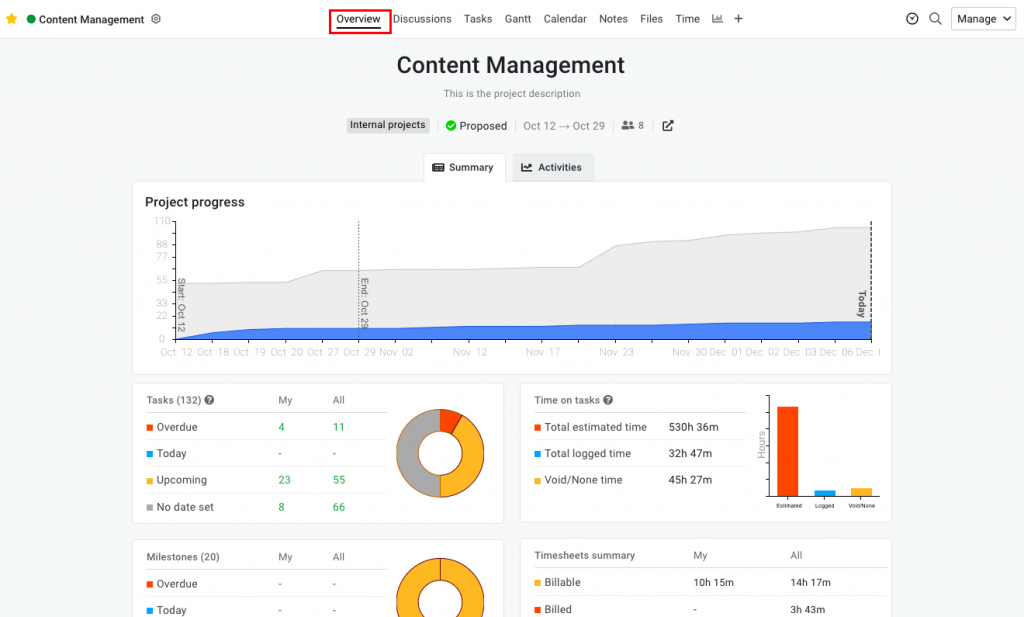
The fundamental pitch for ProofHub is its all-in-one capability. It’s structured less as a specialized project methodology tool and more as a streamlined collaboration workspace.
The design centers on the idea of a Project, which contains all the necessary communication and management tools accessible from a single interface.
Key features are the Discussion area, a Calendar, Files, Notes, and crucially, Online Proofing.
This focus on having everything in one browser tab is a huge operational gain for teams that struggle with dispersed information.
Importantly, ProofHub adopts a flat-rate pricing model, which, much like Basecamp, removes the stress of scaling per-user licenses, making budgeting predictable.
Any honest ProofHub review must acknowledge that its value is tied directly to how effectively it consolidates these disparate functions into one usable platform.
2. Why You Can Trust Us
The conclusions in this ProofHub review are based on implementing the platform within environments that rely heavily on creative asset approval cycles, such as marketing teams and small agencies.
We’ve spent time specifically assessing the efficiency of the Online Proofing feature—a claimed specialty—as well as the platform’s stability under the load of hundreds of concurrent tasks and discussions.
Our reliability stems from this hands-on, contextual application, verifying that the fixed-price model holds up for growing teams without any unexpected feature walls.
We provide a fact-based, professional perspective, ensuring this analysis is clear, accurate, and focused on the practical realities of daily use, giving you confidence in the platform’s long-term utility.
3. Key Features
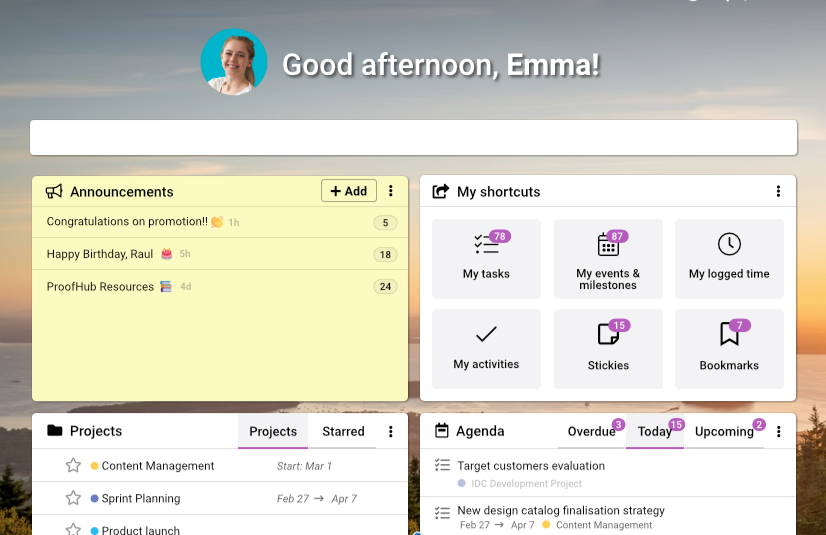
ProofHub’s strength lies in its comprehensive set of integrated tools, with a few features standing out as key differentiators.
Online Proofing and Markup
This feature is a major selling point and a differentiator in a ProofHub review. Users can upload creative assets—images, documents, PDFs—and stakeholders can directly mark up the file with comments, revisions, and approval stamps.
This eliminates the cumbersome process of downloading files, marking up screenshots, and sending messy revision emails.
All feedback is centralized on the asset itself, and version control ensures everyone is looking at the latest draft. For creative or editorial teams, this tool alone can justify the subscription.
Multiple Project Views
ProofHub offers flexibility in how teams manage tasks. You get Kanban Boards (called Workflows) for visual task flow management, allowing teams to define custom stages like Design > Review > Final Approval.
You also have a standard Task List view and an integrated, interactive Gantt Chart for timeline planning and dependency management.
This flexibility allows project managers to use waterfall planning while execution teams use Agile boards, all pulling from the same task data.
Time Tracking and Timesheets
Integrated time tracking is available on every task. Users can start a timer or manually log hours. These time entries are collected in detailed Timesheets, which can be easily exported for client billing or internal auditing.
Having this functionality bundled in, rather than relying on a separate integration, significantly streamlines administrative work.
Discussions and Group Chat
Like other communication-focused PM tools, ProofHub separates formal communication from quick chat.
The Discussions area handles topics and formal decisions (replacing email chains), while Group Chat (available within the app) handles instant, less formal communication, helping teams maintain context and focus.
Notes and File Management
You can create Notes for internal documentation, meeting minutes, or project specs right within the project.
The integrated File Management allows for secure storage and sharing of documents, eliminating the need for a separate cloud storage service for project assets, though you can still link to external files if necessary.
4. User Experience

ProofHub provides a clean, relatively modern, and accessible user experience. The color scheme is easy on the eyes, and the layout is logical, relying on a consistent top and side navigation structure.
The learning curve is moderate. It’s slightly steeper than simple list-based tools but far less daunting than complex platforms focused on process modeling.
The initial challenge comes from the sheer number of bundled tools—it takes a moment to understand where the Notes differ from the Discussions, or the Workflows from the Gantt Chart.
However, once a user understands the logic—that every tool is simply another view of the project data—the flow becomes quite smooth.
The key is in the contextual switching: moving from the Gantt view to the Online Proofing tool, and then to the Time Sheets, happens instantly and without leaving the environment.
This is the biggest UX win, preventing the mental friction of swapping between different standalone applications.
The mobile experience is functional, though naturally less comprehensive than the desktop version, particularly for the detailed proofing feature.
5. Performance and Reliability

Performance is crucial for an all-in-one system because if any part of it lags, users will quickly revert to faster, specialized tools. ProofHub generally performs well.
The platform is a cloud-based application, and task creation, updates, and navigation are fast enough to feel responsive during continuous use.
The data load is heavier than a minimalist app because it’s managing files, discussions, tasks, and time entries simultaneously, but the engineering appears solid.
The most resource-intensive feature, Online Proofing, works reliably, allowing for real-time markup without significant browser lag.
This stability is vital for creative teams who rely on it daily. In terms of reliability, ProofHub maintains high uptime, which is expected for a platform that consolidates essential business functions.
Its stability in file hosting and time logging is solid, ensuring that critical data is available and secure, reinforcing the positive aspects of a practical ProofHub review.
6. Pricing and Plans
ProofHub’s pricing model is a significant selling point, as it adopts a flat-rate structure similar to Basecamp, prioritizing simplicity and predictability over per-user charges.
There is no free plan for sustained professional use, though they offer a standard free trial period. The professional pricing is split into two primary plans, which is refreshing in its simplicity. Both plans offer unlimited users and unlimited projects.
The Essential plan is the entry-level for professional teams. It includes the fundamental PM tools, but it places limits on the number of Kanban boards (Workflows) and the amount of storage. It is ideal for smaller teams with fewer concurrent projects or less complex workflow needs.
The Ultimate Control plan unlocks the full platform capability. This is the plan most professional organizations will gravitate toward because it includes unlimited Workflows, more storage, and unlocks critical, advanced features like Online Proofing, project reporting, resource management, and full API access.
Here are the details for annual billing:
| Plan Name | Best Suited For | Key Features Unlocked | Approximate Price (Monthly/Flat) |
| Essential | Small teams, basic projects | Core PM features, 10 Workflows, 40GB storage | $45/Month |
| Ultimate Control | Growing teams, agencies, creatives | Unlimited Workflows, Online Proofing, Reporting, 100GB storage | $90/Month |
The pricing is highly competitive, especially for organizations with 20 or more users. The ability to add an unlimited number of internal staff and external clients for a fixed fee of $90 per month (Ultimate Control, annual pricing) makes the ProofHub review of value outstanding for growing agencies and departments.
7. Integrations and Compatibility

While ProofHub’s goal is to replace the need for many integrations, it provides necessary links to external services to ensure interoperability.
Core Integrations
ProofHub connects natively with essential tools used for file storage and scheduling:
- Google Drive and Dropbox: Easily attach files to tasks or projects without consuming the platform’s internal storage quota.
- Outlook and Google Calendar: Sync project milestones and deadlines directly to external calendars, ensuring no scheduling conflicts.
- Slack and Microsoft Teams: Integrates for basic notifications and alerts, minimizing the need to check the platform constantly for simple updates.
Extensibility
For deeper operational needs, the Ultimate Control plan provides full API access, allowing development teams to build custom connections to internal ERP, HR, or custom financial systems.
Like most modern platforms, it also plays well with workflow automation tools like Zapier for triggering actions between ProofHub and hundreds of other SaaS applications.
Compatibility is excellent across devices. ProofHub is a web application accessible on all major browsers and offers native mobile apps for both iOS and Android, ensuring that team members can check tasks, log time, and participate in discussions from anywhere.
8. Product Specification
A brief overview of the key technical and structural specifications of the ProofHub platform, particularly relevant for the Ultimate Control plan.
| Specification Category | Detail | Notes |
| Deployment Model | Cloud (SaaS) | Access via web browser and dedicated mobile applications. |
| Pricing Model | Flat Rate, Unlimited Users | Fixed monthly fee irrespective of the number of users. |
| Core Differentiator | Online Proofing and All-in-One Bundling. | Reduces context-switching and dependency on external tools. |
| Project Views | Task List, Kanban (Workflows), Gantt Chart. | Flexibility for different project methodologies. |
| Time Management | Integrated Time Tracking and Timesheets. | Exports available for client billing. |
| User Capacity | Unlimited Users (Internal and Clients). | Major cost saving for scaling teams. |
| Data Security | SSL Encryption, Daily Backups, Standard Security Protocols. | Enterprise-grade security for file and data storage. |
9. Pros and Cons
ProofHub’s defining characteristics lead to clear advantages and specific limitations that must be understood before adoption.
| Pros | Cons |
| Unique Online Proofing | Lacks Financial Depth |
| Centralizes creative asset approval, speeding up review cycles significantly. | Not designed for deep resource costing or invoicing (requires export). |
| Fixed, Scalable Pricing | Basic Reporting |
| Unlimited users and projects for one flat fee, ideal for large team growth. | Reporting is functional but lacks the customization of high-end PM tools. |
| All-in-One Consolidation | Initial Feature Overload |
| Replaces separate chat, file storage, and time tracking apps immediately. | New users might be confused by the number of integrated tools at first. |
| Native Time Tracking | Limited Integrations |
| Built-in time recording simplifies audit and billing preparation. | Deliberately avoids integrating deeply with many third-party apps. |
| Flexibility in Task View | No Free Forever Plan |
| Offers both Kanban boards and full Gantt charts under the same umbrella. | Entry point requires a paid subscription after the initial trial period. |
10. Customer Support
Customer support for ProofHub is highly rated and is included uniformly across their paid plans. Since they offer only two plans, the support is not drastically tiered, which is a welcome approach.
Support is accessible through email, and the platform advertises quick response times, typically available 24/7.
Due to the less complex nature of the platform compared to enterprise-level PMOs, most issues are resolved quickly through direct communication.
For teams subscribing to the Ultimate Control plan, the access to full documentation and API support is naturally more focused, allowing administrators to get the technical help needed for custom deployments or integrations.
The fact that the platform is designed to limit complexity means that the support staff can be highly knowledgeable about the core functionality, leading to better, faster resolution times for any issues encountered during your ProofHub review adoption.
11. Ideal Use Cases

ProofHub is particularly effective for organizations that fit a specific operational profile where centralized collaboration is the biggest hurdle.
Marketing and Creative Agencies
The seamless Online Proofing feature is tailor-made for these environments. Managing content drafts, ad mockups, and client approval cycles becomes dramatically faster when revisions happen directly on the file within the project, not scattered across emails.
Teams with High External Collaboration
Any organization that frequently onboards clients, freelancers, or external vendors will benefit immensely from the unlimited user model.
You can invite everyone necessary to the project without worrying about per-seat license costs, streamlining communication with external partners.
Growing Mid-Sized Organizations
Companies transitioning from simple tools (like Trello or email) but that feel overwhelmed by the complexity and cost of large systems (like Wrike or Jira) will find ProofHub a perfect middle ground. It offers the necessary planning and tracking tools without requiring PMP-level administration.
Remote and Distributed Teams
The consolidation of chat, file storage, and discussions into one unified location is a massive benefit for distributed teams who often struggle with tool sprawl and context switching across different geographic locations.
12. Alternatives
The competitive set for ProofHub includes platforms that offer either more complexity or different pricing models.11
| Software Name | Primary Focus | Best For | Trade-Offs vs. ProofHub |
| Basecamp | Simple, Fixed-Price Collaboration | Teams prioritizing communication clarity over everything else. | Lacks integrated Online Proofing, Gantt charts, and dedicated time tracking. |
| ClickUp | Highly Customizable Work OS | Teams requiring maximum flexibility, custom fields, and vast integrations. | Per-user pricing, can suffer from feature bloat, and proofing is often an add-on or less integrated. |
| Teamwork | Professional Services Automation (PSA) | Agencies needing deep financial tracking, resource management, and client billing. | Higher per-user cost; Online Proofing functionality is not as natively integrated or strong. |
| Asana | Workflow and Task Management | Teams needing complex workflow automation and standardized process routing. | Per-user pricing, not a truly all-in-one platform (requires many integrations for chat/proofing). |
ProofHub occupies the sweet spot for teams that need online proofing and fixed pricing combined with robust PM features.
13. Bottom Line: Our Verdict
ProofHub is a compelling choice, especially for teams in the creative and service sectors. Its commitment to the all-in-one approach successfully addresses the common industry pain point of tool sprawl.
The platform is highly effective at centralizing core functions—tasks, schedules, communication, time, and, uniquely, online proofing—into a single, easy-to-manage workspace.
The financial predictability of the flat-rate, unlimited user pricing is a major operational advantage for organizations that anticipate growth or frequently collaborate with external parties. This cost structure alone often puts it ahead of per-user competitors.
While it lacks the deep resource costing and highly customized reporting of dedicated enterprise PSA tools, it delivers outstanding value and clarity for project execution and collaboration.
This ProofHub review concludes that it is a mature, comprehensive, and highly competitive platform, particularly suited for agencies and marketing teams prioritizing streamlined review and approval cycles.
You May Also Like:
- Smartsheet Review 2026 – Features, Pricing & Verdict
- Microsoft Project Review 2026 – Features, Pricing & Verdict
- Wrike Review 2026 – Features, Pricing & Verdict
- Trello Review 2026 – Features, Pricing & Verdict
Frequently Asked Questions
Does ProofHub have limits on the number of users?
No, ProofHub operates on a fixed-rate pricing model, which includes unlimited users (employees, clients, and contractors) on both the Essential and Ultimate Control plans. This makes the platform highly cost-effective for growing teams.
Is the Online Proofing feature included in all plans?
No, the full-featured Online Proofing and markup tool, which is a key differentiator, is only included in the higher-tier Ultimate Control plan, as are the advanced reporting and resource management features.
Can I track my billable time in ProofHub?
Yes, you can track billable time directly within ProofHub. The platform features an integrated timer and dedicated Timesheets that collect all time entries, which can then be exported for use with external accounting or invoicing systems.
How does ProofHub handle client communication?
ProofHub centralizes client communication within the project workspace. You can invite clients as users to specific projects, where they can participate in Discussions and use the Online Proofing tool to provide feedback, keeping all external communication tied to the relevant task or file.
ProofHub
ProofHub is an integrated, powerful project and collaboration tool offering unique online proofing and flat-rate, unlimited user pricing, ideal for creative agencies and growing teams.
Price: 45
Price Currency: USD
Operating System: Web, iOS, Android
Application Category: BusinessApplication
6.5