

QuickBooks Online serves as the primary hub for small business financial management by automating the flow of money into and out of a company.
- 2. Overview
- 3. Why You Can Trust Us
- 4. Key Features
- 5. User Experience
- 6. Performance and Reliability
- 7. Products
- 8. Pricing and Plans
- 9. Integrations and Compatibility
- 10. Product Specification
- 11. Pros and Cons
- 12. Customer Support
- 13. Ideal Use Cases
- 14. Alternatives
- 15. Bottom Line: Our Verdict
- You May Also Like:
- Frequently Asked Questions
In 2026, the software has moved beyond being a simple digital ledger to become an intelligent system that categorizes transactions and predicts cash flow patterns using integrated AI tools.
The platform is designed for accessibility, allowing owners and accountants to collaborate in real time from any device with an internet connection.
Because it handles everything from basic expense tracking to complex project profitability, QuickBooks Online remains the standard for businesses that need to maintain clean, tax ready books without manually entering every receipt or invoice.
This version specifically focuses on reducing the time spent on administrative tasks through smarter bank feeds and automated reminders that help you get paid faster.
2. Overview
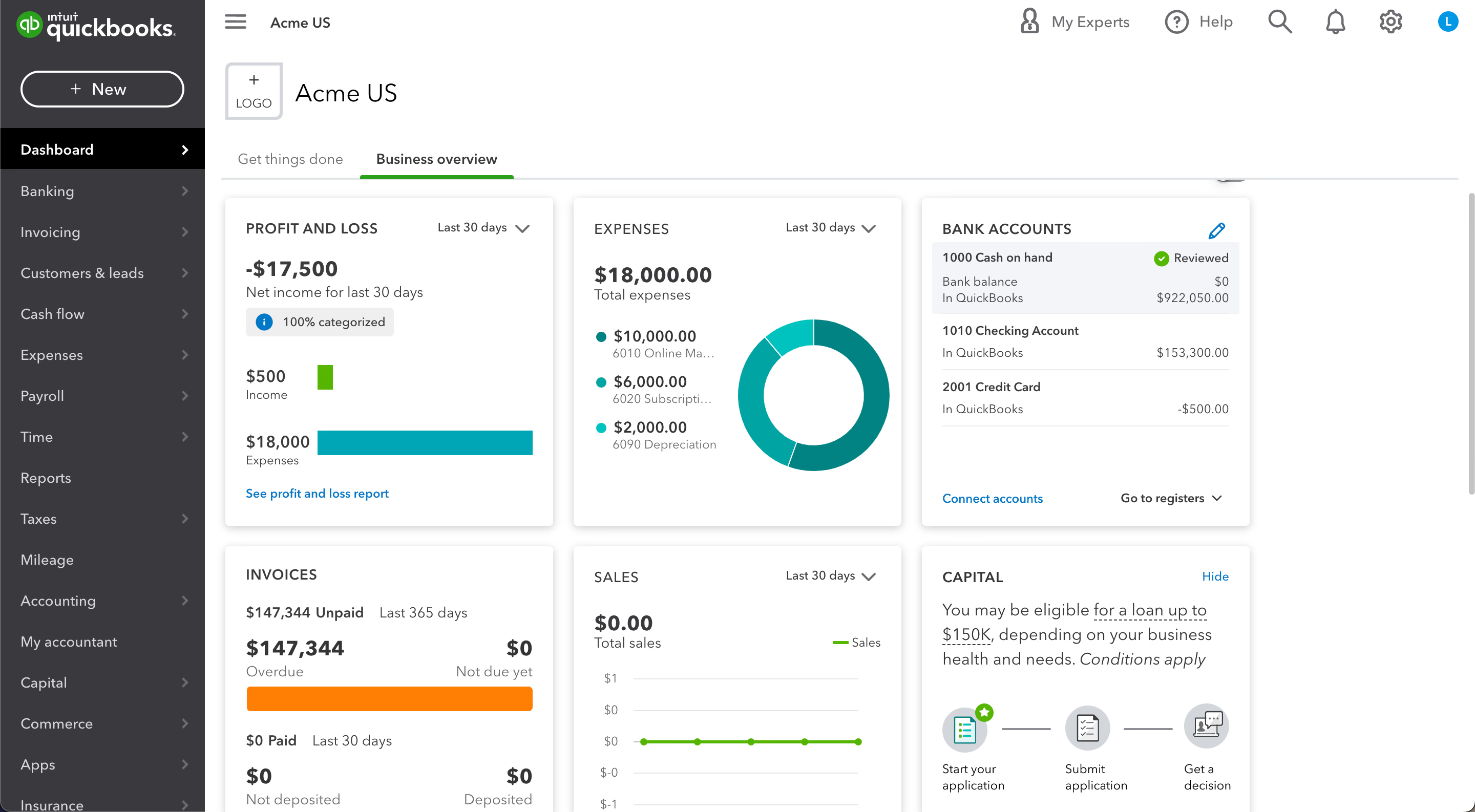
QuickBooks Online provides a scalable environment for managing business finances through its cloud based platform.
The 2026 version emphasizes automation with the introduction of Intuit Assist, an AI agent that proactively identifies bookkeeping anomalies and suggests fixes before they become permanent errors.
Users can manage their entire sales cycle, from sending estimates to receiving payments, while the software handles the underlying accounting entries.
For a starting price of $35.00 per month for the Simple Start plan, businesses gain access to professional invoicing and tax deduction tracking.
With its vast ecosystem of app integrations and a mobile app that allows for on the go management, QuickBooks Online remains a versatile choice for freelancers, service providers, and growing retailers alike.
| Pros | Cons |
| Industry standard for accountants | Relatively high monthly cost |
| Strong AI powered automation | Steep learning curve for some |
| Massive third party app store | Limited features in base plan |
| Excellent mobile app for receipts | Frequent price adjustments |
| Real time collaboration tools | Occasional slow interface speeds |
3. Why You Can Trust Us
The conclusions in this QuickBooks Online review are based on a rigorous evaluation of the software’s current 2026 features and overall reliability.
We analyze the platform by simulating real business workflows, such as importing bank data, setting up complex payroll schedules, and generating year end financial reports.
Our research includes a deep dive into technical specifications, user feedback from diverse industries, and a comparison against the latest independent benchmarks for cloud accounting performance.
We prioritize factual accuracy and clarity, examining how the software actually behaves during peak usage times and how its automated agents handle edge cases in bookkeeping.
This ensures the information provided is both practical and dependable for anyone looking to modernize their financial systems.
4. Key Features
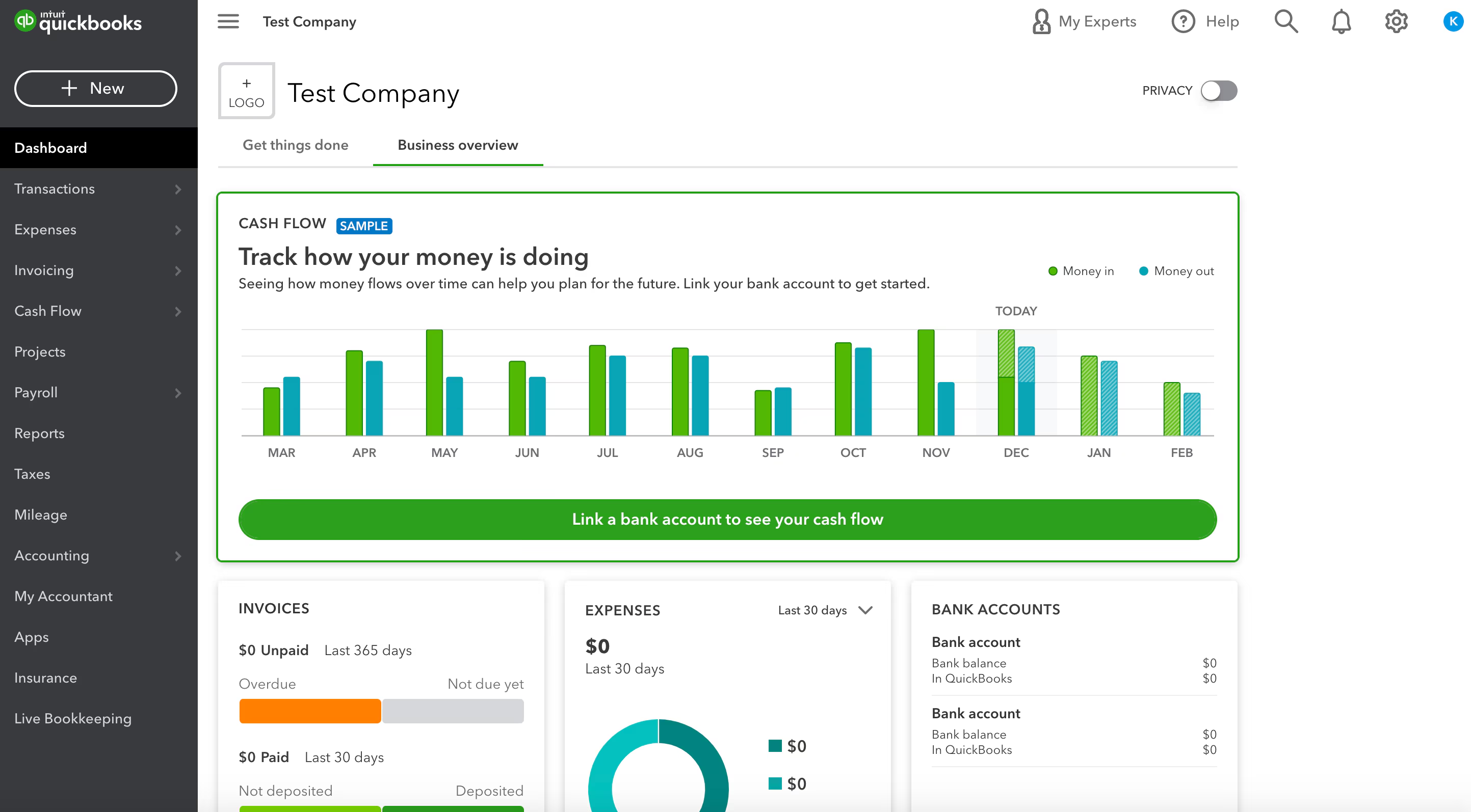
The power of QuickBooks Online lies in its ability to consolidate various financial tasks into a single, cohesive interface. The 2026 updates have refined these tools to be more proactive.
- Intuit Assist AI: This agent acts as a virtual assistant that reviews your profit and loss statements to surface trends or point out transactions that seem out of place based on your historical data.
- Automated Bank Feeds: By connecting directly to your bank and credit card accounts, QuickBooks Online pulls in transactions and uses machine learning to suggest the correct expense categories automatically.
- Advanced Invoicing: The software allows you to create professional, branded invoices that include pay now buttons for credit cards and bank transfers, which significantly reduces the time it takes to collect revenue.
- Receipt Capture: Using the mobile app, you can snap a photo of a physical receipt, and the software will extract the vendor, date, and amount, matching it to an existing bank transaction.
- Project Profitability: Available in higher tiers, this feature tracks income and expenses against specific jobs, giving you a clear view of which projects are making money and which are over budget.
- Inventory Management: The platform tracks stock levels in real time, alerts you when quantities are low, and automatically calculates the cost of goods sold as products are purchased and sold.
- Cash Flow Planner: This tool analyzes your recurring bills and expected income to provide a 90 day forecast, helping you decide when it is safe to make a big purchase or hire new staff.
- Mileage Tracking: For businesses that involve travel, the mobile app uses GPS to log trips automatically, making it easy to categorize business mileage for tax deductions at the end of the year.
5. User Experience
Navigating QuickBooks Online in 2026 is a more streamlined experience than in previous years.
The dashboard has been redesigned to prioritize the most important metrics, such as bank balances, open invoices, and recent expenses.
The left hand navigation menu remains the primary way to move between sections like sales, expenses, and reports, but the new global search bar makes finding specific transactions or settings much faster.
For those who are not accountants, the software uses plain language in most areas, helping users understand exactly what they are doing when they categorize a transaction or reconcile an account.
The setup process is guided by a wizard that asks questions about your industry to pre configure your chart of accounts.
This reduces the initial friction of getting started, though deep customization still requires some manual work.
One of the best aspects of the user experience is the seamless transition between the desktop browser and the mobile app. You can start an invoice on your computer and finish it on your phone while at a job site.
While the interface can sometimes feel dense with options, the help menu and the AI assistant are usually quick to provide context or direct links to the tools you need. It feels like a professional tool that respects the user’s time.
6. Performance and Reliability
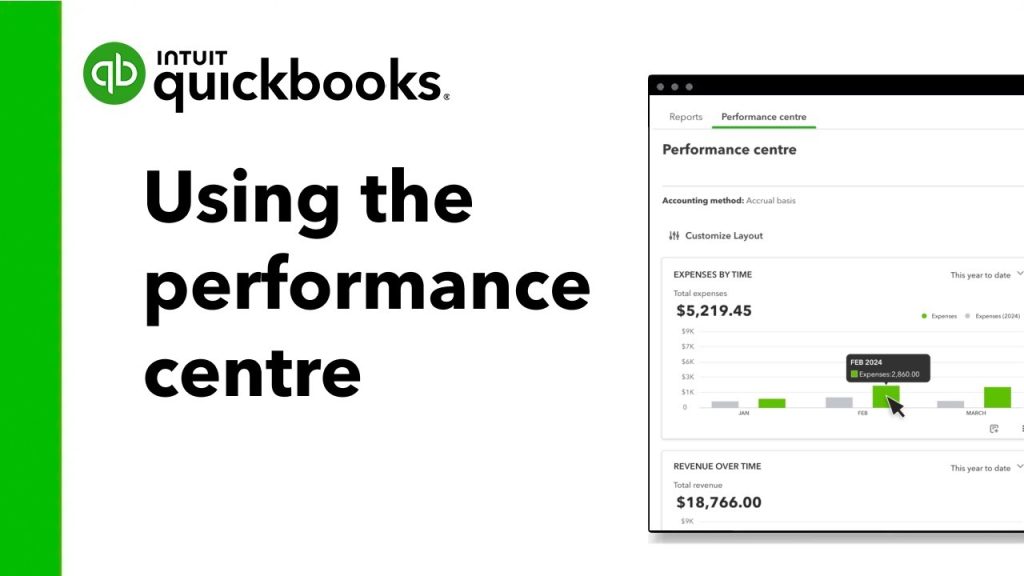
Reliability is a critical factor for any financial software, and QuickBooks Online maintains high uptime standards.
Being a cloud based platform means that your data is backed up automatically across multiple secure servers, so you never have to worry about losing your financial history if a local computer fails.
In terms of performance, the 2026 version has seen improvements in page load times, particularly within the reporting section where large sets of data are processed.
While occasional lag can occur during massive data imports or when running extremely complex reports, the general day to day operations are snappy and responsive.
The accuracy of the automated features has also reached a high level of reliability. The bank feed connection is stable with most major financial institutions, and the auto categorization engine has become much better at distinguishing between similar vendors.
This reliability extends to the integration with payroll and tax filing modules, where calculations must be precise to avoid penalties.
You can trust that the numbers reflected in your balance sheet are a true representation of your connected data.
For a business owner, this stability provides peace of mind that the financial foundation of the company is secure and available whenever a decision needs to be made.
7. Products
QuickBooks Online is offered in several different versions to match the size and complexity of various businesses. Each product builds on the core features of the previous tier.
- QuickBooks Solopreneur: This is built specifically for one person businesses and freelancers who need to track income, expenses, and mileage for tax purposes but do not need full double entry accounting.
- QuickBooks Online Simple Start: The basic plan for small businesses that need to send invoices and track expenses. It supports one user and provides all the fundamental reports needed for tax time.
- QuickBooks Online Essentials: This tier adds support for up to three users and includes bill management and time tracking. It is a popular choice for service based businesses with a small team.
- QuickBooks Online Plus: The most widely used plan, adding inventory tracking and project profitability for up to five users. It is designed for businesses that sell products or manage complex jobs.
- QuickBooks Online Advanced: The enterprise level offering for growing companies. it supports up to 25 users and includes advanced reporting, custom user permissions, and dedicated support.
8. Pricing and Plans
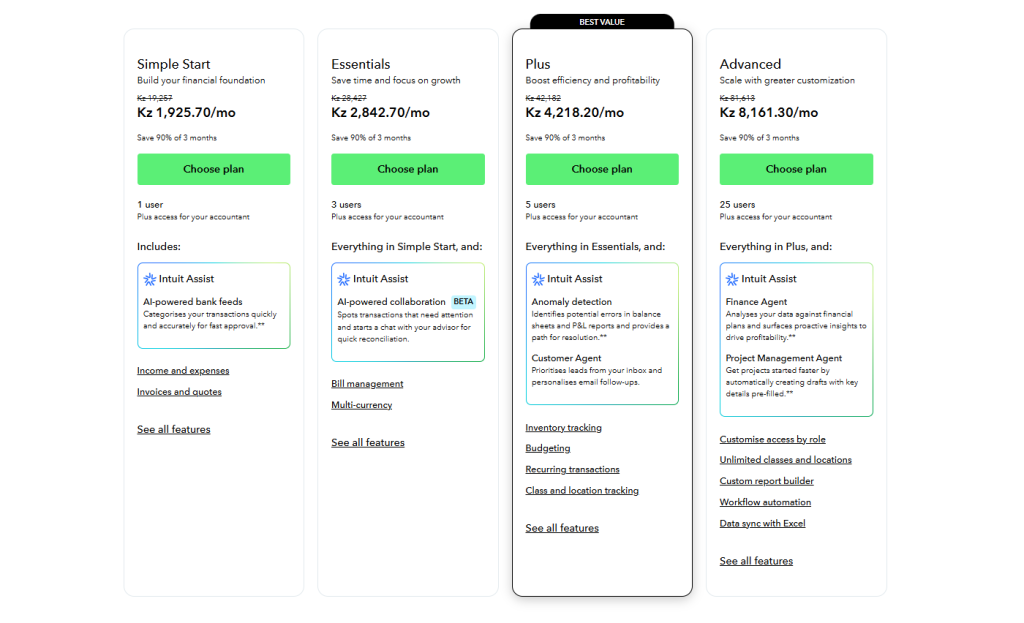
The pricing structure for QuickBooks Online is designed to grow with your business. While the monthly fees are higher than some basic competitors, the value is found in the deep automation and the time saved on manual bookkeeping.
| Plan Name | Initial Price (Monthly) | User Limit | Best For |
| Solopreneur | $20.00 | 1 User | Freelancers |
| Simple Start | $35.00 | 1 User | New Businesses |
| Essentials | $65.00 | 3 Users | Service Teams |
| Plus | $99.00 | 5 Users | Retailers & Projects |
| Advanced | $235.00 | 25 Users | Scaling Companies |
It is worth noting that these prices are in US dollars and represent the standard monthly rate. Intuit frequently offers introductory discounts of 50% for the first few months, which can be a great way to lower the initial cost of adoption.
Additionally, if you need to run payroll, there is an extra monthly fee plus a per employee charge that integrates directly with these plans.
The flexibility to upgrade or downgrade your plan as your business needs change makes the pricing of QuickBooks Online a manageable part of a company’s overhead.
9. Integrations and Compatibility
One of the strongest arguments for using QuickBooks Online is its massive ecosystem of integrations.
The QuickBooks App Store features hundreds of third party tools that connect directly to your accounting data.
Whether you need to sync your Shopify store, manage your CRM in Salesforce, or handle complex time tracking through Gusto, there is almost certainly a pre built integration available.
This connectivity allows you to build a customized tech stack where data flows automatically into your books, eliminating the need for manual exports and imports.
Compatibility is also a major strength. QuickBooks Online works on any modern web browser, and its mobile apps for Android and iOS are highly rated for their functionality.
You can take photos of receipts, send invoices, and check your bank balances from anywhere.
For those who still use spreadsheets for deep analysis, the Advanced plan offers a dedicated spreadsheet sync feature that allows you to pull live data into Microsoft Excel for custom modeling.
This level of cross platform compatibility ensures that no matter how you prefer to work, QuickBooks Online can fit into your existing workflow without friction.
10. Product Specification
The technical requirements for running QuickBooks Online are very low since the heavy lifting is done on the server side.
This makes it accessible for businesses using everything from high end workstations to basic tablets.
| Requirement | Specification |
| Browser | Chrome, Firefox, Edge, Safari |
| Internet Speed | 3 Mbps or higher recommended |
| Mobile OS | iOS 15 or later, Android 8 or later |
| User Access | Role based permissions available |
| Data Storage | Unlimited in the cloud |
| Security | 128 bit SSL encryption |
| Updates | Automatic and continuous |
| Export Formats | Excel, PDF, CSV |
These specifications show that the software is built for the modern, mobile workforce. As long as you have a stable internet connection, you have full access to your financial data.
11. Pros and Cons
Choosing QuickBooks Online involves weighing its industry leading features against its premium price point.
| Pros | Cons |
| Automatic bank reconciliation | Price increases are common |
| Scales easily as you grow | Advanced features are expensive |
| Highly rated mobile app | Customer support can be slow |
| Massive network of ProAdvisors | Occasional software glitches |
| Built in tax preparation tools | Steep learning for non bookkeepers |
The primary advantage is the automation. QuickBooks Online saves hours of manual work by pulling in data and categorizing it with high accuracy.
The availability of thousands of certified ProAdvisors means you can always find a professional who knows the software inside and out.
However, the cost is a significant factor, as the monthly subscription can add up over time, especially with add ons like payroll.
Some users also find the interface to be a bit overwhelming at first, requiring a bit of time to learn where everything is located.
12. Customer Support
The support experience for QuickBooks Online has seen changes in 2026, with a heavier reliance on AI driven assistance.
The primary way to get help is through the in app help menu, which uses a chatbot to answer common questions and provide links to articles.
For many basic tasks, this is efficient and fast. If the AI cannot solve the issue, you can request a call back or start a live chat with a human representative.
This tiered approach helps manage the high volume of users, though some may miss the days of being able to dial a support number directly.
For those on the Advanced plan, priority support is included, which offers faster response times and access to more experienced technicians.
There is also a massive community forum where you can ask questions and get advice from other business owners and accountants.
The quality of support is generally good once you are connected to a human, but the initial hurdles of navigating the automated system can be frustrating if you are in the middle of a time sensitive task like running payroll.
Overall, the documentation and community resources are excellent, making it possible to solve most problems without direct intervention.
13. Ideal Use Cases

Understanding where QuickBooks Online excels can help you determine if it is the right fit for your specific business model.
- E commerce Sellers: With direct integrations for Amazon, eBay, and Shopify, QuickBooks Online is perfect for retailers who need to sync thousands of sales transactions and manage inventory levels automatically.
- Professional Services: Consulting firms and agencies can use the time tracking and project profitability tools to ensure they are billing correctly and staying within budget on every client engagement.
- Nonprofits: The ability to track funds by class or location makes QuickBooks Online a solid choice for organizations that need to report on specific grants or programs.
- Local Service Providers: Plumbers, electricians, and landscapers benefit from the mobile app’s ability to create estimates and invoices on the spot and accept payments immediately.
- Small Businesses with Remote Teams: Because the platform is cloud based, it is ideal for companies where the owner, the bookkeeper, and the accountant are all working from different locations.
In each case, the software provides a centralized location for all financial data, making it easier to manage the business from a distance.
14. Alternatives
While QuickBooks Online is the market leader, there are several other options that might be a better fit depending on your budget and specific needs.
| Alternative | Key Difference | Best For |
| Xero | Unlimited users on all plans | Growing teams on a budget |
| FreshBooks | Very intuitive invoicing | Freelancers and small agencies |
| Zoho Books | Tight integration with Zoho CRM | Users already in the Zoho suite |
| Wave Accounting | Free base accounting software | Very small businesses and startups |
Xero is often cited as the biggest competitor, offering a clean interface and more flexible user limits, making it a favorite for those who find the QuickBooks pricing structure too restrictive.
FreshBooks is the leader in ease of use for simple invoicing, though it lacks some of the deeper accounting features found in QuickBooks Online.
Zoho Books is a great value for those who already use other Zoho products, as the data flows seamlessly between them.
Wave remains a popular choice for those who need a free tool for basic bookkeeping, though it lacks the advanced automation and support found in the paid alternatives.
15. Bottom Line: Our Verdict

The final verdict on QuickBooks Online in 2026 is that it remains the most comprehensive and powerful cloud accounting tool for small and medium sized businesses.
While the cost has continued to rise, the level of automation provided by the new AI agents justifies the price for businesses that want to minimize manual data entry.
The ability to have your bank transactions, payroll, taxes, and inventory all handled in one place provides a level of efficiency that is hard to match with fragmented systems.
It is a professional grade tool that provides the data transparency needed to make informed business decisions.
We recommend QuickBooks Online for any business that plans to scale and needs a reliable financial foundation that accountants already trust.
The software is robust enough to handle the needs of a solo freelancer today and grow with them until they are a multi million dollar enterprise.
While there is a learning curve, the investment in time and money pays off through cleaner books, faster payments, and a much easier experience at tax time.
If you want the most capable accounting ecosystem on the market, QuickBooks Online is the clear choice.
You May Also Like:
- 7 Best CFP Certified Financial Planner Benefits for Wealth
- How to Find a Financial Advisor Quickly and Easily
- How to Be a Certified Financial Advisor in Simple Steps
Frequently Asked Questions
Is quickbooks online easy to learn?
While QuickBooks Online has a user friendly dashboard, mastering all its features takes some time. For basic tasks like invoicing and expense tracking, most users can become comfortable within a few days. However, more complex areas like inventory management and bank reconciliation may require a bit of study or help from a certified ProAdvisor to set up correctly.
Can my accountant access my data?
Yes, one of the primary advantages of QuickBooks Online is the ability to invite your accountant to view your books for free. They receive their own login, allowing them to review your transactions, make necessary adjustments, and pull reports for tax filing without you having to send files back and forth.
Does it work without internet?
No, QuickBooks Online is a cloud based application and requires an active internet connection to function. However, the mobile app allows you to perform certain tasks like capturing receipts or drafting invoices while offline, which will then sync to the servers once you are back online.
Is my financial data safe?
Yes, QuickBooks Online uses the same 128 bit SSL encryption that most major banks use to protect your information. Because the data is stored on Intuit’s secure servers and backed up automatically, your financial records are protected against hardware failure and local data loss.
Can I upgrade my plan later?
Yes, you can upgrade your QuickBooks Online subscription at any time as your business grows. Whether you need more users, inventory tracking, or advanced reporting, the transition between plans is seamless and keeps all your existing data intact.
QuickBooks
QuickBooks Online is a powerful cloud accounting leader that automates bookkeeping tasks and improves cash flow through AI driven insights. It is the gold standard for businesses needing scalable, professional financial management.
Price: 35.00
Price Currency: USD
Operating System: Windows, macOS, Android, iOS, Web Browser
Application Category: BusinessApplication
9.5
Pros
- Automatic bank reconciliation
- Scales easily as you grow
- Highly rated mobile app
- Massive network of ProAdvisors
- Built in tax preparation tools
Cons
- Price increases are common
- Advanced features are expensive
- Customer support can be slow
- Occasional software glitches
- Steep learning for non bookkeepers