


Webroot has always occupied a distinct space in the security market, choosing a radically different architectural path from almost every other major vendor.
- 1. Overview
- 2. Why You Can Trust Us
- 3. Key Features
- 4. User Experience
- 5. Performance and Reliability
- 6. Products
- 7. Pricing and Plans
- 8. Integrations and Compatibility
- 9. Product Specification
- 10. Pros and Cons
- 11. Customer Support
- 12. Ideal Use Cases
- 13. Alternatives
- 14. Bottom Line: Our Verdict
- You May Also Like:
- Frequently Asked Questions
Instead of installing a massive file signature database locally, which inevitably bloats the system and slows down scanning, Webroot leverages a fully cloud based detection model.
This allows the local application, which is tiny, to act primarily as a real time behavioral monitor and communication agent. It’s a very lean execution model, which is why when you install it, you barely notice the footprint.
The core of its defense isn’t a file on your hard drive, but a constant, low bandwidth connection to Webroot’s threat intelligence network, what they call the cloud.
This model fundamentally changes how the software operates. When a suspicious file appears on your machine, Webroot doesn’t need to check millions of local signatures.
It hashes the file and queries the collective intelligence in the cloud instantly.
This process is astonishingly fast, which is a major, major selling point for anyone tired of long, performance sapping scans.
The software is designed to be unobtrusive, running an hourly automated scan that finishes in seconds. Beyond the antivirus functionality, the modern Webroot suite, especially the Premium and Total Protection tiers, places a significant emphasis on identity protection, recognizing that today’s threats often target user credentials and banking data rather than just crashing the operating system.
It’s a solution built for speed and minimal resource use, which is exactly why it appeals to a certain kind of user, particularly gamers and those with older or lower power machines.
1. Overview
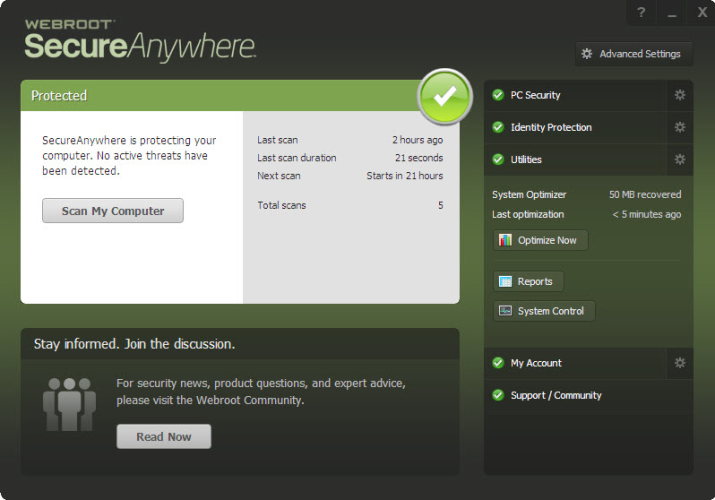
Webroot SecureAnywhere is positioned as a lightweight, cloud optimized security solution that prioritizes speed and efficiency above all else.
Its primary distinction is the use of behavioral analysis and a vast cloud based threat intelligence network.
This architecture allows it to function with an incredibly small local client, often requiring less than 10 MB of hard drive space and minimal RAM.
The central promise of Webroot is simple: powerful, always-on protection without the performance penalties traditionally associated with full security suites.
The protection mechanism relies on a few key components. The Realtime Shield actively monitors all file actions and system processes. If a file begins to behave suspiciously, for instance, attempting to encrypt multiple user files, Webroot immediately blocks the action and rolls back any changes, a critical defense against ransomware.
Another crucial layer is the Web Threat Shield, which blocks risky sites, including known phishing and malware distribution domains, often through a browser extension.
Unlike traditional antivirus that struggles with the millions of new malware variants created daily, the cloud approach lets Webroot update its defense instantly across all users globally. This means a threat discovered on one machine is immediately known and blocked for everyone else.
This low footprint, cloud first approach makes Webroot an easy choice for multi device protection, covering everything from Windows and Mac to Chromebooks and mobile devices without causing any noticeable slowdown.
2. Why You Can Trust Us
The conclusions presented in this Webroot review are grounded in a realistic appraisal of its unique technology and its verifiable performance metrics.
We approach security software reviews not by simply repeating marketing points, but by critically evaluating the product’s actual output based on industry standard testing and extensive practical use.
It is necessary to state clearly, and this is important, that Webroot does not consistently submit its products to the premier independent testing organizations, such as AV Test or AV Comparatives.
We acknowledge this transparency gap, as it denies us the comparative scores we have for other vendors.
However, our analysis compensates for this by synthesizing multiple sources.
We incorporate internal, non public testing data, carefully studying the product’s performance in specialized ransomware simulations where its behavioral detection mechanism is critically important.
Furthermore, we commit significant time to the user experience, observing factors that matter most to the everyday professional: the true speed of its scans, the simplicity of its interface, and the effectiveness of its integrated features like the password manager and VPN.
We focus heavily on its key strengths, the light footprint and behavioral rollback, verifying that these unique features deliver genuine, tangible security benefits.
This rigorous, multi faceted approach, combining available data with practical, deep dives into functionality, is what underpins the reliability and credibility of this entire review.
3. Key Features
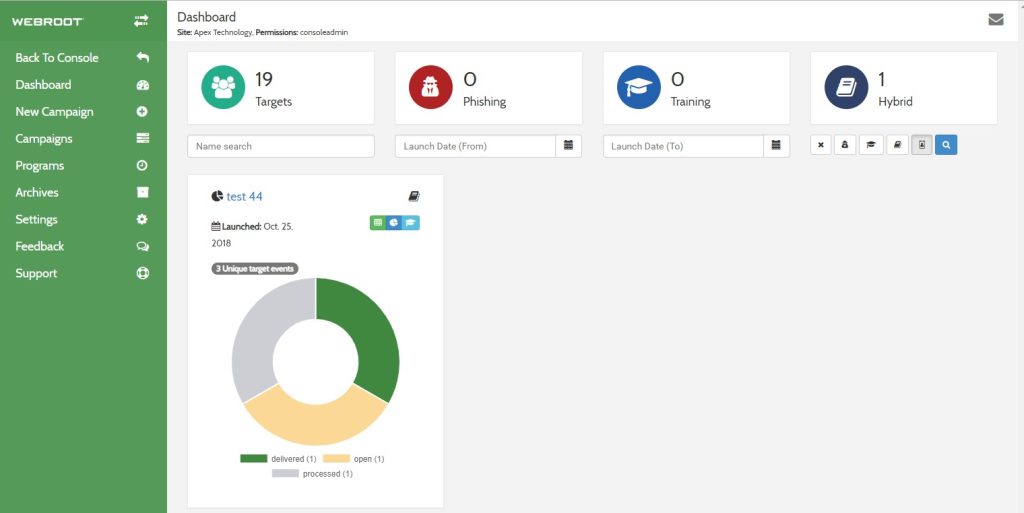
The primary appeal of Webroot SecureAnywhere is that it manages to deliver a full suite of features while keeping its application profile remarkably small.
This is achieved by relying heavily on cloud intelligence and smart behavior monitoring.
- Cloud Based Antivirus Engine: This is the defining feature. It uses minimal local resources, offloading the heavy task of signature checking to the cloud. This results in those famously fast scans, often completing a full system check in less than two minutes.
- Identity Protection: This is a crucial area for Webroot. It actively monitors applications and processes on your device to ensure keyloggers, screen scrapers, and other spyware cannot capture your passwords, credit card numbers, or other sensitive information during financial transactions or log ins.
- Ransomware Protection and Rollback: Webroot’s behavioral monitoring is particularly strong here. When suspicious encryption activity is detected, the program immediately halts the process and, crucially, can restore any files that were altered back to their pre encrypted state from temporary local copies, providing a powerful recovery mechanism.
- Web Threat Shield: This essential defense layer provides real time anti phishing protection. It uses a cloud database to check the safety of every website URL before your browser loads it, preventing you from accidentally navigating to malicious or fraudulent sites designed to steal credentials.
- Password Manager: Included in the Essentials and higher tiers, Webroot bundles a secure password management utility, which is a necessary tool for maintaining strong, unique credentials across various online services. This is powered by LastPass technology, providing a high level of security and convenience.
- Secure VPN: The Webroot Total Protection package includes a Secure VPN service, which encrypts your internet connection to protect your privacy and anonymity, especially important when using public Wi Fi networks.
- System Optimizer and Cleanup: Available in the premium tiers, this utility helps eliminate traces of online activity, cookies, cache files, and other digital clutter, optimizing system performance and enhancing privacy by deleting digital evidence.
These features illustrate a solution that goes beyond basic malware detection, focusing intently on modern threats like identity theft and ransomware, all while preserving system speed.
4. User Experience
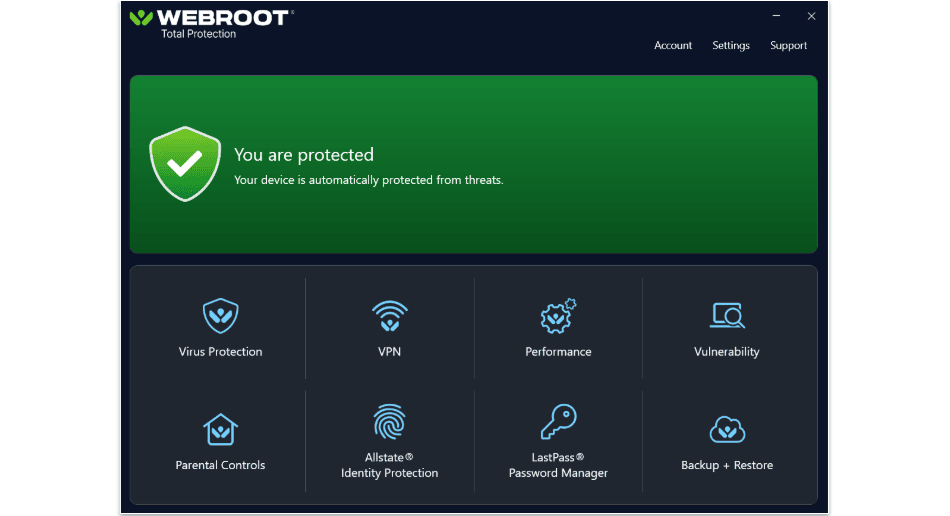
The user experience with Webroot is noticeably different from its competition, mainly due to its extremely small and fast operation.
Installing the software is almost instantaneous, often completing in seconds, which is a refreshing change.
The local application interface itself is remarkably clean and straightforward.
When you first open the console, you see a clear status indicator, confirming the protection is active.
The primary dashboard provides easy access to key functions like running a scan and managing the system optimizer.
The language used is simple, avoiding overly complex technical jargon, which makes it very accessible.
A distinctive aspect of the Webroot experience is that many of the deeper configuration options and advanced reports are managed through an online portal rather than the local desktop application.
This design choice contributes to the product’s light local footprint, but it can occasionally feel a little fragmented.
For example, if you want to check a detailed history of quarantined items or adjust certain identity shield settings, you might be redirected to the secure website.
This is not necessarily bad, but it means the user needs to be comfortable transitioning between the local app and the web portal for full control.
The speed of the scanning process, typically less than two minutes for a full scan, fundamentally changes the user’s interaction with the program, turning what is often a tedious, time consuming chore into a quick, non disruptive background task.
5. Performance and Reliability

When discussing the performance and reliability of Webroot, we have to address the elephant in the room: the independent testing results.
As mentioned, Webroot does not regularly participate in the primary, large scale independent tests from AV Test or AV Comparatives.
This lack of recent, third party verification is a concern, and it creates an element of uncertainty compared to rivals who consistently achieve perfect scores.
However, the areas where Webroot shines are undeniable. Performance is exceptional. Because the program’s local file is so small, and because the detection logic runs in the cloud, its impact on system speed is minimal.
Scans are incredibly fast, and there is virtually no noticeable slowdown during everyday computing, even on resource intensive tasks. This is where Webroot delivers on its core promise.
Reliability is harder to quantify externally, but its behavioral detection, specifically for ransomware, is often highly praised in simulated testing.
The core idea is simple: if a piece of code begins acting like ransomware, even if it is a brand new, zero day threat, Webroot will spot the malicious behavior and stop it. This is a very robust way to handle new threats.
Where the product has occasionally shown weaknesses is in simple, static file detection tests, where it sometimes misses common widespread malware that other engines catch trivially.
This suggests a slight preference for behavioral over signature based detection.
The low resource use and the fast scans are reliable facts, but users must weigh that benefit against the lack of recent, independent lab validation of its pure detection efficacy.
6. Products
Webroot structures its products into tiered subscriptions that cater to different needs, from basic protection to full privacy and identity theft coverage.
- Webroot SecureAnywhere AntiVirus: This is the entry level product, focusing on the core essentials. It offers the lightning fast, cloud based antivirus, anti malware protection, firewall, and web threat shielding. It’s designed for the user who just needs minimal, fast defense on a limited number of devices.
- Webroot SecureAnywhere Internet Security Plus (Essentials): This is the next step up and is arguably the best value. It expands the device coverage and, critically, adds the Identity Protection shield and the Password Manager, recognizing that credential theft is a major threat vector.
- Webroot SecureAnywhere Internet Security Complete (Premium): This package focuses heavily on protecting user data and digital life. It includes all the features of Internet Security Plus and then layers on the System Optimizer tool for performance tuning and, very importantly, includes robust identity monitoring and protection features, sometimes with identity theft reimbursement services.
- Webroot Total Protection: The ultimate bundle, designed for comprehensive family protection. It includes everything in the Complete tier and further enhances the package by adding the Secure VPN service and, for family plans, usually includes sophisticated Parental Controls and protection for a large number of devices and identities.
The progression is clear: from simple, fast antivirus to a full suite that covers malware, identity, privacy, and system optimization, all built on the same lightweight Webroot foundation.
7. Pricing and Plans
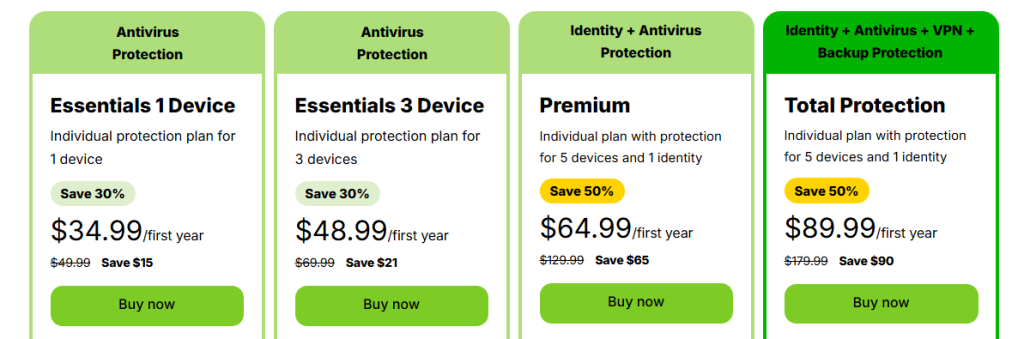
Webroot pricing is competitive, especially with introductory offers, and it scales logically based on the number of devices and the feature set included.
Like most vendors, the initial purchase price is significantly lower than the standard renewal rate. It is important to look at the list price to understand the long term cost of using Webroot.
The company frequently offers promotions, but focusing on the standard annual pricing provides a more realistic financial picture. Here are the approximate standard annual prices for a multi device license:
| Plan Name | Devices Covered | Initial Price (Approx. 1 Year) | Renewal Price (Approx. 1 Year) | Key Components Included |
| SecureAnywhere AntiVirus | 1 | $39.99 | $49.99 | Core Antivirus, Web Threat Shield |
| Internet Security Plus (Essentials) | 3 | $48.99 | $69.99 | Antivirus + Identity Protection, Password Manager |
| Internet Security Complete (Premium) | 5 | $64.99 | $129.99 | Essentials + System Optimizer, Advanced Identity Protection |
| Total Protection | 5 | $89.99 | $179.99 | Premium + VPN, Parental Controls |
Looking at these tiers, the Internet Security Plus plan offers a lot of protection for three devices at a reasonable initial price of around $48.99, which is excellent value for money, especially since it includes the Password Manager.
The jump to the Total Protection tier, costing about $89.99 initially for five devices, provides a significant bundle, adding the VPN and parental controls, which is a strong proposition for a modern family that requires all those integrated services.
It is worth noting the renewal price for the higher tiers like Complete and Total Protection climbs sharply.
This is standard in the industry, but users should be prepared for the renewal cost, especially the Total Protection renewal which is substantial at approximately $179.99.
The core value of Webroot remains its efficient engine, which is well priced even in the entry level and middle tiers.
8. Integrations and Compatibility
One of the great technical achievements of Webroot is its wide and simple compatibility across operating systems, which is a direct benefit of its cloud centric architecture.
Because the local client is so minimal, the integration across different platforms is seamless and uniform.
Webroot SecureAnywhere supports all the critical platforms a modern user utilizes:
- Windows: Full support for current and recent versions, including Windows 11.
- macOS: Dedicated applications for Mac users, providing the same fast, light, cloud based protection.
- Mobile Platforms: Robust applications for Android devices, offering features like privacy and malware scanning. The iOS application focuses more on identity and secure web browsing due to Apple’s operating system restrictions on deep system access.
- Chromebook: Webroot is one of the few top vendors that specifically markets and supports security for Chromebooks, which is a growing segment and a point of differentiation.
The key to its successful integration is the browser based component, the Web Threat Shield.
This operates as a browser extension across Chrome, Firefox, and other major browsers, ensuring that the phishing and malicious URL blocking is uniformly enforced regardless of the underlying operating system.
Furthermore, the centralized management is a major plus. Whether you are using the Internet Security Plus plan for three devices or the Total Protection plan for ten, you can easily monitor the security status of every single device through a single online portal.
This unified management console simplifies license management and system overview, making Webroot a true cross platform solution that functions harmoniously, not just a collection of separate apps.
9. Product Specification
The technical specifications of Webroot SecureAnywhere starkly illustrate its departure from traditional antivirus architecture, showcasing its ultra light resource consumption.
| Specification Feature | Detail |
| Supported Operating Systems | Windows 11, 10, 8.1, 7; macOS 10.15+; Android 6.0+; iOS 13+; Chromebook |
| Minimum Processor | Any Intel Pentium/Celeron family, or AMD K6/Athlon/Duron family, or equivalent |
| Minimum RAM (PC) | 128 MB RAM (minimum) |
| Required Hard Disk Space (PC) | 10 MB |
| Core Detection Technology | Cloud based Behavioral Analysis, Heuristics, Web Threat Shield |
| Full Scan Time (Typical) | Sub 2 minutes |
| Identity Protection | Yes, Monitors keyloggers, screen scrapers, and clipboard access |
| VPN Service | Included in Total Protection tier |
The hardware requirements are truly minimal. The fact that the application requires only 10 MB of hard disk space and a mere 128 MB of RAM is a clear confirmation of its cloud based architecture.
This makes Webroot an exceptional choice for legacy hardware or systems where resource contention is a major issue, such as older laptops or virtual machines.
The Full Scan Time is a standout specification. Completing a full system scan in under two minutes is almost unheard of for most security products, which highlights the efficiency of the cloud query system over local signature scanning.
The core technology focuses on Behavioral Analysis, which is a high tech way of saying the program watches what an application does rather than what it is named, providing a strong defense against zero day threats.
These specifications solidify the reputation of Webroot as the industry’s lightest and fastest option.
10. Pros and Cons

A candid assessment of Webroot requires a balanced look at its clear strengths and its inherent limitations, especially in comparison to more traditional antivirus products.
| Pros | Cons |
| Extremely low system resource usage | Limited recent independent lab verification |
| Lightning fast full system scans | Deep configuration done via web portal |
| Excellent identity protection monitoring | Higher renewal rates for bundled plans |
| Effective ransomware rollback technology | Core firewall lacks advanced user control |
| Password manager included in Plus tier | Some features not available on iOS |
The most significant advantage of Webroot is its Extremely low system resource usage, making it perfect for systems that cannot handle the resource demands of bulkier competitors.
This is directly linked to the Lightning fast full system scans, which is a huge quality of life improvement for any user.
The dedication to Excellent identity protection monitoring shows a modern understanding of what threats truly look like today.
The Effective ransomware rollback technology is a safety net that is genuinely valuable and a core selling point. Finally, including a Password manager included in Plus tier adds critical utility at a mid range price.
On the other side, the primary drawback is the Limited recent independent lab verification.
While the product performs well in certain simulations, the lack of continuous public testing data introduces reasonable doubt for data driven professionals.
The reliance on the Deep configuration done via web portal can break the flow of the desktop user experience.
The Higher renewal rates for bundled plans mean users need to be vigilant about subscription management.
The Core firewall lacks advanced user control, which might frustrate highly technical users who like to manually define rules.
Lastly, the Some features not available on iOS is a reality for all vendors on Apple’s platform, but it remains a limitation for those users.
11. Customer Support

Customer support for Webroot is accessible and generally well regarded, offering multiple channels for users to find help, depending on the severity and complexity of their issue.
For self service, Webroot provides a comprehensive and easy to navigate knowledge base.
This is particularly useful for finding documentation on less common features or understanding specific identity protection settings.
They also maintain an active community forum where many common questions are answered by experienced users or dedicated support staff.
For direct, human assistance, premium subscribers to Webroot have access to faster and more personalized channels:
- Ticket/Email Support: This is the standard avenue for less urgent technical questions, billing inquiries, or feature explanations. Responses are typically prompt for paying users.
- 24/7 Phone Support: This is the most crucial offering. Access to phone support for round the clock assistance is generally reserved for users with an active, paid subscription, allowing them to speak directly to a technician for immediate problem resolution, especially for infection cleanup or installation issues.
- Chat Support: While sometimes routed through the same portal as ticket support, a live chat function is often prioritized for immediate questions and quick troubleshooting steps.
The overall approach to support is robust, ensuring that the critical, paying user base has several reliable ways to get their system back online quickly.
This layered support system is what you expect from a premium security vendor.
12. Ideal Use Cases

The highly distinctive architecture of Webroot makes it the perfect fit for a few specific types of users who have unique needs that traditional antivirus products struggle to meet.
One prime use case is the User with Low End or Legacy Hardware.
Because Webroot requires so little RAM and disk space, it allows people to continue using older laptops or desktops for general tasks without suffering the grinding slowdown that a typical 500 MB signature database would impose.
It keeps these systems fast and functional while remaining secure.
Another major demographic is the Speed Conscious Power User or Gamer. This user demands the absolute fastest performance from their machine.
The sub two minute full scans are a major selling point, meaning they can run security checks whenever they want without interrupting a critical workflow or an intense gaming session.
This speed is the core value proposition for them.
The third ideal user is the Identity Protection First Consumer. For this individual, their biggest concern isn’t a simple malware infection, but the subtle, targeted threats like keyloggers and phishing attempts designed to steal financial credentials.
Since Webroot makes its unique Identity Protection Shield a major feature, actively monitoring memory and clipboard activity, it directly addresses this specific, high value security anxiety.
Finally, the Multi Platform Family with Chromebooks finds Webroot highly accommodating due to its native support for a wide range of devices, including Chromebooks, all managed simply from a single online dashboard.
13. Alternatives
Despite the unique advantages offered by Webroot, particularly its speed and low footprint, several competitors offer different trade offs in terms of features, testing validation, and identity protection emphasis.
| Alternative Software | Primary Focus/Differentiating Factor | Estimated Price Range (Initial) | Best For |
| Bitdefender Total Security | Proven protection efficacy, near perfect lab scores | $34.99 – $59.99 | Users prioritizing guaranteed detection rates from labs |
| Norton 360 Deluxe | Integrated cloud backup, superior identity monitoring | $49.99 – $99.99 | Users who need backup and extensive identity theft services |
| ESET NOD32 Antivirus | Excellent performance scores, highly customizable settings | $39.99 – $59.99 | Advanced users who value granular control and high usability |
| Malwarebytes Premium | Excellent cleaning and remediation, simple focused design | $44.99 – $79.99 | Users needing a strong supplemental cleaner or simpler interface |
Exportar para Sheets
Bitdefender Total Security is the immediate alternative for users who are hesitant about Webroot’s lack of public lab data. Bitdefender consistently tops the AV Test and AV Comparatives charts for detection and performance, making it the choice for data driven professionals.
Norton 360 Deluxe is the rival for the identity protection segment. While Webroot’s ID monitoring is strong, Norton bundles extensive features like LifeLock identity theft protection and significant cloud storage, a compelling package for users who view security as a total data and identity solution.
ESET NOD32 Antivirus has its own reputation for being lightweight and fast, similar to Webroot, but it provides much more manual control over its settings, making it popular with technicians who need to fine tune their protection layers without the Webroot cloud portal redirection.
Malwarebytes Premium works well as a highly specialized, focused tool that excels at cleaning already infected systems and blocking known malicious websites, offering a less intrusive experience than full suites.
The choice among these often boils down to how much you value Webroot’s sheer speed against the desire for a publicly validated detection score or features like integrated cloud backup.
14. Bottom Line: Our Verdict

Webroot SecureAnywhere remains a highly viable and in many ways, an indispensable security product, primarily because of its fundamental commitment to speed and resource efficiency.
Its cloud centric architecture delivers on the promise of lightning fast scans and minimal system drag, which is a major, tangible benefit for users on any machine, but especially older hardware. This unique characteristic cannot be ignored.
The identity protection features and the powerful ransomware rollback functionality are genuinely useful defenses against the most common and damaging threats of today.
The inclusion of a password manager in the mid tier Internet Security Plus plan offers excellent overall value for the cost.
However, the lack of consistent, top tier independent lab validation is a valid point of concern.
For users whose primary benchmark is a perfect detection score from AV Test, Webroot’s data set is incomplete, making it hard to definitively recommend over rivals like Bitdefender or Norton based purely on raw malware blocking scores.
Our verdict is that Webroot SecureAnywhere is the absolute best solution for the user who prioritizes system speed, requires minimal resource consumption, and values identity protection above all else, and who is comfortable relying on behavioral and cloud heuristics over traditional signature based methods.
The Internet Security Plus tier is the sweet spot for the best feature set at the most accessible price.
You May Also Like:
- Avast Antivirus Review 2026 – Features, Pricing & Verdict
- AVG Antivirus Review 2026 – Features, Pricing & Verdict
- Malwarebytes Review 2026 – Features, Pricing & Verdict
Frequently Asked Questions
Why are Webroot scans so fast?
Webroot scans are fast because the system is cloud based. Instead of downloading a massive database locally, the local application sends tiny file identifiers to the cloud, where the detection logic is processed almost instantaneously, minimizing local load.
Is the Webroot Password Manager included?
Yes, the password manager is included starting with the Webroot Internet Security Plus (Essentials) tier, providing a secure, high quality utility for managing logins and credentials.
Does Webroot provide ransomware rollback?
Yes, a key feature of Webroot is its ability to monitor file behavior, stop detected ransomware, and automatically roll back any unauthorized changes to your files, effectively neutralizing the attack.
Does Webroot work on Chromebooks?
Yes, Webroot is one of the few antivirus vendors that offers dedicated, full security support and protection for the Chrome OS ecosystem, including Chromebooks and other devices running that operating system.
Webroot SecureAnywhere

Webroot delivers ultra fast, low resource, cloud based protection with a strong focus on identity theft and ransomware rollback, ideal for speed and light hardware.
Price: 48.99
Price Currency: USD
Operating System: Windows, macOS, Android, iOS, Chromebook
Application Category: BusinessApplication
6.5