

Xero operates as a cloud based accounting platform designed to simplify the financial management of small to medium sized businesses by providing real time visibility into cash flow.
- 2. Overview
- 3. Why You Can Trust Us
- 4. Key Features
- 5. User Experience
- 6. Performance and Reliability
- 7. Xero Products
- 8. Pricing and Plans
- 9. Integrations and Compatibility
- 10. Product Specification
- 11. Pros and Cons
- 12. Customer Support
- 13. Ideal Use Cases
- 14. Alternatives
- 15. Bottom Line: Our Verdict
- You May Also Like:
- Frequently Asked Questions
In 2026, the software has solidified its position as a global leader in the accounting space by focusing on an open ecosystem that allows for deep customization through third party applications.
Unlike traditional software that requires manual data entry, Xero automates the collection of financial information through direct bank feeds and integrated receipt scanning.
This approach ensures that business owners and their accountants are always working with the same set of live data, regardless of their physical location.
The platform covers every necessary angle of business finance, including invoicing, bill payment, payroll, and complex financial reporting, all while maintaining an interface that is accessible to those without a formal background in accounting.
By prioritizing collaboration and automation, Xero helps businesses reduce the time spent on administrative tasks and focus more on strategic growth.
2. Overview
Xero provides a comprehensive suite of financial tools that centralize bookkeeping and business administration in a single online portal.
The 2026 version of the software emphasizes AI driven reconciliation and enhanced reporting capabilities that help users predict future cash positions with greater accuracy.
With a starting price of $29.00 per month for the Starter plan, Xero offers an entry point for freelancers and small startups that need professional invoicing and basic expense tracking.
A significant advantage of the platform is its unlimited user policy across all plans, which encourages transparency and collaboration within a company.
From automated tax calculations to multi currency support for international trade, Xero is built to handle the complexities of modern business operations without the need for locally installed software.
3. Why You Can Trust Us
Our evaluation of Xero for 2026 is based on a rigorous and systematic analysis of the software’s functional capabilities and market performance.
We conduct thorough research by testing the platform’s core workflows, such as setting up automated bank rules, processing multi currency transactions, and generating detailed year end reports.
Our methodology involves cross referencing technical specifications with actual user experiences across various industries, ensuring that we account for both the software’s strengths and its practical limitations.
We maintain a commitment to accuracy and objectivity, relying on fact based analysis rather than marketing claims.
By examining how Xero integrates with external tools and how it handles high transaction volumes, we provide a reliable and comprehensive perspective that helps business owners make an informed choice about their financial technology.
4. Key Features
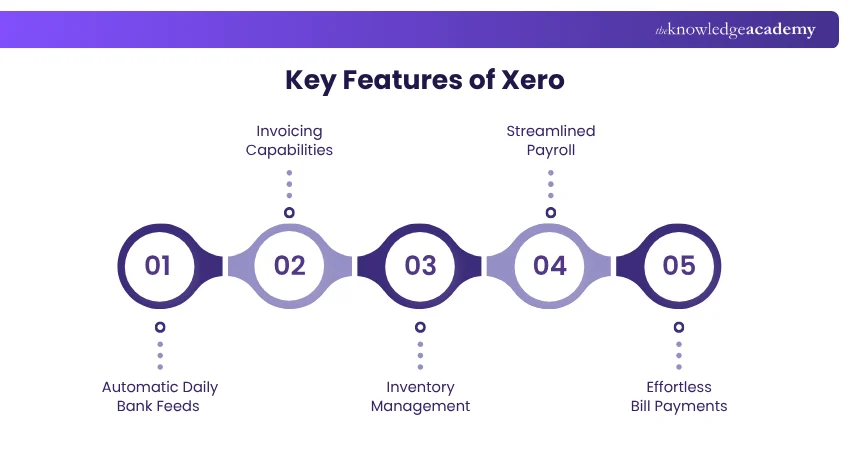
The functional depth of Xero is what makes it a preferred choice for many growing businesses. The 2026 feature set focuses on reducing manual intervention through smarter technology.
- Automated Bank Reconciliation: Xero connects to thousands of financial institutions globally, pulling in transactions daily. The software suggests matches between bank statement lines and your existing records, allowing for quick, one click reconciliation.
- Online Invoicing: You can create and send professional invoices directly from the platform. These invoices include pay now buttons that support credit cards, debit cards, and bank transfers, which significantly speeds up the collection process.
- Hubdoc Integration: Included in most plans, Hubdoc allows you to capture receipts and bills using your phone’s camera or email. The data is automatically extracted and synced with Xero, creating a digital paper trail for every transaction.
- Multi Currency Accounting: For businesses operating internationally, Xero handles transactions in over 160 currencies. It automatically updates exchange rates in real time and calculates realized and unrealized gains or losses.
- Project Tracking: Higher tier plans include tools to track time and expenses against specific projects. This allows you to monitor profitability and compare actual costs against your initial quotes.
- Advanced Reporting: Xero provides a wide array of customizable reports, from simple profit and loss statements to complex executive summaries. You can track specific tracking categories to see how different departments or locations are performing.
- Inventory Management: The software tracks stock levels in real time, automatically adjusting quantities as you buy and sell items. It also provides insights into which products are your best sellers and which are underperforming.
- Xero Analytics Plus: This advanced tool provides AI powered cash flow projections for up to 90 days. It helps you anticipate upcoming expenses and identify periods where cash might be tight.
5. User Experience
Xero has long been praised for its clean and modern aesthetic, and the 2026 interface continues this trend.
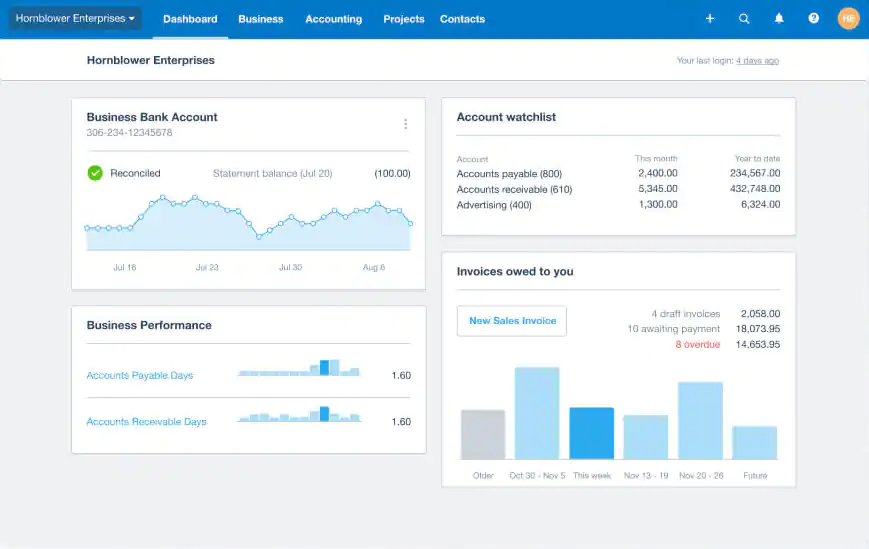
The dashboard provides an immediate snapshot of your business health, showing bank balances, outstanding invoices, and upcoming bills at a glance.
Navigation is logical, with a top menu that separates core functions into categories like Business, Accounting, and Projects.
For new users, the learning curve is mitigated by a helpful setup guide that walks you through connecting your bank and importing your initial data.
The language used throughout the platform is straightforward, avoiding overly dense accounting jargon where possible.
The mobile experience is equally refined. The Xero Accounting app is not just a companion tool but a functional extension of the desktop version.
You can reconcile transactions while waiting for a meeting, send a quote from a client site, or check your profit and loss while traveling.
The consistency between the web and mobile versions ensures that you don’t have to relearn the system when switching devices.
While the sheer number of features can be overwhelming for some, the search function and the ability to customize the dashboard mean that you can focus on the tools you use most frequently.
It feels like a piece of technology built for the user, not just for the accountant.
6. Performance and Reliability
In terms of performance, Xero is a highly stable platform. Since it is entirely cloud based, there is no need for local maintenance or manual backups.
The software is updated automatically, so you always have access to the latest features and security patches.
During our testing, page load times remained consistent even when running large reports or searching through years of transaction data.
The reliability of the bank feeds is also a highlight, as Xero has built direct API connections with most major banks, which results in fewer connection breaks compared to systems that rely on older screen scraping technology.
Security is another area where Xero excels. The platform uses industry standard data encryption and requires multi factor authentication for all users.
This ensures that your financial data is protected even if your login credentials are compromised. Xero also maintains multiple data centers in different geographic locations, ensuring that the service remains available even in the event of a local server failure.
For a business that relies on its accounting software for daily operations, this level of uptime and data integrity is essential.
You can trust that the numbers you see on your screen are accurate and that your financial history is securely preserved.
7. Xero Products

Xero offers several product tiers designed to meet the needs of different business stages. Each tier increases the limits on transactions and adds more advanced features for complex operations.
- Xero Starter: This plan is aimed at sole traders and new freelancers. It allows you to send up to 20 invoices and enter up to 5 bills per month. It includes bank reconciliation and Hubdoc for receipt capture.
- Xero Standard: This is the most popular choice for established small businesses. It removes the limits on invoices and bills, allowing for unlimited transactions. It is ideal for companies that have outgrown the Starter tier.
- Xero Premium: The Premium plan adds multi currency support and is designed for businesses that trade internationally. It allows you to track and report in multiple currencies with ease.
- Xero Ultimate: This is the top tier offering, including everything in Premium plus project tracking, advanced analytics, and expanded expense management for larger teams.
8. Pricing and Plans

Xero’s pricing in 2026 reflects its position as a premium accounting solution. While there are no annual contracts, the monthly subscription fees provide access to the full cloud ecosystem.
| Plan Name | Initial Price (Monthly) | Key Feature | Best For |
| Starter | $29.00 | 20 Invoices | Sole Traders |
| Standard | $50.00 | Unlimited Invoices | Small Teams |
| Premium | $75.00 | Multi Currency | International Firms |
| Ultimate | $110.00 | Projects & Analytics | Growing Enterprises |
Xero often runs promotions for new customers, such as 50% off for the first few months, which can significantly lower the entry cost.
It is important to note that these prices are in US dollars and may vary slightly depending on your region.
Payroll is typically handled through an integration with Gusto or a similar partner, which requires a separate monthly fee.
While the cost is higher than some entry level competitors, the inclusion of unlimited users on every plan provides a unique value proposition, especially for businesses that want their entire team to have access to the financial system without incurring extra costs.
9. Integrations and Compatibility
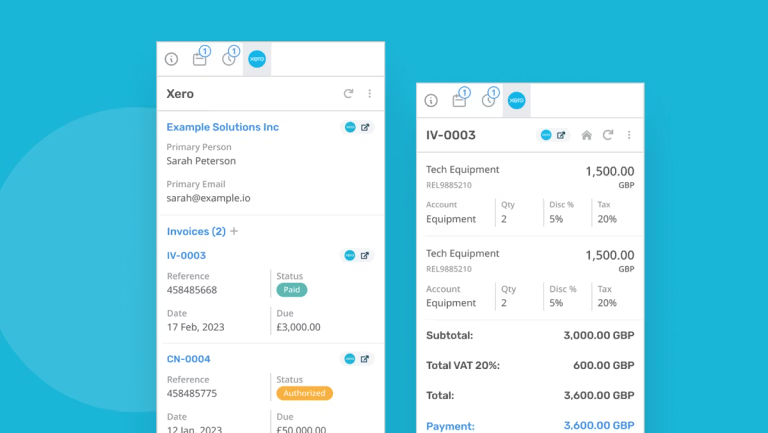
The Xero App Store is one of the platform’s greatest strengths, featuring over 1,000 integrations with other business tools.
This openness allows you to build a custom financial system that perfectly fits your industry.
For example, a retail business can connect their Shopify store to automatically sync sales data, while a construction firm can link a project management tool like Procore to track job costs in real time.
These integrations eliminate the need for manual data entry and ensure that information flows seamlessly between different parts of your business.
Compatibility is wide ranging. Xero works on any modern web browser, including Chrome, Safari, and Edge, on both Windows and macOS.
The mobile apps are optimized for iOS and Android devices, providing a full featured experience on tablets and smartphones.
For businesses that use specialized software for CRM, inventory, or time tracking, Xero’s open API makes it relatively easy for developers to build custom connections if a pre made integration doesn’t exist.
This level of flexibility ensures that Xero can remain the central hub of your business operations as you adopt new technologies.
10. Product Specification
Xero is designed to be accessible and lightweight from a technical standpoint, requiring nothing more than an internet connection and a modern browser.
| Requirement | Specification |
| Browser Support | Chrome, Firefox, Safari, Edge |
| Internet Speed | Standard Broadband (1.5 Mbps+) |
| Mobile OS | iOS 15.0+ or Android 9.0+ |
| Security | MFA and 256 bit encryption |
| User Limits | Unlimited users on all plans |
| Data Storage | Unlimited cloud storage |
| File Exports | CSV, PDF, Excel |
| API Access | Open REST API for developers |
These specifications highlight the platform’s focus on mobility and ease of access. There are no hardware requirements beyond having a device that can run a current web browser.
11. Pros and Cons
Choosing Xero requires an understanding of how its specific strengths align with your business priorities.
| Pros | Cons |
| Unlimited users promote teamwork | Strict limits on the Starter plan |
| Top tier multi currency handling | No phone support for customers |
| Integrates with 1,000+ apps | Reporting can be less granular |
| Mobile app is powerful and fast | Add ons can increase total cost |
| Automated data entry with Hubdoc | Learning curve for complex tools |
The main draw for most businesses is the unlimited user model, which is a rare feature in the accounting software market. It allows you to give access to your bookkeeper, accountant, and staff without paying more each month.
On the downside, the Starter plan is very restrictive with its invoice and bill limits, which quickly forces growing businesses into the more expensive Standard plan.
Additionally, some users find the lack of direct phone support to be a challenge when dealing with urgent technical issues, as Xero relies primarily on an online help center and email based tickets.
12. Customer Support

Xero’s approach to customer support is primarily digital. The Xero Central help portal is a massive repository of articles, video tutorials, and step by step guides that cover almost every aspect of the software.
For most routine questions, this self service model is efficient and provides immediate answers. If you encounter a problem that requires human intervention, you can submit a support ticket through the website.
Xero’s support team typically responds via email, although they may offer a phone call for highly complex technical issues that cannot be resolved through writing.
While the lack of a dedicated call in number can be frustrating for some, the quality of the written support is generally high.
The representatives are knowledgeable and provide detailed solutions. Furthermore, the Xero community and the vast network of Xero certified accountants and bookkeepers provide an additional layer of support.
Many business owners find that working with a Xero partner is the best way to get personalized advice and ensure the software is configured correctly for their specific needs.
Overall, while the support system is modern and efficient, it requires a level of patience and a preference for digital communication.
13. Ideal Use Cases

Xero is particularly well suited for certain types of businesses that can take full advantage of its cloud based, collaborative nature.
- Service Based Agencies: Companies like marketing firms or IT consultants benefit from the unlimited user access and the ability to track time and expenses against client projects.
- E commerce Businesses: Sellers on platforms like Amazon or Shopify can use Xero’s integrations to automate the flow of sales data and manage inventory across multiple channels.
- International Startups: Businesses that trade in multiple countries find Xero’s multi currency tools to be superior to many competitors, especially in how it handles exchange rate gains and losses.
- Nonprofit Organizations: The ability to grant different levels of access to board members and auditors without extra cost makes Xero a cost effective choice for NGOs.
- Small Businesses with Accountants: Since most modern accountants are familiar with Xero, it is an excellent choice for businesses that want to work closely with an external financial advisor.
In these scenarios, the software acts as a flexible tool that adapts to the specific workflows of the organization, providing the data needed to stay compliant and profitable.
14. Alternatives
If Xero doesn’t seem like the right fit for your business, there are other market leaders that offer different features or pricing models.
| Alternative | Key Difference | Best For |
| QuickBooks Online | Better native inventory | Product heavy businesses |
| FreshBooks | Superior time tracking | Individual freelancers |
| Zoho Books | Better CRM integration | Zoho ecosystem users |
| Sage Business | Stronger in the UK market | European SMEs |
QuickBooks Online is the most direct competitor and is often preferred by businesses that need more robust native inventory or payroll features built directly into the platform.
FreshBooks is a great alternative for service providers who prioritize ease of use and professional time tracking over deep accounting functionality.
Zoho Books is an excellent value for businesses already using the Zoho suite of productivity tools, as the integration is seamless.
Sage Business Cloud Accounting remains a strong contender for businesses in Europe that need specific localized tax compliance features.
15. Bottom Line: Our Verdict
Xero remains a top tier choice for cloud accounting in 2026, offering a modern, scalable, and highly collaborative environment for managing business finances.
Its greatest strength is the open ecosystem that allows it to grow alongside a company, transitioning from a simple bookkeeping tool into a comprehensive financial hub.
The unlimited user policy is a significant advantage for teams, and the automation of bank reconciliation and receipt capture saves countless hours of manual data entry.
While the pricing has become more competitive with other market leaders, the value provided through its extensive app store and multi currency capabilities is hard to overlook.
For businesses that value mobility, transparency, and a clean user experience, Xero is an excellent investment.
It provides the tools needed to maintain accurate books and gain deep insights into cash flow without requiring an in depth knowledge of accounting principles.
While the Starter plan limits and the digital only support model may be drawbacks for some, the overall reliability and functionality of the platform make it a standout option for small to medium sized businesses.
If you are looking for a financial system that is built for the future, Xero is a reliable and powerful choice.
You May Also Like:
- 7 Best CFP Certified Financial Planner Benefits for Wealth
- How to Find a Financial Advisor Quickly and Easily
- How to Be a Certified Financial Advisor in Simple Steps
Frequently Asked Questions
Is xero good for beginners?
Yes, Xero is designed with a user friendly interface that makes it accessible for people who are not professional accountants. The dashboard is intuitive, and the automated bank reconciliation simplifies the process of matching transactions. While there is a learning curve for more advanced features like project tracking, the core bookkeeping tools are straightforward to use.
How many users can i add?
Unlike many of its competitors, Xero allows you to add an unlimited number of users on every plan. This means you can give access to your business partners, employees, bookkeeper, and accountant without paying any extra monthly fees. You can also set specific permission levels to control what each person can see and do within the software.
Does xero handle payroll?
In the United States, Xero partners with Gusto to provide a full payroll service. This allows you to manage employee payments, tax filings, and benefits directly through the integrated platform. While this requires an additional subscription fee, the data flows automatically into your Xero books, ensuring your financial records are always accurate.
Can i use xero on my phone?
Yes, Xero has highly rated mobile apps for both iOS and Android. The app allows you to perform most essential tasks on the go, such as sending invoices, reconciling bank transactions, and capturing receipts. This mobility is ideal for business owners who need to manage their finances while away from their desk.
Is it easy to switch to xero?
Xero provides several tools to make the transition from other software like QuickBooks or Excel as smooth as possible. You can import your contacts, chart of accounts, and opening balances using CSV files. Many accountants also specialize in Xero migrations and can help ensure your historical data is moved over correctly and reconciled.
Xero
Xero is a premier cloud accounting solution that excels in collaboration and automation. It is best for businesses that want an open ecosystem with unlimited users and powerful multi currency tools.
Price: 29.00
Price Currency: USD
Operating System: Windows, macOS, Android, iOS, Web Browser
Application Category: BusinessApplication
8.6
Pros
- Unlimited users promote teamwork
- Top tier multi currency handling
- "Integrates with 1,000+ apps"
- Mobile app is powerful and fast
- Automated data entry with Hubdoc
Cons
- Strict limits on the Starter plan
- No phone support for customers
- Reporting can be less granular
- Add ons can increase total cost
- Learning curve for complex tools