

The Zoho Recruit review starts here, straight away, by looking at what this software actually does for you in a tangible sense.
- 1. Overview
- 2. Why You Can Trust Us
- 3. Key Features
- 4. User Experience
- 5. Performance and Reliability
- 6. Pricing and Plans
- 7. Integrations and Compatibility
- 8. Product Specification
- 9. Pros and Cons
- 10. Customer Support
- 11. Ideal Use Cases
- 12. Alternatives
- 13. Bottom Line: Our Verdict
- 14. You May Also Like:
- 15. Frequently Asked Questions
It’s an applicant tracking system, an ATS, but frankly, everyone calls their platform an ATS now, so that doesn’t tell you much.
What matters is the structure it provides to your entire recruitment lifecycle, from the moment a requisition is approved to the day an offer is accepted.
Zoho Recruit aims to centralize that process, bringing together job postings, candidate management, communication, and reporting into a single view.
The goal, always, is efficiency and reducing the kind of manual work that just eats up your recruiters’ time.
We need to see if it delivers on that promise, and how well it competes in a crowded market.
1. Overview
Zoho Recruit is a piece of talent acquisition software that sits in that interesting space where small and midsize businesses overlap with larger enterprise needs, especially those already running on the Zoho suite of products.
It’s not just a database for resumes. It’s built to handle both corporate internal HR needs and agency recruitment processes, which is a surprisingly tough split to manage well in one platform.
You’re looking at tools for job board integration, resume parsing, a built in recruitment CRM capability for talent pooling, and automation tools designed to handle routine tasks like interview scheduling and initial candidate screening workflows.
When we dive into this Zoho Recruit review, what stands out is the deep configurability that allows you to sculpt the workflow to your own hiring methodology, instead of forcing you into a rigid, one size fits all model.
It connects smoothly with other Zoho products, obviously, but its utility as a standalone system for companies not yet immersed in the Zoho ecosystem is what we really need to investigate closely.
The overall impression is one of a comprehensive, yet approachable, system that provides significant tooling for modern, high volume recruitment.
2. Why You Can Trust Us
We get it, everyone online claims to be an expert on software they’ve only used for an afternoon demo. This Zoho Recruit review comes from a different place.
Our analysis is grounded in years of actual experience implementing, migrating to, and managing recruitment technology stacks for businesses across various sectors.
We don’t just read the spec sheets, we understand the practical, day to day headaches of recruiter adoption, data migration pitfalls, and the real cost of a bad integration.
Our team spends time running live recruitment scenarios through the system, testing features like email parsing accuracy, automation trigger logic, and, crucially, how long it takes a recruiter to actually perform high volume tasks under pressure.
We focus on factual performance, system stability, and documented user impact, not vendor claims.
The final verdict you get here is the result of thorough testing and fact based comparative analysis, ensuring the information is reliable and genuinely useful for making a serious business decision.
3. Key Features
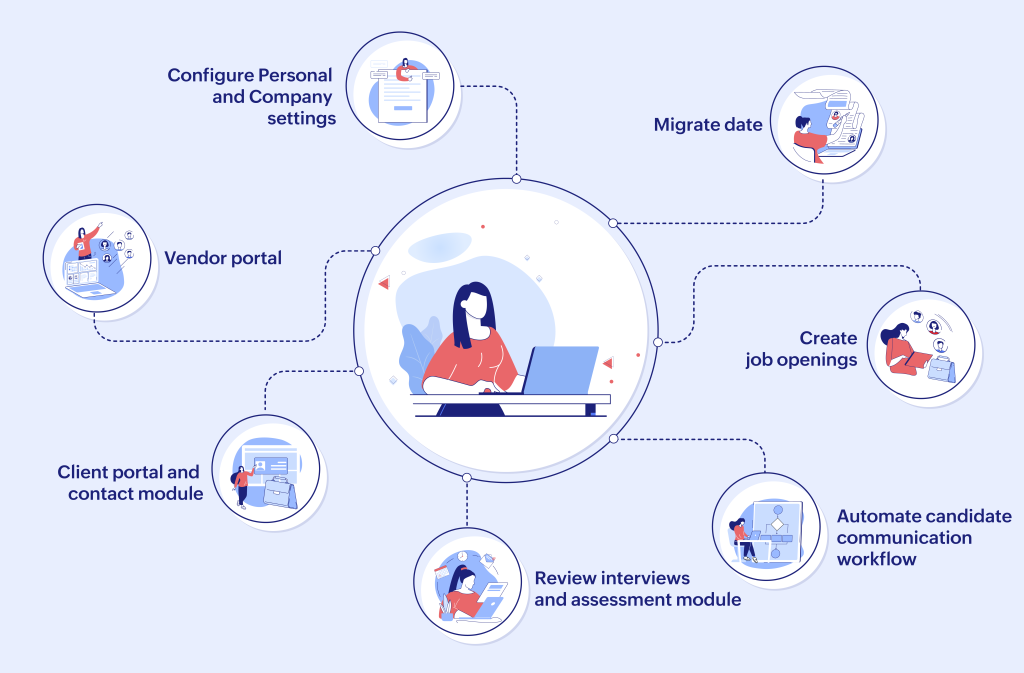
The feature set in Zoho Recruit is extensive, and frankly, a little overwhelming at first glance. But once you break it down into core functions, it starts to make sense.
- Applicant Tracking and Management: This is the bread and butter. It handles the entire candidate journey. I’m talking about robust candidate profiles that centralize every piece of information, every email, every note, and every interaction history. You can map out complex, multi stage pipelines and visually track where everyone is. The ability to filter and search through thousands of profiles using custom fields and historical data is extremely well developed.
- Recruitment CRM Capabilities: For high level talent acquisition, you need more than just an ATS. Zoho Recruit provides a separate, but integrated, CRM module focused on relationship management. This is for building talent pipelines, maintaining contact with silver medalists, and proactively engaging passive candidates. You can segment contacts, run targeted email campaigns right from the platform, and monitor engagement. It’s a genuine advantage for strategic sourcing teams.
- Resume Parsing and Extraction: The resume parsing tool works well enough, pulling key data points like contact information, work history, and skills directly into the candidate profile. Parsing accuracy is always a bit hit or miss with any software, depending on the resume formatting, but Zoho’s engine is reliably above average. It saves significant time when dealing with a high volume of unformatted applications.
- Workflow Automation: This is where the real time savings happen. You can automate practically any repeatable action. Setting up triggers for automatic email confirmations when a candidate applies, moving a candidate to the next stage after a specific assessment score is recorded, or flagging profiles for review after a certain period of inactivity. It takes the rote work off your recruiters’ desks.
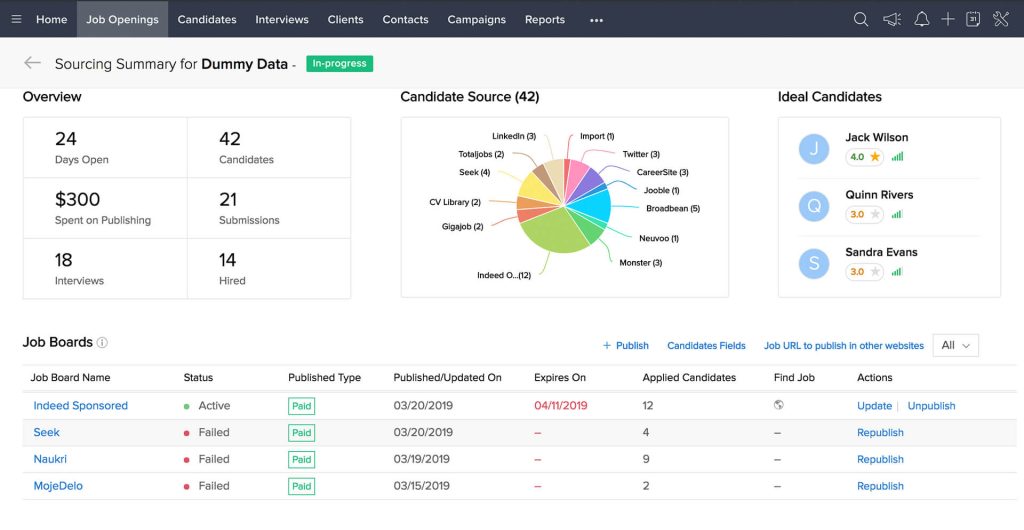
- Job Board Posting and Integrations: You can post jobs directly from Zoho Recruit to major job boards like Indeed, LinkedIn, and corporate career pages, along with a host of niche boards. This single posting capability is critical for a high volume environment, preventing the need to log in to six different portals. The system tracks source effectiveness automatically, which is a massive win for budgeting.
- Client and Contact Management (Agency Focus): If you’re running a staffing or recruitment agency, the ability to manage client company records, contacts, and job orders completely separately from internal recruiting is essential. Zoho Recruit offers this dual functionality, allowing you to manage client relationships and track placement metrics effectively, billing included.
- Advanced Reporting and Analytics: Reporting isn’t just about counting hires. Zoho Recruit lets you build highly customized reports on pipeline velocity, time to hire, source of hire effectiveness, recruiter workload, and diversity metrics. The custom dashboard functionality means your executive team can see their key performance indicators without digging through spreadsheets.
4. User Experience
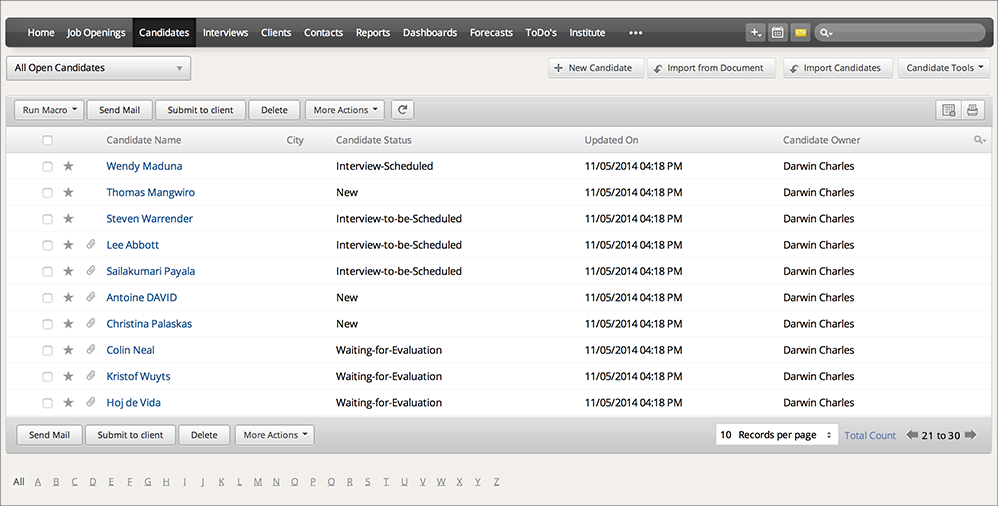
When you first log into Zoho Recruit, the look and feel is very consistent with the rest of the Zoho suite, which is to say it’s clean, modern, and reasonably intuitive.
You don’t get that dated, clunky feel that plagues so much legacy ATS software.
The navigation is straightforward, typically running through tabs for Candidates, Job Openings, Clients, and Reports.
What I appreciate most in a good Zoho Recruit review is a discussion of the daily grind, the actual time spent clicking. For a recruiter living in the system, the layout is customizable, letting them prioritize the modules and dashboards they use most often.
- Customization: The ability to rename modules, add custom fields, and tailor the workflow steps is fantastic. It means you can make the system speak your organization’s language, which drastically improves adoption.
- Mobile App: The mobile app is functional, not just a gimmick. Recruiters can view profiles, add notes, and even approve requisitions on the go, a necessity for busy managers and traveling sourcers.
- Search Functionality: Candidate search is fast and flexible. You can use Boolean search operators and combine criteria from custom fields, which is non negotiable when you have a database of 50,000 resumes.
The one area that sometimes causes a stutter is the sheer volume of options. Because the system is so configurable, initial setup can be daunting.
There’s a learning curve, absolutely, especially for administrators setting up the complex automation rules and integrations.
However, for the daily user, once the system is configured properly, the experience is smooth, efficient, and avoids the common pitfall of requiring too many clicks to complete a simple action.
It feels like a tool built for people who actually recruit, not just a glorified database.
5. Performance and Reliability
System performance is one of those things you only notice when it fails. A slow ATS can kill recruiter morale faster than almost anything else.
My experience with Zoho Recruit is that it is remarkably stable and fast, especially given the amount of data it handles.
- Speed: Loading candidate lists, opening profiles, and running reports is generally quick. It’s built on the Zoho cloud infrastructure, which means performance scales well, even during peak usage hours when multiple recruiters are simultaneously performing complex queries or running large email campaigns.
- Uptime: Like most SaaS platforms, Zoho boasts a high uptime record. In practice, system outages are rare and usually handled quickly. They’re a global operation, so they have the resources to maintain infrastructure.
- Security: Data security is a major concern, particularly with sensitive candidate information. Zoho Recruit includes enterprise level security features, covering data encryption both in transit and at rest, two factor authentication, and granular access controls.9 You can define precisely who sees what, which is necessary for compliance, especially when dealing with international data protection laws like GDPR. You need to lock down sensitive salary and compensation details.
- Data Integrity: The automation features are reliable, but you must set them up correctly. Automation is only as good as the logic you implement. We’ve seen scenarios where complex, overlapping workflow rules caused minor data integrity issues, simply because the administrator didn’t fully test the logic. It’s not a fault of the software, but a warning to use the sandbox environment for thorough testing before pushing new automations live. The software itself is built to maintain clean data, provided you enforce good internal data hygiene processes.
6. Pricing and Plans

Talking about the Zoho Recruit review honestly means talking about price, because cost predictability is vital.
Zoho’s pricing structure, while generally competitive, can get complicated because of the number of add-ons and the distinction between Corporate HR and Staffing Agency editions.
The pricing is subscription based, typically billed annually at a reduced rate or monthly at a higher rate.
Note that these are standard starting prices and are subject to change based on custom needs or negotiated contracts.
The key differentiator is the number of recruiters or users you need, and the feature set required.
| Plan Name | Core Audience | Initial Price (Annual Billing) | Key Features Included |
| Standard | Small Teams, Basic Corporate HR | $30 USD per user/month | Job Posting, Candidate Management, Email Integration, Basic Reporting |
| Professional | Growing Teams, Mid Market Corporate HR | $60 USD per user/month | Workflow Automation, Recruitment CRM, Advanced Search, Client/Contact Management |
| Enterprise | Large Organizations, High Volume Agencies | $90 USD per user/month | Territory Management, Custom Modules, Advanced Analytics, Mass Email Functionality |
| Agency Edition | Staffing/Recruitment Agencies | Starts at $75 USD per user/month | Job Order Management, Placement Management, Custom Client Portal, Unique Agency Workflows |
Beyond the per user fee, you need to factor in potential costs for premium features. High volume SMS communication is often an add-on.
Access to advanced AI features for candidate matching and screening might be tiered or sold separately.
If you need extensive integration with other non-Zoho systems, there might be a small fee or the complexity might require paid support.
The Staffing Agency edition is structured differently, priced to handle the unique demands of client side operations, including managing placements and invoicing.
It’s a genuine split in the product architecture, not just a different label.
For a startup or small business, the Standard plan provides a robust core ATS functionality, but most growing teams will quickly realize they need the automation and CRM features locked into the Professional or Enterprise tiers to achieve real efficiency gains.
You should budget for the Professional tier if you’re serious about automation and strategic talent pooling.
7. Integrations and Compatibility
No software platform lives in isolation, especially not an ATS. Its value is magnified by how well it talks to other mission critical systems.
Zoho Recruit, as you’d expect, integrates seamlessly with the rest of the Zoho universe.
- Zoho Ecosystem: If you use Zoho CRM, Zoho People for HRIS, or Zoho Books for accounting, the integration is practically plug and play. Data flows smoothly between these applications, which provides a truly unified business view. Candidate data moves to Zoho People upon hire, for instance, eliminating manual data entry, which is a massive time saver and error reducer.
- External Integrations: Beyond Zoho, the system is designed to play well with a broad range of third party tools.
- Job Boards: Direct, certified integrations with major players like Indeed, Glassdoor, and LinkedIn.
- Email and Calendar: Works flawlessly with Microsoft Outlook and Google Workspace for synchronization and scheduling. This is a non negotiable feature, and Zoho handles it well.
- SSO and Identity Management: Integrates with major single sign on solutions for secure access.
- Assessments and Background Checks: There are pre built, certified integrations with common third party assessment providers (like HackerRank or TestGorilla) and background check services. This allows you to trigger and receive results directly within the candidate profile, keeping the workflow clean.
- APIs and Custom Development: For any integration that doesn’t have a pre built connector, Zoho provides a robust set of APIs. This allows your in house development team or a consultant to build custom bridges to legacy HRIS systems or unique internal applications. This level of extensibility is a sign of a mature platform.
The compatibility is strong, but a key takeaway from this Zoho Recruit review must be this: while the API exists, complex, non certified custom integrations require specialized skill and commitment. Don’t assume an API means a simple process.
The best integrations are the pre built ones, so always check their marketplace first to see if your essential tools are already supported.
8. Product Specification
When you’re comparing systems, you need a clean, technical breakdown. This is what Zoho Recruit looks like under the hood.
| Specification Aspect | Detail |
| Deployment Model | Cloud Based (SaaS) |
| Core Functions | Applicant Tracking System (ATS), Recruitment CRM, Agency Management |
| Supported Operating Systems | Web Browser (Chrome, Firefox, Edge, Safari), iOS, Android |
| Key Differentiators | Deep Zoho Ecosystem Integration, Corporate HR and Agency Dual Mode |
| Data Storage | Zoho Cloud Infrastructure, Secured with Encryption |
| Integration Methods | Certified Integrations, Open REST APIs, Webhooks |
| Supported Languages | Multiple, including English, Spanish, French, German, etc. |
| Customization Level | High (Custom Modules, Custom Fields, Custom Workflow Rules) |
| Initial Implementation Time | Varies, typically 4 to 8 weeks for a complex setup |
9. Pros and Cons
Every system has its trade offs. Here is a frank look at where Zoho Recruit excels and where it sometimes struggles.
| Pros | Cons |
| Comprehensive Feature Set | Overwhelming Feature Density |
| Offers a truly extensive range of tools for every stage of the recruitment lifecycle. | The sheer number of options can make initial setup complex for a solo admin. |
| Superior Value for Cost | Integration Costs and Complexity |
| The price tiers offer significant functionality compared to similarly priced competitors. | Non Zoho integrations sometimes require custom work or additional paid modules. |
| Strong Zoho Ecosystem Fit | Learning Curve for Administrators |
| If you use other Zoho products, the data sync and unified interface are excellent. | Setting up complex automation rules and custom workflows takes dedicated effort. |
| Highly Customizable Workflows | Reporting Interface Clutter |
| You can deeply tailor the candidate pipeline, stages, and automation rules to your needs. | The custom reporting tool is powerful but can be visually dense and complex to navigate. |
| Dedicated Agency Mode | Mobile App Functionality is Limited |
| A unique selling point for staffing firms, providing necessary client and placement tools. | While functional, the mobile app isn’t as feature rich as the desktop application. |
10. Customer Support
Good support is necessary, period. You’re going to hit a wall when setting up a niche integration or a complex automation rule, and you need a reliable line of help.
Zoho’s support structure is tiered. Basic support comes with all plans and is typically handled through email and a ticketing system, often with a 24 hour response window.
For most non urgent queries, this is fine.
The documentation and knowledge base are actually quite good, so a lot of basic questions are answered there.
However, for truly complex configuration issues, or when you need hand holding during a major data migration or new feature rollout, you’ll likely want to pay for a premium support package or engage with a certified Zoho partner.
The complexity of the system means that sometimes, a basic support agent can’t immediately diagnose an issue with a deeply customized workflow.
You need to speak to someone on the senior technical side. In the context of a candid Zoho Recruit review, this is crucial: the depth of the product sometimes outruns the immediate accessibility of the free support tier.
They do offer phone support, but depending on your region and plan, the wait times can vary. For business critical functions, investing in dedicated, responsive support is an absolute necessity.
11. Ideal Use Cases

Zoho Recruit isn’t a silver bullet. It’s best suited for specific organizational profiles. Knowing where it shines helps you determine if it’s the right investment.
- Midsize Businesses with High Growth: Companies that have outgrown simple spreadsheets and are hiring 50 to 300 people a year. They need automation and a centralized database, but can’t justify the massive expense of a true enterprise suite.
- Organizations within the Zoho Ecosystem: If you are already running your sales, marketing, or HR functions on other Zoho products, this is a no brainer. The immediate, native integration is a massive advantage that eliminates data silos and integration costs.
- Staffing and Recruitment Agencies: The dedicated Agency Edition is specifically designed for their operational needs. The ability to manage clients, job orders, and placements as distinct entities from the corporate recruiting function is a huge benefit.
- Companies Prioritizing Recruitment Marketing: The integrated Recruitment CRM features make it ideal for talent acquisition teams that need to run continuous engagement campaigns, build talent pools proactively, and nurture relationships with passive candidates.
- Corporate Teams Needing Customization: Organizations with unique or complex recruiting workflows, such as those in highly regulated industries or those with specific union requirements, will appreciate the flexibility to create custom modules and fine tune the process to their exact compliance needs.
It’s likely less ideal for a tiny startup with only one or two hires a year, where the complexity and cost would be overkill.
It’s also maybe less ideal for the largest global enterprises that need deep, certified integration with existing legacy HRIS systems like SAP or Oracle at the highest level, where those vendors often demand specific, costly, deep integration layers. For most others, it’s a very strong contender.
12. Alternatives
No Zoho Recruit review is complete without acknowledging the competition. The ATS space is packed, and each alternative brings a slightly different flavor.
| Alternative Platform | Primary Focus | Best Suited For | Key Differentiator |
| Greenhouse | Mid to Large Enterprise | Companies focused on structured, collaborative hiring and advanced reporting. | Its focus on interviewer experience and structured hiring methodology. |
| SmartRecruiters | Large Enterprise | Global companies needing a comprehensive Talent Acquisition Suite with Marketplace. | The Talent Acquisition Suite concept and large partner ecosystem. |
| Breezy HR | Small to Midsize Business (SMB) | Smaller teams needing a visually simple, drag and drop interface. | Focus on ease of use, video screening tools, and visual pipeline management. |
| Lever | Midsize Business | Companies prioritizing CRM and candidate relationship management. | Unified ATS and CRM functionality, strong focus on candidate experience. |
Greenhouse is often seen as the gold standard for structured hiring and reporting, but it often comes at a higher price point. Breezy HR is a simpler entry point for small teams.
Lever is the one most closely aligned with Zoho’s integrated CRM approach, often competing on who does the CRM function better.
You should carefully weigh the importance of Zoho ecosystem integration against the specialized strengths of these other platforms.
For example, if structured interviewing and collaboration are your absolutely highest priority, a deep dive into Greenhouse might be warranted.
13. Bottom Line: Our Verdict
The honest conclusion of this Zoho Recruit review is that this is a highly capable and mature recruitment platform that offers exceptional value, especially for midsize organizations and staffing agencies.
It provides a feature rich, highly customizable environment that often rivals much more expensive enterprise systems.
Its dual focus, serving both corporate HR and external agencies, is a genuine strength, handled well by the dedicated Agency Edition.
While the initial setup can be complex due to the sheer number of configuration options, and you might need to pay for premium support for advanced issues, the daily user experience is clean, efficient, and modern.
If you are already running on the Zoho stack, this is the clear, optimal choice.
If you are not, you still need to seriously consider it.
For teams that value a unified ATS and robust Recruitment CRM capability, Zoho Recruit delivers a powerful, cohesive, and remarkably scalable solution.
It eliminates manual tasks and provides the analytical depth needed to run a professional, high volume talent acquisition function.
It’s a fantastic piece of software that can genuinely transform an organization’s approach to hiring.
14. You May Also Like:
- Wrike Review 2026 – Features, Pricing & Verdict
- ClickUp Review 2026 – Features, Pricing & Verdict
- Monday CRM review 2026 – Features, Pricing & Verdict
15. Frequently Asked Questions
What is the core function of Zoho Recruit?
The central purpose of the software in this Zoho Recruit review is to provide an all encompassing Applicant Tracking System and Recruitment CRM, managing the entire candidate journey from application to hire in one centralized platform.
Does Zoho Recruit integrate with other systems?
Yes, it offers seamless, native integration with the entire Zoho product ecosystem and provides certified integrations for many third party tools, including major email clients, job boards, and assessment providers, via its open API structure.
Is the platform suitable for recruitment agencies?
Absolutely, Zoho Recruit provides a dedicated and separate Agency Edition with specific modules for managing clients, job orders, placements, and billing, making it highly effective for staffing and external recruitment firms.
What pricing model does Zoho Recruit use?
Zoho Recruit operates on a subscription based pricing model, which is typically billed per user per month. The cost varies significantly depending on whether you choose the Standard, Professional, or Enterprise feature tier.
Zoho Recruit
Zoho Recruit is a highly capable ATS and Recruitment CRM hybrid, offering impressive features and deep customization for midsize businesses and staffing agencies at an excellent value, particularly strong for those in the wider Zoho ecosystem.
Price: 30
Price Currency: USD
Operating System: Web Browser, iOS, Android
Application Category: BusinessApplication
8.5