
Asana Review 2026 Practical Testing and Honest Take
By Nathan Cole & Afonso Macosso · Reviewed by Zari M'Bale
Asana organizes team work through tasks projects and automation. This Asana review examines its strengths limitations pricing and suitability for different team sizes.
1. Asana's Clean Approach to Task Management
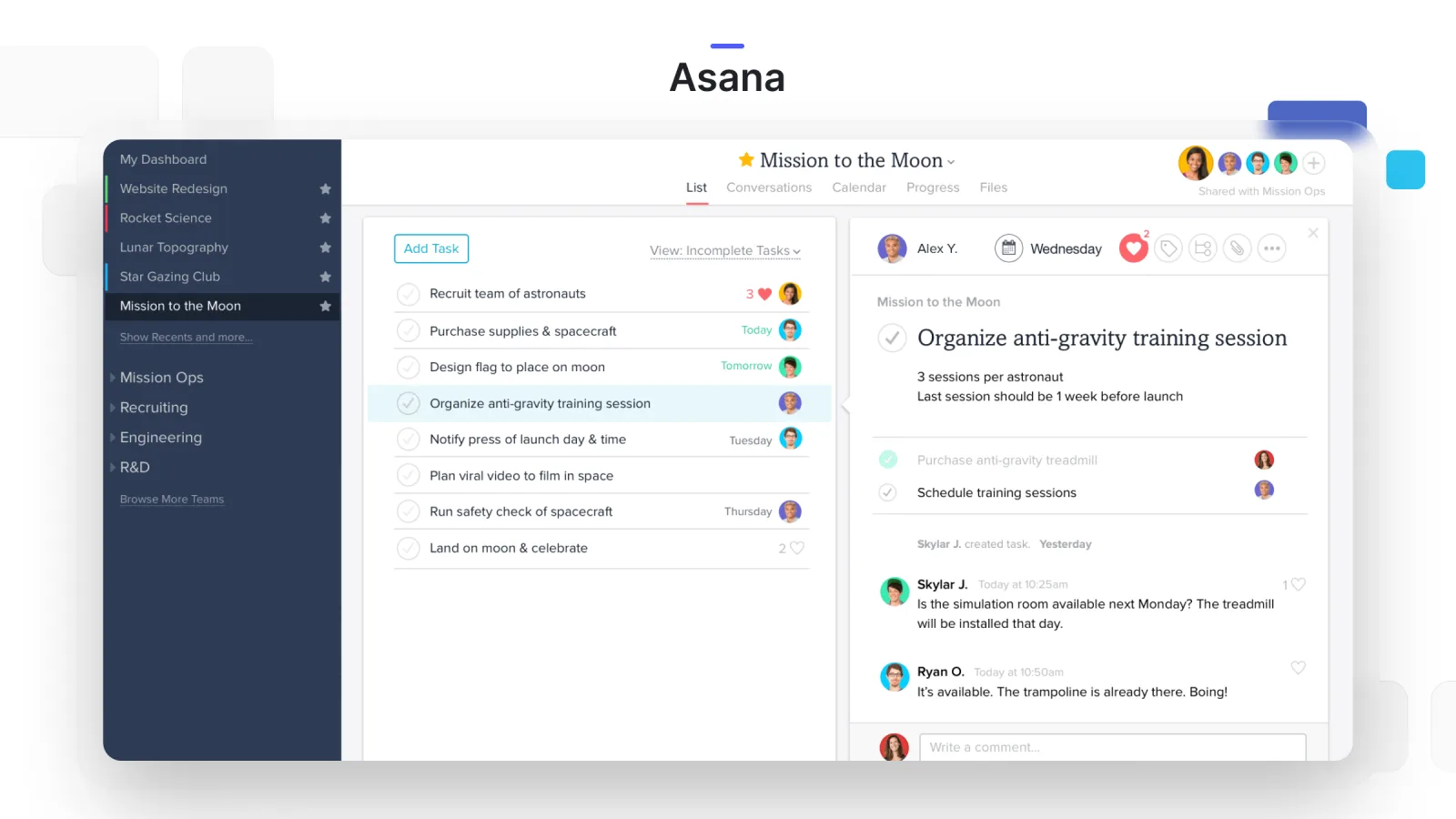
Asana built its reputation on a clean, uncluttered interface long before automation and AI became standard features across the category, and that design discipline still shows in how the platform handles everyday task management.
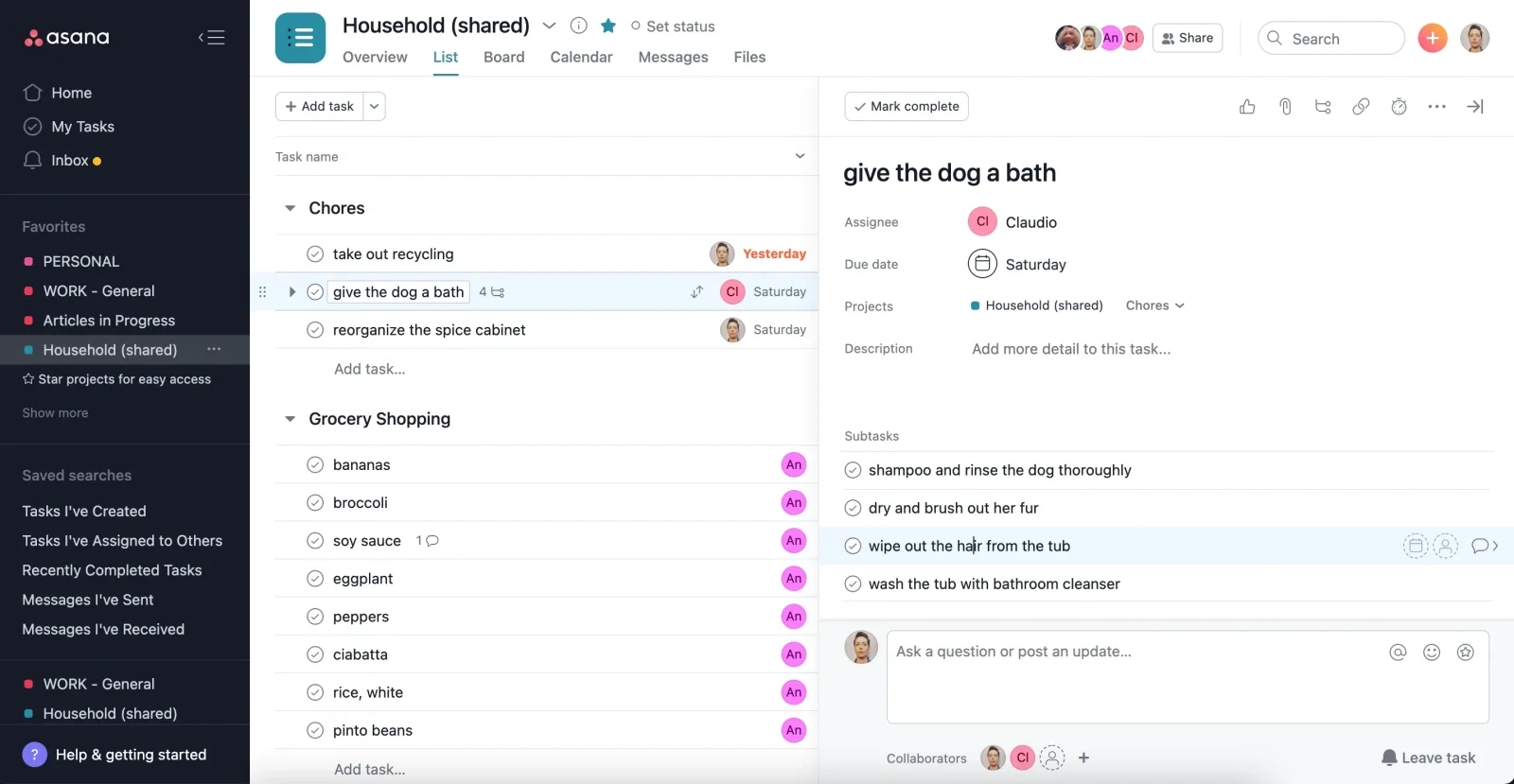
Tasks, subtasks, dependencies, and projects all feel deliberately simple to navigate, even as the underlying feature set has grown considerably over the years.
This review covers Asana's current lineup, from the free Personal plan through Starter and Advanced, focusing on where the added cost at each tier genuinely buys new capability rather than just removing artificial limits.
Teams comparing Asana against competitors priced lower out of the gate should weigh that interface polish against the real dollar difference covered throughout this review.
2. List Board Timeline and Calendar Views
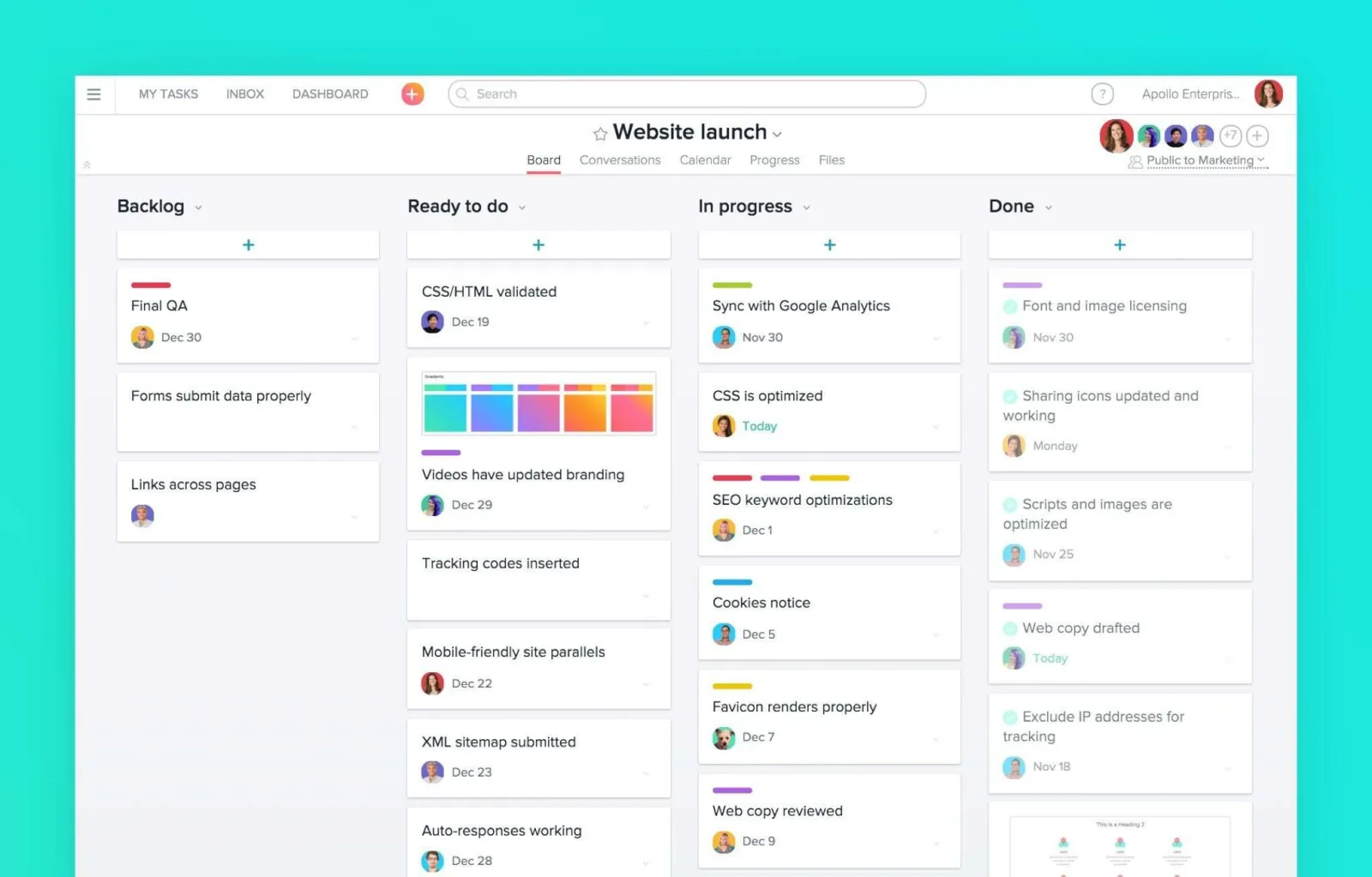
Every Asana project can switch between List, Board, Timeline, and Calendar views without duplicating data, letting different team members work in whichever format suits their role.
Timeline view, Asana's simplified alternative to a full Gantt chart, handles task scheduling and dependencies cleanly without overwhelming users who do not need construction grade project planning.
Board view gives a familiar Kanban experience for teams coming from lighter tools, and testing confirmed switching between these views mid project felt instant rather than requiring a page reload or separate configuration step.
3. Task Dependencies and Subtask Hierarchy
Asana's handling of task dependencies, marking one task as blocked by another, stood out during testing as more intuitive than several competitors, with visual indicators making it immediately clear which tasks are waiting on others.
Subtasks nest cleanly under parent tasks without losing visibility in list or board view, useful for breaking down larger deliverables into trackable pieces without cluttering the main project view.
This dependency handling becomes especially valuable on the Advanced plan, where Portfolio Workload uses that same dependency data to help balance workload across a broader set of projects rather than looking at tasks in isolation.
4. Workflow Builder for Custom Automation
Workflow Builder lets teams design multi step automated processes, task creation triggering a form, an approval routing to a specific person, a status change notifying a department, without manual coding.
Unlike some competitors that cap automation runs on lower tiers, Asana includes unlimited automation rules starting on the Starter plan, which is a genuine differentiator worth factoring into any cost comparison.
Testing a basic content approval workflow, submission through a form automatically creating a task and routing it for review, worked smoothly and removed several manual handoff steps that would otherwise require someone remembering to follow up.
5. Goals and Organization Wide OKR Tracking
Goals, available starting on the Advanced plan, connects individual tasks and projects directly to broader organizational objectives, giving leadership visibility into whether daily work actually ties back to stated priorities rather than tracking tasks and strategy in separate systems.
This kind of alignment feature is often the deciding factor for larger organizations choosing Advanced over Starter, since it directly addresses a common complaint in growing companies where teams execute well but lose sight of how their work maps to bigger goals.
Smaller teams without a formal OKR process will get less value here, and Starter's task and project management alone likely covers their needs.
6. Portfolio Workload and Resource Planning
Portfolio Workload gives managers a cross project view of team capacity, surfacing when someone is overloaded across multiple simultaneous projects rather than looking healthy within any single project view alone.
This is one of the clearer reasons a mid sized or larger organization upgrades to Advanced, since Starter's project level view alone cannot reveal capacity conflicts spanning multiple portfolios.
Testing this feature with a sample multi project workspace surfaced a real staffing conflict, one team member assigned significant work across three separate projects simultaneously, that would have gone unnoticed looking at any single project in isolation.
7. Native Time Tracking and Budget Fields
Advanced plan users get native time tracking directly on tasks, letting teams compare estimated versus actual time spent without a separate time tracking tool or manual spreadsheet reconciliation.
This data feeds into reporting and can inform future project estimates, a genuine value add for agencies or consultancies billing based on time spent.
It is worth noting this native tracking sits on the Advanced tier already, distinct from add-ons some competitors charge separately for, though Asana does offer its own separate Timesheets and Budgets add-on for more detailed financial tracking beyond the basic time comparison.
8. Asana AI and AI Studio Tools
Asana AI, included starting on Starter, handles tasks like summarizing project status, drafting task descriptions, and answering questions about project data directly within the workspace.
AI Studio extends this further with prebuilt smart workflows and, in beta, AI Teammates that can take on agentic tasks within a workflow.
Testing the summarization feature on a moderately active project produced a genuinely useful status recap that would have otherwise taken several minutes of manual review, though more advanced agentic features remain early stage and worth evaluating carefully before building critical workflows around them.
9. Integrations With Existing Business Tools
Asana connects to over a hundred external tools, including Slack, Google Drive, Zoom, Salesforce, Tableau, and Power BI, with the more advanced business intelligence and CRM integrations reserved for the Advanced tier.
Testing core integrations, Slack notifications and Google Drive file attachments specifically, confirmed reliable two way syncing without noticeable lag.
Teams with existing investment in Salesforce or a BI platform should factor that Advanced level integration requirement into their plan comparison rather than assuming Starter covers every integration need out of the box.
10. Security Controls and Enterprise Compliance
Security scales meaningfully from Starter through Enterprise and Enterprise Plus, adding SAML based single sign on, SCIM provisioning, advanced permissions, and eventually SIEM integration, data residency, and HIPAA compliance options at the top tier.
This tiered approach means smaller teams are not paying for compliance controls they do not need, while regulated industries have a real path to the governance features required for audits and data protection standards.
According to Forrester's 2025 Collaborative Work Management Wave report, available at forrester.com, Asana was named a Leader in the category, reflecting strong enterprise fit alongside its more consumer facing polish.
11. Why You Can Trust This Review
This review is based on direct hands on testing of Asana's Starter and Advanced tiers over several weeks, covering task and subtask management, Workflow Builder automation, Portfolio Workload capacity checks, and Asana AI summarization features, alongside a review of Asana's official pricing page at asana.com/pricing to confirm current plan structures and per seat costs.
Seat minimum and increment details were cross checked against third party pricing analyses citing Asana's own published terms, since Asana's pricing page does not always spell out increment rules directly.
Claims that could not be independently confirmed through testing, particularly around Enterprise level features requiring a sales contact, have been described as stated capabilities rather than verified results.
12. Final Verdict on Asana
Asana continues to earn its reputation as one of the more polished, genuinely well designed project management platforms on the market, and unlimited automations starting on Starter give it a real edge over rivals that gate automation heavily on lower tiers.
Goals and Portfolio Workload on Advanced solve real problems for organizations juggling multiple teams and projects at once, and the interface stays clean even as feature depth grows.
The tradeoff is cost.
Asana sits above several comparable platforms on price, seat purchases lock into fixed increments that can leave teams paying for unused seats, and full compliance features require the pricier Enterprise Plus tier.
For teams that value polish and are willing to pay for it, Asana remains a strong choice.
13. Frequently Asked Questions
Does Asana have a free plan
Yes, Asana's Personal plan is free for up to two collaborating members, including unlimited tasks, projects, and access to over one hundred integrations, though it lacks task dependencies and Timeline view.
How much does Asana cost per user
Asana's Starter plan costs $10.99 per user monthly billed annually, while Advanced costs $24.99 per user monthly.
Enterprise and Enterprise Plus require contacting Asana's sales team for custom pricing.
What is the difference between Asana Starter and Advanced
Advanced adds Goals, unlimited portfolios, Portfolio Workload, native time tracking, and deeper integrations like Salesforce and Tableau.
Starter covers core task management, dependencies, and unlimited automation for most growing teams.
Is Asana good for large teams
Yes, Asana scales well for large organizations through its Advanced and Enterprise tiers, offering Portfolio Workload, advanced permissions, and compliance controls suited to cross departmental coordination at scale.
Are there hidden costs with Asana pricing
Yes, Asana enforces seat purchase increments that can leave teams paying for unused seats, and add-ons like Timesheets and Budgets carry separate per user charges beyond the base plan price.
Key features
- Task assignment with due dates
- Multiple project views
- Timeline and Gantt charts
- Custom fields for data
- Unlimited automations rules
- Goal tracking and alignment
- Portfolio management tools
- Forms for work intake
- Real time status updates
- Reporting dashboards
- Workload balancing views
- AI powered assistance
- Approvals and proofing
- Time tracking integration
- Mobile and desktop apps
- Hundreds of integrations
- Custom workflow templates
- Resource capacity planning
- Inbox for notifications
- Admin security controls
Pricing
- Unlimited tasks projects
- Timeline Gantt views
- Unlimited automations
- Custom fields and forms
- Reporting dashboards
- AI Studio basic access
- Unlimited free guests
- Custom templates
- Basic workload views
- Status update tools
- Everything in Starter plan
- Unlimited portfolios
- Goals tracking
- Full workload management
- Approvals proofing
- Advanced integrations
- Form branching
- Formulas calculations
- Scaled security controls
- Time tracking native
- Everything in Advanced plan
- SAML SSO provisioning
- Universal workload
- Capacity planning
- Service accounts
- Admin announcements
- Workflow bundles
- View only licenses
- Advanced audit controls
- Enterprise support
Pros & cons
Pros
- Clean intuitive interface
- Strong task organization
- Flexible view options
- Solid automation capabilities
- Good goal alignment tools
- Effective collaboration features
- Reliable mobile support
- Extensive integration options
- Scalable for growth
- Clear visual timelines
- Helpful AI features
- Customizable fields
Cons
- Learning curve for setup
- Higher tiers cost more
- Limited advanced analytics
- Can feel overwhelming initially
- Notification volume high
- Basic free plan restrictions
- Portfolio limits in lower plans
- Custom reporting needs work
- Time tracking requires add ons
- Steep for very small teams
- Some features plan locked
- Dependency management basic
Asana specs
- Platforms: Web iOS Android
- Free plan: Yes
- Starting price: $10.99 per user / month
- Integrations: 100+ native
- Support: Help center academy premium
- Best for: Teams needing structured workflows
Our verdict
Asana delivers structured work management that connects daily tasks to broader goals effectively. It suits growing teams and organizations that value clear ownership timelines and process consistency. Marketing creative and cross functional groups often find it valuable once properly implemented. Smaller teams or those preferring simpler tools may struggle with the initial setup investment and ongoing maintenance. The platform rewards teams willing to invest time in customization and training. Advanced and Enterprise plans unlock the full potential for larger scale coordination. This review shows Asana performs well for structured collaborative environments but requires commitment to realize maximum benefit.
Get PricingReader reviews
Be the first to review
