
DeskFlex Review: Affordable booking for shared offices
By Evander Thorne & Eva Elekcha · Reviewed by Noura Mint Ely
DeskFlex is workplace booking software built around shared office capacity rather than employee headcount. Starting at $50 per month with annual billing, it makes an attractive case for hybrid offices where many employees share relatively few desks. Its biggest purchasing advantage is also its main constraint: strict space allowances determine when upgrades become necessary.
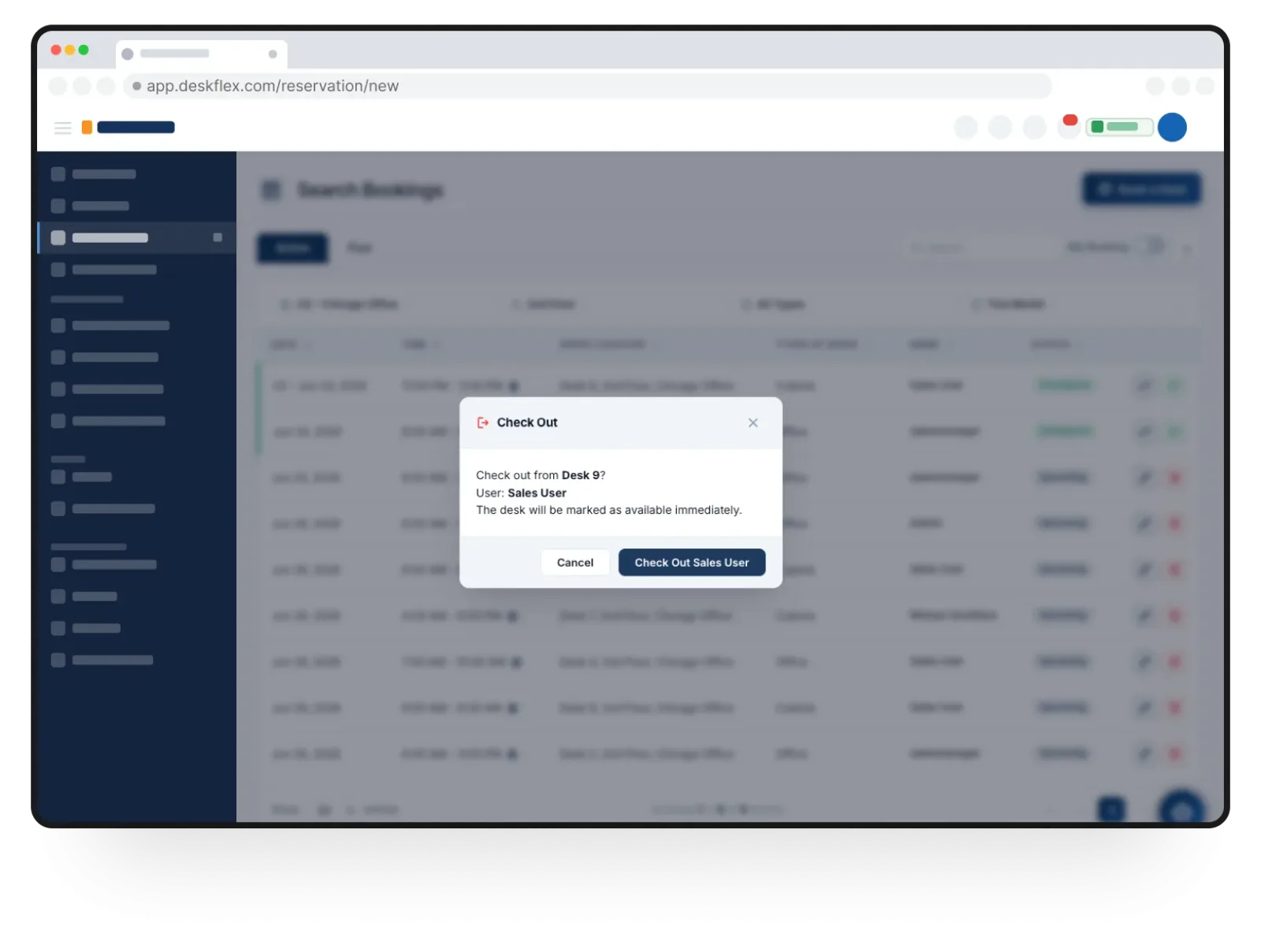
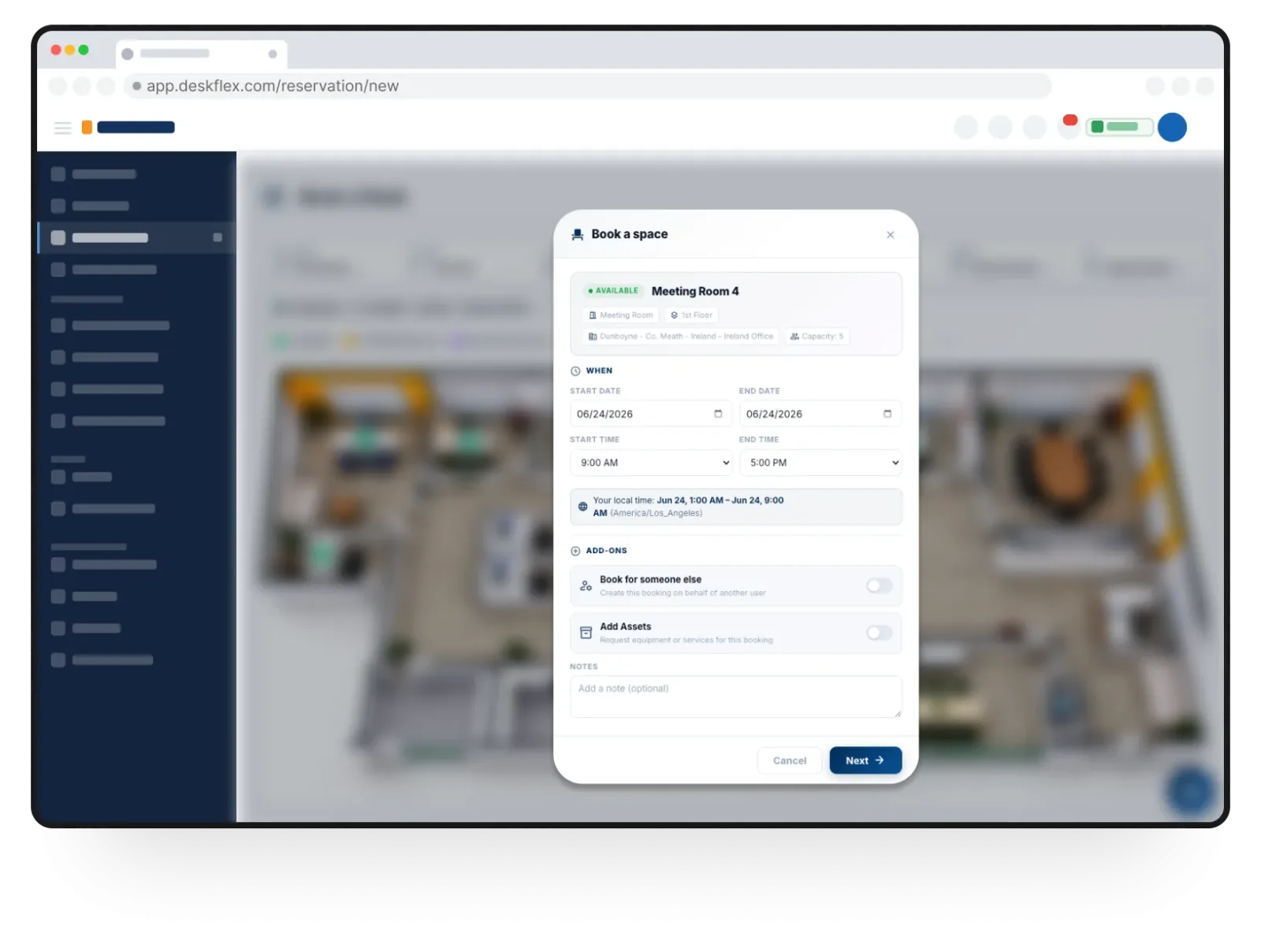
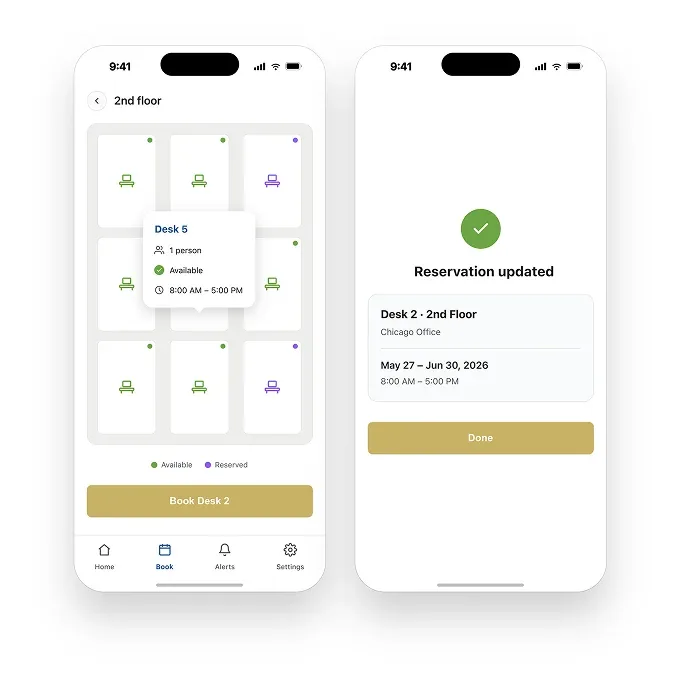
Table of contents
- What DeskFlex does
- How desk booking works
- Floor plans and navigation
- Automatic check in
- Visitor management
- Meeting rooms and resources
- Mobile application
- Integrations and calendars
- Security and employee privacy
- Analytics and occupancy
- Pricing and annual costs
- DeskFlex alternatives
- Customer reviews and reputation
- Company ownership
- Customer support
- Who should use DeskFlex
- Final purchasing assessment
- Frequently Asked Questions
DeskFlex makes office booking affordable, but capacity matters
Employees working from different locations create an administrative problem that ordinary office calendars cannot solve: knowing which desks are available, who will be onsite and whether a meeting room has already been reserved.
DeskFlex addresses that problem through a workplace management system that lets employees book physical workspaces while administrators control availability, attendance and shared office resources.
Its starting subscription costs $50 per month with annual billing, covering up to 25 workplace spaces.
That pricing approach is particularly interesting because the subscription is based on bookable capacity rather than the number of employees using the system.
This distinction changes the economics of workplace software.
A company with 180 employees and 40 shared desks does not necessarily need to purchase 180 individual subscriptions to organize its office.
DeskFlex measures the workplace inventory instead, allowing the same booking environment to serve a much larger workforce.
The model makes sense for businesses with rotating attendance, project based work and departments that share facilities throughout the week.
The software also addresses the administrative work surrounding office visits.
Employees can select desks, coordinate their attendance, locate colleagues and reserve meeting rooms.
Reception personnel can manage visitor registration, while facilities administrators maintain the digital representation of the workplace and monitor space utilization.
The result is a system intended to replace fragmented reservation processes with centralized workplace administration.
DeskFlex is owned by DeskFlex, Inc., which became part of ZenaTech, Inc. through the acquisition of ZooOffice and its subsidiaries in March 2025.
ZenaTech's corporate reporting identifies DeskFlex as a provider of AI room booking and office space optimization software.
That ownership matters because the company behind the product has a broader software and technology portfolio, and buyers making long term commitments should understand the corporate structure responsible for their subscription.
The commercial proposition is straightforward, but the purchasing decision requires more care than the entry price suggests.
Growth accommodates 25 spaces, Professional accommodates 50, and Enterprise is positioned for organizations with 100 or more spaces.
Microsoft calendar synchronization and Teams availability integration also require additional consideration.
DeskFlex therefore makes its strongest case to businesses with a clearly defined office inventory, rather than organizations that expect unlimited capacity and extensive enterprise integrations at the lowest advertised price.
What DeskFlex does
DeskFlex manages the reservation and use of shared workplace facilities.
Its primary users are employees booking desks and meeting rooms, reception personnel coordinating visitors, and administrators responsible for workplace availability.
The software gives employees a way to organize office attendance before arriving, while management can establish reservation permissions and monitor how shared resources are being used.
Desk booking is the central workflow.
Employees can view available workspaces, select preferred desks, create recurring reservations and choose locations near colleagues.
They can also include workplace equipment and service requests when reserving a desk.
These options are useful for companies where employees do not have permanent seating assignments and where particular workstations may have different equipment or location requirements.
Meeting room reservations extend the same principle to shared rooms.
Rather than depending on separate spreadsheets or informal messages, employees can check availability and reserve the rooms they need.
Administrators can maintain a more organized schedule across departments, reducing conflicts involving conference rooms and other shared facilities.
Visitor management addresses another part of office administration.
Employees can register expected guests, while reception personnel manage arrival notifications and visitor records.
The system also supports badge printing and tracking visitor activity across multiple locations.
This makes DeskFlex relevant to organizations where reception and workplace scheduling are connected responsibilities.
The distinction between these capabilities matters.
DeskFlex is primarily concerned with reserving and coordinating workplace resources.
It should not be mistaken for a full enterprise resource planning system, a building access control platform or a specialist facilities maintenance application.
Companies needing those functions should evaluate their existing systems alongside DeskFlex rather than assuming that workplace booking covers every operational requirement.
How desk booking works
The employee experience starts with checking available desks and selecting an appropriate location.
DeskFlex allows employees to save favorite workspaces, make recurring bookings and reserve desks near colleagues.
These options reduce the administrative work involved in coordinating office attendance, particularly when employees follow different schedules.
Recurring bookings are especially useful for employees who work onsite on predictable days.
Instead of making a fresh reservation every week, they can establish a repeated booking arrangement.
Administrators can control booking permissions and reservation windows according to department, employee or office location, giving the organization more control over how shared capacity is allocated.
The ability to reserve desks near colleagues is relevant to departments that organize collaborative office days.
An employee can identify where colleagues intend to work and select a nearby workstation.
This makes the floor plan and availability information part of the actual booking decision, rather than simply an administrative record.
Equipment and service requests add another layer to reservations.
A desk may need particular workplace equipment, and employees can include those requirements during the booking process.
This is useful for offices where workstation availability involves more than finding an empty seat.
However, buyers should confirm which equipment categories can be configured and whether more specialized requirements involve additional implementation.
Booking rules become particularly important when demand exceeds the number of available desks.
An organization may reserve particular areas for specific departments or establish different booking windows for different employee groups.
The objective is to prevent a small number of employees from occupying the entire reservation inventory far in advance.
DeskFlex gives administrators controls over these arrangements, but the quality of the result depends on the policies established during deployment.
A restrictive booking window may suit a conventional office with predictable attendance, while a business with employees visiting several locations needs greater flexibility.
Administrators should establish those rules around actual employee schedules instead of applying identical restrictions to every department.
Floor plans and navigation
The floor plan is one of the most useful parts of DeskFlex because it connects the reservation process to the physical office.
Employees can identify available desks visually, locate colleagues and understand where a particular workspace is situated.
This is especially helpful in offices where employees do not have permanent seating assignments.
A traditional list of desk numbers can tell employees which spaces are available, but it does not necessarily explain where those spaces are located.
A visual floor plan makes it easier to identify desks near colleagues, meeting rooms or particular office areas.
The benefit becomes more apparent when employees regularly visit buildings they do not use every day.
Facilities administrators also benefit from having a visual representation of workplace inventory.
The map can help communicate the organization of the office and make changes to desk availability easier to understand.
It can support the administration of shared areas and provide a clearer picture of how the physical workspace is organized.
There is an important distinction between interactive workplace floor plans and architectural planning software.
DeskFlex uses floor plans to support reservations and space visibility.
It does not follow that the product replaces architectural design applications, building information modelling or specialist facilities planning tools.
The number of included floor plans also affects the purchase.
Growth includes one floor plan, while Professional includes two.
A company with several floors should establish whether additional layouts can be configured and what charges apply.
The floor plan allowance is a commercial detail that deserves attention before a subscription is signed.
A proper demonstration should use the actual office layout.
Administrators should ask to see how available desks, occupied workspaces, restricted areas and meeting rooms appear.
They should also establish how changes to the physical office are reflected in the digital environment.
A demonstration using a generic sample office provides little evidence about how well the software will fit a complex building.
Automatic check in
Unused reservations are one of the most persistent problems in shared office environments.
An employee may reserve a desk and then work remotely, travel to another location or simply fail to arrive.
The reserved desk remains unavailable to other employees even though nobody is using it.
DeskFlex addresses this problem through check in and automatic reservation release.
Employees can confirm attendance using supported methods that include QR codes, Wi Fi and geolocation.
Administrators can configure rules that release unused reservations when the required confirmation does not occur within the specified period.
This functionality has a direct effect on workplace capacity.
A business with 25 available desks cannot make full use of its inventory if several employees reserve spaces and never arrive.
Releasing unused reservations returns those desks to the available pool and allows other employees to book them.
The important consideration is the check in policy.
An organization with fixed office hours may prefer a relatively short confirmation window.
A company with employees travelling between client sites may need a longer period or exceptions for certain departments.
An automatic release rule that does not account for working patterns can create booking conflicts instead of preventing them.
QR code check in is useful where employees can confirm arrival through a designated process.
Wi Fi and geolocation offer alternative approaches, although their suitability depends on the building, network configuration and employee device policies.
Buyers should establish which methods are available in their intended deployment and whether specific hardware or configuration work is necessary.
DeskFlex also uses attendance information to improve visibility into workplace occupancy.
Administrators can distinguish between reservations and confirmed attendance, giving them a more useful basis for understanding office usage.
That distinction is important because a reservation represents an intention to arrive, not proof that a person actually occupied a desk.
Visitor management
Visitor management extends DeskFlex into reception administration.
Businesses receiving customers, contractors, suppliers and other external guests need a process for registering expected arrivals, notifying hosts and maintaining visitor records.
Without a dedicated system, these activities can become dependent on paper registers, emails and manual communication.
DeskFlex supports advance visitor registration, approval workflows and notifications when guests arrive.
Reception personnel can manage visitor information and use badge printing capabilities to support the arrival process.
Visitor activity can also be tracked across multiple office locations, giving administrators greater visibility into external visits.
This is relevant to companies where visitors are part of normal office operations.
Construction businesses, engineering firms, professional services companies and corporate offices may receive guests throughout the week.
Having visitor registration connected to workplace administration can reduce the need to maintain separate processes for reception and office scheduling.
The customer feedback available for DeskFlex provides a useful example.
A Capterra reviewer working in the construction industry described how employees frequently moved between project locations and the main office.
The reviewer specifically praised the floor plan and conference room scheduling because reception staff no longer needed to coordinate everyone's individual workspace requirements.
"I know it has definitely made our receptionists life much easier as well as she no longer has to manage everyone's schedule and workspace requirements."
Capterra reviewer, Accounts Receivable Manager, construction industry.
This is a relevant operational benefit because it describes the reduction of administrative coordination rather than simply praising the software.
However, one customer account cannot establish that every organization will experience the same improvement.
Reception workflows vary significantly according to visitor volume, security procedures and the number of locations.
There is also a limit to what visitor management establishes.
Registration, notifications and badge printing do not automatically provide identity verification, electronic door control or advanced visitor screening.
Organizations with strict physical security requirements should confirm the available access control integrations and establish whether a dedicated visitor management system is more appropriate.
For companies with ordinary reception requirements, the included visitor functionality makes the package more attractive.
Organizations where security screening is the primary requirement should compare Envoy Visitors separately, particularly its enterprise security and access management capabilities.
Meeting rooms and resources
Meeting room scheduling is a natural extension of desk reservations, but it addresses a different administrative requirement.
Employees need to identify available rooms, reserve suitable spaces and avoid conflicts between departments.
When room availability is managed separately from employee attendance, administrators can end up maintaining several disconnected schedules.
DeskFlex places meeting room reservations within the same workplace management environment.
Employees can organize their office arrangements and reserve rooms without depending entirely on manual communication.
This is particularly relevant to organizations where employees visit the office for meetings and need to coordinate their workspaces around those appointments.
Resource reservations extend the system to shared workplace equipment and other reservable assets.
A company may have equipment that several departments use, and informal reservations can lead to uncertainty about availability.
Centralized booking gives employees a clearer way to establish whether a resource is available before they need it.
The distinction between resource reservations and asset management should remain clear.
DeskFlex's ability to reserve shared resources does not establish that it provides maintenance work orders, depreciation accounting, purchasing workflows or full asset lifecycle management.
Businesses needing those functions should retain or evaluate dedicated asset management software.
The same consideration applies to meeting room hardware.
A booking function does not automatically establish compatibility with every room display, audiovisual controller or building automation system.
Organizations with specialized conference facilities should request confirmation of supported devices and integration requirements before deployment.
For ordinary office environments, combining desk and room reservations in one system can simplify daily administration.
For large facilities with complex room technology and extensive equipment management requirements, the scope of the platform needs to be assessed more carefully.
Mobile application
Mobile access matters because employees often organize their office attendance before reaching the building.
DeskFlex has applications for iPhone, iPad and Android, allowing employees to check workspace availability, make reservations, modify bookings and cancel reservations.
The mobile environment also supports attendance confirmation and notifications, giving employees another way to manage their office schedules.
The iOS application has received several documented updates during 2026.
These include a redesigned interface, improved login and site management, session management changes, Microsoft Teams status synchronization and multi check in support.
The April 2026 release notes also identify an AI powered chatbot for reservations and user assistance.
This is a meaningful development, although it should be understood as a documented mobile application capability rather than evidence of a fully developed AI workplace management suite.
The chatbot is particularly interesting because it introduces a different way to interact with the reservation process.
Instead of relying entirely on conventional navigation, employees can receive assistance through a conversational interface.
However, the available release information does not establish the full range of supported requests, whether the assistant can perform every booking action or whether the capability is available across all platforms.
Mobile adoption presents a more complicated picture.
A Capterra reviewer described a preference among employees for the website instead of the mobile application.
This does not necessarily indicate poor functionality, but it suggests that browser access remains important to successful deployment.
Organizations should not assume that employees will install another application simply because it is available.
Google Play feedback also deserves attention.
The published rating is 1.8 out of 5 from nine reviews, a small sample that should not be treated as a reliable measurement of the entire platform.
Nevertheless, individual reports identify problems that potential buyers should investigate.
Crashes, will not open map, poorly written app.
Google Play reviewer.
This complaint concerns the mobile experience and specifically identifies map access and stability.
It is not sufficient evidence to establish that the current application has the same problems, particularly given the subsequent release history.
However, the low rating and limited number of reviews make a practical mobile demonstration advisable.
There is also positive feedback in the same Google Play listing.
Very good app and easy to use.
Smooth transitions and very useful features.
Google Play reviewer, June 2026.
The difference between these comments illustrates the limitations of drawing broad conclusions from a small review sample.
The most sensible approach is to evaluate the latest application on the devices employees actually use.
Buyers should check login behavior, reservation changes, floor plan loading, notifications and check in reliability before making mobile adoption a mandatory workplace policy.
Integrations and calendars
DeskFlex identifies Microsoft 365, Microsoft Outlook, Microsoft Teams, Microsoft Entra, Google Workspace and Okta among its supported integrations.
These connections address different operational requirements, including authentication, calendar synchronization and employee availability.
Treating them as six interchangeable connectors would give an inaccurate picture of how the integration environment works.
Microsoft Entra provides single sign on, while Outlook calendar synchronization connects reservations with employees' existing schedules.
Microsoft Teams availability can help colleagues understand who is planning to work onsite.
Google Workspace and Okta provide additional options for organizations using different identity and collaboration environments.
There is an important pricing distinction for Microsoft customers.
Microsoft Entra single sign on is included in the published packages, but Outlook calendar synchronization and Microsoft Teams status integration are associated with the Microsoft 365 Deep Integration add on.
This means that an organization expecting the complete Microsoft experience should include the additional integration cost in its procurement calculation.
The distinction is particularly relevant to companies already paying for Microsoft 365.
They may reasonably expect desk reservations to appear alongside existing calendar appointments and colleague availability.
DeskFlex supports those workflows, but the additional commercial requirement should be understood before the subscription is approved.
The configuration also requires IT involvement.
Microsoft integration involves administrator permissions and application configuration.
That is not necessarily difficult for an experienced Microsoft administrator, but it should be treated as an implementation task rather than something that can be delegated casually to reception personnel.
Google Workspace customers should establish the exact synchronization behavior they need.
Authentication through a Google account is not necessarily equivalent to complete calendar synchronization.
Buyers should confirm how reservations, cancellations and changes are reflected between systems.
The integration ecosystem is relatively focused compared with broader enterprise workplace platforms.
Companies using Slack, HR systems, electronic access control products or specialist building management software should request confirmation of available connectors and API capabilities.
Custom integration discussions may be possible, but they should not be confused with existing, ready to use integrations.
Security and employee privacy
Workplace booking software handles information that can reveal how employees organize their working lives.
Reservations, attendance records, visitor information and location permissions deserve careful attention, especially when an organization intends to use the platform across several buildings or departments.
DeskFlex publishes a personal data policy addressing information collection, processing, retention and individual rights.
The policy explains that its mobile application may request approximate and precise location permissions to support proximity based reservations and check in notifications.
Background location access can also be used to notify employees when they approach configured workplace buildings.
One important distinction in the policy concerns the storage of location information.
DeskFlex states that the device's latitude and longitude are not stored on its servers and that it does not maintain a history of individual movements.
The system uses location information to determine proximity to configured buildings, rather than maintaining a historical record of every employee's movements.
That distinction is relevant to employers concerned about employee monitoring.
Nevertheless, the organization should explain why location permissions are requested and whether QR code check in can satisfy its attendance requirements.
Background location access should not become mandatory without a clear operational reason.
The policy also describes data subject rights, including access, correction, deletion and portability.
It states that user personal information is stored in the EU region and is not transferred outside the EU.
DeskFlex identifies firewalls and SSL among its security measures and describes a process for reporting data breaches within 72 hours.
These statements are useful starting points, but they do not establish independent security certification.
GDPR obligations and SOC 2 Type II or ISO 27001 certification are different matters.
The available public evidence does not establish either of those independent certifications for DeskFlex.
This distinction is especially important for healthcare, financial services, government and other regulated organizations.
Their procurement teams should request current security documentation, a data processing agreement, information about subprocessors, backup procedures, access controls and incident response arrangements.
The vendor should also clarify contractual data retention and deletion periods.
The mobile application's privacy disclosures deserve separate consideration.
The Apple App Store listing identifies that the application may use location information even when it is not open.
This is consistent with the proximity based functions described in DeskFlex's personal data policy, but it means employees should understand the relationship between background permissions and workplace notifications.
For an ordinary office, these requirements may be manageable.
For a regulated enterprise, they should be treated as formal vendor assessment criteria rather than minor implementation details.
Analytics and occupancy
DeskFlex includes workplace analytics and space utilization reporting.
These capabilities matter because organizations need more than a record of which desks employees reserve.
They need to understand whether the physical office is being used effectively and whether existing space allocation reflects actual attendance.
Reservation data provides an initial view of demand.
Administrators can identify which spaces are being booked and how employees distribute their attendance.
When this information is combined with check in records, it becomes more useful for understanding actual workplace activity.
The distinction between bookings and confirmed occupancy is important.
An employee may reserve a desk and never arrive.
If the organization treats every reservation as actual attendance, its utilization figures may overstate demand.
Automatic release and check in procedures help improve the quality of the information used in these reports.
This can influence real estate decisions.
A company paying for several floors may want to understand whether particular departments consistently use their allocated areas or whether some spaces remain underutilized.
Workplace reports can contribute to those decisions, although they should not be treated as a complete financial analysis of property costs.
The published product information does not establish every reporting metric, historical retention period or export format.
Organizations requiring occupancy by department, building, floor or weekday should request a demonstration of those exact reports.
They should also establish whether data can be exported into existing business intelligence systems.
DeskFlex is therefore best evaluated as a workplace utilization and administration system, not as an independent financial forecasting platform.
Its reports can contribute useful operational information, but the quality of the resulting decisions depends on accurate floor plans, consistent reservations and reliable attendance confirmation.
Pricing and annual costs
DeskFlex uses a capacity based subscription model.
The commercial measurement is the number of workplace spaces managed, not the number of employees registered.
This is an important distinction for organizations with large employee populations sharing a smaller physical office inventory.
Growth costs $50 per month and supports up to 25 spaces.
Professional costs $75 per month and supports up to 50 spaces.
Both subscriptions are billed annually, making the actual contractual commitments $600 and $900 respectively over twelve months.
The difference between the two packages is $300 annually.
In return, Professional doubles the published capacity and includes a second floor plan.
For a company managing 40 bookable spaces, Professional is the appropriate published package rather than attempting to operate beyond Growth's allocation.
Enterprise is designed for organizations with 100 or more spaces.
Its commercial terms are negotiated and include multi location deployments, enterprise onboarding, volume pricing and custom implementation.
This makes it suitable for larger organizations, but the absence of a public price means buyers cannot calculate the complete subscription cost without obtaining a quotation.
The gap between Professional and Enterprise deserves attention.
Professional stops at 50 spaces, while Enterprise is positioned for 100 or more.
DeskFlex states that organizations can increase capacity, but the public pricing information does not provide a clear intermediate price for every deployment between 51 and 99 spaces.
Buyers in that range should request written confirmation of the available capacity and associated costs.
The definition of a billable workplace space is equally important.
A business may have 35 desks, eight meeting rooms and several other shared resources.
The subscription calculation should identify which of those resources count toward the contractual allowance.
Without that information, comparing the advertised subscription with the actual workplace inventory can produce a misleading budget.
Floor plans introduce another consideration.
Growth includes one, while Professional includes two.
Organizations with multiple floors should establish whether additional layouts require a separate charge or a different package.
This is particularly relevant to businesses operating several departments in the same building.
The Microsoft 365 Deep Integration add on also needs to be included in the budget where required.
A business using Outlook calendar synchronization and Teams status integration should not calculate its total subscription using only the advertised Growth or Professional amount.
The additional integration price should be confirmed in writing.
The annual billing requirement makes procurement discipline important.
Buyers should establish renewal terms, cancellation conditions, upgrade procedures and the commercial treatment of additional capacity.
A low monthly figure is attractive, but the real purchasing decision concerns the complete annual agreement.
DeskFlex alternatives
The workplace booking market has several established competitors.
DeskFlex should be compared against products that address the same operational requirements, particularly Skedda, Envoy and Robin.
Each has a different emphasis, and the right choice depends on the organization's balance between space booking, visitor management, administrative controls and enterprise requirements.
Skedda
Skedda is a direct competitor with a particularly relevant pricing model because it also charges according to bookable spaces rather than employee headcount.
Its platform includes interactive floor plans, booking rules, analytics and integrations with Microsoft 365 and Google Workspace.
Its US and Canadian Plus package starts at $249 per month, billed annually, with 35 spaces included.
Premier starts at $349 per month and includes 45 spaces.
These prices are substantially higher than DeskFlex's published Growth and Professional subscriptions.
The difference is not simply the number of available spaces.
Skedda places particular emphasis on its booking rules and administrative controls.
Its higher packages include more extensive customization, advanced booking conditions and identity management capabilities.
The platform also documents SOC 2 Type II independent security auditing, which is relevant to organizations with formal vendor security requirements.
DeskFlex has a stronger entry price and includes visitor management within its published packages.
Skedda has a more extensively documented rules engine and security assurance framework.
A small office with ordinary booking requirements may find DeskFlex more economical, while a larger organization requiring sophisticated booking governance may prefer Skedda.
The additional visitor management cost should also be considered.
Skedda identifies visitor management as a separate paid add on, whereas DeskFlex includes visitor management in its standard packages.
Buyers should compare the complete configuration rather than treating the headline subscription as the final cost.
Envoy
Envoy, particularly its Visitors product, is a stronger choice for companies where reception administration and building security are the main priorities.
Its visitor workflows include pre registration, host notifications, badge printing, visitor analytics and more advanced security controls in higher packages.
Envoy publishes a free Basic visitor package with limited functionality and a Premium package priced at $362 per location per month when billed annually.
Enterprise uses custom pricing.
These figures are based on locations rather than DeskFlex's workplace space allowance, so they are not directly interchangeable.
The important difference is the depth of visitor administration.
Envoy's enterprise offering includes features such as blocklist scanning, access control integrations and identity verification options.
Organizations with complex reception requirements may find that additional control more important than DeskFlex's lower subscription price.
DeskFlex remains attractive for companies that want visitor registration as part of a broader workplace booking subscription.
A business receiving a modest number of visitors and primarily needing desk and room reservations may not require Envoy's more extensive visitor management offering.
Robin
Robin, the workplace management platform, is another relevant alternative for organizations seeking a broader system for coordinating office attendance.
Its published product positioning covers desk booking, room scheduling, visitor management, delivery management, workplace navigation and space utilization.
Robin uses customized annual pricing rather than publishing a standard entry subscription.
This makes a direct price comparison difficult.
Buyers need to obtain a proposal based on the number of employees, locations, required modules and implementation requirements.
The decision should therefore focus on the actual workplace workflows.
DeskFlex has a clear published capacity based pricing structure, while Robin requires a tailored commercial evaluation.
Companies should compare the administrative capabilities and integrations they intend to use rather than assume that a broader product description represents better value.
For buyers with relatively few desks and a large employee population, DeskFlex's pricing is a meaningful advantage.
Robin deserves a closer evaluation where the organization wants a broader workplace platform and is prepared to obtain a customized commercial proposal.
Customer reviews and reputation
DeskFlex has a limited independent review history, which makes customer evidence an important part of the purchasing decision.
Capterra, SoftwareSuggest and Software Advice contain customer feedback, but the available sample is too small to establish a dependable satisfaction trend across different industries and company sizes.
The Capterra account is particularly useful because it describes a construction business where employees frequently move between project locations and the main office.
The reviewer identifies the office floor map and conference room scheduling as practical improvements, especially for reception staff who previously had to coordinate employee schedules manually.
SoftwareSuggest contains a verified review from an organization with between 51 and 200 employees.
The reviewer describes the convenience of selecting a preferred desk and scheduling office attendance remotely.
I can schedule my days in the office in my free time at home or wherever I am at that moment.
Verified reviewer on SoftwareSuggest, company size 51 to 200 employees.
This comment illustrates the central benefit of desk booking: employees can organize office attendance without depending on a receptionist or an administrator to allocate every workstation.
The reviewer also mentions that the software was useful during the pandemic, although that historical context should not be confused with a present day product advantage.
The same customer identifies technical problems as an area requiring attention.
The tech teams are responsive to glitches and app issues.
Verified reviewer on SoftwareSuggest, company size 51 to 200 employees.
This is a mixed observation rather than an outright endorsement of reliability.
The reviewer acknowledges application glitches but describes the technical team as responsive.
There is insufficient evidence to determine the frequency or severity of those issues, and buyers should not interpret one account as proof of consistently good or poor support.
Google Play feedback is more concerning.
Its published rating of 1.8 out of 5 comes from nine reviews, which is too small a sample for a reliable assessment of the complete service.
Nevertheless, the complaints about crashes and map loading are relevant to companies that expect employees to depend heavily on the mobile application.
The Apple App Store provides a different picture.
The DeskFlex application does not have enough ratings to display an overall review summary.
Its release history, however, documents several improvements during 2026, including a redesigned interface, session management changes and multi check in support.
These differences reinforce an important point: DeskFlex's browser experience, mobile application and administrative environment should be evaluated separately.
A company may find the browser workflow perfectly suitable while requiring additional confidence in mobile reliability.
The purchasing decision should reflect the actual devices and workflows employees will use.
The limited review history also means there is little independent evidence about long term renewal rates, customer retention, implementation difficulties or support performance across large deployments.
That is not proof of a poor product, but it reduces the amount of reassurance available to enterprise buyers.
Company ownership
DeskFlex, Inc. is now part of ZenaTech, Inc., a technology company listed on Nasdaq under the symbol ZENA.
The acquisition was completed through ZooOffice and its subsidiaries in March 2025, following an earlier announcement in October 2024.
This ownership history is relevant because older software directories and company descriptions may still associate DeskFlex with Epazz.
Those references reflect its earlier corporate background and should not be confused with its present ownership structure.
ZenaTech's business portfolio includes enterprise software and AI drone technology.
Its annual reporting identifies DeskFlex as a provider of AI room booking and office space optimization software.
The company describes its software acquisitions as part of a wider technology portfolio, although that corporate strategy does not establish a particular roadmap or development commitment for DeskFlex.
For customers, the practical question is product continuity.
A workplace management system may become embedded in employee attendance procedures, reception operations and facilities reporting.
Changing ownership does not automatically create a problem, but it makes contractual clarity important.
Organizations should establish which legal entity signs their subscription agreement, which company processes employee and visitor information, and who is responsible for technical support.
Enterprise buyers should also request clarification about product development priorities, future maintenance and the handling of customer data if the corporate structure changes again.
The acquisition should not be interpreted as evidence that DeskFlex will be discontinued or that its existing customers face immediate disruption.
Equally, buyers should avoid assuming that a larger parent company automatically means stronger product investment.
Those conclusions require evidence that is not established by the acquisition itself.
Customer support
DeskFlex lists email support and telephone assistance through its customer service contact arrangements.
Telephone support is identified as available Monday through Friday, from 8 a.m. to 5 p.m. Central Time.
This gives customers direct contact channels, although the published information does not establish a complete service level agreement for every subscription.
For a conventional office operating during standard business hours, this arrangement may be adequate.
Organizations operating around the clock or across several time zones should establish whether extended support can be purchased.
A workplace reservation system may not be a mission critical application in every company, but a failure during a busy office morning can create immediate administrative problems.
The available customer evidence is insufficient to establish a consistent support performance pattern.
The SoftwareSuggest reviewer describes the technical team as responsive when dealing with glitches, but one positive account cannot establish average response times or resolution quality.
The Google Play complaints also cannot establish whether technical support resolved the reported problems.
Enterprise customers should request written information about escalation procedures, response targets, maintenance notifications and support coverage.
They should also establish whether implementation assistance includes floor plan configuration, employee onboarding and Microsoft integration setup.
These details matter more than a general promise of customer assistance.
The support scope should be included in the commercial agreement.
Buyers should know which services are included in the subscription, which require additional payment and whether the Enterprise package provides a dedicated contact.
This prevents misunderstandings when a technical issue affects several departments or office locations.
Who should use DeskFlex
DeskFlex makes the strongest case for companies where employee headcount is considerably larger than the number of desks available.
A business with 150 employees sharing 40 workspaces is a more natural customer than an organization where every employee has a permanent workstation and rarely uses a shared resource.
Construction companies are a particularly relevant example because employees frequently move between project sites and central offices.
Engineering firms, consulting businesses and professional services organizations can face similar scheduling requirements.
DeskFlex's reservation and visitor workflows address the coordination problems that arise when employees and external guests use the same facilities.
Small and medium sized businesses with up to 25 shared spaces should examine Growth first.
Professional becomes the more appropriate option when the workplace requires between 26 and 50 spaces or needs the second included floor plan.
The difference in annual subscription cost is relatively modest compared with the additional capacity.
Larger organizations should evaluate Enterprise through a formal proposal.
Multi location management, enterprise onboarding and custom implementation are relevant to businesses operating several offices.
However, the commercial terms and security documentation need closer attention, particularly where the deployment involves employee identity information and visitor records.
DeskFlex is less compelling for companies that only need a simple shared calendar.
Microsoft 365 and Google Workspace already provide scheduling capabilities that may be sufficient for organizations with a small number of meeting rooms and no complex desk allocation requirements.
Paying for a separate workplace management subscription makes sense when the company actually needs visual desk selection, attendance confirmation and coordinated visitor administration.
It is also a less obvious choice for enterprises that require independently documented security certifications, advanced visitor screening or an extensive integration ecosystem.
Skedda has a stronger documented case for sophisticated booking governance and SOC 2 Type II auditing, while Envoy has more extensive visitor security capabilities.
Those requirements should determine the shortlist.
Final purchasing assessment
DeskFlex has a clear commercial advantage for businesses with shared office capacity.
Its subscription model separates employee headcount from the number of physical spaces being managed, which can make the software financially attractive when many employees rotate through a relatively small office.
The product's usefulness depends on more than that pricing advantage.
The organization needs to configure its floor plans, establish reservation permissions, decide how employees confirm attendance and determine whether visitor administration meets its reception requirements.
These tasks are manageable, but they require a proper implementation process.
The Microsoft 365 Deep Integration add on, floor plan allowances and the gap between Professional and Enterprise are the main commercial issues to resolve.
Buyers should also evaluate the mobile application directly and request security documentation appropriate to their industry.
The decision should be based on the actual office inventory and the workflows employees need.
A company with 35 shared desks, recurring attendance and ordinary reception requirements has a credible reason to choose Professional.
A business with complex booking rules and formal security requirements should compare Skedda, while organizations prioritizing visitor screening should examine Envoy.
DeskFlex deserves a place in the workplace management market because its capacity based pricing addresses a genuine purchasing problem.
Its strongest customers are those that can use the included functions without requiring extensive custom development or additional enterprise controls.
Key features
- Real time desk reservations
- Recurring desk booking schedules
- Favorite workplace desk selection
- Colleague proximity desk reservations
- Meeting room booking management
- Interactive office floor plans
- Visitor registration and approvals
- Automated visitor arrival notifications
- Visitor badge printing workflows
- Automatic unused reservation release
- QR code attendance confirmation
- Wi Fi employee check in
- Geolocation based check in
- Workplace equipment reservations
- Shared resource booking management
- Department based booking permissions
- Employee reservation access controls
- Workplace occupancy analytics reporting
- Microsoft Outlook calendar synchronization
- Microsoft Teams status synchronization
- Microsoft Entra single sign on
- Google Workspace authentication integration
- Okta identity management integration
- Mobile workplace reservation management
- AI powered reservation chatbot
- Multi location workplace administration
Pricing
- Up to 25 workplace spaces
- Desk and meeting room booking
- Visitor management and registration
- One included workplace floor plan
- Workplace analytics and SSO
- Up to 50 workplace spaces
- Everything included in Growth
- Two included workplace floor plans
- Expanded workplace booking capacity
- Workplace analytics and SSO
- Support for 100 or more spaces
- Everything included in Professional
- Multi location workplace deployments
- Enterprise onboarding and assistance
- Custom implementation and volume pricing
Pros & cons
Pros
- Space based subscription pricing model
- No per employee subscription charges
- Interactive visual office floor plans
- Recurring desk reservation capabilities
- Automatic release of unused desks
- Multiple employee check in methods
- Department based reservation permissions
- Integrated visitor registration workflows
- Meeting room reservation management
- Workplace equipment reservation requests
- Microsoft and Google authentication support
- Multi location enterprise deployment
Cons
- No publicly available free plan
- Annual subscription commitment required
- Growth limited to 25 spaces
- Professional limited to 50 spaces
- Only one included Growth floor plan
- Only two included Professional floor plans
- Enterprise pricing requires sales contact
- Microsoft deep integration costs extra
- Limited published integration ecosystem
- Sparse independent customer review evidence
- No independently verified SOC 2 certification
- Low Google Play application rating
- Mobile application adoption concerns
DeskFlex specs
- Platforms: Web, iOS, Android
- Free plan: No
- Starting price: $50 per month, billed annually
- Integrations: Six published integration entries
- Support: Email and weekday telephone support
- Best for: Hybrid offices and facilities teams
Our verdict
DeskFlex earns a place on the shortlist for businesses where many employees share a relatively small number of physical workspaces. Its space based subscription model is its strongest commercial advantage, while its reservation and visitor administration capabilities address practical office management requirements. Growth suits smaller deployments, while Professional is the better choice for offices approaching 50 spaces. Larger organizations should negotiate Enterprise terms and request additional security documentation. Companies requiring advanced booking governance should choose Skedda, while those prioritizing visitor security should examine Envoy. We rate it 7.8 out of 10 for its attractive pricing structure and useful workplace functionality, tempered by limited independent customer evidence and gaps in publicly documented enterprise assurances. Before purchasing, obtain a written capacity assessment, confirm Microsoft integration costs and evaluate the mobile application using the devices your employees actually use.
View PlansFrequently Asked Questions
What is DeskFlex used for?
How much does DeskFlex cost?
Does DeskFlex have an AI assistant?
Can DeskFlex work without location tracking?
Does DeskFlex support data migration?
Is DeskFlex suitable for large enterprises?
Can a company cancel DeskFlex at any time?
Sources5
- DeskFlex on official pricing plans
- DeskFlex on workplace management features
- SEC on ZenaTech annual reporting
- Capterra on DeskFlex customer reviews
- Apple on DeskFlex mobile application
External pages are independent third-party sources. Desking App does not control or endorse their content and accepts no responsibility for it. Visiting them is at your own responsibility and risk.
Reader reviews
Be the first to review