
FlexiProject Review: Portfolio PPM Without the Enterprise Bloat

By Evander Thorne & Noura Mint Ely · Reviewed by Eva Elekcha
FlexiProject delivers Gantt scheduling, project budgets, and portfolio reporting in one configurable PPM system with a free tier that scales as your team grows.
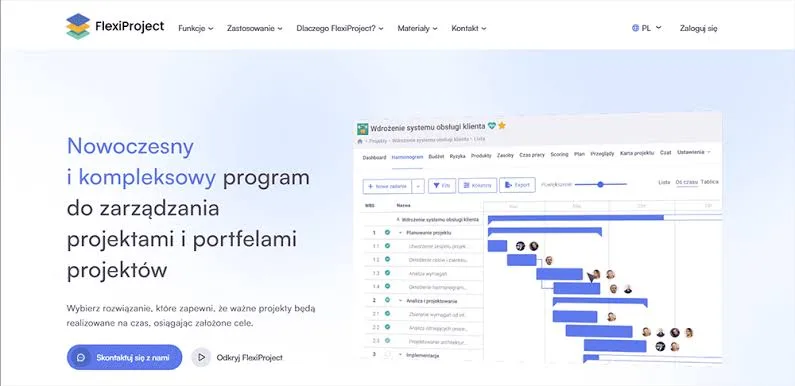
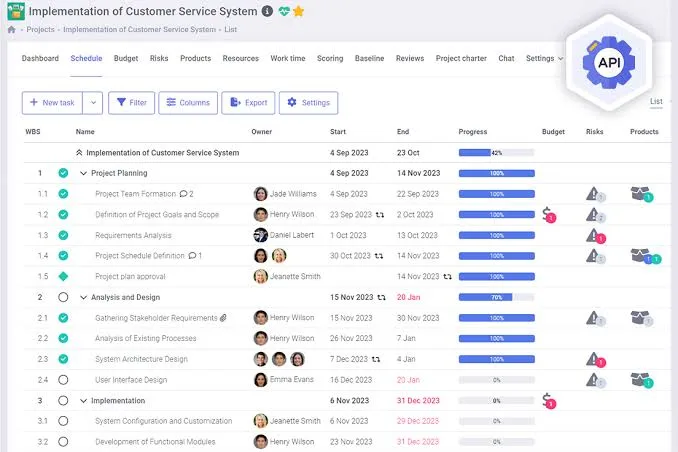
Table of contents
- What FlexiProject Does for Project Driven Teams
- Why This FlexiProject Review Is Worth Your Time
- FlexiProject Gantt Scheduling and Dependency Management
- FlexiProject Budget Forecasting Tied to Task Dates
- Managing Risks Inside FlexiProject
- How FlexiProject Handles Workspaces and Permissions
- FlexiProject Reporting and Portfolio Views
- Where FlexiProject Falls Short
- Who Should Choose FlexiProject
- Frequently Asked Questions
What FlexiProject Does for Project Driven Teams
FlexiProject is a project and portfolio management platform built for organizations running multiple projects with shared resources, budgets, and reporting needs.
It combines Gantt scheduling, project budgeting with forecasts, risk registers, and portfolio level reporting inside one configurable system.
The product targets PMOs, engineering firms, construction contractors, and service companies that have outgrown task lists but do not want to pay for an enterprise suite they will barely use.
A free tier covers unlimited users with basic task management, while paid tiers unlock scheduling, budgets, and portfolio analytics.
The approach is pragmatic: start small, expand capabilities as processes mature, avoid the migration trap that plagues simpler tools.
Why This FlexiProject Review Is Worth Your Time
This review is based on documented product capabilities, release notes, pricing pages, and published case material from FlexiProject.
I examined the feature set across license tiers, the configuration options for workspaces and approvals, and the specific gaps that matter for buyers.
No vendor paid for this assessment.
The conclusions here reflect what the software actually does, not what a sales page claims.
Where the product has real weaknesses, those are stated plainly.
Where it does something well, the evidence is in the feature lists and the deployment stories the vendor has published.
You should treat this as a working evaluation from someone who has read the documentation and understands where PPM tools typically fail.
The goal is to help you decide whether FlexiProject fits your operational reality, not to sell you on a trial.
FlexiProject Gantt Scheduling and Dependency Management
The Gantt chart in FlexiProject supports four dependency types that reflect how work actually sequences in engineering and construction projects.
When a foundation phase slips, successor tasks shift automatically, and the critical path recalculates to show which tasks now determine the end date.
This is not decorative scheduling.
The dependency logic matters for teams managing solar plant construction, metal fabrication, or software delivery where one delayed milestone cascades through everything downstream.
Baseline plans add a layer of accountability.
You save an approved schedule as a baseline, then compare current task dates against it at any point.
The variance shows on the Gantt and in task reports.
Plan changes go through an approval workflow rather than silent edits, which means the schedule you review on Monday reflects what was actually agreed, not what someone quietly adjusted over the weekend.
For PMOs that have struggled with schedule integrity, this feature alone justifies the Full license for project controllers.
FlexiProject Budget Forecasting Tied to Task Dates
Budget line items in FlexiProject carry their own forecasts spread across months, and some entries derive from linked task dates.
When a task moves, the forecast moves with it.
Actuals are assigned to the same budget items, either manually or through import rules, so planned versus forecast versus actual sits in one place.
This is the practical difference between a budget spreadsheet that goes stale and a living financial model that tracks the schedule.
Custom budget attributes extend the structure to match organizational needs.
Cost center, expense type, vendor, capex or opex, and document number are configurable, and those attributes flow into filters and reports.
A construction firm can track budget by trade.
A consultancy can separate client billable from internal overhead.
The configuration happens in system settings without developer involvement, which keeps the PMO in control of the data model.
Managing Risks Inside FlexiProject
The risk register treats risks as project artifacts with owners, impact, probability, and mitigation plans.
Risks link to schedule tasks and roll up to portfolio level, so a recurring supplier delay across three projects becomes visible as a pattern rather than three separate fires.
The risk matrix uses scales you define, and budget impact sits alongside each risk entry.
This structure matters because most project failures are not surprises.
They are known risks that nobody tracked or escalated.
FlexiProject forces the register into the same system as the schedule and budget, which means risk review happens in context rather than as a separate ritual.
The portfolio aggregation is the real value: a PMO director sees which risks threaten multiple projects and can address the root cause once.
How FlexiProject Handles Workspaces and Permissions
Workspaces create logical separation within the system.
You can map them to departments, subsidiaries, or functional areas, and users only see projects within their assigned workspaces.
A marketing team does not need visibility into engineering schedules.
A subsidiary in one region should not see another region's budgets.
Workspace assignment controls all of that without building separate instances.
Permissions layer on top: viewer, creator, administrator roles apply within each workspace.
Project templates, charters, and approval workflows can be scoped to specific workspaces, so a construction project template does not clutter the interface for a software team.
For organizations with more than one business line or geography, this is the difference between a usable system and a political problem about who can see what.
FlexiProject Reporting and Portfolio Views
Portfolio views aggregate project status, cost, and risk in real time.
Graphical reports support per chart filtering, so a risk matrix can exclude closed risks while a budget chart shows only active projects.
Numeric attributes and function attributes can feed charts, meaning you can plot total capex grouped by project phase or sum of savings by category without exporting to Excel.
One page project reviews pull schedule progress, budget, milestones, and open risks from live data, which turns review meetings into decision sessions rather than slide preparation exercises.
The reporting is not infinitely customizable, and complex multi source dashboards will hit limits.
But for the PMO that needs consistent project snapshots without a BI team, the built in reports cover the essentials.
Where FlexiProject Falls Short
Time tracking does not exist on the free tier.
If billable hours or effort tracking is central to your process, you need at least the Standard license from day one.
That is a deliberate design choice, but it means the free tier is not a complete evaluation of the product for service firms.
Native integrations with Slack, Teams, or Jira are absent.
The open API exists and works, but connecting FlexiProject to your collaboration stack requires development effort that many teams underestimate.
Resource leveling is manual: the system shows overload, but you decide how to resolve it.
Automatic leveling algorithms are not part of the product.
And the interface density reflects the product's PPM heritage.
Users coming from simple task apps will need training, and administrators will spend real time configuring workspaces, attributes, and workflows before the system feels natural.
Who Should Choose FlexiProject
Engineering firms running dozens of concurrent projects with shared specialists are the clearest fit.
The combination of Gantt dependencies, resource workload views, and budget forecasts tied to task dates addresses the coordination problem that spreadsheets cannot solve.
Construction contractors managing trade sequences and subcontractor schedules benefit from the same structure.
PMOs in mid size organizations that need portfolio visibility without a six figure enterprise contract will find the Full tier priced within reach.
Teams that only need task lists should skip it.
A free kanban tool will serve them better.
Organizations requiring deep chat integration or automatic resource optimization should look at alternatives built around those specific needs.
FlexiProject is a PPM system, and it is honest about that identity.
Key features
- Portfolio view across multiple projects
- Gantt chart with dependency tracking
- Baseline plan versioning and comparison
- Project budget with forecast over time
- Risk register with owners and matrices
- Project charter with electronic approval
- Critical path calculation on schedules
- Resource workload and capacity views
- Time tracking from tasks and mobile
- Custom project and budget attributes
- AI powered project schedule generation
- Two factor authentication for accounts
- Workspace separation by department
- Strategic goals linked to project scoring
- Graphical reports with per chart filters
- Mobile app for iOS and Android
- On premise deployment option available
- Open API for external integrations
- Approval workflows for plan changes
- Multi currency and multilingual interface
Pricing
- Personal task list management
- Task status changes allowed
- Email notifications for updates
- Unlimited free users permitted
- Web access only
- Basic task views
- No Gantt preview available
- No time tracking included
- No budget creation
- No portfolio access
- Everything in Free tier
- Comments and attachments on tasks
- Gantt chart preview available
- Time tracking from tasks
- Mobile app access included
- Schedule preview views
- Task level notifications
- No budget creation
- No portfolio reporting
- No approval workflows
- Everything in Standard tier
- Schedule and budget creation
- Full project creation rights
- Portfolio management and reports
- Approval workflow configuration
- System administration access
- Risk register management
- Strategic goal linking
- Scoring model creation
- Open API access
Pros & cons
Pros
- Full PPM depth without enterprise pricing
- Free tier remains genuinely usable long term
- Gantt dependencies reflect real work sequences
- Baseline tracking shows schedule drift clearly
- Budget forecasts tie spending to task dates
- Risk register connects threats to schedule tasks
- Workspaces isolate departments cleanly
- On premise option suits strict data policies
- Mobile app handles status changes remotely
- AI schedule builder saves setup time
- Custom attributes adapt to industry specifics
- Approval flows enforce change discipline
Cons
- Free tier lacks time tracking entirely
- No native Slack or Teams integration
- Interface density overwhelms new users
- Advanced reporting requires Full licenses
- On premise setup needs IT involvement
- Mobile app cannot edit budgets
- Learning curve spans multiple weeks
- No built in document coauthoring
- Resource leveling is manual not automatic
- API documentation assumes developer skill
- Budget module tied to Full tier only
- Support response times vary by region
FlexiProject specs
- Platforms: Web, iOS, Android, On premise Windows Server
- Free plan: Yes
- Starting price: $15 per user / month
- Integrations: Open API, Active Directory, ERP import
- Support: Email, help panel, video tutorials
- Best for: PMOs and project driven engineering teams
Our verdict
FlexiProject earns its place for project management offices that need real portfolio oversight but cannot justify the cost or complexity of enterprise suites. The Gantt scheduling with baseline comparison and the budget forecasting tied to task dates are the standout capabilities. The free tier is unusual in that it stays useful for unlimited users, which lowers the barrier for smaller teams to start without a migration trap. Buyers should look elsewhere if they need deep native integrations with chat platforms or automatic resource leveling. The Full tier at forty five dollars per user per month is where the product makes sense, so budget accordingly. The score reflects strong core PPM capability with honest limits on collaboration extras and setup effort.
Contact SalesFrequently Asked Questions
Is FlexiProject free for unlimited users?
Can FlexiProject run on our own servers?
Does FlexiProject support project budgeting across multiple projects?
How long does FlexiProject take to implement?
What is the difference between Standard and Full licenses?
Reader reviews
Be the first to review
