
Paycor Review: Payroll and HR Tools for Growing Teams

By Afonso Macosso & Nathan Cole · Reviewed by Zari M'Bale
Paycor brings payroll, HR, hiring and workforce insights together, helping growing businesses simplify employee administration and make better decisions with connected people data.
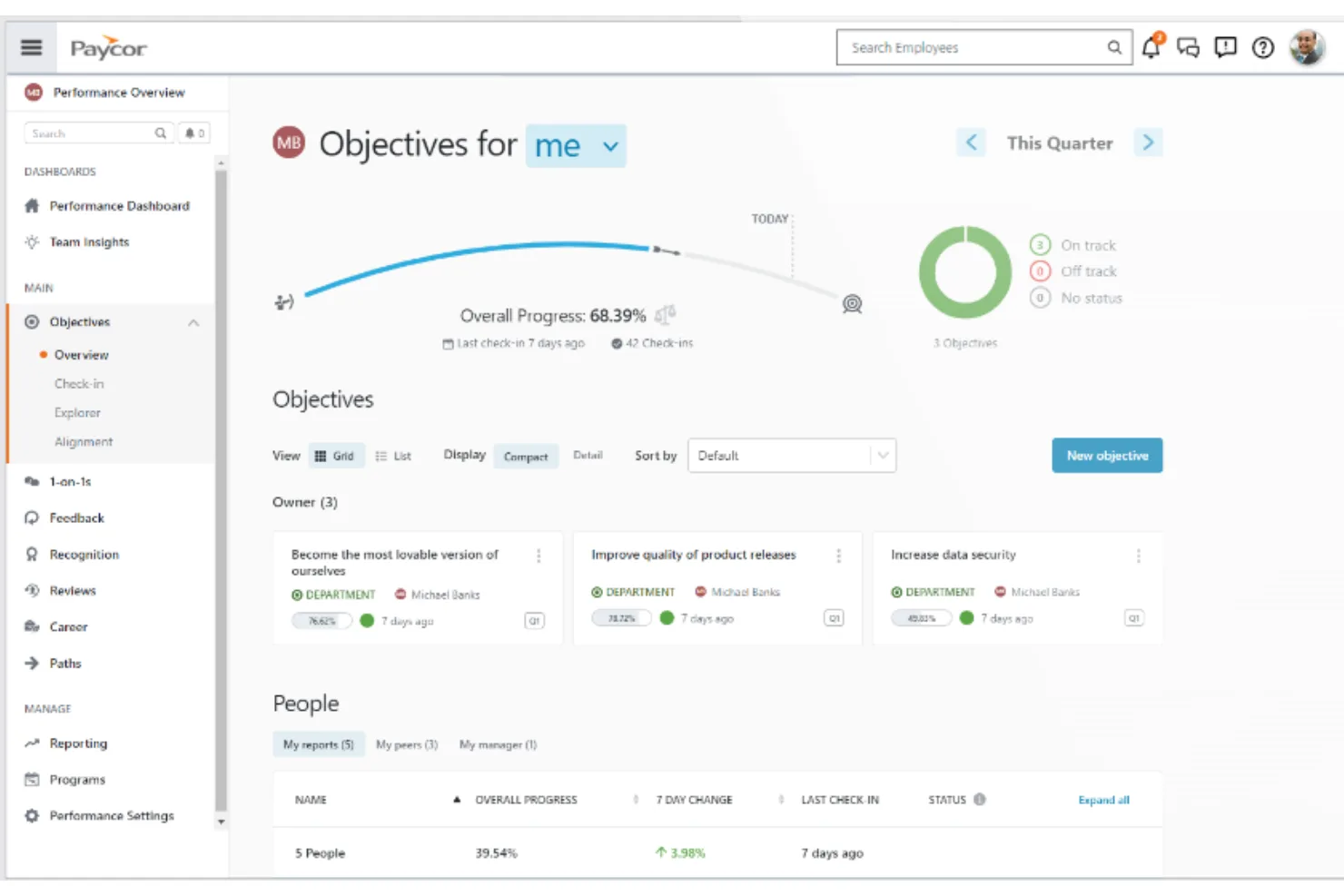
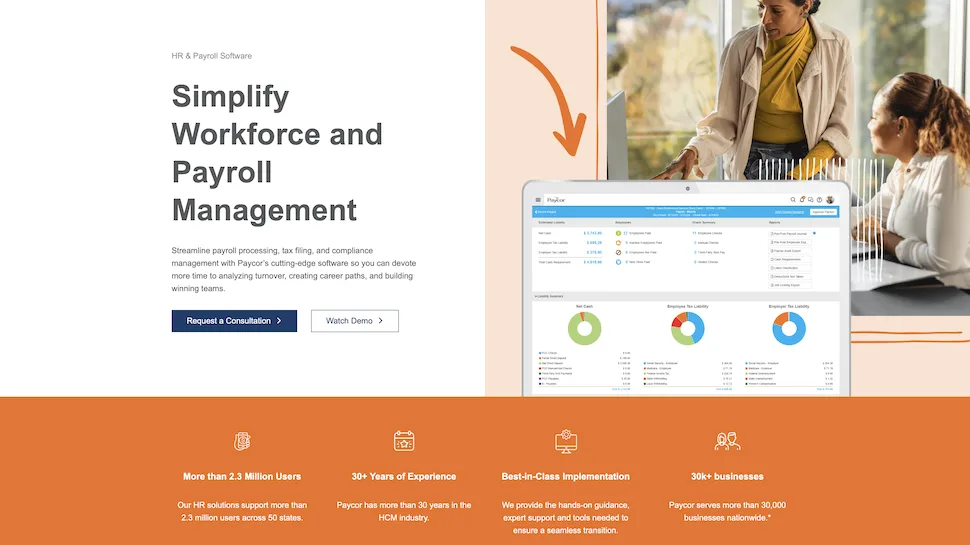
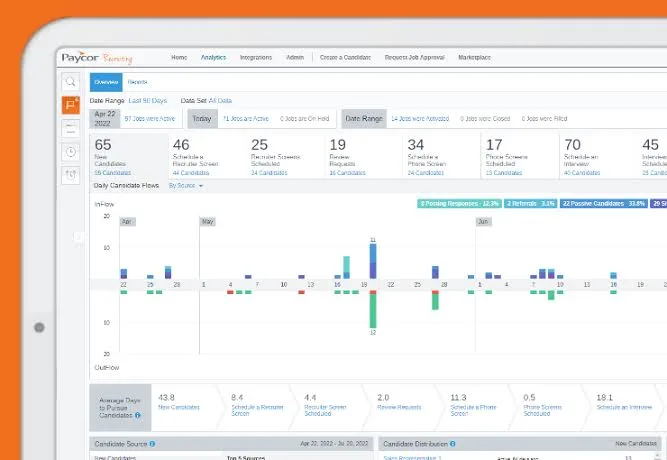
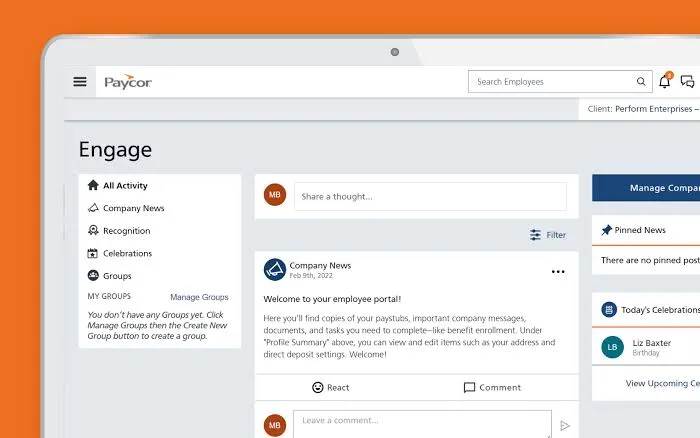
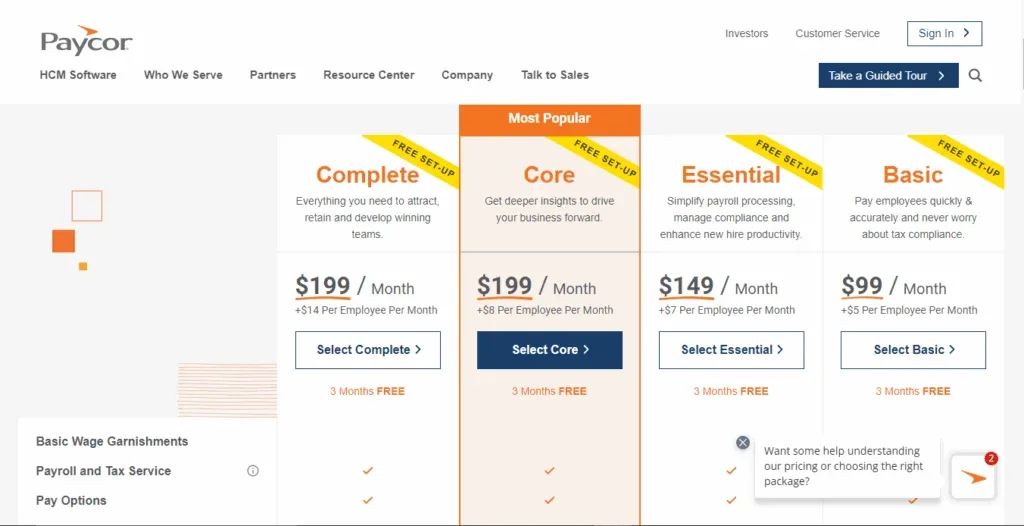
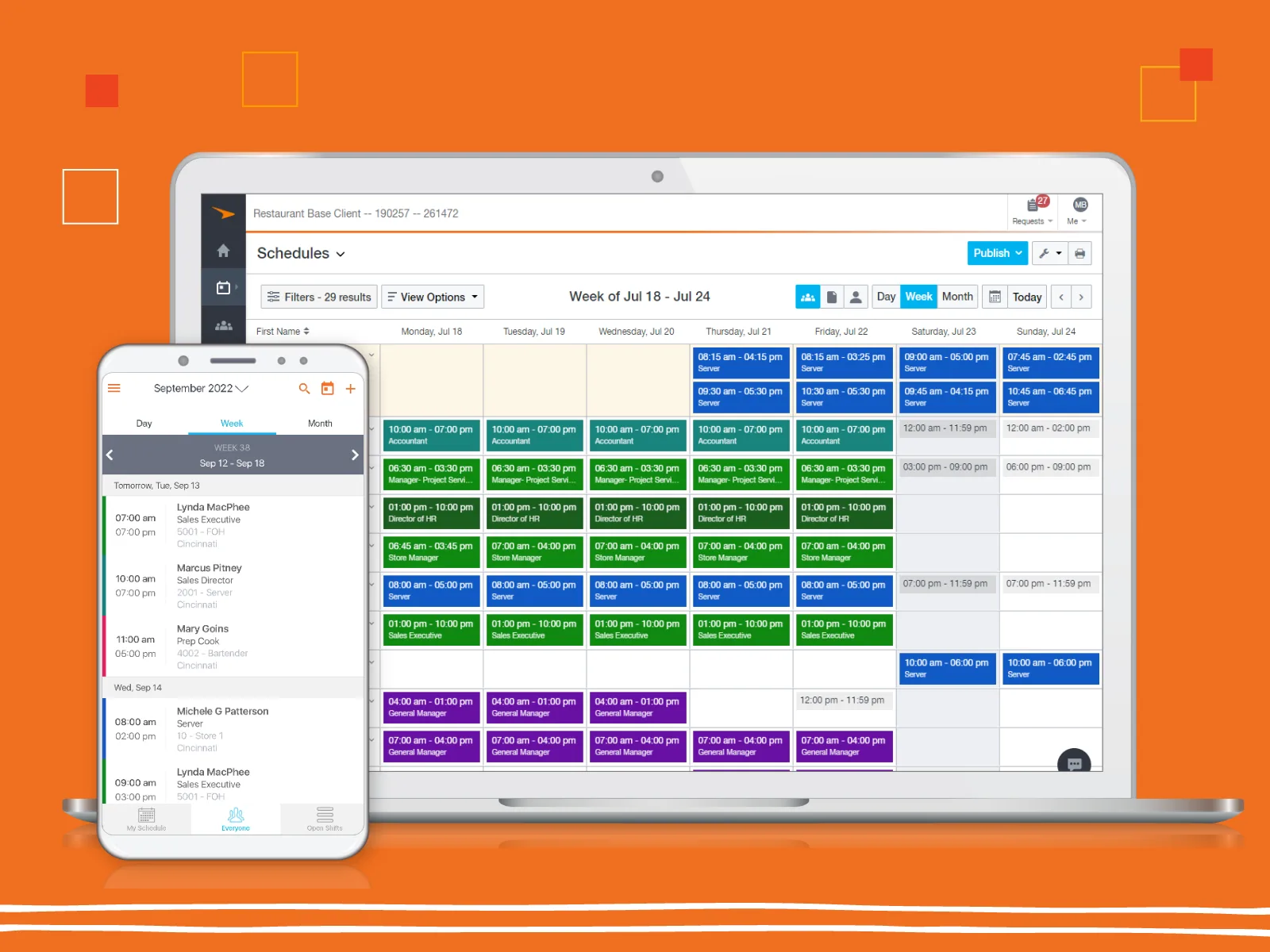
Table of contents
- 1. Paycor Payroll and HR Platform
- 2. Paycor Basic Essential and Complete
- 3. Paycor Payroll Accuracy and Tax Services
- 4. Paycor HR Records and Employee Changes
- 5. Paycor Recruiting and Onboarding
- 6. Paycor Timekeeping and Scheduling
- 7. Paycor Benefits and Employee Self Service
- 8. Paycor Analytics and Workforce Insights
- 9. Paycor WISE AI and Recruiting Tools
- 10. Paycor Integrations and Data Security
- 11. Paycor Implementation and Customer Support
- 12. Paycor Pricing and Total Cost
- 13. Paycor Alternatives and Business Fit
- 14. Paycor Review Method and Evidence
- Frequently Asked Questions
1. Paycor Payroll and HR Platform
Paycor combines payroll, human resources, hiring and workforce management tools in a platform designed to help employers manage the full employee journey.
The main attraction is the connection between everyday administrative work and broader people management.
Employee records, payroll activity, onboarding, reporting and selected workforce services can operate within a shared environment, reducing the need to move information manually between disconnected applications.
The value depends on choosing the right package, however, because Paycor offers different configurations and optional products for organisations with different requirements.
Payroll is often the first reason a business considers Paycor.
Paying employees accurately requires reliable records, consistent pay rules, tax administration and a dependable process for handling corrections.
When payroll sits alongside HR information, changes to employee details can be managed more consistently.
The company can also extend its setup with onboarding, timekeeping, recruiting and reporting tools as its needs grow.
This connected approach can be useful for businesses that have outgrown spreadsheets or a basic payroll service.
A company with several locations, hourly employees and regular recruitment activity may need more than a way to calculate wages.
It may also need to control employee records, manage approvals, organise hiring and give managers a clearer view of labour costs.
Paycor offers packages for smaller businesses as well as broader human capital management products.
The distinction matters because the features, pricing structure and implementation requirements can vary.
Buyers should not assume that every capability associated with Paycor is included in every package.
The most effective evaluation begins with daily work rather than a feature checklist.
Consider what happens when a new employee joins, a pay rate changes, a manager approves leave or payroll discovers an incorrect time entry.
Follow each task from beginning to end and identify where information is entered, who approves it and which reports are produced.
That exercise reveals whether Paycor can reduce repetitive administration and improve consistency.
It also helps identify functions that may require an additional module or an integration.
A well chosen configuration should address the organisation’s real requirements without introducing unnecessary complexity.
2. Paycor Basic Essential and Complete
Paycor’s small business packages provide a starting point for organisations that want to combine payroll with selected HR services.
Basic focuses on payroll and core employee functions.
Essential adds onboarding and additional HR support resources.
Complete builds on the lower packages with analytics and further administrative services.
Basic is intended for employers that want to run payroll, handle related tax services and provide employees with access to their pay information.
The published package information includes direct deposit, employee self service, new hire filing and online reporting.
It can be a practical starting point when payroll is the primary requirement and the business does not need a broad set of additional HR tools.
Essential adds capabilities designed to support the employee lifecycle.
Published features include onboarding, electronic I 9 completion, new hire documents, time off requests and HR Support Center resources.
These additions can help a business organise hiring and employee administration without immediately adopting every advanced capability in the wider Paycor portfolio.
Complete adds further services, including Paycor Analytics, compensation insights, benchmarking and selected payroll related administration.
It is relevant to employers that want more visibility into workforce activity and access to additional HR resources.
The actual value depends on whether the organisation will use these features regularly.
Paycor also offers broader HCM products for businesses that need more extensive capabilities.
These can include additional HR, talent, performance, compensation, time and workforce management functions.
The product names and available options should be checked against the current proposal because a package designed for a small business may not include the same features as a broader HCM configuration.
The right package is the one that meets the organisation’s essential requirements with the least unnecessary complexity.
A business should not pay for advanced analytics if its managers only need basic payroll reports.
Equally, a company with complex hiring, employee development and workforce reporting needs may find a basic package too limited.
Ask Paycor to identify every feature included in the quote, every optional service and any additional charge that could affect the total cost.
Request a demonstration of the selected package rather than a presentation of the entire product portfolio.
That makes it easier to understand what will actually be available after implementation.
3. Paycor Payroll Accuracy and Tax Services
Payroll accuracy affects employee confidence, financial reporting and the organisation’s ability to meet its obligations.
Paycor provides payroll processing and tax related services designed to help employers calculate pay, manage employee payments and handle associated administrative work.
A connected payroll system can reduce repeated data entry.
When employee details, pay rates and approved time records are maintained in the appropriate workflows, payroll staff have fewer reasons to copy information between applications.
This can help reduce avoidable mistakes, although it does not eliminate the need for review and reconciliation.
Paycor’s published small business plans describe services such as federal and state tax filing, direct deposit, new hire filing, employee self service and online check stubs.
The exact service scope varies by package.
Employers should confirm which tax jurisdictions and filing responsibilities are included, especially when their workforce spans several states or has unusual payroll requirements.
Pay rules become more demanding when an organisation pays hourly and salaried employees, uses overtime, offers different rates or processes commissions and bonuses.
Businesses may also need to handle retroactive adjustments, deductions, garnishments and off cycle payments.
These scenarios should be demonstrated during the sales process.
Ask Paycor to show how a payroll administrator identifies a late timesheet, corrects an employee’s pay rate and reviews an unusual calculation.
The demonstration should include the approval trail and any reports used to verify the result.
If the business has multiple locations or different employee groups, test those arrangements explicitly.
Tax services also require clear boundaries.
Employers need to know which tasks Paycor handles, which information they must supply and which responsibilities remain with their internal team.
Software and payroll services can support compliance, but employers still need to maintain accurate employee data and review their obligations.
Before switching payroll systems, create a testing plan.
Where appropriate, compare the new configuration with the existing process across representative pay cycles.
Investigate differences in gross pay, deductions, tax treatment and net pay before using the new system for live payroll.
A discrepancy should be understood and resolved rather than adjusted simply to make totals match.
Payroll controls deserve attention as well.
Ask about approval permissions, audit records, correction procedures and reconciliation reports.
These controls help establish who made a change, who approved a payment and how the organisation can investigate a problem.
Paycor’s payroll capabilities are most useful when they fit the organisation’s pay rules and administrative needs.
Buyers should confirm the available services and the implementation approach before making a decision.
A broad list of payroll features is encouraging, but reliable processing depends on configuration, testing and clear ownership.
4. Paycor HR Records and Employee Changes
Employee information is used throughout the employment relationship.
HR teams need to maintain personal details, job information, employment status and documents, while payroll and managers need relevant information to perform their own tasks.
Paycor provides HR administration tools intended to organise these records and support related workflows.
Centralised information can reduce duplicate work.
Consider an employee who moves into a new role.
The change may affect the reporting line, compensation, department and payroll information.
When each team uses a separate system, someone must coordinate updates and check that every record matches.
Connected workflows can make the process more consistent.
The same principle applies to onboarding, personal information changes, promotions and employee departures.
Defined forms and approvals can help clarify which person is responsible for each action.
HR staff can then focus on exceptions instead of repeatedly chasing routine updates.
The quality of employee administration depends on data governance.
Before implementation, the organisation should define who can create records, approve changes and correct mistakes.
Sensitive information should be restricted to authorised users.
Managers may need access to information about their teams, while payroll administrators require a different set of permissions.
Data migration deserves particular attention.
Existing systems often contain duplicate profiles, inconsistent job titles, outdated details or missing information.
Importing those records without review can transfer old problems into the new environment.
A careful migration should include data cleanup, sample imports, validation and approval from the people responsible for record accuracy.
Document handling should also be tested.
Buyers need to understand how authorised staff retrieve employee documents, how changes are recorded and what options exist for exporting information.
These details matter when the organisation responds to employee requests, reviews historical decisions or changes software providers.
Automation can make routine processes easier to follow, but it should reflect the organisation’s actual policies.
An approval route needs to show who is responsible, what information is required and what happens when a request is rejected.
If the workflow is unclear, employees may still depend on email and informal reminders.
Access rights should be reviewed regularly.
A manager who changes departments may no longer need access to the same employee records, and a departing administrator should not retain unnecessary privileges.
The organisation needs a process for checking permissions as roles change.
Paycor can help employers establish more consistent employee administration, particularly when HR information is connected to payroll and onboarding.
The benefit will depend on clean data, sensible permissions and clearly defined responsibilities.
Buyers should test the specific record keeping and approval workflows they expect to use.
5. Paycor Recruiting and Onboarding
Recruiting and onboarding connect the hiring process with the employee’s first days at work.
Paycor offers recruiting and hiring tools, alongside onboarding functions in relevant packages.
These capabilities can be particularly useful for businesses that recruit regularly or need managers and HR staff to coordinate each hire.
Recruitment involves several moving parts.
Employers need to publish roles, collect applications, communicate with candidates, organise interviews and record decisions.
A structured system can help recruiters understand where candidates are in the process and which actions remain outstanding.
It can also help managers participate without relying entirely on email updates.
Paycor’s recruiting products support candidate management and hiring workflows.
Published package details indicate that job posting limits may vary by plan.
Buyers should confirm the number of active roles supported, the availability of candidate communication tools and whether branded careers pages, referral features or advanced sourcing capabilities are included.
Onboarding begins once a candidate accepts an offer.
The organisation may need to collect personal information, complete employment documents, obtain signatures and communicate policies.
If the resulting information can flow into the employee record, HR staff can avoid entering the same details multiple times.
A useful demonstration should follow one candidate from application to the first payroll cycle.
Ask how a recruiter moves the candidate through each stage, how a manager participates and how incomplete forms are identified.
Then check how the employee record is created and whether payroll receives the necessary information without repeated manual entry.
The candidate experience matters.
Instructions should be clear, forms should be understandable and the process should work for people who are not familiar with the company’s systems.
If new employees repeatedly need help completing basic paperwork, the onboarding process may still be too complicated.
Employers should also review access to candidate information.
Hiring records can contain personal details that should not be available to every employee.
The company should decide who can view applications, how long records are retained and how information is handled when a candidate is unsuccessful.
AI assisted recruiting is another area to examine.
Paycor offers WISE Assistant for Paycor Recruiting, which is designed to help recruiting teams review applicants and identify candidates who match job requirements.
Its official product information describes candidate matching, automated candidate outreach and explanations that help recruiters understand suggestions.
These functions should be assessed as decision support, not as a substitute for human judgement.
During evaluation, ask how candidate matching works, what information influences recommendations and how recruiters can challenge an unsuitable suggestion.
The organisation should maintain consistent hiring criteria and ensure that authorised people remain responsible for employment decisions.
Paycor’s recruiting and onboarding capabilities can be valuable for employers that want a more organised hiring process connected to employee administration.
The right package should make the transition from candidate to employee simpler, with fewer repeated requests and clearer responsibility for each step.
6. Paycor Timekeeping and Scheduling
Timekeeping matters whenever employee hours affect payroll, staffing levels or labour costs.
Paycor offers time and attendance capabilities and additional workforce management options that can help employers record hours, review exceptions and coordinate employee schedules.
For payroll staff, reliable time data can reduce the need to collect paper timesheets or reconcile separate records.
Employees record their hours through supported methods, and managers review submissions before payroll processing.
The available clocking options depend on the selected configuration, so businesses should confirm support for their preferred devices and workflows.
Scheduling addresses the related challenge of ensuring that the right people are available at the right time.
Managers may need to account for employee availability, shift requirements, absences, qualifications and labour budgets.
Retail, hospitality, healthcare and manufacturing employers may have more complex needs than an office where most employees work regular hours.
Paycor provides time and scheduling products, but buyers should verify which capabilities are included in their package and which require an additional service.
A payroll focused plan should not be assumed to include every advanced scheduling function.
Ask for a demonstration using the actual shift patterns and approval rules the business follows.
Test common exceptions.
What happens when an employee forgets to clock in?
Can a manager correct a timesheet while preserving a record of the change?
How are overtime rules applied?
Can employees request time off or swap shifts, and how does an approved absence affect coverage?
The connection between timekeeping and payroll is especially important.
Follow a time entry from the employee’s initial submission through manager approval and payroll processing.
If administrators must export data, edit a file and upload it into another system, those steps create extra work and should be included in the evaluation.
Labour distribution and job costing can also be relevant.
Businesses that allocate employee hours to locations, projects or cost centres need a reliable way to capture the right information.
The system should make those assignments practical for employees and managers, otherwise the reporting may be incomplete.
Scheduling software does not replace workforce planning.
Managers still need to establish staffing levels, communicate changes and approve exceptions consistently.
If shifts are frequently changed at short notice or policies are unclear, the company must address those processes as well as its software configuration.
Privacy requirements may matter when timekeeping uses location data or other monitoring features.
Employers should confirm what information is collected, who can access it and how long it is retained.
The configuration should reflect applicable rules and the organisation’s employee communication policies.
Paycor’s timekeeping and scheduling options can support businesses with hourly employees and changing staffing needs.
Buyers should test the exact scenarios that cause the most administrative effort and confirm that the selected package handles them without excessive manual work.
7. Paycor Benefits and Employee Self Service
Employee self service gives workers direct access to selected administrative tasks.
Paycor’s employee facing tools can support activities such as viewing pay information, accessing tax documents, requesting time off and checking relevant workforce details, depending on the package and services enabled by the employer.
The main benefit is convenience.
Employees can access supported information without asking HR to retrieve every document, while HR staff can focus on requests that require judgement or individual assistance.
For organisations with multiple locations or frontline employees, access through supported mobile devices can be especially useful.
Self service needs to be tested with real users.
Ask employees to find a pay statement, locate a tax document and submit a time off request.
Observe whether they understand the navigation and whether the information is presented clearly.
A feature is only useful if employees can complete the task without unnecessary help.
Benefits administration introduces additional workflows.
Employers need to maintain eligibility information, communicate enrolment options and keep records accurate when employees join, leave or change status.
Paycor offers benefits related services and integrations, but buyers should clarify whether their required processes are included or depend on a third party provider.
Benefits information often moves between the employer, Paycor and external providers.
Ask which fields are exchanged, how often data is updated and who resolves discrepancies.
A connection that transfers information but leaves the HR team to reconcile it manually may not deliver the expected efficiency.
Leave management also needs careful configuration.
Employees may submit requests, managers approve them and HR monitor balances or policy requirements.
Organisations should test the leave rules that apply to their workforce, including differences between employee groups and any relevant legal requirements.
Employee access must be controlled.
Workers should see their own authorised information, while managers should only access details required for their responsibilities.
The organisation should also have a process for account recovery, employee departures and changes to access rights.
Mobile access can improve convenience, but the experience should match the workforce.
Test the supported devices, authentication process, notifications and common employee tasks.
Employers should consider accessibility and whether staff need short instructions to understand the available functions.
A successful self service rollout includes communication and training.
Employees need to know which tasks they can complete independently and where to seek help if information appears incorrect.
HR should review recurring support questions after launch and update instructions where the same confusion occurs repeatedly.
Paycor’s employee self service and benefits related capabilities can reduce routine administrative requests when configured well.
Buyers should verify the features included in their package and make sure the experience works for the employees who will use it every day.
8. Paycor Analytics and Workforce Insights
Workforce reporting helps employers understand staffing, payroll activity and employee trends.
Paycor offers reporting and analytics capabilities that vary by package, from standard payroll reports to broader dashboards and workforce insights.
Different teams need different information.
Payroll staff may focus on payment reports and exceptions.
HR may need visibility into hiring, headcount and employee movement.
Managers may want to understand overtime, attendance and labour allocation, while finance needs reliable figures for budgeting and reconciliation.
Paycor’s published package information describes a library of standard reports, a custom report writer and scheduled reports.
Its analytics features can include benchmarking, diversity and inclusion metrics, prebuilt dashboards and compensation insights, depending on the package.
Buyers should confirm which reports and analytical functions are included in their proposed configuration.
The best way to evaluate reporting is to begin with a business question.
Can a manager identify which department is generating the most overtime?
Can HR compare hiring activity across locations?
Can payroll investigate an unexpected payment?
Can finance obtain the information needed to reconcile payroll costs?
A dashboard may answer common questions quickly, but some organisations need customised reports.
Buyers should ask whether users can create reports themselves, which fields are available and whether additional expertise is required.
A reporting tool that is powerful but difficult to maintain can become a dependency on a small number of administrators.
Data definitions need to be consistent.
If different departments calculate turnover, absence or headcount differently, the reports may produce conflicting results.
Before relying on workforce metrics, establish shared definitions and identify who owns the data behind each measure.
Export and integration options also matter.
Some businesses can work entirely with built in reports, while others need to transfer information to accounting software or a separate analytics platform.
Confirm the available export formats, the frequency of data updates and any additional configuration required.
Sensitive information should be protected.
Reports may contain compensation details, personal data or other confidential records.
Access permissions should reflect job responsibilities, and exported files should be handled according to the organisation’s information security policies.
Analytics is most useful when it leads to a decision.
A report showing increased overtime should help managers investigate staffing patterns, shift coverage and workload.
Software can make a trend visible, but leaders still need to decide what action is appropriate.
Paycor’s reporting tools may provide enough visibility for businesses that want regular workforce and payroll insights.
Organisations with complex analytical needs should test their required reports during the sales process and confirm which capabilities require additional services.
9. Paycor WISE AI and Recruiting Tools
Paycor has introduced WISE AI capabilities intended to help HR teams and employees complete supported tasks more efficiently.
One clearly described offering is WISE Assistant for Paycor Recruiting, which uses AI assisted candidate review and matching to help recruiting teams manage larger applicant pools.
Recruiters often face a practical problem: several open roles can attract hundreds of applications, and reviewing each application takes time.
Candidate matching can help organise the pool according to job requirements and hiring preferences.
Paycor describes WISE as a way to prioritise relevant candidates, support candidate outreach and provide explanations behind suggestions.
The value depends on how well those capabilities fit the existing recruitment process.
A business hiring for a small number of roles may not need advanced AI assistance.
A team managing multiple vacancies and large candidate pools may find it useful if it reduces manual screening while maintaining a consistent review process.
Buyers should ask what information the system uses to assess candidates, how job requirements are represented and whether recruiters can understand the reasoning behind a recommendation.
They should also establish whether the feature is included in their package or requires a separate product or agreement.
AI recommendations should support human decisions rather than replace them.
Hiring affects people’s opportunities, and an automated recommendation may overlook relevant experience or reflect limitations in the information available.
Recruiters should be able to review the evidence, question a suggestion and apply consistent hiring criteria.
Candidate privacy is another consideration.
The employer should understand how applicant information is processed, who can access it and how long records are retained.
Any use of AI should be consistent with the organisation’s recruitment policies and applicable requirements.
WISE is also presented as part of Paycor’s broader approach to AI supported HR work.
Buyers should distinguish between features that are generally available, features tied to a specific product and capabilities that may be introduced or expanded over time.
Ask for a demonstration of the exact functions available under the proposed agreement.
A useful test is to give the recruiting team representative job descriptions and candidate scenarios.
Ask the system to help prioritise candidates, then examine whether the suggestions are relevant and understandable.
Test how recruiters can correct the results and whether the tool supports the decisions they actually need to make.
AI can add value when it removes a defined bottleneck and provides useful assistance without obscuring accountability.
Paycor’s recruiting AI is worth evaluating for teams with substantial candidate volume, but it should not be the sole reason to select the wider HR platform.
10. Paycor Integrations and Data Security
Paycor offers an integration ecosystem for businesses that need workforce data to move between payroll, HR and other applications.
Its Marketplace provides access to partner connections, while developer resources support integrations for systems with more specialised requirements.
Potential integration needs include accounting software, benefits providers, recruiting tools, timekeeping applications and other business services.
Connecting these systems can reduce repeated entry and improve the consistency of employee information.
The benefit depends on the specific data fields and workflows supported by each connection.
A marketplace listing is a useful starting point, not a guarantee that every requirement is covered.
Buyers should ask whether the integration is prebuilt, whether configuration is required, how frequently information synchronises and whether additional fees apply.
Confirm that the connection works with the specific Paycor product being purchased.
Some organisations may need custom integrations.
Developer tools and APIs can support data exchange, but custom work introduces design, testing and maintenance responsibilities.
The proposal should identify who owns the integration, who supports it when it fails and how changes to either system will be handled.
Security matters because HR and payroll platforms hold sensitive personal and financial information.
Paycor publishes information about its security practices and privacy approach.
Buyers should review the current documentation and request the security materials relevant to their proposed deployment.
Official security information is available through Paycor’s security resources.
The security review should cover user access, authentication, administrative privileges and audit records.
Ask how access is granted and removed, how important changes are recorded and what options are available for investigating suspicious activity.
Buyers should confirm whether the proposed setup meets their organisation’s identity and authentication requirements.
Data protection responsibilities are shared.
The provider supplies contracted services and security controls, while the employer decides which information to collect, who can access it and how long it should be retained.
Internal policies are still needed for employee access, account security and information handling.
Businesses operating across multiple jurisdictions should review the applicable data processing terms and legal requirements.
If sensitive employee information is shared with third parties, the organisation should understand which systems receive the data and who is responsible for managing access.
Integrations and security should be considered together.
Every connection creates a route for information to move between systems, so the buyer should know which fields are transferred and whether access is limited appropriately.
This is particularly important for connections involving payroll, benefits and financial records.
Paycor’s integration options can help organisations maintain a more connected technology environment.
The buyer should verify every essential connection and review the applicable security terms before signing.
A dependable integration strategy requires clear ownership and ongoing maintenance, not just a successful initial setup.
11. Paycor Implementation and Customer Support
Implementation affects how well Paycor fits the organisation’s existing processes.
Employee data, payroll rules, approvals and integrations all need to be configured and tested.
A business that treats implementation as a quick activation may overlook issues that later affect payroll or employee administration.
The project should begin with a clear scope.
List the workflows that must work at launch, the records that need to be migrated and the external applications that must connect to Paycor.
Separate essential requirements from optional improvements that can be introduced later.
Data migration should be treated as a formal task.
Existing records may contain duplicates, missing fields or inconsistent formats.
Clean the source information, import a sample and validate the result before moving the full dataset.
Payroll and HR owners should approve the records that affect employee pay and employment status.
Testing should cover routine work and exceptions.
Payroll staff need to verify pay calculations and corrections.
HR administrators should test employee changes and onboarding.
Managers should review approval workflows, while employees should confirm that self service functions work as expected.
Integrations should be tested from the point where information is created to the point where another system uses it.
Training should reflect each user’s responsibilities.
Payroll administrators need to understand calculations, corrections and reconciliation.
HR teams need to manage records and workflows.
Managers need to handle requests and approvals.
Employees need clear guidance for common tasks such as accessing pay information or requesting time off.
Paycor provides support resources and service channels, but the precise terms depend on the package and agreement.
Buyers should confirm the available support hours, response commitments, escalation process and whether dedicated assistance is included.
They should also ask which services incur additional fees.
Implementation and ongoing support should be considered together.
A business may need help configuring reports, changing workflows or troubleshooting integrations after launch.
If those services are not included, the organisation should understand the cost and the level of internal expertise required to manage the system.
A launch plan should include acceptance criteria.
Identify the defects that would prevent deployment, decide who can approve the final setup and agree what happens if payroll or another essential process is not ready.
A planned date should not override the need for reliable testing.
The organisation should also establish ownership after launch.
Someone needs to manage user permissions, review data quality, handle configuration changes and coordinate support requests.
Without that responsibility, even a suitable platform can become difficult to maintain.
Paycor’s implementation and support resources can help businesses move to a connected HR and payroll environment.
Buyers should confirm what assistance is included and ensure their own team has the time and authority needed to complete the project successfully.
12. Paycor Pricing and Total Cost
Paycor offers several small business packages with published monthly base fees and additional charges based on employee count.
Pricing can change, and promotional offers may affect the amount a new customer pays during an introductory period.
Buyers should verify the current terms directly with Paycor before committing.
The published small business pricing page has listed Basic at 99 US dollars per month plus 5 US dollars per employee per month, Essential at 149 US dollars per month plus 6 US dollars per employee per month, and Complete at 199 US dollars per month plus 7 US dollars per employee per month.
These figures are useful for initial comparison, but the final quote and current promotions should be confirmed.
Basic is designed around payroll and tax services, employee self service and online reporting.
Essential adds onboarding, HR Support Center resources and time off management.
Complete adds services such as Paycor Analytics, compensation insights and further payroll related administration.
The exact feature list should be checked against the current package.
The employee based fee makes total cost depend on workforce size.
A business with 20 employees will pay a different amount from a business with 80 employees, even if both choose the same package.
Employers should calculate the expected monthly total using their actual employee count rather than comparing only the base fee.
Optional products can affect the final price as well.
Time and scheduling, benefits administration, recruiting and other services may be available as additional offerings.
Ask the sales representative to identify which features are included, which are optional and whether setup or integration charges apply.
Implementation costs deserve separate attention.
Data migration, training, configuration and integration work may create expenses beyond the recurring subscription.
The buyer should request a complete breakdown of one time charges, ongoing fees and any additional services expected during the first year.
Contract terms matter too.
Confirm the duration, renewal conditions, billing method and rules for adding or removing services.
If the workforce grows, ask how the price changes and whether the organisation moves into a different package.
If the agreement ends, clarify how employee data can be exported and what support is available during the transition.
A fair comparison should use the same scenario for each vendor.
Provide the same employee count, payroll frequency, required HR functions, locations and integration needs.
Compare the full cost over a defined period and include the administrative effort required to maintain the system.
The least expensive package is not automatically the best value.
A higher tier may save time or replace other software, while an entry package may be sufficient for a company with straightforward needs.
The right decision depends on the functions the business will use and the cost of operating without them.
Paycor’s published packages give smaller employers a clearer starting point than a quote only model.
However, buyers still need to check the current price, employee charges, optional services and contract terms.
The objective is to choose a package that meets the actual requirement without paying for capabilities the organisation will not use.
13. Paycor Alternatives and Business Fit
Paycor should be compared with alternatives according to the work the business needs to complete.
A company looking for basic payroll has different requirements from an employer managing multiple locations, frequent recruitment, timekeeping and workforce analytics.
Gusto may be worth considering for eligible smaller businesses that prioritise payroll and straightforward HR tasks.
BambooHR is relevant for organisations focused on employee records, onboarding and HR administration.
Rippling may appeal to businesses that want to connect workforce administration with other operational systems.
ADP is another option for employers comparing payroll services, while Workday may be relevant to larger organisations evaluating enterprise human capital management.
These products do not provide identical capabilities, and their availability depends on plan, location and configuration.
Buyers should avoid assuming that one is cheaper or easier to operate without comparing the actual commercial offer and required workflows.
A fair evaluation uses a shared demonstration scenario.
Follow an employee from hiring through onboarding, payroll, leave and a change in employment status.
Ask each vendor to show how information moves between processes and where manual intervention remains necessary.
Include an exception, such as a late time entry or a correction to an employee record, to test how the system handles everyday problems.
Usability should be evaluated by the people who will use the system.
Payroll administrators need accurate calculations and clear correction procedures.
Managers need accessible approval workflows.
Employees need a straightforward way to access pay information and submit requests.
HR leaders may care about reporting, compliance and the ability to expand the platform over time.
Existing technology also affects the decision.
If the company already has accounting, identity or benefits systems that work well, integration support may be more valuable than replacing everything.
On the other hand, disconnected applications can create repeated work and make reporting more difficult.
Implementation risk belongs in the comparison.
Ask each vendor about data preparation, testing, training, support and customer responsibilities.
Request a written explanation of any custom work that could affect the timeline or budget.
A platform that looks attractive during a demonstration may be difficult to implement if the organisation lacks the necessary internal resources.
Paycor is most compelling when a business wants payroll and HR processes connected, with the option to add recruiting, reporting and other workforce capabilities.
It may be more than a very small employer needs if payroll is the only significant requirement.
Organisations with complex international needs or highly specialised processes should confirm that the proposed configuration supports them before making a decision.
The best choice is the platform that meets essential requirements, fits the available budget and can be maintained by the organisation’s team.
A consistent comparison gives buyers a better basis for deciding whether Paycor offers enough practical value to justify the investment.
14. Paycor Review Method and Evidence
This review uses publicly available Paycor product descriptions, official package information, integration resources and security materials to assess the platform from a buyer’s perspective.
The focus is on payroll, HR administration, onboarding, timekeeping, reporting, AI assisted recruiting, pricing and implementation responsibilities.
This is not a claim of independent hands on testing or a report from a live customer deployment.
The distinction matters because the presence of a feature in product information does not prove that it will perform in a particular organisation or be included in every package.
Official product pages help identify the capabilities a buyer can investigate.
A product demonstration and written proposal are still necessary to confirm the exact scope.
Requirements affecting payroll accuracy, tax administration, employee privacy and business continuity should be verified explicitly rather than left as informal assurances.
The most useful evaluation combines product research with realistic workflow testing.
Prepare a list of essential tasks and ask Paycor to demonstrate each one using the intended package.
Record which functions are included, which require additional services and which depend on the organisation’s own processes.
Implementation quality should also influence the decision.
Data cleanup, configuration, training, user adoption and internal ownership all affect the outcome.
A platform can provide suitable tools but still produce disappointing results if records are inaccurate or responsibilities are unclear.
For purchasing teams, the next step is to establish a written requirements list and request a current quote.
Compare Paycor with alternatives using the same employee count, payroll rules, integration needs and implementation assumptions.
This provides a more dependable basis for deciding whether the proposed package fits the business.
Paycor offers a broad collection of workforce tools, with smaller business packages and additional capabilities for organisations that need more extensive HR services.
Its value depends on choosing the right configuration, confirming the commercial terms and ensuring that the implementation plan supports the way the organisation actually works.
Key features
- Payroll processing and tax administration
- Federal and state tax filing
- Direct deposit payment management
- Employee self service access
- Online pay statements and documents
- Standard payroll reporting library
- Custom report creation tools
- Scheduled payroll report delivery
- Employee onboarding and document collection
- Electronic I 9 completion
- Recruiting and candidate management
- WISE AI candidate matching
- Automated candidate outreach assistance
- Timekeeping and attendance tracking
- Employee scheduling and shift management
- Paid time off request management
- Benefits administration and enrolment support
- Workforce analytics and dashboards
- Compensation insights and benchmarking
- Labour distribution and job costing
- Employee mobile application access
- HR Support Center resources
- Workers compensation service options
- Wage garnishment processing services
- Retirement plan integration options
- Developer APIs and integration tools
- Third party application marketplace
- Employee document storage capabilities
- Electronic general ledger reporting
- Employee performance management options
- Talent development and learning tools
Pricing
- Payroll and tax services
- Direct deposit payment management
- Employee mobile application access
- Standard and custom reporting
- OnDemand Pay options
- Everything included in Basic
- Onboarding and E Verify
- HR Support Center resources
- Time off request management
- Workers compensation support options
- Everything included in Essential
- Paycor Analytics and dashboards
- Benchmarking and compensation insights
- Retirement integration and processing
- Enhanced wage garnishment services
Pros & cons
Pros
- Combines payroll and HR administration
- Offers published small business packages
- Includes federal and state tax services
- Supports direct deposit and pay statements
- Connects hiring with onboarding workflows
- Provides standard and custom reporting
- Offers workforce analytics and dashboards
- Supports timekeeping and scheduling options
- Includes HR support resources
- Provides AI assisted recruiting options
- Offers third party integration capabilities
- Provides developer APIs for connectivity
- Supports employee mobile access
- Includes benefits related service options
- Offers multiple levels of functionality
Cons
- Employee fees increase total subscription costs
- Advanced features may require extra fees
- Package inclusions need written confirmation
- Implementation requires careful payroll testing
- Custom reporting may require specialist knowledge
- Some integrations require additional configuration
- Data migration needs advance preparation
- Scheduling capabilities vary by configuration
- AI recommendations require human oversight
- Support terms vary by agreement
- Complex workflows require configuration effort
- Small employers may not need everything
Paycor specs
- Platforms: Web browser and supported mobile devices
- Free plan: No publicly listed permanent free plan
- Starting price: Published Basic plan from $99 monthly plus $5 per employee
- Integrations: Marketplace and developer integration services
- Support: Customer support resources and HR guidance options
- Best for: Small and midsize businesses seeking connected HR and payroll
Our verdict
Paycor is a compelling option for small and midsize businesses that want payroll, HR administration and selected workforce services in one environment. Its published packages provide a useful starting point, while recruiting, reporting and integration options can support more demanding needs. The main considerations are the recurring employee charges, the availability of additional modules and the effort required to configure and maintain the platform. Paycor is worth considering when it can replace disconnected processes and reduce administrative work. Businesses with simple payroll requirements should compare lighter alternatives, while larger employers should verify that the selected configuration covers every essential workflow.
Contact SalesFrequently Asked Questions
What is Paycor used for?
How much does Paycor cost?
Does Paycor include payroll?
Does Paycor support onboarding?
Can Paycor manage employee schedules?
Does Paycor use artificial intelligence?
Can Paycor integrate with other applications?
Is Paycor suitable for small businesses?
Does Paycor provide workforce analytics?
Is Paycor worth considering?
Reader reviews
Be the first to review
