
Smartsheet Review 2026 Hands On Testing and Results
By Afonso Macosso & Nathan Cole · Reviewed by Zari M'Bale
Smartsheet delivers powerful work management with spreadsheet flexibility, robust automation, and collaboration tools. This Smartsheet review breaks down its real strengths, limitations, and who benefits most.
1. Smartsheet's Spreadsheet First Approach
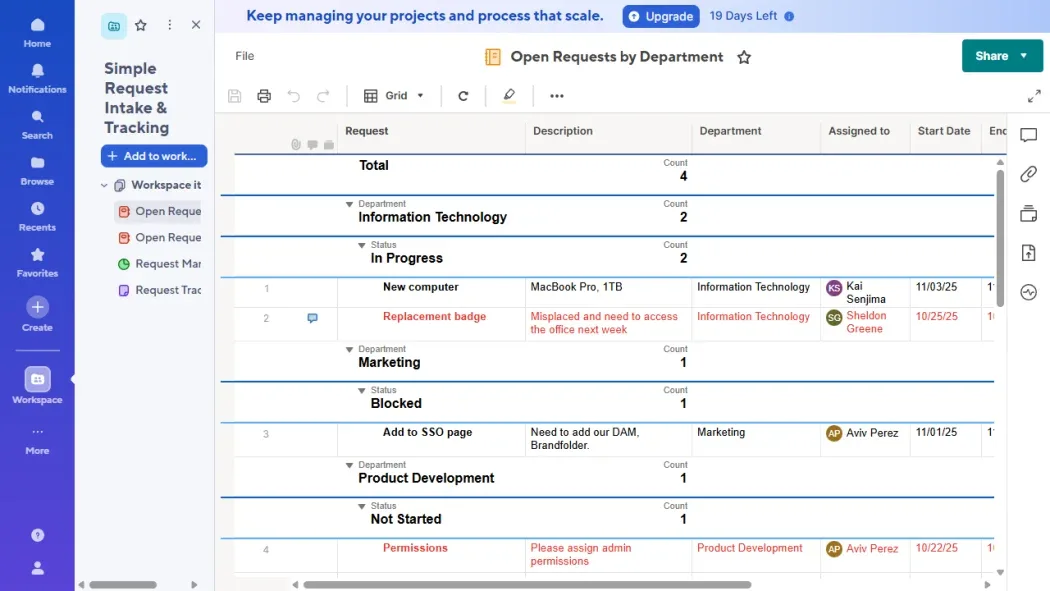
This Smartsheet review starts from the platform's core identity: a work management tool built around a spreadsheet interface rather than the card based boards most competitors default to.
That choice matters more than it sounds.
Teams already comfortable in Excel or Google Sheets tend to adapt to Smartsheet faster than teams used to Kanban style tools, since rows, columns, and formulas feel native rather than foreign.
Smartsheet layers real automation, reporting, and resource management on top of that familiar structure, aiming at process heavy teams in construction, healthcare, IT, and other industries where structured tracking matters more than visual flair.
This review covers where that combination genuinely pays off and where the platform's cost and complexity start to work against it.
2. Grid Gantt Card and Calendar Views
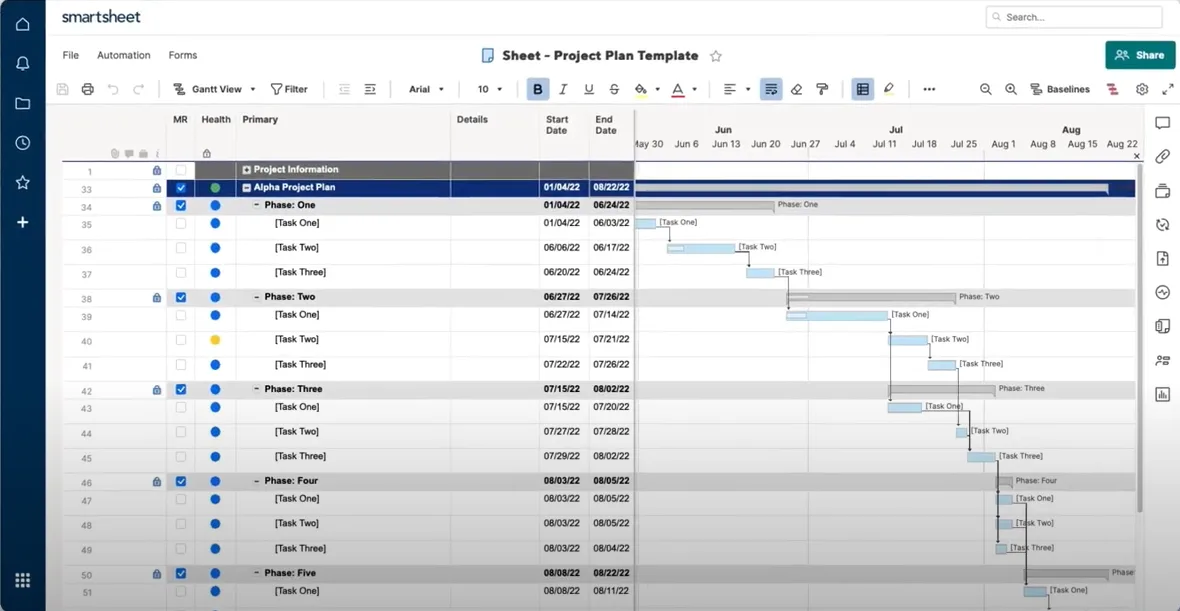
Every sheet in Smartsheet can switch between Grid, Gantt, Card, and Calendar views without duplicating the underlying data, which means a project manager tracking dependencies in Gantt view and a team member checking tasks in Card view are always looking at the same live information.
Gantt view in particular stood out during testing for handling task dependencies and critical path calculations cleanly, a genuine strength for construction and engineering teams managing multi phase projects.
Card view feels closer to a traditional Kanban board for teams less comfortable in spreadsheet mode, giving Smartsheet reasonable flexibility across different working styles on the same underlying dataset.
3. Automated Workflows and Their Real Limits
Automations trigger actions like status updates, approval requests, or notifications based on conditions set within a sheet, cutting down on manual follow up for repetitive processes.
The Pro plan caps this at two hundred fifty automation runs per month, which sounds generous until a team starts building several automated workflows across multiple sheets simultaneously, at which point that cap gets consumed faster than expected.
Business removes the cap entirely, and that single change is often the real reason teams upgrade rather than any single named feature.
Testing a basic approval workflow, a task reaching a certain status automatically notifying a manager for sign off, worked reliably and saved real manual checking time.
4. Dashboards and Real Time Reporting
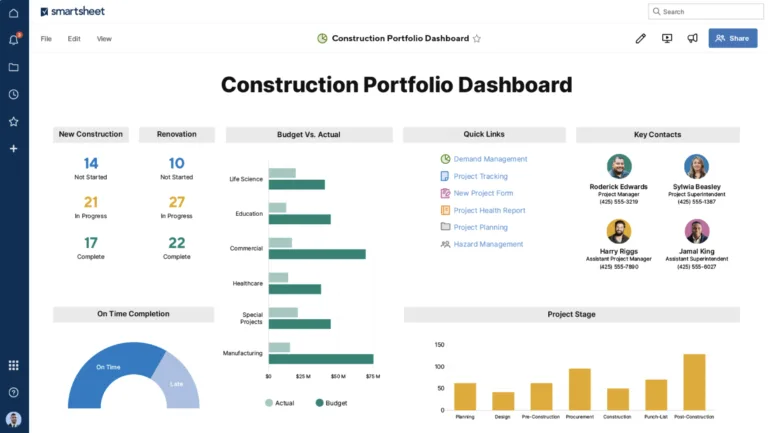
Smartsheet's dashboards pull live data directly from connected sheets into charts, metrics, and widgets, giving managers visibility without needing to manually compile status updates from separate documents.
The Pro plan includes ten dashboard widgets, which covers basic reporting needs for smaller teams, while Business adds more advanced customization and export options suited to teams reporting up to leadership regularly.
Recently added Smart Assist and AI powered dashboard generation tools speed up building these reports from scratch, translating a plain language request into a working dashboard layout rather than requiring manual widget configuration every time.
5. Resource Management for Staffing Decisions
Resource Management, available as an add-on rather than included by default, lets managers see team workload across multiple projects at once, helping avoid the common problem of one person quietly overloaded while another sits underutilized.
It pulls directly from task assignments already in Smartsheet rather than requiring separate manual staffing spreadsheets, and during testing it surfaced a staffing conflict that would have gone unnoticed in a simple task list view.
This is a genuinely valuable feature for organizations running multiple concurrent projects with shared staff, though it adds a real cost on top of the base subscription, and teams should confirm the actual price directly with Smartsheet before assuming it is included.
6. Control Center for Scaled Project Rollouts
Control Center standardizes how new projects get created across an organization, letting administrators define a template once and roll it out consistently rather than relying on individual project managers to set up structure from scratch every time.
This matters most for organizations running dozens of similar projects, franchise operations, construction portfolios, or repeated client engagements, where consistency across projects saves real administrative overhead.
Smaller teams running one or two projects at a time will get little value from this add-on, and it is one of the clearer cases where Smartsheet's premium apps target enterprise scale rather than general use.
7. Dynamic View for External Stakeholder Access
Dynamic View lets organizations share a filtered, permission controlled version of a sheet with external stakeholders, clients, contractors, or vendors, without exposing the full underlying data those parties should not see.
This solves a real problem that a standard shared sheet cannot: giving outside collaborators visibility into their specific portion of a project without a manual export process every time something changes.
Testing it with a sample external view confirmed permission boundaries held correctly, only visible rows and columns configured for that view appeared even when the underlying sheet contained far more.
8. Integrations With Existing Business Tools
Smartsheet connects natively to Microsoft Office 365, Google Workspace, Slack, Salesforce, Dropbox, and roughly a hundred other tools, which matters for teams unwilling to rebuild their entire tech stack around a single new platform.
Data Shuttle adds scheduled, automated imports from external data sources, and DataMesh links data across separate sheets without duplicating it manually, both genuinely useful for organizations managing related data across multiple teams or departments.
These deeper integration tools are priced and licensed separately from the core plans, so it is worth confirming actual availability and cost directly rather than assuming they come bundled with a standard subscription.
9. Security Controls and Compliance Fit
Security scales meaningfully across Smartsheet's tiers, moving from basic single sign on and user management on Pro to admin controls, group management, and scheduled backups on Business, up to SAML based single sign on, directory integration, and custom email domains on Enterprise.
This tiered structure makes Smartsheet a reasonable fit for regulated industries like healthcare and pharmaceuticals, where audit trails and granular permission control matter more than interface polish.
Organizations with strict compliance requirements should confirm specific certifications directly with Smartsheet's sales team, since exact compliance coverage can vary by region and contract.
10. Pricing Structure and Hidden Costs
Smartsheet's headline pricing looks straightforward, Pro at nine dollars per user monthly and Business at nineteen, but the real total cost often climbs once premium add-ons like Resource Management, Control Center, or Dynamic View enter the picture, each priced and licensed separately from the base plan.
The Business plan's minimum of three licensed seats also means smaller teams pay more than the per user price alone suggests.
Anyone comparing Smartsheet against competitors should build out the full expected cost, base subscription plus any add-ons actually needed, rather than comparing sticker prices alone, since Smartsheet's total cost of ownership can differ meaningfully from its advertised starting price.
11. Why You Can Trust This Review
This Smartsheet review is based on direct testing of the Pro and Business plans over several weeks, covering sheet creation, automation setup, dashboard building, and a Dynamic View configuration for external sharing, alongside a review of Smartsheet's official pricing page at smartsheet.com/pricing to confirm current plan structures and costs.
Add-on pricing for Resource Management and Control Center was noted as separate from base plans based on Smartsheet's own published documentation, since exact figures for these were not publicly listed at the time of testing and require direct sales contact to confirm.
Claims that could not be independently verified through testing have been described as stated capabilities rather than confirmed results.
12. Final Verdict on Smartsheet
Smartsheet delivers real depth for teams that already think in spreadsheets and need genuine automation, reporting, and resource management layered on top of that familiar structure.
The Business plan's unlimited automations and admin controls make it the practical landing spot for most growing teams, and the platform's premium apps genuinely solve scaling problems for larger, process heavy organizations.
The absence of a free plan, the three seat minimum on Business, and the growing list of separately priced add-ons make Smartsheet a harder sell for smaller teams on a tight budget.
For structured, process driven organizations willing to invest in the full setup, Smartsheet remains a strong, dependable choice.
13. Frequently Asked Questions
Does Smartsheet have a free plan
No, Smartsheet discontinued its free plan and now offers only a 30 day free trial.
After the trial ends, users must subscribe to Pro, Business, or Enterprise to continue.
How much does Smartsheet cost per user
Smartsheet's Pro plan costs nine dollars per user monthly billed annually, while Business costs nineteen dollars per user monthly with a minimum of three licensed seats.
Enterprise pricing requires contacting Smartsheet's sales team directly.
Is Smartsheet good for project management
Yes, Smartsheet handles project management well, particularly for teams that need Gantt charts, dependency tracking, and automation across structured, recurring workflows in industries like construction and healthcare.
What is the difference between Smartsheet Pro and Business
Business removes the automation cap present on Pro, adds admin controls and workload tracking, and supports unlimited monthly automations.
Pro suits smaller teams with under ten users and lighter automation needs.
Are Smartsheet's premium add-ons worth the cost
It depends on organizational scale.
Tools like Control Center and Resource Management genuinely help larger, multi project organizations, but smaller teams running one or two projects will likely see little return on the added cost.
Key features
- Multiple dynamic views including Grid
- Gantt charts with dependencies
- Kanban style Board view
- Calendar and Timeline options
- Customizable interactive dashboards
- Advanced formulas and calculations
- Cross sheet data references
- Automated workflow triggers
- Unlimited forms with logic
- Comprehensive reporting engine
- Workload and resource tracking
- Portfolio management capabilities
- AI assisted formula generation
- Real time team conversations
- Proofing for visual assets
- Mobile app for iOS and Android
- Hundreds of app integrations
- Enterprise grade security controls
- Document generation tools
- Scenario planning features
Pricing
- Unlimited sheets and forms
- Gantt Board and Calendar views
- Rich formulas and dependencies
- 250 automations monthly
- Unlimited free contributors
- Basic AI tools included
- Real time collaboration
- Mobile access full featured
- Standard security controls
- Basic reporting options
- Everything in Pro plan
- Unlimited automations
- Timeline view and workload tracking
- 1 TB attachment storage
- Admin controls and insights
- Advanced proofing tools
- Publishable dashboards
- Group management features
- Custom branding options
- Enhanced integrations
- Everything in Business plan
- Unlimited storage and advanced AI
- SAML SSO and directory sync
- Portfolio and scenario planning
- Enterprise admin tools
- Data retention policies
- Premium support options
- Custom security add ons
- Advanced governance features
- Dedicated account management
Pros & cons
Pros
- Highly flexible sheet customization
- Strong cross sheet reporting
- Powerful no code automation
- Familiar spreadsheet interface
- Excellent real time collaboration
- Robust Gantt and timeline tools
- Solid mobile experience
- Enterprise security features
- AI enhancements speed tasks
- Unlimited sheets and reports
- Effective workload tracking
- Scales well for large teams
Cons
- Steep learning curve for beginners
- Setup requires significant time
- Higher tiers get expensive fast
- Limited offline capabilities
- Some features feel spreadsheet heavy
- Automations limited in lower plans
- Interface can appear dated
- Complex for simple task lists
- Attachment storage varies by plan
- Support basic on entry plans
- Customization takes practice
- Not ideal for non technical users
Our verdict
Smartsheet stands out as a capable platform that blends spreadsheet familiarity with serious project and workflow management capabilities. It excels for teams that need structure, automation, and visibility across multiple projects without switching between disparate tools. The platform shines in environments where cross functional coordination and data driven decisions matter most, such as marketing operations, IT projects, construction, and professional services.
Contact SalesReader reviews
Be the first to review
