
UKG Review: HR and Payroll Tools for Growing Teams

By Nathan Cole & Zari M'Bale · Reviewed by Afonso Macosso
UKG review covering HR, payroll, workforce management, AI and pricing, helping businesses assess its capabilities, limitations and fit before choosing a platform.
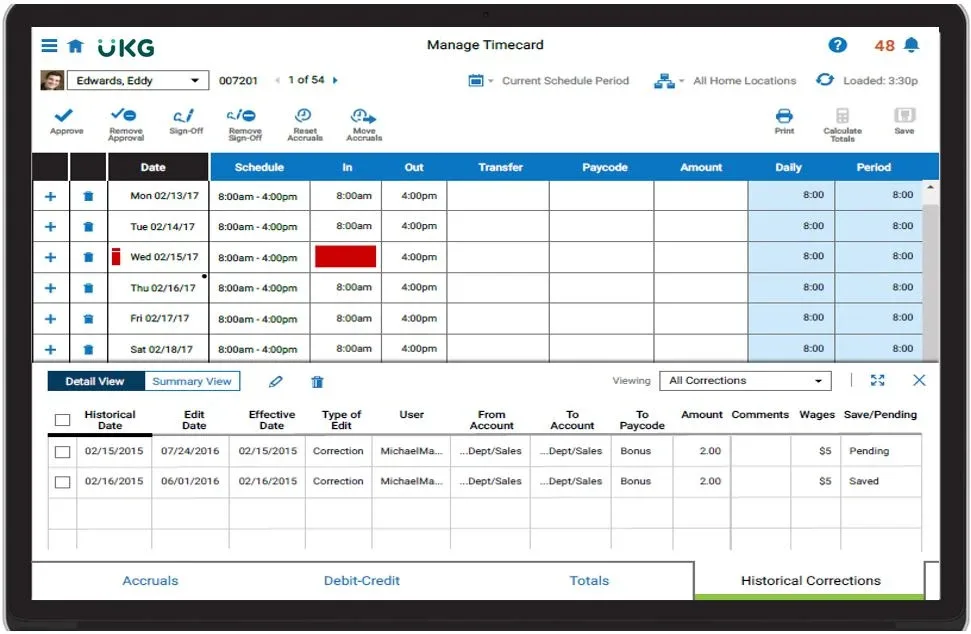
Table of contents
- 1. UKG HR and Payroll Platform
- 2. UKG Ready and UKG Pro
- 3. UKG Employee Records and HR Workflows
- 4. UKG Payroll Processing and Accuracy
- 5. UKG Timekeeping and Scheduling
- 6. UKG Benefits and Talent Management
- 7. UKG Reporting and Workforce Analytics
- 8. UKG Mobile Access and Bryte AI
- 9. UKG Security and Data Protection
- 10. UKG Integrations and Deployment
- 11. UKG Pricing and Contract Structure
- 12. UKG Alternatives and Business Fit
- 13. UKG Review Method and Evidence
- Frequently Asked Questions
1. UKG HR and Payroll Platform
UKG helps organisations manage people, payroll, time and workforce operations through connected software designed for different business sizes.
UKG review begins with a distinction that matters to buyers: UKG is a product family, not a single identical application.
UKG Ready combines core HR, payroll and workforce tools for growing organisations, while UKG Pro serves broader human capital management needs.
The right choice depends on employee numbers, operational complexity, required modules and existing systems.
Buyers should evaluate the specific product and configuration they will receive rather than assuming every capability is included across the UKG portfolio.
HR software becomes valuable when it reduces repeated administrative work and gives employees, managers, payroll specialists and HR professionals a dependable way to complete routine tasks.
Employee records, time entries, payroll information, benefits administration and workforce reporting are often handled across different applications.
Connecting those activities can reduce duplicate entry and help teams work with more consistent information.
UKG addresses these needs through products that combine selected workforce functions.
The breadth of the portfolio is useful for organisations that want to consolidate systems or expand capabilities over time.
It can also make the purchasing process more demanding.
Buyers need to identify which functions are included, which require additional modules and which depend on external integrations or services.
A smaller employer may mainly need employee records, payroll processing, benefits and time tracking.
A larger organisation may need sophisticated scheduling, talent management, advanced reporting and connections with several business systems.
Those are different purchasing scenarios, even when both businesses describe their requirement as HR software.
The most useful evaluation begins with daily work.
Follow an employee from hiring through onboarding, time recording, payroll, leave requests and eventual changes in employment status.
Then examine the same processes from the perspective of a manager, an HR administrator and a payroll specialist.
This reveals whether the proposed configuration will genuinely simplify work or introduce new administrative steps.
2. UKG Ready and UKG Pro
UKG Ready and UKG Pro are two major product families to compare when evaluating the company’s HR software.
Their purposes overlap in several areas, but the products are positioned for different levels of workforce complexity.
UKG Ready brings together HR, payroll, benefits, talent, time and scheduling capabilities.
It is intended for small and midsize organisations that want connected workforce administration.
Its package structure gives buyers a way to select a foundational set of capabilities and add certain functions according to business requirements.
UKG Pro provides a broader human capital management environment.
Depending on the modules selected, it can support HR administration, payroll, workforce management, HR service delivery, talent processes and employee experience requirements.
It is particularly relevant to larger employers and organisations with more demanding workforce operations.
The difference is not determined by headcount alone.
A company with several hundred employees working rotating shifts may have more complicated scheduling and payroll needs than a larger organisation with mostly salaried staff in one location.
Industry, geography, pay rules, regulatory obligations and the number of existing systems all influence the decision.
UKG Ready has four package options.
Start is intended for organisations with fewer than 200 employees that want a simplified implementation.
Core provides a foundation for HR, payroll and workforce management.
Plus includes Core with three additional capabilities selected from the available options.
Advanced includes Core with six additional capabilities.
The selectable options for Plus and Advanced include recruiting, performance, learning, leave, scheduling, compensation, document management, people assistance, expense tracking and the Great Place To Work Hub.
Buyers should confirm the current package details and any eligibility requirements directly with UKG.
Do not assume that choosing a product gives access to every capability associated with the UKG brand.
Ask for a written list of modules, service inclusions, integration requirements and implementation deliverables.
The document should identify any capability that requires additional licensing or a separate agreement.
A sensible product decision is based on the workflows the organisation must support today and those it reasonably expects to add later.
Buying too little can leave important processes disconnected.
Buying too much can increase cost and administrative complexity without improving daily work.
3. UKG Employee Records and HR Workflows
Employee records form the foundation of HR administration.
UKG provides tools for maintaining workforce information and supporting routine processes such as employee changes, document handling and approvals.
When these activities are organised in a shared system, authorised staff can work from more consistent records instead of relying on separate spreadsheets and local files.
Consider a promotion.
The change may affect job title, reporting line, compensation, payroll and access permissions.
If each department maintains its own records, HR may need to notify several teams and verify that every system has been updated.
Connected workflows can reduce the number of manual handoffs, provided the system has been configured to reflect the organisation’s policies.
The same principle applies to onboarding, transfers, employee departures and personal information changes.
Defined forms and approval routes can help standardise the steps required for each process.
This improves consistency and makes it easier to identify incomplete requests.
Automation must still reflect the company’s actual rules.
A workflow should make it clear who approves a change, which information is mandatory and what happens when a request is rejected.
Poorly designed automation can make a flawed process faster without correcting its underlying problem.
Data quality is another important factor.
An organisation moving from spreadsheets or an older HR system may discover duplicate employee profiles, inconsistent job titles, missing information and outdated records.
Those problems should be addressed before migration.
Otherwise, the new platform inherits the same inconsistencies and may make them harder to identify.
Before implementation, assign ownership for each category of employee data.
Define who can create records, approve changes, correct errors and access sensitive information.
Managers generally need a different level of access from payroll administrators or HR leaders, so permissions should reflect responsibilities rather than convenience.
Buyers should also ask how employee records can be exported, corrected and retained.
These questions matter if the organisation changes systems later or needs to respond to a data access request.
Clear ownership and retention procedures help avoid a situation in which the company depends on one administrator to understand how its employee information is maintained.
UKG can provide a more structured approach to HR administration, but the result depends on the quality of the source data and the design of the workflows.
A well configured system supports a disciplined process.
It does not replace the need for one.
4. UKG Payroll Processing and Accuracy
Payroll is one of the most sensitive functions in any workforce system.
Employees expect to be paid correctly and on time, while finance teams need records that can be reconciled and explained.
UKG provides payroll capabilities designed to work with employee and workforce information, helping reduce the need to transfer data manually between disconnected systems.
Connected employee records can support payroll changes such as pay rate updates, job changes and employment status adjustments.
Time and attendance data can also feed payroll processes where the selected product and configuration support that workflow.
This can reduce duplicate entry, although it does not remove the need for approval, reconciliation and exception handling.
The complexity of payroll varies considerably.
Salaried employees with standard pay arrangements create a different workload from hourly staff with overtime, shift differentials, multiple positions, premiums and different pay rules.
Businesses should test their actual scenarios during the buying process rather than relying on a standard demonstration.
Ask the vendor to show how the proposed system handles missed time entries, late approvals, retroactive changes, corrections and off cycle payments.
If employees work at multiple locations or under different rules, those situations should be included in testing.
A payroll product should be judged on its ability to handle the cases that routinely occur in the business, not only the easiest examples.
Tax services, filing support and payroll coverage can vary by product, country and contract.
An organisation operating across several jurisdictions must confirm the services available for each relevant location.
It should not assume that the capabilities advertised across the full UKG portfolio are automatically included in every proposed package.
Implementation testing is essential.
Where appropriate, payroll teams should run parallel calculations using the existing process and the new configuration.
Differences need to be investigated, documented and resolved before the new system becomes the production source for pay.
Simply adjusting a total until it matches can conceal a configuration error that will reappear later.
Buyers should examine audit trails, payroll approval rights, exception reports and the process for correcting errors.
Ask how administrators can identify unusual changes and how the system records who approved them.
The answers help establish whether the platform supports the organisation’s internal controls.
UKG is worth considering when a business wants payroll to operate alongside HR and workforce processes.
The decision should depend on the exact payroll services offered, the complexity of pay rules and the quality of the implementation plan.
A feature list alone is not enough to establish that a particular configuration is suitable.
5. UKG Timekeeping and Scheduling
Timekeeping and scheduling are particularly important for employers whose operations depend on hourly staff, changing shifts or specific staffing levels.
UKG offers time and attendance capabilities across its portfolio, while more advanced workforce management functions are available through selected products.
Timekeeping helps record working hours, manage approvals and identify exceptions.
Depending on the configuration, workflows may support missed clock entries, overtime alerts, time off requests and attendance rules.
These capabilities can reduce manual correction work and improve the consistency of information used for payroll.
Scheduling addresses a different problem.
Managers need to assign employees to shifts while considering coverage, availability, qualifications, labour costs and applicable rules.
In environments such as healthcare, retail, manufacturing, logistics and hospitality, the schedule can directly affect service quality and operating costs.
The required level of sophistication should determine the product choice.
A small business with predictable hours may need only basic clocking, approval and schedule management.
A hospital or large retailer may need more advanced scheduling and forecasting capabilities across many departments and locations.
During a demonstration, test situations that commonly create administrative work.
These might include an employee missing a clock entry, a shift swap, an unexpected absence, a late timesheet approval or an employee working at a different location.
Ask how the manager discovers the issue, how the employee is notified and how the correction affects payroll.
The connection between timekeeping and payroll deserves special attention.
A useful demonstration should show the complete process from time capture through approval to payroll processing.
If the organisation must export files, reenter values or manually reconcile several systems, those steps should be included in the cost and operational assessment.
Scheduling also depends on good management practices.
Software cannot fix chronic understaffing, unclear approval responsibilities or last minute changes that are communicated poorly.
The company needs policies for publishing schedules, requesting changes and approving exceptions.
The platform should support those policies instead of becoming a substitute for them.
Buyers should clarify which time clocks, mobile options and other devices are supported by the proposed configuration.
Where biometric data or location information is involved, they should also review applicable laws, privacy notices, retention periods and employee communication requirements.
UKG can be a strong candidate for organisations that need time records and staffing processes connected with HR and payroll.
However, advanced workforce management should be purchased because it solves a defined operational problem, not simply because it appears in a broader product catalogue.
6. UKG Benefits and Talent Management
Benefits and talent management cover several distinct activities, so buyers should assess each one separately.
UKG Ready offers capabilities in areas such as benefits, recruiting and performance, while additional functions can be selected through its package structure.
UKG Pro supports broader human capital management requirements, subject to the products and modules included.
Benefits administration involves maintaining eligibility information, managing employee enrolment and communicating relevant details.
The business must understand how its selected configuration handles changes in employment status, enrolment periods and information shared with benefits providers.
Some processes may depend on integrations or external services, so inclusion should be confirmed before purchase.
Leave management also needs to reflect company policy.
Employees may submit requests, managers may approve them and HR may need to monitor balances or eligibility.
Different countries and employee groups can have different rules.
A buyer should test representative leave scenarios and confirm that the proposed configuration can handle the policies it must administer.
Recruiting tools can support candidate records and hiring stages.
Onboarding workflows can help transfer information from a successful candidate into the employee administration process.
The practical benefit depends on how well the workflow connects recruiters, hiring managers, HR and any external applicant tracking services already in use.
Performance management and learning capabilities may help organisations coordinate reviews, goals, development plans and training records.
However, these functions are not essential for every employer.
Some companies may already have specialist systems that better match their needs.
Replacing those tools should be justified by a clear improvement in workflow, cost or reporting.
Compensation planning may be relevant when an organisation needs structured processes for pay changes or broader compensation decisions.
Document management can help organise employment paperwork, while people assistance tools may support employee questions and service requests.
Availability and scope depend on the product and package.
The main purchasing risk is treating every available module as automatically necessary.
Each additional function can bring licensing, configuration, training and support requirements.
A module that is rarely used may add complexity without delivering meaningful value.
Create a list of talent and benefits processes that the organisation wants to improve.
For each one, identify the current problem, the responsible team and the expected outcome.
Then ask UKG to demonstrate how the proposed module handles that workflow, including exceptions and reporting.
For growing businesses, the ability to add capabilities later can reduce the need for another platform migration.
Even so, the commercial terms for expansion should be clear.
Buyers should understand how additional modules affect subscription costs and whether they require further implementation work.
7. UKG Reporting and Workforce Analytics
Workforce reporting helps managers understand what is happening across the organisation.
Relevant questions include how headcount changes over time, where overtime is increasing, how absence affects staffing and whether labour costs are moving beyond budget.
UKG offers reporting and analytics capabilities, although the available reports and degree of customisation depend on the product and configuration.
Different teams need different information.
HR may focus on employee movement, recruitment and retention.
Payroll may need reconciliations, exception reports and confirmation that approved time data has been processed correctly.
Operations may want to understand staffing coverage, overtime and attendance patterns.
Finance may need consistent labour cost information for budgeting and financial reporting.
A dashboard can make information easier to access, but its value depends on the quality of the underlying data.
If employee categories are inconsistent or departments calculate metrics differently, reports may create disagreements instead of supporting decisions.
Organisations should agree on definitions for measures such as headcount, turnover, overtime and absence before relying on them for management decisions.
Buyers should ask UKG to demonstrate reports using questions relevant to their organisation.
For example, can a manager identify which departments are generating the most overtime?
Can HR compare workforce movement across locations using consistent definitions?
Can payroll investigate a discrepancy between approved time and processed pay?
Can finance obtain the information needed for its normal reconciliation process?
The answers reveal whether the platform provides the right level of detail.
A standard dashboard may be sufficient for one business, while another may need configurable reporting, data exports or a connection to a business intelligence platform.
Additional tools may be useful, but they introduce their own administration, access controls and maintenance requirements.
Reporting permissions are equally important.
Workforce reports can contain compensation details, personal information or other sensitive data.
Access should be restricted according to job responsibilities, and exported files should be covered by the organisation’s information handling rules.
Analytics should also lead to action.
A report that identifies rising overtime is useful only if managers can investigate the cause and make an appropriate change.
Workforce insights may reveal a pattern, but operational leaders still need to consider staffing needs, employee availability, workload and service requirements.
UKG’s reporting capabilities are most valuable when they reduce manual spreadsheet preparation and make recurring questions easier to answer.
Before buying, confirm the reports available in the proposed configuration, the flexibility of filters and exports, and any additional requirements for advanced analytics.
8. UKG Mobile Access and Bryte AI
Mobile access can make workforce software more practical for employees who rarely work at a desk.
Depending on the product and configuration, UKG mobile experiences can support selected employee and manager tasks, such as checking workforce information, reviewing schedules and handling requests.
For frontline employees, the value lies in completing supported tasks without relying on a desktop computer or contacting HR for every routine question.
Managers may also benefit from reviewing approvals or workforce information while away from their office.
The exact tasks available through mobile access should be verified for the product being considered.
A demonstration should use the devices and workflows employees will actually use.
Check how users authenticate, whether notifications are useful, how clearly the app displays schedules and whether managers can complete essential approvals.
Accessibility, language support and the needs of employees with limited digital experience should also be considered.
UKG promotes Bryte AI as part of its AI capabilities.
The available functionality depends on the product and configuration, so buyers should ask which Bryte AI features are included in the proposed package.
They should also clarify whether additional licensing, configuration or access requirements apply.
AI should be evaluated by the task it performs, not by the presence of the label itself.
Ask what information the feature uses, what kind of assistance it provides, how users can verify its output and whether a human must approve the result.
Those questions are particularly important when AI is involved in HR decisions or access to sensitive employee information.
An AI assistant may help people find information, navigate a supported process or receive relevant guidance.
It should not be assumed to make every employment decision correctly or to understand every local policy.
Hiring, compensation, performance and disciplinary decisions require appropriate human judgement and organisational controls.
Businesses should establish rules for access to AI features, especially when employee records or confidential information may be involved.
Employees need to understand what the system can do, what it cannot do and where to report an inaccurate or inappropriate response.
Mobile access and AI can reduce friction when they make common tasks easier.
They are less valuable when the workforce does not need the features, employees cannot use them reliably or the organisation has not defined the boundaries for sensitive information.
Buyers should test these functions with representative users rather than judging them solely from a product presentation.
9. UKG Security and Data Protection
HR software handles information that requires careful protection.
Employee records, compensation details, benefits information and time data can be sensitive, and some workforce configurations may involve biometric information.
Security should therefore be considered during product selection and implementation, not treated as a final checklist item.
UKG provides a Trust Center with security, privacy and governance information for its solutions.
The company also publishes information about its privacy and cybersecurity practices.
The relevant documentation and contractual commitments should be reviewed for the exact product and services being purchased.
Buyers should ask how access is granted, reviewed and removed.
They should confirm whether the proposed configuration supports the organisation’s identity and authentication requirements, how administrative privileges are restricted and what records are available for auditing important actions.
Security requirements may vary according to the customer’s existing environment and the product selected.
Data protection responsibilities are shared.
UKG provides services and contractual safeguards, while the customer remains responsible for decisions such as which employee information to collect, who should access it and how the system should be configured for internal policies.
Organisations should also establish retention rules and procedures for handling employee requests.
For businesses operating in multiple countries, data location and cross border processing deserve specific attention.
Ask where information is processed, which third party service providers may be involved and what terms govern those arrangements.
The answers should be considered alongside the organisation’s legal obligations and internal risk policies.
Biometric timekeeping requires particular care.
If a proposed deployment uses biometric data, the employer should verify the legal basis for processing, notice and consent requirements where applicable, retention rules and any alternative methods that may be needed.
The availability of a biometric feature does not mean its use is appropriate in every jurisdiction.
Compliance tools can help an organisation maintain documentation and apply rules consistently, but software does not guarantee compliance.
Employment and privacy obligations depend on jurisdiction, business practices and the way the system is configured.
Qualified legal and security advice may be necessary for complex deployments.
Before signing a contract, request the relevant security documentation, data processing terms, incident response details and service commitments.
Have the appropriate security, privacy and legal stakeholders review them.
This is more dependable than relying on general claims made during a sales demonstration.
10. UKG Integrations and Deployment
UKG may need to exchange information with accounting software, identity systems, recruiting tools, benefits providers and business reporting platforms.
The available integration options depend on the product, partner and required workflow.
UKG maintains a Marketplace where customers can explore partner applications and services.
UKG Ready also has a Solutions Exchange for relevant integrations.
Buyers should check the correct catalogue for their product and verify that a listed integration supports the intended use case.
An integration listing does not necessarily mean that every required field and process is supported.
Ask whether the connection is prebuilt, whether configuration work is needed, how often information is synchronised and whether the integration has a separate fee.
A connection that updates information once a day may not be suitable for a process requiring immediate changes.
Implementation involves much more than activating user accounts.
Typical activities include documenting existing processes, cleaning and migrating data, configuring payroll rules, setting permissions, establishing workflows, connecting external applications, testing results and training users.
The exact scope depends on the selected modules and complexity of the organisation.
A project should have a named owner, agreed milestones and a clear process for approving changes.
HR, payroll, finance, IT and operations should participate wherever their work is affected.
If a project is managed only by HR, accounting requirements, access controls or operational scheduling needs may be missed.
Data migration deserves a formal plan.
Existing records should be reviewed for duplicates, missing fields and inconsistent formats before they are imported.
A sample migration can help identify issues early.
The organisation should then reconcile the migrated data and obtain approval from the people responsible for its accuracy.
Testing should cover both routine workflows and exceptions.
Payroll teams should verify representative pay scenarios.
Managers should test approvals, schedule changes and leave requests.
Employees should confirm that self service tasks work as expected.
Integrations should be tested from the point where information is created to the point where it is consumed by another system.
Training should reflect each role.
Administrators need to understand configuration and corrections.
Payroll teams need to know how to review results and investigate discrepancies.
Managers need to handle time approvals and workforce requests.
Employees need clear instructions for common tasks and a way to obtain help.
Do not approve a launch solely because the scheduled date has arrived.
Agree on what must be completed, which defects block deployment and who has authority to delay launch if an essential process is not ready.
A controlled launch is preferable to introducing errors into payroll or employee administration.
Finally, confirm what UKG or its partners will provide after implementation.
Ask about included training, support channels, response commitments, configuration changes and charges for additional work.
These details affect the total cost and the amount of responsibility that remains with the customer.
11. UKG Pricing and Contract Structure
UKG does not publish one universal subscription price that applies to every customer and configuration.
Its pricing process generally requires buyers to request a quote.
Costs depend on the selected product, modules, workforce size, service requirements and implementation scope.
This limits direct price comparison with products that display fixed public subscription rates.
For UKG Ready, the published package structure provides a clearer way to compare scope.
Start is designed for organisations with fewer than 200 employees seeking a simplified deployment.
Core provides a foundational set of HR, payroll and workforce management capabilities.
Plus adds three selected capabilities to Core, while Advanced adds six selected capabilities.
The additional capabilities available for Plus and Advanced include recruiting, performance, learning, leave, scheduling, compensation, document management, people assistance, expense tracking and the Great Place To Work Hub.
Buyers should confirm the current package details and exactly which capabilities are included in their quote.
UKG Pro requires a separate assessment of the enterprise capabilities and services needed.
The proposal should identify the modules included and explain whether payroll services, workforce management, integrations, training and implementation are covered.
A broad product name is not a sufficient description of the commercial commitment.
A useful quote should separate recurring subscription charges from one time costs.
Ask about implementation, data migration, integrations, training, optional modules, support arrangements and future expansion.
Also clarify the contract term, renewal conditions, employee count adjustments and the process for changing the package.
Buyers should compare offers using the same scenario.
Provide each vendor with the same employee count, locations, payroll complexity, integration requirements and essential workflows.
Ask for a written breakdown showing what is included, what costs extra and what would require custom work.
The total cost of ownership is more useful than the subscription price alone.
A platform may cost more but replace several disconnected applications or reduce substantial manual work.
A cheaper offer may become less attractive if it requires extra modules, external services or ongoing spreadsheet work to complete essential processes.
Pricing should also be considered against the organisation’s capacity to implement and maintain the system.
A broad platform can create value when the business has clear processes and people responsible for administration.
If the organisation lacks those resources, the practical cost may be higher than the quote suggests.
Do not treat estimates from unrelated websites as a guaranteed current UKG price.
Public third party figures may refer to different configurations, contract dates or customer circumstances.
Request a quote based on the intended deployment and obtain written confirmation of any requirement that materially affects cost.
12. UKG Alternatives and Business Fit
UKG should be compared with alternatives according to the work the organisation needs to complete.
The strongest competitor for a small employer seeking straightforward payroll may not be the strongest option for a multinational business with complex scheduling and enterprise reporting.
Gusto may be worth considering for eligible smaller businesses that prioritise payroll and related HR administration, subject to its supported countries and available services.
BambooHR is another option to assess when employee records, onboarding and HR workflows are the main requirements.
Rippling may be relevant to organisations looking to connect workforce administration with other business systems.
ADP and Workday should also be considered for buyers evaluating broader payroll or enterprise human capital management requirements.
These products have different strengths, limitations and commercial structures.
Their capabilities vary by plan, country and configuration, so a comparison should be based on verified requirements rather than brand recognition.
A company should not assume that an alternative is cheaper, simpler or more capable without examining the exact package and the services included.
Create a realistic demonstration scenario and give the same requirements to every shortlisted vendor.
Start with a new employee, complete onboarding, update employment information, record working hours, approve time, process payroll and submit a leave request.
Include a correction or exception that forces the system to show how it handles an imperfect situation.
Observe how much work is required from each role.
Can an employee find the relevant information without contacting HR?
Can a manager approve a request quickly?
Can payroll investigate an unusual result?
Can HR update employee information without entering it into several systems?
These details provide a more useful comparison than a feature checklist alone.
Existing technology should also influence the decision.
Replacing a well established accounting system or identity platform may create extra cost and disruption if a reliable integration already exists.
On the other hand, retaining several disconnected applications can make reporting and administration unnecessarily complicated.
Implementation risk belongs in the comparison as well.
Ask each vendor to describe the migration process, customer responsibilities, training, support and conditions that could delay deployment.
A proposal that looks attractive on paper may be difficult to deliver if the organisation has complex data or limited internal project resources.
UKG is most compelling when connected HR, payroll and workforce management can solve real operational problems.
It may be more than a small business needs if only a few basic employee and payroll functions are required.
Businesses with specialised needs should confirm those requirements through a tailored demonstration before committing.
A good shortlist should include products that meet essential requirements, fit the organisation’s working practices and can be supported over time.
The decision should balance capability, usability, total cost, implementation risk and the effort required to keep the system accurate.
13. UKG Review Method and Evidence
This UKG review is based on publicly available product information and official UKG materials covering product scope, package structure, security resources and workforce capabilities.
The evaluation focuses on the issues that affect a purchasing decision, including the relationship between products, workflow coverage, configuration requirements, pricing transparency and implementation responsibilities.
This is not a claim of independent hands on testing or a report of a live customer deployment.
That distinction is important.
A feature appearing on a product page does not establish how well it will perform in a specific organisation, nor does it prove that the capability is included in a particular quote.
Official product information helps identify the intended purpose of a system and the options a buyer can investigate.
The final contractual scope should be confirmed through a product demonstration, a written proposal and the applicable service documentation.
Buyers should seek specific confirmation of requirements that affect payroll, legal compliance, business continuity or employee data.
The most credible evaluation combines product research with a structured demonstration.
The organisation should prepare representative workflows and ask UKG to show how each one operates in the proposed configuration.
Important questions should be recorded, answered and reflected in the commercial proposal rather than left as informal assurances.
A useful review also recognises that software quality depends on implementation.
Data quality, workflow design, training, user adoption and ongoing administration all influence results.
A platform can offer suitable features while still producing a disappointing outcome if the organisation does not assign ownership or test the system properly.
For a purchasing team, the practical next step is to document the essential requirements, distinguish mandatory features from optional ones and request a quote that covers the full intended deployment.
The team should then compare UKG with alternatives using the same scenarios, cost categories and implementation assumptions.
The evidence supports a conditional conclusion: UKG offers a broad portfolio for HR, payroll and workforce management, with different product families for different needs.
Whether it is the right choice depends on the specific product, the included modules and the organisation’s ability to implement and operate it successfully.
Key features
- Centralised employee record management
- Integrated human resources administration
- Payroll processing and pay administration
- Time and attendance tracking
- Basic employee scheduling capabilities
- Advanced workforce management options
- Benefits administration and eligibility management
- Recruitment and candidate management tools
- Employee onboarding workflow support
- Performance management module options
- Learning management module options
- Leave requests and accrual tracking
- Compensation planning capability options
- Employee document management tools
- Workforce reporting and analytics
- Labour cost visibility and insights
- Employee and manager self service
- Bryte AI assisted guidance
- Configurable employee approval workflows
- Compliance resources and management tools
- Third party integration marketplace
- Workforce data export capabilities
- Employee mobile access options
- Multiple UKG product configurations
- Scalable workforce management capabilities
Pricing
- Core human resources capabilities
- Payroll services with SmartCheck
- Time and basic scheduling
- Benefits and talent capabilities
- Bryte AI assistant access
- Centralised HR administration workflows
- Payroll processing and employee pay
- Time tracking and basic scheduling
- Benefits and compliance management
- Workforce insights and Bryte AI
- Everything included in Ready Core
- Select six additional workforce capabilities
- Recruiting and performance management options
- Learning and compensation planning options
- Document and expense management options
Pros & cons
Pros
- Connects HR and payroll information
- Supports workforce time tracking workflows
- Offers flexible Ready package options
- Combines multiple core HR processes
- Provides advanced workforce management options
- Supports employee and manager self service
- Includes workforce reporting and analytics
- Offers selectable talent management modules
- Provides integration discovery through marketplaces
- Supports complex scheduling requirements through WFM
- Publishes security and privacy documentation
- Allows additional capabilities as needs grow
Cons
- Public subscription prices are unavailable
- Implementation can require substantial coordination
- Feature availability varies between products
- Some capabilities require additional modules
- Integrations need individual compatibility checks
- Payroll rules require careful configuration
- Data migration requires advance preparation
- Reporting may require further customisation
- Custom quotes complicate price comparisons
- Training is needed across user roles
- Complex deployments require internal project ownership
- Smaller businesses may not need everything
UKG specs
- Platforms: Web browser and supported mobile devices
- Free plan: No publicly listed free plan
- Starting price: Contact sales for a quote
- Integrations: UKG Marketplace and Solutions Exchange
- Support: Customer support and implementation services
- Best for: Growing businesses and complex workforces
Our verdict
UKG is a strong candidate for organisations that want HR administration, payroll and workforce management connected within a broader software environment. UKG Ready offers a package based approach for growing businesses, while UKG Pro addresses more extensive human capital management requirements. Its main advantages are breadth, selectable capabilities and the potential to reduce manual work across workforce processes. The main considerations are custom pricing, implementation demands and the need to verify exactly which modules and services are included. UKG is worth shortlisting when workforce complexity justifies a comprehensive platform. Businesses with straightforward needs should compare simpler options before committing. The recommendation is positive for the right operational fit, rather than a universal endorsement.
Contact SalesFrequently Asked Questions
What does UKG software do?
What is UKG Ready?
What is UKG Pro?
Does UKG publish prices?
Can UKG manage employee schedules?
Does UKG support payroll?
Does UKG include artificial intelligence?
Is UKG suitable for small businesses?
Can UKG integrate with other software?
Is UKG worth considering?
Reader reviews
Be the first to review
