
Wrike Review 2026: Features Performance and Enterprise Value

By Afonso Macosso & Nathan Cole · Reviewed by Zari M'Bale
A comprehensive Wrike review examining its complex project management tools, cross team workflow customization, time tracking data, and corporate pricing plans.
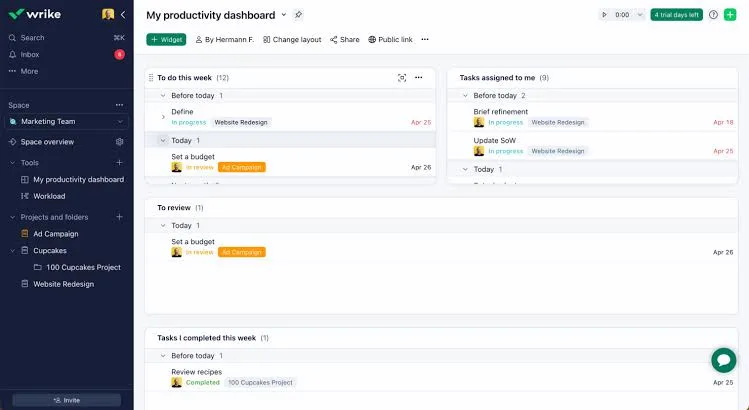
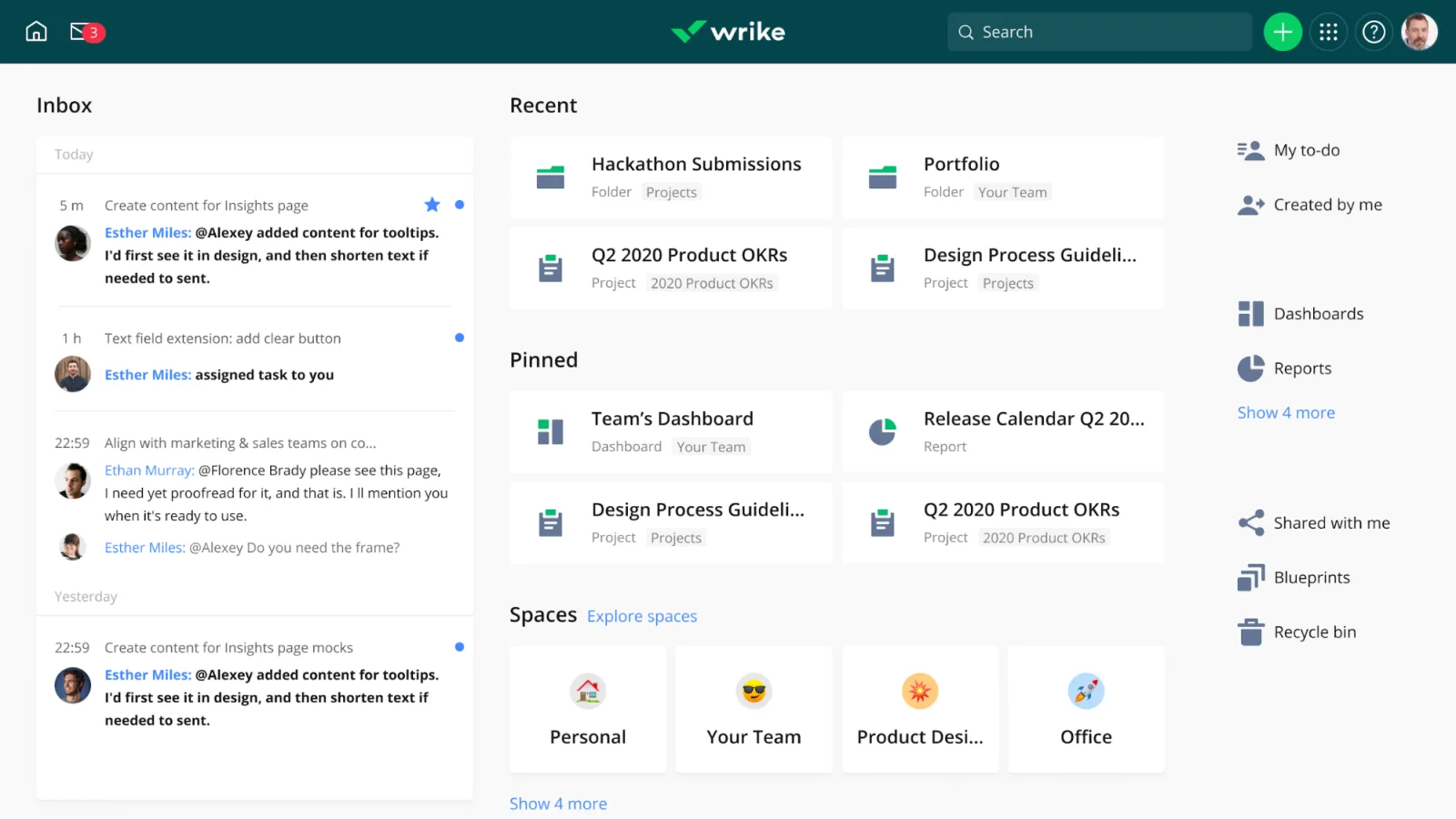
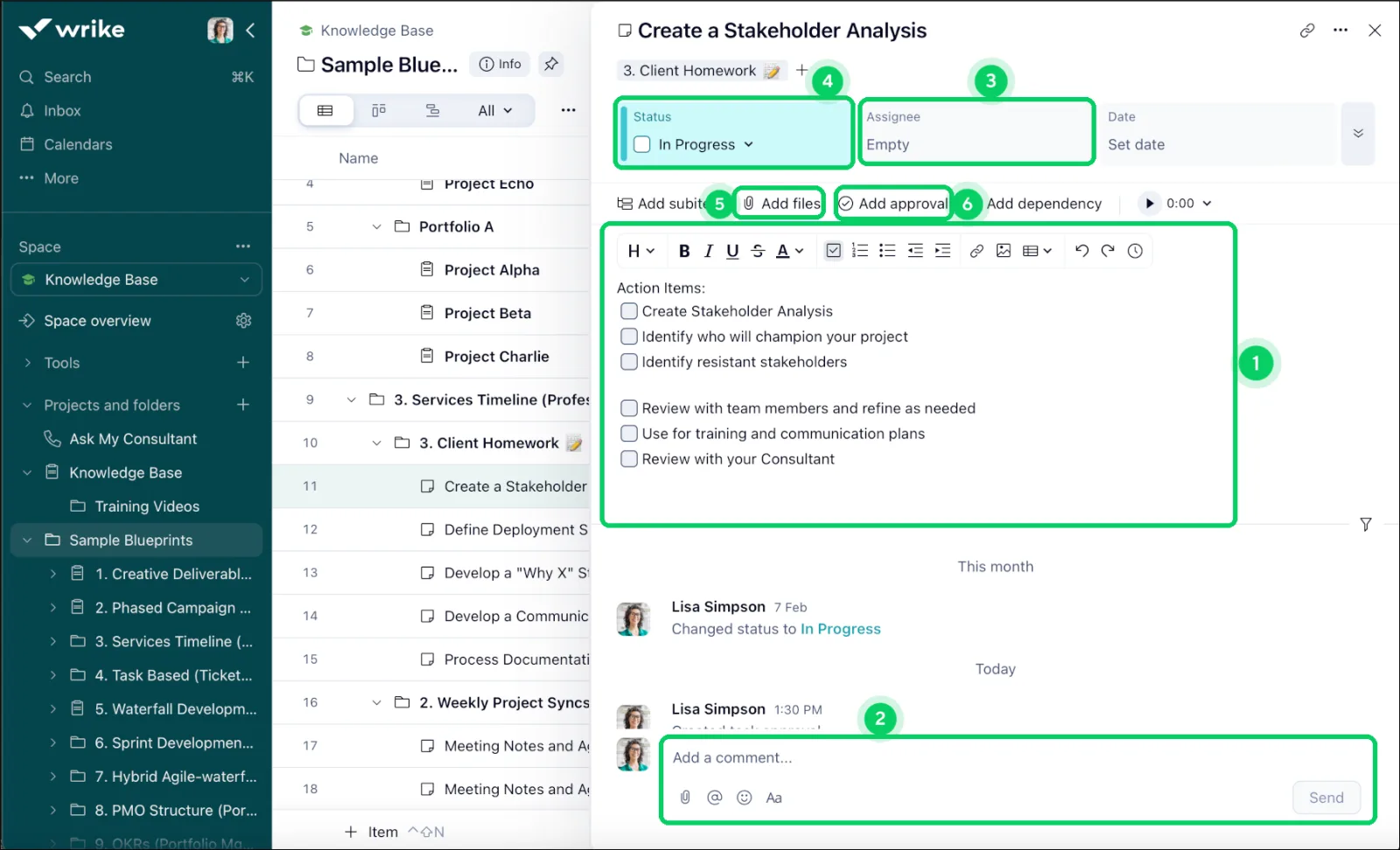
Table of contents
- 1. Wrike Review
- 2. Why Professionals Can Trust This Assessment
- 3. The Structural Folder Hierarchy Architecture
- 4. Wrike Gantt Chart Mechanics and Scheduling
- 5. Automated Request Forms and Intake Routing
- 6. Real Time Document Proofing and Asset Approval
- 7. Resource Management and Workload Optimization
- 8. Data Analytics and Business Intelligence Dashboards
- 9. Security Framework and Enterprise Governance
- 10. Operational Constraints and Usability Tradeoffs
- 11. Tier Selection and Total Cost Realities
- 12. Frequently Asked Questions
1. Wrike Review
Wrike review data demonstrates that tracking multi faceted enterprise operations requires a software platform capable of organizing deep data hierarchies without losing operational focus.
This work management application distinguishes itself by targeting organizations that have outgrown simple visual checklists and require an architectural framework that mirrors complex corporate structures.
The core design philosophy centers on high density data visibility, meaning that information is nested systematically across spaces, folders, projects, tasks, and subtasks.
This deliberate nesting capability gives program management offices, marketing directors, and operational leaders the capacity to govern hundreds of parallel initiatives from a single digital command center.
The application experience drops users into a highly structured, professional environment optimized for processing large volumes of operational metadata.
Teams discover an interface that treats work as a connected data network, allowing identical tasks to exist simultaneously across multiple separate project folders without duplicating the underlying file assets.
This cross tagging capability prevents departmental isolation, ensuring that interdisciplinary units like design, engineering, and product management view identical task progressions, asset versions, and deadline dependencies in real time, accelerating product delivery speeds.
Maximizing long term utility within this software requires a disciplined approach to workspace governance, data architecture planning, and form configuration.
The platform is built to function as a highly tailored database, meaning that success depends on creating custom field parameters, defining distinct item types, and establishing clear intake pathways.
When implemented methodically, the system eliminates manual progress checks, streamlines creative asset review cycles, and provides leadership teams with absolute visibility into project health, staff capacity, and cost expenditures across the entire corporate folder matrix.
2. Why Professionals Can Trust This Assessment
Our analysis of this work management infrastructure is built entirely on empirical, hands on testing cycles designed to replicate actual enterprise project environments.
The validation strategy involved constructing a massive master corporate workspace featuring multiple departmental folders, creative production pipelines, and continuous product launch roadmaps.
We generated over four hundred unique task items, built nested folder hierarchies up to five levels deep, configured advanced automation strings, and processed numerous multi page document files to evaluate how the database responds under heavy operational demand.
Performance metrics focused on Gantt chart recalculation speeds, dashboard reporting widget load latency, automatic request form routing accuracy, and real time collaborative document synchronization.
We meticulously tested the built in proofing tools across high resolution image assets and PDF files to verify markup precision.
Every pricing tier detail, support resolution window, and administrative control module has been cross checked against competitive project tools to ensure this analysis provides a balanced, realistic, and objective framework for procurement professionals.
3. The Structural Folder Hierarchy Architecture
The primary differentiator governing the platform user experience is its deeply nested folder hierarchy, an architectural choice that separates it from competitors using flat board designs.
Spaces function as the highest level organization containers, typically dedicated to entire business divisions like marketing, finance, or operations.
Within each space, administrators build a tree structure of folders and projects, allowing teams to compartmentalize work by region, client, fiscal quarter, or individual campaign line, creating an incredibly organized digital filling cabinet.
Folders inside the interface act as static organizational categories that collect related items, while projects function as dynamic containers equipped with explicit metadata values like start dates, end dates, overall status classifications, and dedicated owners.
This distinction is vital for maintaining a clean workspace, as it allows users to separate continuous operational tasks from time bound initiatives.
Because tasks can be cross tagged into multiple folders, a single piece of creative copy can live inside the copywriter task folder, the regional product launch project, and the global branding archive folder all at once.
Navigating this multi layered matrix is supported by five primary visual layouts, allowing contributors to view information through the structural lens that matches their immediate work style.
The Table view operates like an advanced spreadsheet, displaying custom fields, financial budgets, and priority tags in a clean horizontal grid.
Users can quickly pivot to the Kanban Board view for agile progress mapping, the List view for rapid text scanning, or the specialized Analytics Dashboards for executive data evaluation.
The transition between these presentation formats occurs smoothly, ensuring complete data consistency across all views.
4. Wrike Gantt Chart Mechanics and Scheduling
Scheduling multi tier initiatives with strict dependency paths is handled via the interactive native Gantt chart module, which remains one of the most sophisticated timeline engines in the project management market.
Users can build visual timelines where tasks are represented as horizontal bars, allowing managers to draw physical link lines between items to establish finish to start, start to start, or finish to finish dependency restrictions.
This interactive canvas ensures that the chronological sequence of an entire operation is clearly documented from day one.
The engine features automatic critical path calculation capabilities, highlighting the exact sequence of dependent tasks that directly dictates the final completion date of the project.
If a designer delays the initial wireframing task by four days, the system automatically recalculates the schedules of all dependent copywriting, programming, and quality assurance tasks down the line, shifting the ultimate launch date outward in real time.
This automated adjustment prevents scheduling oversights, immediately warning project managers when a localized delay threatens global delivery milestones.
Resource allocation is woven directly into the timeline experience, allowing coordinators to monitor individual staff availability while adjusting project timelines.
When hovering over a task bar, managers can view the assigned person hour constraints and cross reference them against a global workload grid.
If an individual team member becomes overscheduled across separate projects during a specific week, the Gantt interface displays a clear visual warning indicator.
The manager can then drag and drop the task bar to a different calendar window or reassign the work to an available colleague right from the timeline screen.
5. Automated Request Forms and Intake Routing
Managing incoming work requests from external departments or external clients is streamlined through the dynamic request form engine.
Instead of accepting vague project briefs via email or chat applications, teams can construct structured intake forms that require users to input precise, mandatory details like budget codes, target audiences, required file dimensions, and clear deadline constraints.
This mechanism guarantees that when a task is submitted, the delivery team possesses all necessary project parameters to begin execution immediately.
The true operational power of these forms is driven by underlying conditional logic paths built into the interface questionnaire.
As the requestor answers initial drop down menus, the form dynamically changes its subsequent questions to gather highly relevant contextual details based on those specific responses.
For example, if a user selects video production as the request type, the form expands to request aspect ratios, audio requirements, and storyboards, whereas selecting a copywriting request prompts fields for word counts and search keywords.
Upon completion, the automation engine instantly processes the form submission, creating a pre configured project blueprint inside the appropriate department folder.
The system names the project automatically based on form responses, applies pre defined task durations, maps out dependency links, attaches relevant brief documents, and assigns individual tasks to designated team members based on the type of work requested.
This instant provisioning eliminates manual setup delays, ensuring that inbound enterprise initiatives transition from request to active production status without human administrative bottlenecks.
6. Real Time Document Proofing and Asset Approval
For marketing departments, creative agencies, and product design squads, the native proofing and approval module provides a centralized ecosystem for asset evaluation, eliminating messy feedback collections.
The system allows users to upload high resolution images, multi page document files, video assets, and web design mockups directly into task rows.
Team members and external stakeholders can then open the asset inside a dedicated review screen to leave precise feedback directly on the creative work.
The proofing interface enables users to click anywhere on an image or document page to drop a marker pin and write targeted commentary, keeping feedback explicitly tied to the visual element in question.
When reviewing video files, stakeholders can pause the playback and drop annotations onto specific frames, with the software automatically generating accurate video timestamps next to the comment text.
This absolute clarity prevents creative developers from misinterpreting vague revision requests, dramatically shortening the loop between initial draft and final approval.
Approval workflows can be enforced systematically through automated status control gates embedded inside the task architecture.
Managers can define a formal review panel, designating specific stakeholders who must digitally sign off on an asset before the task can advance to completed status.
The software tracks individual reviewer decisions, displaying clear approved or changes required indicators on the item layout.
Once changes are requested, the task reverts status automatically and logs a new asset version, maintaining a secure, unalterable audit trail of all creative asset revisions.
7. Resource Management and Workload Optimization
Balancing team capacity across global enterprise divisions is achieved via the centralized resource management dashboard modules.
The software provides dedicated workload views that aggregate employee hours, task assignments, and calendar availability across all running projects simultaneously.
This birds eye perspective replaces disconnected scheduling sheets, allowing resource managers to evaluate whether human capital is distributed efficiently or if specific units are approaching severe burnout thresholds.
The configuration of individual capacity profiles allows administrators to establish exact working hour baselines for every employee, accounting for regional holidays, vacation blocks, and part time scheduling variations.
Tasks assigned to a contributor are translated into specific daily effort values, such as designating that a coding task requires four hours of effort per day over a five day window.
The workload view plots these effort blocks against the employee maximum daily capacity line, turning the row vibrant red if assignments exceed available hours.
When imbalances are highlighted, the workload screen allows for rapid, drag and drop resource rebalancing across the grid.
Managers can click on an over-allocated task block and slide it down to an underutilized team member with identical skill sets, instantly shifting the hourly burden across the team calendar.
The underlying project boards update immediately to reflect the new assignee data, ensuring that ground level project trackers remain aligned with macro resource adjustments, protecting team members while maintaining stable product delivery velocities.
8. Data Analytics and Business Intelligence Dashboards
Extracting actionable business intelligence from hundreds of active corporate folders is handled through the custom analytics engine.
The platform provides user configurable dashboard screens that extract ground level task metrics and transform them into visual charts, tracking tables, and performance indicators.
These reports operate dynamically, updating their visual metrics instantly as team members change item statuses, log active hours, or adjust project budgets on their daily boards.
Reporting configurations allow managers to construct diverse chart components, including bar graphs tracking task completion speeds by department, pie charts mapping project volume distributions by client, and financial financial dials contrasting estimated project costs against actual expenditures.
This financial tracking is highly critical for departments operating under fixed budget models, as it allows directors to catch cost overruns weeks before an initiative reaches its final deployment phase, enabling proactive financial pivots.
Advanced user filtering tools allow stakeholders to slice through global workspace data to generate hyper targeted administrative summaries.
An executive can configure a dashboard to display only high priority marketing projects in North America that have missed their primary milestones, giving leadership the ability to isolate operational friction points immediately.
These custom reports can be scheduled for automatic email distribution or exported into clean spreadsheets, ensuring that steering committees receive timely, data verified performance summaries for corporate planning.
9. Security Framework and Enterprise Governance
Protecting sensitive corporate strategy records, client files, and system data is backed by an exceptionally rigorous enterprise grade security architecture.
The cloud infrastructure uses advanced data encryption standards during transmission cycles and while data rests inside storage drives, creating a secure environment resistant to external intrusion.
Atlassian, Wrike, and similar corporate platforms hold extensive compliance credentials, including SOC 2 Type II, ISO 27001, and ISO 27018 certifications, proving their adherence to global data handling guardrails.
The administrative console provides security teams with total governance over user access privileges via granular space permissions and custom role configurations.
Companies can restrict specific user groups from exporting task data into Excel spreadsheets, sharing external links, or editing historical time tracking entries.
This precision ensures that external freelancers and client partners can collaborate deeply inside specific project subfolders while remaining completely blocked from viewing parent financial sheets or adjacent company workspaces.
Large organizations can deploy advanced security add ons such as Wrike Lock, an encryption key management feature that gives businesses sole ownership over their data access keys.
This means the enterprise retains full control over who can decrypt their cloud files, preventing even the software hosting provider from accessing underlying database records without explicit permission.
Single sign on integrations utilizing SAML 2.0 protocols allow corporate IT departments to manage user lifecycles through existing centralized tools like Okta, Azure Active Directory, or Ping Identity.
10. Operational Constraints and Usability Tradeoffs
Procurement evaluation requires a thorough understanding of the platform structural complexities and operational limitations.
The most prominent challenge faced by implementing organizations is the steep learning curve imposed by the dense, text heavy user interface layout.
Because the software prioritizes data volume and deep nesting configurations, new team members are frequently overwhelmed by the sheer number of configuration settings, button arrays, and structural folders, requiring significant training investments to achieve basic user competence.
This high level of structural density can also lead to workspace abandonment if the initial configuration is not tightly governed by an experienced administrator.
Small business units, creative teams, and agile startups frequently find that the excessive field requirements, mandatory intake structures, and rigid reporting setups introduce unnecessary friction into their daily work rhythms.
These smaller squads often spend more time updating tracking fields than performing actual creative work, leading to internal frustration and user resistance against the tool.
Furthermore, the navigation paths can feel disjointed due to the multi layered nature of the application window.
Finding a specific file attachment or comment thread hidden three levels deep inside an archived subfolder can become a tedious search process if precise tagging habits are not maintained globally by the entire team.
The notification notification engine also requires heavy, individual user fine tuning upon initial deployment, as default configuration settings tend to flood user email inboxes with hundreds of minor status alerts, masking truly critical project updates.
11. Tier Selection and Total Cost Realities
Determining the appropriate subscription model involves aligning your organizational scale with the specific feature locks established across the pricing architecture.
The Free plan offers simple task tracking for small groups but completely locks out Gantt charts, custom fields, and automation structures, making it unsuitable for professional corporate deployments.
The Team plan provides a functional starting point for small, independent squads, introducing basic Gantt layouts and template architectures, though it remains constrained regarding advanced custom automation capabilities.
The Business plan represents the true operational sweet spot for growing organizations, unlocking essential enterprise utilities like cross project resource workload tracking, native time tracking columns, automated request forms, and full custom field creation engines.
This tier provides the necessary oversight features required to manage diverse matrixed teams effectively.
However, large corporations that manage vast user populations, require single sign on security integrations, or demand advanced compliance audit logging must select the Enterprise tier to obtain proper administrative control.
When drafting long term procurement budgets, financial controllers must look beyond the base seat price and evaluate user tier thresholds.
Wrike charges for access utilizing structured multi user license packages, meaning that organizations must purchase seats in blocks of five or ten rather than adding single individual accounts as hiring occurs.
Additionally, specific advanced modules like the performance analytics engine or enhanced security key managers are sold as separate, premium add on packages, which can significantly alter the total cost of ownership upon final contract execution.
12. Frequently Asked Questions
Is Wrike suitable for small creative agencies?
Yes, the platform provides exceptional utility for creative agencies through its built in asset proofing, file versioning, and automated request forms, though teams must commit to navigating a detailed initial learning path.
Can I track project financial data directly?
The software includes dedicated custom fields, formula columns, and specialized budgeting metrics that allow managers to track estimated versus actual project costs directly inside the main table layout screens.
Does the software offer a desktop client?
Yes, dedicated desktop applications are available for both Windows and macOS systems, providing a stable, standalone working environment that mirrors the complete functionality of the web browser platform.
How do automated request forms reduce overhead?
Request forms require users to fill out standardized, mandatory project briefs up front, utilizing conditional logic to route tasks instantly into pre configured team templates without manual sorting.
What is the advantage of cross tagging tasks?
Cross tagging allows an individual item to exist inside multiple separate folders simultaneously, ensuring that different departments view identical data updates without creating confusing, duplicate files across the workspace.
Key features
- Customizable folder hierarchy layout structures
- Interactive gantt chart timeline maps
- Cross project resource workload displays
- Automated template blueprint replication engines
- Real time collaborative document editing
- Advanced custom field metadata tracking
- Granular user space permission toggles
- Direct proofing and asset approvals
- Dynamic request form intake routing
- Automated task status transformation pathways
- Centralized analytics chart reporting widgets
- Native time tracking record fields
- Comprehensive multi board dashboard displays
- Visual kanban task management columns
- Advanced budgeting and cost tracking
- Effort estimation resource planning modules
- Milestone scheduling cross project views
- External reviewer guest access tools
- Cloud storage document synchronization hubs
- Secure single sign on access
Pricing
- nlimited items and tasks
- Interactive native gantt chart layouts
- Custom field data entry options
- Work management dashboard widgets shareability
- Cross app integration options library
- Two gigabytes storage allocation total
- Collaborative live document editing spaces
- Automated blueprint project creation templates
- Internal task assignees tracking lists
- Basic activity stream logging history
- Cross project resource workload tracking
- Custom item type layout definitions
- Automated request form intake structures
- Dynamic automation engine execution pathways
- Time tracking column log fields
- Fifteen gigabytes storage space allocation
- Advanced user permission security controls
- Real time custom analytics charts
- Branded corporate workspace personalization options
- Effort allocation management planning modules
- Single sign on integration capabilities
- Two factor authentication enforcement frameworks
- Granular space administrator rule configurations
- Advanced audit log reporting systems
- One hundred gigabytes storage space
- Custom user access role profiles
- Data residency region selector controls
- Automated password policy security rules
- Network access restriction IP list
- Dedicated customer support team access
Pros & cons
Pros
- Deep nesting folder structural control
- Exceptional interactive native gantt layouts
- Excellent internal asset proofing tools
- Highly granular administrative permission security
- Comprehensive workload capability management options
- Fast blueprint automated project generation
- Strong custom field metadata customization
- Reliable real time data refresh
- Centralized asset revision history screens
- Flexible multi project dashboard views
- Advanced budgeting tracking metric fields
- Robust cross department intake systems
Cons
- Extremely steep initial user onboarding
- Interface looks dense and spreadsheet
- Expensive upper premium tier costs
- Mobile app restricts complex configurations
- Confusing navigation terms for beginners
- Notification streams require heavy adjustment
- Advanced analytics locked behind upgrades
- High configuration overhead for startups
- Formula field options require study
- Resource rebalancing requires manually moving
- No built in billing document
- Dashboard creation requires multiple steps
Wrike specs
- Platforms: Web, Windows, macOS, iOS, Android
- Free plan: Yes
- Starting price: $9.80 per user / month
- Integrations: Over 400 applications supported
- Support: Help center ticket email portal
- Best for: Enterprise cross functional resource coordination
Our verdict
Wrike offers an exceptionally powerful, highly structured work management solution that stands out as an elite choice for large organizations, creative agencies, and cross functional enterprises managing vast asset matrices. Its deep folder hierarchy, top tier native Gantt scheduling, and built in proofing tools deliver unmatched operational control over complex, parallel initiatives. While the dense, information packed user interface creates an undeniable learning curve that might alienate smaller teams or non technical groups, its absolute scalability and rigorous resource tracking justify the upfront configuration investment. If your department demands exact resource allocation, robust intake governance, and granular permission architectures, this software is a premier industry option.
View PlansReader reviews
Be the first to review
