
Table of contents
- 1. Understand the Shared Desk Concept
- 2. See How Hot Desking Works
- 3. Compare Hot Desks With Other Seating Models
- 4. Understand Why Companies Adopt Hot Desks
- 5. Evaluate the Employee Experience
- 6. Address Privacy, Cleanliness, and Equipment
- 7. Choose the Right Booking Process
- 8. Introduce Hot Desking Without Disrupting Work
- 9. Design an Office Around Real Working Habits
1. Understand the Shared Desk Concept
What are Hot Desks?
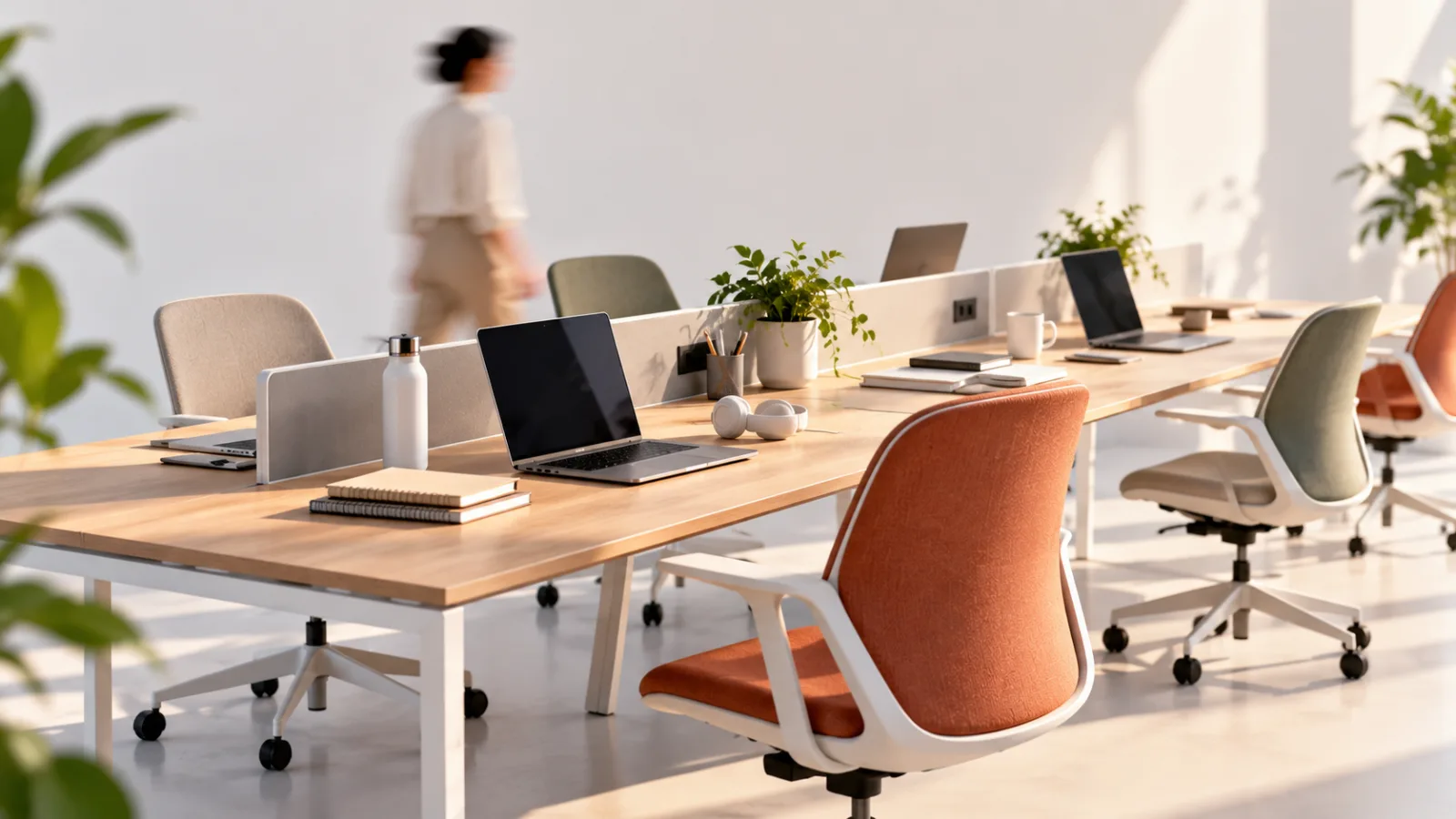
They are workstations that employees share instead of assigning one permanent desk to each person.
An employee arrives at the office, chooses an available workstation or books one in advance, completes their work, and leaves the desk ready for someone else to use.
This arrangement is commonly called hot desking.
It is particularly useful in workplaces where employees split their time between the office, home, client locations, and meetings.
Rather than maintaining an empty desk for every employee throughout the week, a company can make better use of its available office space.
Imagine a company with 100 employees, many of whom work remotely several days a week.
If only 60 employees are typically present at the same time, providing 100 permanently assigned desks may use space inefficiently.
A shared seating arrangement can allow the company to accommodate its usual attendance with fewer workstations, provided it plans for busy days and special requirements.
Hot desks can look like traditional office desks, adjustable standing desks, or workstations equipped with monitors, docking stations, and other shared equipment.
The defining feature is not the furniture.
It is the absence of permanent individual ownership.
Employees may choose a desk when they arrive, reserve one through a workplace booking system, or use designated areas according to team schedules.
The exact process depends on company policy.
A successful arrangement requires more than removing nameplates from desks.
Employees need reliable equipment, clear booking rules, suitable spaces for different tasks, and confidence that they can find somewhere appropriate to work.
2. See How Hot Desking Works
A typical hot desking system follows a straightforward daily routine.
Employees check their attendance plans, locate an available workstation, set up their equipment, and work from that space during the day.
In a smaller office, this may operate informally.
Staff members choose from the available desks when they arrive, with simple rules to prevent confusion.
Larger workplaces often use desk booking software.
Employees can view available workstations, reserve a desk for a particular date, and sometimes select a location near colleagues or within a suitable work zone.
Some organizations assign neighborhoods to departments without assigning individual desks.
A marketing team might have a shared area, while finance and human resources use separate zones because their work requires different levels of privacy.
The company also needs a process for handling attendance changes.
If employees reserve desks but do not show up, unavailable workstations can remain empty even when colleagues need them.
Booking systems may therefore release unused reservations after a defined period.
At the end of the working day, employees remove personal belongings, secure confidential documents, disconnect their equipment where necessary, and leave the workstation clean.
This routine sounds simple, but small operational details determine whether it works well.
Employees should know where to find chargers, how to connect monitors, where to store personal items, and whom to contact when equipment fails.
Breathe HR
Breathe HR helps UK businesses organise employee records, leave, documents and performance reviews, with optional tools for recruitment, training and workforce…
- Straightforward core HR administration
- Centralises employee records and documents
- Payroll processing is not the core offering
- Advanced modules increase subscription costs
The system should also accommodate people who need accessible workstations, specialized equipment, or predictable seating arrangements.
Shared seating must not create unnecessary barriers for employees whose needs cannot be met by choosing any available desk.
3. Compare Hot Desks With Other Seating Models
Hot desking is one of several ways to organize an office.
Understanding the differences helps companies avoid adopting a system that does not match their working habits.
Assigned desks give each employee a permanent workstation.
This arrangement suits people who regularly use specialized equipment, handle physical documents, or benefit from a consistent personal workspace.
It also makes it easier to leave approved work materials in a designated place.
Hot desks are shared and generally available to different employees at different times.
They suit workplaces with variable attendance, mobile teams, and employees who do not need a dedicated setup every day.
Desk hoteling is a reservation based version of shared seating.
Employees book a workstation for a particular period, often before arriving at the office.
The term is sometimes used interchangeably with hot desking, although organizations may distinguish between informal desk sharing and advance booking.
Activity based working organizes the office around different types of work.
Employees might choose a quiet desk for focused tasks, a collaboration area for group work, or a private room for sensitive conversations.
Hot desking can be part of this model, but activity based working covers more than seating arrangements.
Team neighborhoods reserve a shared area for a department or group while allowing individuals to choose different desks within that area.
This can preserve proximity to colleagues without giving everyone a permanent workstation.
None of these approaches is automatically superior.
A company with predictable attendance and specialized roles may benefit from assigned desks.
A hybrid organization with fluctuating office attendance may gain more from shared seating.
Some workplaces need a combination.
The decision should reflect how employees actually work, not simply how many desks can be removed from a floor plan.
4. Understand Why Companies Adopt Hot Desks
The main business attraction of hot desking is the opportunity to use office space more efficiently.
When employees do not attend the office every day, permanently assigned desks may remain unused for long periods.
Sharing workstations can help organizations reduce the amount of space dedicated to individual seating.
Depending on the building and lease arrangements, this may reduce future space requirements, free room for meeting areas, or make it possible to accommodate growth without expanding the office immediately.
There may also be operational advantages.
Teams can gather in shared neighborhoods on collaborative days, while employees who need concentration can use quieter areas.
A well designed office can support different work patterns without requiring every employee to own a desk.
Hot desking may encourage employees to interact with colleagues outside their immediate teams.
Sitting in a different area can create opportunities for informal conversations and knowledge sharing.
However, these benefits depend on implementation.
Employees will not necessarily collaborate more simply because their desks change each day.
People may prefer sitting with familiar colleagues, and random seating can make communication harder if teams rarely overlap in the office.
Financial savings are also not guaranteed.
Booking software, additional storage, adjustable furniture, cleaning, equipment maintenance, and new meeting spaces can create costs.
Reducing desk numbers is useful only when the remaining capacity meets actual demand.
Before introducing hot desking, calculate office attendance patterns, identify peak days, and consider the full cost of operating the shared environment.
A smaller office is not an achievement if employees cannot find a suitable place to work when they need one.
5. Evaluate the Employee Experience
Hot desking changes more than the physical layout.
It changes how employees begin their day, store belongings, access equipment, and interact with colleagues.
For some people, this flexibility is welcome.
They can choose a workstation that suits the task, sit near collaborators when needed, and avoid being tied to a desk they rarely use.
For others, the arrangement introduces repeated friction.
They may arrive to find their preferred equipment unavailable, spend time adjusting chairs and monitors, or struggle to locate colleagues who have chosen different areas.
The experience can be particularly difficult for employees who rely on a consistent environment to concentrate or manage accessibility requirements.
A desk that is technically available may not be suitable for every person or task.
The social effect also deserves attention.
A permanent desk can provide a sense of belonging, while a shared workstation may make the office feel temporary.
Employees who already feel disconnected from a hybrid team may find it harder to establish routines when their physical location changes every day.
Managers should ask employees about these practical issues before deciding how the system will operate.
A short pilot, followed by structured feedback, can reveal whether people spend too much time searching for desks, whether booking rules are confusing, and whether quiet or collaborative spaces are sufficient.
Breathe HR
Breathe HR helps UK businesses organise employee records, leave, documents and performance reviews, with optional tools for recruitment, training and workforce…
- Straightforward core HR administration
- Centralises employee records and documents
- Payroll processing is not the core offering
- Advanced modules increase subscription costs
The aim is to make the office easier to use.
If employees spend the first part of every morning negotiating seating, reconnecting equipment, and searching for teammates, the arrangement may be saving floor space at the expense of productive time.
6. Address Privacy, Cleanliness, and Equipment
Shared workstations introduce responsibilities that are less noticeable when employees have permanent desks.
Privacy is one of the most important.
Employees may handle personal information, financial records, customer details, or confidential business documents.
A shared desk should not become a place where sensitive information remains visible to the next person.
Organizations should establish clear procedures for locking screens when employees step away, securing physical documents, using approved storage, and removing confidential material at the end of the day.
Employees should also understand which areas are suitable for private calls and sensitive conversations.
Cleanliness matters because workstations are used by multiple people.
Companies need a realistic process for cleaning shared surfaces, maintaining keyboards and monitors, and reporting equipment that requires attention.
Employees should know which items they are expected to clean themselves and which responsibilities belong to facilities staff.
Equipment should be consistent wherever possible.
If one desk has a working docking station and another requires employees to search for cables, the system becomes unpredictable.
Standardized monitors, power connections, chairs, and instructions can reduce setup time.
Personal storage also needs consideration.
Lockers, secure cabinets, and designated spaces for approved equipment help employees avoid carrying every item between home and work.
These arrangements should be documented and communicated before launch.
Employees should not have to discover privacy or cleaning rules through trial and error.
7. Choose the Right Booking Process
A booking system is useful when demand exceeds the number of desks or when employees need to coordinate attendance.
It may be unnecessary for a small office where everyone can easily see which workstations are available.
For larger teams, booking software can display available desks, show office layouts, support reservations, and help employees plan which days to attend.
Some systems also provide occupancy reports that help facilities teams understand how spaces are used.
When evaluating software, consider the actual workflow rather than the number of features.
Employees should be able to locate and reserve a suitable desk quickly.
Administrators should be able to manage availability, accessibility requirements, and booking conflicts without excessive manual work.
Check whether the platform integrates with the organization's existing workplace tools, calendars, or identity systems.
Confirm its data handling practices, access controls, and ongoing costs before implementation.
The rules matter as much as the software.
Decide how far in advance employees can book, whether they can reserve desks for colleagues, what happens when someone cancels, and how the system handles unused reservations.
Avoid creating rules that make ordinary work unnecessarily complicated.
If employees must complete a long process every time they visit the office, the booking system can become a source of frustration rather than a convenience.
Use occupancy data responsibly.
Aggregate information can help determine whether the office has enough desks and which areas are underused.
Individual movement or attendance data should not be collected or used without a clear, appropriate purpose and transparent policies.
8. Introduce Hot Desking Without Disrupting Work
A successful rollout begins with understanding how the office operates today.
Before removing assigned desks, collect information about attendance, meeting patterns, equipment needs, accessibility, and the types of tasks employees perform.
Start with a pilot area or a team whose work is suitable for shared seating.
Keep the initial scope manageable so that problems can be corrected without disrupting the entire organization.
During the pilot, measure practical outcomes.
Can employees find desks on busy days?
Do they spend less time in underused office areas?
Are there enough private spaces and meeting rooms?
Do people experience recurring equipment or booking problems?
Explain the reasons for the change honestly.
If the organization wants to use space more efficiently, say so.
Avoid promising that hot desking will automatically increase collaboration or employee satisfaction without evidence.
Provide simple instructions covering reservations, workstation setup, storage, cleaning, security, and assistance.
Make sure managers understand the system well enough to answer questions consistently.
Collect feedback from people with different roles and working patterns.
A policy that suits a mobile sales team may not work for employees who regularly handle confidential information or need specialized equipment.
Adjust the system before expanding it.
The pilot should reveal whether the desk ratio is appropriate, whether certain workstations need to remain assigned, and whether additional quiet rooms or storage are required.
Breathe HR
Breathe HR helps UK businesses organise employee records, leave, documents and performance reviews, with optional tools for recruitment, training and workforce…
- Straightforward core HR administration
- Centralises employee records and documents
- Payroll processing is not the core offering
- Advanced modules increase subscription costs
A successful rollout is not measured by how quickly permanent desks disappear.
It is measured by whether employees can perform their work effectively within the new arrangement.
9. Design an Office Around Real Working Habits
Hot desking works best when the office is designed around the activities people perform rather than the assumption that everyone needs the same desk every day.
A company introducing shared seating should examine where focused work takes place, how teams collaborate, which conversations require privacy, and how often employees need specialized equipment.
Those answers should guide the mix of workstations, meeting rooms, quiet areas, and shared facilities.
For organizations dealing with excessive pressure or poor working conditions, seating arrangements are only one part of the employee experience.
A redesigned office cannot solve unrealistic workloads, inadequate management support, or persistent workplace stress on its own.
Employees facing those problems may also benefit from reading How to Deal With Burnout at Work, which addresses the causes of work related exhaustion and the changes that can make working life more sustainable.
The physical environment can influence concentration, comfort, and communication, but its effects depend on the broader workplace.
Shared desks should make it easier to complete work, not create another daily problem employees must solve.
Likewise, companies considering hot desking should evaluate the different ways workplace conditions affect employees.
3 Types of Burnout and How to Overcome Them offers further context on overload, disengagement, and feelings of helplessness, helping readers understand why changes to an office layout alone may not address deeper problems.
The best seating model is the one that supports the organization's actual work while giving employees reliable access to appropriate spaces, equipment, privacy, and support.
Hot desking can be an effective part of that approach when it is introduced with clear rules and evaluated against real outcomes.
