
What Is Asana Used For: 2026 Team Productivity Guide
By Afonso Macosso · July 8, 2026
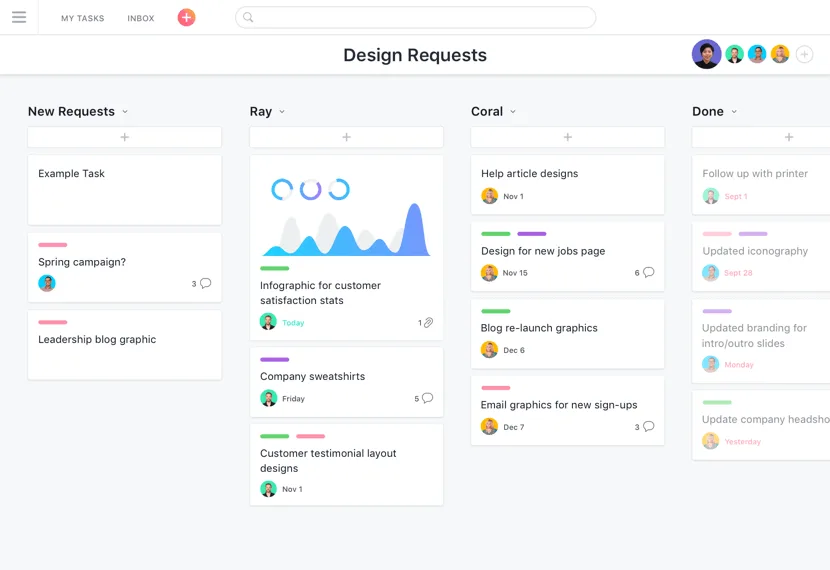
Table of contents
- 1. What Is Asana Used For in Workspaces
- 2. Why Trust Our Software Workspace Reviews
- 3. Coordinate Complex Cross Functional Projects
- 4. Centralize Team Communication and Feedback
- 5. Visualize Operations Using Diverse Layouts
- 6. Automate Repetitive Administrative Tasks Easily
- 7. Manage Individual Workloads with Personal Dashboards
- 8. Track Multi Project Portfolios for Executives
- 9. Connect Third Party Technical Applications Smoothly
- 10. Our Ultimate Platform Implementation Verdict
- 11. Frequently Asked Questions
1. What Is Asana Used For in Workspaces
What is asana used for remains a foundational question for teams trying to eliminate internal operational chaos and coordinate corporate milestones across multiple departments.
At its core, the platform operates as a centralized task tracking and collaborative workspace environment designed to replace messy internal email chains, fragmented chat logs, and manual spreadsheets.
Organizations deploy the software to map out complex workflows, assign explicit accountability to individual contributors, and establish unambiguous due dates for specific deliverables.
By creating a transparent visual record of all active initiatives, the software ensures that everyone inside an organization understands their current priorities, upcoming duties, and the broader context of team goals.
2. Why Trust Our Software Workspace Reviews
Our operational software evaluations are grounded entirely in extensive hands on testing inside active production environments over multiple months.
We do not copy marketing text or rely on summarized documentation, we set up real working spaces to run software product launches, content production queues, and technical engineering sprints.
We systematically test user cap limits, mobile notification behaviors, API stability, and automated rules to observe how the system handles stress.
Every single guide we publish is written by experienced professionals who analyze software capabilities independently, drawing factual insights directly from active usage and updates found on the official developer platform.
3. Coordinate Complex Cross Functional Projects
Managing a large initiative involving different corporate departments requires a system that can handle overlapping timelines and varied task requirements.
Teams use this platform to break down massive company goals into smaller, digestible components called projects and sections.
Asana
Asana organizes team work through tasks projects and automation. This Asana review examines its strengths limitations pricing and suitability for different tea…
- Clean intuitive interface
- Strong task organization
- Learning curve for setup
- Higher tiers cost more
For instance, a product launch project can be divided into distinct sections for market research, software engineering, marketing asset creation, and legal compliance.
Within these sections, managers build individual tasks that outline specific requirements, ensuring that no critical step gets overlooked during execution.
This structure allows distinct teams to work simultaneously inside the same dashboard while maintaining a clear view of how their pieces fit together.
4. Centralize Team Communication and Feedback
Misunderstandings happen constantly when project discussions are scattered across multiple instant messaging apps, emails, and shared documents.
This platform solves that specific corporate friction by anchoring all communications directly inside the relevant task box.
Team members use the comment section of a specific assignment to post status updates, ask clarifying questions, upload file attachments, and provide design feedback.
Keeping the conversation bound to the active asset creates an unchangeable historical record of the work, allowing any newly assigned employee to review the discussion history and catch up instantly without scheduling meeting overviews.
5. Visualize Operations Using Diverse Layouts
Different professional roles require distinct ways of looking at data to work efficiently throughout the day.
Creative professionals often prefer the board layout, which arranges tasks as cards in vertical columns that mimic a classic physical Kanban setup.
This view makes it simple to slide content assets from ideation to writing, editing, and final approval stages.
Analytical operators often prefer the list layout, which displays work as a dense spreadsheet ideal for sorting metadata and prioritizing hundreds of line items quickly.
By allowing individuals to toggle between lists, boards, calendars, and timelines instantly, the software accommodates diverse human cognitive preferences without breaking the underlying data structure.
6. Automate Repetitive Administrative Tasks Easily
Manual data entry and repetitive status updates consume hours of valuable employee time every single week.
Organizations configure native automation rules within their project boards to handle these clerical routines automatically.
You can build a simple rule stating that when an engineer marks a software bug task as fixed, the system instantly reassigns the item to a quality assurance analyst and moves it to the testing column.
You can also create rules to automatically apply specific tags, adjust due dates based on dependencies, or send automated warnings when a critical milestone goes past its scheduled deadline without completion.
7. Manage Individual Workloads with Personal Dashboards
When employees are assigned to twenty different team projects simultaneously, keeping track of their personal daily obligations becomes incredibly difficult.
The system solves this problem through a personalized interface called My Tasks, which aggregates every single item assigned to a specific user across the entire organization.
Asana
Asana organizes team work through tasks projects and automation. This Asana review examines its strengths limitations pricing and suitability for different tea…
- Clean intuitive interface
- Strong task organization
- Learning curve for setup
- Higher tiers cost more
Individuals use this personal space to organize their work day using custom sorting buckets such as tasks due today, items happening next week, or long term objectives.
This private view empowers workers to plan their morning schedules independently, ensuring they hit their personal targets without constantly asking managers what to focus on next.
8. Track Multi Project Portfolios for Executives
Company executives and department directors do not have the time to click into hundreds of individual tasks to check daily operational progress.
They utilize a high level overview feature known as portfolios, which groups multiple related projects into a single consolidated dashboard view.
A marketing director can build a portfolio containing separate projects for the company blog, social media campaigns, paid advertisement setup, and annual event planning.
The portfolio screen instantly displays the real time health, completion percentage, and active deadline status of each project, allowing leaders to spot slipping schedules instantly and reallocate corporate resources appropriately.
9. Connect Third Party Technical Applications Smoothly
No single piece of corporate software can handle every single aspect of modern digital business operations perfectly.
This platform features a massive integration marketplace that connects your central task workflows to external apps your company already relies on daily.
Developers connect their repositories to link code changes directly to task tickets, while sales professionals link customer accounts to automatically generate task flows when a contract closes.
According to data and setup workflows outlined on the official
10. Our Ultimate Platform Implementation Verdict
This platform functions exceptionally well as a robust operational hub for teams that need to organize complex, multi layered workflows and establish crystal clear lines of accountability.
It successfully eliminates the modern corporate reliance on messy spreadsheets and scattered internal emails by keeping tasks, files, and discussions bound together in one place.
While small teams can operate highly effectively on the free personal plan, larger enterprises with heavy dependencies will find the automated rules and portfolio features well worth the cost of subscription.
If your organization suffers from missed deadlines, vague ownership, and communication silos, implementing this software provides a structured solution to stabilize your daily business operations.
11. Frequently Asked Questions
Is Asana just a basic checklist?
No, the platform goes far beyond simple to do lists by offering deep database capabilities, file attachments, and automated rules.
Teams use it to map complex projects, build portfolios, track employee workloads, and manage intricate operational pipelines across entire corporate divisions.
Can non technical teams use it?
Yes, marketing agencies, human resource departments, and event planners use the software heavily due to its friendly visual interfaces.
Asana
Asana organizes team work through tasks projects and automation. This Asana review examines its strengths limitations pricing and suitability for different tea…
- Clean intuitive interface
- Strong task organization
- Learning curve for setup
- Higher tiers cost more
The intuitive board and calendar layouts allow non technical workers to organize schedules and collaborate on creative assets without writing code or learning complex development frameworks.
Does the software handle time tracking?
Yes, the platform includes native time tracking features on its premium tiers, allowing users to log active hours directly inside task cards.
Teams also integrate the platform with external time monitoring tools to generate detailed productivity reports and accurate client billing invoices based on recorded project tasks.
How does it replace company email?
It reduces email volume by moving project discussions, file reviews, and status updates directly into the comment section of individual tasks.
Instead of sending mass internal update emails, team members tag colleagues inside specific work items to keep conversations contextual and organized.
