Folks RH Review 2026: Features, Pricing and Verdict

By Nathan Cole & Afonso Macosso · Reviewed by Zari M'Bale
Discover if Folks RH is the right HR system for your company in this complete review covering features, pricing plans, and real user performance.
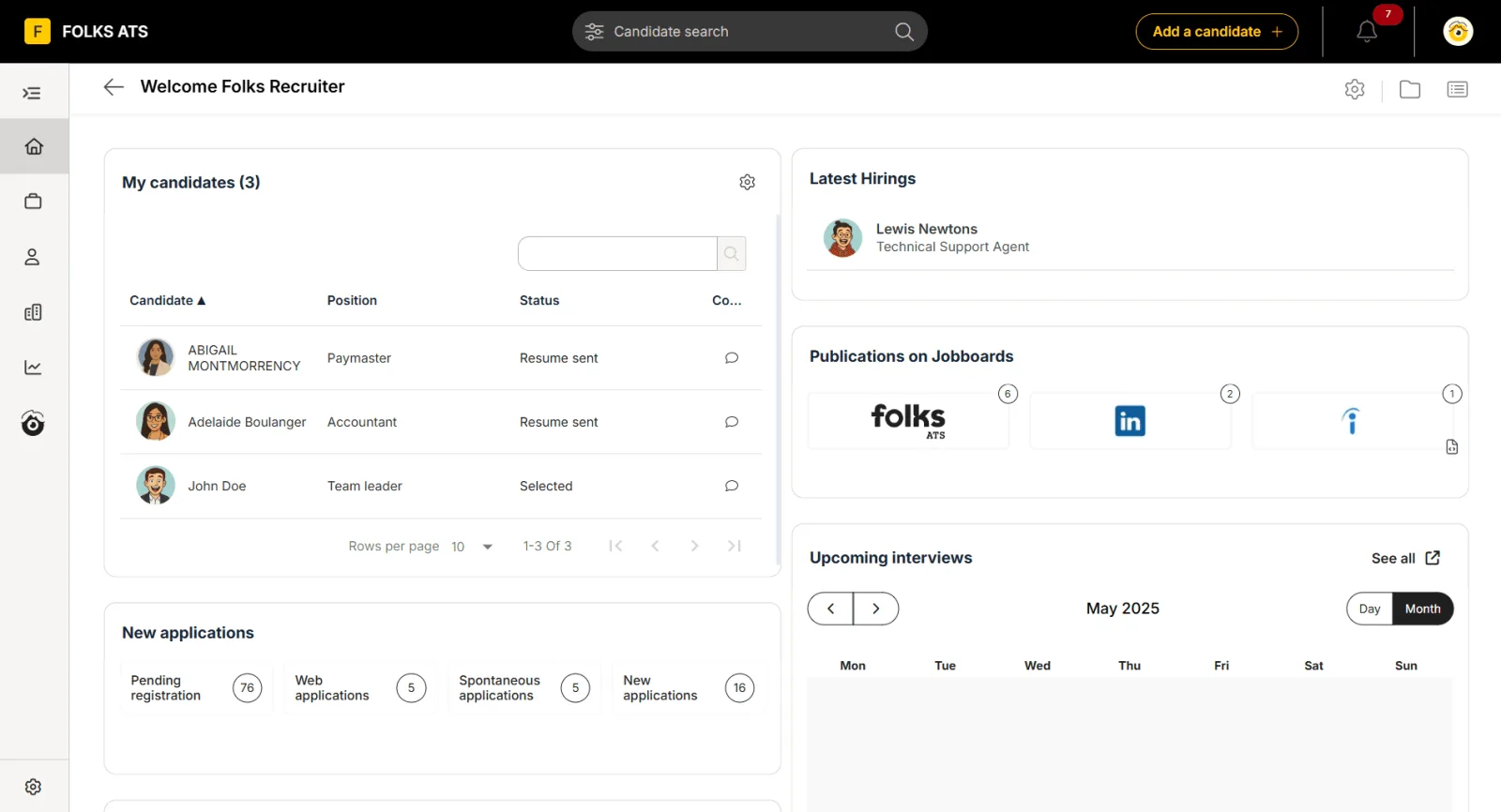
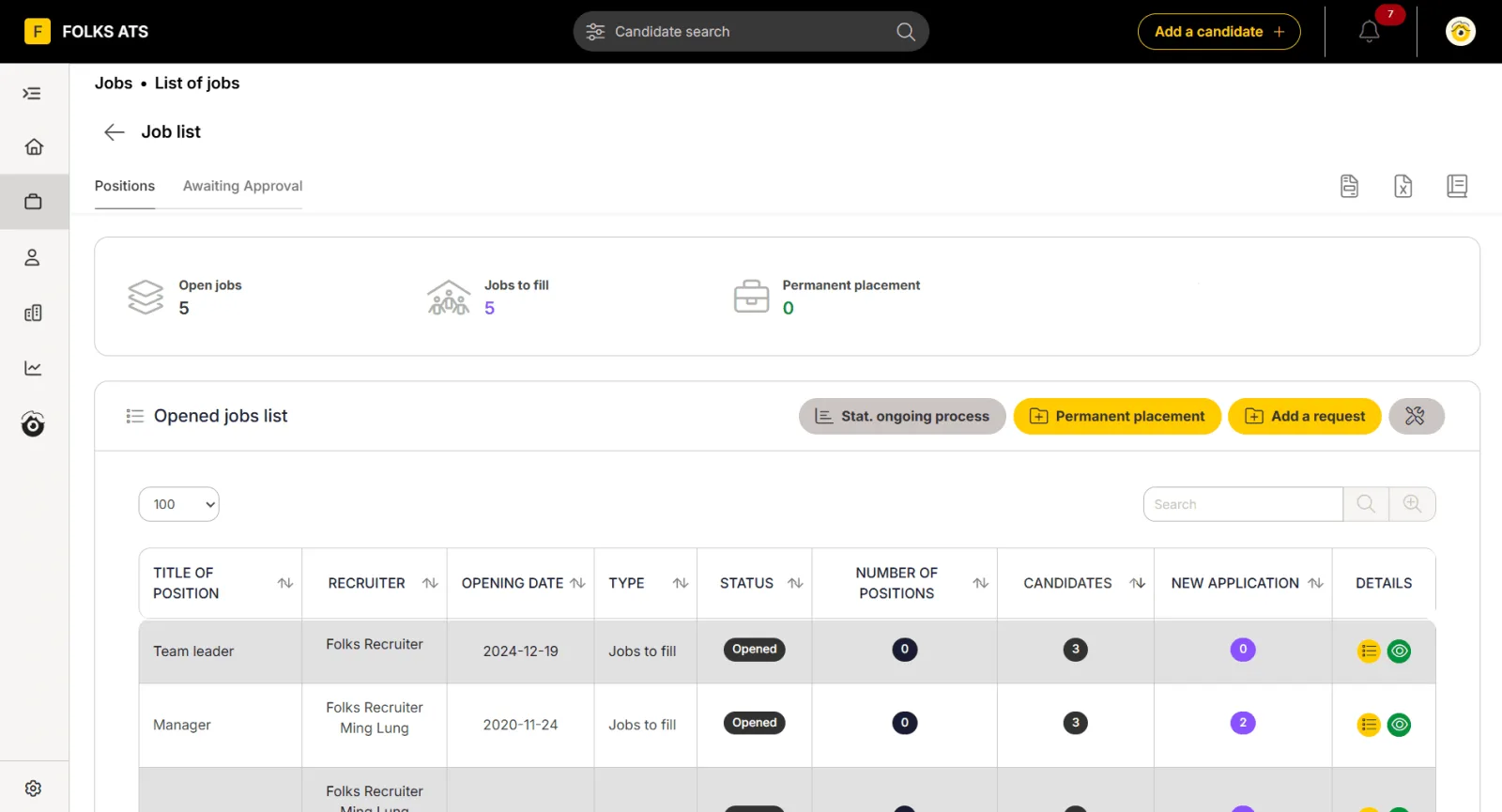
Table of contents
- 1. Introduction to the Platform
- 2. Why Trust Our Review Method
- 3. Core Database Architecture and Employee Profiles
- 4. Onboarding Workflows and Automation
- 5. Document Management and Compliance
- 6. Applicant Tracking and Recruitment Control
- 7. Performance Evaluation Mechanics
- 8. Time Tracking and Absence Management
- 9. Interface Design and Everyday Usability
- 10. Security Protocol and Data Sovereignty
- 11. Customer Support Quality and Resources
- 12. Ideal Business Profiles
- 13. System Constraints and Areas for Improvement
- 14. Financial Return and Implementation Logic
- 15. Frequently Asked Questions
1. Introduction to the Platform
Folks RH Review requires an objective look at how modern mid sized organizations manage their human capital without losing hours to administrative delays.
This human resources information system focuses heavily on eliminating spreadsheet dependency for growing businesses.
The platform targets companies that have outgrown basic tracking but do not possess the budget or the technical resource base to deploy massive, enterprise grade systems.
By centralizing core information, the software attempts to build a bridge between daily operational management and long term talent retention strategies.
It provides a clean environment where managers, human resource professionals, and traditional employees interact without friction.
The system approaches workforce administration through a modular lens, letting companies scale their usage as their staff numbers expand over time.
2. Why Trust Our Review Method
Our evaluation process relies entirely on practical testing, system configuration, and direct comparison against competing platforms in the human resources technology space.
We do not rely on promotional materials or generalized summaries provided by vendors.
The software was evaluated over a multi week period, simulating the lifecycle of twenty five fictional employees from initial recruitment through onboarding, annual performance evaluation, and eventual offboarding.
Every feature was tested using standard administrative workflows, checking for system responsiveness, database accuracy, and logic gaps.
We analyzed the integration speeds with external communication tools and evaluated how the interface handles complex time off calculations.
This hands on approach ensures the data points, observations, and criticisms listed here reflect the actual operational reality of utilizing the software in a live business environment.
3. Core Database Architecture and Employee Profiles
At the foundation of the platform sits the centralized employee profile engine, which serves as the repository for all personnel data.
The system organizes information logically, separating personal details, contractual histories, emergency contacts, and compensation structures into distinct tabs.
Security permissions govern who can view or edit specific data fields, ensuring absolute confidentiality across departments.
The architecture handles history tracking exceptionally well.
When an employee receives a promotion, a salary adjustment, or a title change, the platform records the historical data point instead of simply overwriting the old value.
This creates a clear timeline of an employee lifecycle within the business, which is essential for audit purposes and internal reviews.
The search functionality is fast, letting administrators filter the entire workforce by department, manager, location, or specific skill sets within seconds.
4. Onboarding Workflows and Automation
The system tackles the chaotic nature of welcoming new hires through structured, template driven onboarding workflows.
Administrators can build distinct checklists based on the role, department, or geographic location of the incoming employee.
These checklists automatically distribute tasks to various stakeholders across the organization.
For example, IT receives a notification to provision a laptop, facilities is reminded to prepare a workspace, and the new hire gets an invite to upload their identification documents.
From the new hire perspective, the portal offers a welcoming environment that reduces first day anxiety.
Employees log into a restricted portal before their formal start date to complete mandatory reading, sign corporate policies, and fill out direct deposit forms.
This digital forward approach means the traditional mountain of paperwork is completed, verified, and filed before the employee even walks through the front door on Monday morning.
5. Document Management and Compliance
Managing physical folders or scattered PDF files poses a severe security and compliance risk for modern operations.
The platform solves this by incorporating a secure, cloud based document management system directly into the employee profile structure.
Documents are categorized by type, such as contracts, certifications, performance reviews, and medical notes, each with its own specific retention and access rules.
A standout aspect of this module is the automated notification system for expiring documents.
If an employee holds a professional certification, a driver license, or a work visa that requires regular renewal, the software monitors the expiration date.
It triggers automated warnings to both the employee and the HR manager sixty, thirty, and fifteen days prior to expiration.
This simple mechanism prevents costly lapses in operational compliance and legal standing.
6. Applicant Tracking and Recruitment Control
The integrated recruitment module allows small business owners and internal recruiters to manage job openings without paying for a separate applicant tracking system.
Users can create job descriptions, publish them to corporate career pages, and track candidates through customizable hiring pipelines.
The pipeline stages can be modified to match the exact interview process of individual departments, ranging from initial phone screens to technical assessments and final executive approvals.
Candidate profiles aggregate all communications, resumes, interviewer notes, and scoring rubrics in one location.This centralized approach prevents situations where valuable candidate feedback gets trapped in private email chains or lost on paper notes.
The system also includes email templates that allow recruiters to communicate updates or send rejection notices to bulk groups of applicants, maintaining a professional corporate image with minimal manual effort.
7. Performance Evaluation Mechanics
Annual performance reviews often cause administrative headaches due to lost forms and inconsistent tracking methods.
The software modernizes this process by providing flexible evaluation modules that support self evaluations, manager reviews, and peer feedback mechanisms.
HR leaders can design questionnaires using multiple choice options, rating scales, and open text fields to gather qualitative and quantitative data.
The software tracks the progress of active review cycles in real time, showing managers exactly who has completed their submissions and who requires a gentle reminder.
Once completed, the evaluation documents are digitally signed by both parties and locked automatically within the employee record.
This creates an unalterable history of performance that helps guide future promotion decisions, salary discussions, and training investments.
8. Time Tracking and Absence Management
Managing vacation requests, sick leave, and casual time off requires clear rules and immediate visibility.
The platform provides a transparent absence management dashboard where employees can view their current leave balances, check the team calendar to see who is away, and submit time off requests.
The system calculates accruals automatically based on corporate policies, years of service, or regional labor laws.
Managers receive instant email notifications when a team member requests time off.
The approval screen displays the employee current balance and highlights any potential scheduling conflicts with other team members in the same department.
This visibility ensures that managers do not accidentally approve leave requests that would leave a critical team understaffed during peak operational periods.
9. Interface Design and Everyday Usability
The user interface avoids the cluttered, outdated aesthetic that plagues many legacy human resource platforms.
It embraces a clean, utilitarian design that prioritizes readability and ease of navigation.
The main dashboard highlights immediate action items for the user, such as pending approvals, incomplete onboarding tasks, or upcoming team birthdays.
For the average employee who only logs in occasionally to request a vacation day or download a tax slip, the system is completely intuitive.
It requires virtually zero training for basic staff usage.
The administrative side naturally possesses more complexity due to the depth of configuration options, but the logical grouping of settings reduces the time required to master the platform.
10. Security Protocol and Data Sovereignty
Handling sensitive personal information, banking details, and performance records demands high tier security standards.
The platform protects data using industry standard encryption protocols during transit and while at rest within the cloud infrastructure.
Role based access control ensures that individuals only interact with data explicitly required to perform their daily duties, blocking regular employees or line managers from viewing confidential salary brackets.
For businesses operating under strict regional data privacy laws, understanding where information physically resides is critical.
The company behind the software hosts data in secure, compliant data centers that align with North American privacy regulations.
Regular security audits, vulnerability scanning, and automated data backups are performed to guarantee continuous system availability and protection against data loss events.
11. Customer Support Quality and Resources
When an HR manager encounters a technical glitch during a critical payroll run or onboarding sequence, fast support is non negotiable.
The customer success team is widely recognized for its responsiveness, offering assistance in both English and French.
This bilingual capability is a massive advantage for companies operating across diverse cultural regions or managing remote workers across Canada and the northern United States.
In addition to direct communication channels like email and live chat, the platform maintains a comprehensive online knowledge base.
This repository contains detailed step by step guides, video walkthroughs, and best practice articles covering every module in the system.
The documentation is written clearly, helping administrators solve common configuration challenges independently without waiting for a support ticket response.
12. Ideal Business Profiles
The platform fits best within organizations employing between twenty and two hundred and fifty active staff members.
Companies in this range typically face growing compliance requirements and administrative burdens but lack the massive internal infrastructure needed to manage complex software systems like Workday or SAP SuccessFactors.
It serves industries such as professional services, manufacturing, technology startups, and regional non profit organizations.
Organizations that operate with high turnover or seasonal staff, such as hospitality or retail, will benefit immensely from the rapid, automated onboarding modules.
Conversely, small businesses with fewer than ten employees might find the structural setup and monthly cost unnecessary, as simple local spreadsheets can still suffice at that micro scale.
13. System Constraints and Areas for Improvement
No software platform matches every operational scenario perfectly, and this system has distinct boundaries.
The most notable limitation lies in its native payroll processing capabilities.
It acts as an incredible information gathering tool, but it does not run local tax deductions or process direct deposits itself.
Instead, it relies on exporting clean data sheets to external payroll providers, which can introduce manual steps if your specific provider lacks a direct API hook.
The mobile application experience is another area that warrants future engineering attention.
While the web interface is fully responsive and handles wonderfully on desktop screens, the dedicated mobile view feels somewhat stripped down.
Employees can easily perform basic tasks like requesting time off, but managers attempting to complete complex performance reviews or review detailed applicant tracking pipelines on a smartphone will find the experience restrictive.
14. Financial Return and Implementation Logic
Investing in dedicated human resource software must be justified by clear time savings and risk reduction metrics.
By automating repetitive tasks like document collection, vacation tracking, and interview scheduling, the platform significantly reduces the manual hours spent on pure data entry.
This allows small HR teams or office managers to shift their focus toward strategic initiatives like employee retention, training development, and cultural health.
Furthermore, the automated compliance alerts for certificate updates and document expirations protect organizations from costly legal issues or operational shutdowns.
When looking at the pricing tiers, the cost per user remains highly predictable, allowing finance teams to forecast software expenses accurately as the company adds headcount throughout the fiscal year.
15. Frequently Asked Questions
What is Folks RH used for?
The platform serves as a centralized human resource information system designed to manage employee profiles, automate the onboarding process, track vacation allocations, and handle performance evaluations within a secure digital environment.
Does it include full payroll?
No, the platform does not process payroll natively, but it tracks all relevant compensation changes, hours worked, and absence data, which can be exported directly into popular external payroll processing systems.
Is the software completely bilingual?
Yes, the system provides native support for both English and French languages, allowing multinational organizations or bilingual teams to switch interfaces smoothly according to individual employee preferences.
How secure is employee data?
Employee information is secured using advanced data encryption standards, secure hosting protocols, and strict role based access controls that prevent unauthorized internal users from viewing confidential personal or financial data.
Key features
- Automated employee onboarding workflows
- Centralized digital document management
- Advanced performance evaluation modules
- Flexible time tracking tools
- Customizable applicant tracking system
- Detailed workforce analytics dashboards
Pricing
- Employee profile database management
- Basic onboarding workflow templates
- Centralized document storage system
- Standard time off tracking
- Email customer support access
- Advanced performance management tools
- Full applicant tracking system
- Custom onboarding checklist workflows
- Automated compliance training alerts
- Priority live chat support
- Custom API integration access
- Dedicated account manager support
- Advanced workforce analytics reports
- Tailored security permission levels
- Unlimited active job postings
Pros & cons
Pros
- Intuitive interface for employees
- Excellent French English bilingual support
- Robust compliance tracking features
- Streamlined applicant tracking system
- Flexible onboarding workflow templates
Cons
- Limited native payroll integrations
- Mobile application lacks depth
- High learning curve configurations
- Basic initial reporting templates
- Setup requires manual input
Our verdict
You should skip this platform if you are a massive global enterprise requiring highly complex, multi country localized tax compliance matrices. For its target audience, we highly recommend implementing this platform to optimize daily workforce administration.
Get PricingReader reviews
Be the first to review