CRM vs. ERP: What Businesses Need to Know About These Two Software Systems
By Noura Mint Ely · November 6, 2026
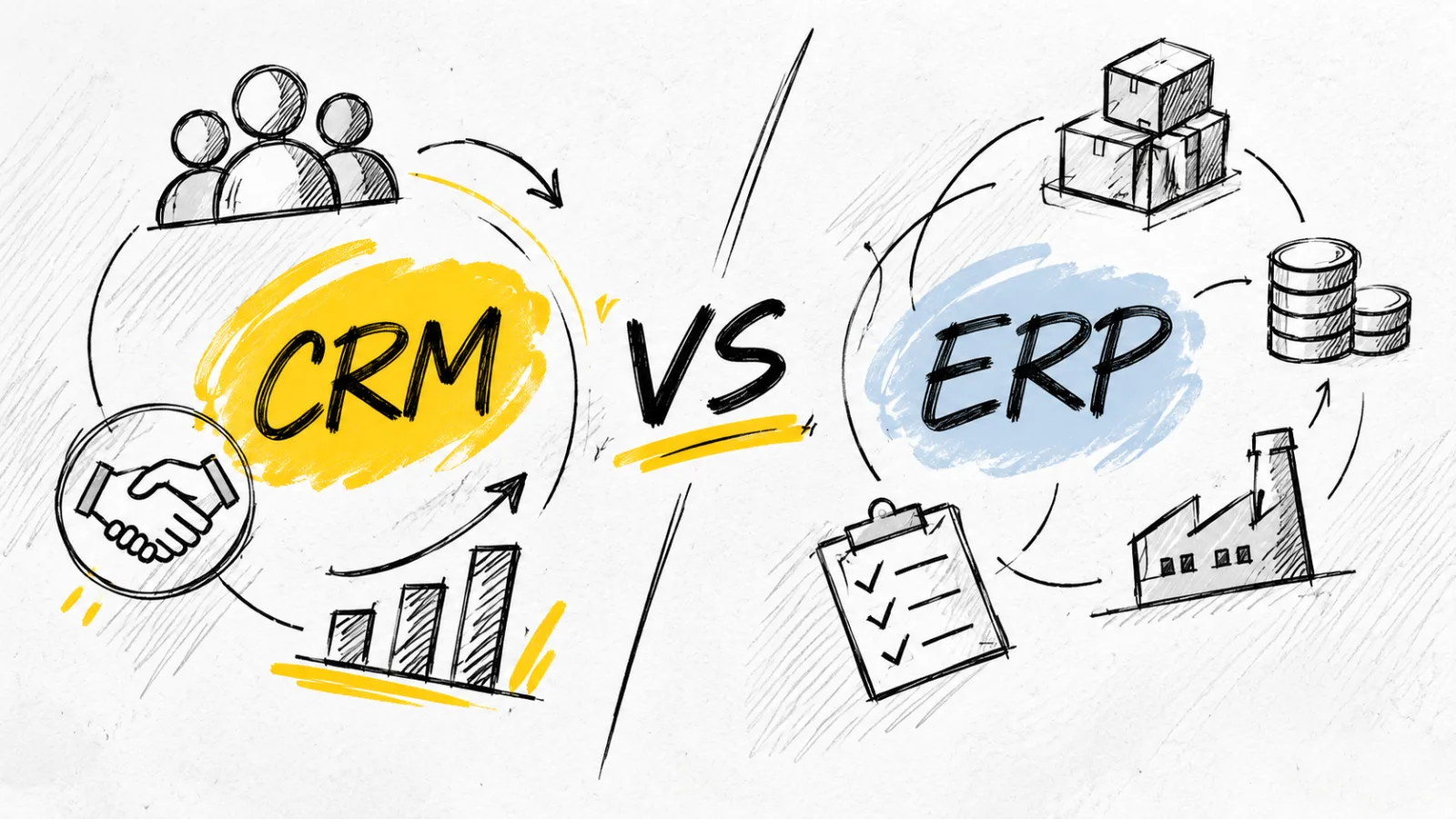
Table of contents
- The difference becomes clear when a customer places an order
- CRM software manages the commercial relationship
- ERP software coordinates the business behind the sale
- The real dividing line: what information each system controls
- What happens when CRM and ERP are connected?
- The same company may need both, but not necessarily at the same time
- The overlap can be confusing: CRM and ERP are not always separate products
- What buyers should examine before choosing software
- CRM and ERP selection: the mistakes that create expensive problems
- The future of CRM and ERP is increasingly connected
- The decision is about the business problem, not the software category
- Frequently Asked Questions
CRM and ERP software solve different business problems. Customer Relationship Management (CRM) systems help companies manage sales, marketing, customer interactions, and service relationships.
Enterprise Resource Planning (ERP) systems coordinate internal operations such as finance, procurement, inventory, production, supply chains, and human resources.
The distinction is more important than simply choosing between two categories of business software.
A CRM helps a company understand and serve its customers; an ERP helps the company organize the resources and processes required to deliver what it sells.
Businesses that confuse these roles risk buying the wrong platform, duplicating information, or creating operational gaps between customer-facing teams and the departments responsible for fulfilling orders.
The two systems can work independently, but their value often increases when they share reliable information.
Understanding where one ends and the other begins is therefore a practical starting point for any organization evaluating its software infrastructure.
The difference becomes clear when a customer places an order
Consider a company that sells industrial equipment.
A prospective customer contacts its sales department, requests a quotation, discusses product requirements, and negotiates commercial terms.
The sales team records the interaction, tracks the opportunity, schedules follow-ups, and manages the relationship.
These activities belong primarily in a CRM.
Once the customer approves the quotation, the business has a different set of responsibilities.
It must confirm stock availability, arrange procurement if necessary, issue the appropriate financial documents, coordinate delivery, record the transaction, and account for the resulting revenue and costs.
These activities are typically managed through ERP capabilities.
The distinction is not absolute: modern platforms can overlap, and some CRM products include order-management or billing functions.
However, the central responsibilities remain different.
A CRM is organized around the customer relationship and the commercial opportunity.
An ERP is organized around the business processes, resources, and records required to operate the company.
That difference explains why replacing one system with the other is rarely a straightforward software substitution.
CRM software manages the commercial relationship
Customer Relationship Management (CRM) software gives sales, marketing, and customer-service teams a shared environment for recording and managing interactions with prospects and existing customers.
Instead of relying on disconnected spreadsheets, email inboxes, and individual notes, employees can work from a structured customer record.
A typical CRM record may contain contact details, company information, communication history, sales opportunities, meeting notes, support requests, and previous purchases.
The exact information depends on the product and the company's configuration.
For a sales team, this creates visibility into the commercial pipeline.
Managers can see which opportunities are active, which deals are progressing, where negotiations are stalled, and which prospects require attention.
Marketing teams can use customer information to organize campaigns, segment audiences, and coordinate communications.
Customer-service teams can review previous interactions before responding to a request, reducing the need to ask customers to repeat information already provided.
What a CRM is designed to do
The capabilities commonly associated with CRM software include:
Contact and account management.
Lead capture and qualification.
Sales pipeline tracking.
Opportunity and deal management.
Email and communication history.
Marketing campaign coordination.
Customer support and case management.
Sales forecasting and performance reporting.
 4.0Hot Desk Booking Tool
OfficeSpace
4.0OfficeSpace connects desk booking, digital floor plans, workplace analytics and space planning to help businesses coordinate hybrid work and make better use of…
- Combines several workplace management workflows
- Flexible desk booking and reservations
- Pricing requires a custom quotation
- No public universal subscription price
Workflow automation and follow-up reminders.
Customer segmentation and relationship analysis.
These capabilities help organizations manage the process of attracting, converting, retaining, and supporting customers.
A CRM does not necessarily manage the company's complete financial or operational infrastructure.
It may show a customer's order history or outstanding commercial activity, but that does not automatically make it the authoritative system for inventory valuation, general-ledger accounting, procurement, or production planning.
Examples of CRM platforms
Several established vendors serve different business sizes and requirements.
Salesforce Sales Cloud is designed to support sales operations, customer information management, pipeline visibility, and automation.
Its broader platform also provides tools for service, marketing, analytics, and integrations.
HubSpot CRM combines contact management with sales, marketing, and customer-service capabilities.
It is commonly considered by businesses seeking an integrated customer-facing platform.
Microsoft Dynamics 365 Sales provides sales-management functionality within Microsoft's wider business application ecosystem.
It can be relevant to organizations that already use Microsoft products and want connected workflows.
The products differ in pricing, configuration, automation, integrations, and implementation complexity.
Their shared purpose is to organize customer-facing commercial activity.
ERP software coordinates the business behind the sale
Enterprise Resource Planning (ERP) systems address a different challenge: ensuring that the departments responsible for operating a company work with coordinated processes and consistent business information.
An ERP platform can connect finance, purchasing, inventory, manufacturing, logistics, project operations, and other functions through shared records and workflows.
This matters because business departments rarely operate in isolation.
A sales order can affect inventory.
Inventory availability can influence procurement.
Procurement creates supplier obligations.
Delivery affects fulfillment records, while the financial transaction must ultimately be reflected in the company's accounting records.
Without coordinated systems, employees may need to re-enter information, reconcile conflicting spreadsheets, or manually communicate changes between departments.
ERP software aims to reduce these disconnected processes by providing an integrated operational environment.
What an ERP is designed to do
Depending on the product and the modules implemented, ERP software may support:
General-ledger accounting and financial management.
Accounts payable and accounts receivable.
Purchasing and supplier management.
Inventory and warehouse management.
Order processing and fulfillment.
Production planning and manufacturing.
Supply-chain coordination.
Project costing and resource allocation.
Human resources and payroll.
Financial reporting and business analysis.
Not every ERP includes every capability in the same way.
Some organizations purchase a broad suite, while others implement selected modules and connect specialist applications for functions such as payroll, warehouse management, or advanced manufacturing.
The defining feature is the coordination of business operations and information, rather than customer relationship management alone.
Examples of ERP platforms
SAP S/4HANA supports integrated enterprise processes across finance, procurement, manufacturing, supply chain, and other operational areas.
Oracle Fusion Cloud ERP provides cloud-based financial management and broader ERP capabilities for organizations managing complex business operations.
Microsoft Dynamics 365 Finance supports financial operations within Microsoft's Dynamics 365 business application portfolio.
Microsoft also offers supply-chain management capabilities through separate applications in the same ecosystem.
Odoo offers a modular approach that can bring together applications for accounting, inventory, sales, purchasing, manufacturing, and other business functions.
These platforms vary significantly in scale and implementation requirements.
A smaller company may need a modular system, while a multinational organization may require extensive financial controls, regional compliance support, complex supply-chain processes, and integrations across multiple subsidiaries.
The real dividing line: what information each system controls
The front-office and back-office distinction is useful, but it does not fully explain how CRM and ERP systems differ in practice.
A more important question for technology buyers is: which business records should each platform own and maintain?
A CRM is generally the primary record for customer-facing activity.
It tracks who the customer is, how the relationship developed, which sales opportunities exist, and what conversations or service interactions have taken place.
An ERP is generally the primary record for operational and financial transactions.
It tracks what the company owns, buys, sells, owes, produces, ships, and records in its accounts.
This distinction becomes especially important when both platforms contain information about the same customer.
The CRM may store the customer's contact details, account owner, sales history, and current opportunities.
The ERP may hold the customer's billing account, payment terms, credit status, invoices, tax information, and transaction history.
Neither system should automatically overwrite the other.
The company needs clear rules about which application is authoritative for each data category.
For example, a salesperson might update a customer's telephone number in the CRM.
The finance department might update the customer's payment terms in the ERP.
Integration should make the relevant information available to the teams that need it, while preserving the correct system of record.
This is one reason enterprise software integration requires more planning than simply connecting two applications.
What happens when CRM and ERP are connected?
The strongest case for using both systems appears when information needs to move between commercial and operational departments.
Imagine a distributor receiving an order from an existing business customer.
The CRM contains the relationship history and the sales opportunity.
Once the deal is approved, the order information can be transferred to the ERP, where the company checks inventory, confirms pricing and payment conditions, and coordinates fulfillment.
The ERP can then return relevant information, such as order status, shipment progress, invoice details, or payment status, to the CRM.
Sales and customer-service employees can see what is happening without having to contact the warehouse or finance department for every update.
The result is a more connected customer experience and fewer disconnected internal processes.
Microsoft's ERP guidance describes how connected applications can exchange customer, order, inventory, billing, and service information.
OfficeSpace
OfficeSpace connects desk booking, digital floor plans, workplace analytics and space planning to help businesses coordinate hybrid work and make better use of…
- Combines several workplace management workflows
- Flexible desk booking and reservations
- Pricing requires a custom quotation
- No public universal subscription price
Oracle similarly explains that integrating CRM and ERP can reduce data silos and improve the flow of information across departments.
Integration is not the same as having one database
Businesses sometimes assume that connecting CRM and ERP means merging everything into one database.
That is not necessarily how integration works.
The applications can remain separate while exchanging selected records through application programming interfaces (APIs), prebuilt connectors, middleware, or integration platforms.
An API allows one application to request or send information to another through defined interfaces.
Middleware can coordinate data movement, transform formats, and manage workflows between multiple systems.
The technical approach depends on the platforms involved, the volume of transactions, security requirements, and how quickly information must be synchronized.
A poorly designed integration can create duplicate customer records, inconsistent product information, delayed order updates, or conflicting financial data.
Businesses should therefore establish data ownership, synchronization rules, error handling, and access permissions before connecting the systems.
The same company may need both, but not necessarily at the same time
The choice between CRM and ERP should be based on the operational problem a business needs to solve, not simply its employee count or annual revenue.
A small consultancy with a few employees may benefit more immediately from a CRM because its biggest challenge is managing leads, client communications, proposals, and follow-ups.
Its accounting and administrative needs may still be handled effectively by a dedicated accounting application.
A growing retailer may face a different situation.
It could already have a customer database and a functioning sales process, but struggle with inventory accuracy, supplier purchasing, warehouse coordination, and financial reporting.
In that case, ERP capabilities may offer greater operational value.
A manufacturer has another set of priorities.
It may need to coordinate customer orders with production schedules, raw materials, supplier deliveries, labor, and product costs.
An ERP system is often central to those processes, while CRM remains important for managing customer accounts and commercial opportunities.
The order of implementation is therefore not universal.
When CRM should come first
A CRM is often the more practical starting point when a business:
Loses track of prospective customers and sales conversations.
Relies on individual employees to remember follow-up activities.
Cannot see the status of opportunities across the sales team.
Has customer information spread across spreadsheets and email accounts.
Needs better coordination between sales, marketing, and customer support.
The immediate objective is to make customer-facing work more organized and measurable.
When ERP should come first
ERP may deserve priority when a business:
Cannot reliably determine stock availability.
Struggles to reconcile purchasing, sales, and accounting records.
Manages operations across several locations or departments.
Needs stronger control over financial transactions and reporting.
Has complex production, procurement, or supply-chain requirements.
In these circumstances, improving internal coordination may be more urgent than expanding sales-management capabilities.
When both become necessary
A business may need both when customer-facing teams depend on operational information to make accurate commitments.
For example, a salesperson cannot reliably promise a delivery date without access to inventory and fulfillment information.
Likewise, finance and operations teams may need visibility into confirmed customer orders to plan cash flow, purchasing, staffing, and production.
At that stage, CRM and ERP are not competing investments.
They are complementary parts of the company's software architecture.
The overlap can be confusing: CRM and ERP are not always separate products
The distinction between the categories is clear, but the software market is less tidy.
Some ERP platforms include customer-management features.
Some CRM platforms offer quoting, order management, billing, analytics, and other capabilities that touch processes traditionally associated with ERP.
Microsoft Dynamics 365, for example, is a portfolio of business applications rather than one monolithic product.
Its applications cover different areas, including sales, finance, and supply-chain management.
SAP also offers a broad enterprise software portfolio spanning customer-facing and operational functions.
This creates an important purchasing consideration: a product's label does not tell the whole story.
A business should examine the actual modules, workflows, and transaction controls included in the proposed system.
A CRM with basic invoicing is not automatically a full financial-management platform.
An ERP with customer records is not necessarily equipped for advanced sales engagement, marketing automation, or customer-service management.
The relevant question is whether the product supports the complete process the company needs, including controls, reporting, and integrations.
What buyers should examine before choosing software
A software purchase should begin with a process review rather than a vendor demonstration.
First, identify where the current workflow breaks down.
If leads are lost, customer histories are incomplete, and sales forecasts are unreliable, CRM deserves attention.
If inventory figures do not match physical stock, purchasing is disconnected from demand, or financial reporting requires extensive manual reconciliation, ERP may be the more urgent investment.
Second, identify the people who will use the system.
Sales representatives, marketing teams, finance employees, warehouse staff, procurement specialists, and executives have different information requirements.
A platform that works well for one department may create unnecessary complexity for another.
Third, evaluate the total cost of ownership.
Subscription fees are only one part of the expense.
Implementation, data migration, configuration, integrations, training, support, additional modules, and future customization can materially affect the budget.
ERP projects in particular can involve extensive process changes across multiple departments.
SAP identifies the broader implementation and customization demands that can accompany ERP deployments.
SAP+1
Fourth, examine data governance and security.
Customer records, financial transactions, employee information, and supplier details should not be accessible to every user by default.
Role-based permissions, audit trails, retention policies, backup arrangements, and appropriate access controls should form part of the evaluation.
Finally, test how the software handles exceptions.
A convincing demonstration of a standard sales order is not enough.
OfficeSpace
OfficeSpace connects desk booking, digital floor plans, workplace analytics and space planning to help businesses coordinate hybrid work and make better use of…
- Combines several workplace management workflows
- Flexible desk booking and reservations
- Pricing requires a custom quotation
- No public universal subscription price
Ask vendors to demonstrate partial shipments, cancelled orders, customer credit restrictions, returns, pricing changes, duplicate records, and failed integrations.
These situations reveal whether the system can support the real complexity of business operations.
CRM and ERP selection: the mistakes that create expensive problems
Even when a company understands the difference between CRM and ERP, implementation decisions can still go wrong.
Several recurring mistakes deserve attention before signing a software contract.
Buying based on features rather than business processes. A long feature list does not prove that a platform fits the company's workflow.
Businesses should test how the application handles actual operations, from the first customer inquiry through payment and fulfillment.
Treating integration as an afterthought. If CRM and ERP are expected to exchange information, integration requirements should be evaluated before implementation.
Otherwise, the company may discover that essential data cannot move reliably between applications without additional development or third-party services.
Migrating inaccurate information. Moving duplicate customer records, outdated product details, or inconsistent supplier information into a new platform does not solve the underlying data problem.
It transfers it into a more expensive environment.
Data cleansing and ownership rules should be established before migration.
Underestimating employee adoption. A technically capable platform can fail to deliver value if employees do not understand how to use it or continue maintaining separate spreadsheets.
Training, clear procedures, management support, and realistic rollout plans are essential.
Customizing everything. Excessive customization can increase implementation costs and make future upgrades more complicated.
Companies should distinguish between genuinely necessary requirements and processes that could be improved by adopting standard software workflows.
The objective is not to purchase the platform with the most features.
It is to establish a dependable system that improves the way the business operates.
The future of CRM and ERP is increasingly connected
Cloud computing has changed how organizations deploy and access business applications.
Companies can now adopt cloud-based CRM and ERP platforms without necessarily maintaining all the underlying infrastructure themselves.
This has also encouraged modular software architectures, in which organizations combine applications from different vendors instead of relying entirely on a single suite.
Artificial intelligence is becoming another area of development across both categories.
In CRM, AI capabilities can assist with sales forecasting, customer segmentation, communication summaries, and recommendations for sales activities.
In ERP, AI can support financial analysis, demand forecasting, anomaly detection, and operational planning.
However, the usefulness of these capabilities depends on the quality of the underlying data and the reliability of the business processes they support.
AI cannot consistently produce dependable operational recommendations when customer records are duplicated, inventory information is outdated, or financial transactions are incomplete.
The more meaningful development is not simply that CRM and ERP vendors are adding AI features.
It is that businesses increasingly need connected, well-governed information across customer relationships and internal operations.
For technology decision-makers, this makes data architecture, interoperability, security, and process ownership just as important as the software's visible features.
The decision is about the business problem, not the software category
CRM and ERP systems serve different purposes, and neither should be selected simply because it is popular or widely used.
A company struggling to manage customer relationships, sales opportunities, and service interactions should examine CRM first.
A company dealing with disconnected financial, inventory, procurement, and operational processes should evaluate ERP.
Businesses with more complex requirements will often need both, connected through a carefully designed integration strategy.
The most reliable way to choose is to identify which processes need control, which information must be shared, and which system should own each important business record.
Once those decisions are clear, selecting the right software becomes a much more disciplined exercise.