
OfficeSpace Review 2026: Powerful Tools for Smarter Workplaces

By Evander Thorne & Noura Mint Ely · Reviewed by Eva Elekcha
OfficeSpace connects desk booking, digital floor plans, workplace analytics and space planning to help businesses coordinate hybrid work and make better use of office space.
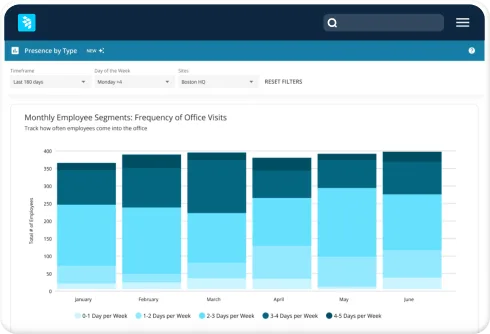
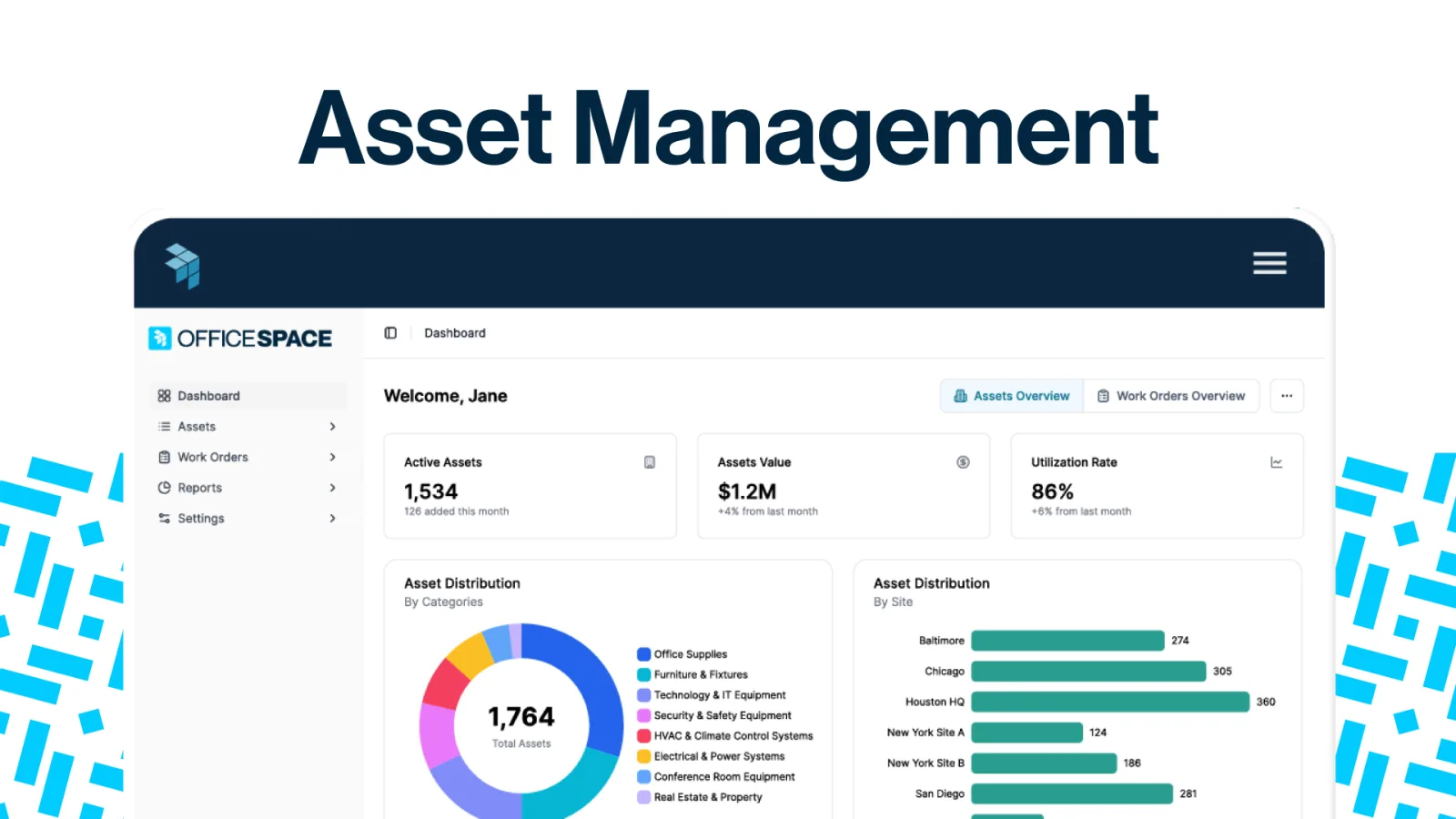
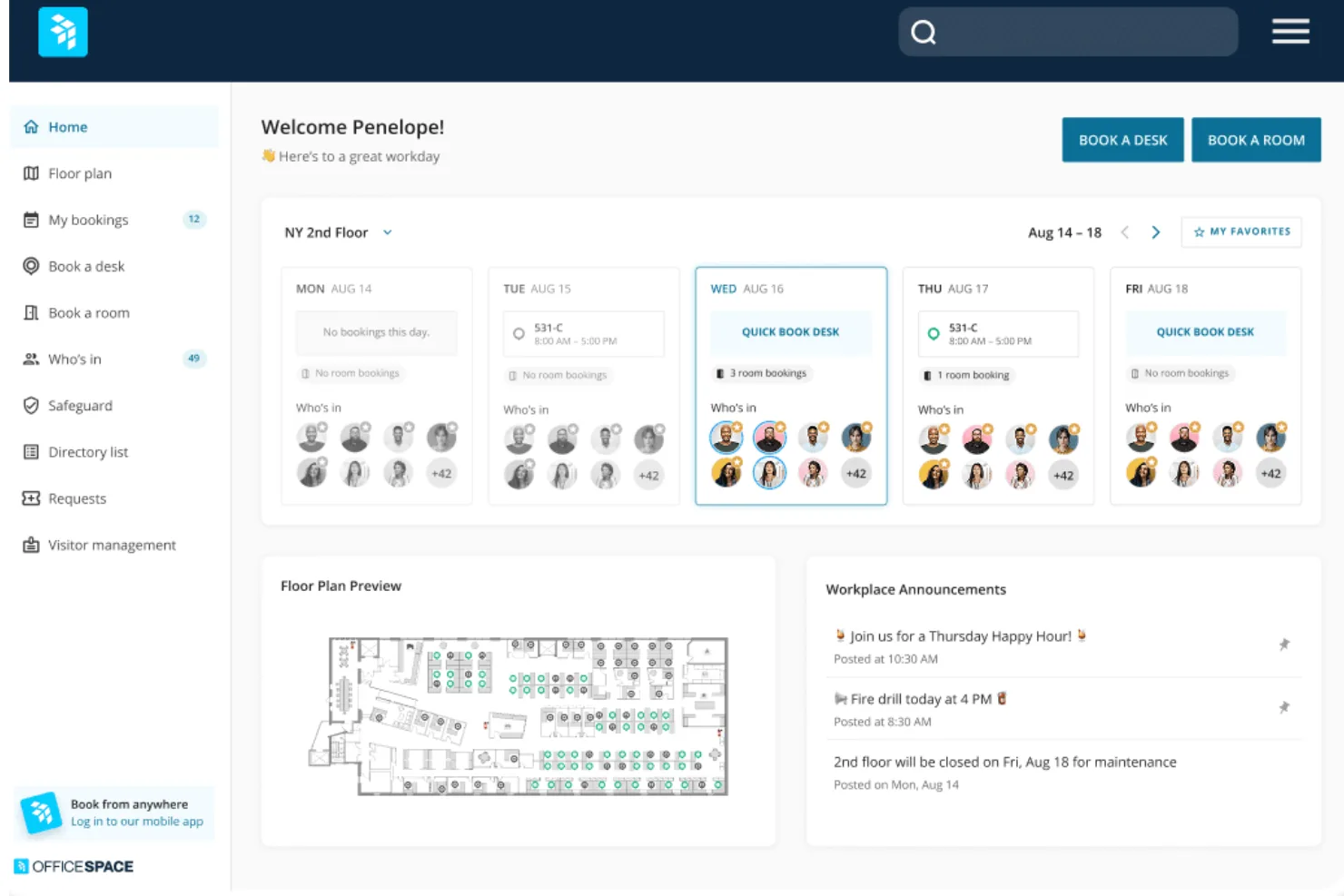
Table of contents
- 1. OfficeSpace Connects Workplace Planning With Daily Operations
- 2. How This OfficeSpace Review Was Evaluated
- 3. OfficeSpace Desk Booking and Flexible Seating
- 4. Digital Floor Plans and OfficeSpace Wayfinding
- 5. Meeting Room Reservations and Calendar Coordination
- 6. OfficeSpace Space Planning and Office Moves
- 7. Workplace Analytics and Occupancy Reporting
- 8. Employee Presence and Hybrid Work Coordination
- 9. Facilities Requests and Service Management
- 10. Visitor Management and Delivery Tracking
- 11. Asset Management and Maintenance Records
- 12. OfficeSpace Integrations and Access Controls
- 13. OfficeSpace Security and Data Governance
- 14. OfficeSpace Implementation and Employee Adoption
- 15. OfficeSpace Pricing and Total Cost
- 16. Who Benefits Most From OfficeSpace?
- Frequently Asked Questions
1. OfficeSpace Connects Workplace Planning With Daily Operations

OfficeSpace helps businesses coordinate office attendance, manage shared workspaces and understand how their buildings are being used.
Its combination of desk and room booking, digital floor plans, workplace analytics and facilities workflows gives operations teams a way to connect everyday office activity with longer term property decisions.
The practical advantage is visibility.
Employees can find places to work, facilities teams can coordinate requests and workplace leaders can examine whether available space matches actual demand.
OfficeSpace is particularly relevant to organizations operating hybrid workplaces, multiple offices or changing seating arrangements.
Instead of managing reservations in one system, floor plans in another and employee attendance in disconnected spreadsheets, businesses can bring several related activities into a shared platform.
The value depends on implementation quality, integration with existing systems and the consistency of the information entered.
The platform also extends beyond desk reservations.
Depending on the package and modules selected, businesses can manage meeting rooms, visitors, deliveries, office moves, assets and maintenance workflows.
More advanced workplace capabilities include occupancy reporting, presence data integrations and planning tools designed to help organizations evaluate alternative office layouts.
However, OfficeSpace is a business platform rather than a simple consumer booking application.
Buyers should expect a sales led purchasing process, configuration decisions and implementation work.
Public pricing is not listed as a straightforward fixed subscription on its current plans page, so organizations should request a tailored quotation before calculating the full cost.
For companies trying to make hybrid work more predictable while improving the use of expensive office space, OfficeSpace is worth evaluating.
The strongest case is for organizations that need several connected workplace functions and want to use operational data to guide decisions about desks, rooms, facilities and real estate.
2. How This OfficeSpace Review Was Evaluated
A useful software review must distinguish between documented product capabilities, purchasing considerations and conclusions that depend on an organization's own requirements.
This review examines OfficeSpace through those three lenses.
The aim is to help prospective buyers understand what the platform offers, where its design is most useful and what needs to be verified before signing a contract.
The assessment is based on the vendor's published product information, plan descriptions, feature explanations and integration materials.
Those sources establish which capabilities OfficeSpace advertises and how the platform is positioned.
They do not, by themselves, prove that every feature performs equally well in every workplace or that every listed capability is included in every subscription.
No unsupported claim of independent laboratory testing or hands on performance measurement is made here.
Where functionality depends on a plan, add on, integration, connected sensor or configuration, buyers should confirm the specific entitlement with OfficeSpace.
That distinction matters because workplace software can appear straightforward during a demonstration while its real operational requirements emerge during deployment.
The review considers several questions.
Can employees find and reserve desks without unnecessary administrative work?
Can facilities teams maintain accurate digital floor plans?
Does the platform provide useful evidence about occupancy and space utilization?
Can organizations connect bookings to calendars, collaboration tools and access systems?
How much configuration and data preparation will implementation require?
Finally, can the commercial proposal be justified by measurable improvements?
These questions are more useful than a generic feature count.
A business with one small office may need little more than reservations and a basic floor plan.
An organization with dozens of locations, a changing hybrid policy and significant property costs may need centralized reporting, integration with workplace systems and support for complex space planning.
OfficeSpace should therefore be assessed against the intended operating model, not simply against the number of features displayed in a product demonstration.
Buyers should ask for a demonstration using realistic scenarios, a detailed list of included modules and a written quotation that separates recurring software charges from implementation and optional services.
3. OfficeSpace Desk Booking and Flexible Seating
Desk booking is one of the platform's most immediately useful capabilities.
In an office where employees do not have permanently assigned desks, people need a reliable way to identify available workspaces, reserve them and coordinate attendance with colleagues.
OfficeSpace supports flexible seating arrangements, including hot desking, advance reservations and recurring bookings.
Employees can search for desks through digital floor plans and supported interfaces.
The available booking options can help organizations accommodate different working patterns, from occasional office visits to teams that attend on recurring days.
Administrators can configure booking rules according to organizational needs, including restrictions associated with locations, departments, teams or particular workspaces.
This flexibility is important because a hybrid workplace rarely follows one universal seating policy.
A company might reserve particular neighborhoods for a department, make specialist desks available only to trained employees or allow assigned desks to be released temporarily when their regular users are absent.
The platform's booking controls can help represent these arrangements without requiring every exception to be handled manually.
OfficeSpace also supports booking workflows that can include mobile and desktop access, along with integrations for collaboration and calendar applications.
The precise combination available depends on the subscribed plan and configuration.
Buyers should confirm which interfaces employees can use, whether reservations can be made in Microsoft Teams or Slack and how bookings appear in the organization's calendar environment.
One important capability is the handling of unused reservations.
When employees book desks but fail to arrive, the resulting empty seats can make an office appear more occupied than it really is.
OfficeSpace describes check in controls and automatic release options intended to reduce this problem.
Presence integrations and sensors may support more automated workflows, although their availability depends on the configuration.
The effectiveness of desk booking still depends on employee behavior.
If users routinely forget to cancel reservations, book multiple desks or ignore check in rules, the system needs appropriate policies and reminders.
Administrators should define what happens when someone fails to arrive, how early a desk can be reserved and whether certain teams receive priority access.
Before purchasing, test the complete booking journey.
An employee should be able to locate a suitable desk, see relevant details, reserve it, change the booking and understand the check in requirement without asking an administrator for help.
A smooth employee experience is essential to adoption.
4. Digital Floor Plans and OfficeSpace Wayfinding
Digital floor plans make workplace information easier to interpret because they show desks, rooms and other spaces in their physical context.
Rather than selecting a workspace from a long list of room numbers, employees can look at a visual representation of the office and identify an appropriate location.
OfficeSpace supports digital floor plans for workplace management and space planning.
Its published capabilities include creating and maintaining plans, organizing locations and floors, displaying seating information and synchronizing design information with supported computer aided design workflows.
These functions can be especially valuable for organizations with several buildings or frequent office changes.
A floor plan is only as useful as its underlying data.
If desks have been moved but their digital positions have not been updated, employees may reserve the wrong space.
If a room's capacity or amenities are inaccurate, meeting organizers can make unsuitable bookings.
If an office directory contains outdated employee assignments, wayfinding becomes less dependable.
Implementation should therefore begin with an inventory of buildings, floors, rooms, desks and relevant amenities.
Each space should have a consistent identifier, a clearly defined purpose and accurate attributes.
Organizations importing existing drawings should check that the digital representation matches the physical environment, including changes made after the original design was produced.
OfficeSpace also describes tools for finding colleagues, locating amenities and viewing availability on digital maps.
These functions can reduce the friction associated with unfamiliar offices, particularly when employees visit different locations or move between neighborhoods.
Kiosks and mobile access may provide additional ways to navigate, depending on the deployment.
For facilities teams, floor plans can support more than employee directions.
They can provide a visual reference for seating assignments, space changes, office moves and asset locations where the relevant functionality is available.
This can reduce the need to reconcile separate diagrams and spreadsheets whenever a team moves to another floor.
Buyers should clarify how floor plans are created, who maintains them and whether changes are included in the subscription or require additional professional services.
OfficeSpace advertises floor plan support and implementation services, but the exact scope should be documented in the proposal.
A practical demonstration should include a real floor, several workspace types and a change to an existing layout.
Ask the vendor to show how the update reaches employees and whether the same change affects booking availability, reporting and space planning.
This reveals whether the digital map behaves as a maintained operational resource rather than a static drawing.
5. Meeting Room Reservations and Calendar Coordination
Meeting room management becomes complicated when several teams compete for limited space.
Employees need to find a room with the right capacity, check its availability, reserve it and coordinate the booking with the meeting invitation.
OfficeSpace brings room reservations into its broader workplace management environment.
The platform describes room search and booking through web and mobile interfaces, with support for calendar integrations and collaboration tools in relevant configurations.
Users may be able to filter rooms by location, capacity and amenities, helping them avoid reservations that do not match the meeting's requirements.
Calendar integration is particularly important.
When room bookings and employee calendars are disconnected, users can end up maintaining two records for the same meeting.
A booking may exist in the workplace system while the invitation says something different.
Buyers should verify how OfficeSpace handles synchronization, edits, cancellations and conflicts with the calendar platform already used by their organization.
OfficeSpace also describes support for connecting video conferencing services to room reservations.
Depending on the setup, meeting organizers may be able to include conferencing details for services such as Microsoft Teams, Zoom or Google Meet.
The exact workflow should be demonstrated using the organization's preferred calendar and conferencing tools.
A well configured room booking system can help facilities teams understand how meeting rooms are being used.
Reservations reveal demand, but they do not necessarily prove that a room was occupied for the entire booked period.
A room may remain empty after a meeting is cancelled, or a meeting may end early while the reservation stays active.
OfficeSpace lists capabilities for automatically releasing unused rooms and analyzing room utilization in supported configurations.
Buyers should investigate how the system determines that a room is unused, whether check in is required and which integrations or devices are necessary.
Automated release can improve availability, but it should not cancel legitimate reservations because of unreliable presence data or a misunderstood check in policy.
Room booking rules also need to reflect how the business operates.
Some organizations require larger rooms to be reserved for larger meetings, while others need priority access for specific departments or client appointments.
Clear restrictions help protect availability without making routine scheduling unnecessarily difficult.
During evaluation, test a complete meeting scenario.
Search for a room, check its capacity, reserve it, invite participants, add conferencing details and then change or cancel the meeting.
Confirm how each change appears in connected calendars and room displays.
This is a better indication of operational suitability than simply seeing a calendar inside a demonstration.
6. OfficeSpace Space Planning and Office Moves
Space planning connects the physical layout of an office with the organization's staffing, collaboration patterns and operational requirements.
OfficeSpace offers tools intended to help workplace and real estate teams manage floor plans, evaluate layout options and coordinate changes when people, departments or facilities move.
For organizations that regularly reorganize teams, office moves can generate considerable administrative work.
A single change may affect desk assignments, room availability, equipment locations, access requirements and employee communications.
Managing those dependencies through separate spreadsheets increases the chance of errors and missed updates.
OfficeSpace describes workflows for planning moves, additions and changes, including the ability to manage people and spaces through digital floor plans.
These capabilities can help teams coordinate seating changes and track which spaces are assigned, available or being prepared for another use.
Its published plans also describe space planning features that can support alternative layouts and scenario comparisons.
Advanced capabilities include AI assisted planning functions designed to help generate layout options and consider factors such as occupancy, adjacencies and utilization data.
The precise availability of these tools should be confirmed because some capabilities may be restricted by plan or sold as an add on.
Scenario planning is useful when an organization needs to compare several plausible office configurations.
For example, a company may be considering whether a department should move closer to another team, whether a floor can accommodate planned hiring or whether underused space can be converted into collaboration areas.
Comparing alternatives helps decision makers understand the tradeoffs before physical changes begin.
However, automated planning should support professional judgement rather than replace it.
A layout that appears efficient on paper may conflict with accessibility requirements, fire safety rules, specialist equipment needs or the way a team actually works.
Workplace leaders must validate proposed arrangements against building constraints and employee needs.
The quality of planning also depends on reliable input data.
If employee records are outdated or room capacities are wrong, the resulting scenarios may be misleading.
Before relying on utilization forecasts, organizations should examine how occupancy is measured, which data sources are included and whether missing information can distort the results.
OfficeSpace can be especially valuable when planning is a recurring responsibility rather than an occasional project.
Organizations managing multiple sites, regular departmental moves or significant portfolio changes may benefit from maintaining their floor plans and operational data in one environment.
Buyers should ask to see a realistic planning exercise during the sales process.
Provide a representative floor plan, explain a planned team move and ask the vendor to demonstrate how people, desks and spaces are updated.
Confirm whether scenario planning, CAD synchronization, move management and floor plan editing are included in the proposed subscription.
7. Workplace Analytics and Occupancy Reporting
Workplace analytics helps organizations understand how their offices are used rather than relying solely on assumptions about attendance.
OfficeSpace provides reporting capabilities intended to help workplace teams examine utilization, seating demand, room usage and attendance patterns across locations.
This information matters because an office can be expensive to operate while remaining underused on some days and overcrowded on others.
A company may have enough total desks but too few seats in a particular neighborhood.
Meeting rooms may appear fully booked even when many reservations are not used.
Different floors may experience different levels of demand.
OfficeSpace describes reporting on desk and room utilization, booking trends, capacity and attendance.
Depending on the plan and available data, organizations may be able to compare sites, floors, neighborhoods, departments and time periods.
These views can help facilities leaders identify patterns that are difficult to see in individual booking records.
The most useful analysis begins with a defined business question.
Are Mondays consistently quieter than Wednesdays?
Does a department regularly exceed its assigned seating capacity?
Are large meeting rooms being used for small meetings?
Which floors have enough unused space to accommodate a team move?
Clear questions make reports more actionable.
Advanced workplace analytics can also help leaders compare alternative property decisions.
If a location is consistently underused, the organization might examine whether its footprint can be reduced, whether teams should be consolidated or whether the current hybrid policy is creating uneven attendance.
These are financial and operational decisions, so the underlying measurements must be interpreted carefully.
Occupancy and utilization are not always interchangeable.
A reservation shows that someone intends to use a space.
A check in indicates a recorded arrival under the system's rules.
A sensor or access control event can provide another signal, but each method has limitations.
Some employees may forget to check in, devices may fail to report and access events may not establish how long a person stayed.
Organizations should understand exactly how OfficeSpace calculates each reported measure.
Ask which sources contribute to occupancy figures, how often the data updates, how missing records are treated and whether reports distinguish bookings from verified presence.
These details determine whether analytics can support serious planning decisions.
The platform's published materials also describe more advanced analytics features that use natural language questions to generate insights and charts.
Such tools may make reporting easier for nontechnical users, but buyers should confirm which features are currently available in their proposed package.
They should also check whether generated answers can be traced back to understandable data and definitions.
Analytics is most valuable when it changes a decision.
A dashboard that no one reviews adds little value.
Organizations should identify the people responsible for reviewing reports, establish a regular review schedule and connect findings to actions such as adjusting desk availability, changing layouts or reconsidering office capacity.
8. Employee Presence and Hybrid Work Coordination
Hybrid work introduces a coordination problem that traditional office assignments do not fully address.
Employees may work remotely on some days, visit the office for collaboration on others and need to know whether colleagues will be present before making the trip.
OfficeSpace includes employee presence and workplace coordination features designed to make these patterns more visible.
Employees can use booking information and supported presence indicators to understand who is expected in the office.
This can help teams coordinate shared workdays and make better decisions about where to sit.
For managers, the information can provide a clearer view of planned attendance without requiring every employee to send individual messages.
The platform's published capabilities describe presence information that can draw on booking records, badge systems, WiFi integrations and other supported sources.
Advanced packages may offer additional presence indicators and integrations.
Availability depends on the organization's systems and the subscription purchased.
Presence data must be interpreted with care.
A desk reservation does not prove that an employee arrived.
A badge event may show entry into a building but not whether the person remained at a desk.
A WiFi connection can indicate that a device is nearby without proving the employee is working in a particular space.
The business should decide which signals are appropriate for each purpose.
Desk availability may require a check in event or sensor reading, while team coordination may work adequately with declared attendance and reservations.
Performance management or employee monitoring raises different questions and should not be treated as a routine extension of booking software.
OfficeSpace can support more useful hybrid coordination when employee profiles, booking information and location data are kept current.
Administrators should establish clear rules for remote days, assigned desks, bookable neighborhoods and exceptions.
Employees should understand what information is displayed to colleagues and how the organization uses attendance data.
Organizations should also avoid assuming that a single attendance pattern fits every team.
Customer facing staff, laboratory personnel, field employees and office based departments may have different reasons for visiting a location.
A sensible configuration should reflect those differences rather than impose identical rules across the entire workforce.
When evaluating OfficeSpace, ask how employees indicate their planned attendance, how presence information is updated and how permissions control what other people can see.
If the business uses access control or WiFi systems, confirm the integration requirements and the precise data exchanged.
A pilot involving a representative group can reveal whether the feature genuinely improves coordination.
Measure whether employees find colleagues more easily, whether booking conflicts decline and whether the data is reliable enough for planning.
Those results will help determine whether advanced presence integrations are worth the additional cost.
9. Facilities Requests and Service Management
OfficeSpace includes facilities request workflows that can help employees report workplace problems and allow operations teams to manage the response.
Instead of relying on scattered emails or messages, staff can submit requests through supported interfaces, identify the relevant location and follow the status of the issue.
This is useful for recurring office needs such as reporting a damaged chair, requesting equipment, reporting a maintenance problem or asking for help with a workspace.
When requests are associated with a floor plan, facilities staff can understand where the problem occurred without having to exchange several messages to identify the room or desk.
The platform describes options for creating requests from desktop or mobile interfaces, attaching photos and managing status updates.
It also supports routing and notifications in relevant configurations.
These features can help an operations team organize incoming work, assign responsibility and communicate progress to the employee who submitted the request.
The real benefit depends on how the organization configures its workflow.
If every request enters one queue without a clear owner, the platform may simply digitize an inefficient process.
Facilities teams should establish request categories, priorities, assignment rules and service expectations before inviting employees to use the system.
For example, a request involving a broken chair should not follow the same escalation process as a safety issue or a meeting room that is unavailable before an important client appointment.
Appropriate categories help the team prioritize urgent work while maintaining a manageable queue for routine requests.
OfficeSpace describes capabilities for managing requests across locations, assigning them to responsible people and tracking progress.
Some workflows can also connect with external service management systems.
Organizations already using a dedicated service desk should confirm whether OfficeSpace can complement the existing system or whether the business would end up maintaining duplicate tickets.
The distinction matters for larger IT and facilities departments.
If an employee submits a request through OfficeSpace and the operations team must manually recreate it in another platform, the process may introduce delays.
A supported integration can reduce that duplication, but the details of synchronization, ownership and status updates need to be tested.
Reporting can help managers identify recurring problems, understand request volumes and assess whether resources are allocated effectively.
Over time, the organization may discover that a particular floor generates frequent equipment requests or that a specific category consistently misses its response target.
These insights are useful only when request categories and status changes are recorded consistently.
A practical rollout should therefore include short instructions for employees and clear operating procedures for the team responsible for resolving requests.
Before buying, demonstrate the entire process from submission to closure.
Check whether employees can identify the right location, whether staff receive notifications, whether assignments can be changed and whether requesters can see meaningful updates.
Confirm any limits on custom fields, automation, reporting and integrations in the selected plan.
10. Visitor Management and Delivery Tracking
Visitor management is an important part of office operations, particularly for organizations that regularly receive clients, contractors, candidates or other external guests.
OfficeSpace includes visitor management capabilities intended to help reception teams coordinate arrivals and notify employees when their visitors reach the workplace.
The platform describes workflows for preregistering visitors, collecting information through digital forms, issuing visitor badges and recording check in and check out activity.
Depending on the setup, organizations can configure a digital reception experience using a supported tablet or kiosk interface.
Preregistration can reduce the time required to process expected visitors.
A host can prepare for an appointment, provide the relevant information in advance and help reception staff recognize the guest when they arrive.
Digital notifications can also reduce the need for reception employees to locate a host manually.
Visitor workflows should be designed around the organization's security and privacy requirements.
Some businesses need a simple record of arrivals, while others require visitor acknowledgements, specific forms, identity checks or host approval.
Buyers should verify which controls OfficeSpace supports and which processes remain the responsibility of reception or security staff.
Digital forms and electronic signatures can be useful where visitors must acknowledge workplace policies or provide required information.
However, the organization should collect only the information it genuinely needs, establish appropriate retention periods and restrict access to visitor records.
A digital form does not automatically make the overall process compliant with every applicable privacy or security requirement.
OfficeSpace also provides delivery management capabilities for businesses that receive frequent parcels and internal mail.
Teams can record incoming deliveries, associate packages with recipients, capture photos where supported and notify employees that an item is ready for collection.
This can be particularly helpful in larger offices where packages arrive throughout the day and reception staff cannot rely on employees being present when a courier delivers an item.
A searchable delivery log and collection reminders can reduce manual follow up and make it easier to identify parcels that have not been collected.
Delivery management also needs clear ownership.
Someone must receive the package, record the relevant details, store it securely and verify that it is handed to the right person.
Software can organize the record, but it cannot replace sensible procedures for handling valuable, confidential or sensitive deliveries.
Organizations should consider the expected volume of visitors and packages before deciding which capabilities are necessary.
A small office with occasional guests may have simpler requirements than a corporate headquarters with several reception points and a high volume of daily deliveries.
When evaluating OfficeSpace, test visitor preregistration, arrival notifications, badge creation and visitor log access.
For deliveries, test the process of recording a parcel, notifying the recipient, reminding the recipient and documenting collection.
Ask how long records are retained and which administrators can access them.
11. Asset Management and Maintenance Records
OfficeSpace offers asset management capabilities that are relevant to organizations that need a centralized record of workplace equipment and other business assets.
Depending on the subscription, the platform can help teams record asset details, categorize equipment, monitor lifecycle information and maintain related documentation.
A consistent asset register is useful when equipment moves between departments, floors or locations.
Without a reliable record, teams may struggle to identify who is responsible for an item, where it is located or whether it is approaching the end of its useful life.
The platform's asset management materials describe centralized asset lists, search and filtering, custom fields, attachments, lifecycle notifications and depreciation information.
Asset records can include details such as category, department, location and status.
Bulk import options may also help organizations move existing records into the system.
The quality of an asset register depends on the information maintained by the business.
If equipment is purchased without being recorded, transferred without an update or disposed of without closing the record, the system will gradually become less reliable.
A successful deployment needs an agreed process for creating, updating and retiring assets.
OfficeSpace also describes asset related maintenance workflows in its more advanced asset management offering.
These can include work orders, scheduled preventive maintenance, reactive maintenance and records of completed work.
The exact capabilities available should be confirmed against the proposed subscription.
Preventive maintenance can help organizations schedule recurring work before equipment failures disrupt operations.
Reactive maintenance records help staff document what happened after a problem was reported.
Together, these records can give facilities managers a clearer picture of recurring costs and assets that require frequent attention.
For example, a facilities team responsible for equipment across multiple sites may want to identify assets with repeated repair requests or warranties that are approaching expiration.
Centralized records can make those tasks easier to coordinate than a collection of disconnected spreadsheets.
However, buyers should distinguish asset tracking from a full enterprise asset management system.
The needs of a small office equipment inventory differ significantly from those of an industrial organization managing complex machinery, regulatory inspections, spare parts and specialized maintenance procedures.
OfficeSpace should be evaluated against the actual depth of the required asset workflow.
Integration also deserves attention.
If the organization already uses a maintenance management platform or service desk, it should establish whether OfficeSpace will become the primary asset register, exchange selected records with the existing system or operate alongside it.
Duplicate records can undermine the value of centralization.
Before purchasing asset management, request a demonstration using representative equipment records.
Include an asset transfer, a warranty reminder, a maintenance request and a report.
Confirm whether barcode or QR code scanning, advanced reporting, work order integrations and floor plan based asset location are included or require a separate workplace subscription.
12. OfficeSpace Integrations and Access Controls

Workplace software becomes more useful when it connects to the systems employees and administrators already use.
OfficeSpace describes integrations with calendar services, collaboration applications, employee directories, identity providers, access control systems, WiFi platforms, sensors and selected operational tools.
Calendar integration can reduce duplication between room bookings and meeting invitations.
Collaboration integrations can make reservations and facility requests accessible through familiar tools.
Employee directory synchronization can help maintain profiles and organizational information.
Access control and WiFi integrations can provide additional signals for workplace presence reporting where the relevant configuration is supported.
The platform also advertises an API and webhooks for custom integrations.
These options may be useful for organizations with specific workflows that cannot be handled entirely through standard connectors.
However, an API listing should not be treated as proof that a particular integration is ready to use without development work.
Before selecting a plan, create an integration inventory.
Record the systems the business already relies on, the data each system owns and the outcome required from each connection.
For example, decide whether the employee directory is authoritative for department information, whether the calendar system controls meeting invitations and whether access control data may be used for attendance reporting.
This exercise helps prevent unnecessary duplication.
If two platforms can both change the same record, the implementation team must define which system takes precedence and how conflicts are resolved.
If a connector only sends data in one direction, users need to know where updates must be made.
Identity and access management deserve particular attention.
OfficeSpace describes single sign on options involving supported identity providers, along with role based permissions and user management capabilities.
These controls can help administrators align workplace access with existing security policies, although the exact options should be confirmed for the selected package.
A sound permission model should follow the principle of least privilege.
Employees need access to their own bookings and the information required to coordinate work.
Reception staff may need visitor records.
Facilities teams may need space and service request information.
Administrators may require broader access, but that does not mean every user should see all employee or visitor details.
Organizations should also define how accounts are created, updated and disabled.
Employee departures, role changes and transfers between locations should trigger appropriate changes to access permissions.
Directory synchronization can reduce manual work, but the organization still needs to test how quickly changes propagate and what happens when a source record is incomplete.
Integration testing should cover normal use and failure scenarios.
Ask what happens if a calendar connection is unavailable, a badge event arrives late or an employee record changes in the source system.
Confirm whether errors are logged and whether administrators can identify and resolve failed synchronization.
The official integration directory is available at https://www.officespacesoftware.com/integrations/.
Use it to identify relevant connectors, then ask OfficeSpace to confirm their availability and limitations in the proposed subscription.
A written integration scope is more reliable than a general statement that the platform integrates with the organization's technology stack.
13. OfficeSpace Security and Data Governance
OfficeSpace can hold information about employees, office attendance, desk reservations, visitors, workplace requests and organizational locations.
The sensitivity of that information depends on the organization's configuration and the data it chooses to collect.
Security and data governance should therefore be considered before a deployment begins, not after employees start using the platform.
Access permissions are a practical starting point.
Administrators should determine which roles can view employee information, manage bookings, change floor plans, access visitor logs and review workplace analytics.
Permissions should reflect job responsibilities and be reviewed whenever staff change roles.
Single sign on can simplify account management when it is configured with the organization's identity provider.
It can also help align access with existing authentication policies.
Buyers should confirm the available authentication methods, supported identity providers and any restrictions associated with their chosen plan.
Data integration creates additional governance questions.
If OfficeSpace receives employee information from an HR system or presence signals from an access control platform, the organization needs to understand which fields are transferred, why they are needed and how long the information is retained.
Presence information deserves special care because it can reveal patterns about when people visit the office and which spaces they use.
Businesses should explain the purpose of collection, restrict access appropriately and avoid repurposing operational data without reviewing the relevant legal, contractual and employee relations requirements.
Visitor records may contain contact information and details about a person's visit.
Organizations should determine who can view those records, how retention works and whether the information can be exported.
If the company operates across jurisdictions, its privacy team should evaluate applicable requirements rather than assuming one configuration satisfies every local law.
Security review should also cover vendor responsibilities.
Ask for the current security documentation, relevant certifications or independent assurance reports, incident response procedures, backup and recovery information, data hosting details and contractual commitments.
Confirm which commitments apply to the actual product and subscription under consideration.
A vendor's published security claims are useful starting points, but procurement teams should evaluate the evidence directly.
Requirements may differ depending on the organization's industry, data sensitivity and internal policies.
Some buyers will require formal security questionnaires, contractual data protection terms or additional approvals before a service can be deployed.
Data governance should be reflected in everyday administration.
Define who can export reports, who can change permissions and who is responsible for removing outdated employee records.
Establish a retention policy for visitor logs and other information that no longer serves a legitimate business purpose.
OfficeSpace should be assessed as part of the organization's overall security environment.
It does not remove the need for secure identity management, responsible configuration, employee communication or periodic access reviews.
A well governed deployment is more likely to remain reliable as the company adds locations and new workplace workflows.
14. OfficeSpace Implementation and Employee Adoption
OfficeSpace implementation involves more than creating accounts and enabling desk reservations.
Organizations must prepare workplace data, establish booking rules, configure integrations and decide how the platform will fit into existing facilities processes.
The first task is to define the scope.
A company implementing desk booking at one location has a different project from a business rolling out room reservations, visitor management, asset tracking and advanced analytics across a global portfolio.
Trying to activate every possible workflow at once can make implementation harder to manage.
Start by identifying the operational problems the deployment must solve.
These might include frequent desk conflicts, inaccurate floor plans, poor visibility into office attendance or delays in facilities requests.
Each problem should have a corresponding configuration decision and a measurable outcome.
The next step is data preparation.
Organizations should gather current floor plans, room and desk inventories, employee records, location hierarchies and any information required by the selected modules.
Duplicate employee records, inconsistent location names and outdated seating assignments should be resolved before migration wherever possible.
Poor source data can create problems throughout the platform.
An employee may appear under the wrong department, a desk may be shown on the wrong floor or a room may have incorrect capacity information.
These errors are easier to correct before launch than after hundreds of employees begin relying on the system.
Integration setup should be treated as a separate workstream.
Identify the owners of the calendar, identity, HR, collaboration and access control systems involved.
Confirm the information each connection exchanges, who can approve configuration changes and how failures will be monitored.
OfficeSpace advertises structured implementation support, training and dedicated project assistance for relevant customers.
Its published materials describe implementation timelines of approximately 35 days or less in certain service arrangements.
That is a vendor stated target, not a guarantee that every organization will complete its deployment within the same period.
Project complexity, data quality, integration requirements and internal approval processes can all affect the schedule.
A pilot can reduce risk.
Select a representative office or employee group and include the workflows most likely to reveal problems.
Test desk reservations, cancellations, check in, room bookings, notifications and facilities requests.
Include administrators as well as employees so the team can evaluate both daily use and ongoing management.
Employee communication is equally important.
Explain why the system is being introduced, which activities employees must complete and what happens when a booking is missed.
People are more likely to adopt a workplace tool when the rules are clear and the system removes a recognizable frustration.
Training should reflect different responsibilities.
Employees need concise guidance on finding and reserving spaces.
Reception teams need to understand visitor processing and delivery records.
Facilities staff need to manage requests and maintain space information.
Administrators need training on permissions, integrations, reporting and configuration changes.
Before the full rollout, establish a support process for the first weeks of use.
Employees should know where to report incorrect floor plans, booking problems or missing access permissions.
Administrators should review the incoming issues frequently and correct recurring problems rather than resolving each one as an isolated incident.
Finally, define how success will be measured.
Useful indicators include booking completion rates, missed reservations, room utilization, request resolution times and the accuracy of space records.
The right measures depend on the original problem.
If the objective is to reduce unused desks, measure actual availability and usage rather than simply counting bookings.
15. OfficeSpace Pricing and Total Cost

OfficeSpace uses a sales led pricing model for its workplace management products.
Its official plans page presents packages and feature sets but directs prospective customers to request pricing rather than publishing a single standard subscription price that applies to every organization.
That approach means buyers should not assume that a price quoted by another company, a software directory or an older review represents the current price for their own requirements.
Costs can depend on the package, employee count, modules, implementation scope and additional services.
The workplace offering includes packages such as Essentials Plus and Pro Plus in the published plan structure.
The lower level package focuses on workplace operations and employee experience, while the higher level offering adds more advanced workplace intelligence, portfolio analysis and integration capabilities.
The precise entitlement should be verified in the current commercial proposal.
OfficeSpace also offers asset management packages, including Essentials and Pro.
These address a different set of needs, covering asset records and, in the more advanced offering, maintenance and work order workflows.
Buyers should determine whether asset management is being purchased as a standalone product or alongside the workplace platform, especially if they want to associate assets with digital floor plans.
A meaningful quotation should separate the recurring subscription from implementation services and optional components.
Depending on the requirements, additional costs may relate to floor plan preparation, advanced integrations, specialized training, data services or custom development.
Not every organization will require these items, but they should be identified before procurement approval.
The number of employees or locations included in a package is another important point.
OfficeSpace's published pricing information describes platform fees and included employee allowances for relevant packages, with additional synced employees potentially charged separately.
Buyers should ask how the contract defines a billable employee, whether inactive accounts count and what happens when the workforce grows.
It is also important to establish how the contract treats expansion.
Adding a new office, connecting another system or introducing an additional module may change the subscription cost.
Ask whether these changes trigger a new minimum commitment, an implementation charge or a revised annual agreement.
The right comparison is total cost against the expected operational benefit.
If a platform reduces unused office capacity, simplifies facilities administration or avoids the need for several separate tools, those savings may justify a higher subscription.
However, savings should be calculated from credible assumptions rather than from an optimistic demonstration.
For a workplace utilization project, estimate the annual cost of the relevant space, determine how much capacity could realistically be reduced or repurposed and calculate the cost of making that change.
For facilities workflows, estimate the administrative time currently spent assigning, tracking and closing requests.
For desk booking, consider whether the platform improves the availability of workspaces during peak periods.
Do not count the same benefit twice.
If better occupancy data supports a decision to reduce office space, the resulting property savings should not also be counted as a separate benefit under several feature categories.
A conservative financial model makes the purchase decision easier to defend.
Request a written quotation with the following details clearly documented:
- The exact product and package names.
- The features included in each subscription.
- The employee or location allowance.
- Any charge for additional employees or sites.
- Implementation and data migration costs.
- Integration, training and professional service fees.
- Contract length, renewal terms and payment schedule.
- Support coverage and service commitments.
- Any minimum purchase or expansion requirements.
- The process for changing packages or ending the agreement.
Because OfficeSpace does not publish a universal fixed price for its current workplace packages, a responsible review cannot assign a verified public dollar amount to those subscriptions.
The appropriate next step is to request a quote based on the intended deployment.
Buyers should also confirm whether the quotation includes all required modules before comparing it with alternative workplace management platforms.
16. Who Benefits Most From OfficeSpace?
OfficeSpace is best suited to organizations that need a coordinated way to manage office space, employee attendance and related workplace operations.
Its range of capabilities makes it relevant to facilities teams, workplace experience leaders, corporate real estate departments and organizations responsible for multiple offices.
Companies with hybrid work policies can use desk booking and presence information to help employees coordinate office visits.
Organizations with changing seating arrangements can use floor plans and move management to keep records aligned with physical changes.
Facilities teams can use service requests to organize maintenance and employee support, while workplace leaders can examine utilization reports when reviewing capacity.
The platform is particularly worth considering when these responsibilities overlap.
A business may already have separate systems for room reservations, visitor records, facilities requests and floor plans.
If those tools create duplicated work or make it difficult to understand how the office is operating, consolidating selected workflows may provide a meaningful benefit.
Multi location organizations may also appreciate the ability to manage locations and analyze workplace information across a broader portfolio.
Centralized reporting can help leaders compare occupancy patterns and identify sites that require further investigation.
This becomes more useful when locations follow consistent data definitions and reporting procedures.
The strongest candidates usually have enough operational complexity to justify a dedicated workplace platform.
They may manage large employee populations, several floors, recurring moves, a substantial meeting room inventory or significant real estate costs.
These organizations are more likely to benefit from advanced configuration, integrations and reporting.
Smaller businesses should evaluate the platform differently.
A company with one modest office and a simple booking policy may not need an extensive workplace management environment.
A lightweight scheduling tool or an existing calendar system may solve the immediate problem with less administrative work and a lower total cost.
OfficeSpace may also be less suitable when an organization needs a specialized enterprise system outside its main scope.
For example, complex industrial maintenance, highly customized property accounting or a deeply specialized access control requirement may call for a dedicated product.
Integration can help connect systems, but it does not mean OfficeSpace replaces every specialist application.
The purchasing decision should begin with a list of required workflows rather than a broad ambition to modernize the workplace.
Identify the problems that need solving, determine which features are essential and establish which existing systems should remain in place.
Then request a demonstration that follows those workflows from beginning to end.
The buyer should also consider the internal resources required to maintain the system.
Digital floor plans, employee records, booking rules and integrations need ongoing ownership.
A platform can simplify work, but it still requires people to maintain accurate information and respond when business processes change.
For the right organization, OfficeSpace can provide a coherent environment for coordinating workplace activity and turning usage data into practical decisions.
For a business that needs only one narrow function, its broader capabilities may create unnecessary complexity.
Fit depends on the actual operating requirements and the value of bringing those workflows together.
Key features
- Flexible desk booking for hybrid teams
- Recurring reservations for regular office visits
- Interactive floor plans for workspace discovery
- Meeting room booking with calendar synchronization
- Room searches by capacity and amenities
- Hot desking and desk hoteling support
- Automatic release of unused reservations
- Configurable booking restrictions by department
- Mobile access to workplace reservations
- Employee presence and attendance indicators
- Workplace utilization reports across locations
- Digital planning for office moves
- Alternative layouts for space planning
- CAD synchronization for supported floor plans
- Visitor preregistration and digital check in
- Digital visitor forms and badge printing
- Delivery logs with employee notifications
- Facilities requests with location based reporting
- Centralized workplace asset records and tracking
- Preventive maintenance and work order management
- Integration support for workplace systems
- Single sign on and role based permissions
- API and webhook integration capabilities
- Portfolio level workplace reporting and analysis
- AI assisted space planning capabilities
- Employee directory and organizational data synchronization
Pricing
- Desk and room booking workflows
- Digital floor plans and wayfinding
- Workplace requests and visitor management
- Employee experience and mobile access
- Standard workplace reporting capabilities
- Advanced workplace intelligence and analytics
- Portfolio utilization and attendance reporting
- Advanced integration and webhook capabilities
- AI assisted space planning tools
- Enhanced employee presence indicators
- Centralized workplace asset inventory
- Preventive and reactive maintenance workflows
- Automated asset related work orders
- Warranty and lifecycle notifications
- Advanced asset and maintenance reporting
Pros & cons
Pros
- Combines several workplace management workflows
- Flexible desk booking and reservations
- Visual floor plans simplify navigation
- Supports multiple office locations centrally
- Useful reporting on space utilization
- Configurable rules for shared seating
- Integrates with common workplace systems
- Supports office moves and planning
- Visitor and delivery workflows included
- Facilities requests support operational coordination
- Advanced analytics aid property decisions
- Asset records support equipment oversight
- Role based access control available
- Implementation and training support offered
Cons
- Pricing requires a custom quotation
- No public universal subscription price
- Implementation requires internal coordination and preparation
- Data accuracy depends on ongoing maintenance
- Advanced capabilities depend on package selection
- Some integrations require additional configuration
- Sensor based features need compatible systems
- Complex deployments can require professional services
- Small offices may need fewer features
- Presence data requires careful interpretation
- Reporting quality depends on source data
- Asset management scope needs careful evaluation
- Custom workflows may require technical assistance
- Total cost needs detailed procurement review
OfficeSpace specs
- Platforms: Web browser, iOS, Android, supported integrations and kiosks
- Free plan: No publicly listed permanent free workplace plan
- Starting price: Contact sales for a customized quotation
- Integrations: Calendar, collaboration, HR, identity, access control and sensor systems
- Support: Help center, live email and phone support, implementation assistance
- Best for: Hybrid workplaces, facilities teams and multi location organizations
Our verdict
OfficeSpace is a capable workplace management platform for businesses that need to coordinate desk booking, room reservations, digital floor plans, facilities requests and workplace analytics within a connected environment. Its broad feature set is particularly useful for hybrid organizations and multi location operations that need reliable space information and more structured workplace processes. Buyers should carefully evaluate the quotation, implementation requirements and availability of individual modules before committing. Smaller offices with simple booking needs may prefer a lighter solution, while larger organizations can benefit from OfficeSpace when they have clear operational objectives, reliable data and the resources to maintain the platform.
Visit SiteFrequently Asked Questions
What Is OfficeSpace Software Used For?
How Much Does OfficeSpace Cost?
Does OfficeSpace Support Hybrid Work?
Can OfficeSpace Integrate With Microsoft Teams?
Is OfficeSpace Suitable for Small Businesses?
Reader reviews
Be the first to review
