
Salesforce Review 2026: CRM Features That Connect Every Team
By Noura Mint Ely & Eva Elekcha · Reviewed by Evander Thorne
Salesforce connects customer data, sales pipelines, service operations, marketing, and automation, giving businesses a configurable CRM platform for managing customer relationships.
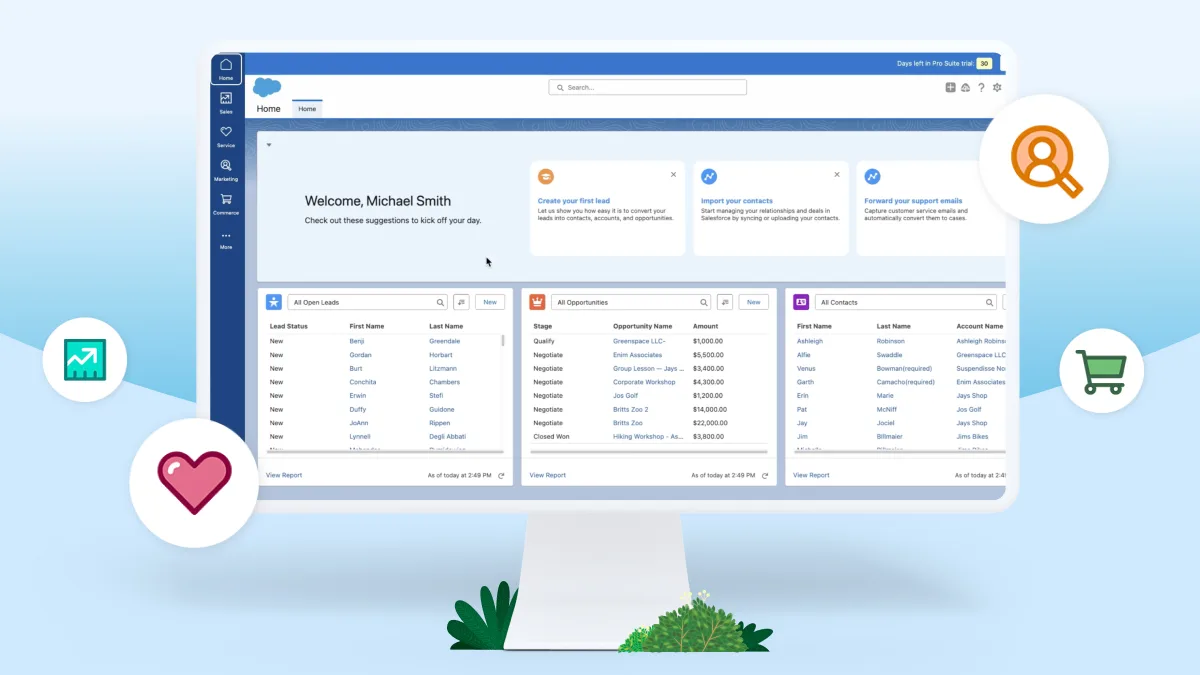
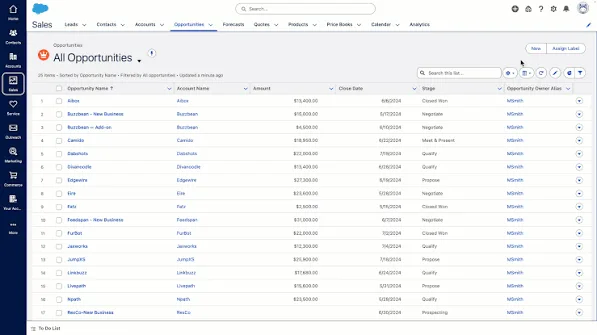
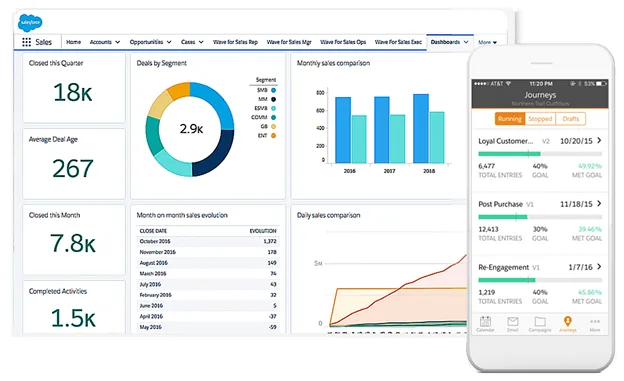

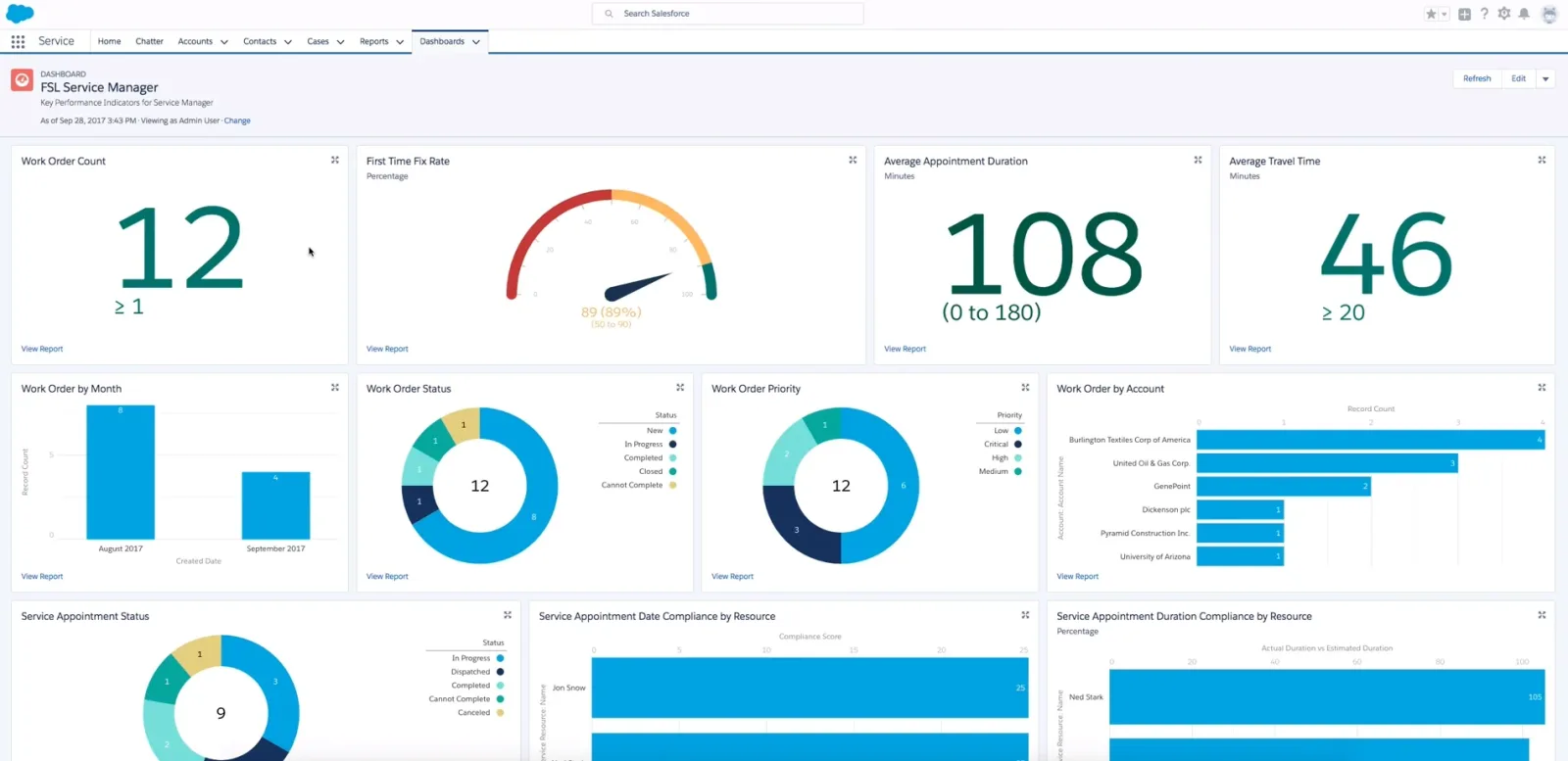
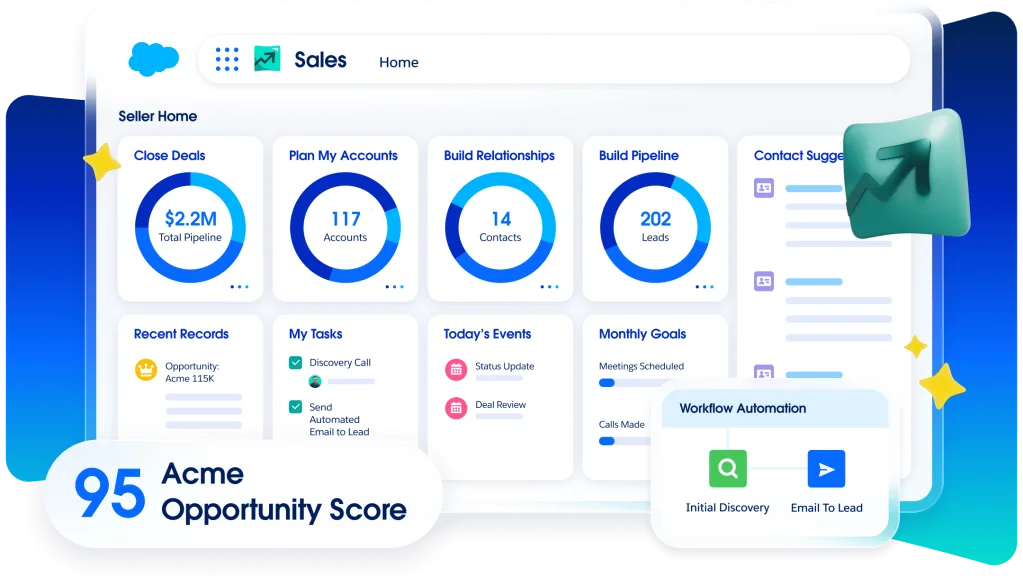
Table of contents
- 1. What Salesforce Actually Does
- 2. How This Salesforce Review Was Assessed
- 3. Salesforce CRM and Customer Records
- 4. Salesforce Sales Pipeline Management
- 5. Salesforce Automation and Workflow Configuration
- 6. Salesforce Reports and Business Intelligence
- 7. Salesforce Integrations and Connected Applications
- 8. Salesforce AI and Agentforce
- 9. Salesforce Security and Access Controls
- 10. Salesforce Customization and Implementation
- 11. Salesforce Pricing and Total Cost of Ownership
- 12. Who Should Choose Salesforce?
- 13. Salesforce Verdict and Frequently Asked Questions
- Frequently Asked Questions
1. What Salesforce Actually Does
Salesforce is a customer relationship management platform that helps businesses organize customer information, manage sales opportunities, coordinate service interactions, and automate processes across departments.
Its main advantage is that teams can work from connected customer records rather than maintain separate spreadsheets and disconnected applications for every stage of a relationship.
The platform is broader than a conventional sales database.
Businesses can use Salesforce to track leads, manage accounts, record customer communications, forecast revenue, handle support cases, build automated workflows, analyze performance, and connect external applications.
Additional products extend its capabilities into marketing, commerce, analytics, integration, and artificial intelligence.
That breadth is both its principal advantage and one of its biggest purchasing considerations.
Salesforce can support organizations with complex requirements, but buyers need to decide which products they actually need.
Purchasing a broad platform without a clear implementation plan can create unnecessary expense and administrative work.
A useful way to understand Salesforce is to follow a customer through the business.
A prospective buyer enters the sales pipeline as a lead.
A salesperson qualifies the opportunity, records the conversations, and develops a proposal.
Once the prospect becomes a customer, the account record can support further sales activity and customer service.
Support staff can record a problem, assign it to the appropriate team, and track its resolution.
Management can then examine sales performance and service activity using reports.
The precise experience depends on the products, permissions, and workflows configured for the organization.
Salesforce does not automatically create a consistent process simply because the business has purchased a subscription.
Administrators must define fields, stages, access rules, automations, and reporting requirements that reflect how the company operates.
For a small company, this might mean managing contacts, opportunities, follow up tasks, and a straightforward sales pipeline.
For a larger organization, it might involve different processes for multiple regions, sales teams, customer segments, service departments, and product lines.
Salesforce is designed to accommodate a wide range of these scenarios, although the complexity and cost of implementation rise with the number of requirements.
The platform is particularly relevant when customer information needs to be shared across teams.
A salesperson should not have to ask a support representative to explain a customer's outstanding issue before discussing a renewal.
A service agent should not have to search through old email threads to understand the history of a customer relationship.
A manager should be able to examine the pipeline without asking every salesperson to submit a separate spreadsheet.
Salesforce can provide the shared structure for this work, provided records are maintained accurately and the appropriate teams have access.
It is also important to separate Salesforce the company from Salesforce the CRM product.
The business offers a portfolio of applications, including Sales Cloud, Service Cloud, marketing products, commerce tools, analytics, integration technology, and Agentforce capabilities.
These products have different purposes, licensing models, and technical requirements.
Consequently, there is no single price or feature list that describes every Salesforce deployment.
A review of Salesforce must distinguish the accessible entry level CRM experience from more advanced enterprise configurations.
The central buying question is whether the organization needs a configurable customer platform or simply a tool for tracking contacts and deals.
If the latter is sufficient, a simpler CRM may be easier to adopt.
If the company needs interconnected sales, service, automation, and reporting workflows, Salesforce becomes a more compelling candidate.
2. How This Salesforce Review Was Assessed
This Salesforce review evaluates the platform as a purchasing decision rather than treating a long feature list as proof of quality.
The assessment draws on official product information, published pricing, Salesforce documentation, and the documented behavior of its major capabilities.
It does not claim that a private customer environment was accessed or that hands on performance testing was conducted.
That distinction matters because Salesforce can be configured in many different ways.
The experience of a company using a basic Starter Suite is not equivalent to that of an enterprise running multiple clouds, custom integrations, advanced permissions, and extensive automation.
The official Salesforce Sales pricing page is the main reference for the current published sales editions and their advertised starting prices.
It identifies Starter Suite at $25 per user per month, Pro Suite at $100, Core at $195, Advanced at $395, and Max at $550, with billing and feature conditions that vary by plan.
These are published US dollar prices, not a complete estimate for every Salesforce product or implementation.
Official pricing page: https://www.salesforce.com/sales/pricing/
Salesforce's product documentation helps explain the capabilities behind the pricing descriptions.
It covers topics such as record management, automation, permissions, APIs, reporting, and AI related features.
This information is essential because a feature advertised across the wider Salesforce ecosystem may not be included in every subscription.
The assessment focuses on six practical areas.
First, customer record management.
The CRM should make it possible to organize contacts, companies, leads, opportunities, and related activities without creating unnecessary duplication.
Second, sales workflow management.
The system should help salespeople track progress, schedule follow ups, identify next actions, and maintain a usable pipeline.
Third, automation and customization.
Businesses should be able to configure routine processes while understanding the administrative effort required to maintain them.
Fourth, reporting and visibility.
Managers need useful information about pipeline health, conversion, activity, revenue forecasts, and customer service performance.
The value of each report depends on the quality and consistency of the underlying data.
Fifth, integration and security.
Salesforce may need to exchange information with email systems, collaboration tools, finance applications, customer support products, and internal databases.
Buyers must verify the relevant connection methods and access controls.
Sixth, total cost of ownership.
Subscription prices are only one part of the investment.
Implementation, migration, configuration, training, integration work, support, and ongoing administration can materially affect the final cost.
This method is intended to help different types of buyers evaluate the product according to their actual requirements.
A small business should not pay for enterprise complexity it will never use.
A large organization should not select an entry level plan simply because its initial subscription price looks attractive.
Salesforce's breadth makes a requirements led evaluation particularly important.
The most useful demonstration is one built around real business scenarios, not a presentation that moves quickly through features without showing how they fit together.
3. Salesforce CRM and Customer Records
Customer records are the foundation of a CRM implementation.
If information is scattered across spreadsheets, email accounts, personal notes, and departmental databases, employees can spend a surprising amount of time reconstructing the history of a customer relationship.
Salesforce provides structured records for leads, accounts, contacts, opportunities, and activities.
These records serve different purposes and should be configured carefully.
A lead represents a potential customer or sales prospect that has not yet been fully qualified under the organization's process.
An account represents a company or other organization with which the business has a relationship.
A contact represents an individual associated with an account.
An opportunity represents a potential commercial transaction that the sales team is working to develop.
These distinctions allow teams to organize customer relationships without treating every person and commercial conversation as the same type of record.
Consider a business selling software to other companies.
One account might represent a prospective customer.
Several contacts could be associated with that account, including a department head, a technical evaluator, a procurement manager, and a finance representative.
The company might have separate opportunities for different products or business units.
Keeping those relationships organized helps the sales team understand who is involved and what each opportunity represents.
Salesforce also supports activities associated with customer records, including tasks, meetings, and communications.
This gives employees a place to record interactions and establish follow up actions.
The usefulness of the record depends on whether people maintain it consistently.
If a salesperson conducts an important meeting but never records the outcome, colleagues may not know what was agreed.
If contact details are outdated, subsequent communications may fail.
If multiple records exist for the same organization, reports may exaggerate the number of customers or divide activity across duplicate accounts.
Data quality is therefore an operational responsibility.
Salesforce can provide the structure, but organizations need rules for record creation, ownership, validation, duplicate handling, and updates.
A sensible implementation begins by defining the minimum information required for each record type.
Salespeople should not be forced to complete dozens of fields that have no practical purpose.
Excessive data entry can slow down the team and encourage users to enter placeholder information simply to complete a form.
At the same time, essential fields should be enforced where they support a meaningful business process.
A company may require an opportunity amount, expected close date, account owner, and sales stage before a deal can advance.
A support team may need a case category and priority to route a request correctly.
The right balance is to collect information that enables action, analysis, or accountability while avoiding fields that nobody uses.
Salesforce allows organizations to customize record layouts, fields, relationships, and validation rules according to their requirements.
More advanced configurations can support different teams or business processes, but customization needs governance.
Without clear standards, different departments may create overlapping fields, inconsistent definitions, and confusing layouts.
Administrators should maintain a documented data model.
It should identify which fields are authoritative, who owns each record type, how records relate to one another, and which changes require approval.
This is especially important when multiple applications exchange information with Salesforce.
Customer record management becomes more valuable when teams use the information in their daily work.
A salesperson can prepare for a meeting by reviewing prior interactions.
A service representative can understand the customer's relationship with the company.
A manager can examine open opportunities without requesting separate reports from each employee.
The practical benefit is less time spent searching for context and fewer decisions made using incomplete information.
However, Salesforce may be more elaborate than necessary for a business with a small contact list and a straightforward sales process.
A simple CRM that offers contact records, follow up tasks, and a basic pipeline may meet those needs with less administration.
Salesforce is a stronger fit when customer relationships involve multiple contacts, long sales cycles, several departments, or reporting requirements that justify a more configurable record system.
4. Salesforce Sales Pipeline Management
Sales pipeline management is one of Salesforce's most recognizable use cases.
It helps sales teams organize opportunities, monitor progress, and maintain a view of potential revenue.
A pipeline typically divides a sales process into stages.
The exact stages depend on how a business sells.
A company might use qualification, discovery, proposal, negotiation, and closed stages.
Another might require technical evaluation, legal review, procurement approval, or a pilot before a deal can be considered likely to close.
Salesforce allows organizations to configure sales stages and associated opportunity fields.
This makes it possible to reflect the actual sales process rather than force every team into an identical sequence.
A well designed pipeline should answer several questions.
Which opportunities are active?
What is the expected value of each deal?
Who owns the next action?
When is the deal expected to close?
Which opportunities are blocked?
What evidence supports the current stage?
These questions help managers distinguish between a pipeline that looks large and one that has a credible chance of producing revenue.
For example, a salesperson might classify an opportunity as being in the proposal stage.
That stage is only useful if the organization has defined what it means.
Does it require that a proposal has been sent?
Does the customer need to confirm the budget?
Has the decision maker agreed to a commercial review?
Without clear stage definitions, two salespeople can classify similar deals differently.
Salesforce can store the stage and supporting information, but sales leadership must define the standards.
Opportunity records can also include amounts, close dates, account relationships, ownership, and other details used in pipeline review.
These fields support sales forecasting and help management understand the composition of potential revenue.
Forecast quality depends on the quality of the information entered.
If salespeople routinely postpone close dates, overstate deal values, or move opportunities forward without evidence, the dashboard will present an unreliable picture.
Salesforce cannot compensate for unrealistic sales discipline simply by collecting more data.
A practical implementation should define how opportunities enter the pipeline, which evidence is required at each stage, how inactive deals are handled, and how often forecasts are reviewed.
Sales managers should also agree on what happens when an opportunity becomes stalled.
It might require a next step, a revised close date, a risk classification, or a review with the account owner.
A clear process prevents old opportunities from remaining indefinitely in the pipeline and inflating expected revenue.
Salesforce can help organize these routines through reports, dashboards, tasks, and configurable automation.
Higher tier capabilities may add more advanced forecasting, AI assistance, and sales planning features.
Buyers should confirm which functions are included in their proposed edition, since the Salesforce product family contains several different licensing arrangements.
The system can also support multiple pipelines when different teams follow genuinely different processes.
This may be useful when a company sells different products, serves distinct customer segments, or operates across regions with different commercial requirements.
Multiple pipelines should not be created merely because teams prefer different labels.
Excessive variation makes reporting and management more difficult.
A company should standardize what can reasonably be standardized and preserve differences only where they reflect a real business need.
For individual salespeople, the value is clearer visibility into active opportunities and next actions.
For managers, it is a more consistent basis for coaching and forecasting.
For executives, it is a consolidated view of commercial activity.
Salesforce's pipeline tools are most useful when they support a defined sales methodology and reliable data entry.
If the team has not agreed on what each stage means, the system may simply digitize inconsistent habits.
5. Salesforce Automation and Workflow Configuration
Automation can reduce repetitive work, improve consistency, and help employees follow required business processes.
Salesforce provides configurable automation capabilities that can respond to record changes, evaluate conditions, assign tasks, send notifications, and support approval workflows.
The practical value depends on selecting the right tasks to automate.
A process that happens frequently and follows clear rules is usually a better candidate than an unusual decision requiring substantial human judgment.
A straightforward example is lead assignment.
When a new lead enters the system, the company may want it routed according to geography, product interest, industry, or another qualifying field.
Without automation, an employee might need to review every incoming lead and assign it manually.
A configured process can reduce that repetitive work and apply the same routing rules each time.
Another example is follow up management.
When a sales opportunity reaches a particular stage, the system may create a task, notify the account owner, or request additional information.
A service process might assign a case based on its category or priority.
Salesforce Flow is a key tool for building these types of automated processes.
The available limits and capabilities depend on the subscription.
Buyers should confirm the number and type of flows supported by their intended plan, as well as the conditions under which additional functionality is available.
Automation should begin with a documented process.
Before building a flow, the business should identify the trigger, the required conditions, the actions to perform, the exceptions, and the person responsible for maintaining the configuration.
This sounds basic, but it prevents a common implementation problem: automating a process that has never been properly defined.
If a team cannot explain what should happen when a lead is unqualified, a deal is delayed, or a record lacks required information, the automation will reproduce that uncertainty.
A useful workflow specification should answer five questions.
- What event starts the process?
- What conditions determine the next action?
- Which record or person should be affected?
- What happens if required information is missing?
- How can an administrator detect and correct a failure?
The final question is particularly important.
Automated processes can fail because of permissions, incomplete records, conflicting rules, or changes in connected systems.
An organization needs a way to identify failures and resolve them without relying on a user to notice a missing notification.
Testing is essential before an automation is deployed to a live environment.
Administrators should test normal cases, unusual cases, incomplete data, and scenarios where the same action might occur more than once.
They should also consider what happens when the process is changed later.
Salesforce customization can become difficult to maintain when too many automations overlap.
One flow might update a field that triggers another flow, while a third process sends a notification based on the same record.
If the rules are poorly documented, troubleshooting can take longer than the manual task the system was intended to replace.
A governance process helps prevent this problem.
The organization should keep an inventory of automations, document their purpose, assign an owner, and review dependencies before making changes.
High impact workflows should be tested before release and monitored after deployment.
It is also wise to automate incrementally.
Start with a small number of well understood processes, measure the result, and expand after the team has confirmed that the workflows behave as intended.
For instance, a company might first automate lead assignment and reminders for overdue follow ups.
After reviewing the results, it could introduce approval routing or more complex customer lifecycle processes.
This staged approach makes errors easier to isolate and gives employees time to adapt.
Salesforce's automation capabilities are a major advantage for businesses with repeated, rule based work.
They are less valuable when the organization lacks clear processes or the internal expertise to maintain the resulting configuration.
The real measure of success is not the number of automations built.
It is whether the company reduces avoidable work while keeping processes understandable, auditable, and dependable.
6. Salesforce Reports and Business Intelligence
Salesforce reporting helps organizations turn customer and sales records into information that can guide decisions.
Managers can examine pipeline activity, opportunity values, sales performance, customer records, and other information stored in the CRM.
Dashboards can present selected metrics in a consolidated view.
The main benefit is that leaders can examine operational activity without relying entirely on manually prepared spreadsheets.
A sales manager might review opportunities by stage, compare activity across teams, or identify deals that have remained inactive.
A service manager might analyze case volumes and resolution patterns when the relevant service products and data are configured.
Salesforce reports are only as reliable as the data and definitions behind them.
A dashboard cannot accurately represent revenue expectations if salespeople use stages inconsistently.
A customer count may be misleading if duplicate accounts are common.
An activity report may understate work if employees do not record their calls, meetings, or follow up tasks.
This is why reporting should be designed alongside the underlying business process.
Begin by identifying the decisions management needs to make.
A sales director may need to understand whether the team is likely to reach its target.
A sales operations manager may need to identify where opportunities are getting stuck.
A business owner may want to know which customer segments generate the most revenue.
Each question requires different data and a clear definition of the measure being reported.
Consider conversion rate.
The company must define what counts as a conversion and identify the starting population.
A lead conversion rate may be calculated using all new leads, qualified leads, or another defined group.
Comparing reports built on different definitions can create false conclusions even when both calculations are technically correct.
The same applies to sales cycle length.
The result depends on the event that marks the start and the event that marks the end.
If one team measures from lead creation and another from opportunity creation, the resulting numbers are not directly comparable.
Salesforce allows reports to be filtered and grouped according to available fields and reporting functionality.
Dashboards can then present selected reports for different audiences.
A salesperson may need a personal pipeline view, while a manager needs a team level overview and an executive needs a consolidated business view.
These views should be designed for specific decisions rather than populated with every available metric.
A useful dashboard typically emphasizes a limited set of measures, highlights changes that need attention, and makes it easy to investigate the underlying records.
If a chart shows that a region has a growing number of stalled opportunities, the manager should be able to examine the relevant deals and determine what action is needed.
Reports should also distinguish between activity measures and outcomes.
The number of calls made or meetings scheduled may indicate effort, but it does not automatically demonstrate revenue generation.
Activity measures are most useful when considered alongside pipeline progression, conversion, deal size, and other results.
Forecasting requires additional care.
An opportunity's expected value and close date can support projections, but those values are estimates.
Management should understand the assumptions behind the forecast and review whether historical accuracy is acceptable.
Salesforce offers additional analytics products and advanced capabilities beyond the basic reports available in a CRM subscription.
Tableau, for example, is a separate analytics product within the Salesforce portfolio, and more advanced reporting or data analysis requirements may involve additional products or licensing.
Buyers should not assume that every analytics feature is included in their CRM subscription.
Organizations with complicated data requirements should establish whether native Salesforce reports are sufficient before investing in a broader analytics stack.
The decision depends on the number of data sources, the complexity of the calculations, the need for cross system analysis, and the people who will maintain the reports.
A company that needs a few sales dashboards may not require a separate business intelligence platform.
An enterprise combining CRM information with financial systems, product usage data, marketing performance, and operational records may need a broader analytics architecture.
Data access is another consideration.
Reports should respect the organization's permission model and expose information only to appropriate users.
Compensation, sensitive customer details, and confidential opportunity information may require restricted access.
Salesforce reporting is most useful when the organization defines its metrics, maintains consistent records, and gives each role the information needed to act.
Without those foundations, even sophisticated dashboards can create an impression of precision that the underlying data does not justify.
7. Salesforce Integrations and Connected Applications
A CRM rarely operates alone.
Sales teams use email and calendars, marketing teams run campaigns, finance teams manage billing, customer service teams use support tools, and executives rely on reporting systems.
Salesforce becomes more valuable when it can exchange the right information with those applications.
The available integration options include standard connectors, applications from the Salesforce ecosystem, APIs, and custom integrations.
The exact options depend on the external application, the Salesforce product and edition, and the requirements of the intended workflow.
Email and calendar integration is a common starting point.
Salespeople may want to associate communications and meetings with customer records so that they can review relationship history from within the CRM.
This can reduce manual record keeping, although the details depend on the email product, configuration, and licensing.
Collaboration integrations can help teams discuss customer issues and commercial opportunities.
Salesforce has a close relationship with Slack, which appears in several of its current CRM packages.
However, the features and license level available with a particular Salesforce plan should be verified rather than assumed.
Other businesses may need to connect Salesforce with accounting, invoicing, subscription management, electronic signature, customer support, ecommerce, or marketing platforms.
These integrations can help keep information consistent across the customer lifecycle.
For example, when a salesperson closes a deal, the organization may need the resulting account and commercial details to reach a billing or onboarding system.
A support request may need to appear in the CRM alongside the customer's account information.
A marketing system may need selected customer fields to support segmentation and campaign management.
Each connection should be assessed as a data flow rather than a simple feature checkbox.
The first step is to identify which application owns each important field.
If Salesforce and an accounting system both store a customer's billing address, the organization must decide which system is authoritative.
Otherwise, updates may overwrite one another or leave conflicting records.
The second step is to define how information moves.
Some integrations transfer data in one direction, while others synchronize updates.
Some operate in near real time, while others run on a schedule.
These differences can affect how employees use the connected systems.
The third step is to determine what happens when a transfer fails.
A record might be rejected because a required field is missing, a user lacks permission, or an external service is unavailable.
The integration should have a clear process for identifying and resolving those errors.
The fourth step is to review security.
Integrations may transfer personal information, commercial data, or customer communications to another application.
Buyers should understand which fields are shared, how access is authorized, and whether the connection meets internal policies.
Salesforce provides APIs for organizations that need to exchange data with external applications or develop custom functionality.
APIs can support flexible workflows, but they also introduce technical responsibilities.
Developers must understand authentication, access controls, data limits, error handling, and version changes.
The company must also decide who will maintain the integration when business requirements change.
The existence of an API does not guarantee that every desired workflow can be implemented without additional development.
Before committing, technical teams should confirm that the required objects, fields, events, and operations are supported.
AppExchange is another important part of the Salesforce ecosystem.
It provides access to third party applications and extensions that can add functionality or connect the CRM to other business tools.
Buyers should evaluate the provider, pricing, security requirements, compatibility, and ongoing support for each application.
A marketplace listing does not mean that an extension is free or included with the Salesforce subscription.
Some applications require separate licenses, and others may involve implementation or configuration charges.
For procurement, a short integration inventory is more useful than a long list of possible connections.
Identify the systems that are essential for launch, the data each must exchange, the responsible owner, the expected implementation effort, and the cost of any additional licenses.
A company with a small technology stack may be able to rely mainly on standard integrations.
A business with several internal systems may need specialist implementation support and ongoing technical ownership.
Salesforce's ecosystem is a meaningful advantage, but the number of available connections is less important than whether the specific integrations required by the organization are reliable, secure, affordable, and maintainable.
8. Salesforce AI and Agentforce
Salesforce has made artificial intelligence a significant part of its product strategy.
Its offerings include AI assisted sales and service functions, generative AI capabilities, and Agentforce, a platform for building and deploying AI agents within business workflows.
The practical value depends on the specific capability being considered.
AI may help summarize information, generate draft content, assist with customer interactions, support sales research, or automate selected tasks.
An AI agent may be configured to handle defined activities using approved information and actions.
These uses should not be treated as interchangeable.
For a salesperson, an AI assistant might help prepare for a customer conversation by summarizing relevant information from available records.
A service team might use AI to draft a response or summarize a case.
A sales operations team might investigate whether AI can reduce repetitive administrative work.
These possibilities are useful only when the feature is available in the selected product, the required data is accessible, and the organization has defined how outputs should be reviewed.
Salesforce's AI features are distributed across products and subscription levels.
Some capabilities are included in selected plans, while others require an additional purchase or a higher edition.
The current Sales pricing comparison identifies AI related functions across the available plans, with several Agentforce capabilities listed as separately purchasable features.
Buyers should verify exact entitlement and usage terms in their quote.
A company should not buy a more expensive CRM edition solely because it contains an AI label.
It should identify the task the feature will improve and estimate the value of that improvement.
For example, if a team spends considerable time preparing summaries after customer meetings, an AI assisted note or summary feature may reduce administrative effort.
The business should measure the time saved, check the accuracy of the generated output, and confirm that the information is available to the correct users.
If the team rarely performs the task or already has an effective alternative, the additional capability may have little practical value.
Agentforce deserves a separate evaluation because AI agents can be configured to perform actions rather than simply generate text.
Buyers should establish exactly which actions an agent is permitted to take, which records it can access, what conditions trigger an action, and when human approval is required.
A customer service agent, for instance, may be allowed to retrieve approved information or assist with a defined request.
Actions that change customer records, affect commercial terms, or make consequential decisions may require tighter controls and explicit approval.
Organizations should test both successful and unsuccessful scenarios.
The agent may encounter incomplete records, ambiguous requests, conflicting information, or a situation outside its approved scope.
A dependable implementation needs a clear way to stop, escalate, or request human assistance.
AI generated content can be inaccurate, incomplete, or inconsistent with the company's policies.
Users should have a way to inspect the relevant information and correct outputs before relying on them for important decisions.
Salesforce describes its Einstein Trust Layer as part of its approach to AI security and data protection.
Its documentation discusses controls intended to reduce the risk of exposing customer information to external model providers and to respect existing Salesforce access controls.
Buyers should examine the documentation relevant to their specific feature, model, data processing arrangement, and contract rather than assume that every AI workflow has identical protections.
AI governance also requires business rules.
Organizations should identify permitted use cases, determine what information may be processed, establish human review requirements, and define how AI generated outputs are monitored.
The company should also consider the effect on customers.
If AI is used in customer facing interactions, the organization needs to determine when disclosure is appropriate, how customers can reach a human, and how complaints or errors are handled.
AI features should be assessed against measurable outcomes.
Useful measures might include time saved per case, reduced manual entry, improved response consistency, or lower administrative workload.
The organization should also track errors, escalations, user adoption, and any unexpected consequences.
Salesforce's AI capabilities may be valuable for organizations that have clear use cases, reliable data, and the resources to govern automated actions.
They are less compelling when adopted as a general technology initiative without an operational objective.
9. Salesforce Security and Access Controls
A CRM contains information that businesses cannot afford to expose indiscriminately.
Customer contact details, commercial discussions, revenue forecasts, service histories, and internal notes may be sensitive.
Security must therefore be considered during implementation, not added after users have started entering data.
Salesforce provides a range of access controls and security features, but the exact controls available depend on the product, edition, and configuration.
Administrators can use permissions to determine which users can access records, view fields, or perform particular actions.
The principle of least privilege is a useful starting point.
Users should receive the access needed for their responsibilities, without automatically gaining access to every customer record or administrative function.
A salesperson may need to view and update opportunities assigned to them.
A sales manager may need visibility across a team.
A service representative may need access to account information and cases.
A system administrator may require broader privileges to maintain the environment.
Those roles should be defined deliberately.
Access should also be reviewed when employees change positions or leave the company.
A user who no longer handles a customer account should not retain unnecessary access simply because the original permission assignment was never revisited.
Field level security and record access can help separate sensitive information from general customer records.
A business may restrict access to compensation fields, confidential account information, or other data that only certain roles should see.
The correct configuration depends on the organization's structure and risk profile.
An overly restrictive model can prevent employees from doing their jobs, while an overly broad model exposes information unnecessarily.
Both outcomes create operational problems.
Authentication and identity management also deserve attention.
Organizations may have requirements for single sign on, multi factor authentication, user provisioning, and centralized access administration.
Buyers should verify which identity features are included in the selected edition and which require additional configuration or products.
Salesforce provides documentation about security architecture and compliance.
Its trust and compliance materials describe security and privacy information, audits, certifications, and the controls relevant to its services.
The organization should review the current documentation applicable to the products it plans to use.
Compliance claims should be interpreted carefully.
A vendor's certifications do not automatically make every customer deployment compliant with every law or internal policy.
The customer remains responsible for configuring the system appropriately and handling personal information according to its obligations.
Data retention is another area to address.
Businesses should decide how long different types of customer and prospect information should be kept, who can authorize deletion, and how retention requirements interact with legal or contractual obligations.
Backups and recovery should be discussed explicitly.
Buyers need to understand the protection available under their subscription, whether additional backup products are required, how recovery works, and what recovery objectives are supported.
They should not assume that a general platform subscription automatically includes every advanced backup and recovery capability.
Auditability matters as well.
Organizations may need to know who changed a record, when a permission was updated, or how a critical field was modified.
The availability and depth of audit logs can vary, so buyers should confirm the specific requirements against the proposed edition.
Security extends to integrations and AI.
When Salesforce exchanges information with another application, the organization must assess the destination, permissions, and data fields involved.
When AI features process CRM data, the organization must understand the relevant processing terms and access boundaries.
A sound implementation assigns ownership for these decisions.
The administrator should not have to make security policy independently without input from IT, legal, privacy, and business stakeholders where those teams exist.
Salesforce can support complex access and governance requirements, but that flexibility requires expertise.
A business with limited administrative resources should assess the ongoing work required to maintain its configuration.
10. Salesforce Customization and Implementation
Customization is one of Salesforce's major strengths.
Organizations can adapt the CRM to different sales processes, record structures, user roles, approval requirements, and reporting needs.
The challenge is deciding how much customization is genuinely necessary.
A good implementation begins with the business process, not with a request to recreate every detail of the previous system.
Legacy processes often contain duplicate steps, outdated fields, or workarounds that have persisted because no one reviewed them.
Reproducing all of them in Salesforce can carry the same problems into a new platform.
Before configuration begins, the organization should map its current workflow and identify what needs to change.
This includes how leads enter the system, how opportunities progress, which approvals are required, what information employees need, and how success will be measured.
The next step is to separate standard functionality from requirements that need customization.
If the standard product can support a process cleanly, using it may reduce the amount of maintenance required.
Customization should be reserved for genuine business needs rather than personal preferences about screen layouts or labels.
Record fields deserve particular attention.
Every additional field creates a potential data quality and maintenance obligation.
If the business does not know how a field will be used, who owns it, and whether it affects a decision or report, the field may not be necessary.
The same discipline applies to automation.
A process should be documented before it is built.
Administrators need to know what triggers it, which conditions apply, what happens when an exception occurs, and how the process will be monitored.
Implementation also requires a migration plan.
Existing CRM data may contain duplicate contacts, inconsistent company names, missing values, old opportunities, and fields that do not match Salesforce's proposed structure.
Moving everything without review can preserve those problems and make the new environment harder to use.
A migration project should identify the records that need to be transferred, define the field mappings, establish duplicate handling rules, and specify how the migrated information will be validated.
It should also determine whether historical activities need to be retained and which records can be archived rather than imported.
Testing should use realistic business scenarios.
Users should confirm that they can create and update records, move opportunities through the correct stages, run reports, trigger automations, and access the information required for their roles.
Integrations should be tested with both normal data and expected failure conditions.
Training needs to be role specific.
Salespeople need to understand their daily pipeline activities.
Managers need to know how to review opportunities and forecasts.
Administrators need to understand configuration and permissions.
Employees who use only a small portion of the CRM should not be forced through training focused on unrelated modules.
User adoption is a critical implementation measure.
If employees continue maintaining private spreadsheets because the CRM is difficult to use or does not support their workflow, the business may end up with two competing systems.
That undermines reporting and creates uncertainty about which record is correct.
Adoption can be improved by keeping layouts relevant, removing unnecessary data entry, providing practical training, and responding to user feedback.
Managers should also establish clear expectations about where customer activity must be recorded.
Change management is especially important when the company replaces an established system.
Employees need to understand why the new process exists, which habits must change, and where to ask for help.
A launch announcement is not a substitute for ongoing support.
Salesforce implementations can be handled internally, with implementation partners, or through a combination of both.
The right model depends on the complexity of the requirements and the skills available inside the organization.
An internal team may be suitable for a relatively simple deployment if it has relevant Salesforce expertise.
Complex migrations, multiple integrations, advanced automation, or enterprise governance may justify external specialists.
Buyers should assess partners based on relevant project experience, delivery methods, documentation quality, and the ability to support the system after launch.
The implementation should have a defined scope and acceptance criteria.
Rather than declaring success because the system is live, the business should measure whether the intended processes work and whether employees can perform their jobs effectively.
Salesforce's flexibility is valuable when the organization is prepared to manage it.
Without process ownership and configuration discipline, that same flexibility can produce a system that is expensive to maintain and difficult for employees to understand.
11. Salesforce Pricing and Total Cost of Ownership
Salesforce pricing needs careful attention because the product family contains multiple editions, clouds, add ons, and consumption based capabilities.
The advertised starting price is only one part of the buying decision.
For its US Sales offering, Salesforce currently lists Starter Suite at $25 per user per month, Pro Suite at $100, Core at $195, Advanced at $395, and Max at $550.
The published conditions differ by plan.
Starter can be billed monthly or annually, while several higher tiers require annual billing.
Buyers should confirm current terms, availability, and features before purchasing.
Salesforce also offers a free CRM option in some of its current pricing materials.
Availability and limits should be checked directly on the current pricing page, because product packaging and regional offerings may change.
A free option should not be assumed to include the capabilities required for a business deployment.
Starter Suite is positioned as an accessible entry point for smaller organizations.
Its advertised capabilities include lead, account, contact, and opportunity management, built in sales flows and lead routing, email marketing, analytics, and selected collaboration functionality.
Pro Suite adds greater customization and automation, sales quoting and forecasting, and access to AgentExchange.
It is intended for organizations that need more than basic CRM functions but should still be evaluated against the specific limitations and entitlements described in the current plan comparison.
Core, Advanced, and Max target progressively broader requirements, including more advanced sales capabilities, AI options, security, data capacity, support, and related products.
The exact contents differ, and some capabilities remain available only as additional purchases.
This is why buyers should avoid choosing an edition based solely on the plan name.
The only reliable comparison is a feature by feature review of the current offer against the organization's requirements.
Subscription costs increase with the number of licensed users.
A company should estimate the number of employees who need access and identify which user types require which functions.
It should not automatically purchase the same expensive license for every person if a suitable lower cost option exists and the contract permits the proposed arrangement.
The organization should also determine whether it needs Sales Cloud alone or additional products such as Service Cloud, marketing applications, analytics, integration tools, or commerce capabilities.
Each product can introduce its own licensing and implementation considerations.
AI related functions require special attention.
Some are included in selected editions, while others require additional purchases or may involve usage based pricing.
Buyers should ask whether the quoted price includes the specific AI features they plan to use, what usage limits apply, and what additional charges could arise as activity increases.
Support is another potential cost factor.
Salesforce provides different Success Plan options, and the availability of enhanced support varies by product and subscription.
Organizations should confirm what support is included, the response commitments that apply, and whether they need a separate support package.
Implementation costs can be substantial relative to the first year's subscription for organizations with complex requirements.
Data migration, process redesign, configuration, integrations, testing, and training all require time and expertise.
These costs should be estimated before the contract is signed.
Ongoing administration should also be included in the budget.
Someone must manage user access, respond to configuration requests, maintain automations, review data quality, update reports, and monitor integrations.
If the organization relies on an external partner, those services may create recurring expenses.
The business should calculate the expected total cost over a realistic period, not simply compare monthly license prices.
The estimate should include subscriptions, implementation, add ons, support, integration maintenance, training, and internal administrative time.
The next step is to compare that investment with the operational benefit.
If Salesforce reduces manual administration, improves forecast quality, shortens response times, or gives leaders a more reliable view of customers, those gains may justify the cost.
The company should define how it will measure those outcomes before implementation.
If the requirements are basic, a lower cost CRM may deliver sufficient value with less complexity.
If the organization needs a configurable platform across sales, service, data, and automation, Salesforce may justify the greater investment.
A useful vendor quote should identify every product, edition, add on, user license, billing term, usage limit, implementation fee, and renewal condition.
Ask which features are included and which are optional.
Confirm how costs change when the number of users increases or the organization adds another cloud.
Salesforce's pricing is not inherently good or bad in isolation.
Its value depends on the functions purchased, the cost of operating the system, and the measurable business results it supports.
12. Who Should Choose Salesforce?
Salesforce is a strong candidate for businesses that need a configurable CRM and expect their customer processes to grow in complexity.
It is particularly relevant when several teams share customer information, sales cycles involve multiple decision makers, or management needs consistent reporting across a larger operation.
A growing business may benefit when its existing tools have become disconnected.
Salespeople may maintain their own spreadsheets, service staff may use a separate case system, and managers may have difficulty producing a consistent revenue forecast.
Salesforce can help consolidate those processes when the appropriate products and integrations are selected.
Organizations with multiple sales teams can also benefit from shared standards.
Different regions may need specific fields or workflows, but leadership can still establish common definitions for opportunities, customer records, and reporting.
The challenge is to preserve meaningful local differences without allowing every team to create an incompatible system.
Businesses with complex sales cycles may find the opportunity management capabilities useful.
Large deals can involve several contacts, approval stages, technical assessments, commercial negotiations, and long periods without activity.
A well configured CRM helps make those relationships visible and gives the team a record of what must happen next.
Service organizations may benefit when customer issues need to be connected with account information and wider relationship history.
However, advanced customer service requirements should be evaluated against Service Cloud specifically rather than assuming that every service feature is included in a basic sales subscription.
Companies with established technical teams may be well positioned to take advantage of Salesforce's APIs, customization options, and wider application ecosystem.
Those teams can design integrations and maintain workflows that match the business's operating model.
The situation is different for very small businesses with simple needs.
A company that only wants to store contacts, track a handful of deals, and schedule follow ups may not need a platform with extensive customization options.
The additional administration can become a distraction rather than an advantage.
Businesses without a clear process owner should also proceed carefully.
Someone needs to decide how the CRM is structured, which fields are mandatory, how reports are defined, and who can approve changes.
If no one owns those decisions, the system may become inconsistent as different teams modify it.
Companies that expect a platform to solve sales performance problems without changing employee behavior should adjust their expectations.
Salesforce can improve visibility and automate defined tasks, but it cannot make salespeople qualify leads correctly, conduct better discovery conversations, or maintain accurate records without clear expectations and training.
The purchasing decision should therefore consider organizational readiness as well as software features.
Before committing, the buyer should document the most important use cases and rank them by business value.
A short list of essential requirements is more useful than a long wishlist.
The team should then test those requirements using realistic scenarios and verify which are supported by the proposed subscription.
The organization should also estimate implementation effort and identify the people who will own the system after launch.
This includes business ownership, administrative responsibility, technical support, and reporting governance.
Salesforce is most compelling when its flexibility supports a defined business strategy.
It is less compelling when the company has no clear requirements, limited resources for administration, and little need for cross departmental coordination.
13. Salesforce Verdict and Frequently Asked Questions
Salesforce is a capable CRM platform for businesses that need more than contact storage and basic opportunity tracking.
Its strengths include configurable customer records, sales pipeline management, automation, reporting, integrations, and a broad ecosystem of additional products.
Organizations can use these capabilities to coordinate customer relationships across teams and build workflows around their own operating requirements.
That flexibility comes with responsibility.
A successful deployment requires clear processes, reliable data, thoughtful configuration, training, and ongoing administration.
The subscription is only one part of the cost, and advanced functionality may require additional products or licenses.
Buyers should confirm the exact features included in their plan rather than assume the entire Salesforce ecosystem is available by default.
Smaller businesses with straightforward sales requirements may prefer a simpler CRM that is easier to manage.
Organizations with complex sales cycles, multiple departments, significant integration needs, or more demanding reporting requirements are more likely to benefit from Salesforce's breadth.
The fairest assessment is that Salesforce offers substantial capability, but the return depends on how well the business implements and operates it.
Buyers should start with clear use cases, request a quote that matches those needs, and evaluate the system using realistic workflows before committing.
Key features
- Lead and opportunity management
- Account and contact relationship tracking
- Customizable sales pipeline stages
- Sales forecasting and opportunity tracking
- Automated lead assignment and routing
- Configurable workflows using Salesforce Flow
- Customer activity and task management
- Email and calendar integration options
- Custom fields and record layouts
- Sales reports and dashboard creation
- Role based permissions and access
- Approval processes for business workflows
- AppExchange applications and extensions
- APIs for external system integration
- Service case management through Service Cloud
- Marketing capabilities across Salesforce products
- Commerce capabilities through dedicated products
- AI assisted sales and service
- Agentforce tools for configurable AI agents
- Customer data management capabilities
- Enterprise identity and security controls
- Integration with Slack collaboration tools
- Advanced analytics through Tableau products
- Sandbox options in eligible editions
- Data management and validation rules
- Custom application development capabilities
- Multi team customer relationship management
Pricing
- Lead and opportunity management
- Account and contact tracking
- Built in sales flow automation
- Email marketing and analytics
- Connected Slack conversations
- Everything included in Starter Suite
- Greater customization and automation
- Sales quoting and forecasting
- Access to AgentExchange applications
- Additional sales process capabilities
- Advanced sales workflow capabilities
- Built in AI and Slack
- Expanded sales process management
- Tableau Next capabilities included
- Premier Success Plan included
Pros & cons
Pros
- Comprehensive customer relationship management capabilities
- Flexible sales process configuration options
- Detailed opportunity and pipeline tracking
- Customizable reports and sales dashboards
- Broad third party application ecosystem
- Powerful workflow automation capabilities
- Supports multiple business departments
- Extensive API and integration options
- Configurable roles and access permissions
- AI capabilities across selected products
- Supports complex enterprise sales operations
- Connected customer service workflows available
- Large ecosystem of implementation specialists
- Multiple subscription levels and capabilities
Cons
- Advanced features require higher subscriptions
- Total costs can increase substantially
- Implementation may require specialist expertise
- Customization requires ongoing administration
- Pricing varies across product editions
- Some capabilities require separate purchases
- Poor data quality weakens reporting
- Complex configurations increase maintenance demands
- Training is necessary for adoption
- Integrations may require technical resources
- AI features have usage conditions
- Reporting depends on consistent data
- Small teams may find it complex
- Feature availability varies by subscription
Salesforce specs
- Platforms: Web based, mobile applications for iOS and Android
- Free plan: Yes, limited free CRM option subject to availability
- Starting price: $25 per user per month for Starter Suite
- Integrations: AppExchange, APIs, and third party connectors
- Support: Documentation, Trailhead, community, and paid support options
- Best for: Businesses managing complex customer relationships and workflows
Our verdict
Salesforce is a powerful CRM for businesses that need structured customer records, sales pipeline visibility, automation, reporting, and integrations across departments. Its flexibility makes it suitable for growing organizations and enterprises with complex sales processes. However, implementation, administration, and subscription costs require careful planning. Smaller businesses with straightforward requirements may find a simpler CRM more practical. Salesforce earns serious consideration when its broader capabilities solve identifiable operational problems and the organization has the resources to maintain them.
Contact SalesFrequently Asked Questions
What is Salesforce used for?
How much does Salesforce cost?
Does Salesforce have a free plan?
Is Salesforce good for small businesses?
What is the difference between Salesforce and Sales Cloud?
Reader reviews
Be the first to review
