
Notion 2026 Review: The Workspace That Refuses to Stay in One Box

By Evander Thorne & Noura Mint Ely · Reviewed by Eva Elekcha
Notion 2026 blends docs databases and AI agents into one configurable workspace where teams build their own project systems instead of renting a rigid template.
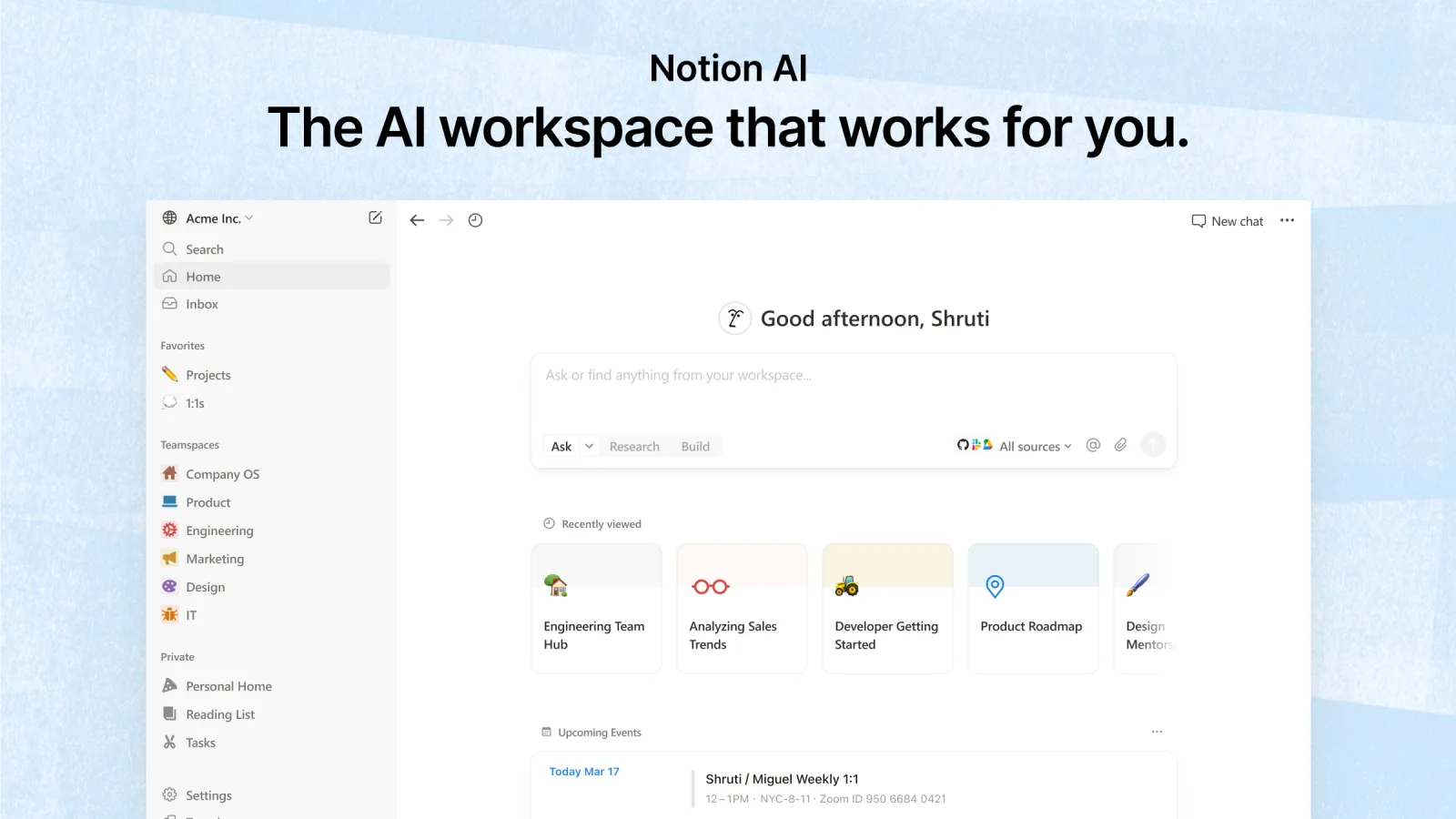
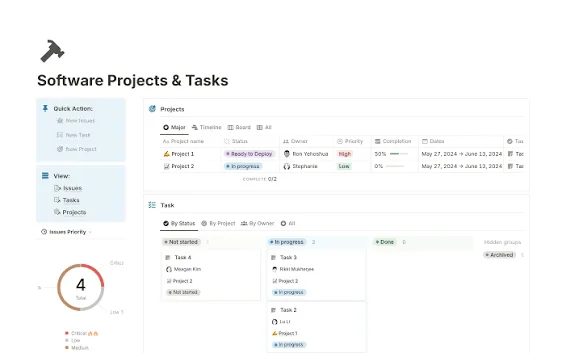
Table of contents
- What Notion Actually Is in 2026
- Why This Notion Review Holds Up to Scrutiny
- Notion Databases and the View Switching Advantage
- Notion AI Agents and What Changed in 2026
- Building Wikis and Knowledge Bases in Notion
- Notion vs Jira for Development Teams
- Notion vs ClickUp and Asana for Project Work
- Where Notion Still Struggles
- Who Notion Serves Best
- Frequently Asked Questions
What Notion Actually Is in 2026
Notion is a workspace platform that combines documents, databases, and AI agents into one configurable environment.
Unlike project management tools that ship with fixed structures, Notion provides building blocks.
You arrange pages, properties, and views to match how your team already works.
The 2026 release pushes further into automation: agents can run multi step tasks, pull data from connected sources, and execute scheduled workflows .
For teams tired of forcing their process into someone else's template, the appeal is obvious.
The tradeoff is equally clear.
Notion gives you freedom, and freedom requires maintenance.
Why This Notion Review Holds Up to Scrutiny
This assessment draws from Notion's published feature documentation, release notes from October 2026, pricing data from procurement platforms, and comparison material from independent software review sites .
No vendor compensation influenced the conclusions.
Where Notion has genuine weaknesses, they appear in the sections below without softening.
The goal is straightforward: help you decide whether Notion fits your team's actual working style, not whether it sounds impressive in a demo.
Notion Databases and the View Switching Advantage
The database layer is where Notion separates itself from both pure document tools and rigid project managers.
A single dataset can display as a table, board, calendar, timeline, or gallery without duplicating entries.
A product team can log feature requests in a table, switch to a board grouped by status for sprint planning, then view the same records on a timeline for release scheduling.
No export.
No sync delay.
No second system to maintain.
Formula and rollup properties add calculation without leaving the page.
You can sum estimated hours across linked tasks, calculate days remaining from a deadline property, or pull a parent project's status into every child task automatically.
These are not developer features.
They are configuration options available to anyone who can fill out a form.
The limitation appears at scale.
Databases with thousands of entries and multiple rollup properties begin to lag.
Workspaces that grow without structural planning become slow and difficult to navigate.
Notion rewards deliberate organization and punishes accumulation.
Notion AI Agents and What Changed in 2026
The October 2026 release rebuilt Notion's agent infrastructure around longer running tasks and smarter context handling .
Agents can now work on a single task for up to 24 hours, a massive jump from earlier limits.
They have their own computer environment for running scripts and a browser for research.
The "Review for me" mode adds a safety check before actions execute.
For practical use, this means an agent can compile customer feedback from connected sources, organize it into a structured database, draft a summary report, and notify you when finished.
Custom agents can run on schedules without manual triggering.
The credit system introduced alongside these upgrades means heavier usage incurs additional cost, though Notion claims most users stay within included monthly credits .
The AI add on costs ten dollars per member per month on top of base subscriptions .
For content heavy teams producing meeting notes, research summaries, and documentation drafts, the time savings justify the expense.
For teams using Notion mainly as a task list, the AI layer sits unused.
Building Wikis and Knowledge Bases in Notion
Notion's wiki capability supports verified pages, meaning admins can mark certain content as trustworthy and current.
Stale pages lose their verification badge automatically when they go too long without review.
For teams that have suffered through outdated onboarding docs and contradictory process pages, this small feature addresses a real pain point.
Teamspaces create logical separation.
An engineering teamspace can hold technical documentation and sprint notes while marketing keeps campaign plans and brand assets in its own area.
Permissions cascade from workspace to teamspace to individual page.
The granularity extends to database columns in the 2026 release, so a recruiting database can show candidate names and interview scores to hiring managers while hiding compensation fields from everyone else .
The search layer pulls from connected tools.
Enterprise search indexes Notion content alongside Slack messages and Jira issues, which means finding that decision from three months ago no longer requires checking four different applications .
Search quality depends heavily on how well the workspace is organized.
A messy Notion produces messy search results.
Notion vs Jira for Development Teams
Jira remains the stronger choice for engineering teams running formal sprints, tracking defects, and managing release cycles .
Its workflow engine enforces state transitions, its permission model handles complex organizational structures, and its ecosystem of plugins covers testing, deployment, and monitoring.
Notion has none of that depth in software development specific features.
What Notion offers instead is context.
A sprint task in Notion can contain the full product requirements document, the user research notes that informed the decision, and the meeting transcript where priorities were debated.
Jira tasks typically link to these artifacts elsewhere.
Notion embeds them directly.
For product managers who spend more time writing than configuring workflows, this integration of narrative and task is genuinely useful.
The practical recommendation: teams with dedicated QA processes and release management requirements should run Jira for execution and use Notion for product documentation.
Teams without that complexity can run everything in Notion and accept lighter sprint mechanics.
Notion vs ClickUp and Asana for Project Work
ClickUp tries to be everything for everyone, packing tasks, docs, goals, chat, and whiteboards into one product .
The result is powerful but dense, with a learning curve that matches its feature count.
Asana takes the opposite approach, offering clean task and timeline views with minimal configuration required .
Notion sits between them.
It requires more setup than Asana because you design your own databases and views.
It demands less configuration than ClickUp because you are not navigating a pre built hierarchy of spaces, folders, and lists that you did not create.
The database flexibility means a marketing team and an engineering team can use completely different structures within the same workspace without conflict.
Asana wins on timeline views with dependency logic and on onboarding speed.
ClickUp wins on raw feature density and built in time tracking.
Notion wins on context preservation and on the document plus database combination that neither competitor matches.
Choose based on whether your team's biggest problem is scheduling precision (Asana), tool consolidation (ClickUp), or knowledge fragmentation (Notion).
Where Notion Still Struggles
Performance degrades in large workspaces.
Databases with extensive relations and rollups slow down, and the mobile app trails desktop responsiveness by a noticeable margin.
Teams that build sprawling workspaces without periodic cleanup will feel the drag.
Time tracking does not exist natively.
ClickUp includes it.
Jira integrates with Tempo.
Notion requires a third party tool or a manually built property system that nobody updates consistently.
The free tier's block limit sounds generous until you build a real database.
A single table with fifty rows and several properties consumes blocks quickly, and the five megabyte upload cap forces workarounds for design files and video assets .
Small teams hit these ceilings faster than they expect.
Guest limits also tighten on lower tiers.
Ten guests on Free, one hundred on Plus, two hundred fifty on Business.
Agencies collaborating with multiple clients will need to map their external collaborator count before choosing a plan.
Who Notion Serves Best
Content teams producing articles, research, and documentation find an unmatched combination of writing environment and structured storage.
Startups building their first internal processes benefit from the template library and the freedom to evolve structures as the business changes.
Product managers who live in documents and want their task tracking to live there too will appreciate the unified workspace.
Engineering teams with strict sprint requirements should pair Notion with Jira rather than replace it.
Large enterprises with compliance departments will need the Enterprise tier for audit logs and SCIM provisioning, and even then should expect a configuration project rather than a simple deployment.
Note on Notion AI: The AI add on costs $10 per member per month on paid plans, but Business includes it within the seat price. Custom agents consume extra credits at $10 per 1,000 credits. Enterprise pricing is quoted on request and adds SCIM provisioning, audit logs, and a dedicated customer success manager.
Key features
- Block based document editor
- Relational databases with multiple views
- Kanban board and timeline layouts
- Notion AI meeting notes
- Enterprise search across Slack and Jira
- Synced databases from GitHub
- Custom agents with scheduled triggers
- AI writing and editing tools
- Wiki with verified pages
- Teamspaces for department separation
- Granular page level permissions
- SAML single sign on
- SCIM user provisioning
- Audit logs for admins
- Version history with restore
- Web clipper browser extension
- Forms feeding directly into databases
- MCP connections for external AI
- API for custom integrations
- Column permissions in databases
Pricing
- Everything in Free included
- Unlimited blocks for teams
- Unlimited file uploads
- Thirty day version history
- Up to 100 external guests
- Small group collaboration
- No private teamspaces
- No SAML single sign on
- No audit log access
- No SCIM provisioning
- Everything in Plus included
- Private teamspaces enabled
- SAML single sign on
- Ninety day version history
- Up to 250 external guests
- Advanced page analytics
- Bulk PDF export tools
- Batch user management
- Notion AI included per seat
- Custom agent credits included
- Unlimited pages for individuals
- File uploads capped at 5 MB
- Seven day version history
- Up to 10 external guests
- Basic real time collaboration
- Slack and GitHub integrations
- API access included
- Community template library
- No unlimited team blocks
- No advanced permissions
- No SSO authentication
- No SCIM provisioning
Pros & cons
Pros
- Documents and databases live together
- Views switch without data migration
- AI agents handle multi step tasks
- Free tier supports small teams indefinitely
- Custom agents run on schedules
- Synced databases stay current automatically
- Templates cover common team structures
- Permission granularity reaches column level
- Enterprise search pulls from Slack and Jira
- MCP opens workspace to external AI tools
- Pricing stays reasonable for small groups
- Onboarding feels familiar to doc users
Cons
- No native sprint or bug tracking
- Complex setups need a dedicated admin
- AI credits add cost on top
- Database performance slows at large scale
- No built in time tracking
- Mobile editing lags behind desktop
- Guests count toward collaboration limits
- Block limits on free tier arrive fast
- Automation depth trails dedicated PM tools
- No native Gantt dependency logic
- Search quality varies by workspace structure
- Support response slow on lower tiers
Notion specs
- Platforms: Web, Windows, macOS, iOS, Android
- Free plan: Yes
- Starting price: $10 per user / month
- Integrations: Slack, Jira, GitHub, Salesforce, Figma, MCP
- Support: Email, help center, community, priority on Enterprise
- Best for: Knowledge heavy teams building custom workflows
Our verdict
Notion works best for teams that think in documents and want their project data sitting beside the context that explains it. The 2026 agent upgrades add real automation muscle without forcing a rigid methodology. Freelancers and content teams will get immediate value from the free and Plus tiers. Engineering groups running sprints and defect tracking should look at Jira instead, and teams that need strict dependency driven scheduling will find ClickUp or Asana more direct. Notion asks you to build your own system. If you want that control, nothing else matches it at this price.
Contact SalesFrequently Asked Questions
Is Notion free for small teams?
Does Notion work for software development?
How much does Notion AI cost?
Can Notion replace Asana or ClickUp?
Reader reviews
Be the first to review
