
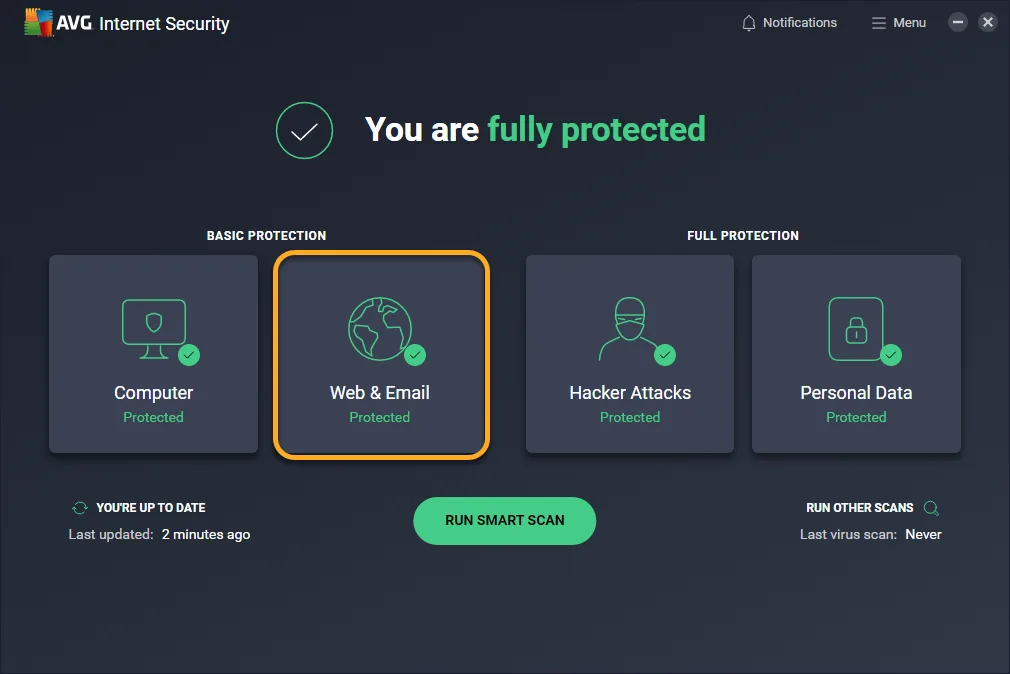
1. Top 10 Features in AVG Antivirus You Should Be Using in 2026
Top 10 features in AVG antivirus you should be using in 2026 sounds like a marketing headline, but the truth is that most people install AVG Antivirus, run the default scan once, and never open the settings menu again.
That leaves several genuinely useful tools sitting dormant, from ransomware protection to a firewall that can flag exactly which app is trying to reach the internet and why.
This guide goes through the ten features worth knowing about, where to find each one inside the app, and which ones belong to the free tier versus the paid plans.
None of this requires technical skill, just a few extra minutes in the settings menu.
2. How We Tested and Verified This Guide
Every feature described here was checked against AVG's current interface and cross referenced with independent lab reviews that tested the same version of the software this year, rather than relying on older screenshots or outdated menu names.
Antivirus interfaces do get reorganized between updates, so a setting that lived under one tab last year sometimes moves, but the underlying feature and what it does for you stays stable.
Where a specific performance claim is used, such as a detection rate or a firewall behavior, it comes from a named source rather than a general impression, so you can look up the original test if you want more detail than fits here.
3. The Top 10 AVG Antivirus Features You Should Be Using
These ten features cover the core of what AVG actually does for you day to day, from the free tier basics to the paid extras that most people never activate.
Some run automatically once installed, others need a toggle flipped in settings, and a couple only exist if you have upgraded past the free plan.
3.1 Real Time Protection Powered by AI
This is the engine running quietly in the background, checking files and processes as they execute rather than waiting for a scheduled scan to catch something.
AVG's real time protection uses AI pattern matching to flag new and unfamiliar threats, not just ones that match a known signature, which matters because most modern malware gets slightly rewritten before each release specifically to dodge older detection methods.
The upside is you rarely need to run a manual scan for daily browsing.
The tradeoff is a small constant use of system resources, which is noticeable on an older laptop but rarely a problem on anything built in the last five years.
AVG Antivirus
AVG Antivirus provides robust malware protection and overall system performance, making it an excellent choice for securing professional devices easily.
- Excellent free version malware protection
- Minimal impact on system performance
- Frequent upgrade prompts can irritate
- Full system scans run slowly
3.2 Ransomware Protection for Your Files
Ransomware protection is enabled by default and works by locking down a list of protected folders so that only trusted applications, like Word or Photoshop, are allowed to modify the files inside them.
You can add your own folders to that protected list, which is worth doing if you keep important documents somewhere outside the default Documents or Pictures folders.
It is also worth checking which apps are marked as trusted, since a newly installed program you actually use might get blocked from editing your files until you approve it manually.
Independent testing has found this feature less reliable at stopping an active ransomware attack than some competitors, but AVG's real time layer often intercepts the malicious file before it runs at all, which reduces how often the ransomware shield needs to step in.
3.3 Enhanced Firewall
The free version of AVG ships with a basic firewall, but the enhanced firewall in the paid Internet Security tier gives you a detailed breakdown of exactly which applications are trying to reach the internet, and lets you approve or block them individually rather than accepting an all or nothing setting.
This is the feature reviewers tend to praise most consistently, since it is genuinely readable rather than a wall of technical jargon, and it catches connection attempts that a basic firewall would simply wave through.
If you share a home network with several devices or work with sensitive files regularly, this is one of the clearer arguments for paying for the upgrade rather than sticking with the free tier.
3.4 Webcam Protection
Webcam protection blocks any application from accessing your camera unless you have explicitly approved it, which stops the specific scenario where spyware quietly activates your webcam without a visible indicator light or with a spoofed one.
This sits behind the paywall in AVG's paid tiers, and it works passively once turned on, meaning you only notice it when an unapproved app actually tries to use the camera and gets stopped.
For anyone doing video calls regularly on a work laptop, this is a small but meaningful layer that costs nothing in terms of daily friction.
3.5 Network Inspector
Network Inspector scans your home network for vulnerabilities, checks router settings, and can alert you when an unfamiliar device joins the network.
This is genuinely useful if you live somewhere with a shared or older router, since it flags weak configurations you might not think to check yourself, like an open port or a default admin password still in place.
It also gives you visibility into every device currently connected, which is a fast way to notice if something unexpected has joined without your knowledge.
3.6 Fake Website Shield and Phishing Protection
This feature checks links and web addresses against a constantly updated list of known scam and phishing sites before your browser fully loads the page, and it extends to pharming sites designed to imitate a real banking or shopping page.
It runs automatically in the background during normal browsing and does not require any setup once installed.
The main thing to know is that it protects against known bad sites, so a brand new phishing page that has not been reported yet can still slip through in the narrow window before it gets added to the block list, which is why it should never be your only line of defense against a suspicious email.
3.7 CyberCapture for Unknown Files
When AVG encounters a file it does not recognize, CyberCapture automatically sends it to AVG's cloud lab for analysis and temporarily locks the file until a verdict comes back, rather than guessing based on local signatures alone.
This is particularly useful for brand new malware variants that have not been added to standard virus definitions yet.
The tradeoff is a short delay, usually just a few seconds, before an unfamiliar file becomes usable, which is a reasonable price for catching threats that a purely local scan would miss entirely.
3.8 Remote Access Shield
Remote Access Shield prevents attackers from exploiting exposed remote desktop connections, which has become a more common attack path as more people work from laptops connected to home or shared networks.
It specifically watches for attempts to abuse Windows Remote Desktop Protocol, a favorite entry point for attackers targeting poorly secured machines.
If you never use remote desktop features, this runs invisibly with no downside, and if you do use them for legitimate remote work, it adds a layer of scrutiny around that access without blocking it outright.
AVG Antivirus
AVG Antivirus provides robust malware protection and overall system performance, making it an excellent choice for securing professional devices easily.
- Excellent free version malware protection
- Minimal impact on system performance
- Frequent upgrade prompts can irritate
- Full system scans run slowly
3.9 Data Shredder
Data Shredder, previously called File Shredder, permanently deletes files rather than sending them to a recycle bin where basic recovery software could pull them back.
You can access it directly from the AVG dashboard or by right clicking a file and selecting the shred option from the context menu.
This matters more than people assume, since a normal delete on most systems only removes the file's reference point, leaving the actual data recoverable until it gets overwritten, sometimes for weeks.
If you are getting rid of an old laptop or clearing sensitive documents, this is the feature that actually finishes the job.
3.10 Smart Scan and Boot Time Scan
Smart Scan is AVG's quick check, typically finishing in under a minute, covering the areas malware most commonly hides without scanning your entire drive.
Boot Time Scan runs before Windows fully loads, which catches certain rootkits and persistent threats that are specifically designed to hide from scans once the operating system and its background processes are active.
Running a boot time scan occasionally, particularly after noticing unusual slowdowns or unfamiliar programs, catches a category of threat that your regular real time protection is structurally less equipped to see.
4. Free Tier Versus Paid Tier Feature Differences
The free version of AVG covers real time protection, ransomware protection, a basic firewall, and the phishing and fake website shield, which is a genuinely solid baseline for a home user with straightforward browsing habits.
The paid Internet Security tier adds the enhanced firewall, webcam protection, remote access shield, and a more capable overall detection profile through additional scanning layers.
AVG Ultimate goes further, bundling in a VPN, tune up tools, and anti tracking software as separate licenses rather than fully integrated features, which is worth knowing since some reviewers find that bundling approach less polished than a single unified app.
If you only need core protection for personal browsing and email, free covers you.
If you handle work files on the same machine or want the firewall's detailed breakdown, the paid tier earns its price.
5. Where to Find These Settings Inside the App
Most of these features live under the Protection tab in AVG's main dashboard, with ransomware protection, the firewall, and web and email shields each getting their own subsection you can expand.
Network Inspector usually sits nearby with a dedicated scan button, while Data Shredder is reachable either from the dashboard or directly through a right click menu on any file, which is faster once you know it is there.
If a feature appears grayed out, it is almost always because it belongs to a paid tier rather than a bug in the free version, and the app will typically show an upgrade prompt when you click it.
6. What These Features Will Not Cover
None of these tools stop you from willingly typing your password into a convincing fake login page if you do not notice the warning signs yourself, and none of them recover money sent directly to a scammer through a wire transfer or gift card request.
They also will not protect files stored purely in cloud services that never touch your local device, since the scanning applies to what is actually running or stored on the machine AVG is installed on.
Treat these features as a strong safety net rather than a reason to skip basic caution around unfamiliar links, urgent payment requests, or attachments from senders you do not recognize.
7. Final Verdict on AVG's Feature Set
AVG's core lineup holds up well against independent testing, with one detailed review reporting that AVG's deep scan detected all malware samples during testing, correctly identifying trojans, worms, rootkits, and cryptojacking software, which reflects the same real time engine described throughout this guide.
You can read the full methodology at https://www.safetydetectives.com/best-antivirus/avg-technologies/.
The free tier alone is enough for most home users who browse, bank, and email without much else going on.
The paid tier's firewall and webcam protection are the two upgrades most worth paying for if you decide to move past free, while the bundled VPN and tune up tools in Ultimate feel more like a convenience than a necessity.
AVG Antivirus
AVG Antivirus provides robust malware protection and overall system performance, making it an excellent choice for securing professional devices easily.
- Excellent free version malware protection
- Minimal impact on system performance
- Frequent upgrade prompts can irritate
- Full system scans run slowly
Turning on the features already sitting in your account costs nothing and takes less time than reading this article.
8. Frequently Asked Questions
Are these features free or paid
Real time protection, ransomware protection, and the phishing shield come with the free tier, while the enhanced firewall, webcam protection, and remote access shield require a paid AVG plan.
Do I need to turn features on manually
Most core features like real time protection and ransomware protection are enabled automatically after installation, though Network Inspector and Data Shredder often need to be launched manually the first time.
Will these features slow down my computer
Real time scanning uses some background resources, but most users on hardware from the last five years will not notice a meaningful slowdown during normal use.
Is CyberCapture safe to leave on
Yes, CyberCapture only delays access to genuinely unfamiliar files while AVG checks them in the cloud, which is a small tradeoff for catching brand new malware variants.
Should I upgrade for the firewall
If you handle sensitive files or want detailed visibility into which apps are contacting the internet, the enhanced firewall is one of the more consistently praised reasons to upgrade from the free tier.
