
Employment Hero Review: Powerful HR Tools and Alternatives
By Afonso Macosso & Dr. Isabella Gunn · Reviewed by Nathan Cole
Employment Hero brings employee records, onboarding, performance management and payroll into one platform, with flexible plans for different HR needs.
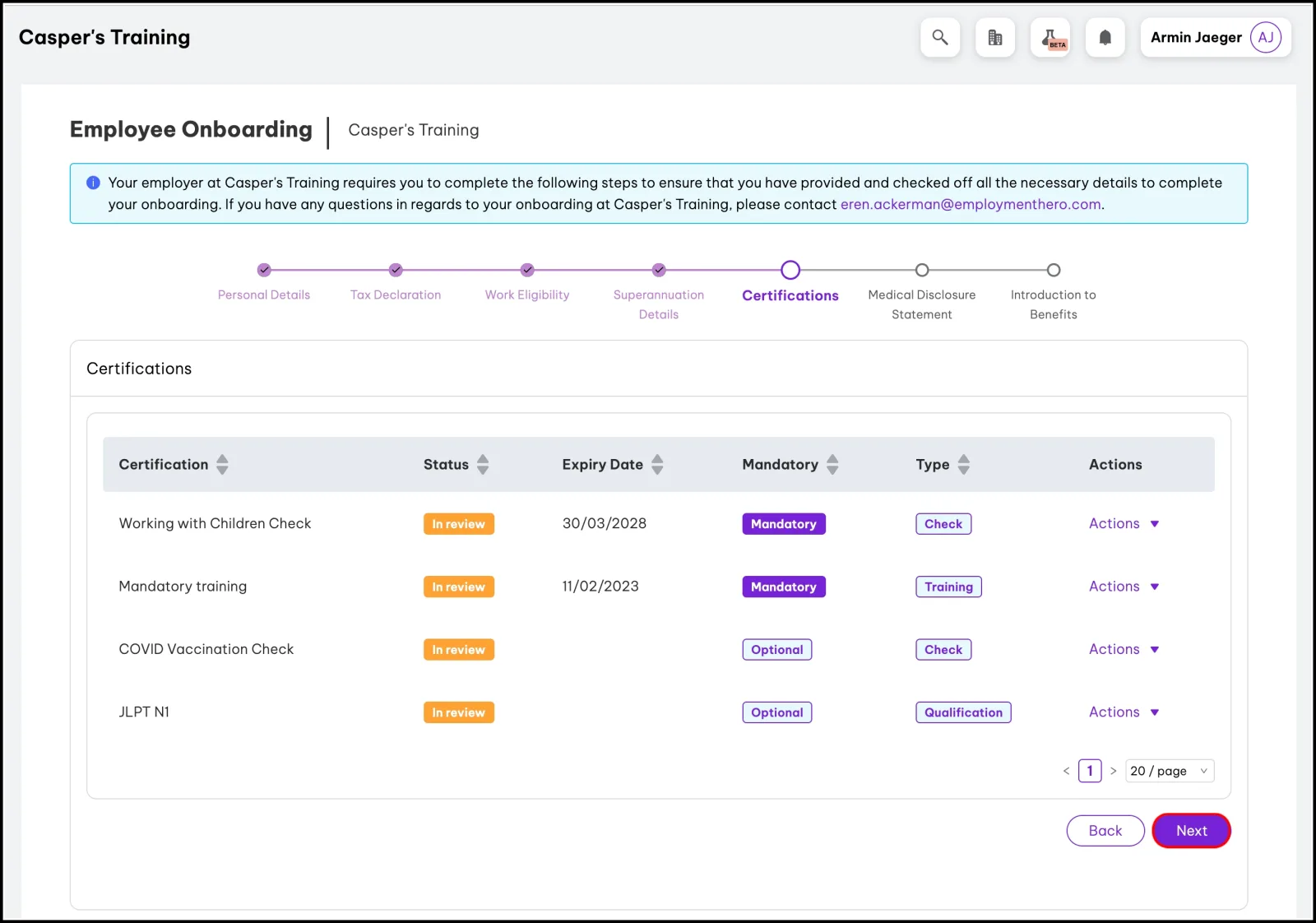
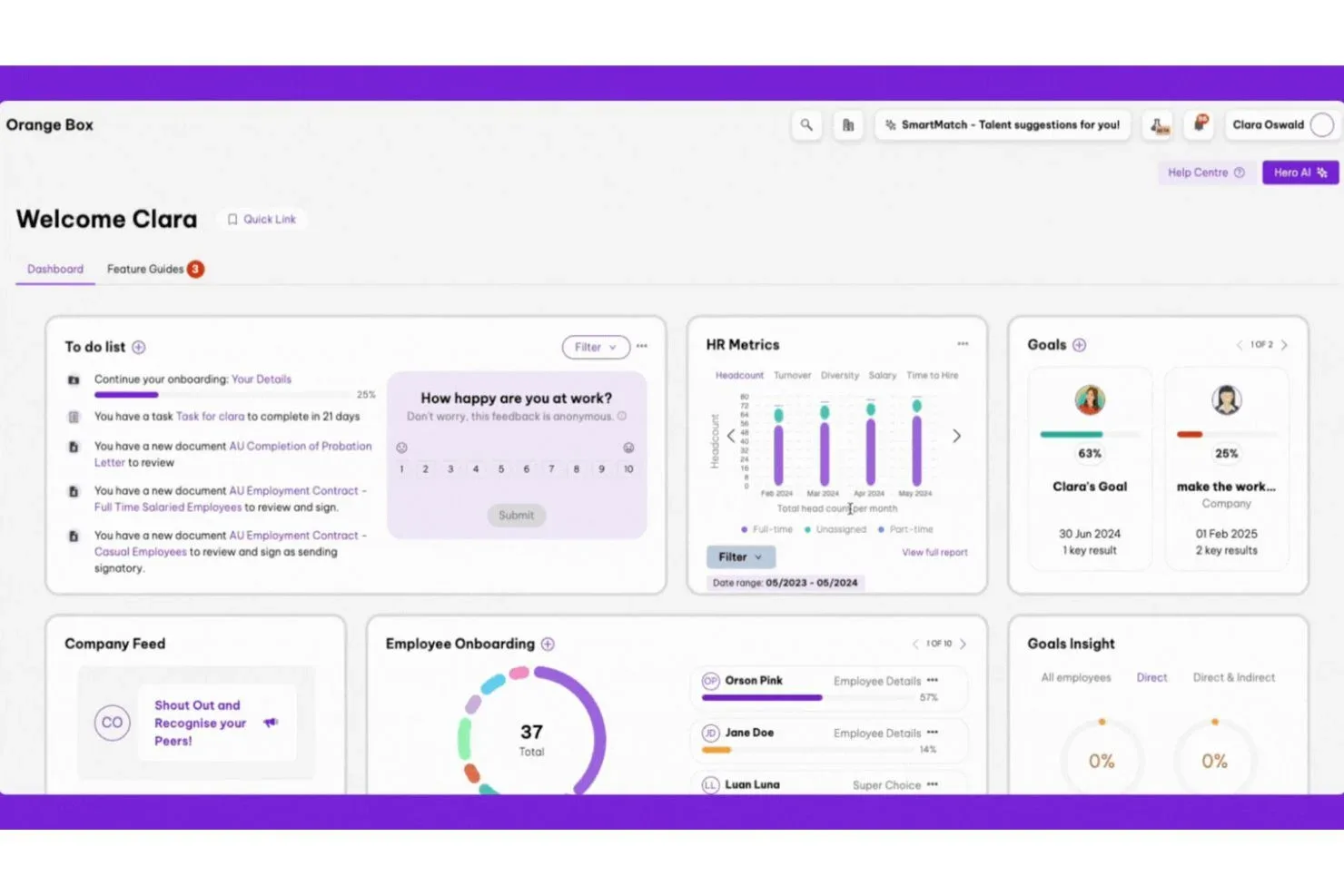
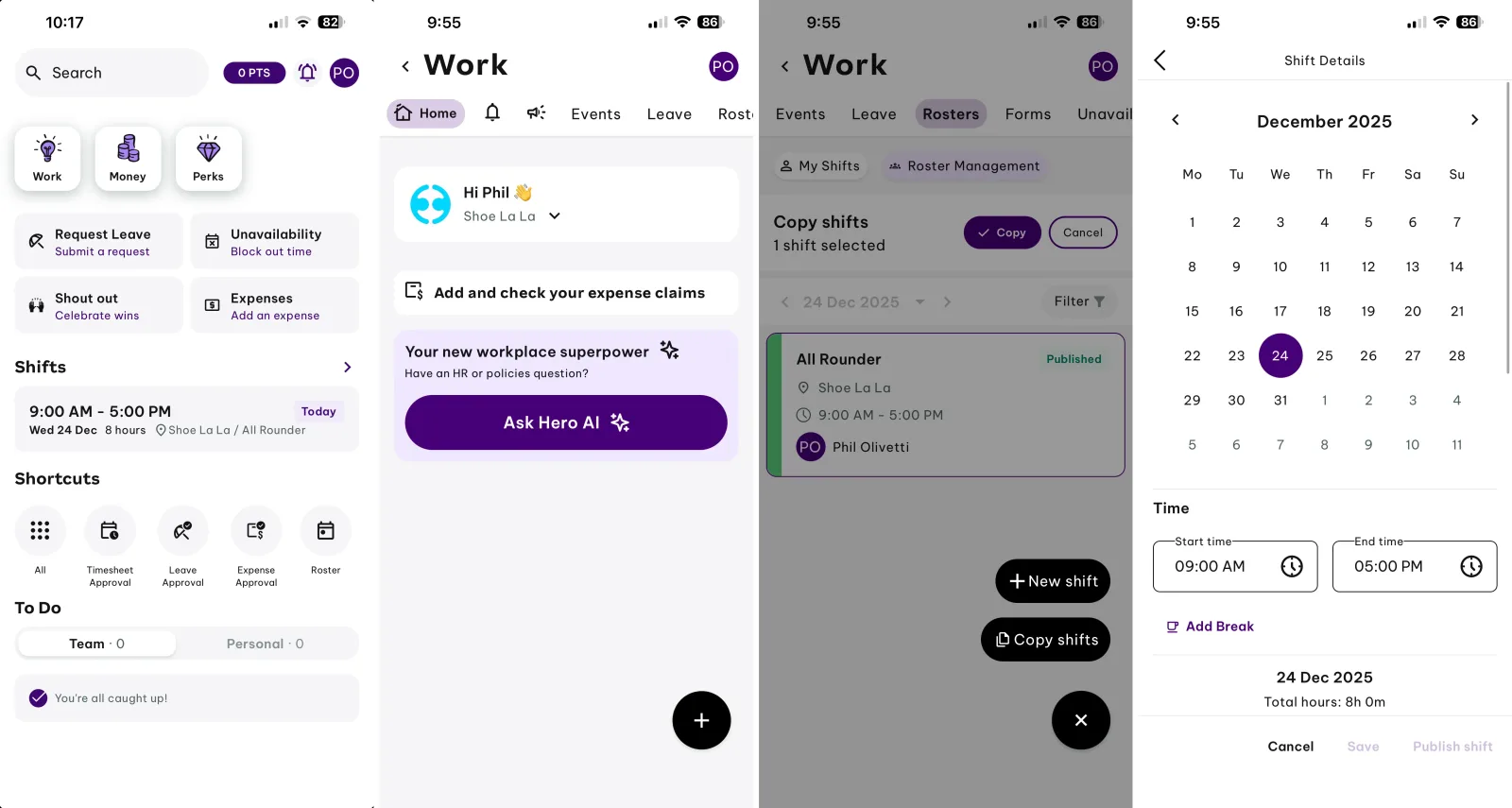
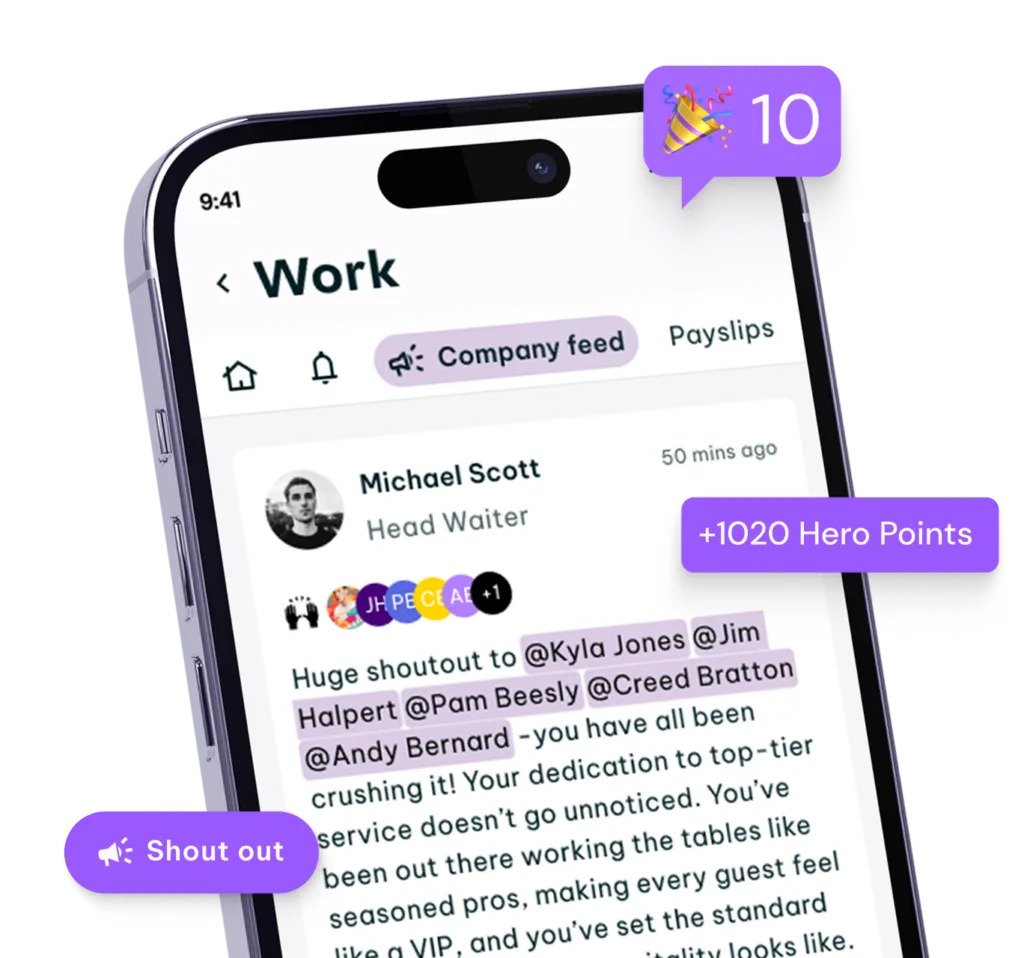
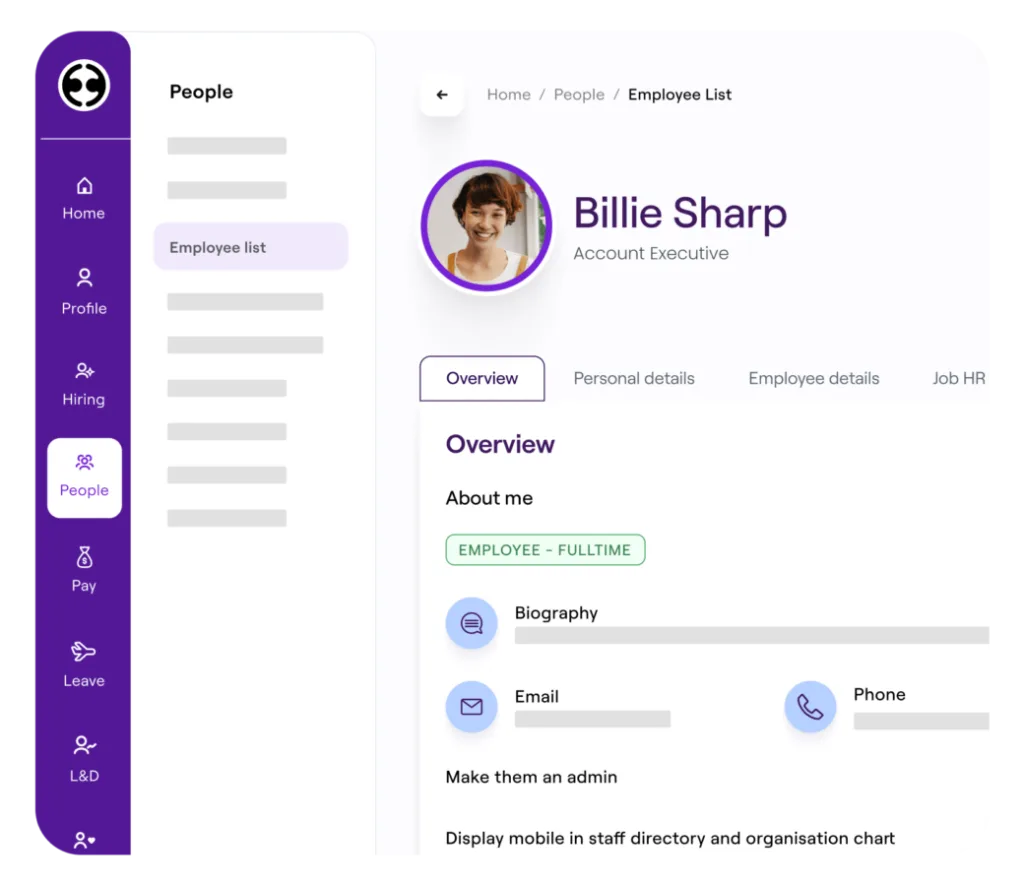
Table of contents
- 1. Employment Hero HR and Payroll
- 2. Employee Records and Workflows
- 3. Leave Management and Attendance
- 4. Recruitment and Performance Management
- 5. Employee Experience and Reporting
- 6. Integrations and Data Security
- 7. Employment Hero Pricing and Plans
- 8. Employment Hero Alternatives Compared
- 9. Implementation and Support Requirements
- Frequently Asked Questions
1. Employment Hero HR and Payroll
Employment Hero gives businesses a connected place to manage employee information, onboarding, leave, performance, recruitment and payroll, depending on the products and plan selected.
Its main appeal is the breadth of work that can sit within one system, especially for companies trying to reduce spreadsheets, disconnected applications and repeated administrative tasks.
The important qualification is regional availability.
Payroll rules, integrations, services and pricing depend on the market in which the company operates, so buyers should confirm that their country and employment arrangements are supported before committing.
Employment Hero is best assessed as a collection of connected people management tools rather than a single, identical package for every customer.
Some businesses may need only core HR records and leave management.
Others may want recruitment, employee engagement, performance reviews, workforce scheduling, payroll or additional advisory services.
This modular approach gives buyers room to choose their priorities, although it also means that the advertised entry price does not necessarily represent the cost of the full system they eventually need.
The platform is designed to help HR teams organise the employee journey from recruitment and onboarding through everyday administration, development and departure.
Depending on the selected modules, managers can maintain employee records, manage documents, handle leave requests, organise reviews and access reporting.
Payroll capabilities are available in supported markets, with country specific calculations and compliance requirements playing a major role in how the service works.
That distinction matters when comparing Employment Hero with other HR platforms.
A business looking for employee experience tools and a flexible HR system has a different requirement from a US employer seeking payroll tax filing, health insurance administration and a professional employer organisation.
Employment Hero can be compelling in its intended markets, but it should not be treated as a universal replacement for every payroll or employer services provider.
This review examines the platform through practical buying questions: what it helps teams manage, how its modules fit together, where the price can expand, which limitations deserve attention, and which alternatives are worth comparing.
The aim is to help buyers identify the right product category before they invest time in demonstrations, data migration and implementation.
2. Employee Records and Workflows
Employee records are among the most important parts of Employment Hero because so many HR processes depend on accurate employee information.
A central record can help a company organise contact details, employment information, documents and other information required for day to day administration.
When maintained properly, this reduces the need for HR staff to search across separate files or ask employees to repeatedly provide information that the company already holds.
A centralised record is only useful if the organisation establishes clear ownership of the information.
Before implementation, the HR team should decide who can create employee profiles, who can change sensitive fields, how changes are approved, and which records must be retained when an employee leaves.
These decisions are organisational responsibilities, not tasks software can solve by itself.
Employment Hero also supports HR workflows that help structure recurring processes.
Onboarding and offboarding are obvious examples.
A business can use a defined process to identify required documents, communicate tasks and ensure that relevant steps are not forgotten when someone joins or leaves.
The precise workflow options available will depend on the selected package and configuration.
For a new employee, the intended process should be clear from the first interaction.
The employee needs to know what information to submit, which policies to review, what documents require attention and when they are expected to complete each task.
HR should be able to see outstanding work without relying entirely on email reminders or a manually maintained spreadsheet.
Offboarding deserves the same discipline.
The process may involve recording the departure date, collecting company property, removing system access, completing final payroll steps and retaining necessary documentation.
Employment Hero can support the HR administration side of this workflow, but businesses should verify how it connects with their identity management, IT service management and payroll systems.
The strongest implementation is one that reflects the company's actual policies.
Avoid copying every existing manual step into the new platform simply because it exists today.
Review the process first, remove unnecessary approvals, define exceptions and then configure the software around the revised procedure.
That approach creates a cleaner employee experience and makes automation more useful.
3. Leave Management and Attendance
Leave management is a practical test of any HR platform.
Employees need a straightforward way to submit requests, managers need to understand team availability, and HR needs consistent records for reporting and payroll coordination.
Employment Hero includes leave management in its core HR offering, making it relevant for organisations that want to replace informal email requests or scattered spreadsheets with a more structured process.
The quality of leave administration depends on configuration.
Businesses need to define leave categories, entitlement rules, approval responsibilities, public holiday handling and the treatment of part time or irregular working arrangements.
These details may differ by jurisdiction, contract and internal policy.
A platform can help apply defined rules, but it cannot decide which rules are legally or contractually correct for every employee.
Attendance and scheduling are related but distinct requirements.
A company with office based employees and predictable hours may need only basic leave tracking.
A retailer, hospitality business, healthcare provider or field services company may need rosters, clock in records, timesheets, shift changes and labour cost visibility.
Employment Hero offers additional time and attendance capabilities, but buyers should check the precise modules, integrations and regional functionality included in their proposed package.
This is where product demonstrations should use real examples rather than generic screens.
Ask the vendor to show a leave request that crosses a public holiday, a part time employee with a different entitlement, an urgent absence and a manager who oversees several teams.
For workforce scheduling, ask how the platform handles a shift swap, missed clock in, overtime approval and a change made after a roster has been published.
The buyer should also confirm whether attendance data flows directly into payroll in the relevant market.
An integration that exports a file can be useful, but it is not equivalent to a fully connected process with appropriate validation and error handling.
The cost of manual reconciliation can become significant when employee numbers rise or work patterns become more complicated.
Employment Hero is worth considering for organisations that want HR and workforce processes to share a common employee record.
It is less suitable to assume that one subscription automatically covers every scheduling, award interpretation or time tracking requirement.
Those are specific capabilities to verify before signing.
4. Recruitment and Performance Management
Employment Hero's higher tier HR capabilities extend beyond employee administration into recruitment and employee development.
Depending on the selected plan, businesses can access recruitment tools, performance reviews, one to one meeting processes, feedback and learning management.
These capabilities can help HR teams connect hiring, employee development and retention within the same broader platform.
Recruitment tools are most useful when they reflect the way a company actually hires.
A small employer may need a vacancy record, a place to organise candidates and a consistent interview process.
A company hiring for many roles may need multiple approval stages, structured scorecards, job board connections, reporting on recruitment sources and clear ownership of candidate communication.
Before adopting the recruitment module, ask whether it supports the specific hiring workflow the organisation uses.
Confirm which job boards are available in the target country, how candidate data is stored, whether interview feedback can be standardised, and how access is controlled when hiring managers change.
Also ask how candidate records are handled when an applicant requests deletion or the company no longer needs the information.
Performance management requires a different kind of discipline.
Software can schedule reviews, collect feedback and store goals, but the quality of the process still depends on the company.
If managers do not understand the review criteria, or employees only receive feedback once a year, a new interface will not automatically create a healthier performance culture.
A practical rollout starts with a small number of clear goals.
The business might want managers to hold regular one to one meetings, set measurable objectives, provide timely feedback or standardise annual reviews.
The configuration should support these aims without creating a maze of forms that managers complete only to satisfy an administrative requirement.
Learning management can be useful when training records, development plans and employee information need to be organised together.
However, buyers should inspect the course catalogue, content licensing, reporting and integration options rather than assuming that every learning requirement is included in the base subscription.
A company with regulated training obligations may need detailed evidence of completion and a way to manage overdue requirements.
Employment Hero's broader HR approach makes sense for companies that prefer to keep recruitment and employee development close to everyday HR administration.
Organisations with advanced talent acquisition, complex compensation planning or sophisticated workforce analytics should compare the available modules carefully with specialist platforms before deciding.
5. Employee Experience and Reporting
An HR platform affects employees as much as it affects administrators.
The employee experience includes the ability to find personal information, access documents, submit requests, complete onboarding tasks and understand what the organisation expects.
When these processes are clear, employees need less direct assistance for routine questions and HR staff can spend more time on work that requires judgement.
Employment Hero offers employee facing tools and a mobile application as part of its broader platform.
The exact experience depends on the products and features enabled, so a demonstration should include both the employee view and the administrator view.
Buyers should check whether employees can complete common tasks without switching between separate applications or contacting HR for routine assistance.
A good evaluation should include accessibility and adoption.
Ask how the interface behaves on mobile devices, whether employees can access the information they need when away from a desk, and what happens when someone has limited digital confidence.
If the workforce includes multiple languages, locations or employment types, test those scenarios rather than evaluating the product only with a standard office employee profile.
Reporting is another important consideration.
HR teams may need to answer questions about headcount, leave balances, employee turnover, recruitment progress, performance activity and compliance tasks.
Useful reporting allows authorised users to identify patterns and take action, not merely download a large spreadsheet.
Before purchase, list the reports the business actually needs each month.
Identify who uses each report, where its data comes from, how frequently it must be refreshed and whether it needs to be shared with finance or leadership.
Then ask the vendor to demonstrate the report using realistic data.
A report that looks attractive in a product presentation may not include the fields or filters required for operational decisions.
The business should also distinguish standard reports from custom analytics.
Standard reports may cover common HR questions, while advanced analysis can require higher tiers, additional configuration or data exported to another tool.
Employment Hero's published plans position advanced reporting and analytics among its higher level capabilities, so organisations with demanding reporting needs should include those requirements in their quote.
Employee engagement features can help make communication and feedback more consistent, but they should not be treated as a substitute for management quality.
The platform is most valuable when its workflows support a clear process that employees and managers already understand.
6. Integrations and Data Security
HR data rarely lives in isolation.
Payroll, accounting, identity management, recruitment, scheduling and learning systems may all need to exchange information with an HR platform.
Employment Hero maintains an integration directory covering supported products and categories, including accounting tools, job boards, communication services and workforce applications.
Its official integration directory is available.
The presence of an integration listing does not automatically mean that every connection supports every data flow.
Buyers should verify which product tier the integration requires, which fields are synchronised, how frequently updates occur, whether the connection is one way or two way, and who is responsible for resolving errors.
An integration that only exports a payroll journal has a different purpose from one that synchronises employee changes automatically.
Create a simple system map before implementation.
Identify the system that owns each important record, such as employee identity, bank details, payroll results, accounting entries and access permissions.
Decide whether Employment Hero or another application is the authoritative source for each field.
Without that agreement, teams can end up with conflicting records and uncertainty about which value is correct.
Security requires the same level of scrutiny.
Employment Hero publishes a trust centre describing its security approach and compliance information, including details on cloud infrastructure, access controls and relevant certifications.
Buyers should review the documentation applicable to their region, product and contract rather than treating a general security statement as a complete assessment.
Questions to raise during procurement include how role based permissions work, how administrator access is controlled, whether audit records are available, how data is encrypted, how backups and recovery are managed, and how the provider handles security incidents.
The company should also ask about subprocessors, data location, retention and deletion, and the process for retrieving records at the end of the contract.
Privacy requirements vary by country and by the nature of the data being processed.
A company operating across several jurisdictions should confirm which legal entity provides the service, what contractual data processing terms apply, and how cross border data transfers are handled.
HR records can contain sensitive personal information, so these questions should be settled before uploading production data.
The platform's integration options can reduce manual work, but each connection also creates an operational dependency.
Document the purpose of each integration, its owner, its permissions and the process for handling a failure.
This is especially important when a connection affects payroll, employee access or financial reporting.
7. Employment Hero Pricing and Plans
Employment Hero uses a tiered and modular pricing model.
Its published HR plans include HR Essentials and HR Engage, while HR Elite and Employment Unlimited offer broader capabilities through customised packages.
The company also lists payroll products and add ons, including options for time and attendance, HR advisory services and learning.
Published prices are subject to conditions, minimum user requirements and regional terms.
The current public pricing page lists HR Essentials at $10 and HR Engage at $14, with higher tiers requiring a sales conversation.
These displayed prices are presented on Employment Hero's regional site, and buyers should confirm the billing currency, tax treatment, contract minimums and per user basis directly with the provider.
The displayed dollar sign should not be assumed to mean US dollars.
The pricing page also indicates a minimum subscription of ten users for the relevant HR plans, with billing based on the greater of the contracted user count or active users.
That minimum matters for a small business.
A company with only six employees may still be billed against a ten user minimum if that condition applies to its agreement.
The headline per user price alone will therefore not show the full monthly commitment.
Additional modules can also change the total, so the quote needs to identify every included and optional service.
HR Essentials is aimed at businesses that need foundational employee administration.
Its listed capabilities include leave management, employee records, document management, onboarding and offboarding, policy and compliance tools, and help centre and chat support.
This tier may be sufficient for a company that wants to organise basic HR processes without immediately adopting a full talent management suite.
HR Engage builds on those foundations with recruitment, expenses, performance management, learning management and additional HR capabilities.
It is more relevant to organisations that want structured hiring and development workflows alongside everyday employee administration.
Buyers should still verify the exact feature availability and any optional charges for time and attendance, advisory support or learning packages.
HR Elite adds higher level capabilities such as talent development, workforce planning, compensation management, goals, 360 degree reviews, advanced analytics, workflows and more extensive customisation, security and integration options.
Employment Unlimited is positioned as a broader package that includes payroll and additional services.
These plans require a quote, making a feature by feature commercial proposal essential.
A reliable pricing comparison should include more than the subscription.
Ask about implementation fees, data migration, training, minimum contract duration, annual price increases, support coverage, optional modules and charges for additional integrations.
Also confirm whether the quote includes all employee types, locations and payroll entities the organisation needs.
The most useful commercial exercise is to price the intended configuration rather than the smallest advertised package.
If the company needs payroll, scheduling, performance reviews, recruitment and HR advisory services, request a written breakdown of each component.
That makes it easier to compare Employment Hero with a competing platform that packages the same capabilities differently.
8. Employment Hero Alternatives Compared
Employment Hero is not the only way to organise HR and payroll.
The right alternative depends on the business's country, employment model, workforce complexity and preferred balance between software and outsourced services.
Three alternatives worth considering are Justworks, HiBob and Paycor.
They overlap with Employment Hero in some areas, but they are not interchangeable products.
Justworks is particularly relevant to US businesses that want payroll, HR support, compliance assistance and employee benefits within a professional employer organisation model.
Its published pricing lists Payroll at $8 per employee per month plus a $50 monthly base fee, PEO Basic at $79 per employee per month, and PEO Plus at $124 per employee per month.
The PEO options include different combinations of payroll, HR tools, support, compliance and benefits administration.
Those published prices are subject to the provider's current terms and do not represent a direct like for like comparison with Employment Hero's regional HR prices.
HiBob, often referred to as Bob, is worth evaluating when the main priority is a modern HR information system and employee experience rather than a bundled US PEO service.
Its core platform includes an employee database, document management, time off, lifecycle workflows, integrations, analytics and a mobile application.
HiBob uses customised pricing based on company size, requirements and selected modules, so a buyer needs a tailored quote before comparing total cost.
Paycor is another strong comparison candidate for US employers seeking payroll and broader human capital management tools.
Its product range includes payroll and tax services, employee self service, onboarding, time off management, HR support and analytics, with the exact package depending on the plan selected.
Paycor publishes some small business plan prices but also uses sales led pricing for other company sizes and product configurations.
Buyers should confirm which current package applies to their employee count and needs.
The important difference is the operating model.
Employment Hero presents connected HR and payroll capabilities in the markets it serves.
Justworks combines software with PEO services for eligible US employers.
HiBob focuses on the HR platform and employee lifecycle.
Paycor offers a broader US payroll and HCM proposition.
A business should compare the product that matches its actual need, not simply select the vendor with the longest feature list.
When Justworks Makes More Sense
Choose Justworks for serious consideration when the company is based in the United States and wants a provider to help coordinate payroll, HR support, compliance and benefits.
The PEO model can be attractive to smaller employers that do not have a large internal HR team and want access to a more structured service arrangement.
PEO services are different from buying HR software alone.
The relationship affects responsibilities, benefits arrangements, service scope and costs.
Buyers should understand the implications of co employment, confirm eligibility, compare available insurance options and check what happens when the business changes size or needs to leave the arrangement.
Justworks is not necessarily the best choice for a company that only needs an employee database and performance reviews.
Its value depends on whether the payroll, compliance and benefits services align with the employer's requirements.
Businesses outside the supported US model should not assume the same product is available in their country.
When HiBob Makes More Sense
HiBob deserves attention when employee experience, HR workflows and people analytics are central to the buying decision.
It can suit organisations that need to manage the employee lifecycle across teams and locations, particularly when HR wants a platform that can expand through selected modules.
Its customised pricing means that buyers need to define their requirements before a meaningful cost comparison is possible.
Ask for a quote that separates the core HR platform from additional modules and implementation services.
Confirm which capabilities are native, which depend on integrations and which require a higher tier.
HiBob may be the more appropriate candidate when a company prioritises HR process design, employee data and workforce insights.
However, if the main requirement is a PEO service with bundled US benefits, Justworks addresses a different need.
If the company depends on local payroll calculations, the buyer must verify the exact payroll coverage and available integrations rather than assuming that HRIS functionality guarantees local payroll support.
When Paycor Makes More Sense
Paycor is worth shortlisting when US payroll, tax filing and connected HR administration are major priorities.
The company offers plan combinations that include payroll services, employee self service, onboarding, reporting and other HR functions.
Higher level options can add more guidance and analytics, depending on the current package.
A buyer should ask Paycor to demonstrate the actual payroll cycle, including time input, approval, tax calculations, corrections, employee payslips and the accounting output.
If HR and payroll are currently separated, the evaluation should measure how much manual work can be removed and which responsibilities remain with internal staff.
Paycor's published pricing for small businesses includes base monthly charges and per employee fees on certain plans, while other packages require a quote.
That structure makes it important to compare total cost at the company's current headcount and at a realistic future headcount.
Also ask about setup costs, service levels, support availability and the conditions that apply to each product bundle.
How to Choose Between Them
Start by identifying the most expensive problem the company needs to solve.
If the issue is disorganised employee records and onboarding, a core HR platform may be enough.
If payroll tax administration and benefits are the main challenge for a US employer, a provider such as Justworks or Paycor may deserve priority.
If the company wants to improve HR workflows and employee insights, HiBob may be more relevant.
Next, check regional coverage.
Employment Hero's product availability and payroll functionality vary by market.
Justworks and Paycor are particularly relevant to US employers, while HiBob's HR platform can support a different set of international organisational needs.
Do not assume that a platform supporting international employees automatically handles every country's payroll and employment obligations.
Then compare implementation effort.
A provider with a larger feature set may still be a poor fit if it requires complex configuration that the internal team cannot maintain.
Ask each vendor to explain who will migrate data, map policies, configure permissions, test payroll, train managers and support the business after launch.
Finally, score each option against a consistent set of requirements.
Include the full cost, mandatory modules, integration quality, reporting, security, support, implementation, contract terms and data export process.
A short structured evaluation is more reliable than comparing marketing pages or selecting the product that looks easiest in a demonstration.
9. Implementation and Support Requirements
HR software implementation is partly a data project and partly a process improvement project.
The company needs to prepare employee records, review existing policies, define permissions, test workflows and train the people who will use the platform.
Skipping these steps can create confusion even when the software itself is capable.
Start with a data audit.
Identify duplicate employee records, outdated documents, inconsistent job titles, missing fields and unclear reporting relationships.
Decide which information needs to be migrated and which old records must be retained separately for legal or operational reasons.
The business should not transfer unnecessary personal information simply because it exists in the old system.
Next, document the policies that the platform must support.
Leave entitlements, approval routes, onboarding tasks, document retention and offboarding responsibilities should be clear before configuration begins.
If policy decisions are unresolved, the software setup can become a series of temporary workarounds that are difficult to maintain later.
Assign a named owner for each major workstream.
HR should lead employee processes, payroll specialists should validate pay related data, finance should review accounting outputs, IT should oversee access and integrations, and managers should confirm that approvals reflect actual team responsibilities.
One project lead should coordinate decisions and track unresolved issues.
Testing should cover ordinary cases and exceptions.
Include new hires, departing employees, leave requests, changes in pay, changes in working hours, access changes and employees with unusual contract arrangements.
Where payroll is involved, parallel testing can help compare the expected result with the new system before the business relies on it for live payments.
Support arrangements need to be evaluated before signing.
Ask what channels are available, which hours are covered, how urgent payroll issues are escalated, and whether the subscription includes direct access to specialists.
Confirm whether support is delivered by the software provider, a partner or a separate service team.
A help centre may be adequate for routine questions but insufficient when a payroll run is blocked.
Training should be role specific.
Employees need a simple explanation of how to access their information and complete common tasks.
Managers need to understand approvals, reporting and responsibilities.
HR administrators need deeper training on records, permissions, configuration and exception handling.
Payroll staff require a dedicated test process if payroll is included.
After launch, review adoption and process quality rather than declaring the project finished.
Track completion of onboarding tasks, errors in employee data, unresolved support issues, payroll corrections and the number of manual steps still required.
These measures reveal whether the system is delivering its intended value.
Key features
- Employee database and records management
- Employee onboarding and offboarding workflows
- Document storage and policy management
- Leave requests and approval tracking
- Recruitment pipeline and candidate management
- Performance reviews and ongoing feedback
- One to one meeting management
- Employee learning and development tools
- Workforce planning and compensation management
- Advanced HR analytics and reporting
- Custom workflows and process automation
- Employee self service access
- Mobile application for employees
- Payroll processing in supported markets
- Automated payroll calculations and reporting
- Time and attendance add on
- Workforce rostering and shift scheduling
- Employee expense management tools
- Third party software integrations
- Role based access and permissions
- Employee communication and engagement features
- HR advisory services as add ons
Pricing
- Employee records and document management
- Leave management and approval workflows
- Onboarding and offboarding administration
- Policies and compliance tools
- Help centre and chat support
- Everything included in HR Essentials
- Recruitment and candidate management
- Performance reviews and employee feedback
- Learning management capabilities
- Expenses and advanced HR tools
- Everything included in HR Engage
- Workforce planning and compensation management
- Goals and 360 degree reviews
- Advanced analytics and reporting
- Custom workflows and integration options
Pros & cons
Pros
- Centralises everyday employee administration tasks
- Combines records with onboarding workflows
- Offers several configurable HR modules
- Supports leave request approval processes
- Includes employee self service tools
- Connects with selected third party applications
- Provides recruitment and performance capabilities
- Offers learning management in higher tiers
- Supports payroll in selected markets
- Includes mobile access for employees
- Provides advanced reporting in higher tiers
- Offers additional HR advisory services
Cons
- Pricing currency needs regional confirmation
- Minimum user commitments may apply
- Advanced tiers require a sales quote
- Add ons can increase total costs
- Payroll coverage varies by country
- Not every integration supports identical data flows
- Complex setups require careful planning
- Advanced reporting may require higher tiers
- Implementation requires accurate employee data
- Policy configuration remains the employer responsibility
- Support coverage varies by service arrangement
- May not replace US PEO services
Employment Hero specs
- Platforms: Web browser and mobile app
- Free plan: No publicly listed permanent free HR plan
- Starting price: $10 displayed for HR Essentials, regional currency to confirm
- Integrations: Directory of accounting, recruitment, workforce and communication tools
- Support: Help centre, chat and plan dependent services
- Best for: Businesses needing connected HR and workforce processes
Our verdict
Employment Hero is a credible option for organisations that want employee records, onboarding, leave, recruitment, performance management and related HR workflows in a connected platform. Its modular approach lets businesses begin with core administration and consider broader capabilities as their needs develop. The main buying conditions are regional suitability, total cost and implementation readiness. Companies should verify payroll coverage, currency, minimum user commitments and add on charges before signing. For US employers primarily seeking payroll tax services and benefits through a PEO, Justworks may be a better fit. Businesses prioritising HR workflows and employee experience should compare HiBob, while employers focused on US payroll and broader HCM capabilities should evaluate Paycor. Employment Hero is most attractive when its available modules match the company's actual operating processes without requiring unnecessary complexity.
Contact SalesFrequently Asked Questions
What is Employment Hero used for?
How much does Employment Hero cost?
Is Employment Hero suitable for small businesses?
Is Employment Hero a payroll system?
What are the best Employment Hero alternatives?
Reader reviews
Be the first to review
