

Appspace Review 2026: Features, Pricing, Pros, Cons and Alternatives

By Noura Mint Ely & Evander Thorne · Reviewed by Noura Mint Ely
Appspace earns its strongest case when a company needs one operating environment for employee communications, digital signage and physical workplace management. Its ability to connect screens, desks, meeting rooms and internal information is genuinely valuable, particularly across multiple locations. However, quote based pricing and administrative complexity make it a purchase that requires careful planning.
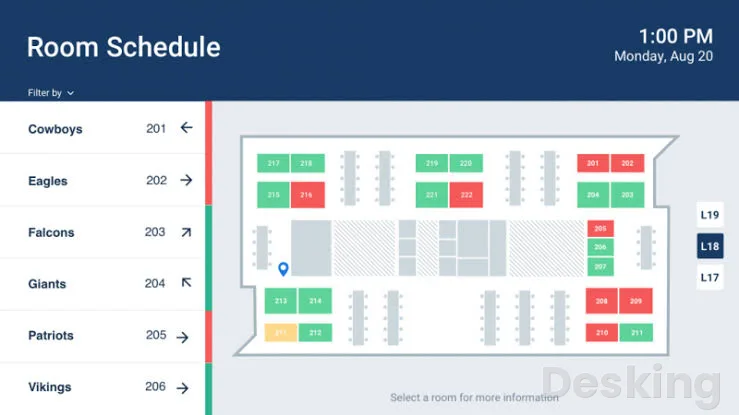
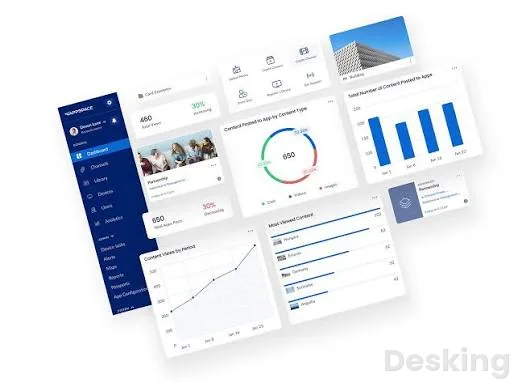
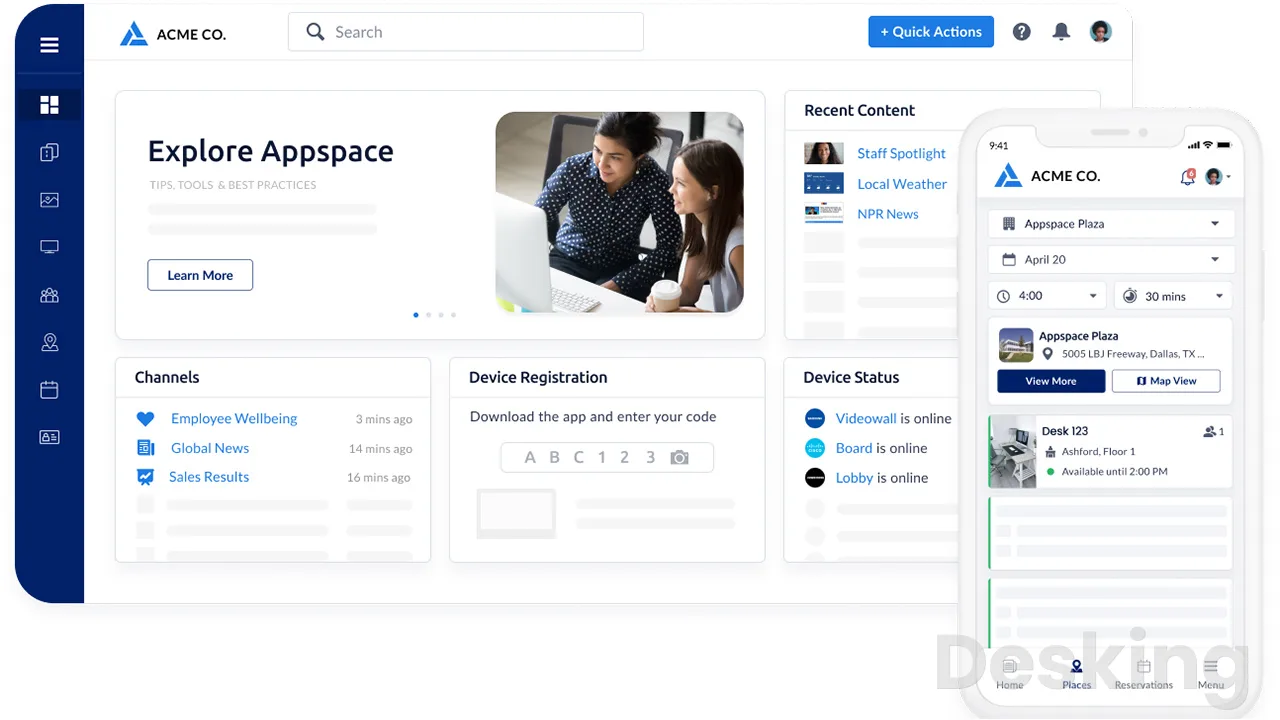
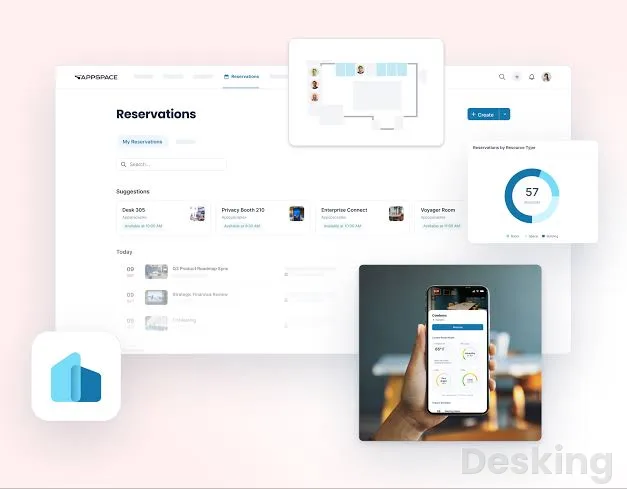
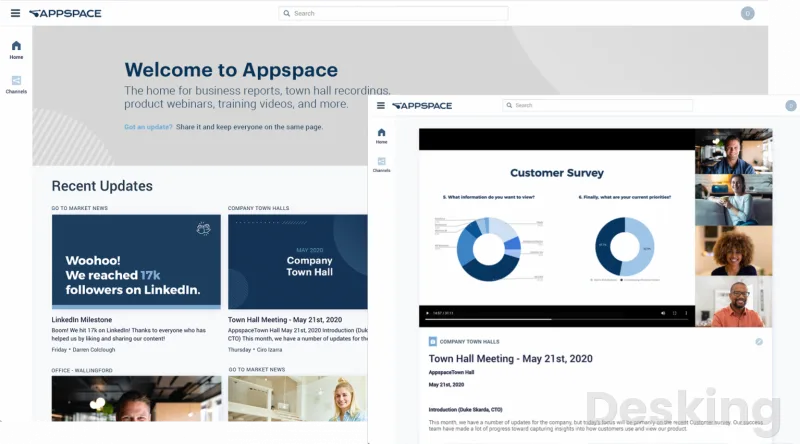
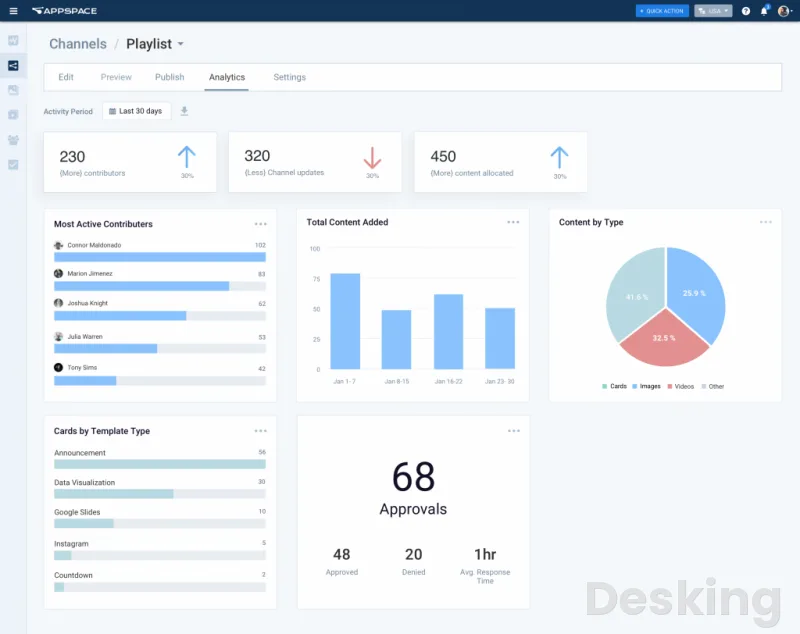
Table of contents
- What is Appspace
- How Appspace works
- Workplace communications
- Digital signage
- Space reservation
- Visitor management
- Appspace Intelligence and AI
- Integrations
- Ease of use
- Setup and implementation
- Security and compliance
- Customer support
- Appspace pricing plans
- Appspace versus competitors
- Pros and cons
- Who should use Appspace
- Who should avoid Appspace
- Final buying considerations
- Frequently Asked Questions
What is Appspace
A company can have an excellent intranet, a separate system for booking meeting rooms, another application for managing visitors and a collection of digital displays that somebody still updates manually.
The problem is not necessarily that any of these systems performs badly.
The problem is that they operate independently, leaving employees, administrators and facilities managers working across disconnected environments.
Appspace addresses this fragmentation by connecting internal communications and physical workplace operations through one shared software environment.
Appspace, developed by Appspace Inc., originated in digital signage and subsequently expanded into workplace communications, employee engagement, intranet publishing, space reservation and visitor management.
Its development reflects a deliberate move away from managing screens independently towards managing the broader employee experience.
The result is a product with two closely connected areas: workplace communications and workplace management.
The first distributes information across employee applications, intranets, messaging services and physical displays.
The second manages the resources people use when they enter an office, including desks, meeting rooms, visitors and shared spaces.
The distinction matters because Appspace is not simply competing with another digital signage application.
It competes for technology budgets that might otherwise be divided between an intranet provider, a desk booking system, a visitor management service and a signage platform.
That broader commercial position explains both its appeal and its complexity.
Appspace is a workplace experience system for organizations that need to communicate with employees and coordinate physical office resources through connected applications and displays.
It combines digital signage, employee communications, intranet publishing, desk and room reservations, visitor registration and workplace administration.
Its strongest audience is the organization with several of these requirements, particularly one operating multiple offices or supporting both frontline and office based employees.
The company has been operating since 2002 and received a strategic growth investment from Accel-KKR in 2023.
That investment is relevant because it places Appspace within a private equity backed software business with an established enterprise customer base and an interest in expanding its workplace technology offering.
The company's portfolio positioning also reflects its emphasis on larger deployments rather than competing exclusively for small businesses looking for inexpensive screen management.
How Appspace works
The central idea is to manage workplace information and resources through a common administrative environment.
Administrators configure the organization's locations, employees, devices, communication channels and available resources.
Employees then access the functions relevant to their roles through the Employee App, intranet, supported messaging applications, mobile devices, room panels and digital displays.
This arrangement changes the responsibility for everyday workplace administration.
A communications manager can prepare an announcement and distribute it through the appropriate channels.
A facilities manager can organize desks and meeting rooms.
An IT administrator can monitor connected devices and manage permissions.
These activities remain distinct operational responsibilities, but they share a common platform rather than requiring entirely independent systems.
The distinction between Premium Users and administrators is particularly important.
Appspace does not treat every employee account as an identical licensing unit.
Administrators are free, while Premium Users are the people who access the Employee App and functions such as reservations.
Employees can also view information through workplace displays and enterprise messaging applications without necessarily requiring the same Premium User access.
That arrangement can make the economics attractive for businesses with large frontline populations.
A manufacturing company, for example, may have hundreds of employees who primarily receive announcements through workplace screens, while a smaller group of office employees uses the application to reserve desks and meeting rooms.
The licensing structure recognizes that these two populations do not necessarily consume the same functionality.
Devices are another licensing consideration.
A display, room booking panel, visitor kiosk or other supported endpoint can count towards the organization's device allocation.
Consequently, the total number of employees alone is insufficient when estimating the cost of deployment.
There is also a practical implementation consideration.
Before purchasing, an organization should establish how many Premium Users it needs, how many devices will be connected, how many locations require management and which modules will be deployed.
These figures influence the commercial proposal and the technical work involved in implementation.
Workplace communications
Workplace communications is one of the most important reasons to consider Appspace.
The product addresses a problem that conventional corporate email systems do not solve particularly well: making company information accessible to employees who do not spend their working day in front of a computer.
The platform distributes content through the Employee App, intranet, digital signage and supported messaging integrations.
Communications administrators can create content centrally and publish it to selected destinations.
This is especially useful when the same information needs to reach employees working in offices, production facilities, reception areas and other locations.
The ability to distribute information through several channels also reduces the administrative burden associated with maintaining separate communication processes.
Instead of asking different departments to prepare independent announcements for different systems, an organization can establish a shared publishing process.
Employee App
The Employee App acts as an access point for company information and workplace services.
Employees can view organizational updates, access relevant content and use supported workplace functions.
Its importance is not simply that it gives employees another application.
The value comes from connecting information with the services employees already use during their working day.
A person can access organizational communications and workplace reservations within the same environment rather than constantly switching between unrelated applications.
The distinction becomes particularly relevant when employees are distributed across several locations.
Company communications can be targeted according to organizational requirements, while the application provides a consistent place to access information.
However, an employee application succeeds only when people have a reason to use it.
Companies should therefore establish clear publishing responsibilities and maintain relevant content.
Installing the application without a communication strategy will not automatically improve employee engagement.
Appspace Intranet
The intranet is another substantial part of the product.
It provides a centralized environment for company news, information, documents and employee communications.
Appspace supports personalized content distribution, allowing information to be organized according to employee roles, locations and interests.
This is particularly useful for organizations where the same corporate announcement does not necessarily apply to every department.
The platform also supports publishing information across different communication destinations.
A company can distribute relevant content through its intranet, messaging applications and workplace displays, reducing the need to recreate announcements for every channel.
Search and access to organizational information are equally important.
Employees should be able to locate company documents, policies and operational information without repeatedly contacting HR or administrative departments.
Appspace has been extending this experience through federated search and connections to external information repositories.
Its documented integration ecosystem includes SharePoint, Box, Google Drive, Dropbox and ServiceNow search connections.
These integrations allow the intranet to function as an access point to information that remains stored in other enterprise systems.
This distinction is important for IT administrators.
Appspace does not automatically replace every underlying document management or service management application.
It provides an additional workplace experience through which employees can access connected information.
Broadcasts and employee announcements
Broadcasts allow administrators to distribute information to employees through supported communication channels.
This is particularly useful for organizational announcements, operational updates and messages that need to reach specific audiences.
A company operating several locations may have corporate announcements that apply everywhere and local messages that concern only one facility.
Appspace's content distribution and audience management capabilities allow these communication requirements to be handled within the same environment.
The benefit is organizational consistency.
Communications departments can establish central publishing standards while allowing local teams to distribute relevant information.
For organizations with frontline employees, this can be more effective than relying exclusively on corporate email.
An employee working on a production floor may have limited access to a computer but can still receive information through workplace displays or an appropriate mobile experience.
Digital signage
Digital signage is where Appspace's history becomes particularly important.
The company began as a digital signage business, and this original specialization remains one of the defining elements of its offering.
The software allows organizations to manage workplace screens centrally, distribute multimedia content and organize publishing schedules.
Instead of manually updating individual televisions or relying on USB storage devices, administrators can control content through a centralized management environment.
For organizations operating several buildings, this makes a considerable operational difference.
A corporate communications department can prepare information centrally and distribute it to designated screens across different locations.
The system supports content channels, playlists, templates, multimedia and scheduled publishing.
Administrators can organize displays according to their intended purpose, location and audience.
Content creation and publishing
Appspace provides tools for creating and publishing screen content.
Its template and content library reduces the need to design every announcement from scratch.
Administrators can prepare information using existing templates, organize it into channels and determine where the content should appear.
Scheduling allows messages to be published and removed according to defined periods.
This last capability is particularly useful for organizations that regularly communicate temporary information.
Safety notices, event announcements, operational schedules and internal campaigns should not remain visible indefinitely after their relevance has expired.
A reviewer on Capterra specifically praised the ability to use the template library and automatically archive content according to its publishing schedule.
That feedback identifies an important operational benefit: the software can reduce the amount of manual housekeeping required to maintain accurate workplace displays.
The more interesting advantage is consistency.
When multiple locations receive information from a central publishing environment, the organization has greater control over the messages displayed throughout its facilities.
Multi-zone channels
Multi-zone layouts allow different types of information to appear within the same screen.
An organization can allocate different display areas to announcements, information feeds and other content.
This is useful in reception areas, employee cafeterias, production facilities and corporate offices where a single screen serves several communication purposes.
The flexibility is valuable, although it introduces a design consideration.
Different display sizes and orientations can affect how content appears.
A layout that looks appropriate on one screen may require adjustments before it works well on another.
A G2 reviewer specifically identified difficulties with the layout editor when creating more precise arrangements involving multiple zones and widgets.
This is a meaningful limitation for communications teams that frequently produce customized screen designs.
Appspace's template library reduces some of that work, but organizations with demanding visual requirements should evaluate the content editor carefully before committing to a large deployment.
Device management
Managing the devices themselves is another important part of the product.
Administrators can monitor connected players, review device information and manage supported device operations.
The centralized dashboard helps IT departments understand the status of their signage infrastructure without visiting every physical display.
This becomes increasingly valuable as the number of endpoints grows.
A company with four screens can usually manage them through informal processes.
A company with hundreds of screens distributed across different locations needs a more disciplined monitoring and administration system.
G2 feedback identifies centralized visibility into online status, firmware versions, last-seen information and content cache status as a practical strength.
However, device management is not entirely free of operational difficulties.
Some reviewers report synchronization problems, devices going offline and content loading delays.
These issues matter more when displays carry operational or safety information than when they are used for occasional corporate announcements.
For business-critical signage, device monitoring should be evaluated alongside network reliability, hardware selection and escalation procedures.
Space reservation
Appspace Workspace extends the product beyond communications into physical workplace management.
Its reservation capabilities allow employees to book desks, meeting rooms and other shared resources.
The system supports both spontaneous hot desking and advance reservations, giving organizations flexibility in how they allocate office space.
This is particularly relevant for companies that no longer assign a permanent desk to every employee.
Instead of relying on spreadsheets or informal arrangements, employees can view available resources and reserve the space they need.
The platform also supports maps and floorplans, helping employees identify where resources are located.
Desk booking
Desk booking is one of the strongest practical applications of Appspace.
Employees can reserve available workstations through supported access methods, including the mobile application, desktop environment and Microsoft Teams.
Visual floorplans make it easier to understand which desks are available and where colleagues are located.
The ability to connect reservations with workplace calendars is particularly valuable.
Employees can organize their office attendance without relying on separate spreadsheets or informal messages.
G2 reviewers have highlighted the visual floorplan experience and the ability to synchronize reservations with Outlook.
One reviewer described how the map changes the process of finding a desk from walking around the office to selecting an available workstation before arriving.
This is a meaningful advantage for facilities managers because desk booking produces information about actual workplace demand.
Organizations can examine which areas are used frequently and which remain underutilized.
However, the reservation process depends on accurate configuration.
Floorplans, resource availability, booking rules and check-in requirements need to reflect how the organization actually operates.
Meeting room booking
Meeting room reservations address another familiar administrative problem.
Employees can identify available rooms and make reservations through supported workplace interfaces.
Appspace integrates with Microsoft Outlook and Google Calendar, connecting workplace reservations with the scheduling environments many businesses already use.
The platform also supports room panels and other workplace endpoints.
This gives employees different ways to reserve or identify meeting spaces.
The value is particularly clear in offices where employees previously depended on receptionists or administrative assistants to coordinate meeting room availability.
A G2 reviewer described how the reservation process replaced a system in which employees sometimes waited days or weeks for an administrative assistant to confirm a room.
That is the type of operational improvement that justifies a workplace reservation system.
It reduces unnecessary communication and gives employees greater control over their working day.
There is, however, an important consideration concerning check-in policies.
Organizations should configure these rules carefully.
Automatic release mechanisms can improve resource utilization, but poorly communicated rules can make employees lose reservations while they are physically using the space.
Maps and floorplans
Floorplans provide the visual foundation for workplace reservations.
Employees can identify desks, meeting rooms and other resources according to their physical locations.
This is particularly useful in larger offices where knowing that a room is available is not enough.
Employees also need to know where it is.
For facilities managers, maps can provide a more accessible representation of the workplace than a conventional resource list.
The quality of this experience depends on the accuracy of the underlying floorplans and resource configuration.
Building changes, new departments and reorganized office areas require administrative maintenance.
One recurring user complaint concerns the difficulty of changing certain floorplan arrangements without administrative assistance.
This is an important point to clarify during procurement, particularly for companies that frequently reorganize their offices.
Visitor management
Visitor management extends Appspace into reception and workplace security operations.
The system supports visitor pre-registration, registration forms, digital document signing, check-in and visitor notifications.
It also provides administrative visibility into people visiting the workplace.
These functions are useful for organizations that receive customers, suppliers, contractors and other external visitors regularly.
Visitor registration
Pre-registration allows organizations to prepare for visitors before they arrive.
Guests can complete relevant information and documentation in advance, reducing the amount of paperwork required at reception.
The platform supports digital forms and document signing, including workflows involving nondisclosure agreements.
For companies handling confidential information, this is more than a convenience.
A consistent registration process can help ensure that visitors complete the necessary administrative steps before entering controlled areas.
Check-in and notifications
Appspace supports visitor check-in through appropriate workplace interfaces, including kiosks and QR-based workflows.
When a visitor arrives, the system can notify the relevant employee.
This reduces the need for reception staff to locate hosts manually.
The visitor management dashboard also provides a view of people registered at the workplace.
This information is useful for reception, facilities and security personnel who need to understand who is on site.
However, buyers should distinguish visitor registration from a complete physical access control system.
Visitor management helps coordinate the registration process, but organizations should confirm exactly which access control integrations and security procedures are supported in their intended deployment.
Companies with strict regulatory requirements should also establish how visitor records are retained, exported and governed.
Appspace Intelligence and AI
Artificial intelligence is becoming an increasingly important part of Appspace's product direction.
Appspace Intelligence introduces AI capabilities into workplace communications, content creation, information access and operational decision making.
The objective is to reduce the manual work involved in preparing communications and finding organizational information.
AI content creation
Appspace Intelligence supports content generation through prompts.
Administrators can use AI to draft text, create visual content and generate narration.
This can reduce the time required to prepare routine workplace announcements and digital signage material.
For communications departments, the benefit is most apparent when publishing requirements are frequent.
Instead of preparing every message independently, employees can use AI assistance to accelerate initial content production.
However, generated content still requires editorial review.
Corporate announcements, safety instructions and regulatory communications should never be published without appropriate human approval.
AI assistants
Appspace also incorporates assistants that answer questions and help employees interact with workplace information.
Examples include finding information and requesting assistance with room reservations.
This is a logical extension of the platform because the assistant can operate within an environment already connected to workplace resources.
The value depends on the quality of the underlying information and the permissions governing access.
An assistant cannot reliably provide useful answers when company documents are outdated, improperly organized or inaccessible.
Appspace has continued developing this area through its 2026 releases.
The October 2026 release introduced AI assistant memory and web search improvements, while the November maintenance release addressed assistant behavior on instances skipped during registration.
These developments show that AI is becoming part of the platform's ongoing product development rather than an isolated marketing addition.
Workplace analytics
Analytics provide administrators with information about communication activity and workplace utilization.
For facilities managers, this can help identify how frequently desks and meeting rooms are used.
For communications departments, engagement information can provide insight into whether employees are accessing published information.
The practical value comes from using these insights to make decisions.
For example, workplace utilization information can help a company evaluate whether it needs the same number of office workstations across every location.
Communication analytics can help identify whether certain employee groups are receiving and interacting with company announcements.
AI assisted insights can make this information easier to interpret, although buyers should verify which analytics capabilities are included in their proposed subscription.
Integrations
Appspace's integration strategy is central to its position as a workplace experience platform.
A product that attempts to manage communications, reservations and workplace operations cannot operate effectively in isolation.
It must connect with the applications employees already use and the infrastructure administrators already maintain.
Microsoft 365 and Teams
Microsoft is one of the most important integration environments for Appspace.
The platform supports Microsoft Teams integration and connections with Outlook.
Employees can access workplace information and reservation functions through supported Microsoft experiences.
This reduces the need to introduce an entirely separate daily workflow.
For organizations already using Microsoft 365, the integration can make Appspace easier to introduce because employees are familiar with the surrounding environment.
Google Workspace
Appspace also supports Google Calendar integration for workplace reservation workflows.
This is important for businesses that do not operate entirely within Microsoft's ecosystem.
The integration allows workplace scheduling to connect with an established calendar environment rather than forcing employees to manage every reservation independently.
Slack and Webex
The platform supports publishing content to Slack and Webex Teams.
These integrations are particularly relevant for companies that distribute internal communications through enterprise messaging applications.
The intention is to ensure that important information can reach employees through the channels they already use.
Content repositories and enterprise systems
Appspace's documented integration ecosystem includes SharePoint, Box, Google Drive, Dropbox and ServiceNow federated search connections.
The distinction between publishing integrations and federated search is important.
Some integrations distribute content between applications, while others allow employees to locate information stored in external systems.
IT administrators should evaluate each integration according to its actual function rather than treating every connection as equivalent.
The integration catalog also includes hardware and workplace technology partners.
This is relevant for organizations deploying room scheduling panels, displays and other connected endpoints.
The practical recommendation is to build an integration checklist before purchasing.
Identify the systems that must exchange information, confirm which integrations are generally available and establish whether any require additional configuration or professional services.
Ease of use
Appspace's employee experience and administrative experience should be evaluated separately.
For employees, the platform can make everyday activities easier.
Booking a desk, checking company announcements or locating workplace information becomes more straightforward when these functions are available through connected interfaces.
The employee experience benefits from the visual approach used for desk and room reservations.
Floorplans are easier to understand than complicated resource lists, especially for employees unfamiliar with a particular office.
Administrators face a different experience.
The platform contains several interconnected product areas, and managing these requires an understanding of channels, permissions, device configurations, locations, resources and publishing workflows.
That complexity is understandable given the scope of the product, but it should not be dismissed.
A company purchasing Appspace needs people who can manage the platform properly.
G2 reviewers have described the administration environment as heavy, with configuration options distributed across several navigation levels.
Another reviewer identified the absence of batch editing as a source of repetitive work.
These observations suggest that Appspace is easier to justify when an organization has enough operational scale to benefit from centralized management.
A small business that only needs to update a handful of screens may find the administration environment unnecessarily extensive.
Setup and implementation
Implementation requires more than creating an account and inviting employees.
The organization must configure its workplace structure, register devices, establish user permissions, prepare floorplans and connect the required integrations.
Digital signage deployments also require appropriate network access and compatible hardware.
Workplace reservation deployments require accurate resource information and calendar configuration.
The time required depends heavily on the number of locations, the existing infrastructure and the number of modules being implemented.
G2 feedback provides useful examples of this distinction.
Some reviewers describe relatively straightforward use, while others report spending several weeks coordinating devices, network preparation and channel assignments.
A reviewer operating across multiple industrial sites described an implementation period approaching four months.
Much of that effort involved hardware procurement, governance decisions and training local coordinators.
These examples should not be interpreted as a universal implementation timetable.
They demonstrate that the software is only one part of the deployment.
For a successful rollout, the company should assign clear ownership to IT, facilities and communications departments.
Someone must be responsible for device infrastructure, someone must maintain workplace resources and someone must govern published content.
Without these responsibilities, the organization risks reproducing the same fragmentation it purchased Appspace to eliminate.
Security and compliance
Security is an important purchasing consideration because Appspace handles employee information, workplace reservations and visitor records.
The platform publishes information about its security controls and certifications through its trust resources.
Its security documentation identifies SOC 2 Type II and ISO 27001 related controls, alongside ISO 27017 certification.
The company also publishes information concerning its security policies and audit processes.
Microsoft's application certification information provides additional evidence for enterprise procurement.
The Appspace application listing identifies SOC 2 Type II and ISO 27001 certification information.
Single sign-on is supported within the platform's administrative and workplace capabilities.
This is important for businesses that want employees to authenticate through established identity management systems.
Security teams should nevertheless examine the exact scope of the certification documents, the services covered and the contractual responsibilities associated with data processing.
The existence of a certification does not automatically establish that every deployment configuration meets an organization's regulatory requirements.
Companies handling sensitive visitor information or operating in regulated industries should review access permissions, data retention, identity management and audit requirements before deployment.
Customer support
Appspace offers different support levels according to subscription arrangements.
The Free plan includes base support, which provides access to online documentation, video tutorials, software releases and managed cloud infrastructure.
Express includes advanced support, with online chat, a stated 12 hour response time, two ticket administrators and three incidents per month.
Enterprise can include premium or elite support, depending on the selected arrangement.
Premium support includes phone and ticket assistance, with a four hour response target for cloud issues and an eight hour target for on premises issues.
Elite support adds a customer success manager and shorter response targets.
These distinctions matter because a company operating digital signage across several locations may require more than access to documentation.
A display outage in a corporate reception area is inconvenient.
A display outage affecting operational safety communications can have much greater consequences.
Buyers should therefore examine the support tier included in their proposal rather than assuming that every subscription receives the same service.
Customer feedback is generally positive about the assistance received during implementation, although some reviewers have requested better access to immediate technical support.
Appspace pricing plans
Appspace uses a subscription model based on the organization's requirements, particularly Premium Users and registered devices.
Its publicly presented subscription structure contains three plans: Free, Express and Enterprise.
The important distinction is that the paid subscription prices are not publicly displayed as fixed monthly dollar amounts.
Buyers must obtain a commercial proposal.
Free
The Free plan provides an entry point for organizations evaluating the platform.
It includes two Premium Users, one Appspace Device ID, 5GB of monthly storage and 5GB of monthly bandwidth.
The plan is useful for understanding the administration environment and evaluating basic workplace workflows.
Its restrictions make it unsuitable for most substantial corporate deployments.
A company with several screens or a larger employee population will quickly exceed its allocations.
Express
Express increases the allocation to 25 Premium Users and 25 device IDs.
It includes 25GB of monthly storage and 25GB of monthly bandwidth.
The plan also introduces advanced support, including online chat and a stated 12 hour response time.
Its payment options include credit card and invoice arrangements, with monthly or annual account durations.
Express is the more relevant starting point for smaller organizations that need a paid workplace deployment without the larger allocations associated with Enterprise.
Enterprise
Enterprise increases the allocation to 50 Premium Users and at least 50 device IDs.
It includes 50GB or more of monthly storage and bandwidth.
The support arrangement can include premium or elite service, with additional administrative and assistance provisions.
Enterprise is intended for larger deployments and organizations requiring more extensive workplace administration.
The important purchasing consideration is that the published allocation is not a complete description of the total commercial agreement.
Additional users, devices, storage, bandwidth and services can affect the final investment.
Additional costs
Appspace publishes additional storage and bandwidth charges for paid subscriptions.
Additional storage costs $0.10 per GB per month, while additional bandwidth costs $0.15 per GB per month.
The company also identifies professional services, customized integrations, training and other specialized services as potential additional expenses.
For an organization planning a large deployment, these charges should be included in the commercial evaluation.
A buyer should request a proposal that separates user licensing, device licensing, storage, bandwidth, support and implementation services.
This makes it easier to compare Appspace with competitors that price individual modules differently.
Appspace versus competitors
Appspace operates in several overlapping software categories.
Its competitors therefore depend on the specific problem an organization is trying to solve.
The most relevant alternatives include Envoy, Robin and Poppulo.
Appspace vs Envoy
Envoy is particularly relevant for workplace operations, visitor management and resource reservations.
Its approach is more modular.
Organizations select a platform tier and add products such as reservations, visitor management, digital signage and deliveries.
Envoy publishes a starting reservation price of $5 per bookable resource per month when billed annually, excluding its platform fee.
Its digital signage Standard plan is listed at $12 per device per month, also billed annually and excluding the platform fee.
This provides a more visible pricing reference for buyers evaluating specific operational requirements.
Appspace takes a broader approach to workplace communications.
Its intranet, employee application, digital signage and workplace management functions make it attractive when the organization wants to consolidate several communication activities as well as physical office operations.
Envoy is the stronger alternative when visitor workflows and workplace operations are the primary purchasing requirements.
Appspace is more compelling when internal communications and signage deserve equal importance.
Appspace vs Robin
Robin focuses on workplace experience and resource management.
Its offering includes desk and room booking, parking, workplace maps, space management and workplace analytics.
Robin also emphasizes integrations with Microsoft and Google calendars, along with workplace management functions such as office neighborhoods and booking policies.
Its commercial pricing is quote based.
The main difference is product emphasis.
Robin is a more focused choice for organizations primarily interested in coordinating office attendance, workplace resources and meeting spaces.
Appspace is a broader choice for companies that also need centralized internal communications and digital signage.
If the purchasing requirement is mainly desk booking, Robin deserves serious evaluation.
If the company wants the same investment to support workplace communications and physical office operations, Appspace has a stronger argument.
Appspace vs Poppulo
Poppulo is particularly relevant in employee communications and enterprise digital signage.
Its offering includes internal communications, frontline mobile applications, intranet capabilities and digital signage.
Poppulo also emphasizes content governance, advanced publishing, analytics and enterprise communications management.
Its pricing is quote based, similar to Appspace.
The comparison becomes particularly interesting for companies with large communications departments.
Poppulo has a strong proposition for organizations where internal communication strategy, employee engagement and large scale content distribution are the main priorities.
Appspace has a more direct connection between communications and physical workplace management, particularly desk booking, meeting rooms and visitor registration.
The decision should depend on which department owns the purchasing requirement.
Communications led organizations should compare both carefully, while facilities led organizations may find Appspace's workplace management capabilities particularly attractive.
Competitor comparison
| Product | Main strength | Pricing approach | Best suited to |
|---|---|---|---|
| Appspace | Communications and workplace management | Quote based paid plans | Connected workplace operations |
| Envoy | Visitor and resource management | Published module prices and platform fee | Workplace operations |
| Robin | Desk and room booking | Quote based | Office space management |
| Poppulo | Enterprise communications and signage | Quote based | Internal communications |
The important distinction is that these products do not compete equally across every category.
Selecting the cheapest desk booking subscription does not necessarily produce the cheapest complete workplace communications environment.
Organizations should compare the cost of the entire required workflow rather than selecting a winner based on one module.
Pros and cons
Appspace has a strong argument for organizations that need to connect internal communication with physical workplace operations.
Its digital signage heritage, workplace reservation capabilities and employee communication functions give it a broader purpose than a conventional signage application.
The ability to manage content centrally is particularly valuable across multiple locations.
So is the separation between administrators and Premium Users, which gives organizations a different way to approach licensing.
The disadvantages are equally important.
Administrative complexity, quote based pricing and the operational requirements of managing devices can make implementation more demanding than buyers initially expect.
The lack of publicly displayed paid prices also makes budget planning more difficult.
Organizations cannot reliably calculate their full subscription investment from the published plan names alone.
The following points summarize the purchasing considerations.
Advantages
- Centralized workplace communications management
- Extensive digital signage capabilities
- Visual desk booking floorplans
- Microsoft Outlook calendar integration
- Google Calendar reservation integration
- Employee intranet publishing capabilities
- Multi location content distribution
- Centralized screen device monitoring
- Flexible workplace resource reservations
- Visitor registration and notifications
- AI assisted content creation
- Integrated workplace information access
- Dedicated enterprise support options
- Free entry level subscription
Disadvantages
- Paid subscription prices require quotations
- Administrative interface can feel complex
- Device provisioning requires technical preparation
- Batch editing capabilities have limitations
- Screen synchronization problems affect reliability
- Content layouts require careful configuration
- Large deployments require substantial coordination
- Advanced support costs require consideration
- Additional device licensing affects budgets
- Storage and bandwidth incur additional charges
- Integration capabilities vary by application
- Some administrative workflows involve multiple steps
- Floorplan modifications can require assistance
- Implementation effort increases across locations
Who should use Appspace
Appspace makes the most sense when several departments share responsibility for the employee experience and workplace operations.
Large organizations
Companies with multiple offices, campuses or operational facilities are among its strongest potential customers.
The platform can centralize workplace announcements, screen management and reservations while allowing local teams to manage location specific information.
For these organizations, replacing several disconnected systems can justify a more extensive software investment.
Manufacturing and industrial companies
Manufacturing businesses frequently have employees who do not spend their working day using corporate email.
Digital signage and frontline communication capabilities can make company information more accessible across production facilities and operational environments.
The ability to distribute safety messages and local operational announcements is particularly relevant.
However, hardware selection, network availability and content approval processes deserve careful planning in industrial environments.
Educational institutions
Universities and other educational institutions often operate several buildings, meeting spaces and communication channels.
Appspace can support campus announcements, room reservations, digital signage and information distribution.
The ability to manage communications centrally while supporting local information requirements is useful in these environments.
Facilities and workplace management departments
Facilities managers can benefit from the reservation system, floorplans, visitor management and device monitoring.
Organizations seeking better visibility into workplace resource utilization may find the platform particularly useful.
Communications departments
Internal communications teams can use the platform to distribute information across intranet pages, employee applications, messaging applications and digital signage.
The centralized publishing model is especially relevant when a company needs consistent messaging across several employee populations.
Who should avoid Appspace
Appspace is not automatically the right choice for every business.
A company that only needs inexpensive digital signage should compare specialized providers before committing to a broader workplace platform.
Similarly, an organization that only needs desk booking may find a dedicated workplace management product easier to purchase and administer.
Small businesses with a handful of employees and a limited number of screens may not need the administrative depth Appspace introduces.
The pricing structure also makes it less convenient for buyers who require a straightforward public monthly subscription before beginning an evaluation.
Finally, organizations with strict hardware requirements should establish device compatibility before purchasing.
The software cannot compensate for unreliable network infrastructure or unsuitable display equipment.
Final buying considerations
There are several decisions that deserve attention before signing an Appspace agreement.
First, calculate the number of Premium Users separately from the total employee population.
This distinction can materially change the proposed subscription.
Second, prepare a complete device inventory.
Include televisions, signage endpoints, room panels, kiosks and other connected equipment that will use the platform.
Third, identify which departments will administer the software.
Workplace communications, IT and facilities management should agree on ownership and responsibilities.
Fourth, document the integrations required for the first deployment.
Microsoft Teams, Outlook, Google Calendar, SharePoint and other connected systems should be assessed according to their actual use.
Fifth, ask for a detailed support agreement.
The difference between base, advanced, premium and elite support matters when workplace displays and reservations become operationally important.
Finally, conduct a representative pilot.
It should include at least one actual workplace location, the intended display hardware, a reservation workflow and the employee communication channels the organization plans to use.
A successful pilot should establish whether the product reduces administrative work without introducing excessive maintenance requirements.
Key features
- Digital signage content management
- Centralized screen device management
- Scheduled content publishing channels
- Multi zone screen layouts
- Interactive workplace digital signage
- Employee App communications
- Modern employee intranet publishing
- Targeted employee newsfeeds
- Corporate announcement broadcasts
- Branded content templates library
- Desk and room reservations
- Interactive office floorplans management
- Custom workplace resource reservations
- Automated visitor pre registration
- Digital visitor check in
- Visitor registration form customization
- Concierge reservation management dashboard
- Microsoft Outlook calendar integration
- Google Calendar reservation integration
- Microsoft Teams workplace integration
- Slack communication channel publishing
- Webex Teams content publishing
- Appspace Intelligence AI assistants
- AI generated workplace content
- AI assisted information search
- Workplace analytics and insights
- Single sign on authentication
- User permissions administration
- Centralized device task management
- Federated enterprise document search
- Frontline employee communication access
Pricing
- Two Premium Users included
- One Appspace Device ID
- Five GB monthly storage
- Five GB monthly bandwidth
- Base support documentation access
- Twenty five Premium Users included
- Twenty five Appspace Device IDs
- Twenty five GB monthly storage
- Twenty five GB monthly bandwidth
- Advanced support with online chat
- Fifty Premium Users included
- Fifty plus device IDs
- Fifty GB monthly storage
- Fifty GB monthly bandwidth
- Premium or Elite support options
Pros & cons
Pros
- Centralized workplace communications management
- Extensive digital signage capabilities
- Visual desk booking floorplans
- Microsoft Outlook calendar integration
- Google Calendar reservation integration
- Employee intranet publishing capabilities
- Multi location content distribution
- Centralized screen device monitoring
- Flexible workplace resource reservations
- Visitor registration and notifications
- AI assisted content creation
- Integrated workplace information access
- Dedicated enterprise support options
- Free entry level subscription
Cons
- Paid subscription prices require quotations
- Administrative interface can feel complex
- Device provisioning requires technical preparation
- Batch editing capabilities have limitations
- Screen synchronization problems affect reliability
- Content layouts require careful configuration
- Large deployments require substantial coordination
- Advanced support costs require consideration
- Additional device licensing affects budgets
- Storage and bandwidth incur additional charges
- Integration capabilities vary by application
- Some administrative workflows involve multiple steps
- Floorplan modifications can require assistance
- Implementation effort increases across locations
Appspace specs
- Platforms: Web, iOS, Android, digital signage endpoints and supported workplace devices
- Free plan: Yes
- Starting price: $0 for Free, paid plans require quotations
- Integrations: Microsoft 365, Teams, Outlook, Google, Slack, Webex and enterprise connectors
- Support: Documentation, tutorials, online chat, phone and ticket support by tier
- Best for: Enterprise workplace communications and facilities management
Our verdict
Appspace is a strong workplace investment when communications, signage and office management must operate together. Choose Express for smaller deployments and Enterprise for larger requirements. Envoy is preferable for operations focused buyers, while Poppulo deserves attention for communications led organizations. We rate it 8.6 out of 10. Request a detailed quotation before committing.
Contact SalesFrequently Asked Questions
What is Appspace used for?
Is Appspace free?
How much does Appspace cost?
Does Appspace integrate with Microsoft Teams?
Can Appspace be used for desk booking?
Is Appspace suitable for digital signage?
Is Appspace secure?
What are the best alternatives to Appspace?
Sources7
- Appspace on pricing plans
- Appspace on workplace management
- Appspace on digital signage
- G2 on Appspace customer reviews
- Capterra on Appspace customer reviews
- Gartner on Appspace reviews
- Microsoft on Appspace certification
External pages are independent third-party sources. Desking App does not control or endorse their content and accepts no responsibility for it. Visiting them is at your own responsibility and risk.
Reader reviews
Be the first to review