Deskbird Review: Features, Pricing and Pros and Cons

By Eva Elekcha & Noura Mint Ely · Reviewed by Evander Thorne
Deskbird helps hybrid teams coordinate office days, reserve desks and meeting rooms, and understand workplace occupancy through one connected platform.
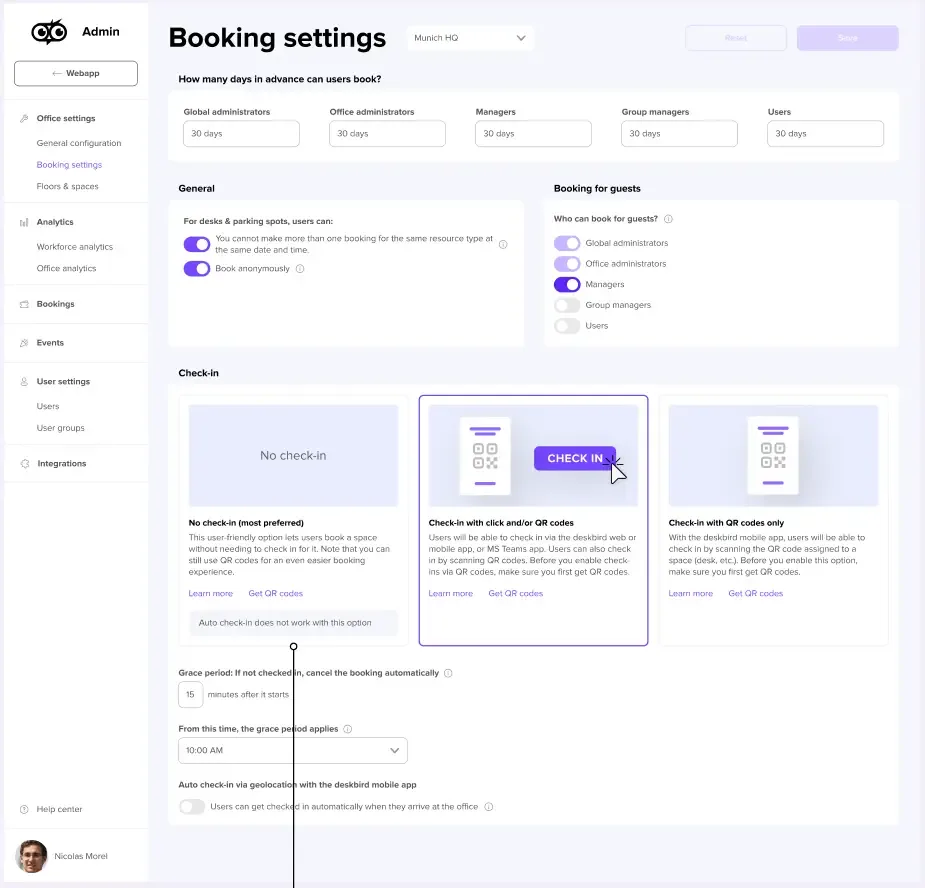
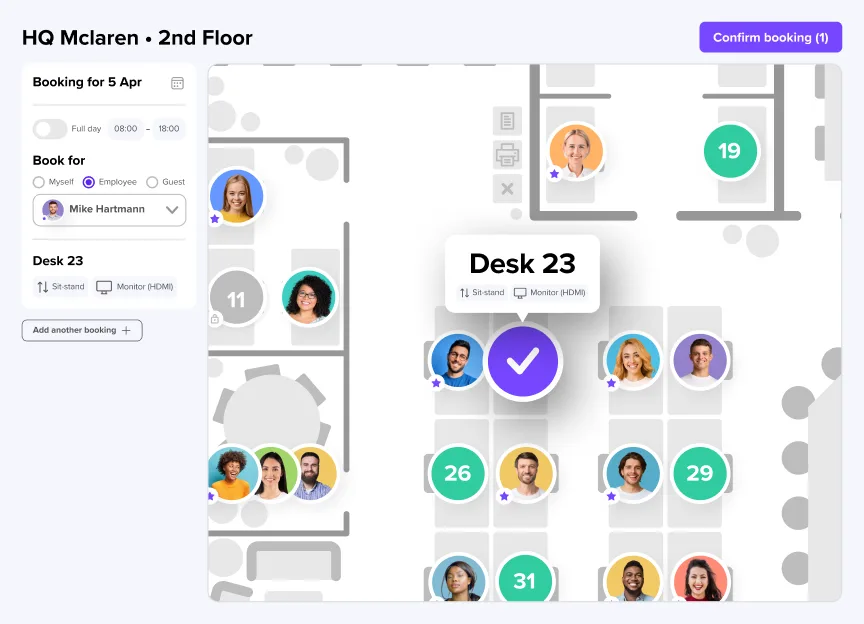
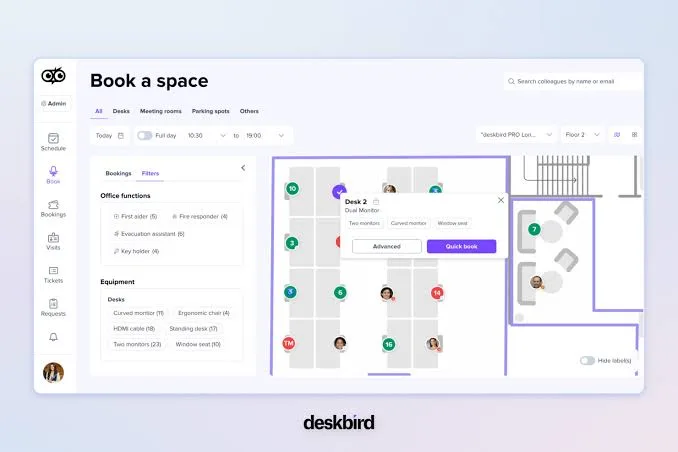
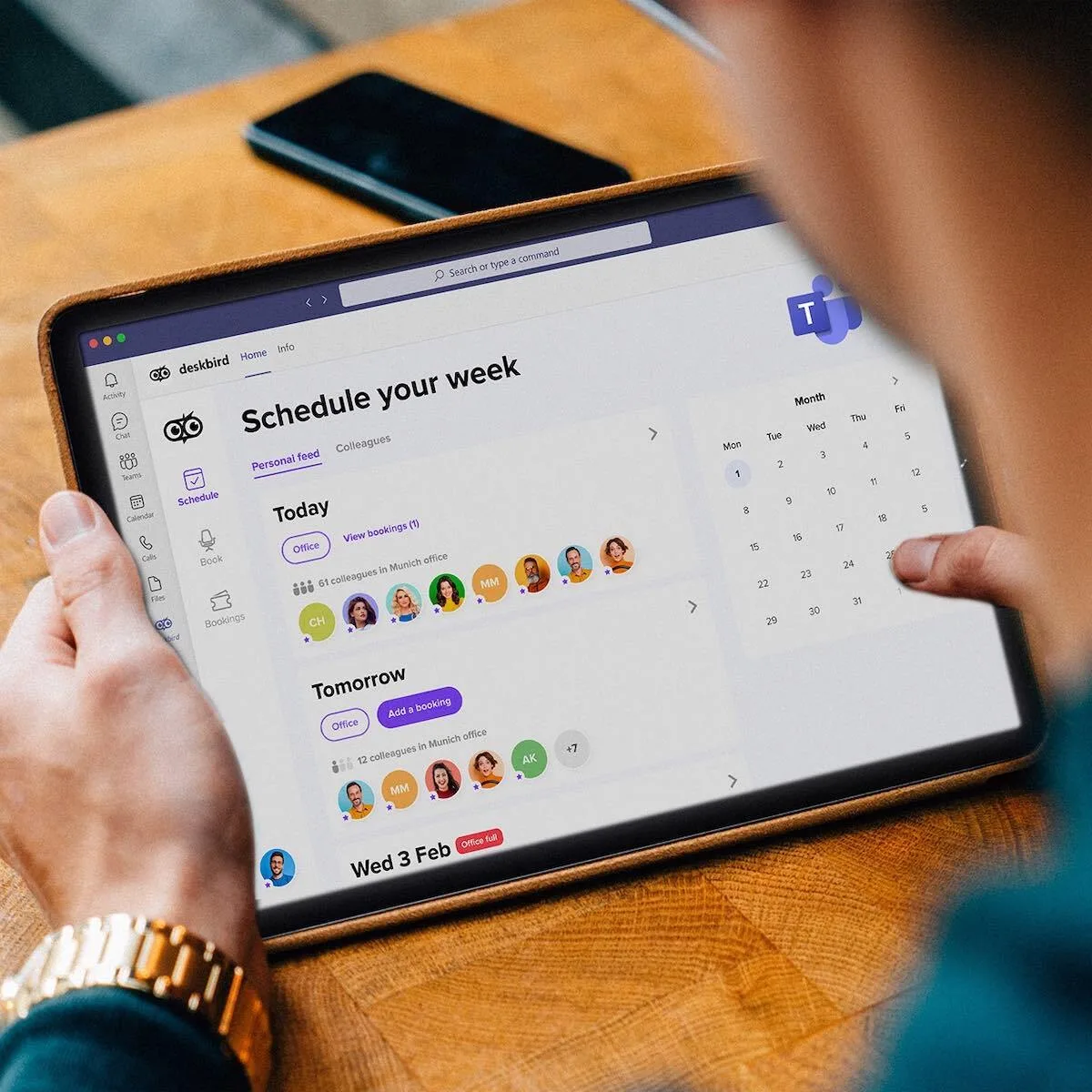
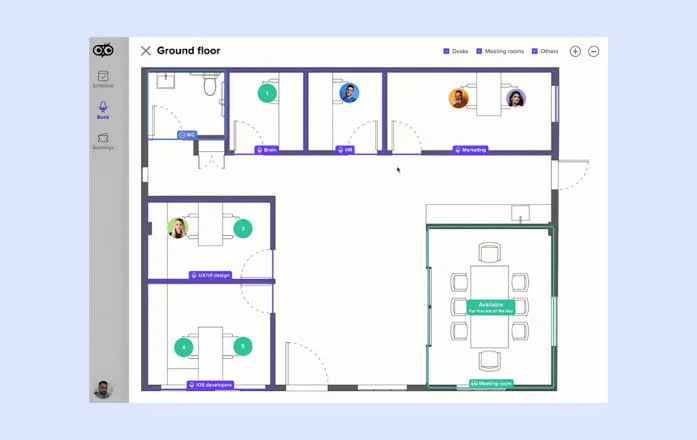
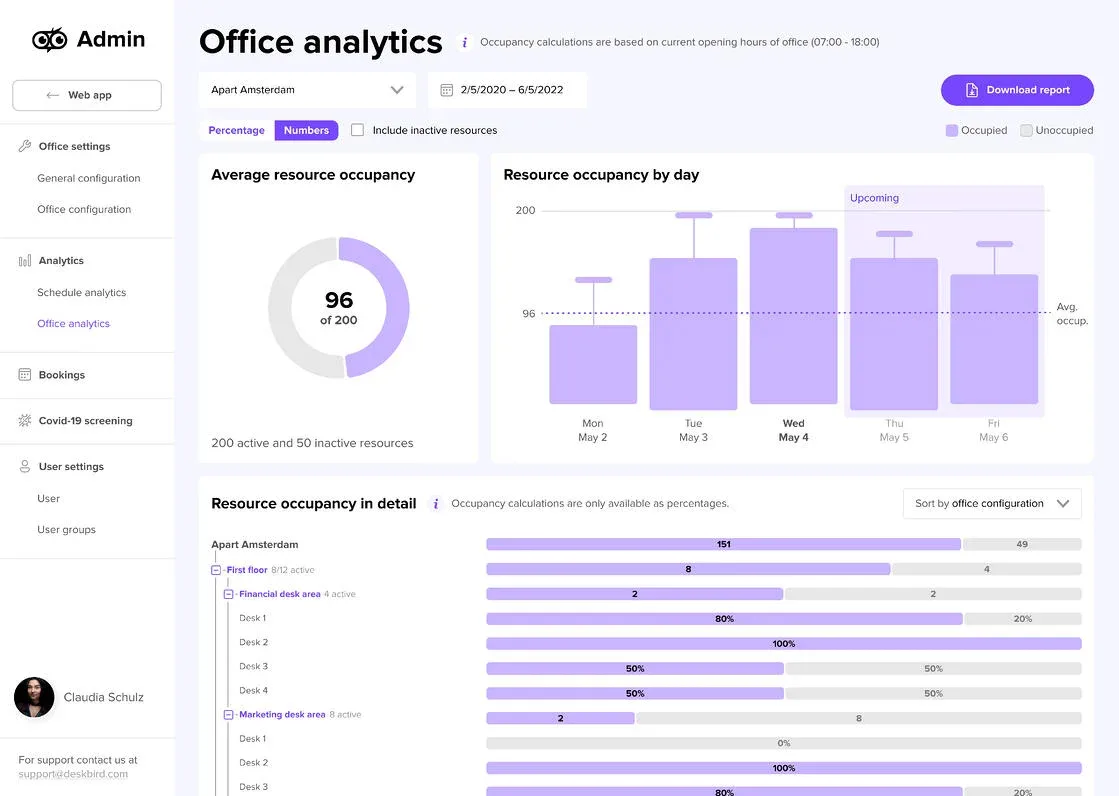
Table of contents
- 1. The workplace problem deskbird solves
- 2. What kind of platform is it?
- 3. Desk booking and floor plans
- 4. Office attendance coordination
- 5. Meeting rooms and shared resources
- 6. Booking rules and automation
- 7. Workplace analytics and utilization
- 8. Integrations with business tools
- 9. Administration and employee onboarding
- 10. Security and employee privacy
- 11. Pricing and subscription costs
- 12. Customer support and service
- 13. What customers actually report
- 14. Where deskbird falls short
- 15. Who should choose deskbird?
- 16. Alternatives worth comparing
- 17. How to evaluate it before buying
- 18. Final verdict
- Frequently Asked Questions
Deskbird is a workplace management platform that helps companies coordinate hybrid office attendance, reserve desks and meeting rooms, manage shared workplace resources, and understand how their offices are being used.
It is designed for organizations where employees no longer have permanently assigned seats and where knowing who will be in the office, where they will sit, and which facilities they can use has become an operational challenge.
That distinction matters. deskbird is not simply a calendar with a floor plan attached.
It sits between employee scheduling, physical office operations, workplace analytics, and resource management.
Employees use it to plan office days and reserve spaces.
Office managers use it to coordinate capacity and reduce conflicts.
HR and facilities teams can use attendance and utilization information to understand whether the workplace still reflects the way people actually work.
The platform's strongest proposition is its relatively focused approach.
Rather than attempting to replace an organization's HR system, project management suite, or collaboration environment, deskbird connects workplace activities to tools employees already use, including Microsoft Teams, Outlook, Slack, and calendar services.
That makes it particularly relevant to companies trying to make hybrid work more predictable without introducing another complicated administrative process.
However, the value of a workplace platform depends on more than whether employees can reserve a desk.
Booking restrictions, mobile reliability, calendar synchronization, employee adoption, reporting flexibility, privacy controls, and contract costs all influence whether the software becomes a useful daily service or another application people have to remember to open.
This review examines deskbird from the perspective of an organization evaluating a workplace management investment.
It considers what the platform offers, where its capabilities become more sophisticated, how its pricing is structured, what customers report about using it, and which businesses are likely to benefit most.
1. The workplace problem deskbird solves
A hybrid office creates a coordination problem that traditional office administration was not designed to handle.
In a conventional workplace, an employee usually has an assigned desk, a known working schedule, and a relatively predictable location.
Facilities teams can estimate how much space is required because the number of employees present on a particular day changes relatively little.
Meeting rooms are managed through familiar calendar systems, and office managers can resolve most seating conflicts through established procedures.
Hybrid work changes that arrangement.
Employees divide their working time between home, the office, client locations, and sometimes several company locations.
Two people who collaborate every day may want to work together on Tuesday, while another department may need a larger office presence on Thursday.
A meeting room that appears available in a calendar might already be occupied, while desks remain reserved by employees who eventually decide to work remotely.
These problems are not necessarily caused by poor employee behavior.
They are often the result of using systems designed for a different operating model.
A spreadsheet can record who intends to attend the office, but it does not provide a particularly convenient way to select a specific desk from a floor plan.
A messaging channel can help colleagues coordinate attendance, but it quickly becomes difficult to maintain when dozens or hundreds of employees are involved.
A shared calendar can reserve meeting rooms, but it does not automatically provide a complete view of desk availability, parking, workplace attendance, and other shared resources.
deskbird attempts to centralize these activities.
Employees can indicate when they plan to work from the office, check whether colleagues are attending, and reserve available desks or rooms.
Depending on the organization's configuration and subscribed features, the platform can also support parking reservations, visitor workflows, workplace ticketing, and more advanced resource management.
The practical benefit is a shared source of information.
Instead of asking several colleagues where they will sit, checking multiple calendars, or contacting facilities staff to locate an available room, employees can consult a common workplace interface.
For office managers, this creates a more structured way to distribute limited resources.
A company with fewer desks than employees can manage reservations according to its hybrid work policy.
A business operating several offices can give employees a consistent method for checking availability across locations.
A facilities department can use booking and occupancy information to identify patterns that might justify changing the office layout.
There is an important limitation to this proposition: software cannot make an unsuitable hybrid work policy effective by itself.
If management does not establish clear rules for office attendance, booking periods, cancellations, and shared resources, employees may continue experiencing confusion even after deskbird has been introduced.
The platform is therefore best understood as an operational coordination layer.
It helps organizations implement a workplace model, but management still needs to define that model.
2. What kind of platform is it?
deskbird belongs to the workplace management software category, with a particular emphasis on hybrid workplace coordination and space booking.
That category includes products that help organizations manage the physical resources employees use when working from company premises.
These resources can include desks, meeting rooms, parking spaces, private offices, phone booths, and other reservable areas.
The distinction between workplace management and ordinary meeting scheduling is important.
A meeting calendar is primarily concerned with appointments, participants, and time slots.
A workplace management system must also account for physical capacity, employee presence, locations, access rules, and the practical relationship between people and available office space.
deskbird combines several related functions in one environment.
The first is employee workplace planning.
Employees can communicate their expected office attendance and see relevant information about colleagues.
This helps teams coordinate shared office days rather than treating attendance as an isolated individual decision.
The second is resource reservation.
Employees can select available desks, meeting rooms, and other supported resources.
Visual floor plans make it easier to identify the physical position of a reservation instead of relying entirely on room names or desk identifiers.
The third is workplace administration.
Administrators can configure locations, spaces, booking rules, permissions, and employee groups.
These settings are important because a workplace with 40 desks and one office does not have the same administrative requirements as a company operating several buildings across different countries.
The fourth is workplace analytics.
Depending on the plan, organizations can access information about booking activity and workplace utilization.
This can help management evaluate how frequently resources are used and whether office capacity is aligned with employee attendance patterns.
The fifth is integration with existing business systems.
Microsoft Teams, calendar services, identity providers, and other workplace tools can reduce the need for employees to manage separate processes.
This combination gives deskbird a broader role than a simple desk reservation application.
Nevertheless, buyers should avoid assuming that every feature is included in every subscription.
Advanced analytics, more sophisticated booking rules, automated check-in capabilities, and certain integration or administration functions are associated with higher tiers or optional add-ons.
A company considering the platform should evaluate the specific capabilities it needs rather than purchasing on the assumption that every part of the product is available in the entry-level subscription.
3. Desk booking and floor plans
Desk booking is the central feature around which much of deskbird's value proposition is built.
In an office that uses hot desking or flexible seating, employees do not necessarily have a permanent workstation.
They need a reliable way to identify an available desk before arriving.
Without a reservation process, employees may arrive at the same time and compete for the same limited resources, while other desks remain unused because nobody knows they are available.
deskbird provides a booking interface in which employees can inspect available spaces and reserve a suitable desk.
The visual floor plan is particularly relevant because it gives users a representation of the office rather than presenting a list of anonymous workstation numbers.
This makes a practical difference in larger workplaces.
An employee may want a desk close to a particular department, near a colleague, beside a window, or in an area with specific equipment.
A visual layout makes those choices easier to understand.
The system also supports booking for a selected day or a custom time range, according to the available configuration.
That flexibility matters for organizations where employees do not necessarily follow identical office schedules.
Someone may need a desk for a full day, while another employee only needs a workstation for a few hours.
The booking experience is also connected to workplace attendance.
Employees can plan an office day and reserve a desk as part of the same general workflow.
Colleagues can see relevant attendance information, making it easier to coordinate office visits.
From an administrative perspective, desk reservations can help organizations implement shared seating policies.
For example, a company can operate fewer desks than employees because not everyone attends the office simultaneously.
Instead of permanently allocating a workstation to every employee, the organization distributes capacity according to demand.
However, the success of desk booking depends on the quality of the underlying floor plan and resource configuration.
If the office layout is inaccurate, if desks are not categorized correctly, or if employees cannot understand the availability rules, the booking interface becomes less useful.
Administrators should therefore treat the initial setup as a workplace data project.
They need to confirm the number of reservable desks, the physical arrangement of the office, the resources attached to each workstation, and any restrictions that apply to specific teams.
Another consideration is the difference between a reservation and actual occupancy.
A reserved desk is not necessarily an occupied desk.
Employees may change their plans, forget to cancel, or arrive later than expected.
This is why check-in and automatic release functions matter.
deskbird supports booking check-ins and automatic release workflows in its Business offering.
These mechanisms can reduce the number of desks that remain unavailable because of reservations that are never used.
Their effectiveness depends on how the organization configures the rules and how consistently employees follow the process.
For companies with limited office capacity, this is more than a convenience feature.
It can influence how much usable space the business needs to maintain.
4. Office attendance coordination
A workplace booking system becomes more useful when employees can understand who else plans to attend.
This is one of deskbird's most practical features because hybrid work is not only a facilities problem.
It is also a coordination problem between people.
Consider a department whose members work remotely on different days.
An employee may be willing to commute to the office but wants to know whether the colleagues they collaborate with will also be present.
Without shared attendance information, employees have to ask individually, post messages in team channels, or rely on informal assumptions.
deskbird gives employees a way to communicate planned office attendance and view relevant colleague schedules.
This can make it easier to coordinate team days, arrange in-person collaboration, and select desks near colleagues.
The benefit is particularly clear in organizations that have adopted flexible attendance policies rather than fixed office days.
Employees retain some control over when they work from the office, while managers gain a more organized picture of expected attendance.
For management, attendance information can also help identify patterns.
If a department consistently attends on the same days, the organization may need more desks or meeting rooms during those periods.
If attendance is distributed across the week, the business may be able to operate with a smaller physical footprint.
However, attendance visibility must be managed carefully.
Employees should understand what information is visible, who can access it, and whether the system records planned attendance, confirmed bookings, or actual check-ins.
These are different types of information.
A planned office day is an intention.
A desk reservation indicates that an employee has reserved a resource.
A check-in provides a stronger indication that the reservation is being used.
Treating these events as interchangeable can produce misleading management reports.
Companies should also establish sensible visibility policies.
Colleagues may need to know whether someone is working from the office, but not every organization wants to expose detailed individual schedules to every employee.
deskbird's permission and privacy options can help administrators define access according to the company's requirements.
Buyers should still test the actual visibility settings during implementation, especially when different departments, locations, or employee categories have different expectations.
5. Meeting rooms and shared resources
Meeting room booking is another important part of the deskbird proposition.
Many organizations already use Outlook or Google Calendar to reserve meeting rooms.
The difficulty is that meeting room management does not always operate independently from the rest of the workplace.
Employees may need to find a room close to their team, reserve a space that supports a particular meeting format, or coordinate a room with their office attendance.
Facilities teams may also need to understand whether rooms are being used efficiently.
deskbird brings room reservations into the wider workplace environment.
This gives employees a more unified way to consider desks, rooms, and attendance when planning an office visit.
The platform's visual approach can make room selection easier.
Instead of choosing a room based only on its name, employees can use the workplace layout to understand where the room is located.
Calendar synchronization is also relevant.
When workplace reservations and business calendars are connected, employees can reduce the amount of manual coordination required.
However, buyers should confirm exactly which calendar events are synchronized, how changes are handled, and what happens when a reservation is modified outside deskbird.
Recurring meetings deserve particular attention.
They are common in businesses that reserve the same room every week for management meetings, project reviews, or departmental planning.
Customer feedback has identified limitations around recurring room bookings and the need to create some reservations manually.
That does not mean deskbird cannot support every recurring workflow.
It means organizations with complex room scheduling requirements should validate those workflows before committing to the platform.
The distinction between basic room booking and advanced room management also matters.
Some organizations only need to know whether a meeting room is available.
Others require catering requests, service workflows, approval processes, or multi-tenant management.
deskbird offers additional room management capabilities through its Rooms Plus add-on.
The availability of these functions should be checked against the organization's subscription and commercial proposal.
Parking reservations extend the same operational idea beyond the building itself.
Where parking capacity is limited, employees can reserve spaces rather than arriving without knowing whether parking will be available.
For companies operating offices with multiple shared resources, the value of deskbird is therefore not limited to desks.
It can provide a common reservation environment for several parts of the employee's physical workplace experience.
6. Booking rules and automation
A reservation platform needs rules because office resources are not unlimited.
Without restrictions, employees might reserve desks far in advance, hold several spaces simultaneously, or maintain bookings they no longer intend to use.
Such behavior can make a booking system appear fully occupied even when the office has available capacity.
deskbird includes booking check-ins and automatic release capabilities in its Business plan.
These features address one of the most common problems in shared office environments: reservations that are never converted into actual use.
A check-in process asks employees to confirm that they are using the resource they reserved.
Depending on the configuration, check-in can be performed through supported channels such as the mobile application, QR codes, or Microsoft Teams.
Automatic release rules can make an unused desk available to another employee when the required confirmation does not happen within the configured period.
This is particularly useful in offices where desk availability is tight.
A reservation that remains active all day despite the employee working from home represents capacity that another person might have used.
The Professional plan adds more advanced booking rules.
This is relevant for organizations with more complicated operating policies, such as departments with different reservation windows, restrictions on particular resources, or more controlled access to workplace areas.
The quality of these rules is important.
A company may want to allow employees to reserve desks several weeks ahead, while another may prefer a shorter booking window to prevent employees from monopolizing preferred workstations.
Some organizations may need different policies for employees, contractors, visitors, and managers.
The platform's usefulness depends on whether these policies can be represented without creating excessive administrative complexity.
Automation can reduce repetitive tasks, but it should not be confused with complete workplace autonomy.
Administrators still need to define the rules, maintain the underlying resource information, and resolve exceptions.
The Professional tier also includes automated check-in through deskbird Dock.
Organizations considering this option should ask how the hardware works, which devices are supported, what installation is required, and whether the automated process is suitable for their office environment.
Automation is most valuable when it removes a recurring administrative burden without making the employee experience more difficult.
A check-in system that employees frequently forget or cannot complete reliably may create more support work rather than less.
For that reason, businesses should test booking rules with a representative group of employees before deploying them across every location.
7. Workplace analytics and utilization
Workplace analytics can turn reservation activity into information that helps management make better decisions about office capacity.
A company paying for several floors of office space needs to understand whether those areas are being used.
A business considering a lease renewal needs evidence about occupancy patterns.
A facilities manager may want to identify which meeting rooms are consistently overbooked and which remain underused.
deskbird offers workplace analytics, with more advanced analytics capabilities included in the Professional plan.
The general purpose is to provide visibility into workplace activity and resource utilization.
Organizations can use this information to evaluate how employees interact with the office and whether the available space reflects actual demand.
This can be useful in several ways.
First, utilization information can support space planning.
If a company repeatedly observes low demand for a particular area, it may consider changing the layout or reducing the amount of space allocated to that function.
Second, attendance patterns can help facilities teams prepare for busy days.
If Tuesdays and Thursdays consistently attract more employees, the organization may need to adjust desk availability, meeting room capacity, or support services.
Third, analytics can help management assess whether a hybrid work policy is producing the intended outcome.
If the organization expects teams to collaborate in person on particular days, attendance information may help evaluate whether those arrangements are working.
Fourth, workplace data can support longer-term real estate decisions.
A business may be able to identify opportunities to consolidate office space, reorganize floors, or improve the distribution of shared resources.
There is an important analytical distinction between bookings and occupancy.
Booking data describes reservations.
Occupancy data describes whether people actually use the physical space.
A platform that relies only on reservations may overestimate usage when employees fail to cancel unused bookings.
deskbird describes options for cross-checking occupancy information through sources such as WiFi access points, monitors, and docking stations.
Organizations should confirm which data sources are available for their implementation and whether additional hardware or configuration is required.
The quality of the resulting analytics depends on the quality of the underlying data.
If employees do not check in consistently, calendar synchronization is incomplete, or physical occupancy signals are unavailable, reports may not accurately represent actual workplace behavior.
Businesses should also examine the reporting experience itself.
It is not enough for a platform to advertise analytics.
Administrators need to know which metrics are available, whether reports can be filtered by location or department, how data can be exported, and whether the platform supports the reporting requirements of finance, HR, and facilities teams.
The Professional plan's advanced workplace analytics are more appropriate for organizations that need deeper operational visibility.
The Business plan may be sufficient for companies whose main requirement is booking and basic coordination.
The Enterprise tier adds custom analytics and reporting according to the published plan structure.
That distinction may matter for organizations with complex reporting obligations or a need to align workplace metrics with internal management systems.
8. Integrations with business tools
deskbird is more useful when it fits into the software environment employees already use.
Introducing a separate application creates friction.
Employees must remember another login, another interface, and another place to check before making a routine decision.
In a hybrid workplace, that friction can reduce adoption.
Microsoft Teams integration is therefore an important part of the platform's proposition.
Employees can access workplace functionality through an application they may already use throughout the working day.
This can make it easier to check colleagues' office plans and manage reservations without constantly switching between tools.
Calendar integration is equally important.
Microsoft 365 and Google Calendar environments are common in organizations that need to coordinate meetings, room reservations, and employee schedules.
deskbird supports connections with Microsoft and Google calendar services.
Buyers should nevertheless test synchronization behavior rather than treating the presence of an integration as proof that every scheduling scenario is covered.
Questions worth testing include whether changes made in one system appear correctly in the other, how cancellations are handled, whether recurring reservations synchronize as expected, and how conflicts are resolved.
Slack integration is another useful option for organizations that use Slack as their primary collaboration environment.
It can help bring workplace information into an existing communication workflow.
Beyond collaboration and calendars, deskbird supports integration categories that include HR systems, identity management, ticketing, access control, hardware, and APIs.
These integrations can become important during implementation.
An HR system may provide employee information and organizational structure.
An identity provider may manage authentication.
A ticketing system may connect workplace issues with existing support processes.
The Professional plan includes public API access, which is relevant to organizations that want to connect deskbird with internal applications or build more specialized workflows.
The Enterprise offering includes custom integration support.
This is more relevant to companies with complex environments that require coordinated implementation across multiple systems.
Integration availability should be evaluated at the level of the exact product, subscription, and configuration.
A list of supported integration categories does not necessarily mean that every connector is included in the standard price.
Before purchasing, the IT team should identify which systems must exchange information, which direction the data needs to flow, and which department will maintain each connection.
A successful integration is not simply one that can be activated.
It must remain reliable when employees join or leave the company, when departments change, when calendars are modified, and when the organization adds new office locations.
9. Administration and employee onboarding
Workplace management software requires two different experiences: one for employees and another for administrators.
Employees want to reserve a desk quickly, see where colleagues are working, and avoid confusion when they arrive at the office.
Administrators need to configure locations, define spaces, establish permissions, manage policies, and maintain accurate employee information.
deskbird addresses both sides of that requirement.
The employee experience is designed around everyday workplace tasks.
A person should be able to understand whether a desk is available, reserve it, and check relevant attendance information without needing to learn a complicated administrative system.
For administrators, implementation involves a different set of responsibilities.
The organization needs to create its workplace structure, add locations and floors, configure desks and rooms, assign access rights, and establish booking policies.
This work should not be underestimated.
A business with one small office may be able to complete the initial configuration relatively quickly.
A multinational organization with several buildings, different employee groups, local workplace rules, and complex identity systems will require more planning.
The most important early task is establishing accurate workplace information.
Incorrect desk locations, outdated room capacities, or missing resource categories can undermine user confidence before the platform has a chance to demonstrate its value.
Employee onboarding is another factor.
Even intuitive software needs a clear introduction when it changes an established workplace routine.
Employees should understand how to announce office attendance, reserve resources, modify bookings, cancel reservations, and complete check-ins.
They should also know what happens when they forget to check in or when an office reaches its reservation capacity.
Administrators should communicate the booking policy in plain language.
If the software automatically releases a desk after a certain period, employees need to know that rule before they arrive.
The same applies to visibility.
Employees should understand which attendance details colleagues can see and whether managers have access to additional workplace reports.
A sensible rollout begins with a limited pilot.
One department or location can test the booking process, calendar synchronization, mobile experience, check-in rules, and administrative workflows.
The organization can then correct problems before expanding the system.
deskbird's relatively focused feature set can make it approachable for employees, but successful adoption still depends on implementation discipline.
10. Security and employee privacy
Workplace software processes information that can reveal employee schedules, office attendance, resource reservations, and patterns of physical presence.
That makes security and privacy central purchasing considerations rather than optional technical details.
Organizations should ask what information the platform collects, where it is processed, how long it is retained, who can access it, and which controls are available to administrators.
deskbird describes a security framework that includes ISO 27001 and SOC 2 Type 2 certifications, GDPR-related controls, encryption, identity management, and access restrictions.
The vendor states that data is processed and hosted in the European Union using Google Cloud Platform infrastructure.
It also describes encryption using TLS 1.2 or higher for data in transit and AES-256 for data at rest.
These are meaningful controls, but buyers should request the current security documentation and confirm that the certifications and infrastructure statements apply to the specific service and contractual arrangement being purchased.
Identity and access management are particularly important for larger organizations. deskbird supports SAML 2.0 single sign-on with identity providers that include Microsoft Entra ID, Okta, and Google Workspace.
SCIM provisioning is also described as part of its identity management capabilities.
These functions can reduce the administrative burden associated with creating and removing employee accounts.
When an employee joins or leaves the organization, identity provisioning can help keep access aligned with the company's central directory.
Role based access control allows permissions to be configured according to organizational requirements, including location, floor, room, department, and role.
This is useful because not every employee should have the same administrative authority.
A facilities manager may need access to workplace configuration, while an ordinary employee only needs to reserve available resources.
deskbird also describes logical separation between tenant data and additional privacy settings.
The vendor states that personal transactional data is anonymized after six months by default, with configurable periods available for Enterprise customers.
This retention policy deserves careful review.
Organizations should understand exactly which records are included, what anonymization means in the context of the service, and whether their legal or operational requirements call for a different retention period.
Employee privacy is particularly sensitive in countries where works councils or employee representatives have a formal role in workplace monitoring decisions.
A company should not assume that because a platform offers privacy settings, every deployment is automatically compliant with local employment law.
The organization remains responsible for determining the lawful basis for processing, communicating relevant practices, and involving the appropriate internal stakeholders.
The platform's privacy controls may help support a responsible deployment, but legal and compliance teams should review the data processing agreement, subprocessors, retention settings, access model, and applicable contractual terms before implementation.
11. Pricing and subscription costs

deskbird uses a tiered subscription model.
The published Business plan has a per active user price, while Professional and Enterprise use custom pricing.
The official pricing page lists Business at $3.75 per active user per month with annual billing and $4.75 with monthly billing.
The displayed price can vary according to billing currency and payment arrangement, so organizations should confirm the exact commercial proposal before budgeting.
The difference between active users and total employees is important.
A business should understand how deskbird defines an active user, how that figure is measured, and whether employees who rarely visit the office are counted in the same way as regular users.
At a small scale, the starting price may appear straightforward.
At a larger scale, the annual cost depends on the number of billable users, the selected plan, optional add-ons, and any implementation or integration services included in the agreement.
Business is positioned as the entry paid tier for organizations that need core workplace booking.
It includes desk, room, and parking reservations, native mobile applications, booking check-ins, automatic releases, smart booking recommendations, and Microsoft Teams integration.
Professional adds advanced booking rules, advanced workplace analytics, an AI powered floor plan designer, automated check-in through deskbird Dock, workplace ticketing, compliance and safety management, and public API access.
Enterprise is designed for organizations with more demanding requirements.
The published plan structure includes workplace surveys and sentiment, custom analytics and reporting, advanced data privacy configurations, custom integration support, advanced service level agreements, and a dedicated senior customer success manager.
The distinction is not merely about the number of features.
It is about the level of administrative control, integration complexity, reporting requirements, and support expected by the organization.
deskbird also offers optional add-ons that can expand the platform.
User and Data Management Plus includes capabilities such as SAML, SCIM, HRIS integration, and advanced privacy settings.
Rooms Plus adds functions such as interactive kiosks, catering and service requests, booking approvals, and multi tenancy.
Visitors Plus supports reception kiosk mode, pre visit registration, Microsoft Teams integration, and branded invitations.
These add-ons matter because a company comparing deskbird with another platform should calculate the full configuration it actually needs.
A low starting price does not necessarily represent the final cost of a deployment that requires advanced identity management, visitor workflows, or more sophisticated room operations.
The vendor also documents a Free option for desk booking in its help material.
However, buyers should verify its current availability, eligibility, user limits, and feature restrictions directly with deskbird.
It should not be assumed that a free subscription provides the same capabilities as the paid Business plan.
A careful purchasing process should request a written quote that identifies the subscription tier, active user definition, billing frequency, optional modules, implementation charges, renewal terms, and any minimum contract commitments.
The monthly Business price provides a useful starting reference, but the total cost of ownership is determined by the configuration the organization actually needs.
12. Customer support and service
Customer support becomes especially important when workplace software is used by a large employee population.
A problem with a desk reservation may seem minor when it affects one person.
The same problem can become an operational issue when employees across several departments cannot reserve workstations before arriving at the office.
Administrators may also need assistance with identity configuration, calendar synchronization, employee provisioning, floor plan setup, and booking policies.
These issues require more than a basic help article.
Capterra's published deskbird review profile reports a customer service score of 4.6 out of 5, based on the review dataset displayed on the platform.
That is a positive indicator, although it should not be interpreted as a guarantee of response times or service quality for every subscription.
The support experience should be evaluated in relation to the organization's requirements.
A small company may be comfortable with standard support channels and documentation.
A large enterprise operating multiple offices may require defined response times, escalation procedures, implementation assistance, and a named customer success contact.
deskbird lists advanced service level agreements and a dedicated senior customer success manager among its Enterprise capabilities.
These provisions are relevant for organizations where workplace software is operationally important and where delays can affect a large number of employees.
Before signing a contract, buyers should ask which support channels are included, whether support is available during the organization's working hours, what response commitments apply, and whether implementation assistance is included or charged separately.
It is also worth testing the quality of the documentation.
Administrators should be able to find clear instructions for managing users, changing booking rules, configuring locations, resolving calendar conflicts, and understanding security settings.
Support quality is not measured only by whether a vendor responds to a ticket.
It is also measured by how effectively the platform helps customers prevent recurring problems.
13. What customers actually report
Customer reviews provide a useful counterweight to vendor feature descriptions.
They show how software behaves in ordinary working environments, where employees have limited patience for confusing interfaces and administrators must maintain systems alongside their other responsibilities.
The available review data presents a generally positive picture of deskbird, particularly around usability, desk reservations, floor plan visibility, and hybrid attendance coordination.
Capterra displays a 4.7 out of 5 overall rating based on 93 reviews in the dataset surfaced for this review.
Its category scores include 4.7 for ease of use, 4.6 for customer service, 4.5 for features, and 4.4 for value for money.
G2 also contains substantial customer feedback, including positive reports about booking speed and visual desk selection.
These figures are useful indicators, not universal performance guarantees.
Review populations differ, and the experience of a small office may not represent that of a large enterprise with complex integrations.
Several customer comments illustrate the strengths and weaknesses more clearly.
Aviral G., a manager in the business supplies and equipment sector, described the interface as a “clean and intuitive interface” and highlighted the usefulness of Microsoft Teams and Outlook integration.
The review also pointed to limitations involving advance booking and the mobile experience.
This is a useful example of a recurring pattern: customers may appreciate the core workflow while still expecting greater flexibility around specific booking scenarios.
A verified G2 reviewer in logistics and supply chain described deskbird as “very convenient and fast to use” and valued the ability to see the exact desk before making a reservation.
The same reviewer noted that some features were not easy to locate, particularly the map after completing a booking.
This suggests that visual booking can be a strength without making every part of the navigation equally intuitive.
A reviewer identified as Valerie C., a financial controller, praised the clean interface and ability to see favorite seats, but described the product as “Pretty expensive given such as basic app, and inflexible contract terms.” That criticism is important for buyers comparing the platform against simpler reservation tools.
The value of deskbird depends on whether an organization needs the broader workplace capabilities, not simply whether it can reserve a desk.
Another G2 reviewer described the experience as “Gets the job done but could be smoother.” The reviewer considered the web version adequate for everyday use but criticized the Teams integration on mobile and the number of clicks required for some routine actions.
This is a reminder that an integration can exist while still producing an uneven experience across devices.
A Capterra reviewer using the title “The way hybrid work, works!” explained that the company had previously relied on sticky notes, spreadsheets, and phone calls to manage its hybrid workplace.
The reviewer praised the ability to reserve desks and meeting rooms and highlighted Slack and Outlook integrations, while identifying the pricing model as a concern.
Taken together, these reviews suggest that deskbird's strongest customer value lies in replacing fragmented workplace coordination with a more visible reservation process.
The weaknesses are also consistent.
Some users want better mobile usability, more flexible booking options, smoother navigation, and more predictable commercial terms.
Those complaints should not automatically disqualify the platform.
They should become part of the buyer's evaluation checklist.
A company that depends heavily on mobile booking should test the mobile application with actual employees.
An organization with complex recurring meetings should validate those reservations before signing.
A cost sensitive buyer should compare the full subscription and add-on structure with competing products.
14. Where deskbird falls short
deskbird has a clear product focus, but its suitability depends on the complexity of the workplace and the expectations of the people using it.
The first limitation is that mobile experience deserves careful testing.
Customer feedback includes reports of glitches, navigation difficulties, and less convenient use compared with the web interface.
This matters because employees often need to make workplace decisions while commuting or shortly before arriving at the office.
The second limitation concerns booking flexibility.
Some reviewers have identified difficulties with recurring room reservations, multi date booking, and certain advance scheduling scenarios.
Organizations with predictable recurring meetings should confirm that the platform supports their exact booking patterns.
The third limitation is customization.
A reviewer on Capterra noted that the platform lacked some customization options needed for particular tasks.
Businesses with highly specialized workplace policies may find that a focused workplace product does not cover every operational requirement without additional tools.
The fourth limitation is the pricing structure.
Business has a published starting price, but more advanced capabilities require Professional or Enterprise pricing, and optional add-ons can increase the final cost.
Companies should avoid comparing only the entry price when their requirements include advanced reporting, identity provisioning, visitor management, or custom integrations.
The fifth limitation is that integration quality must be assessed individually.
Microsoft Teams, Slack, and calendar connections can improve adoption, but customer feedback shows that the experience may differ between desktop and mobile environments.
The presence of an integration should not be treated as proof of a seamless workflow.
The sixth limitation is implementation effort.
A straightforward office may be easy to configure, but larger deployments require accurate floor plans, user groups, identity settings, booking policies, and data governance.
A platform can be simple for employees while still requiring substantial administrative preparation.
Finally, workplace analytics should be evaluated carefully.
Organizations that need sophisticated real estate reporting, custom data models, or extensive integration with corporate business intelligence systems should examine the available reporting capabilities before purchasing.
The availability of analytics does not automatically mean that every enterprise reporting requirement is satisfied.
These limitations point to a broader conclusion. deskbird is strongest when the organization needs a well defined workplace coordination platform.
It is less compelling when the buyer expects a highly customized enterprise facilities management system, a complete HR platform, or a universal solution for every office operation.
15. Who should choose deskbird?
deskbird is particularly relevant to organizations that have adopted hybrid work and need a consistent way to manage shared office resources.
Small and medium sized businesses can benefit when employees no longer have permanently assigned desks.
A reservation platform can reduce confusion, make office attendance more predictable, and help employees coordinate their working days.
Growing companies may find the platform useful when they move beyond informal arrangements.
A team that once managed office attendance through chat messages and spreadsheets may eventually need more reliable visibility into desks, rooms, and employee schedules.
Organizations with several locations may also benefit from a common booking environment.
Employees can plan where they will work, while administrators can manage workplace resources according to location specific requirements.
Facilities teams are another natural audience.
They can use booking and utilization information to understand demand, manage available capacity, and identify areas that may require operational changes.
HR teams may find the attendance coordination and employee visibility useful, particularly when hybrid work policies need to be communicated and implemented consistently.
However, deskbird should not be mistaken for a full HR information system.
Its role is to support workplace coordination, not replace the company's employee management platform.
IT departments should consider the product when integration with identity providers, collaboration applications, and calendars is a priority.
The Professional and Enterprise capabilities become more relevant when API access, advanced identity management, and custom integrations are required.
deskbird may be less suitable for businesses where every employee already has a permanent assigned workstation and where there is little need for shared resource booking.
In that environment, the platform could introduce an administrative layer without delivering enough operational value.
It may also be excessive for very small teams that can coordinate office attendance through an existing calendar without creating meaningful booking conflicts.
Organizations with extensive facilities management requirements should compare deskbird against broader workplace and facilities platforms.
The decision should depend on whether the business primarily needs hybrid office coordination or a more comprehensive system for managing buildings, services, maintenance, and complex physical operations.
16. Alternatives worth comparing
A software purchase should be evaluated against the organization's actual requirements, not simply against the number of features displayed on a vendor website.
deskbird competes in a market that includes workplace management platforms, desk booking products, room scheduling applications, and broader employee coordination systems.
Envoy Workplace is worth comparing for businesses that want workplace coordination alongside visitor management and related office workflows.
Organizations that place significant emphasis on reception operations and visitor experiences should examine how its modules compare with deskbird's booking and visitor capabilities.
YAROOMS is another relevant option for organizations evaluating desk and room reservations, workplace scheduling, and office resource management.
Buyers should compare its booking rules, reporting, integrations, and pricing against the specific deskbird tier they are considering.
Tribeloo may be relevant to companies looking for desk booking and workplace planning capabilities.
It deserves consideration when the primary requirement is managing shared desks and coordinating office attendance.
Google Workspace can provide a simpler alternative for organizations whose needs are limited to calendar based room scheduling and basic coordination.
It is not a direct replacement for every workplace management feature, but businesses with modest requirements may prefer to use existing tools rather than introduce another subscription.
Zoom Workplace may enter the comparison for organizations already using Zoom's collaboration environment and evaluating how workplace coordination fits into their broader communications stack.
The right comparison depends on the problem being solved.
A company primarily interested in desk reservations should compare booking simplicity, floor plan functionality, and mobile performance.
A business that needs visitor workflows should examine reception management.
An enterprise with extensive reporting and identity requirements should compare integrations, administrative controls, and contractual support.
The objective is not to find the platform with the longest feature list.
It is to select the product that solves the organization's most important workplace problems without adding unnecessary complexity.
17. How to evaluate it before buying
A structured evaluation can prevent a company from purchasing a workplace platform that looks attractive in a demonstration but does not fit its actual operating model.
The first step is to document the current workplace process.
The organization should identify how employees currently communicate attendance, how desks are allocated, how rooms are reserved, and how unused bookings are handled.
This creates a baseline against which deskbird can be evaluated.
The second step is to map the physical environment.
The company should confirm the number of locations, floors, desks, meeting rooms, parking spaces, and other resources that need to be managed.
It should also identify any areas with restricted access or special booking requirements.
The third step is to define the booking policy.
Management should decide how far ahead employees can reserve resources, whether recurring bookings are allowed, what check-in rules apply, and how unused reservations are released.
The fourth step is to test employee workflows.
A representative group should book desks, change reservations, cancel bookings, check colleague attendance, and use the mobile application.
The test should include employees who use Microsoft Teams and those who rely on other collaboration tools.
The fifth step is to validate integrations.
IT should test calendar synchronization, identity management, employee provisioning, and any required connections to HR or facilities systems.
If the organization expects to use the public API, it should examine the available documentation and confirm that the necessary data can be accessed.
The sixth step is to evaluate analytics.
Administrators should identify the reports they need and confirm whether the selected plan provides those metrics.
If workplace utilization is a major purchasing reason, the company should understand how actual occupancy is measured and whether additional data sources are required.
The seventh step is to review security and privacy.
The legal and IT teams should examine the data processing terms, hosting arrangements, access controls, retention policies, subprocessors, and relevant certifications.
The final step is to calculate the complete cost.
The quote should include the required subscription tier, active user assumptions, add-ons, implementation services, contract length, renewal terms, and any support commitments.
A pilot deployment is preferable to relying entirely on a sales demonstration.
The organization should use real employees, real floor plans, and representative booking scenarios.
That is the most reliable way to discover whether deskbird will become a useful part of the daily workplace routine.
18. Final verdict
deskbird is a capable workplace management platform for organizations that need to coordinate hybrid attendance, reserve shared desks and rooms, and improve visibility into office usage.
Its strongest advantages are its focused booking experience, visual floor plans, colleague visibility, integrations with common workplace tools, and the ability to extend into more advanced administration and analytics through higher subscription tiers.
It is not a universal facilities management system, and its value depends on how closely its booking rules, mobile experience, reporting, and integrations match the organization's requirements.
Customer feedback is generally positive, but concerns around mobile usability, customization, recurring bookings, and pricing deserve attention.
For businesses replacing spreadsheets and informal office coordination, deskbird is a strong candidate.
For organizations with complex facilities operations or highly specialized reporting needs, a wider market comparison is sensible before committing.
Key features
- Hybrid office attendance planning
- Interactive workplace floor plan
- Visual desk reservation system
- Meeting room availability management
- Shared parking space reservations
- Colleague attendance visibility
- Microsoft Teams workplace integration
- Outlook calendar synchronization
- Google Calendar connectivity
- Slack workplace notifications
- Custom time range bookings
- Booking check in controls
- Automatic unused desk releases
- Smart desk recommendations
- Advanced workplace booking policies
- Workplace utilization analytics
- AI powered floor plan design
- Automated check in hardware
- Workplace ticketing management
- Compliance and safety workflows
- Public API access
- Employee group administration
- Role based access controls
- Multi location workplace management
- Visitor registration workflows
- Reception kiosk functionality
- Advanced privacy configurations
Pricing
- Desk and room booking
- Parking space reservations
- Native mobile applications
- Booking check ins
- Microsoft Teams integration
- Advanced workplace booking rules
- Advanced workplace analytics
- AI powered floor plans
- Automated check in hardware
- Public API access
- Custom workplace analytics
- Advanced data privacy settings
- Custom integration support
- Advanced service level agreements
- Dedicated senior customer success
Pros & cons
Pros
- Intuitive desk booking interface
- Visual floor plan reservations
- Clear colleague attendance visibility
- Useful Microsoft Teams integration
- Outlook calendar connectivity
- Desk and room reservations
- Automatic unused booking releases
- Flexible multi location management
- Advanced workplace analytics available
- Enterprise identity management options
- Visitor management add on
- Public API for integrations
- Positive customer satisfaction ratings
- Centralized workplace resource coordination
Cons
- Mobile experience needs refinement
- Advanced plans require custom pricing
- Some booking workflows lack flexibility
- Recurring room booking limitations
- Customization options can feel restrictive
- Integration quality varies by workflow
- Advanced capabilities increase total costs
- Complex deployments require careful configuration
- Analytics depend on reliable data
- Contract terms need careful review
- Some navigation feels unintuitive
- Free plan availability needs confirmation
Deskbird specs
- Platforms: Web, iOS, Android, Microsoft Teams
- Free plan: Free desk booking option, subject to availability
- Starting price: $3.75 per active user / month, annually
- Integrations: Microsoft Teams, Outlook, Google Calendar, Slack, HRIS, SSO
- Support: Help center, customer support, enterprise SLA options
- Best for: Hybrid offices and shared workplace management
Our verdict
Deskbird is a strong choice for companies that need a practical way to coordinate hybrid attendance, reserve shared desks, and manage meeting rooms without relying on spreadsheets and informal messages. Its visual booking experience, colleague visibility, and collaboration integrations make everyday office planning easier. However, businesses should test mobile workflows, recurring reservations, reporting requirements, and the full subscription cost before committing. It is particularly suitable for hybrid workplaces with shared resources, but less compelling for offices that already operate efficiently with permanently assigned seating.
Contact SalesFrequently Asked Questions
What is deskbird used for?
Does deskbird offer free plans?
Does deskbird integrate with Teams?
Is deskbird secure for businesses?
Who should use deskbird?
Reader reviews
Be the first to review