
Archie Review 2026: What Your Office Needs to Run Better

By Eva Elekcha & Noura Mint Ely · Reviewed by Afonso Macosso
Archie helps employees find desks, coordinate office days and book rooms while giving workplace managers clearer visibility into attendance, space availability and usage.
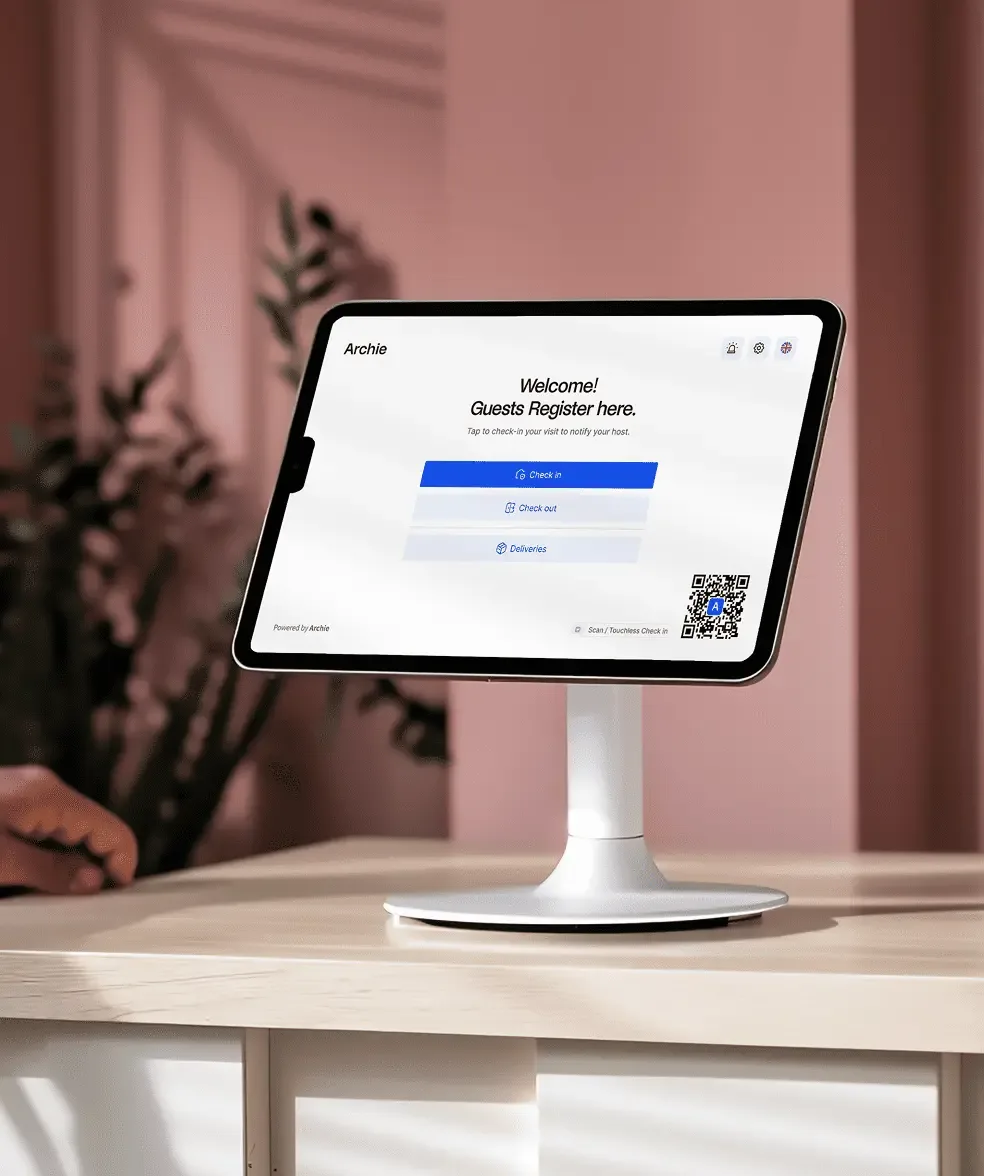
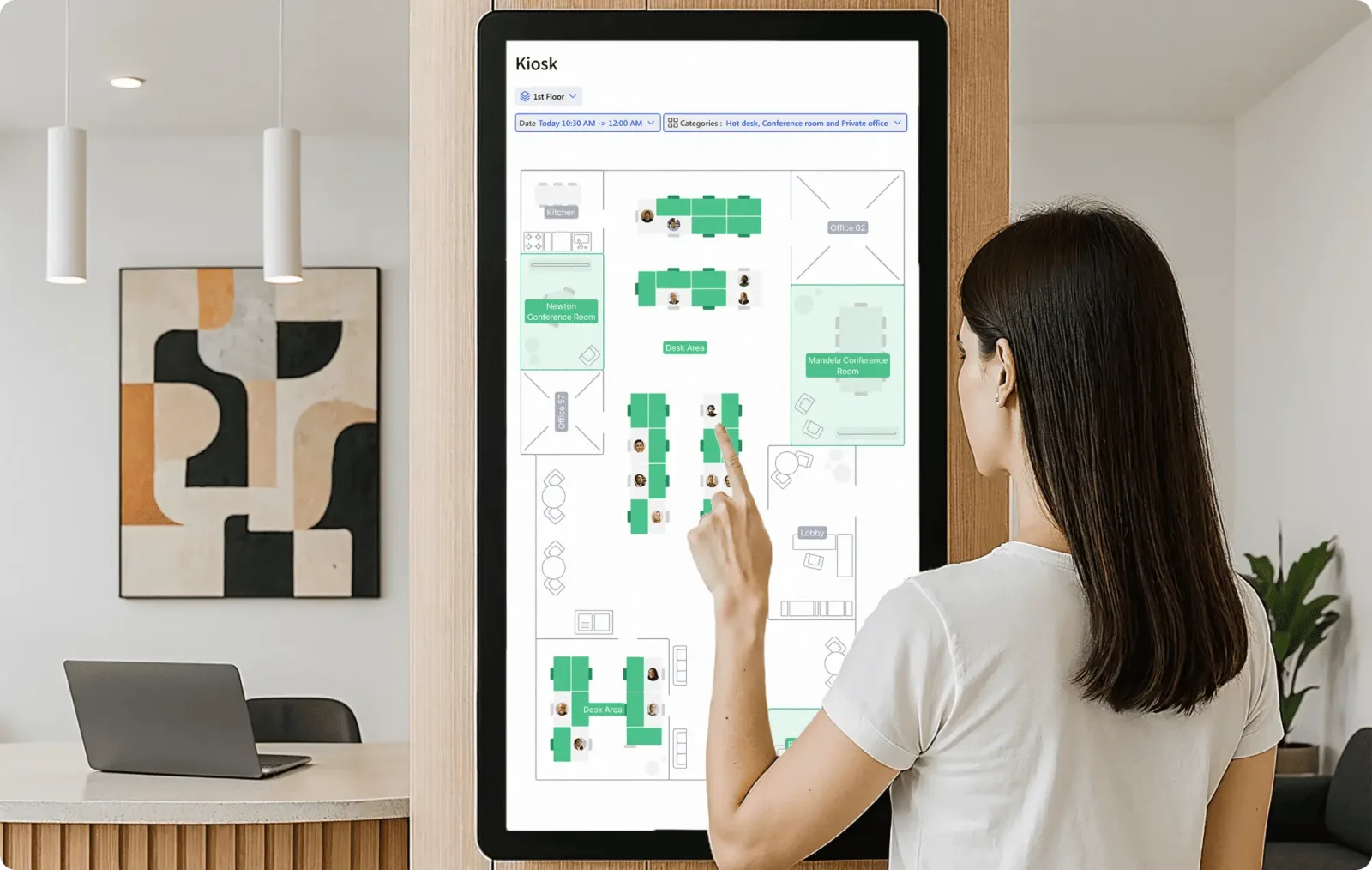
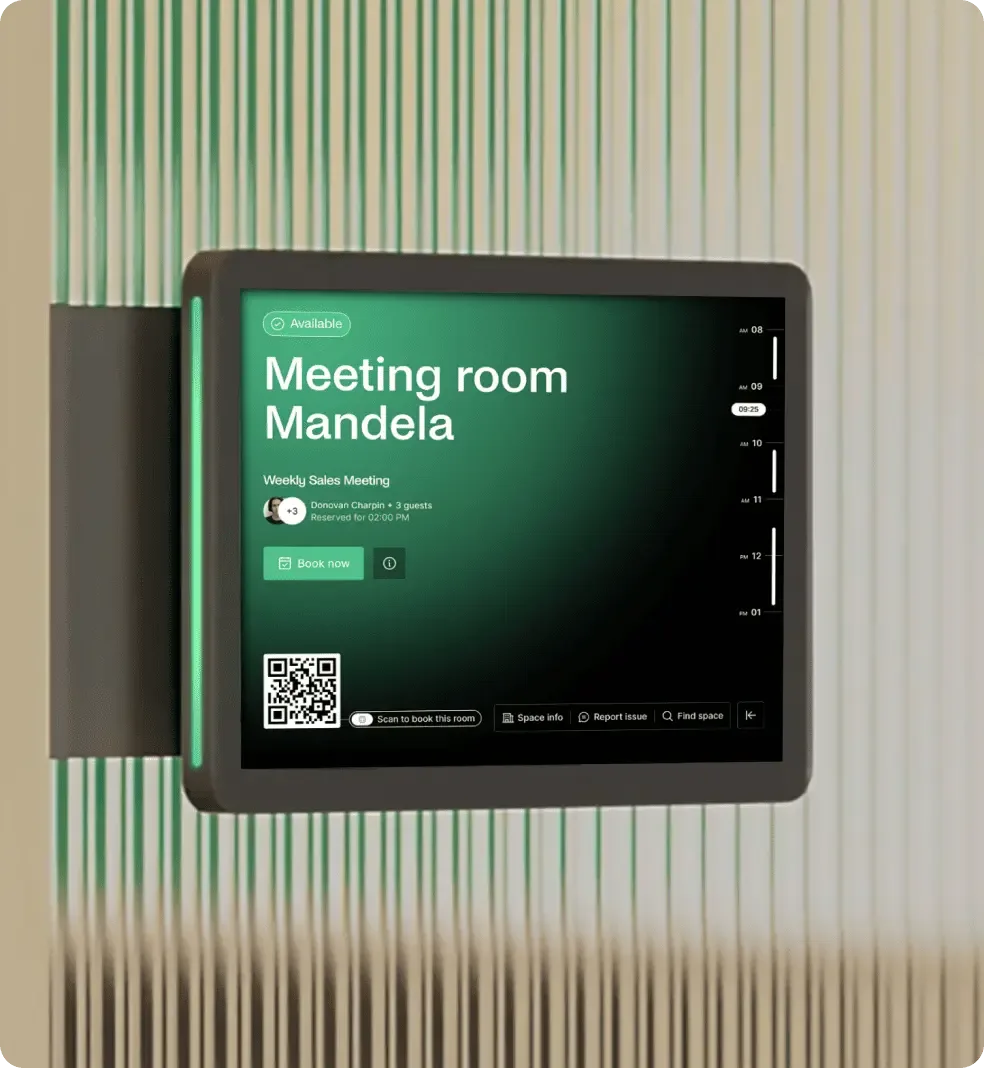
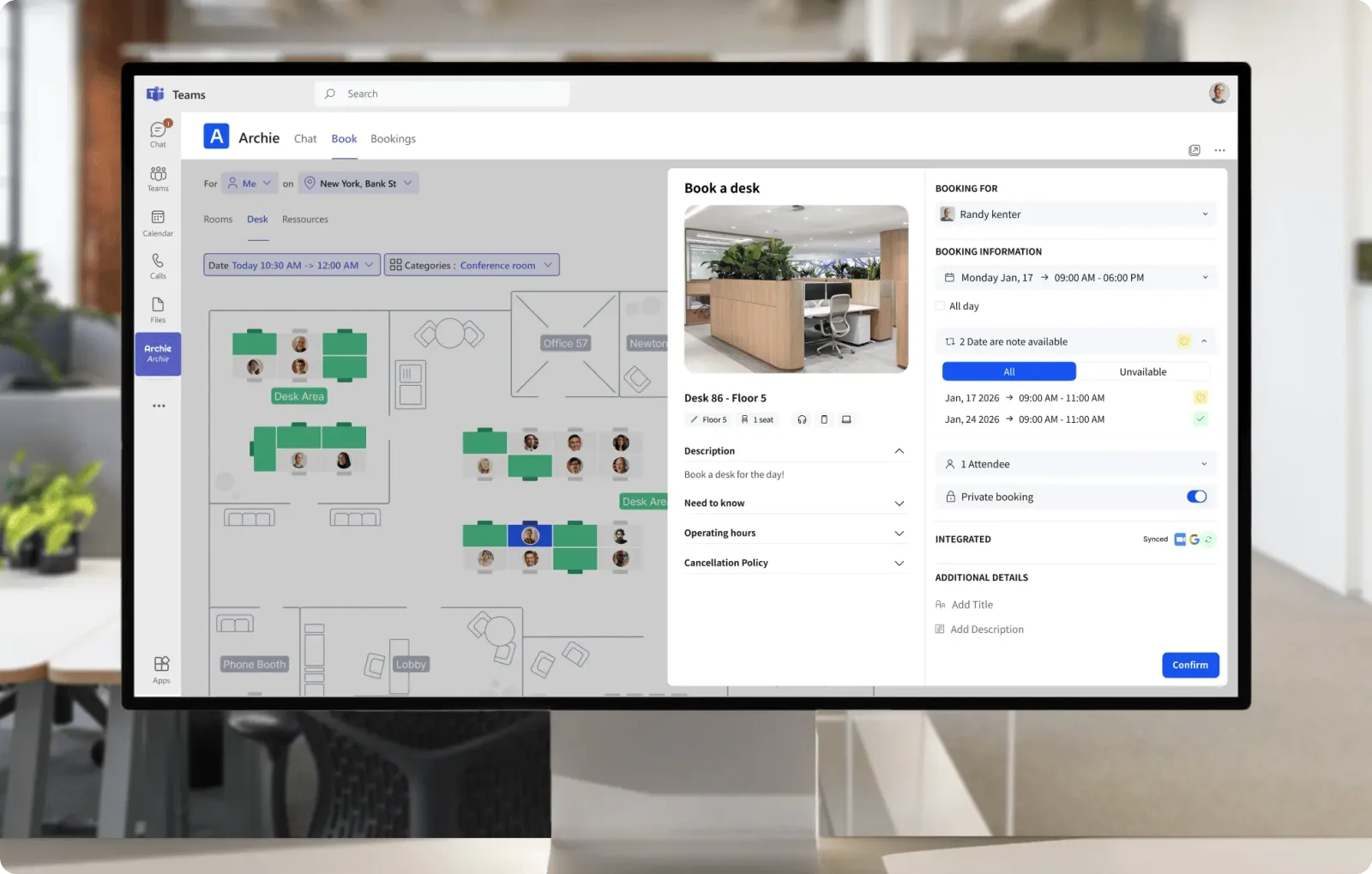
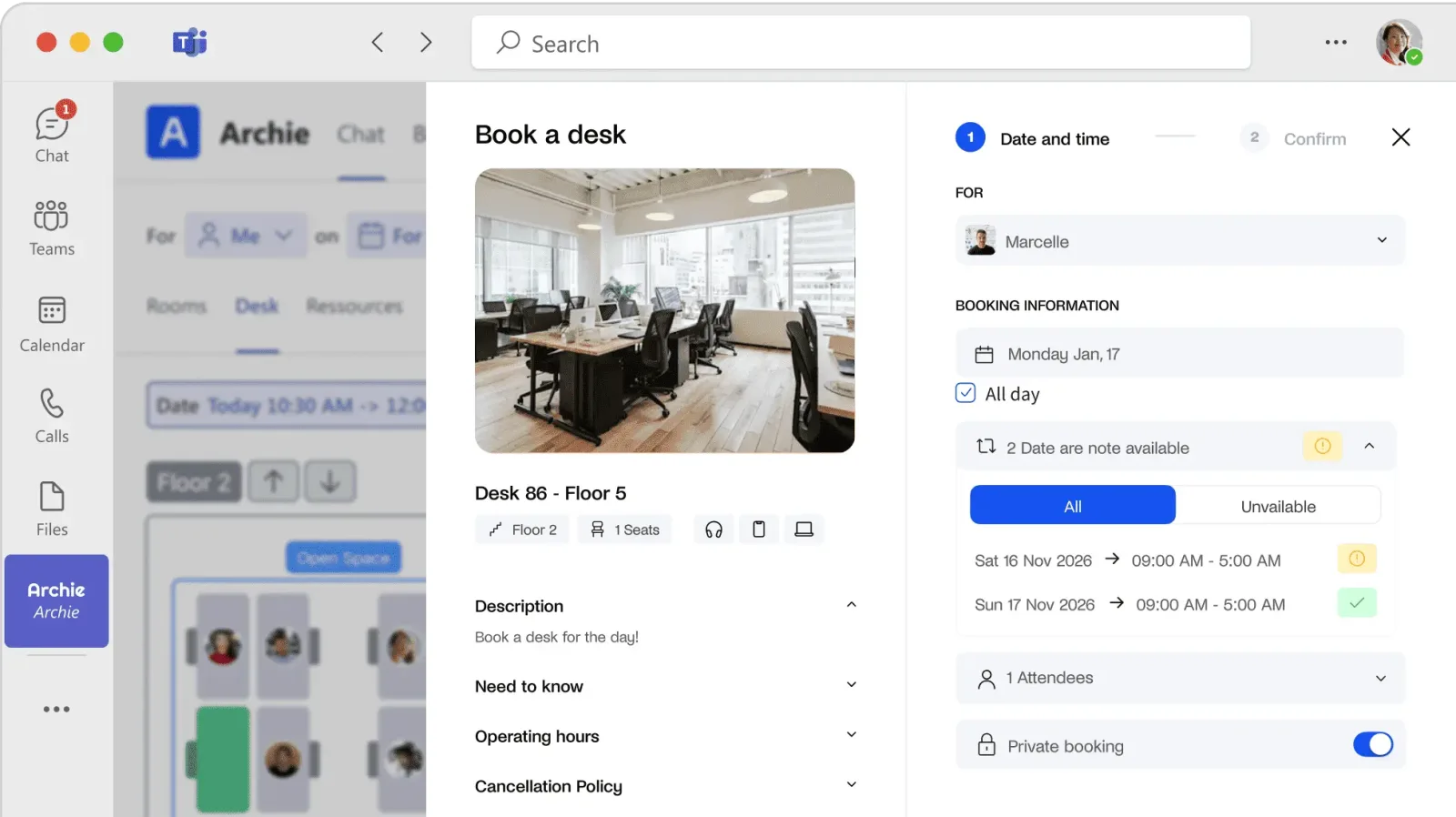
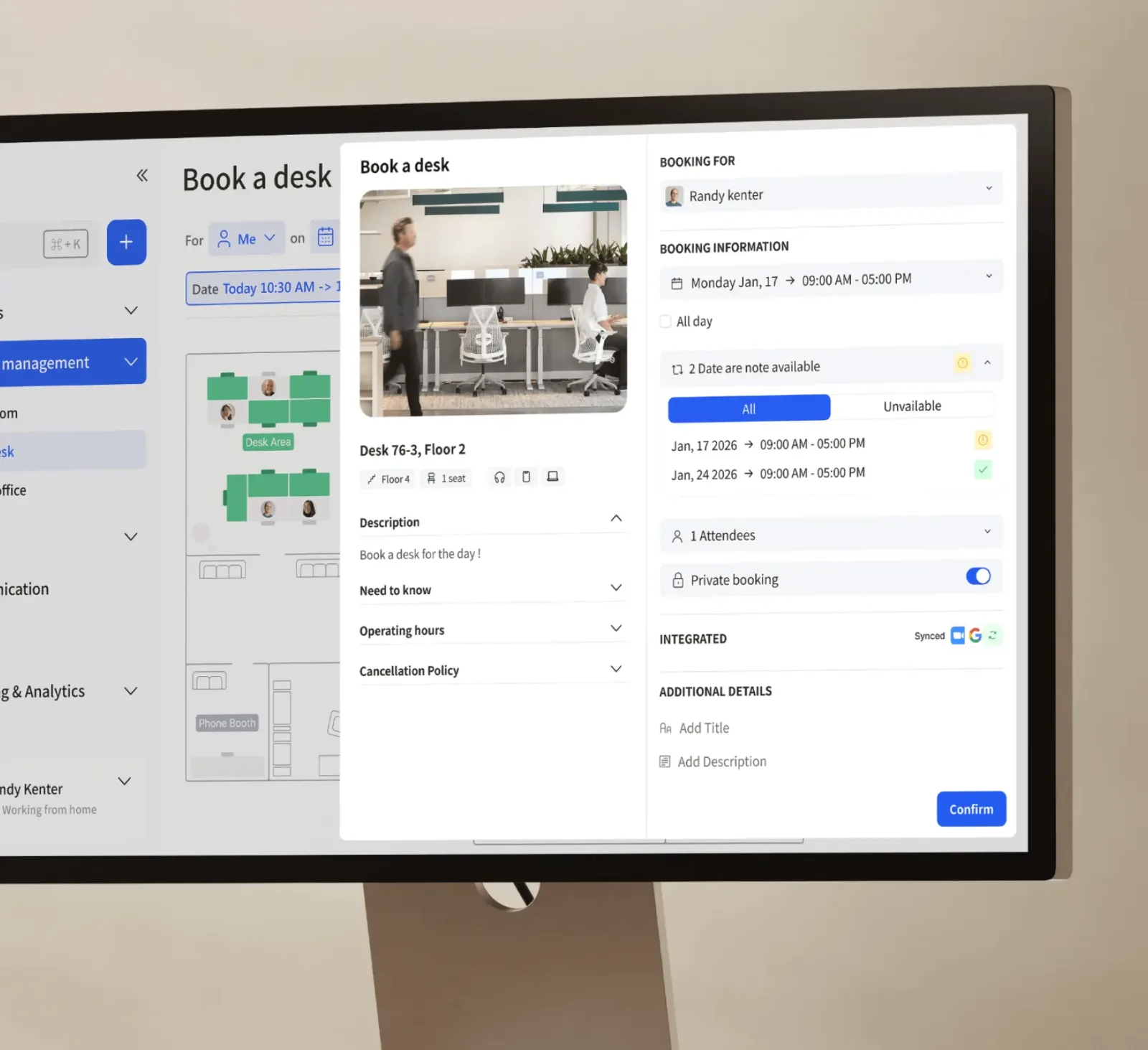
Table of contents
- 1. Archie Solves the Everyday Problems of Hybrid Offices
- 2. What Archie Actually Helps Employees Do
- 3. Archie Desk Booking for Real Workdays
- 4. Can Archie Fix Office Attendance Confusion?
- 5. Meeting Rooms Are a Different Problem
- 6. Floor Plans That Employees Can Trust
- 7. Does Archie Prove You Need More Office Space?
- 8. Microsoft Teams Outlook and Slack Integration
- 9. Visitor Management Without Reception Bottlenecks
- 10. Archie for Coworking Operators
- 11. Security Privacy and Employee Trust
- 12. Archie Pricing and the Cost That Matters
- 13. Implementation Without Disrupting the Office
- 14. Where Archie May Fall Short
- 15. Archie Verdict: Who Should Buy It?
- Frequently Asked Questions
1. Archie Solves the Everyday Problems of Hybrid Offices
Archie helps businesses answer a practical question: when employees come to the office, can they find the right place to work without wasting time?
The platform combines desk booking, room scheduling, interactive floor plans and workplace attendance information, with additional options for visitor management.
For employees, the goal is to make office visits easier to plan.
For managers, it is to reduce booking conflicts, improve visibility into space availability and understand whether the office is being used effectively.
The real buying decision depends on the problem a company needs to solve.
If employees arrive on different days and compete for desks, booking and colleague visibility matter most.
If meeting rooms are constantly occupied or double booked, room scheduling deserves closer attention.
If reception handles a steady flow of guests, visitor registration may justify a separate purchase.
Archie offers products for these different needs, so businesses should identify their priorities before comparing packages.
Archie is also relevant to coworking operators, although their requirements differ from those of an ordinary corporate office.
A coworking business may need to sell memberships, manage day passes, collect payments and coordinate access to desks and meeting rooms.
Archie has a separate coworking product designed around those operational requirements.
That distinction matters because a corporate workplace booking system and a coworking management platform are not interchangeable.
A company generally wants employees to reserve internal resources, while a coworking operator must manage customers, membership agreements, bookings and revenue.
Archie serves both markets, but buyers should evaluate the correct product rather than assume every capability belongs to every plan.
For a hybrid office, the first thing to establish is whether Archie will make a normal workday measurably easier.
Can an employee reserve a desk in seconds?
Can colleagues see when others plan to attend?
Can a meeting organizer find a room that suits the group?
Can an administrator change a seating arrangement without maintaining several disconnected records?
These questions are more revealing than a long feature list.
Workplace software succeeds when people use it consistently and when the information it provides reflects the physical office.
A sophisticated floor map is of limited value if desks are incorrectly labelled.
Attendance reports can mislead if employees do not check in.
A booking system can create frustration if the rules do not match how teams actually work.
Archie deserves consideration when a business wants a more organized way to coordinate office attendance and shared spaces.
Its suitability depends on the size of the workplace, the number of locations, the integrations employees need and whether the company requires visitor management or coworking operations alongside desk and room booking.
2. What Archie Actually Helps Employees Do
The employee experience is a sensible place to begin an evaluation because employees interact with booking software far more frequently than most administrators.
If the everyday process is confusing, the organization may struggle to maintain accurate reservations and attendance information.
Archie supports desk booking through web and mobile interfaces.
Employees can check availability, select a date and reserve a workspace.
Interactive floor plans help them understand where a desk is located rather than forcing them to interpret a list of unfamiliar desk identifiers.
The system can also help employees find colleagues and see where people plan to work.
That is useful when a visit to the office depends on meeting specific teammates.
Someone who wants to collaborate with a colleague can check the available workplace information before travelling, instead of arriving and discovering that the rest of the team is working remotely.
Room reservations address a related problem.
Employees need to find a room that is available at the right time and suitable for the intended meeting.
Archie supports booking rooms and other configured resources, with availability depending on the workspace setup.
Organizations can define the resources employees are allowed to book and the rules governing those reservations.
For employees, convenience depends on how these functions are configured.
A company may allow staff to choose any available desk, assign specific seats to particular people or organize workspaces into neighborhoods.
These arrangements support different operating models, but the booking interface should make the relevant rules easy to understand.
Archie also provides options for recurring bookings, check ins and reminders.
Those capabilities can reduce repetitive work and improve the reliability of booking records.
However, the company still needs to decide how far in advance employees can reserve spaces, whether cancellations are allowed close to the booking time and what happens when a person does not arrive.
An effective evaluation should measure the number of steps needed to complete a typical task.
Ask an employee to reserve a desk, find a colleague, change a booking and reserve a meeting room.
Repeat the exercise on both desktop and mobile devices.
If the process requires repeated searches or administrator assistance, the configuration needs further attention.
Employees should also understand what a reservation means.
A booking indicates an intention to use a resource.
It does not necessarily prove that the person arrived or remained at that location.
Check in policies and any connected attendance technology determine how actual presence is recorded.
This distinction affects employee trust.
If the system shows someone as attending the office simply because they reserved a desk, the information may be inaccurate.
If check in requirements are too strict, employees may find the system burdensome.
The organization needs a practical balance between reliable information and a straightforward booking experience.
Archie is most useful when it removes uncertainty from routine office visits.
Employees should be able to decide where to work, reserve the right resource and understand what their colleagues are doing without learning an unnecessarily complicated process.
3. Archie Desk Booking for Real Workdays
Desk booking is often the first reason a company considers Archie.
Hybrid schedules make permanent seating less practical for some organizations, especially when employees attend the office on different days.
Booking software can help distribute available desks, coordinate teams and reduce disputes over shared workspaces.
Archie supports different ways to organize desk inventory.
A business can configure bookable desks and groups, then decide whether employees select a specific seat or receive an available desk automatically.
This distinction is useful because different workplaces have different expectations.
In a team with assigned neighborhoods, employees may prefer to choose a desk near their colleagues.
In a hot desking environment, the company may want the system to allocate any suitable available seat.
The right approach depends on how much choice employees need and how the office is organized.
Consider a company with sixty desks and one hundred employees.
The total headcount does not automatically mean the office is short of space.
What matters is how many people attend on the same day, whether they need specific equipment and how seating is distributed between departments.
A booking system can make the available inventory more visible, but the company must still set sensible capacity and allocation rules.
Archie can help employees filter and locate available desks through its booking interface and visual floor plans.
Relevant options may include locations, desk groups and amenities.
These details are useful when employees need a particular type of workstation, although buyers should confirm which filters and restrictions are available in their chosen package.
For example, an employee who needs a monitor, a quiet area or an accessible workstation should not have to reserve several desks to find a suitable one.
Administrators should label relevant desks accurately and make sure the booking process exposes the information employees need.
The business also needs to establish a fair booking policy.
Some companies allow reservations a few weeks in advance, while others prefer shorter windows to prevent employees from occupying desks they may not use.
Rules can also govern cancellations, repeated bookings and access to designated seating areas.
Archie's published booking controls include settings for advance notice, cancellations, preparation time and restrictions on multiple simultaneous bookings.
These options give administrators ways to align the software with workplace policy.
They also introduce decisions that should be made before launch, rather than left to individual employees.
No show management deserves special attention.
When someone reserves a desk and never arrives, that reservation may prevent another employee from using the space.
Check in rules and automatic release policies can help make the inventory more accurate, but they must be explained clearly and tested against normal working patterns.
A good policy should account for occasional delays, visitors who need assistance and employees whose schedules change unexpectedly.
The goal is to return genuinely unused desks to the available pool without punishing reasonable changes in plans.
Buyers should ask Archie to demonstrate a full booking cycle.
Reserve a desk, change the date, cancel it, miss the check in window and verify what happens to the reservation.
Then test whether the employee and administrator see consistent information.
These practical details often matter more than the presence of a booking calendar.
4. Can Archie Fix Office Attendance Confusion?
One of the most frustrating aspects of hybrid work is uncertainty about who will be in the office.
Employees may travel to meet colleagues who are working remotely, while managers may struggle to estimate how many desks will be needed on a given day.
Archie includes a workplace visibility feature that helps users see who plans to be onsite.
Its desk and room booking product also supports workweek schedules and colleague visibility on office maps.
Together, these functions can help teams coordinate attendance before they leave home.
The key distinction is between planned attendance and confirmed presence.
A workweek schedule or desk reservation shows what an employee intends to do.
A check in records an action taken under the organization's rules.
Connected access systems may provide another signal, but each source represents a different kind of information.
A manager should not treat all these signals as equivalent.
A person who booked a desk may have cancelled plans without updating the system.
Someone who entered the building may be attending a meeting and never use the desk assigned to them.
A connected system can improve visibility, but it does not remove the need to understand what the data means.
Archie supports QR code check ins and physical check in workflows, with additional options depending on configuration.
These can help the organization distinguish reservations from recorded attendance.
The exact behavior should be demonstrated, including whether an employee can check in before a reservation begins and what happens if the QR code is unavailable.
Attendance visibility can also help teams choose the right days for collaboration.
If employees can see that colleagues intend to attend on Wednesday, they may schedule their own office visit for the same day.
This can make shared workdays more purposeful and reduce the frustration of travelling to an office when key teammates are absent.
However, employee adoption depends on clear expectations.
If the company expects everyone to declare their work location, it should explain when and how that information must be updated.
If check in is required, employees should know whether a QR code, a room display or another approved method is used.
Privacy matters too.
Employees should understand which attendance information is visible to colleagues, managers and administrators.
A system introduced to coordinate seating should not become an unclear employee monitoring program.
Organizations need a legitimate purpose for collecting presence data and should limit access to the people who need it.
Archie can help make office attendance more predictable, but the platform cannot compensate for an inconsistent hybrid work policy.
Leaders should define the rules first, configure the system to reflect them and explain how the resulting information will be used.
Before purchasing, ask whether the product shows planned attendance, confirmed check ins or both.
Confirm whether reporting can distinguish these states and whether the organization can configure the visibility of employee information.
These answers determine whether the feature will improve coordination or simply produce another calendar that employees forget to maintain.
5. Meeting Rooms Are a Different Problem
Desk booking and room scheduling are often purchased together, but they solve different operational problems.
A desk is usually allocated to one employee for a period of time.
A meeting room must accommodate a group, a particular time slot and sometimes specific equipment or conferencing requirements.
Treating both as interchangeable resources can lead to poor booking rules and unnecessary frustration.
Archie supports meeting room scheduling alongside desk reservations.
Employees can search for rooms, check availability and make bookings through the configured system.
Organizations can also configure other bookable resources, such as phone booths and designated spaces, depending on their setup.
The first question to ask is whether the booking system reflects how people actually use meeting rooms.
A room intended for six people should not routinely be reserved for a one person video call if smaller spaces are available.
A room with video conferencing equipment should be identifiable when employees search for a space suitable for a remote meeting.
Archie's room and resource configuration provides options for defining availability, booking intervals, preparation time, cancellation rules and advance booking limits.
These settings matter because different resources need different policies.
A meeting room may require preparation time between events, while a desk might be available for a full workday.
Consider a company with ten meeting rooms.
If employees can book any room without seeing its capacity or amenities, a small meeting may occupy a large conference room while a larger team struggles to find space.
Better room information and appropriate filters can improve allocation without increasing the number of rooms.
Calendar synchronization is another key consideration.
Employees may schedule meetings through Google Calendar or Microsoft Outlook, while workplace teams manage room availability through Archie.
Buyers should verify how the relevant integration works, which system controls the booking and how cancellations or time changes are synchronized.
The precise integrations available depend on the selected plan.
Archie's published pricing information lists Microsoft Teams and Outlook booking for the Pro tier, while other integration options and workflows should be confirmed against the current package.
Do not assume that every calendar or collaboration feature is included in every subscription.
Room displays can also improve the experience.
Archie offers a room application designed for tablets placed outside meeting rooms.
Employees can view availability and, where configured, make a reservation, check in or cancel a booking from the display.
This can be useful when a room becomes available unexpectedly and someone wants to use it immediately.
The hardware decision should be based on the environment.
A small office may work perfectly well with web and mobile booking.
A busy conference area may benefit from dedicated displays that make room status visible without requiring employees to open an application.
The most important test is whether the system handles real scheduling changes reliably.
During a demonstration, reserve a room, modify the meeting time, cancel the reservation and attempt to book the same room from another account.
Check what happens when the requested period is unavailable and whether users can identify a suitable alternative.
Archie is worth considering when room scheduling is a recurring source of friction.
Buyers should assess calendar synchronization, room display requirements, booking restrictions and reporting before deciding which configuration provides enough value.
6. Floor Plans That Employees Can Trust
A digital office map is useful only when it represents the office accurately.
Employees need to know where desks are located, which areas are available and how to find colleagues without relying on an outdated diagram or asking reception for directions.
Archie provides interactive floor plans that connect the visual layout of the office with booking information.
Users can identify desks and locate colleagues on the map, while administrators can organize workspaces into groups or neighborhoods.
This is particularly helpful when employees do not have assigned desks or work across different parts of a building.
A clear floor plan can reduce the uncertainty that comes with visiting an unfamiliar office.
An employee arriving at a new location should be able to identify the relevant floor, find the correct desk area and understand which resources can be booked.
The map becomes more useful when desk labels, room names and workplace amenities match what employees see physically.
Floor plans also help organizations implement seating policies.
For example, a company might designate a neighborhood for the finance team, reserve a set of desks for visiting employees or keep certain workstations available for staff with particular equipment needs.
These arrangements can be easier to communicate visually than through a long list of rules.
However, floor plan quality depends on administrative discipline.
When a desk moves, a room changes purpose or a new area opens, the digital representation needs to be updated.
Otherwise, employees may reserve resources that are difficult to locate or no longer available.
The business should assign responsibility for maintaining the map.
That person or team needs a process for recording changes, checking labels and ensuring that newly created resources have the correct booking settings.
If different departments can make changes independently, clear ownership becomes even more important.
The map should also be tested on the devices employees actually use.
A layout that looks clear on a large desktop display may be harder to navigate on a phone.
Employees should be able to zoom, locate their destination and understand the available options without excessive effort.
For larger workplaces, location structure deserves particular attention.
Buildings, floors, zones and desks should follow consistent naming conventions.
A desk called North 24 in one system and N24 in another can create confusion when employees switch between booking interfaces or ask facilities staff for assistance.
Buyers should ask Archie how floor plans are created and maintained, what information can be displayed and which changes require administrator involvement.
They should also confirm whether the selected package includes the necessary mapping capabilities and whether any professional setup service carries an additional cost.
A useful demonstration should start with a real floor layout rather than a polished sample office.
Ask the vendor to add a desk, change a room label, move a workspace and show how the update becomes available to employees.
This reveals how much work the organization must perform to keep the map useful after the initial rollout.
Archie's floor plans are most valuable when they are treated as operational records rather than decorative interfaces.
Their purpose is to help employees make reliable booking decisions and help administrators maintain an accurate picture of the workspace.
7. Does Archie Prove You Need More Office Space?
Office occupancy is a common source of poor real estate decisions.
A company may see empty desks and conclude that it has too much space, or it may hear complaints about availability and assume that it needs another floor.
Both conclusions can be wrong when the organization lacks reliable information about when and how workspaces are used.
Archie includes occupancy analytics and reporting features intended to help workplace managers understand desk usage and attendance patterns.
Its published capabilities include measures such as desk occupancy, commonly used desks, average booking duration, peak days and hours, and attendance across teams or users.
These reports can help answer practical questions.
Which days experience the highest demand?
Are some neighborhoods consistently underused?
Does the company have enough bookable desks for the attendance pattern it expects?
Are particular areas popular while others remain empty?
The answers can inform decisions about seating allocation and office planning.
If one floor is consistently busy while another is quiet, managers may consider changing desk availability or moving teams closer together.
If certain days are much busier than others, the company may be able to improve scheduling and reduce pressure on popular areas.
However, occupancy analytics must be interpreted correctly.
A reservation records an intention to use a desk.
It does not necessarily prove that the employee arrived.
A check in provides another signal, but it still depends on the check in process being followed.
Reports built from different signals can produce different results.
This is why buyers should ask Archie how each metric is calculated.
Does the report count bookings, check ins or another signal?
Can administrators compare planned attendance with recorded presence?
How frequently does the data update?
Can results be filtered by location, department or team?
These questions matter more than the appearance of the dashboard.
Reporting detail is another consideration.
Some organizations need a small set of standard reports, while others want to export data, compare departments or create custom management reports.
Archie's published plans describe reporting and analytics features, but buyers should test whether the available reports answer their actual questions without manual data manipulation.
For example, a facilities manager may want to identify the busiest desks over the past month.
A finance director may want to compare occupancy with office operating costs.
A workplace leader may want to know whether employees attend on the days their teams are scheduled to collaborate.
These are different questions, and one standard chart may not answer all of them.
The business should also avoid treating low occupancy as automatic proof that space can be removed.
Some rooms must remain available for peak periods, confidential meetings, accessibility needs or specialist work.
A desk that is rarely used may still be necessary for a team whose schedule changes from week to week.
A more responsible approach combines utilization data with the cost of the space, employee requirements, business schedules and the consequences of reducing capacity.
Archie can help provide part of the evidence, but leaders still need to make the property decision.
Before purchasing, identify three or four reports that would genuinely influence management decisions.
Ask for each report to be demonstrated using realistic scenarios.
If the reporting cannot answer those questions clearly, the organization should reconsider whether the analytics are sufficiently detailed for its needs.
8. Microsoft Teams Outlook and Slack Integration
Employees are less likely to adopt a workplace application if they must constantly leave the tools they already use.
Calendar and collaboration integrations can reduce that friction by bringing booking actions or notifications into familiar interfaces.
Archie's current published pricing information lists Microsoft Teams and Outlook booking, as well as Slack integration, among the Pro plan capabilities.
The product also provides web and mobile access.
Exact integration behavior varies by tool, so buyers should confirm the actions available through each connector rather than treating integration as a single universal feature.
The practical question is what employees can do without opening the main Archie application.
Can they search for a desk, reserve a room, check in, cancel a booking or see colleagues' attendance?
Are these actions fully supported, or does the integration only provide a link or notification?
This distinction matters.
A connection that allows employees to reserve desks but does not expose the information they need may reduce some friction without replacing the main application.
That may still be acceptable, but the business should understand the limits before promising a completely integrated employee experience.
Calendar synchronization also needs careful testing.
Employees may change a meeting in Outlook or Google Calendar after the original booking has been made.
The organization should verify whether the room reservation updates automatically, whether a cancellation releases the space and how conflicts are resolved.
A sensible integration assessment starts with the applications employees already use.
If the business relies on Microsoft 365, it should prioritize Outlook and Teams workflows.
If Slack is central to internal communication, test the relevant Slack integration.
There is little value in purchasing a connector simply because it appears on a feature list.
Administrators should also consider identity management.
Archie lists single sign on and SCIM provisioning among the Pro plan features.
Single sign on can help employees authenticate through an existing identity provider, while SCIM can support automated account provisioning and deprovisioning when configured with compatible systems.
These capabilities can reduce administrative effort, especially when employees join, leave or change roles.
However, buyers should confirm supported identity providers, setup requirements and the exact provisioning behavior.
They should also test whether disabled accounts lose access as expected and how changes to employee attributes affect workplace permissions.
Integration work involves ownership as well as technology.
The IT team may control identity and collaboration tools, while facilities teams own floor plans and booking rules.
The implementation project needs a clear process for approving changes, testing connections and resolving problems when data fails to synchronize.
Archie advertises API access and webhooks in its plan comparison, with some advanced options subject to package restrictions.
These capabilities may be relevant when a business needs a custom connection to an internal application.
The buyer should confirm which endpoints or events are available, whether usage limits apply and whether development work is included.
The strongest approach is to choose integrations based on employee behavior and operational need.
Ask the vendor to demonstrate the exact workflow in the tools your organization uses.
A successful integration should remove repeated work, preserve accurate booking records and make the employee experience simpler rather than creating another place to troubleshoot.
9. Visitor Management Without Reception Bottlenecks
Visitor management becomes important when a workplace receives customers, contractors, job candidates and other guests.
Reception staff need to know who is expected, employees need to know when their visitors arrive, and the organization may need a reliable record of people entering the premises.
Archie offers visitor management as a product that can be evaluated alongside its desk and room booking capabilities.
The system supports scheduled visits, visitor check in, host notifications and configurable visit types.
Depending on the selected configuration, visitors can receive an email containing visit details and a QR code or check in link.
This helps reduce the administrative work involved in coordinating appointments.
A host can register a visit in advance, provide instructions and assign responsibility for receiving the guest.
When the visitor arrives, the reception process can use the scheduled record rather than relying on handwritten notes or a message sent at the last minute.
Visitor policies need to reflect the actual workplace.
A customer appointment may require a different process from a maintenance visit or a job interview.
Archie supports configurable visit types and form fields, allowing organizations to collect information appropriate to the visit category.
The organization should avoid collecting information merely because the software makes it possible.
Visitor forms should ask for the details needed to manage the appointment and satisfy legitimate security or administrative requirements.
Retention periods and access permissions should be defined before the system begins collecting records.
Check in rules also deserve attention.
Archie provides settings that can restrict when visitors may check in and whether check in must occur physically through a QR code.
It also describes options for self check out and automatic check out.
Buyers should test these settings against the reception process they intend to operate.
For example, a visitor who arrives early may need to wait until the approved check in window opens.
A contractor who remains onsite for several hours may need a different process from a guest attending a short meeting.
The organization should decide how such cases are handled and make the instructions clear.
Visitor notifications are another important part of the workflow.
A digital record is less useful if the host never receives the arrival notification or cannot identify the visitor.
Test the full sequence from registration to confirmation, arrival and check out, including the handling of incorrect email addresses and changes to scheduled visits.
Archie's visitor management capabilities can also support delivery notifications in relevant configurations.
Employees can be notified when a package is ready for collection, while reception staff can record incoming deliveries.
Businesses that receive frequent parcels may benefit from keeping this process separate from general visitor records.
Emergency procedures should be considered as well.
If the organization needs an accurate view of who is onsite during an evacuation, it should establish what data the platform provides and how that information can be accessed during an incident.
A booking record alone should not be assumed to represent a complete and verified list of people physically present.
Visitor management is a worthwhile addition when reception work is frequent enough to justify a dedicated process.
Smaller offices with occasional visitors may have simpler requirements.
Buyers should compare the product's visitor policies, notifications, reporting and privacy controls with their actual reception needs before adding it to the purchase.
10. Archie for Coworking Operators
Archie's coworking product addresses a different business problem from corporate desk booking.
A coworking operator needs to manage available workspaces while also handling memberships, customer relationships, payments and the day to day experience of members.
A corporate office usually reserves desks for its own employees.
A coworking space may sell access to desks, private offices, meeting rooms and day passes to different customers.
Its software must connect availability with the commercial terms under which each resource is sold.
Archie's coworking offering includes booking, membership and customer management capabilities.
Its published materials describe web and mobile access, automated billing and payments, plans and day passes, contract signatures, room and desk reservations, member communication and reporting.
The exact features and integrations should be confirmed for the current coworking package.
Automated billing can reduce the manual work involved in charging members for recurring access or bookable resources.
The operator still needs to define the commercial rules, including membership periods, included credits, cancellation policies and any extra charges.
Software can apply the configured rules, but it cannot decide whether the pricing model is commercially sensible.
Day passes and resource bookings are also important.
A coworking operator may sell a desk for one day, reserve a meeting room for an external customer or allow members to book selected resources within their membership.
Availability, prices and booking permissions need to reflect the terms offered to each customer.
Customer relationship management can help staff maintain member records and manage the relationship beyond an individual booking.
Operators should determine whether the available customer records, communication tools and reporting cover their sales process or whether a separate CRM remains necessary.
Integrations with payment and accounting tools should be tested carefully.
A booking platform may record a payment while the accounting system requires additional information for reconciliation.
Before selecting Archie, confirm which payment methods and accounting connections are supported, how refunds are handled and how financial records are exported.
Multi location management may be useful for operators with several coworking sites.
Members may want to book different locations, while managers need to understand resource availability and revenue across the portfolio.
Buyers should verify which location permissions, booking rules and reports are included in the proposed package.
A coworking business should evaluate Archie using a complete customer journey.
Create a membership, sell a day pass, book a desk, reserve a meeting room, process a payment and review the resulting customer record.
Then test a cancellation, a refund and a change to the membership.
The operator should also consider the member experience.
Can customers understand what their plan includes?
Can they find an available resource without contacting staff?
Are booking confirmations and changes communicated clearly?
A system that simplifies administration but confuses customers can create a different set of problems.
Archie's coworking product is relevant to operators that want to coordinate bookings and commercial workflows in one environment.
A coworking business with highly specialized accounting, access or customer management requirements should verify the integration depth before replacing existing systems.
Corporate buyers should not assume that they need the coworking package simply because they share desks.
Hot desking inside a company is a workplace management requirement.
Selling memberships and resources to external customers is a separate business model.
Choosing the right product avoids paying for workflows the organization will never use.
11. Security Privacy and Employee Trust

Workplace software can contain employee profiles, attendance information, booking histories, visitor records and details about office locations.
These records may appear routine, but their sensitivity depends on how much information is collected and how the organization uses it.
Security should be evaluated before employees begin using Archie.
The company should understand how users authenticate, how permissions are assigned, what information administrators can export and how access is removed when someone leaves the organization.
Archie lists single sign on and SCIM provisioning among its Pro plan capabilities, with additional enterprise security and compliance support available through its higher tier.
These options can help organizations align account access with existing identity management processes.
Buyers should confirm the supported configuration and the contractual commitments that apply to their subscription.
Role based permissions are equally important.
A facilities administrator may need to manage desks and room availability, while a regular employee only needs to make reservations and view relevant workplace information.
Reception staff may need access to visitor records without receiving unrestricted access to all employee data.
The organization should follow the principle of least privilege.
Each user should receive the access required for their responsibilities, with broader permissions limited to people who genuinely need them.
Permissions should be reviewed when roles change and removed when accounts are no longer required.
Employee privacy needs separate consideration.
Attendance information may help colleagues coordinate office visits, but it can also reveal patterns in an individual's working routine.
The organization should explain which information is visible, who can access it and whether the data will be used for purposes beyond booking and workplace coordination.
A booking record should not automatically be treated as evidence of productivity.
An employee may reserve a desk and change plans, work in a meeting room or attend the office for a short appointment.
Organizations should avoid using incomplete attendance signals to make conclusions that the data cannot support.
Visitor records raise similar questions.
Companies should decide which information must be collected, who can view it and when it should be deleted.
If the business operates in multiple countries, its legal and privacy teams should review the applicable requirements rather than assuming one policy covers every jurisdiction.
Buyers should request current security documentation directly from Archie.
Depending on internal requirements, that review may include independent assurance reports, applicable certifications, data processing terms, data hosting locations, backup practices, incident response procedures and contractual commitments relating to security incidents.
Enterprise customers may have additional requirements concerning data residency, contractual terms or compliance reviews.
Archie lists custom data residency and tailored legal support among enterprise capabilities, but these should be treated as items to verify during procurement rather than assumptions about every subscription.
Security review should also include integrations.
When employee information is synchronized from a directory or attendance signals are received from another system, the business needs to understand which fields are exchanged and how failures are handled.
An integration can improve convenience while introducing additional access and data management responsibilities.
Finally, the organization should establish a clear administrative process.
Someone needs to maintain access permissions, respond to data requests, review visitor retention and ensure that employee information remains accurate.
Software provides controls, but responsible governance still depends on the organization using them correctly.
12. Archie Pricing and the Cost That Matters

Archie publishes starting prices for its desk and room booking plans, making it easier to establish an initial budget than with products that require a completely private quotation.
The important detail is that the published starting price is a minimum monthly charge, while the actual cost can depend on the number and type of resources being managed.
The current official pricing page lists Starter from $159 per month and Pro from $249 per month.
Enterprise pricing is customized.
The company also offers a 14 day test environment after a demonstration, according to its published pricing information.
The pricing model for desk and room booking is resource based.
Archie's published product materials list Starter desk pricing at $2.80 per desk per month and Pro at $3.50 per desk per month.
For room scheduling, the published rates are $8 per room per month for Starter and $12 per room per month for Pro.
The minimum monthly charges still apply, so a small inventory may cost more than a simple multiplication of the resource rate would suggest.
This model can work well when a business has substantially more employees than desks.
A company with one hundred employees sharing thirty desks may prefer a cost structure based on the thirty bookable desks rather than paying for every employee.
However, the minimum monthly charge means a very small office should calculate its actual cost rather than assuming the per resource rate is the final bill.
Pro adds capabilities relevant to larger or more complex deployments, including multiple locations, booking through Microsoft Teams and Outlook, Slack integration, brand customization, single sign on, SCIM and custom groups and roles.
It also includes tailored premium onboarding according to the current pricing comparison.
Starter is designed for organizations that need the core booking experience at a single location.
Its listed features include web and mobile access, visual floor plans, colleague search, workweek schedules, QR code check ins, seat assignment and occupancy analytics.
Enterprise is intended for deployments that need more customization or formal procurement support.
The current pricing page lists options such as security and compliance support, tailored legal terms, custom data residency, migration assistance and premium API support.
The price is provided by quotation.
The company also offers visitor management and coworking products.
These should be evaluated separately from desk and room booking because their commercial structures and included capabilities differ.
If an organization wants desk booking and visitor registration, it should ask whether the products are quoted together and whether any combined pricing is available.
The price comparison should account for more than the subscription.
Buyers may need to budget for onboarding, employee training, floor plan preparation, hardware for room displays or kiosks and work required to configure integrations.
Some of these items may be optional or included in the chosen package, so they should be explicitly listed in the quote.
The total cost should be compared with a measurable operational benefit.
For example, an organization might estimate how much time facilities staff currently spend resolving desk conflicts, maintaining spreadsheets or coordinating room reservations.
If Archie reduces that work, the time savings can be included in the business case.
Space savings require more careful calculations.
Better occupancy information may reveal that a company can change its office layout or reduce unused capacity, but the software does not guarantee a reduction in rent.
Any financial benefit should be based on a realistic property decision that the organization can actually implement.
Buyers should also confirm the billing frequency and contract terms.
The public page advertises starting prices per month, but the commercial agreement should clarify the actual billing schedule, renewal terms, minimum commitment and what happens if the number of bookable resources changes.
Before accepting a quotation, request a breakdown of the recurring subscription, resource counts, any minimum charge, included integrations, onboarding and optional services.
Ask the vendor to model the cost if the company adds another office or changes the number of bookable desks.
A clear expansion model is important for a workplace that is expected to grow.
The 14 day test environment is useful for evaluating the workflow before committing.
Use it to test real booking scenarios and involve both employees and administrators.
A short trial will not reveal every long term issue, but it can identify confusing workflows and gaps in required functionality.
For official plan details, consult Archie's pricing page at Archie Pricing Page.
Because commercial terms can change, the final purchase decision should use the current written quotation rather than a price copied from an older comparison article.
13. Implementation Without Disrupting the Office
A workplace booking system can be easy to demonstrate and still require careful preparation before employees depend on it.
The main implementation challenge is making sure that the digital office matches the real one and that booking rules reflect the organization's operating policies.
Archie offers onboarding options that vary by plan.
Its current pricing information highlights tailored premium onboarding for Pro and more extensive migration and implementation support for Enterprise.
Buyers should confirm exactly what assistance is included, who will perform the setup and what responsibilities remain with the customer.
Start with an inventory of the workplace.
Identify each building, floor, bookable desk, meeting room and relevant resource.
Check that names, locations, capacities and amenities are accurate.
If the company already maintains floor plans or seating records, compare them with the physical office before importing the information.
Next, define the booking rules.
Decide how far in advance employees can reserve desks, whether they can choose specific seats, which neighborhoods are available to different groups and how cancellations are handled.
Set room booking limits and check in policies as well.
These decisions should be approved by the people responsible for workplace operations before the system goes live.
Employee records and permissions should then be prepared.
Determine how users will be created, which information will come from a connected directory and which roles can manage spaces or view reports.
If single sign on or SCIM is part of the selected package, involve the identity management team early enough to test account creation and removal.
Integration testing should happen before a company wide rollout.
Verify calendar synchronization, collaboration workflows and any connections to access systems.
Test ordinary scenarios as well as errors, including a cancelled meeting, a disabled user account and a booking made while a connection is unavailable.
A pilot is often the safest way to identify problems.
Choose a representative team or office and let employees use Archie for normal workdays.
Include people who book desks regularly, employees who visit occasionally, meeting organizers and administrators.
Ask them to report unclear labels, missing amenities and booking steps that create unnecessary friction.
The pilot should test the entire process, not merely whether a reservation can be created.
Employees should be able to find the office, choose an appropriate desk, book it, check in and change their plans.
Administrators should be able to update the floor plan, review attendance information and resolve common support requests.
Training should be short and role specific.
Employees need clear instructions for booking and cancelling spaces.
Reception staff need visitor procedures if that product is enabled.
Facilities administrators need guidance on maintaining resources and reviewing reports.
IT staff need to understand identity management, integrations and the process for diagnosing synchronization issues.
Communication is equally important.
Explain why the organization is introducing the system, what employees are expected to do and how the data will be used.
If check in is mandatory, state that clearly.
If the platform is intended to coordinate attendance rather than monitor individual productivity, communicate that distinction.
After launch, review the most common issues.
Frequent missed check ins may indicate that the policy is unclear or the process is inconvenient.
Repeated booking conflicts may mean the resource inventory or booking restrictions need adjustment.
Incorrect maps may indicate that responsibility for maintaining floor plans has not been assigned.
Implementation success should be measured against the original business problem.
If the goal is to reduce booking conflicts, monitor how often those conflicts occur.
If the goal is to make attendance more predictable, compare planned attendance with the records available through the configured process.
If the goal is to reduce administrative work, measure the time spent managing bookings before and after deployment.
Archie is more likely to deliver value when the organization treats implementation as an operational change rather than a software installation.
Accurate data, clear rules, tested integrations and a named administrator will matter long after the initial setup is complete.
14. Where Archie May Fall Short
Archie's breadth is useful, but not every organization needs a workplace platform with several connected products.
The right decision depends on the actual complexity of the office and the cost of solving the problem with a narrower tool.
The minimum monthly price is an important consideration for small businesses.
An organization that needs only a few bookable desks or rooms may find that the minimum charge represents a relatively high cost per resource.
The published starting rate should therefore be treated as a budget baseline rather than a guarantee of the final price.
Some employees may also find that the full administrative interface provides more information than they need for routine bookings.
Integrations can reduce the need to switch applications, but buyers should confirm which functions are available within Teams, Outlook or Slack and which still require the Archie web or mobile application.
Reporting requirements need careful evaluation as well.
Standard occupancy charts may be sufficient for everyday workplace management, but organizations with highly specialized reporting needs should test the available filters, exports and level of detail.
Do not assume that the presence of analytics means every custom question can be answered without additional work.
Data maintenance is another ongoing responsibility.
The company must keep floor plans, resource details and employee records accurate.
If these records are neglected, employees may see incorrect availability or reserve resources that no longer exist.
A platform can centralize information, but it still needs a reliable process for maintaining it.
The integration strategy may also affect the effort required.
Connecting a calendar or identity provider is not the same as implementing a complex custom workflow.
Organizations with unusual internal systems should establish whether a native connector exists, whether the API can support the required behavior and who will pay for any development.
Hardware should be considered separately from software.
Archie can be used through web and mobile interfaces, while room displays and kiosks may be useful additions in certain environments.
Businesses should confirm whether their existing tablets are suitable, whether any dedicated hardware is needed and what maintenance the devices will require.
There is also a distinction between workplace booking and broader enterprise facilities management.
Archie can support desk and room reservations, attendance visibility, visitor workflows and related workplace tasks.
Companies with specialized requirements for industrial maintenance, complex building systems or highly regulated asset operations should verify whether the product meets those requirements or needs to coexist with specialist software.
Finally, no booking system can compensate for a poorly defined hybrid policy.
If managers give conflicting instructions about attendance or employees are unclear about which desks they can use, the software may make the inconsistency more visible without resolving it.
The organization needs agreed rules before expecting the platform to improve coordination.
These limitations do not make Archie unsuitable.
They identify the questions that should be answered before the purchase.
A realistic demonstration, a clear statement of required integrations and a written cost breakdown will help buyers distinguish a genuine fit from a collection of features they may never use.
15. Archie Verdict: Who Should Buy It?
Archie is a strong candidate for businesses that need to make shared office space easier to book and manage.
Desk reservations, interactive floor plans, colleague visibility and room scheduling address practical problems that become more noticeable when employees follow different hybrid schedules.
The platform also offers visitor management and a separate coworking product for organizations with those additional requirements.
Its biggest advantage is the combination of booking and workplace visibility.
Employees can find resources and coordinate office visits, while administrators gain information that can help them improve seating arrangements and understand usage patterns.
Integrations with common workplace tools can reduce friction when the selected plan supports the required workflows.
The principal buying considerations are the minimum monthly price, the quality of reporting, integration requirements and the work involved in keeping workplace information accurate.
A business should not pay for a broad platform simply because it has many features.
It should identify the problems it needs to solve and confirm that the chosen package addresses them.
For a company with several teams sharing desks, recurring room conflicts or a need to coordinate attendance across locations, Archie deserves a serious evaluation.
A very small office with only occasional bookings may be better served by a simpler and less costly tool.
Coworking operators should evaluate Archie's dedicated coworking offering rather than treating the corporate booking product as a complete membership management system.
The best next step is to test a realistic workday during the available trial period.
Have employees reserve desks, find colleagues, book rooms and change reservations.
Have administrators review the reports, test the integrations and calculate the total cost using the actual number of bookable resources.
Archie is worth buying when those tests demonstrate that it reduces daily friction and provides information the business will genuinely use.
The right decision comes from operational fit, not the length of the feature list.
Key features
- Interactive office maps and floor plans
- Real time desk availability and booking
- Flexible hot desking and seat assignments
- Recurring reservations for regular office days
- Colleague search on workplace maps
- Workweek schedules for hybrid employees
- QR code check in workflows
- Automated reminders for upcoming reservations
- No show protection and cancellation policies
- Meeting room scheduling and availability
- Room booking through supported integrations
- Tablet based room booking displays
- Desk and room occupancy analytics
- Peak attendance and usage reporting
- Multi location workplace administration
- Custom desk groups and neighborhoods
- Microsoft Teams and Outlook booking
- Slack integration for workplace coordination
- Single sign on and SCIM provisioning
- Visitor registration and host notifications
- Customizable visitor policies and forms
- QR code visitor check in
- Delivery notifications for arriving packages
- Coworking memberships and day passes
- Automated coworking billing and payments
- API access and webhook integrations
Pricing
- Single location workplace management
- Web and mobile booking access
- Interactive maps for desk selection
- QR code check in support
- Occupancy analytics and attendance visibility
- Everything included in Starter
- Multi location workplace administration
- Microsoft Teams and Outlook booking
- Slack integration and custom branding
- Single sign on and SCIM
- Everything included in Pro
- Custom security and compliance support
- Tailored legal and contractual framework
- Custom data residency options
- Migration and premium API assistance
Pros & cons
Pros
- Visual maps simplify desk discovery
- Resource based pricing supports shared seating
- Clear visibility into planned attendance
- Recurring desk bookings reduce repetition
- Room scheduling supports shared facilities
- QR code check ins improve records
- Multiple locations supported on Pro
- Teams and Outlook booking available
- Slack integration reduces application switching
- Occupancy analytics reveal usage patterns
- Custom booking policies support flexibility
- Visitor workflows simplify reception operations
- Coworking tools support member management
- Enterprise options support tailored requirements
Cons
- Minimum monthly charges affect small offices
- Enterprise pricing requires a custom quotation
- Advanced integrations depend on selected plans
- Attendance accuracy depends on employee behavior
- Floor plans require ongoing maintenance
- Reporting depth should be tested carefully
- Some workflows require the main application
- Visitor management may cost extra
- Hardware displays require separate planning
- Implementation needs clear internal ownership
- Custom integrations may require additional work
- Booking software cannot fix unclear policies
- Coworking tools exceed basic office needs
- Feature availability varies across product packages
Archie specs
- Platforms: Web, iOS, Android, tablet based room displays
- Free plan: No permanent free plan publicly listed, 14 day trial available
- Starting price: $159 per month for Starter
- Integrations: Microsoft Teams, Outlook, Slack and supported workplace systems
- Support: Help center, onboarding options and enterprise assistance
- Best for: Hybrid offices, shared workspaces and coworking operators
Our verdict
Archie is a practical choice for organizations that need employees to find desks, coordinate office attendance and reserve meeting rooms without relying on disconnected calendars and spreadsheets. Its interactive floor plans, colleague visibility and occupancy analytics are particularly useful for hybrid offices with shared seating. Pro adds integrations and multi location support for more complex operations. The main concerns are the minimum monthly price, reporting requirements and the need to maintain accurate workplace data. Small offices with occasional bookings may prefer a simpler tool, while larger workplaces should test Archie against real booking scenarios before committing.
View PlansFrequently Asked Questions
How Much Does Archie Cost?
Is Archie Good For Hybrid Offices?
Does Archie Integrate With Microsoft Teams?
Can Archie Manage Visitors Too?
Is Archie Better Than Basic Booking Tools?
Reader reviews
Be the first to review
