
Gusto Review 2026: Payroll Precision and Benefits for Small Business

By Evander Thorne & Noura Mint Ely · Reviewed by Afonso Macosso
Gusto automates complex payroll calculations compliance tracking and health benefits management delivering an intuitive platform that saves time every pay period.
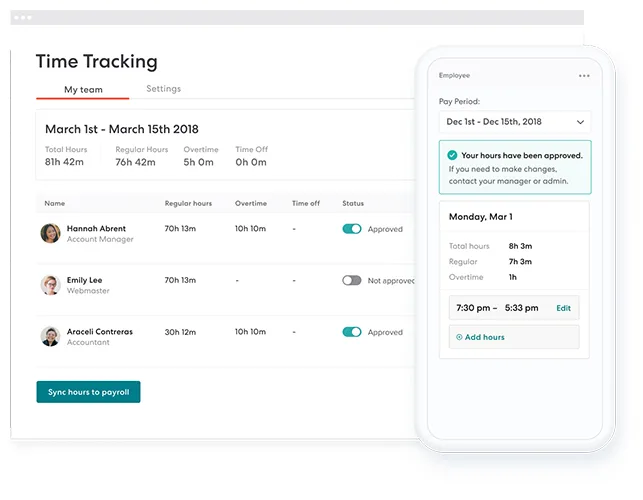
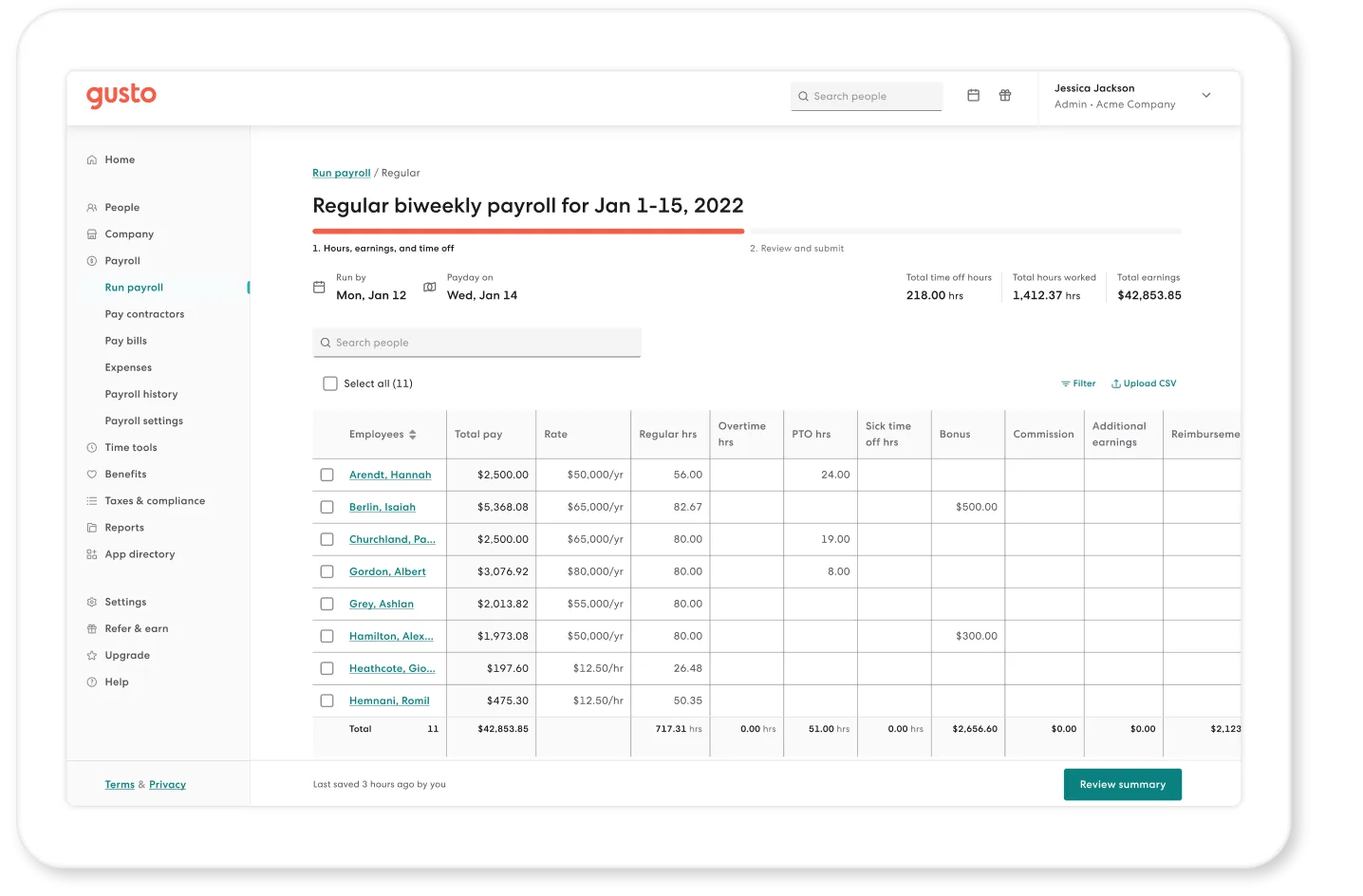
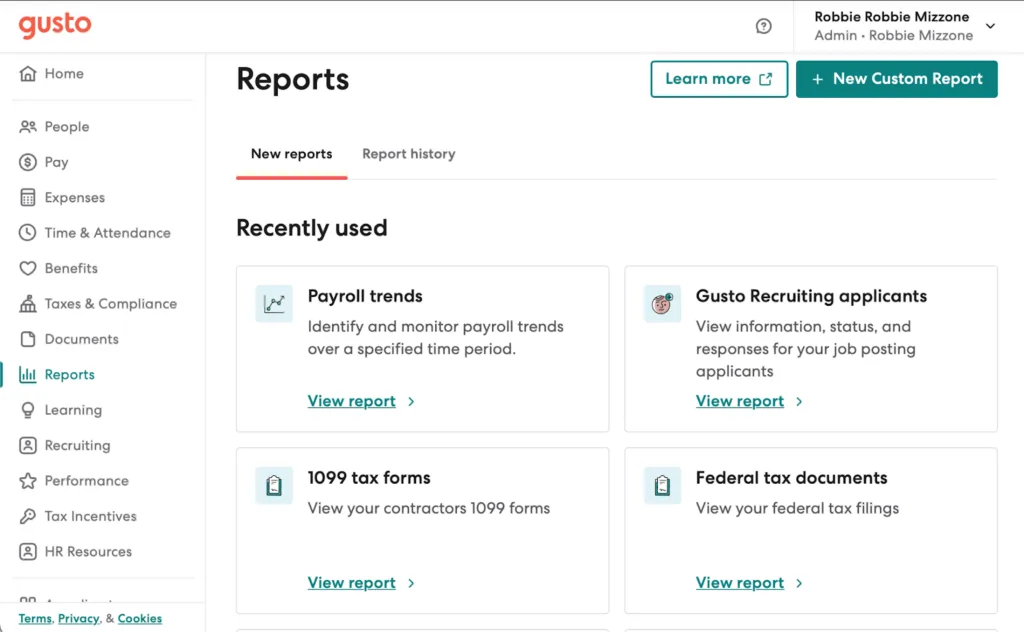
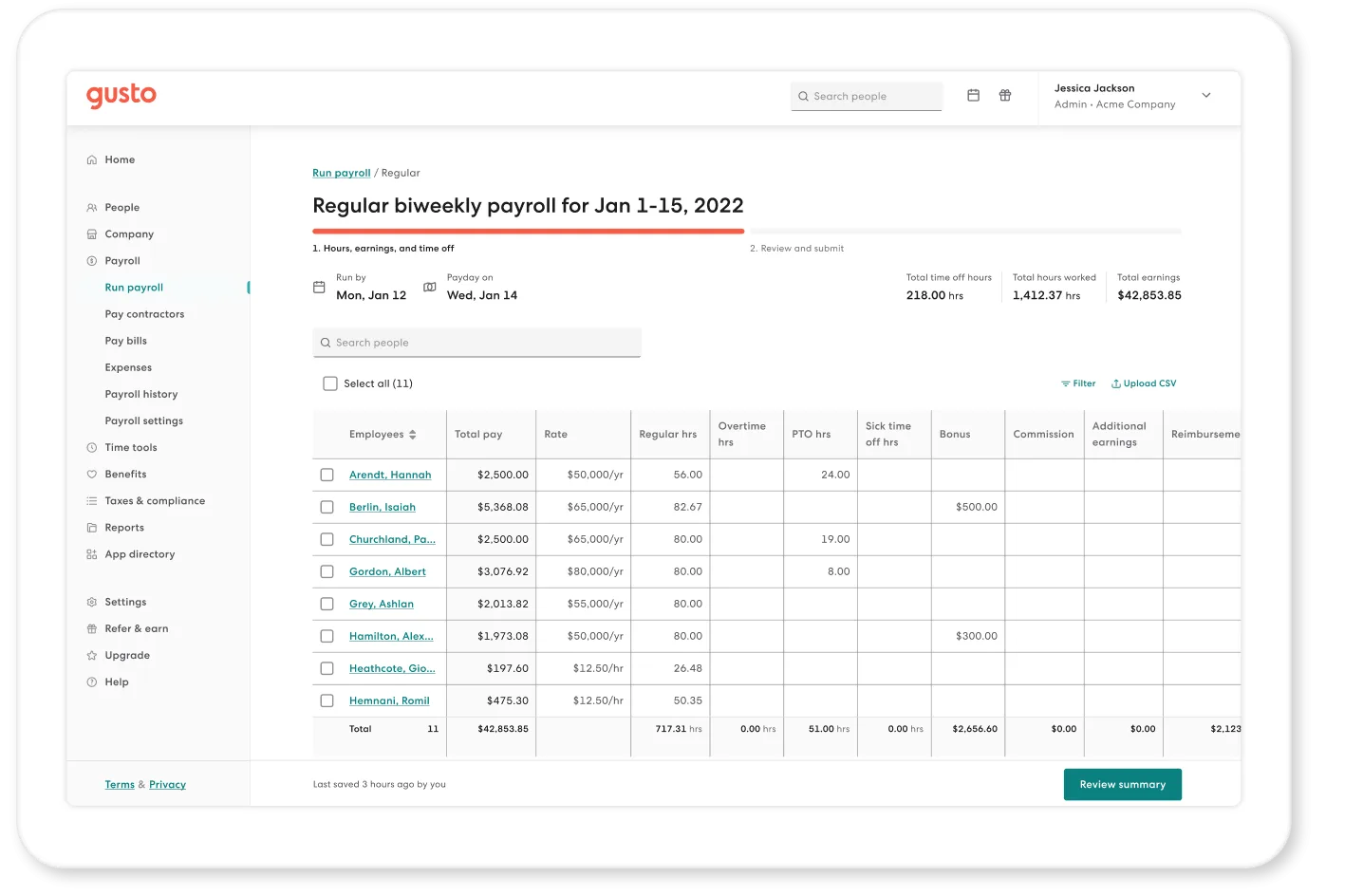
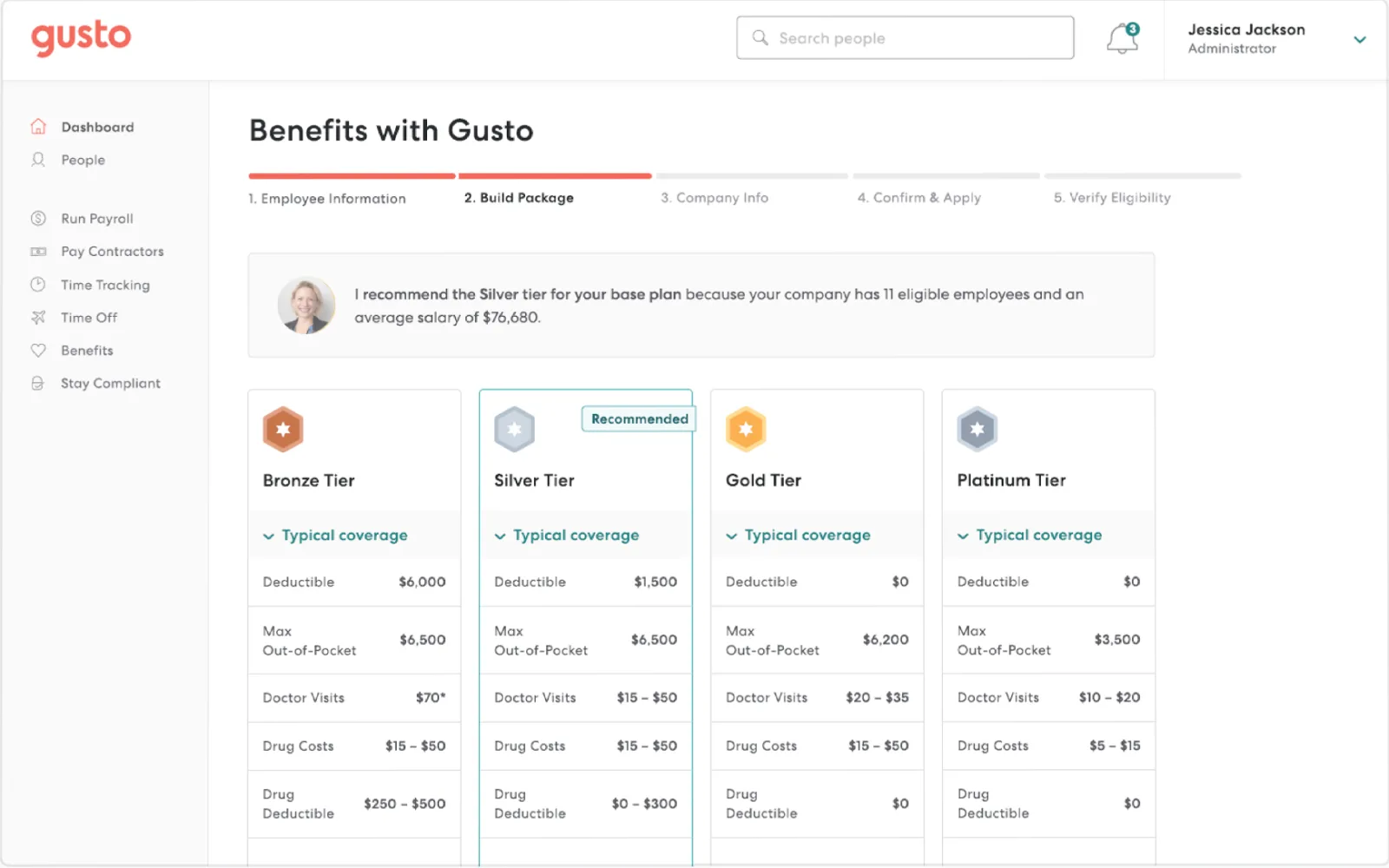
Table of contents
- 1. Gusto Makes Payroll a Manageable Business Process
- 2. How This Gusto Review Was Evaluated
- 3. Payroll Processing and Tax Filings
- 4. Employee Payments and Direct Deposit
- 5. Benefits Administration and Employee Coverage
- 6. Hiring, Onboarding and Employee Records
- 7. Time Tracking, Scheduling and Paid Leave
- 8. Contractor Payments and Mixed Workforces
- 9. HR Support, Compliance and Employee Self Service
- 10. Reporting, Integrations and Financial Records
- 11. Gusto Pricing and Total Cost
- 12. Security, Data Ownership and Operational Risk
- 13. Gusto Alternatives and Final Buying Verdict
- Frequently Asked Questions
1. Gusto Makes Payroll a Manageable Business Process
Gusto is a payroll and HR platform designed primarily for US small businesses that need to pay employees, handle payroll tax filings, manage benefits and complete routine people administration without building a large internal HR function.
Its appeal lies in the operational detail: recurring payroll runs, direct deposit, employee pay statements, tax calculations, onboarding tasks and benefits administration sit within a product built around the needs of employers with limited administrative capacity.
For businesses moving beyond spreadsheets or a basic accountant managed process, Gusto offers a structured way to run payroll and support employees.
Payroll is the clearest starting point.
Employers need to collect accurate employee information, establish pay schedules, record hours or other compensation inputs, calculate deductions and taxes, approve payroll and ensure that employees receive their money.
A reliable platform should make these steps repeatable and provide clear records when a payment, deduction or employee detail needs attention.
Gusto automates many routine parts of that workflow, including payroll tax calculations and filings for supported US businesses.
The wider product adds employee onboarding, time tracking, paid time off, benefits administration, contractor payments, workforce reports and HR support, with availability varying by plan and add on.
That breadth makes Gusto more than a payroll calculator.
It can serve as the administrative layer for a small employer that wants employees to complete tasks themselves instead of sending every question to the owner or bookkeeper.
The product is especially relevant to US businesses with W 2 employees, domestic contractors or a combination of both.
Companies can use Gusto to manage recurring pay cycles, organize employee records and explore benefits options without adopting a large enterprise HR suite.
The value becomes more pronounced when the business needs predictable payroll operations but lacks a dedicated payroll department.
There are limits.
Gusto is designed around US payroll and employment requirements, so international employers must verify coverage rather than assume the platform can run local payroll in every country.
More complicated organizations may also need stronger customization, advanced reporting, specialist workforce scheduling or more elaborate approval structures than a small business focused product provides.
Published prices make initial budgeting easier, but optional services and per employee charges still affect the total.
The sensible buying question is whether Gusto can handle the company's real pay and HR processes at an acceptable total cost.
A business with a straightforward US payroll, standard benefits and a small number of HR workflows may find the product highly practical.
An employer with multiple countries, complex labor agreements or demanding enterprise controls should compare Gusto with broader platforms before committing.
2. How This Gusto Review Was Evaluated
This review examines Gusto's published capabilities, current public pricing and themes in customer feedback.
It does not claim a private hands on test or access to a live payroll account.
That distinction matters because vendor documentation explains how a product is intended to work, while public reviews reflect individual customer experiences shaped by payroll complexity, implementation, support needs and business size.
The evaluation concentrates on decisions that affect actual use.
These include payroll processing, tax filing, employee payments, benefits administration, contractor payments, onboarding, time tracking, employee self service, reporting, customer support and the commercial model.
It also considers where a small business may outgrow the platform or need additional services.
Gusto's published pricing is more transparent than the quote based models used by many larger HR platforms.
The company lists Simple, Plus and Premium plans with a base monthly fee and a per person charge.
This allows employers to estimate a starting cost before speaking to sales, although add ons, state registrations, accelerated payments and other optional services may increase the total.
Customer reviews commonly praise the accessible interface, employee self service and the convenience of managing payroll and benefits in one product.
Other feedback points to limitations when unusual payroll circumstances require manual intervention, when support is slow to respond or when a business needs greater flexibility for complex workflows.
Those observations are useful signals, not universal outcomes.
A small company with one pay schedule may have a very different experience from a business with multiple states, unusual deductions and frequent off cycle payments.
A credible purchasing decision requires more than reading a feature list.
Employers should test representative scenarios, including a new hire, a compensation change, an employee leaving the business, a missed time entry, a benefit deduction and a payroll correction.
They should also check which plan includes each required capability and which services incur additional charges.
The analysis below distinguishes product features from assumptions about outcomes.
Automated payroll can reduce repetitive work, but it cannot correct incorrect employee information without an appropriate process.
Benefits administration can reduce paperwork, but eligibility rules and plan choices still require attention.
Employee self service can reduce routine questions, but staff need clear instructions and a reliable route to help.
The best test is whether Gusto fits the business's actual operating model.
A buyer should be able to explain how payroll is prepared, which tasks employees complete, who approves changes, how exceptions are handled and what the company pays for the resulting service.
Those answers are more useful than a general claim that payroll becomes easier.
3. Payroll Processing and Tax Filings
Gusto's core capability is payroll processing.
Employers configure pay schedules, maintain employee compensation information, enter or import relevant hours and earnings, review payroll and authorize payments.
The platform calculates applicable payroll taxes and supports filing and payment processes for eligible US employers.
Recurring payroll can be run without rebuilding the entire process each time, which is particularly useful for owners who manage payroll alongside sales, operations and customer service.
A well designed payroll workflow should make the ordinary pay period predictable while exposing unusual items for review.
Salary changes, bonuses, reimbursements, overtime, deductions and employee status changes can affect the result.
Gusto supports several common payroll requirements, but employers should verify the exact handling of their compensation types and tax circumstances before relying on automation.
Tax filing is one of the strongest reasons to use a full service payroll platform instead of calculating payroll manually.
Tax rates and filing requirements can vary by jurisdiction and employer circumstances.
Gusto's service is designed to calculate and handle supported payroll tax obligations, reducing the need for owners to track every routine deadline themselves.
That does not eliminate the employer's responsibility to provide accurate information, respond to notices and confirm that the business is configured correctly.
Businesses operating in more than one US state should examine the plan requirements carefully.
Gusto's Simple plan is positioned around single state payroll, while Plus supports multistate payroll.
A company planning to hire its first employee in another state should establish what registration work is needed, which services are included and whether additional fees apply.
The published pricing page lists state tax registration as an add on for certain plans.
Payroll approvals also matter.
The owner or authorized administrator should have an opportunity to check totals, unusual changes and the payroll date before money moves.
A system that automates calculations but encourages users to approve without review can make mistakes harder to catch.
Establish a standard checklist for each pay cycle, even when the software performs most calculations automatically.
The correction process deserves particular scrutiny.
Ask how an employer corrects a missed payment, changes an employee's bank details, reverses an error or handles an off cycle payment.
Confirm whether the action requires support, what deadlines apply and how the correction appears in payroll records.
These details are especially important for companies with hourly employees, commissions or variable compensation.
Gusto's payroll model is strongest when the employer has a predictable US payroll and wants the software to manage routine calculations, filings and payments.
Businesses with highly unusual pay rules or intricate multi entity requirements should demonstrate those scenarios before purchase.
A feature being listed on a plan page does not prove that every special case will be handled without manual work.
4. Employee Payments and Direct Deposit
Paying employees accurately and on time is the most visible outcome of payroll administration.
Gusto supports direct deposit and printable checks, with payment timing and accelerated options depending on the selected plan and service.
For employees, reliable payments and accessible pay statements can be more important than the broader list of HR features.
Direct deposit reduces the need for employers to print and distribute physical checks, while digital pay statements give employees a way to review earnings and deductions.
Employee access can also reduce routine requests to HR or the business owner for copies of previous payroll records.
These benefits are practical, especially for small companies where the same person manages payroll, invoices and day to day operations.
Payment timing should be checked against the business's real schedule.
The company needs to understand when payroll must be approved, when funds are withdrawn and when employees can expect deposits.
A late approval or incorrect bank detail can affect the employee even if the software's normal process works as designed.
Employers should build a clear internal deadline that leaves enough time to review exceptions.
Gusto advertises next day direct deposit with Plus and additional same day or instant pay options in Premium, while some accelerated payment features may be available as paid services on lower tiers.
The exact eligibility and cost should be confirmed on the current pricing page because product terms can change.
A business should not choose a plan based only on the headline payment speed.
It should compare how often accelerated processing is needed, whether the payroll calendar is predictable and what happens when a pay date falls near a holiday.
The cost of an add on may be reasonable for occasional use but less attractive if it becomes a routine part of every payroll cycle.
Employee payment information is sensitive, so access controls also matter.
The organization should limit who can change bank details, compensation and payment instructions.
It should also establish how employees verify changes and what process is followed when an employee suspects that payment information has been altered.
The platform's capabilities should be evaluated alongside the company's internal security practices.
For most small employers, direct deposit and digital pay statements are baseline requirements.
Gusto's value comes from making those tasks part of the recurring payroll workflow.
The best way to validate the experience is to review a sample pay statement, examine employee access and ask how corrections are processed when a payment does not match the approved payroll.
5. Benefits Administration and Employee Coverage
Benefits can be a major administrative burden for a small employer.
Health insurance, retirement plans and other benefits involve eligibility, employee elections, payroll deductions, provider information and ongoing changes.
Gusto offers benefits related services designed to help eligible employers manage selected benefits alongside payroll, subject to availability and the business's location.
The attraction is operational continuity.
When an employee enrolls in a benefit, the employer needs to understand the resulting deduction and how it appears in payroll.
When an employee changes a selection or leaves the company, the business must follow the relevant process and keep records accurate.
Managing those activities through a payroll and HR service can reduce the number of separate administrative systems the owner must coordinate.
Benefits availability depends on the employer's location, plan options and circumstances.
Buyers should ask which insurance products are available in their state, what broker or administrative services are included and whether there are additional charges.
They should also establish which tasks remain with the employer, which are handled by Gusto and which depend on an external insurance provider.
Health insurance is not simply a checkbox on a software plan.
The business must evaluate coverage, premiums, employee contributions, eligibility rules and renewal arrangements.
Employees need clear information to compare options and understand their share of the cost.
Gusto can support administration, but it does not remove the need to select appropriate plans or communicate benefits responsibly.
Retirement benefits should be assessed separately.
Employers need to understand provider options, eligibility, payroll deductions, contribution handling and any additional service fees.
The right setup depends on company size, employee needs and the applicable rules.
A business should not assume that all benefits services are included in the base payroll subscription.
Benefits integration can be particularly useful when employee changes happen frequently.
New hires need to be enrolled at the right time, terminations may require coverage changes and compensation adjustments can affect deductions.
Buyers should ask how these events are represented in the system, what notifications appear and how the employer confirms that the relevant information reached the correct provider.
A good demonstration should include a new employee becoming eligible, an employee changing an election and a departing employee whose benefits need to be reviewed.
Ask who initiates each step, how payroll deductions change and what records the employer can access.
This reveals whether the service will genuinely reduce administrative work or simply move it between screens.
Gusto is most attractive when the business wants benefits administration as part of a broader US payroll workflow.
Employers with specialized benefit structures, unusual eligibility requirements or international coverage should validate the exact service boundaries before buying.
Coverage and pricing are too important to infer from a general platform description.
6. Hiring, Onboarding and Employee Records
Gusto supports hiring and onboarding workflows that help small businesses collect employee information and prepare new hires for their first day.
The practical benefit is consistency.
Instead of sending a new employee a collection of unrelated forms and reminders, an employer can use a defined process to gather information, complete required documentation and prepare the employee record.
A good onboarding process begins before the employee's start date.
The business may need personal details, tax information, payment instructions, signed documents and acknowledgments of workplace policies.
Depending on the role and applicable requirements, additional eligibility checks or forms may be necessary.
The employer should confirm which parts of this process Gusto supports directly and which require an external service.
The transition from candidate to employee is a useful test of the platform.
Ask how a candidate becomes a new hire, which details transfer into the employee record and what information must be entered again.
Repeated entry creates opportunities for errors, especially when a business hires several employees at once.
A structured onboarding workflow should make incomplete tasks visible and help the employer identify what remains outstanding.
Employee records are equally important after onboarding.
Employers need accurate information about compensation, job status, payment details and other relevant employment data.
Gusto can help centralize information associated with payroll and HR administration, but the company still needs to maintain clear ownership of its records.
Someone should be responsible for checking changes, confirming approvals and resolving discrepancies.
Access permissions should reflect the small business's structure.
A business owner may need broad access, while a manager may only need selected employee information.
Employees should be able to access their own pay information and complete permitted tasks without seeing confidential details belonging to colleagues.
Buyers should test the available permissions and determine whether they support the organization's internal responsibilities.
Hiring workflows should also be assessed for recruitment depth.
A small company that hires occasionally may need a straightforward process to publish jobs, collect applications and prepare offers.
A company recruiting hundreds of candidates across several locations may need specialist applicant tracking, advanced candidate search, complex interview coordination and recruitment analytics.
Gusto's hiring capabilities should not be assumed to replace every dedicated recruitment system.
Onboarding is successful when the employee understands what to do and the employer can see whether required tasks are complete.
Ask how reminders work, how missing information is handled and whether the process can be adjusted for different job types.
If the company has multiple locations or distinct onboarding requirements, demonstrate each relevant workflow before choosing a plan.
7. Time Tracking, Scheduling and Paid Leave
Time tracking becomes important when employee pay depends on hours worked, overtime, projects or different schedules.
Gusto offers time and attendance capabilities, including time tracking, scheduling and related workflows, with availability depending on the selected plan or add on.
These features can help employers move away from manually collecting hours and retyping them into payroll.
The quality of time data directly affects payroll.
A missed clock in, an incorrect time entry or a late approval can change the amount an employee receives.
Employers need a clear process for employees to submit corrections and managers to approve them before the payroll cutoff.
A system that captures hours but leaves exceptions unresolved still requires substantial manual administration.
Scheduling is useful for businesses that organize shifts or need to coordinate employee coverage.
Managers may want to see who is scheduled, identify gaps and respond when an employee cannot work a shift.
Gusto's Plus plan advertises time tracking and scheduling, while the company's Time and Attendance Plus add on includes additional time management functions.
Buyers should verify the precise features included in their proposed subscription.
Overtime and break rules require careful evaluation.
The employer should determine whether the product supports the applicable rules for its workforce and whether exceptions are flagged before payroll.
Businesses with different pay rates, job codes or locations should test those cases directly.
A generic time clock demonstration does not prove that the system can handle every labor policy.
Paid time off is another important part of employee administration.
Staff need to request leave, managers need to approve it and the business needs to maintain accurate balances.
Leave policies may include accruals, carryover limits, different employee eligibility and specific holiday arrangements.
Employers should verify how Gusto represents their policies and whether employees can see the information they need.
The link between time records and payroll is a major part of the business case.
If approved hours can be used in payroll without repeated manual entry, the company may save time and reduce transcription errors.
However, it still needs to verify that hours are assigned to the right employee, the correct pay rate is applied and approvals are complete.
Before purchasing, ask the vendor to demonstrate a full example involving a missed clock entry, a manager approval, overtime and a leave request during the pay period.
Check what the employee sees, what the manager must do and how the final hours appear in payroll.
These scenarios will reveal whether the workflow is appropriate for the company's operations.
8. Contractor Payments and Mixed Workforces
Many small businesses use both employees and independent contractors.
Their payment and reporting requirements differ, so the payroll platform must support the relevant workflows without confusing the two arrangements.
Gusto offers domestic contractor payments and contractor invoice management, with capabilities depending on the plan selected.
For a business that pays contractors regularly, a structured process can reduce the effort required to collect payment details, prepare transactions and maintain records.
Contractor invoices and payment information should be organized so the employer can determine which amounts have been approved and whether the payment has been completed.
The business also needs to preserve the information required for its accounting and tax processes.
The distinction between employees and contractors is important.
The software can help administer payments, but it does not determine whether a working relationship is legally classified correctly.
Employers must evaluate the actual arrangement under the rules that apply to their jurisdiction.
A contractor payment feature should never be treated as a substitute for proper classification advice.
Gusto's published plan comparison indicates that domestic contractor payments are available across its main payroll plans, while contractor invoice upload is included in Plus and Premium rather than Simple.
Global contractor payments are offered as an add on.
The business should check the current conditions, eligible countries and transaction costs before relying on this capability.
Businesses paying contractors in other countries need particular care.
Cross border payments may involve exchange rates, local reporting requirements, payment methods and additional fees.
A platform that supports global contractor payments is not necessarily a full international payroll service for employees.
Buyers should establish the distinction clearly and verify which country combinations are supported.
Mixed workforces also affect reporting.
The company may need to understand total labor cost while keeping employee payroll and contractor payments correctly categorized.
Accounting mappings and exports should be tested so that payment data reaches the relevant financial records.
If contractors submit invoices through a separate tool, the employer should confirm whether the integration is included or requires additional work.
Gusto is a practical option for businesses with a straightforward combination of US employees and contractors.
Companies with complex contractor networks, extensive international payments or demanding vendor management processes should assess whether the available workflow is sufficient.
The right decision depends on the number of contractors, payment frequency, geography and the reporting information the business needs.
9. HR Support, Compliance and Employee Self Service
Small businesses often lack a dedicated HR department.
The owner, office manager or bookkeeper may handle payroll questions alongside other responsibilities.
Gusto's employee self service features and HR support options can reduce the burden of routine administration by giving employees access to relevant information and helping employers find answers to common questions.
Employee self service is useful when workers can access pay statements, complete onboarding tasks and manage permitted personal information without asking an administrator to perform every action.
This saves time only when the interface is clear and employees understand which tasks they can complete themselves.
If the process is confusing, the company may continue receiving the same requests through email and phone calls.
Support is especially important when payroll or compliance issues arise.
A business may need help interpreting an error, correcting a payroll entry or understanding a notice.
Gusto offers different levels of support depending on the plan, with Premium advertising priority support and access to certified HR experts.
Employers should confirm the exact service, availability and limitations included in the quote.
Customer feedback on support is mixed.
Some reviewers describe helpful service and an easy overall experience, while others report long waits or difficulty resolving unusual cases.
These experiences suggest that buyers should consider support as part of the product evaluation rather than assume every issue will be resolved quickly.
A business with straightforward payroll may rarely need specialist help, while a company with unusual pay circumstances may depend on responsive assistance.
Compliance tools can help employers organize tasks and manage selected administrative requirements.
Gusto's product offering includes services such as state tax registration and business compliance tools, with availability and fees varying by plan.
These services can be useful when a company expands into another state, but the employer should confirm which registrations are handled and which remain its responsibility.
The company should also understand the limits of general HR guidance.
Software based resources and access to HR experts may help with common questions, but they do not necessarily replace legal advice for a complicated employment dispute or a jurisdiction specific issue.
Employers should know when to escalate a question to a qualified professional.
Before choosing a plan, ask how support is accessed, what hours apply, whether phone or chat options are available and how urgent payroll issues are prioritized.
Confirm whether a dedicated advisor is included and whether implementation or migration assistance carries separate terms.
These details can matter more than a small difference in the monthly subscription price.
10. Reporting, Integrations and Financial Records
Payroll data has value beyond paying employees.
Business owners may need to understand labor costs, compare payroll periods, reconcile expenses and prepare accounting records.
Gusto offers payroll and workforce reports, with additional reporting capabilities depending on the plan.
Plus and Premium include broader workforce cost reporting, while Premium advertises advanced analytics and custom reporting.
For a small company, standard reports may cover most routine requirements.
Payroll summaries, tax information, employee payment records and workforce costs can support bookkeeping and business planning.
The important question is whether the reports provide the fields and level of detail the accountant needs.
A report that looks clear in a demonstration may still be insufficient for a specific accounting workflow.
Integration with accounting software can reduce duplicate entry and make reconciliation easier.
Buyers should establish which accounting products are supported, what data moves between systems and whether the connection is included in the subscription.
They should also ask how corrections are reflected and what happens when a transfer fails.
Do not assume that every integration behaves in the same way.
A direct connection may synchronize data automatically, while another workflow may rely on exports or a partner service.
The difference affects maintenance, error handling and the time required to close the books.
Before purchasing, map the data flow from approved payroll through the accounting records and identify who is responsible for reconciliation.
Custom reporting deserves attention when management needs to analyze labor costs by project, location or department.
The business should test whether those categories can be captured consistently and whether the selected plan supports the required report.
If the company must export data and rebuild a spreadsheet every week, it should include that effort in the value calculation.
Data quality determines the reliability of every report.
Employee classifications, compensation rates, hours, deductions and department assignments must be maintained consistently.
If the source records are wrong, the report may be internally consistent but still misleading.
A small business should establish a simple review process for employee changes and payroll adjustments.
Security is also relevant to financial reporting.
Payroll reports can contain sensitive compensation and personal information, so access should be restricted to authorized users.
Ask how administrator roles are managed, how report access is controlled and what audit information is available.
The business should also confirm how payroll records can be exported if it later changes providers.
Gusto's reporting and integration capabilities are likely to suit businesses with standard accounting workflows and moderate reporting requirements.
Organizations that depend on advanced financial modeling, extensive custom data pipelines or complex enterprise resource planning integrations should test the exact workflow before choosing the platform.
11. Gusto Pricing and Total Cost
Gusto publishes a base subscription fee plus a per person charge for its main payroll plans.
The current official US pricing page lists Simple at $49 per month plus $6 per person, Plus at $80 per month plus $12 per person and Premium at $180 per month plus $22 per person.
These figures establish a starting point, not a guarantee of the final bill.
Additional services, state registration, payment options and other requirements may add cost.
Simple is designed for small businesses that need full service payroll in one state.
It includes unlimited payroll runs, tax filings and payments, direct deposit or printable checks, employee self service and basic paid time off policies.
For a company with a straightforward payroll schedule, it may provide the essential services without requiring a higher tier.
Plus is positioned for employers that need more extensive payroll and workforce management.
It adds multistate payroll, next day direct deposit, time tracking and scheduling, and additional hiring and onboarding capabilities.
The plan may make sense when the company operates in several states or needs time and attendance workflows alongside payroll.
Premium targets businesses that want a broader support experience and more advanced HR capabilities.
It includes a named service advisor, access to certified HR experts, performance management, advanced analytics and custom reporting, along with priority support and migration services.
Employers should still confirm the specific terms of support and any limitations relevant to their needs.
Gusto also offers a contractor focused plan for businesses that pay independent contractors without W 2 employees.
The public pricing page has shown promotional pricing for that option, so buyers should verify the current offer and its conditions rather than assume the displayed introductory rate is permanent.
Contractor payment requirements and global payment options should be priced separately where applicable.
The total cost depends on the size of the workforce and the features the business needs.
For example, a company with ten employees on Simple would calculate the base subscription and per person charges, then add any required services.
A company that needs multistate payroll, time tracking and additional compliance support should price those requirements before deciding that one plan is cheaper than another.
Employers should also consider internal time.
A low subscription price is less attractive if the payroll process still requires substantial manual reconciliation.
Conversely, a higher tier may be justified if it replaces separate tools, reduces recurring administrative work and provides support the company would otherwise purchase elsewhere.
These savings should be estimated realistically rather than treated as guaranteed results.
Before committing, ask for a written confirmation of the selected plan, included features, add ons, transaction charges and service limits.
Confirm whether prices change with employee count, how billing works for inactive employees and what happens when the company adds another state.
Review the cancellation terms and data export options so the business understands its obligations if it later switches providers.
12. Security, Data Ownership and Operational Risk
Payroll platforms hold information that should be handled carefully, including employee compensation, tax details, payment instructions and personal records.
Security is therefore part of the buying decision, even for a small business.
Employers should review Gusto's current security documentation, authentication controls, data handling terms and incident response commitments before uploading sensitive information.
Access should be restricted according to responsibility.
A business owner may need access to payroll totals and employee records, while a manager may only need information relevant to their direct reports.
Employees should be able to access their own pay information without seeing confidential records belonging to other workers.
Buyers should verify how roles and permissions can be configured for their business.
Payroll changes also need oversight.
A change to an employee's bank details, pay rate or tax information can affect a payment.
The business should define who can make these changes, whether approval is required and how suspicious or incorrect changes are reviewed.
Software controls are most effective when they support clear internal procedures.
Data ownership and portability should be considered before signing.
Employers should ask how payroll reports, tax records and employee information can be exported if they leave the platform.
They should also understand what records remain available after cancellation and which retention obligations apply.
A migration plan should identify the information that must be preserved for accounting, tax and employment records.
Operational continuity is another consideration.
If the payroll administrator is unavailable near payday, someone else should know how to review payroll, approve payments and contact support.
Businesses should document their payroll calendar, responsibilities and escalation process rather than rely on one person's memory.
A platform can simplify routine work, but it does not remove the need for continuity planning.
Employers should also plan for service interruptions or unusual processing problems.
Ask how urgent issues are reported, whether payroll deadlines can be met during an incident and what information the company should retain independently.
These questions are standard procurement diligence, not evidence that a particular provider has failed.
For a small business, the appropriate approach is to combine the platform's controls with simple internal governance.
Limit access, review important changes, reconcile payroll and preserve the records the company needs.
This discipline makes it easier to benefit from automation without assuming that software alone eliminates payroll risk.
13. Gusto Alternatives and Final Buying Verdict
Gusto should be compared with platforms that address the same operational need, but the strongest alternative depends on whether the buyer prioritizes US payroll, broad HR administration, employee experience, workforce management or enterprise level controls.
Four useful comparisons are Paylocity, HiBob, Breathe HR and Paycom.
They serve different markets and should not be treated as identical replacements.
Paylocity is worth evaluating when the company needs broader HR and payroll operations, workforce management, compliance workflows and support for a more complex employee lifecycle.
Its published product offering includes payroll, human resources, time and attendance, talent management and global payroll support.
Employers should request a customized quote and compare the actual modules, implementation responsibilities and reporting capabilities with the Gusto package.
HiBob is a relevant alternative for organizations that place greater emphasis on people operations, employee lifecycle workflows, engagement and HR data.
It may be a better fit when HR needs extend beyond basic payroll administration into structured talent processes and broader workforce management.
Buyers should confirm how payroll is delivered in their jurisdiction and which functions require external integrations or separate providers.
Breathe HR is particularly relevant to UK small and midsized businesses seeking straightforward HR administration.
Its published offering includes holiday and absence management, document and policy management, performance management and reporting, with optional modules for recruitment, learning, expenses and time and attendance.
Public pricing starts at £24 per month for a business with one to ten people, excluding VAT, while add ons can increase the total.
Breathe HR should not be assumed to replace a full US payroll service.
Paycom is a broader HCM option for employers looking to combine payroll, talent acquisition, time and labor management, talent management and HR administration in one platform.
It uses customized pricing based on the tools and services required.
A company with more complex processes may value the breadth, while a small business with straightforward payroll may prefer Gusto's published pricing and simpler buying process.
The comparison should begin with geography.
Gusto is centered on US payroll and employment workflows.
Breathe HR is positioned strongly for UK SMEs and core HR administration.
Paylocity and Paycom are broader HCM providers, while HiBob focuses on people operations and HR workflows.
A buyer should first eliminate options that do not support its legal and operational requirements.
Next, compare the actual process rather than the marketing description.
Ask each vendor to demonstrate onboarding, payroll changes, employee leave, reporting and the correction of a payment error.
If time tracking is essential, include a missed punch and an overtime example.
If benefits are central, test eligibility changes and deductions.
If HR analytics matters, request a report that uses the company's real dimensions.
Finally, compare total cost over the intended contract period.
Include subscription fees, per employee charges, add ons, implementation, training, integration maintenance and internal administrative time.
A vendor with a higher monthly fee may still offer better value if it removes several existing tools.
A cheaper platform may be more appropriate when the company only needs a few well defined workflows.
Gusto is a strong choice for US small businesses that want payroll, tax filings, employee payments and practical HR functions in a product with published pricing.
Its value is clearest when the company has relatively standard payroll needs and wants to reduce the burden of recurring administration.
The higher plans add time tracking, more HR capabilities and stronger support options.
The main limitations are the US centered service model, the cost of optional features and the possibility that unusual payroll or complex workflows require additional effort.
Businesses that need extensive international operations, deep enterprise customization or advanced workforce management should compare broader platforms before deciding.
Choose Gusto when the payroll process is central, transparent pricing matters and the required workflows fit the available plans.
Choose Paylocity or Paycom when a broader HCM environment deserves closer evaluation, HiBob when people operations are a priority, and Breathe HR when UK focused HR administration is the main requirement.
The final decision should follow a scenario based demonstration, a complete quote and a clear understanding of which responsibilities remain with the employer.
Pricing note: These are the published US base prices found during research. Each plan adds a per person fee. Optional services, including selected time and attendance, compliance, payment speed and contractor services, may increase the total. Verify current prices, eligibility and terms before purchasing.
Key features
- Automated US payroll tax calculations
- Federal and state tax filings
- Unlimited payroll runs monthly
- Direct deposit and printable checks
- Employee pay statements and portals
- Contractor payment administration workflows
- Multi state payroll processing
- New employee onboarding and documentation
- Employee personal information management
- Health benefits administration options
- Retirement benefits administration options
- Paid time off policies
- Employee time tracking and scheduling
- Workforce cost reporting tools
- Hiring and onboarding workflows
- Multiple employee pay rates
- Payroll approval and review workflows
- Expense reimbursement management capabilities
- Global contractor payment options
- HR guidance and expert support
- Premium service advisor access
- Advanced analytics and custom reports
- Employee mobile app access
- Business compliance support tools
- Accounting integrations and payroll records
Pricing
- Single state full service payroll
- Unlimited monthly payroll processing runs
- Tax filings and payments
- Direct deposit or printable checks
- Basic paid time off policies
- Everything included in Simple
- Multistate payroll and tax support
- Time tracking and employee scheduling
- Hiring and onboarding tools
- Next day direct deposit
- Everything included in Plus
- Dedicated service advisor access
- Certified HR expert guidance
- Advanced analytics and custom reporting
- Priority support and migration services
Pros & cons
Pros
- Published pricing supports budget planning
- Automated payroll tax filings
- Unlimited payroll runs monthly
- Direct deposit and digital pay statements
- Employee self service reduces routine requests
- Benefits administration options available
- Multi state payroll in Plus
- Contractor payments within payroll workflows
- Time tracking and scheduling options
- Clear tiers for different needs
- Premium includes dedicated service advisor
- Custom reporting available in Premium
- HR guidance available in Premium
- Payroll and HR in one account
Cons
- Primarily designed for US payroll
- Monthly fees increase per employee
- Several useful functions cost extra
- Simple plan limits multistate payroll
- Complex payroll may require manual intervention
- Customer support feedback is mixed
- Advanced reporting requires Premium
- Global contractor payments cost extra
- International employee payroll requires verification
- Unusual workflows may lack flexibility
- Benefits availability varies by location
- Time tracking may need an add on
- Compliance services can add costs
Gusto specs
- Platforms: Web browser, iOS and Android apps
- Free plan: No, contractor promotions may vary
- Starting price: $49 monthly plus $6 per person
- Integrations: Accounting, benefits and business applications
- Support: Online support, premium options by plan
- Best for: US small businesses and employers
Our verdict
Gusto is a strong payroll and HR choice for US small businesses that need recurring payroll, tax filings, direct deposit and employee self service without building a large administrative team. Its published pricing helps owners estimate costs, while Plus and Premium add time management, more HR capabilities and stronger support. The main caveats are the additional charges for selected services, mixed feedback about support and the need to validate unusual payroll scenarios. Businesses with standard US payroll should shortlist Gusto, while organizations with extensive international operations or complex HCM requirements should compare Paylocity, HiBob, Breathe HR and Paycom before committing.
Contact SalesFrequently Asked Questions
How much does Gusto cost?
Is Gusto good for small businesses?
Does Gusto handle payroll taxes?
What are the best Gusto alternatives?
Does Gusto support international payroll?
Reader reviews
Be the first to review
