Housecall Pro Review 2026: What Contractors Get for Their Money

By Eva Elekcha & Noura Mint Ely · Reviewed by Evander Thorne
Housecall Pro is field service management software for contractors who need to book jobs, dispatch technicians, prepare estimates and collect payments.
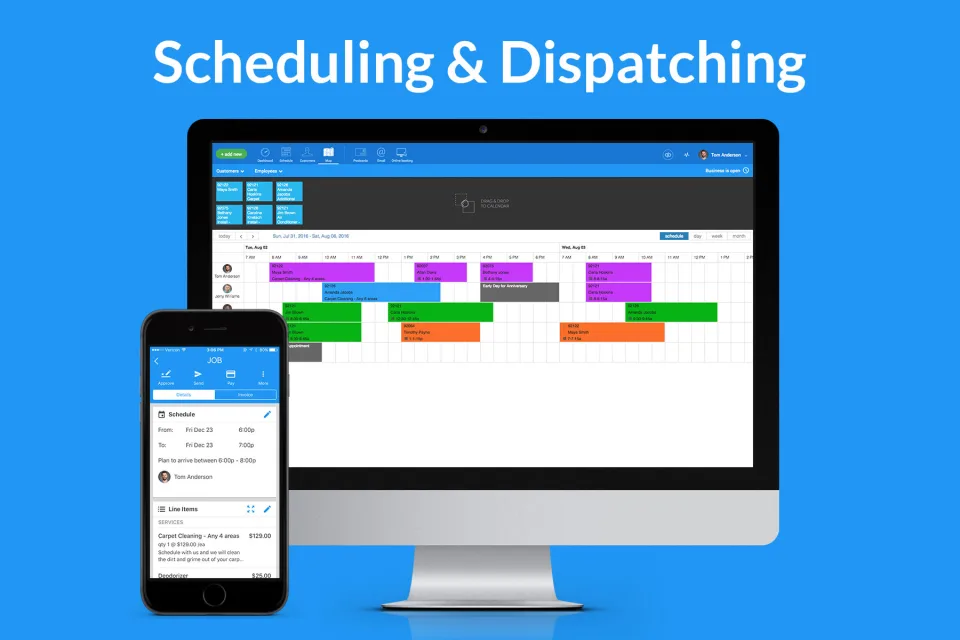
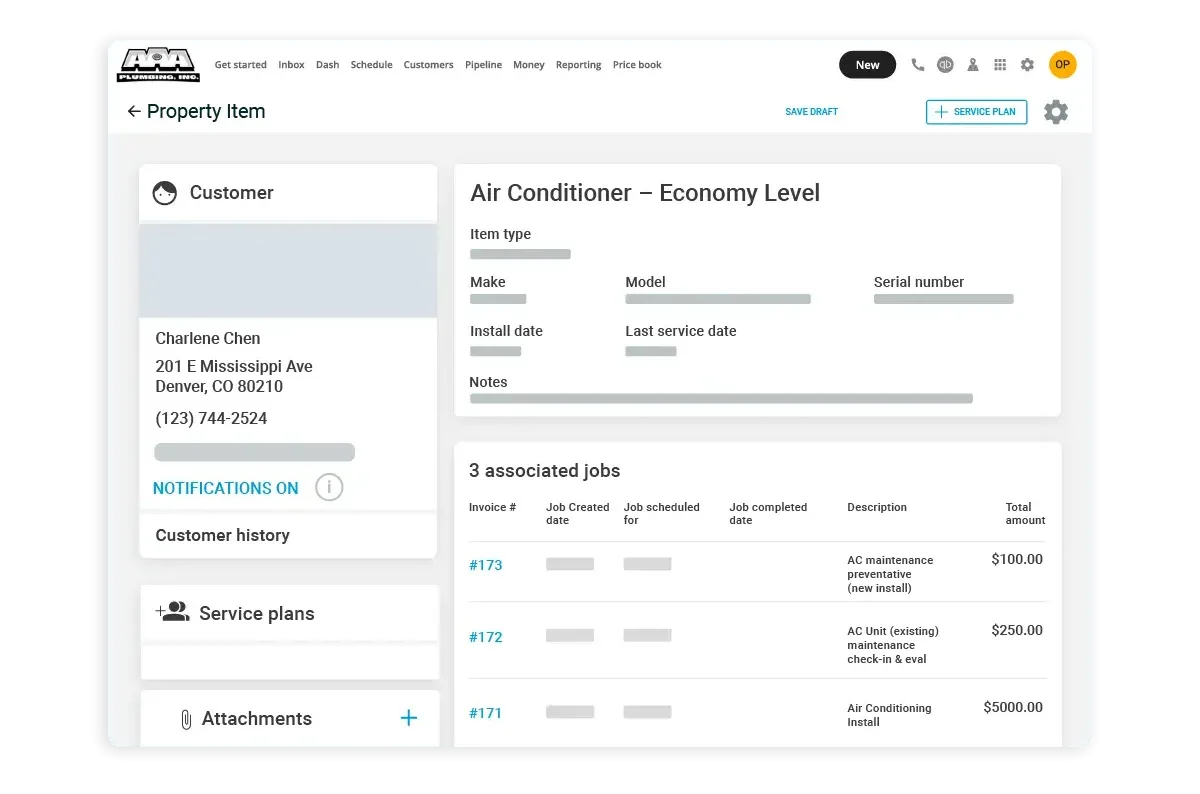
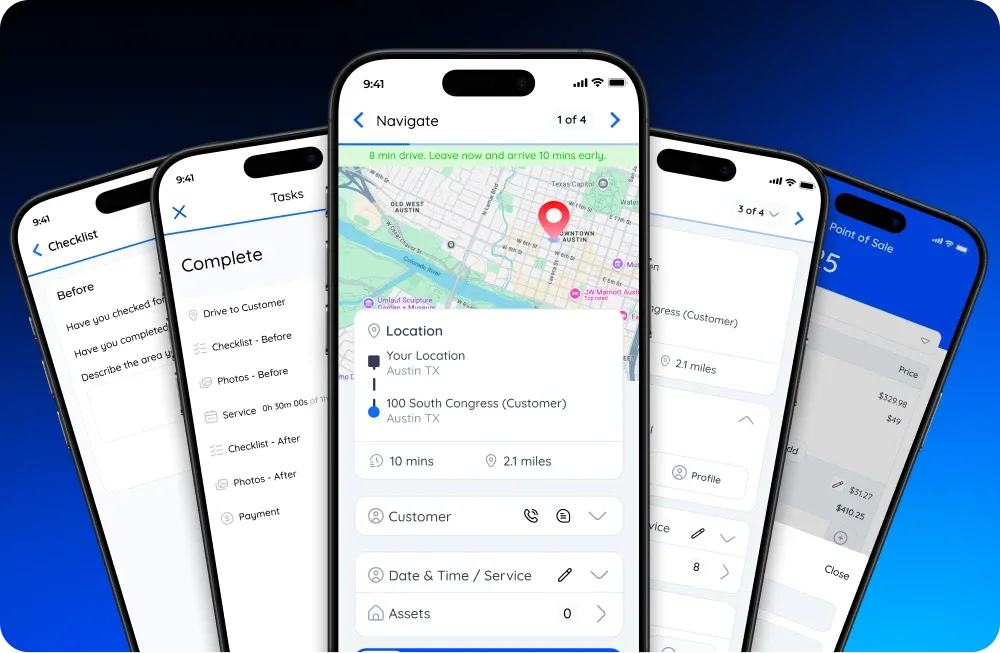
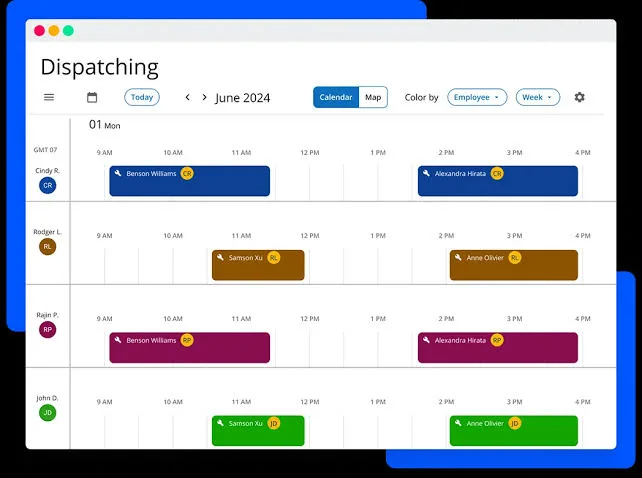
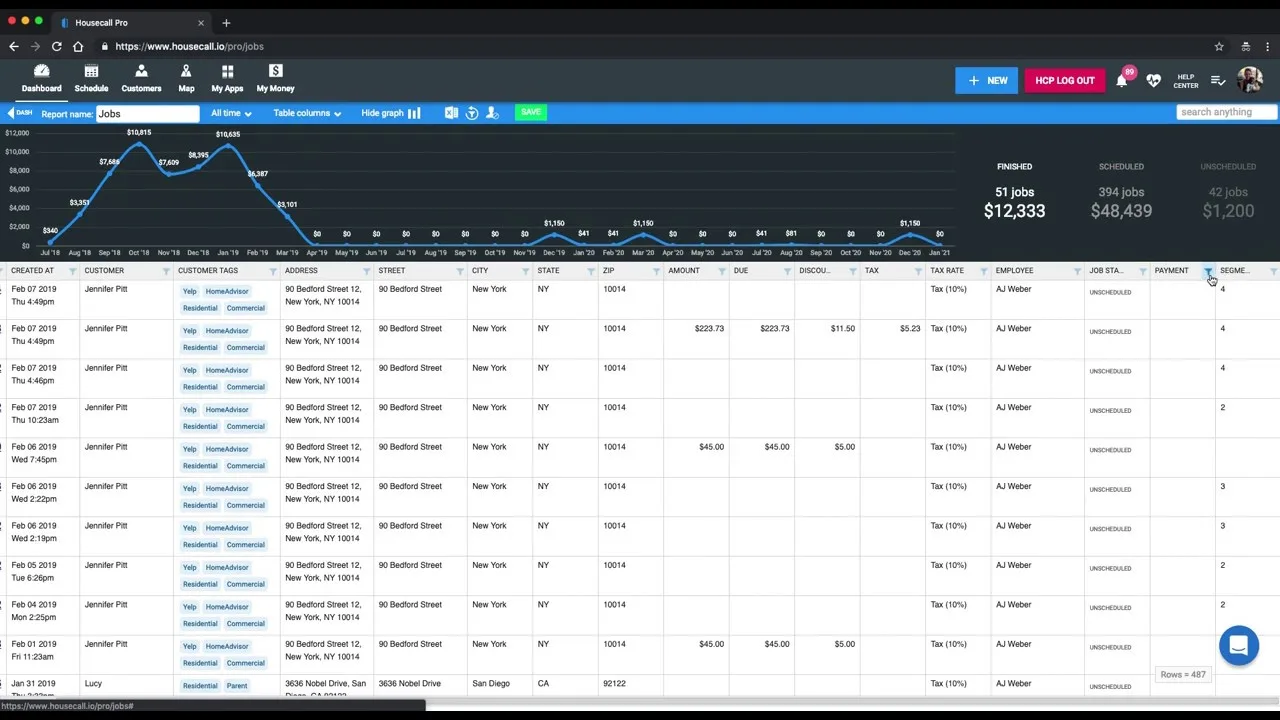
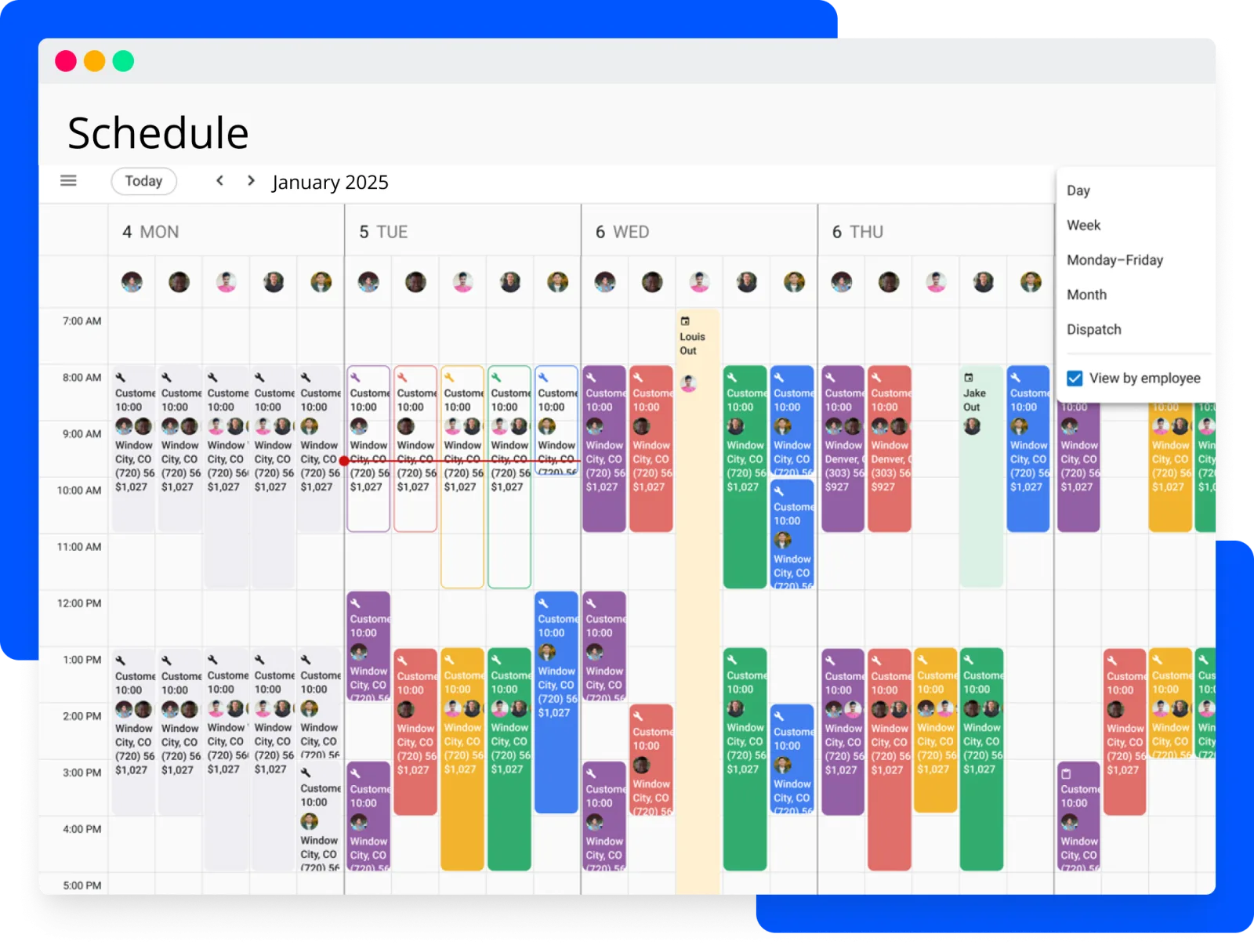
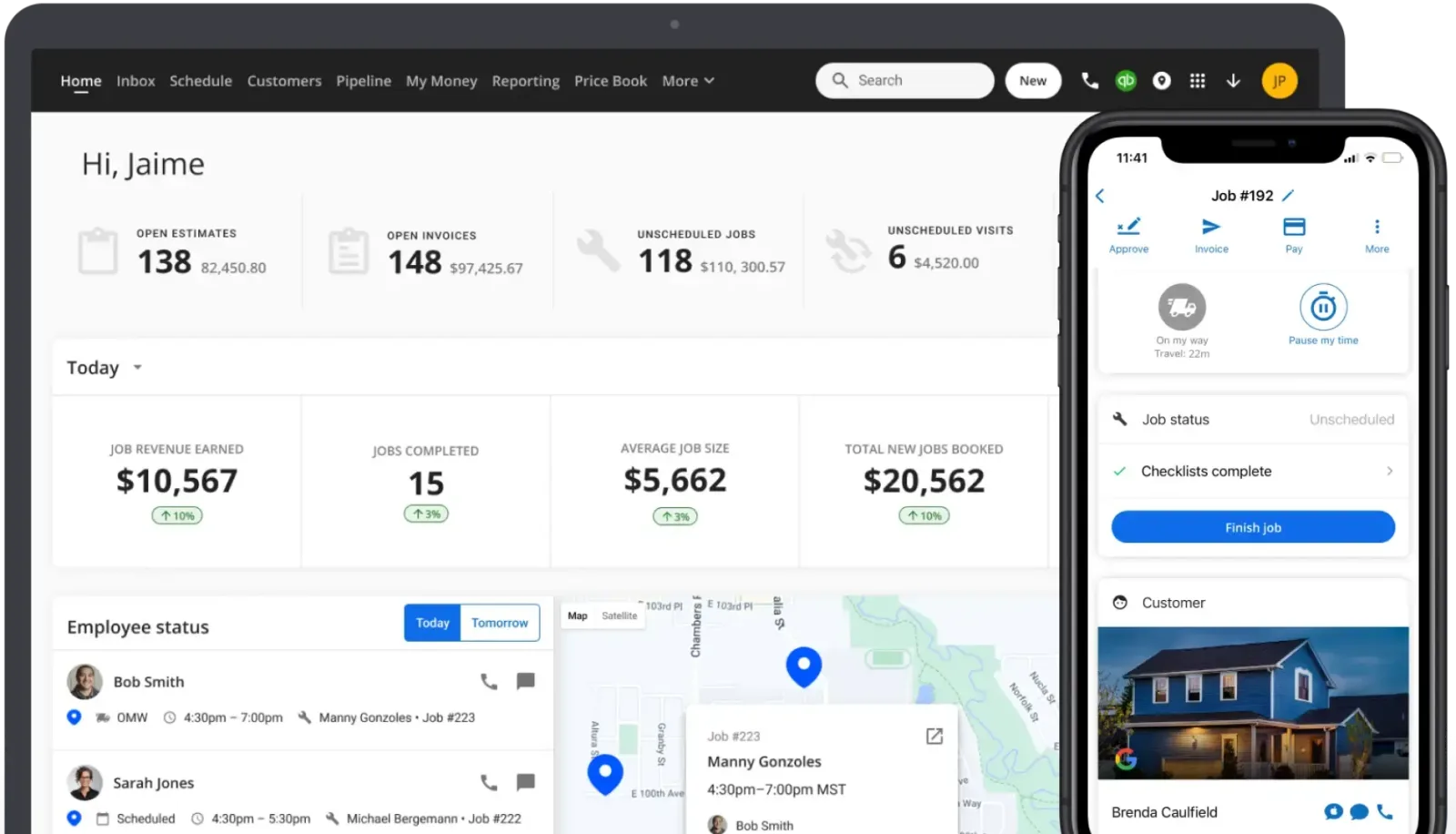
Table of contents
- 1. Housecall Pro Is Field Service Software
- 2. The Business Problems It Addresses
- 3. How We Evaluated Housecall Pro
- 4. Customer Booking And Lead Capture
- 5. Scheduling Around Real Work
- 6. Dispatch And Technician Allocation
- 7. Route Planning And Travel Time
- 8. Estimates And The Price Book
- 9. Job Records And Property History
- 10. Mobile Work For Technicians
- 11. Invoicing And Payment Collection
- 12. QuickBooks And Accounting Workflows
- 13. Job Costing And Profit Reports
- 14. Recurring Jobs And Service Agreements
- 15. Customer Communication And Reviews
- 16. Employee Management And Time Tracking
- 17. Plans And The Real Cost
- 18. Housecall Pro Versus Jobber
- 19. ServiceTitan And Specialist Alternatives
- 20. Implementation And Staff Adoption
- 21. Support And Subscription Risks
- 22. Data Protection And Access Control
- 23. Who Should Choose Housecall Pro?
- 24. Housecall Pro Review Verdict
- Frequently Asked Questions
1. Housecall Pro Is Field Service Software
Housecall Pro is field service management software built for businesses that send technicians to customers' homes and properties.
Plumbers, HVAC contractors, electricians, cleaners and other service professionals use it to manage bookings, assign jobs, prepare estimates, issue invoices and collect payments.
The platform also includes customer communication, price books, job costing, reporting and tools for coordinating employees in the field.
Its main appeal is practical: a contractor can manage much of the work between a customer's first enquiry and the final payment without moving between several disconnected applications.
That definition matters because Housecall Pro is often described as an all in one business platform.
The phrase sounds impressive, but it does not tell a contractor whether the software can handle the actual demands of a working service company.
The important questions are more specific.
Can the office assign an urgent repair without losing track of existing appointments?
Can a technician prepare an estimate at the property?
Can the customer approve the work and pay the invoice?
Can the owner see whether the job made money?
Housecall Pro is designed to support those activities through connected customer, job and payment records.
A booking can become a scheduled job.
The job can be assigned to a technician.
The technician can access its details, record work and prepare an estimate.
Once the work is approved and completed, the business can issue an invoice and collect payment.
Information from the process remains associated with the customer and the job.
For a small contractor, this can replace a patchwork of calendar entries, text messages, paper work orders and manually prepared invoices.
For a company with several technicians, the bigger question is whether the scheduling, dispatch and reporting tools are sufficiently capable to coordinate the entire team.
Housecall Pro is not a general accounting system, a full enterprise resource planning platform or a specialist construction project management application.
Its strongest use case is the day to day administration of residential and local field services.
That distinction should guide the purchase decision from the beginning.
2. The Business Problems It Addresses

A field service company has two working environments.
There is the office, where customer enquiries, appointments, prices and payments are managed.
Then there is the field, where technicians travel, inspect problems, perform work and communicate with customers.
When these environments rely on separate systems, information gets lost between them.
Consider a plumbing company receiving a call about a leaking pipe.
Someone in the office records the customer's address, asks about the problem and finds an available technician.
The appointment is written into a calendar.
The technician receives the details through a message.
After arriving, the technician discovers that the repair requires additional parts and labour.
The office prepares a revised estimate, the customer approves it, and an invoice is eventually issued.
Every handoff creates an opportunity for mistakes.
The address may be entered incorrectly.
The technician may receive an incomplete description.
The revised price may not reach the office.
The invoice may be delayed because the paperwork is still in the vehicle.
Housecall Pro brings these activities into a shared operational record.
The purpose is to reduce repeated data entry and make it easier for office staff and field employees to work from the same job information.
The same problem appears in other trades, although the details differ.
An HVAC contractor may need to coordinate maintenance appointments, equipment information and follow up repairs.
An electrician may need to document the work performed and obtain approval for additional services.
A cleaning company may need to organize recurring visits across several properties.
The software is most useful when a company has enough recurring administration to justify a dedicated system, but does not need the complexity of a large enterprise platform.
A solo technician can benefit from organized estimates and invoices.
A small office team can benefit from shared scheduling.
A larger contractor needs to investigate the depth of dispatch, reporting, permissions and integration capabilities before adopting it.
There is also a limit to what software can solve.
Housecall Pro cannot compensate for poor scheduling policies, inaccurate service prices, weak employee training or a lack of financial controls.
It gives a company tools to manage those processes.
Management still has to define how the work should be performed.
3. How We Evaluated Housecall Pro
This review examines Housecall Pro using its official product and pricing information, published help documentation, integration details and independent customer feedback.
Product capabilities are distinguished from customer experiences and from our own assessment of their practical implications.
A feature appearing on a vendor page does not prove that it will suit every company's workflow.
The official feature pages and help centre are useful for understanding how the platform is intended to work.
The public pricing page establishes the advertised subscription structure, while independent review platforms provide insight into usability, support and recurring customer concerns.
Capterra's review page showed a 4.7 out of 5 rating from 2,748 reviews in the research snapshot.
Its published feedback includes positive comments about scheduling, invoicing and ease of use, alongside criticism of interface changes, pop ups, reporting and workflow interruptions.
Trustpilot showed a 2.9 out of 5 score from 705 reviews, with recent complaints involving support, billing, navigation and messaging.
These scores measure different reviewer populations and should not be treated as directly comparable product benchmarks.
The Better Business Bureau complaint page also lists customer disputes involving billing and product issues.
Complaint records are not a measure of the proportion of customers affected, but they are relevant when assessing the administrative risks of a subscription.
Businesses should pay particular attention to billing terms, cancellation procedures and written confirmation of account changes.
Better Business Bureau
This is a research based product review, not a claim that a private Housecall Pro account was used to conduct controlled performance tests.
Where the assessment concerns a workflow that varies by business, the review explains what a buyer should verify during the trial.
That is more useful than presenting an unverified assumption as a hands on finding.
4. Customer Booking And Lead Capture
Housecall Pro provides online booking tools that allow customers to request services without having to telephone the business.
A company can use this capability to accept booking requests through its website and supported online channels.
The feature is particularly relevant to businesses that receive routine enquiries outside normal office hours.
Online booking can reduce the amount of time an employee spends collecting basic information.
A customer may be able to select a service, provide contact details and submit an appointment request.
The business can then manage the resulting work through its scheduling process.
However, online booking needs sensible boundaries.
A standard cleaning appointment may be relatively easy to classify.
An emergency plumbing problem or a complex electrical installation may require questions that cannot be handled by a simple booking form.
If customers can select an unsuitable service or appointment duration, the office may spend more time correcting requests than it saves.
A contractor should decide which services are suitable for direct booking and which require manual review.
It should also determine how service areas, availability, appointment lengths and customer information are handled.
A booking tool is only useful when it captures enough information to help the office make a correct decision.
Housecall Pro also lists lead management and sales pipeline capabilities.
These are relevant when a business receives enquiries that do not immediately become booked jobs.
A lead may need a callback, a site visit, an estimate or a later follow up.
Tracking those stages helps the company distinguish between a new enquiry and confirmed revenue.
The sales pipeline is especially important for contractors selling larger installations.
A customer requesting a replacement HVAC system may need an assessment and a proposal before approving the work.
If the enquiry remains in an employee's inbox, it can be forgotten.
A visible pipeline gives the business a place to track the opportunity and its next action.
The buyer should confirm which pipeline and automation capabilities are included in the selected subscription.
Housecall Pro's feature catalogue includes several products and services beyond the core job management tools, and availability may depend on plan or add on status.
5. Scheduling Around Real Work
Scheduling is where a field service platform either becomes useful or creates another administrative burden.
A contractor does not simply need a list of appointments.
The business needs to assign the correct employee, allow enough time for the work, account for travel and respond when the day changes.
Housecall Pro provides a schedule for managing estimates, events and jobs.
Office staff can create appointments, assign technicians and adjust the calendar as new work arrives.
The platform also supports recurring jobs, which can be useful for routine maintenance, cleaning visits and other services delivered at regular intervals.
Housecall Pro Help Center+1
The practical challenge is appointment duration.
A simple inspection may take less than an hour, while a repair involving diagnostics and replacement parts may occupy much of the day.
If the office consistently underestimates job duration, technicians fall behind and customers receive inaccurate arrival expectations.
A company should establish realistic appointment categories before relying on the schedule.
These categories might reflect the type of work, expected duration, required technician skills and whether the job needs a preliminary inspection.
The more consistent the underlying information, the easier it becomes to allocate work.
Housecall Pro's drag and drop scheduling tools are intended to make calendar adjustments easier.
This can help when an appointment is cancelled, a technician becomes unavailable or an urgent job needs to be fitted into the day.
The buyer should test how quickly an administrator can move a job and how the change is communicated to the affected technician and customer.
Multi day work deserves particular attention.
Some installations and larger service jobs cannot be represented accurately as a single short appointment.
Housecall Pro's help documentation describes settings for scheduling jobs across multiple days and employees.
Businesses with longer projects should test these settings against their real scheduling requirements rather than assume that every project workflow is supported in the same way.
A schedule can look organized while still being operationally unrealistic.
Ask whether the system makes it easy to identify overbooked technicians, unassigned jobs, schedule gaps and appointments that conflict with working hours.
These details determine whether the calendar helps dispatchers make decisions or merely displays the information they entered.
6. Dispatch And Technician Allocation
Dispatching is the process of deciding which employee should perform each job and when.
The decision can involve location, availability, qualifications, job type and customer commitments.
Housecall Pro provides dispatch tools intended to help businesses assign technicians and coordinate field activity.
For a small company, the process may be straightforward.
The owner sees a new job, checks the schedule and assigns the available technician.
As the company grows, the allocation becomes more complicated.
A specialist may be required for a particular repair.
Another technician may be closer to the property but lack the necessary experience.
A third may have the correct skills but already be committed to a long installation.
The software can make employee schedules and job assignments easier to manage, but the company still needs clear dispatch rules.
Buyers should examine whether the platform supports the allocation decisions they make every day.
If the business relies on detailed skill matching, territory restrictions or complex crew assignments, these requirements should be demonstrated during the trial.
Housecall Pro also promotes GPS based visibility and customer arrival updates.
Its scheduling material describes live GPS information and customer notifications that can include estimated travel information and technician details.
This can help reduce uncertainty when a customer is waiting for a service visit.
There is an important difference between seeing an employee's location and having a complete fleet management system.
GPS visibility can help a dispatcher understand where a technician is, but it does not automatically provide every function required for vehicle maintenance, fuel control, driver compliance or commercial fleet administration.
Companies should also establish a fair employee tracking policy.
Technicians need to understand when location information is collected, who can view it and how it is used.
The business should avoid collecting more information than it needs for dispatch and service delivery.
A useful trial exercise is to create a normal working day with several technicians, different job durations and one urgent appointment.
Then move an existing job, change an employee assignment and notify the customer.
This reveals more about dispatch quality than simply viewing a product demonstration.
7. Route Planning And Travel Time
Travel is a direct operating cost for a field service business.
Every unnecessary mile consumes fuel, vehicle capacity and paid working time.
A technician who spends too much of the day driving has less time available for billable work.
Housecall Pro offers route mapping and route planning capabilities.
Its scheduling feature page describes viewing technician routes, checking estimated travel time between jobs and making adjustments.
The platform also promotes route optimization for businesses that need more advanced planning.
For a cleaning company with several appointments in the same neighbourhood, route planning can help organize visits in a sensible sequence.
An HVAC business may use it to coordinate maintenance calls across a wider territory.
A plumbing contractor handling emergency work may need to balance travel time against the urgency of each request.
The quality of a route depends on the accuracy of the information behind it.
Addresses must be correct, appointment windows must be realistic and job durations must reflect the work.
A route that appears efficient on a map may be impractical if it ignores customer availability or the time needed to complete a service.
Route planning and route optimization should not be treated as identical.
Mapping shows destinations and helps dispatchers understand travel.
Optimization attempts to improve the order of stops according to available route information.
The more complex the daily schedule, the more important it becomes to understand exactly what the selected plan provides.
Housecall Pro lists advanced route optimization among the Max plan capabilities in its public plan descriptions.
Businesses that need this feature should confirm the current inclusion and any limitations before subscribing.
A contractor should measure the potential benefit before paying more for advanced routing.
Record the number of daily jobs, average distance between appointments, total driving time and the proportion of the working day spent travelling.
If travel is already minimal, a higher subscription may not produce a meaningful return.
8. Estimates And The Price Book
Estimates determine what the customer is being asked to approve.
In service businesses, the quality of an estimate affects conversion, customer expectations and the eventual profitability of the job.
Housecall Pro includes digital estimates and a price book designed to help contractors prepare and manage service pricing.
An estimate can contain the services, materials and charges associated with a proposed job.
The contractor can send it to the customer for review, and approved work can proceed through the job and invoicing process.
This reduces the need to prepare a separate document and manually transfer every line into an invoice.
The price book is particularly useful when a company performs repeatable work.
A plumbing business might maintain standard prices for common repairs.
An HVAC contractor may define prices for inspections, maintenance tasks and replacement components.
An electrical company may create service items for common installations.
A structured price book helps staff apply consistent prices.
It can also make it easier to update rates when labour or material costs change.
Housecall Pro's help documentation describes managing services, labour rates, tax rates and materials, including material markups and price adjustments.
The business must still establish the correct prices.
A service item should account for labour, materials, overhead, travel and the margin required by the company.
If the original price is wrong, applying it consistently only makes the mistake repeatable.
Flat rate pricing can help contractors present a defined price for a common service.
Customers may prefer knowing the expected cost before approving work.
The business also gains a consistent method for quoting routine jobs.
However, unusual repairs may require inspection and a custom estimate because the actual work cannot be known in advance.
A price book is not a substitute for detailed project estimating.
A major installation may involve several stages, equipment options, subcontractors and site specific requirements.
Contractors should test whether the estimate builder can represent those requirements clearly, including optional work and customer approvals.
The sales proposal capabilities listed in higher tier plans may be useful for companies selling larger jobs.
Buyers should distinguish ordinary estimates from enhanced proposal tools and confirm which are included in the plan.
9. Job Records And Property History
A customer record should tell the business what has happened before.
When a technician visits a property for the second or third time, the company should not have to reconstruct the history from old messages or paper documents.
Housecall Pro provides customer and job records, with property profile capabilities listed in its feature catalogue.
These records can help a business retain service history and information about equipment associated with a property.
That is particularly relevant to HVAC, plumbing and other trades where previous work can affect the next service decision.
Consider an air conditioning contractor returning to a property for a maintenance visit.
The technician may need to know which unit was serviced, what problem was recorded previously and whether the customer approved a recommended repair.
A reliable history can reduce repeated inspections and help the technician prepare for the visit.
The same principle applies to plumbing.
A property may have recurring drainage issues, previous pipe repairs or equipment that needs periodic inspection.
If the company retains accurate records, the next employee can begin with useful context rather than asking the customer to explain everything again.
The quality of property history depends on data discipline.
Employees must record relevant work, identify the correct property and avoid creating duplicate customer records.
A customer who owns several properties should not have all service information mixed into one undifferentiated record.
Photo reports and annotations can add useful evidence to job records.
A technician may document a damaged component, an installation condition or completed work.
The business should establish consistent rules for photographs, including what must be captured and how images should be described.
This is an area where implementation matters.
If technicians are not trained to record meaningful details, the customer history will become incomplete.
A platform can store information, but it cannot decide which observations are important enough to preserve.
10. Mobile Work For Technicians
Housecall Pro offers mobile applications for field employees.
The mobile experience matters because technicians need to work with job information while travelling and while standing at a customer's property.
A desktop interface alone would not meet the needs of a business whose employees spend most of the day outside the office.
A technician should be able to review assigned work, find the service address, understand the job description and update its status.
Depending on the enabled features and subscription, the employee may also work with estimates, invoices, photographs, checklists and payment collection.
The most important test is whether the mobile application supports the complete job without requiring repeated calls to the office.
If an employee can see the appointment but cannot record the additional work, the company still has a communication gap.
If an estimate can be created but not approved conveniently, the customer may have to wait.
Housecall Pro's product materials describe mobile tools for field operations, and its help documentation covers settings for job templates, checklists, time tracking and mobile job details.
Offline access also deserves a practical test.
Some properties have poor mobile coverage, especially in basements, rural locations or buildings with thick walls.
Buyers should establish which information can be viewed without connectivity, which actions can be completed and how changes synchronize when the device reconnects.
Offline viewing should not be interpreted as proof that every mobile workflow functions without an internet connection.
Device compatibility is another consideration.
A business should test the application on the actual phones and tablets used by employees.
Older devices, operating system versions, battery condition and camera quality can affect the daily experience.
Managers should avoid evaluating the mobile application only from an administrator's perspective.
Give technicians a realistic job and ask them to complete the process without assistance.
Their feedback will reveal whether the application is practical under normal working conditions.
11. Invoicing And Payment Collection
Housecall Pro includes invoicing and payment processing because completing a job does not generate revenue until the customer is billed and the payment is collected.
For many contractors, the delay between finishing work and receiving money is a serious administrative problem.
The platform allows businesses to create digital invoices and send them to customers.
Payment reminders can help follow up on outstanding balances, while online payment options give customers a way to settle invoices without returning to the office or arranging a separate transaction.
The connection between job records and invoices is useful.
The office should be able to identify the work performed, the agreed price and the amount due.
Technicians may also need to collect payment at the property, particularly for repairs that are completed during a single visit.
Housecall Pro promotes card payments, bank payments and customer financing.
These options serve different situations.
A card payment may be convenient for a completed service call.
A bank payment may suit customers who prefer direct account payment.
Financing can help customers manage the cost of a larger repair or installation, subject to the relevant provider's approval and terms.
Payment processing charges need careful attention.
The subscription price does not represent the complete cost of using the platform.
Card processing fees, bank payment charges, financing arrangements and payout conditions can affect the financial result.
Housecall Pro's advertised rates should be checked against the actual terms offered to the business before accepting payments through the platform.
The company should model its payment costs using realistic transaction volumes.
A contractor processing a high monthly value in card payments may pay substantially more in processing fees than the software subscription itself.
Even a small rate difference can become material over a year.
Invoice configuration also deserves attention.
Housecall Pro's help documentation describes settings for payment options, progressive invoicing, automated invoice delivery, customer facing invoice details and the messages sent by email or SMS.
These settings are important for businesses that use deposits, staged payments or different payment terms.
Before moving all billing into the platform, test deposits, partial payments, refunds, discounts, taxes and overdue balances.
Confirm how the system represents a partially paid invoice and how staff identify a transaction that needs investigation.
A smooth payment screen is useful, but accurate financial records are essential.
12. QuickBooks And Accounting Workflows
Housecall Pro includes accounting integrations, with QuickBooks particularly relevant to contractors that already use it for bookkeeping.
The purpose of an integration is to reduce duplicate data entry and help operational transactions reach the accounting system.
Housecall Pro's published materials describe synchronization involving invoices, customers, line items and payments.
Its plan information lists QuickBooks Online synchronization as an Essentials capability.
The integration directory also references QuickBooks products, but businesses should verify the exact supported version and connection method for their account.
The distinction between field service management and accounting is important.
Housecall Pro manages operational activity such as jobs, estimates, invoices and payments.
QuickBooks is used for broader accounting tasks, including financial reporting and bookkeeping.
A connection between the systems can help, but it does not remove the need for reconciliation and financial oversight.
Before enabling synchronization, decide which application owns each type of information.
If customer details are changed in both systems, the company needs to understand which update takes precedence.
If an invoice is edited after synchronization, staff should know whether the change transfers automatically or requires intervention.
Duplicate customers and inconsistent line items can create problems.
A business migrating from another platform should clean its records before connecting the new system to accounting.
It should also test a small set of transactions and compare the resulting entries with the original records.
The first reconciliation should include an invoice, a payment, a refund and a customer record.
Check whether the correct amounts, dates and names appear in both systems.
Confirm how taxes and payment processing fees are represented.
If a transaction fails to synchronize, employees need a clear method for identifying and correcting it.
Housecall Pro also lists integrations with services such as Google, Zapier, Gusto, Thumbtack, Mailchimp, Podium and Wisetack.
Their availability and functionality vary, so a business should confirm the specific integration rather than assume that every connection supports full two way synchronization.
Open API access is listed among Max plan capabilities.
This may be relevant to companies that need custom connections with other business systems.
API access creates opportunities, but it also introduces technical responsibilities involving authentication, data mapping, error handling and ongoing maintenance.
13. Job Costing And Profit Reports
Revenue is not the same as profit.
A contractor may complete a large job and still make very little money if labour, materials, travel and other costs were underestimated.
Job costing helps reveal the financial result of individual jobs rather than treating every completed invoice as a success.
Housecall Pro lists job costing as one of its field service capabilities.
Its help documentation describes settings for tracking job costs and material details.
This can help businesses understand the expenses associated with work and compare them with the amount charged to the customer.
For example, an electrical contractor quotes a customer for a replacement installation.
The estimate includes labour and materials.
During the work, the technician discovers that additional components are required.
If the extra cost is not recorded, the final job may appear more profitable than it actually was.
Job costing is useful only when employees capture the right information.
The company needs to decide how labour time is recorded, how materials are assigned to jobs and how other direct expenses are handled.
If technicians record hours inconsistently, the owner cannot rely on the resulting figures.
Housecall Pro also promotes reporting and dashboards for business activity.
The feature catalogue describes reporting on revenue, profit and job counts, with personalized dashboards and custom reports.
Buyers should verify the precise report fields, filters, export options and plan availability relevant to their business.
A manager should be able to answer practical questions.
Which service categories generate the most revenue?
Which types of jobs consume more labour than expected?
How many estimates become approved work?
How much money remains outstanding?
Are technicians completing enough billable work to support their cost?
The software's reporting should be compared with the company's existing accounting records.
A difference between operational revenue and accounting revenue may be caused by timing, refunds, taxes or synchronization rules.
The business needs to understand those differences rather than treating every dashboard figure as a final financial statement.
Capterra feedback includes reports of limitations involving reporting and customization.
That does not mean the platform's reports are unusable, but it makes verification important for businesses that depend on detailed financial analysis.
If management requires complex profitability models or consolidated reporting across several entities, a dedicated accounting or business intelligence tool may still be necessary.
14. Recurring Jobs And Service Agreements
Recurring work can make demand easier to plan.
Maintenance visits, cleaning appointments and routine property services are often delivered on a schedule rather than sold as isolated jobs.
Housecall Pro supports recurring jobs, while its Max plan lists recurring service plans.
The difference between a recurring job and a service agreement deserves attention.
A recurring job places appointments on the calendar at defined intervals.
A service agreement may include commercial terms, specific benefits, payment arrangements or obligations that continue over a period.
A business should not assume that scheduling a repeat visit automatically manages every part of a customer contract.
An HVAC contractor might sell an annual maintenance arrangement that includes two inspections.
The company needs to know when each visit is due, whether the customer has paid, what equipment is covered and whether additional repairs require separate approval.
The recurring schedule handles the appointment side, but the contractor must verify how the service plan records the agreement and its commercial details.
A cleaning business has a different pattern.
A customer may request weekly visits at a fixed property.
The company needs to manage the recurring schedule, employee allocation, access instructions and changes caused by holidays or customer requests.
The value comes from keeping those details organized without manually creating every appointment.
Recurring services also create opportunities for customer retention.
A company can remind customers about maintenance, schedule future work and maintain a history of completed visits.
Housecall Pro's feature catalogue includes property profiles and customer reminders that can support this kind of relationship.
Buyers should test exceptions.
What happens when a customer pauses a service?
Can an appointment be skipped without deleting the entire recurring arrangement?
How are price changes handled?
Can the company identify agreements that are due for renewal?
These questions matter more than the simple ability to repeat a calendar entry.
For a business where service agreements represent a significant portion of revenue, the Max plan's recurring service plan tools deserve a detailed demonstration.
If the company only needs occasional repeat appointments, a higher subscription may not be necessary.
15. Customer Communication And Reviews
A service appointment involves several customer interactions.
The business confirms the booking, provides arrival information, explains the work, requests approval for additional costs and sends the invoice.
Poor communication at any stage can create disputes even when the technical work is completed correctly.
Housecall Pro includes customer communication features and promotes automated reminders, job updates and review management.
These tools can reduce the amount of routine contact handled manually by office staff.
Appointment reminders are useful when customers frequently forget bookings or when technicians travel significant distances.
Arrival notifications can reduce uncertainty about when someone will reach the property.
The business should configure these messages carefully so that customers receive relevant information without being overwhelmed by repeated notifications.
The content of a message matters.
A reminder should identify the appointment clearly.
An arrival message should give the customer a useful indication of the technician's progress.
A payment reminder should reflect the actual invoice status.
Automation becomes counterproductive when it sends incorrect or duplicate information.
Housecall Pro also lists in app chat and customer communication tools.
Its feature catalogue describes communication between customers and businesses, alongside tools intended to keep technicians informed.
Buyers should test how conversations are associated with customer records, especially when a customer uses more than one phone number or contacts the business before a formal booking exists.
This is worth investigating because customer feedback includes complaints about fragmented message threads and difficulty locating conversations.
Trustpilot reviews describe cases where messages from an unknown number and a later customer record appear in separate conversations.
Individual reports do not establish a universal defect, but communication history is important enough to test before adoption.
Review management is another part of the customer lifecycle.
A contractor can request feedback after a completed job and use customer responses to understand service quality.
The business should maintain a fair process for requesting reviews and responding to negative feedback.
Automated requests should not replace genuine customer service.
The buyer should also examine email and SMS customization.
Different trades may need different messages, and some companies require more detailed communication records than others.
Confirm which templates can be changed, whether messages can be searched and how long communication history remains available.
16. Employee Management And Time Tracking
Field service businesses need to coordinate employees, not just appointments.
Owners may need to understand who is available, which jobs have been assigned and how much time technicians spend travelling or working at a property.
Housecall Pro's feature and help materials describe employee GPS tracking, time tracking and technician related job settings.
Time tracking can help companies record working hours and distinguish travel time from time spent on site.
This information can improve labour costing.
If a job is estimated to take two hours but regularly consumes four, the company may need to revise its pricing or investigate the cause.
Time records can also help managers understand whether the schedule is realistic.
Employee commissions are another listed capability in the plan information.
Commission rules need to be defined clearly.
A business may pay incentives based on completed jobs, sales or other performance measures.
Before using software calculations for payroll decisions, verify the supported commission structure and confirm how adjustments are handled.
GPS tracking requires an employee policy.
Technicians should know when location data is collected and how managers use it.
The company should also distinguish between tracking a vehicle for dispatch purposes and monitoring an employee outside working hours.
Clear expectations protect trust and reduce misunderstandings.
Businesses with complex payroll requirements should not assume that time tracking replaces a dedicated payroll system.
Housecall Pro lists Gusto among its integrations, but the exact workflow should be tested.
Confirm whether approved hours, employee details and commission information transfer as expected, and identify which calculations remain the responsibility of payroll staff.
17. Plans And The Real Cost

Housecall Pro's public pricing page presents three main subscriptions: Basic, Essentials and Max.
The displayed annual billing prices are $59 per month for Basic, $149 for Essentials and $299 for Max.
The same page advertises a 14 day free trial without requiring a credit card.
Prices are in US dollars and may be subject to applicable sales tax.
Basic includes one user and is intended for businesses that need the main scheduling, booking, estimate, invoicing and payment tools.
It is the entry point for an owner operator or a very small business that does not need several employees working inside the platform.
Essentials is designed for companies coordinating more jobs and employees.
The published plan information includes five users and adds capabilities such as routes, flat rate pricing, checklists, photo reports, GPS tracking and QuickBooks Online synchronization.
For a small contractor team, these features may be more relevant than advanced sales or API tools.
Max includes eight users and adds capabilities such as recurring service plans, advanced route optimization, open API access and enhanced onboarding and support options.
It is intended for businesses with more demanding operational requirements.
The monthly billing prices displayed on the public pricing page are higher than the annual billing equivalents.
Buyers should compare the full contract commitment rather than assuming the monthly equivalent is the amount charged under every billing arrangement.
Additional users and optional services may also increase the total.
The subscription is only one part of the cost.
Payment processing, financing, websites, communication products, payroll services and other optional offerings can change the monthly expense.
Businesses should ask for a complete breakdown before signing up.
A practical cost calculation should include the number of employees who need access, the plan required for essential features, payment processing volume and any add ons.
A company that selects Basic and later discovers it needs features available only in Essentials may find that its initial saving was temporary.
The 14 day trial is an opportunity to test the platform, but two weeks can pass quickly during a busy service period.
Prepare a test plan before starting.
Include customer booking, dispatch, mobile job completion, estimates, invoices, payment collection and accounting synchronization.
The trial should answer operational questions, not simply provide time to explore menus.
18. Housecall Pro Versus Jobber
Jobber is one of the most relevant alternatives for businesses comparing field service management platforms.
Both products target service companies that need to organize customers, appointments, estimates and payments.
The decision should come down to the actual workflow, team structure and subscription cost.
Jobber offers scheduling, quoting, invoicing, customer management and online booking.
It also provides a client hub and tools for managing field operations.
Housecall Pro places particular emphasis on its contractor workflows, including its price book, GPS visibility, routing and service management capabilities.
A solo operator should compare the entry level plans carefully.
The number of included users matters because an inexpensive subscription can become less attractive when additional employees need access.
A business with several technicians should calculate the total cost at its actual team size.
The accounting connection also deserves attention.
If the company already uses QuickBooks, it should test the exact synchronization process in both products.
A listed integration does not establish that every invoice, payment, customer field or adjustment transfers in the way the business expects.
The most useful comparison is a demonstration of the same customer journey in both systems.
Create a booking, assign a technician, prepare an estimate, obtain approval, complete the job, issue an invoice and record payment.
Then examine the customer history and financial records.
The platform that handles this sequence with fewer workarounds may be the better choice, even if its feature list looks shorter.
19. ServiceTitan And Specialist Alternatives
ServiceTitan deserves consideration from larger residential and commercial contractors with more complex operations.
Its market positioning focuses on established service businesses that need extensive operational capabilities.
Companies evaluating it should expect a different purchasing process and should request pricing based on technician numbers, business structure and implementation requirements.
FieldEdge is another option for HVAC and plumbing companies.
Its trade focused positioning may be relevant to businesses that place particular importance on service agreements, dispatch and accounting workflows.
The correct comparison depends on the exact plan and the accounting environment already used by the contractor.
Service Fusion may appeal to companies looking for field service scheduling, customer management and invoicing with a different user pricing structure.
Buyers should compare the complete cost at their employee count and confirm which capabilities are available without additional services.
Workiz is worth examining for service companies with substantial telephone activity and a need to manage customer calls alongside jobs.
Its suitability depends on the importance of call handling, dispatch and communication in the company's operating model.
These alternatives should not be ranked using feature counts alone.
A contractor may value advanced dispatch more than marketing automation.
Another may need a stronger customer communication system or more flexible reporting.
The right choice is the product that supports the company's most important processes without creating unnecessary administration.
A structured demonstration should include a difficult job, not just a straightforward appointment.
Ask the vendor to handle a rescheduled visit, an additional estimate, a partial payment, a customer complaint and an accounting correction.
Those situations reveal whether the software is practical when normal operations become complicated.
20. Implementation And Staff Adoption
Housecall Pro should be configured around the way the business actually operates.
Simply importing customer records and inviting technicians does not guarantee a successful implementation.
The company needs consistent service categories, accurate prices, reliable employee information and clear rules for managing jobs.
Start with the customer database.
Identify duplicate records, incomplete addresses and outdated contact details.
If the company has several properties associated with one customer, decide how those properties should be represented.
Poor data quality can undermine dispatch and customer communication from the first day.
Next, prepare the price book.
Define common services, labour rates, materials, tax settings and markups.
The owner or financial manager should approve the pricing structure before technicians begin using it to prepare estimates.
This prevents different employees from quoting inconsistent prices for the same work.
Job templates and checklists should be built around the company's service procedures.
A maintenance checklist should contain the steps that matter to the quality and safety of the visit.
Avoid adding fields simply because the software allows them.
Excessive administration can make employees less willing to complete records properly.
Scheduling rules need agreement between management and dispatch staff.
Define working hours, appointment durations, service territories and how urgent requests are prioritized.
Decide who can move appointments and how changes should be communicated to customers.
The first group of technicians should receive practical training.
They need to know how to open assigned jobs, review customer information, record work, upload photographs, prepare estimates and collect payment.
Training should use realistic jobs rather than a presentation that only explains where the buttons are.
Run a controlled pilot before moving the entire company.
Compare the new workflow with the existing process.
Check whether invoices are accurate, technicians receive the correct information and customers receive the expected notifications.
Keep access to historical records during the transition, subject to the company's retention requirements.
The accounting integration should be tested separately.
Confirm that customer records, invoices and payments reach the accounting system correctly.
Establish who investigates synchronization failures and how corrections are recorded.
A field service platform should not be allowed to introduce unexplained differences into the company's financial records.
21. Support And Subscription Risks
Support quality becomes important when software manages appointments, payments and customer records.
A problem with a rarely used feature may be inconvenient.
A problem that prevents technicians from seeing their jobs or customers from paying invoices can interrupt the working day.
Housecall Pro provides support options, with enhanced support and onboarding benefits associated with the higher tier.
Buyers should verify the channels and service levels available to their subscription.
Do not assume that every customer receives the same access to telephone support or implementation assistance.
Independent feedback is mixed.
Some Capterra reviewers praise customer service, while others describe difficulty reaching a representative or waiting for responses.
Trustpilot feedback also includes complaints about support and unresolved billing matters.
These experiences do not establish how every support request will be handled, but they justify testing the support process before migrating essential operations.
Billing and cancellation deserve the same attention.
Before subscribing, establish the billing frequency, renewal terms, cancellation procedure and any conditions attached to promotional pricing.
Keep copies of the subscription confirmation and written cancellation requests.
If the company changes plans, verify the effective date and the amount that will be charged.
The business should also understand what happens to its records if it leaves the platform.
Ask how customer information, invoices, photographs and job histories can be exported.
Determine which data formats are available and whether any information cannot be transferred directly into another system.
A software purchase should include an exit plan.
That may sound excessive for a small contractor, but customer history and financial records can become difficult to reconstruct after several years.
Knowing how to retrieve business data reduces the risk of becoming dependent on a platform simply because leaving it is inconvenient.
22. Data Protection And Access Control
Housecall Pro can contain customer names, addresses, telephone numbers, job histories, photographs, estimates and payment related information.
For a contractor, this is valuable business data.
It also requires responsible access management.
The company should assign individual accounts rather than allowing employees to share one login.
Individual access makes it easier to identify who changed a job, updated a customer record or modified an appointment.
Permissions should reflect the employee's responsibilities.
A technician may need access to assigned jobs and relevant customer details.
An office administrator may require access to scheduling, estimates and invoices.
An owner may need broader reporting and account management permissions.
Not every employee needs access to every part of the business.
Before adopting the platform, review the current privacy policy, security documentation and contractual terms.
Confirm how customer information is processed, what controls are available and how the vendor handles account termination and data requests.
Businesses operating under specific privacy obligations should assess those requirements with appropriate professional advice.
Photographs also need a policy.
Images taken inside customer properties may reveal personal possessions, security arrangements or other sensitive details.
Employees should capture only what is necessary for the service record and follow the company's rules for customer consent and retention.
Payment handling should be assessed separately from general job information.
Confirm which payment details are processed by the payment provider and what information is stored or displayed in Housecall Pro.
Businesses should not assume that using a third party platform automatically satisfies all their legal, contractual or industry obligations.
23. Who Should Choose Housecall Pro?
Housecall Pro is a strong candidate for contractors whose daily work revolves around appointments, field employees, estimates and customer payments.
Its intended audience includes plumbing, HVAC, electrical, cleaning and other residential service businesses.
A solo operator may find value in keeping bookings, quotes and invoices together.
The owner can reduce administrative duplication and maintain a more consistent record of each customer interaction.
The Basic subscription is the logical starting point if one user can manage the operation and the included tools are sufficient.
A small team may benefit more from Essentials.
Multiple users, field coordination, GPS visibility, checklists, photo reports and accounting synchronization can support a business with regular technician dispatch.
This is the plan that deserves close examination when the company has several employees and wants to standardize its service process.
Max is more relevant to businesses that need advanced routing, recurring service plans, API access and enhanced onboarding.
Those capabilities should correspond to identifiable operational requirements.
A company should not pay for a higher tier simply because it contains more features.
Housecall Pro may be less suitable for businesses that need extensive project management, sophisticated inventory control, complex enterprise reporting or highly customized approval structures.
It may also be unsuitable for companies outside its primary service markets if payment processing, local tax handling or regional availability do not meet their requirements.
A business already using a mature accounting and dispatch environment should be cautious about replacing everything at once.
It may be better to compare the cost of integrating existing systems with the cost and disruption of migrating to a new platform.
The final decision should be based on a complete working demonstration.
If Housecall Pro handles the company's most common and most difficult jobs with acceptable effort, the subscription deserves consideration.
If important tasks require repeated workarounds, the business should investigate alternatives before transferring its records.
24. Housecall Pro Review Verdict
Housecall Pro is field service management software with a particularly clear purpose: helping contractors organize the work that happens between a customer requesting a service and the business receiving payment.
Its scheduling, dispatch, estimates, invoicing and mobile tools make it a credible option for residential service companies that have outgrown manual administration.
Its strongest case is a small or medium sized contractor that needs a shared operational system without adopting a complex enterprise platform.
Basic can suit a solo operator, Essentials is more appropriate for a working team, and Max has a stronger case when advanced routing, recurring service plans and API access are necessary.
The main reservations concern the complete cost, the availability of advanced capabilities by plan, the depth of reporting and the mixed customer feedback around support, billing and interface changes.
These are not reasons to dismiss the product, but they are important purchase considerations.
Housecall Pro deserves a place on the shortlist for HVAC, plumbing, electrical and other home service businesses.
It should be purchased only after the company has tested its real dispatch process, technician mobile workflow, accounting connection and payment costs.
If those requirements are met, the platform can provide a practical foundation for managing daily field operations.
If the business needs deeper customization or specialist operational controls, Jobber, FieldEdge, Service Fusion or ServiceTitan may deserve a closer comparison.
Key features
- Online customer booking and scheduling
- Technician dispatch and assignment management
- Recurring jobs and service appointments
- Digital estimates and customer approvals
- Centralized service price book management
- Flat rate service pricing tools
- Digital invoices and payment reminders
- Credit card and bank payments
- Customer financing for larger repairs
- Job costing and expense tracking
- Custom reporting and business dashboards
- Technician GPS location and tracking
- Route mapping and travel estimates
- Advanced field route optimization
- Custom job checklists and templates
- Job photographs and image annotations
- Customer property service histories
- Lead management and sales pipeline
- Customer messaging and appointment reminders
- Online review collection and management
- QuickBooks accounting data synchronization
- Zapier automation and API access
- Mobile applications for field technicians
- Employee time tracking and commissions
Pricing
- Online booking and customer scheduling
- Estimates and digital invoicing
- Technician dispatch and job management
- Payments and consumer financing
- Price book and review management
- All Basic plan capabilities included
- Technician GPS and route visibility
- Custom checklists and photo reports
- QuickBooks Online synchronization tools
- Flat rate pricing and commissions
- All Essentials plan capabilities included
- Recurring service plans management
- Advanced route optimization tools
- Open API and custom integrations
- Dedicated onboarding and escalated support
Pros & cons
Pros
- Scheduling and dispatch share records
- Estimates convert into customer invoices
- Online booking captures service enquiries
- Price book supports consistent pricing
- Mobile tools support field technicians
- Recurring jobs simplify maintenance scheduling
- GPS visibility assists technician dispatch
- Photo reports document completed work
- QuickBooks reduces duplicate financial entry
- Job costing improves expense visibility
- Customer history supports repeat visits
- Multiple plans accommodate different operations
Cons
- Advanced routing requires higher subscription
- Additional users increase subscription costs
- Payment processing creates extra expenses
- Optional services can raise costs
- Reporting may lack specialist depth
- Interface changes can disrupt workflows
- Messaging organization receives customer criticism
- Support response times can vary
- Cancellation procedures deserve careful verification
- Complex projects may need other software
- International availability requires prior confirmation
- Some integrations need additional configuration
Housecall Pro specs
- Platforms: Web, iOS, Android
- Free plan: No, 14 day free trial
- Starting price: $59 per month, annual billing
- Integrations: QuickBooks, Google, Zapier, Gusto and others
- Support: Online support, phone options vary by plan
- Best for: Residential contractors and field service companies
Our verdict
Housecall Pro is a capable field service management platform for contractors who need to coordinate bookings, technicians, estimates, invoices and customer payments. Its strongest fit is a residential service company that wants to replace disconnected administrative tools with a shared job management system. Basic is suitable for smaller operations, Essentials is more practical for teams, and Max is relevant when advanced routing, recurring service plans and API access are required. Buyers should carefully assess payment fees, additional user costs, reporting requirements and customer support before committing. Companies with complex project management or specialist operational requirements should compare alternatives before migrating.
View PlansFrequently Asked Questions
What Is Housecall Pro Used For?
How Much Does Housecall Pro Cost?
Does Housecall Pro Have A Free Plan?
Does Housecall Pro Work With QuickBooks?
Is Housecall Pro Better Than Jobber?
Reader reviews
Be the first to review