Kling AI Review 2026: A Creative Studio for Video Makers

By Evander Thorne & Eva Elekcha · Reviewed by Noura Mint Ely
Kling AI deserves particular attention from buyers who need to turn still images, written concepts and visual references into finished video material. Its latest generation of tools extends beyond basic text to video, with reference driven production, motion control, AI avatars, audio synchronisation and image generation. The important purchasing question is how much creative control these tools actually provide, how consistently they preserve a subject across shots, and how quickly credit consumption becomes a production cost. This review examines those decisions rather than treating impressive sample videos as proof of a dependable production workflow.
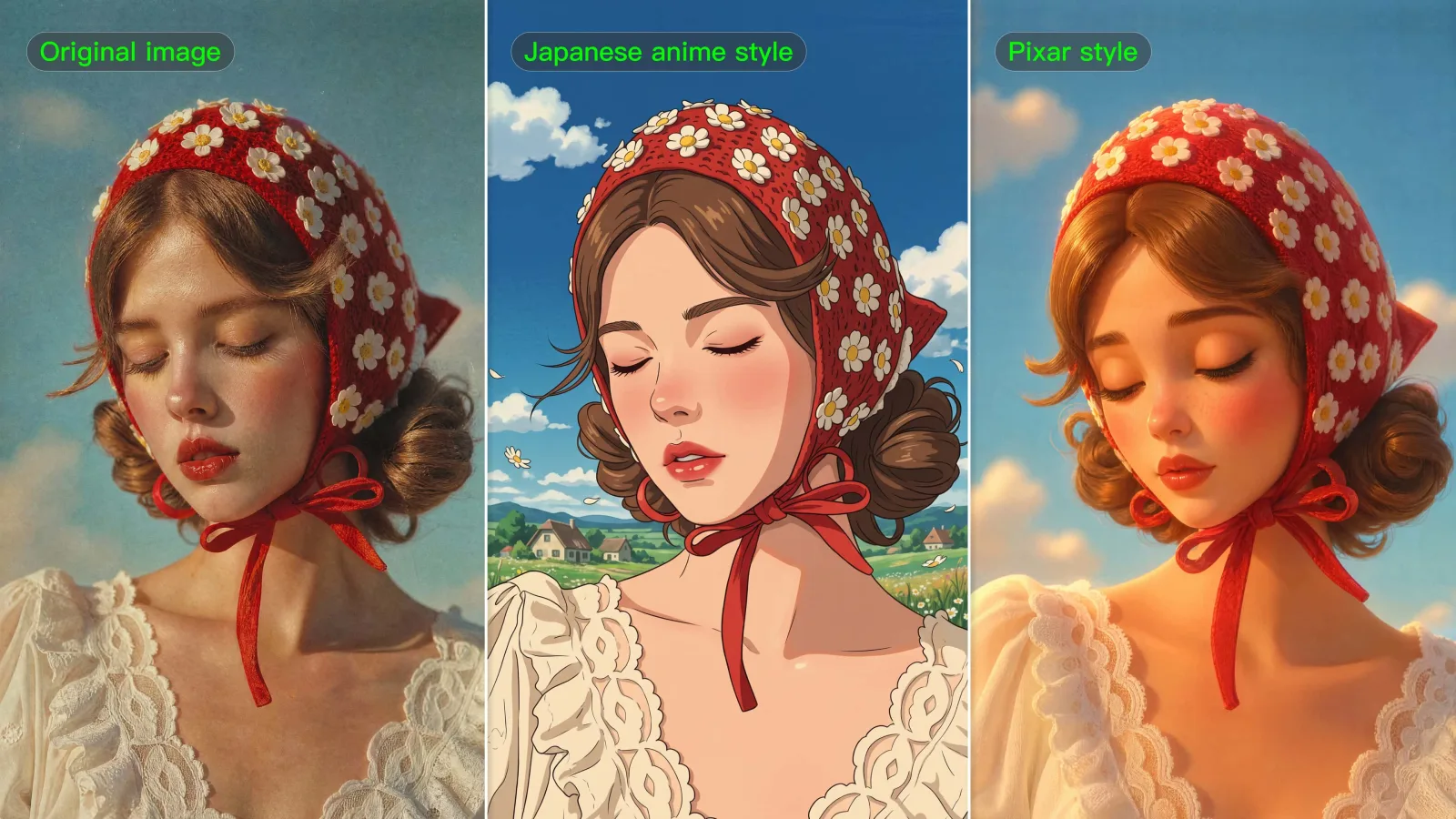


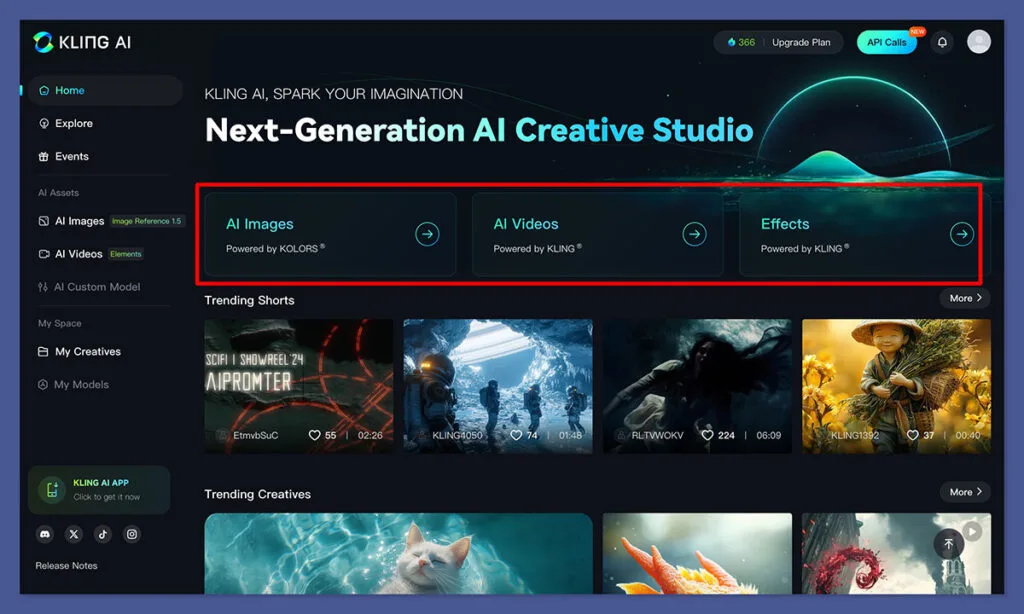
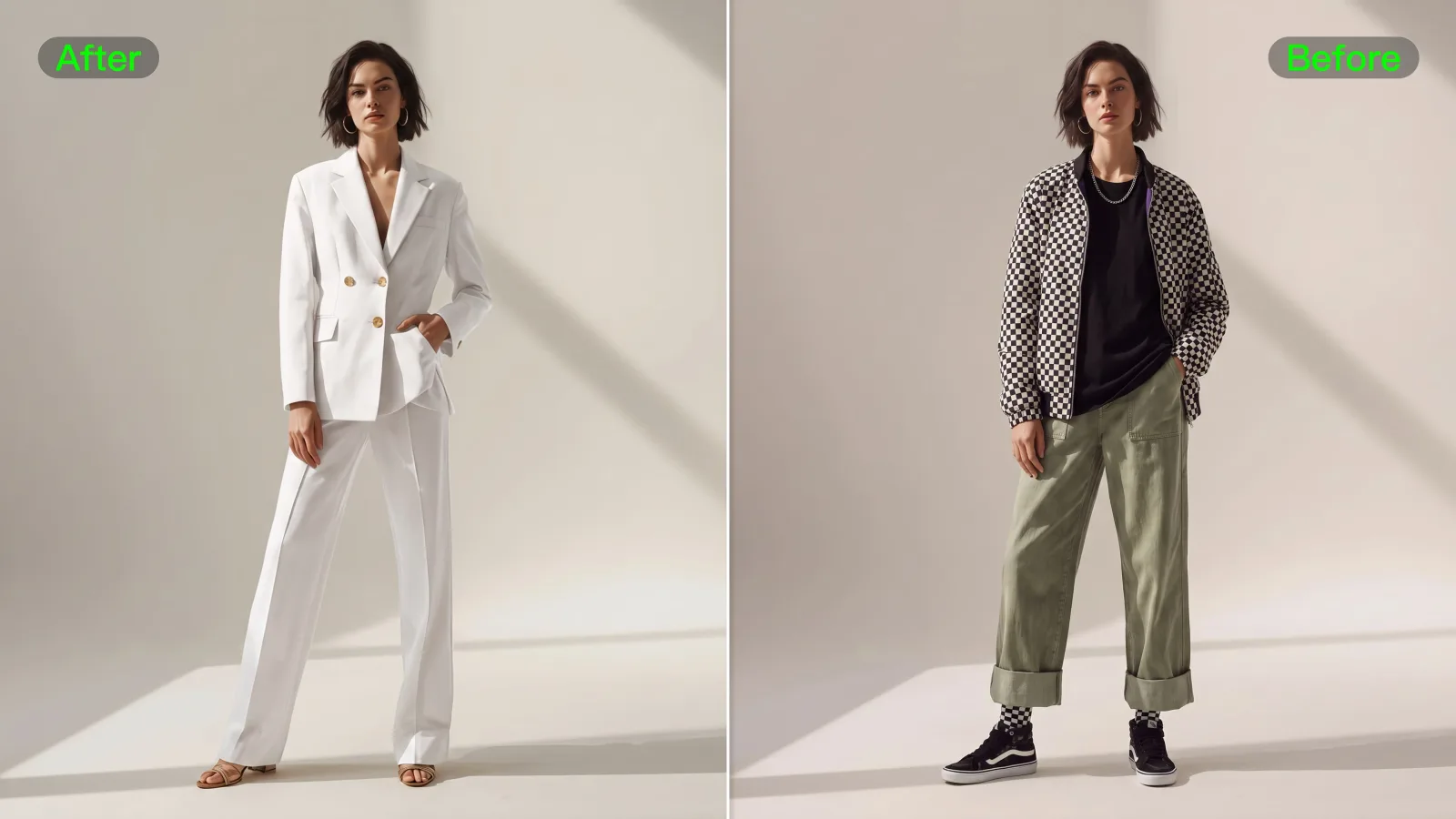

Table of contents
- 1. Kling AI Turns Visual Ideas Into Video
- 2. What Kling AI Actually Offers
- 3. How Kling AI Video Generation Works
- 4. Kling 4.0 and Its Longer Clips
- 5. Image to Video and Reference Control
- 6. Motion Control for Directed Actions
- 7. Element Library and Character Consistency
- 8. AI Avatars and Lip Synchronisation
- 9. Kling Image 3.0 and Visual Assets
- 10. Canvas and Agent Creative Workflows
- 11. Audio Generation and Video Sound
- 12. Credit Consumption and Production Economics
- 13. Kling AI Pricing and Subscription Plans
- 14. Commercial Rights and Content Ownership
- 15. Privacy and Protection of Uploaded Assets
- 16. Kling AI for Marketing and Advertising
- 17. Kling AI for Filmmakers and Content Creators
- 18. Kling AI Compared With Other Tools
- 19. Learning Curve and Daily Production
- 20. API Access and Automated Production
- 21. Where Kling AI Falls Short
- 22. Who Should Choose Kling AI?
- 23. Kling AI Review Verdict
- Frequently Asked Questions
1. Kling AI Turns Visual Ideas Into Video
Kling AI gives creators a way to generate video and image content from written prompts, reference images, video clips and other visual inputs.
Its capabilities now extend into motion control, character consistency, AI avatars, lip synchronisation, audio generation and creative editing.
The platform is particularly interesting for marketers, filmmakers, social media teams and ecommerce businesses that need visual material without organising a conventional production shoot for every concept.
Its real value depends on how much control a creator needs, how many generations a project consumes and how much editing remains necessary after generation.
The platform has developed beyond a simple text to video generator.
Kling 4.0 introduces longer native video generation, multiple reference inputs and keyframe control.
Kling 3.0 and its Omni variants provide additional approaches to video and image creation, while the Element Library and Motion Control tools address a problem that matters in professional production: maintaining recognisable subjects and directing movement across generated scenes.
That distinction changes how buyers should evaluate the service.
Someone creating a few experimental clips for social media has different requirements from a production studio building recurring advertising campaigns.
The first user may care most about accessibility and the number of monthly credits.
The second needs repeatability, predictable output, commercial permissions, asset management and a workflow that can be revised without rebuilding every scene.
Kling AI is attractive because it combines several creative tools in one environment.
However, the presence of multiple models does not guarantee that every output will be usable.
Generative video still requires selection, iteration, editing and quality control.
A realistic face can change between frames, a hand can behave unnaturally, a product label can become distorted and an action can develop differently from the prompt.
The platform can reduce production effort, but it does not remove the creative and technical judgement needed to deliver professional material.
2. What Kling AI Actually Offers
Kling AI is a generative creative platform built around video and image production.
Its main workspace brings together tools for text to video, image to video, image generation, motion control, avatars, lip synchronisation, visual effects, image enhancement and other creative operations.
The distinction between these tools is important because they solve different production problems.
Text to video is useful when the creator has an idea but no finished visual reference.
A prompt can describe the subject, setting, action, camera movement, lighting and overall visual direction.
Kling then generates a video based on that description.
Image to video is more suitable when a creator already has a photograph, illustration, product image or AI generated still that should become animated.
The reference image gives the model a visual starting point.
This can be particularly useful for marketing teams that already have approved brand imagery.
Motion Control focuses on reproducing movement and performance.
Rather than relying entirely on a written description of how a character should move, creators can use movement references to guide the generated result.
This is relevant for dance sequences, gestures, character animation and other scenes where the action itself matters.
AI Avatar and Lip Sync tools address talking characters and presenters.
They can turn an image or character reference into a speaking visual, using audio or text based inputs depending on the selected workflow.
These capabilities are useful for explanatory videos, virtual presenters and some forms of promotional content.
Image generation provides a separate creative path.
Kling Image 3.0 and Image 3.0 Omni offer reference based image creation and higher resolution output options, including native 2K and 4K capabilities described in the developer platform documentation.
The image workflow can support storyboards, campaign artwork and the creation of visual references for later video generation.
Kling also provides Canvas and Agent capabilities.
The official platform describes Canvas as an environment for organising creative work, generating scripts, storyboards, images and videos, and refining projects through multiple stages.
Node based editing provides a more structured way to organise creative operations than a sequence of isolated prompts.
For a buyer, the important point is that Kling AI is becoming a broader creative workspace.
It is not simply a single model with one generation button.
The available tools, models and credit requirements need to be evaluated separately.
3. How Kling AI Video Generation Works
Video generation begins with a creative instruction.
The user selects a model, provides a prompt or visual reference, chooses available settings and submits the generation request.
The prompt should communicate the scene in a way that leaves little room for conflicting interpretations.
A description such as a woman walking through a city is too broad for a controlled production task.
A more useful prompt identifies the subject, clothing, location, time of day, movement, camera behaviour and visual style.
For example, an ecommerce team might want a short video showing a premium bottle rotating on a reflective surface.
The prompt should specify the bottle's appearance, the direction and speed of rotation, the background, the lighting, the camera position and the intended visual mood.
If the actual product packaging must remain accurate, a reference image becomes especially important.
Kling offers text to video and image to video workflows.
The first is suited to concept creation, while the second gives the model a visual anchor.
The latest model documentation also describes reference based video generation, including combinations of images, videos, elements and voice references through Omni capabilities.
The number and type of supported references depend on the selected model and generation workflow.
The user should also consider duration and resolution before submitting a task.
Longer clips and higher resolution outputs can require more credits.
The generation interface displays the credit cost associated with the current settings before submission.
This is a useful safeguard, particularly for users who are still learning how different models affect the production budget.
Kling 4.0 supports native video generation up to 30 seconds in a single generation according to the official developer documentation.
It also supports flexible keyframe inputs and reference based workflows.
These specifications make it more practical for scenes that need a longer continuous action than older short clip workflows.
However, a longer generation is not automatically a better production choice.
A 30 second scene gives the model more time to introduce visual inconsistencies, unexpected movement or changes in subject appearance.
For a commercial sequence, generating several shorter controlled shots and editing them together may offer more predictable results.
A practical workflow is to generate a short test first, review the movement and composition, refine the prompt, and only then produce the longer or higher resolution version.
This avoids spending a large portion of the monthly credit allowance on a concept that has not yet been validated.
4. Kling 4.0 and Its Longer Clips
Kling 4.0 is a significant part of the platform's current direction.
Its capabilities include native video generation up to 30 seconds, reference based creation, keyframe inputs and multimodal asset handling.
The longer generation duration is particularly relevant to creators who need scenes with a continuous sequence of actions.
A product demonstration, a character walking through an environment or a cinematic establishing shot can benefit from having more time to develop without immediately requiring multiple separate generations.
The model also supports 720p and 1080p output according to the official API update published in October 2026.
The same update describes 21:9 and adaptive aspect ratios, alongside support for text to video, image to video and Omni reference to video.
For buyers, the practical benefit is flexibility.
A creator working on a vertical social media campaign may need a different composition from someone producing a widescreen brand film.
Aspect ratio selection helps adapt the generated material to its intended destination.
Kling 4.0 also supports multiple reference inputs.
The official API documentation describes up to 15 combined inputs for an Omni reference task, with support for images, videos, elements and voice.
This can provide a more controlled creative process when a scene must preserve several visual or audio characteristics.
The ability to use multiple references is particularly useful when the creator needs to maintain a subject's appearance, clothing, environment or other identifiable characteristics.
A single text prompt may not describe these details consistently enough.
Reference material can provide more specific visual guidance.
There are still important limits.
Reference inputs do not guarantee exact reproduction.
A model can interpret a visual reference differently from the creator's intention, particularly when multiple assets contain conflicting details.
The result should be inspected carefully before being used in a commercial campaign.
Kling 4.0 is best evaluated through a controlled project rather than a collection of unrelated demonstration prompts.
Use the same character, product or environment across several generations and inspect whether the model maintains the details that matter.
That will reveal more about its usefulness than a single attractive output.
5. Image to Video and Reference Control
Image to video is one of Kling AI's most practical workflows because many businesses already possess the visual assets they want to animate.
A marketing team may have product photography but no budget for a separate video shoot.
A designer may have created a campaign illustration that needs movement.
An independent filmmaker may have prepared concept art for a scene and wants to test how it could look in motion.
In each case, the image provides a starting point.
The prompt then describes what should happen after the initial frame.
The most important decision is how much movement the image can support.
A photograph of a person standing in a room can be animated with a camera push, a slight head turn or a change in lighting.
A more complex request involving walking, turning, picking up an object and leaving the room introduces several actions that the model must interpret.
For professional work, it is often better to request one primary action per shot.
This gives the model a clearer objective and makes the result easier to evaluate.
Reference control becomes more important when the same subject appears in multiple scenes.
A fashion brand, for example, may want to show the same model wearing the same outfit in different environments.
A product company may need to preserve the appearance of a device across several promotional clips.
Kling's Omni reference approach is designed for combining different reference types.
Its documentation describes image, video, element and voice references as part of the same multimodal workflow.
This is a meaningful development for creators who need more than a single image prompt.
There is still a difference between recognisable consistency and exact continuity.
The model may preserve the general appearance of a person while changing small details such as accessories, fabric texture or facial characteristics.
It may also reinterpret the shape of an object when the camera angle changes.
A buyer should therefore test the specific level of consistency required by the project.
If a campaign depends on exact packaging, logos, product dimensions or character identity, the generated video should be reviewed frame by frame.
Additional compositing or conventional editing may still be required.
6. Motion Control for Directed Actions
Motion Control is relevant when a creator needs to guide how a subject moves rather than merely describe the movement in text.
Traditional prompt based video generation leaves much of the action to the model's interpretation.
A prompt can ask a character to dance, run, turn or perform a gesture, but the exact timing and body movement may differ from what the creator imagines.
Motion Control provides a more directed approach.
Kling's official documentation describes the capability as recreating movement and facial expression using motion capture technology.
The workflow is intended to make performance driven generation more controllable.
This has practical applications in advertising, entertainment, social media and character animation.
A creator may want a virtual character to reproduce a dance sequence, a presenter to perform a particular gesture or a digital subject to follow a reference performance.
The quality of the source movement matters.
A reference video with clear subject visibility and unobstructed movement gives the system more useful information.
If the person is frequently hidden, the camera moves unpredictably or several subjects overlap, interpreting the intended action can become more difficult.
Motion Control should also be judged by the relationship between movement and appearance.
A character may reproduce the broad action while facial details, clothing or body proportions vary.
The creator needs to inspect both the performance and the visual identity.
For social media creators, the feature can help produce repeated movements for recurring characters.
For commercial production, it can reduce the amount of manual animation needed for some scenes.
It should not be treated as a complete replacement for professional motion capture or character animation pipelines.
The best use case is a scene where the movement is clearly defined and the visual subject can be controlled through appropriate reference material.
A complex performance with several interacting characters will require more testing.
7. Element Library and Character Consistency
Recurring characters are difficult to maintain in generative video.
A character that looks correct in one scene may appear noticeably different in the next.
The face, clothing, body proportions or other identifying details can change even when the same written prompt is reused.
Kling's Element Library is designed to address part of this challenge.
Its documentation includes an Element Library 3.0 guide, and the wider Omni reference workflow allows creators to use elements as part of video generation.
The purpose of an element is to provide a reusable reference for a subject or visual asset.
Rather than describing the same character repeatedly, a creator can establish a reference that can be used across multiple generations.
This is relevant for episodic content, branded characters, virtual personalities and advertising campaigns.
A company producing a series of short videos with the same digital presenter has a clear reason to care about visual consistency.
The practical process begins with preparing suitable reference material.
The creator should choose images that show the subject clearly and avoid unnecessary visual clutter.
Important details should be visible, particularly if the subject will appear from different angles.
Once the reference has been created, it can be used in compatible workflows to guide future generations.
The results still need to be reviewed.
A reference system improves control, but it does not guarantee that every frame will reproduce every detail exactly.
The feature is particularly valuable when a project has several scenes rather than one isolated clip.
If a creator only needs a single short video, building a reusable character element may add unnecessary preparation.
For recurring production, the initial setup can become more worthwhile.
Buyers should test whether the platform preserves the details that matter to their own work.
For a fashion campaign, clothing and accessories may be critical.
For an animated series, facial identity and body proportions may matter more.
For a product advertisement, packaging and branding accuracy should take priority.
8. AI Avatars and Lip Synchronisation
Kling AI includes avatar and lip synchronisation capabilities for creators who need speaking characters or presenters.
An AI avatar can be useful when a business wants a digital presenter without recording a new human performance for every video.
This can support product explainers, internal training, educational material, promotional content and certain social media formats.
Kling's Avatar 2.0 documentation describes workflows that use character images and voice inputs to generate a performance.
The platform also provides Lip Sync tools that align visible mouth movement with supplied audio.
The quality of the source image and audio is important.
A clear facial reference gives the model a better starting point.
A clean voice recording with understandable speech makes synchronisation easier to assess.
Background noise, overlapping speakers and unclear pronunciation can complicate the result.
Lip synchronisation is especially important when the audience expects a person to be speaking directly to camera.
Small timing differences can make an otherwise convincing avatar feel artificial.
A viewer may not immediately identify the technical problem, but the mismatch can reduce trust.
For a company producing multilingual content, avatar workflows can be useful when the same presenter needs to deliver several language versions.
However, the business should verify the supported language, voice and audio options before planning a campaign around them.
There are also ethical and legal considerations.
Using a real person's face or voice requires appropriate permission.
A company should not create a synthetic presenter that imitates an employee, customer, public figure or other identifiable person without the necessary rights and consent.
AI avatars are not automatically suitable for every brand.
A technical tutorial or product walkthrough may benefit from a digital presenter.
A sensitive financial, medical or public service message may require a more carefully controlled human presentation.
The decision should reflect the audience and the trust expected from the communication.
9. Kling Image 3.0 and Visual Assets
Kling AI is not limited to video.
Its image generation tools provide a separate way to create still visuals that can be used in campaigns, storyboards, product concepts and later video workflows.
Kling Image 3.0 is positioned around cinematic image creation, with attention to composition, lighting, visual tone and depth of field.
The official platform also describes native 4K output and image series generation intended to support consistent visual storytelling.
Image generation is useful when the creator needs to establish a scene before animating it.
A storyboard can be developed from several still images, then selected images can become starting points for image to video generation.
This workflow can be more efficient than asking a video model to invent every visual detail from a long prompt.
The creator first decides what the scene should look like, checks the composition and then introduces movement.
For ecommerce, image generation can support promotional concepts, campaign backgrounds and visual variations.
It can also help a marketing team explore different creative directions before arranging a traditional photoshoot.
However, image generation introduces its own accuracy problems.
Product labels, small text, logos and precise physical details can be difficult to reproduce reliably.
A generated product image should not be treated as an accurate representation of a product unless the result has been checked against the real item.
The same caution applies to brand identity.
If a campaign depends on an exact logo, packaging design or trademark, the company should use approved assets and inspect the generated output.
AI generated text and branding elements may require correction in a conventional design application.
Kling Image 3.0 is most useful as a creative production tool.
It can help develop concepts, create visual references and generate polished artwork.
It should not replace final brand asset approval or product accuracy checks.
10. Canvas and Agent Creative Workflows
Kling's Canvas and Agent capabilities move the platform toward a more organised creative environment.
The official website describes Canvas as a place where users can brainstorm with an agent, develop scripts, generate images, videos and storyboards, and refine work through multiple rounds of post production.
It also describes flexible node editing, allowing creative elements to be arranged and adjusted while retaining project context.
This is a different proposition from generating a single clip.
A production project usually contains several related tasks.
A script may need to be written, a storyboard created, visual references generated, scenes produced and selected material refined.
A workspace that connects these stages can reduce the need to move repeatedly between unrelated tools.
It can also make it easier to understand how one creative decision affects the next.
The Agent concept is relevant to users who want help developing a project from an initial brief.
A marketing professional might start with a product and campaign objective, then use the agent to develop a script or storyboard direction.
The resulting material can provide a starting point for image and video generation.
The value depends on how much control the creator retains.
Automated creative suggestions are useful when they accelerate planning, but professional work still requires decisions about tone, audience, brand guidelines, product accuracy and final editing.
Node based editing may be especially useful for users who prefer visual workflows.
Instead of treating each generation as an isolated request, they can organise assets and creative steps in a more structured way.
Buyers should distinguish between the availability of a workspace and the depth of its editing capabilities.
Canvas can help organise creative production, but it should not automatically be compared with a full professional editing environment such as Adobe Premiere Pro or DaVinci Resolve.
Those applications provide extensive timeline editing, colour correction, audio mixing and finishing tools.
Kling Canvas is best understood as part of an AI generation workflow.
A production team may still need a conventional editor for final assembly and delivery.
11. Audio Generation and Video Sound
A video without appropriate sound can feel unfinished, particularly when it is intended for advertising, entertainment or social media.
Kling's current creative environment includes tools such as Video to Audio and Text to Audio.
The platform also promotes audio visual generation through its newer video models.
Kling 3.0 Omni is described in the developer documentation as supporting synchronised audio and video generation.
These capabilities can help creators develop a more complete scene.
Depending on the model and workflow, audio can support dialogue, atmosphere or other elements that contribute to the visual experience.
Native audio generation is particularly interesting when a creator wants the sound to correspond with the action.
A scene showing a vehicle moving through a wet street, for example, benefits from sound that matches the movement and environment.
However, generated audio should be reviewed separately from the video.
Dialogue clarity, timing, background noise and sound consistency can affect whether the result is suitable for publication.
Businesses should also consider whether they need licensed music, a recognisable brand sound or a specific voice performance.
AI generated audio does not automatically provide the rights to use existing copyrighted music or imitate a protected voice.
For a professional campaign, the final sound mix may still need to be completed in a dedicated audio or video editor.
Kling can contribute to the creation process, but the buyer should not assume that every generation is ready for broadcast or commercial distribution without review.
12. Credit Consumption and Production Economics
Credits are one of the most important purchasing considerations in Kling AI.
The platform uses a credit based system for many generation tasks.
The number of credits consumed depends on the selected model, duration, resolution and task settings.
A short video generated with one model may cost substantially less than a longer video created with a more advanced model.
This makes the headline subscription price an incomplete measure of value.
A creator should calculate how many usable outputs can realistically be produced within the monthly allowance.
A generation that looks impressive but contains an incorrect face, distorted product or unwanted movement may need to be repeated.
Those additional attempts consume credits.
The cost of a finished video is therefore different from the cost of a single generation.
A production budget should account for concept testing, failed attempts, alternate versions, final resolution and any additional editing work.
Consider a marketing team producing ten short product videos.
If each video requires several prompt revisions and multiple candidate generations, the credit requirement can be considerably higher than the number of final clips suggests.
The same problem affects creators who work with longer durations.
Extending a clip or choosing a higher resolution can change the credit requirement.
A buyer should check the displayed cost before submitting each generation.
Kling's official billing guidance explains that the generation interface displays the credit price before submission and that the cost changes according to the selected model and settings.
This is useful because the user can compare options before committing credits.
Monthly subscription credits should also be treated as a time limited allowance.
The platform's published membership information describes monthly credits as tied to the subscription validity period.
Buyers should check the current expiry and renewal terms rather than assuming unused credits will accumulate indefinitely.
For teams producing content every week, a higher tier may provide a better effective cost per generation.
For occasional users, a lower tier or a limited free credit allocation may be more sensible.
The right decision depends on actual production volume, not the number of features listed on the pricing page.
13. Kling AI Pricing and Subscription Plans

Kling AI offers a subscription structure built around monthly credits and additional membership benefits.
The platform currently promotes plans beginning at $6.99 per month, although the regular price and introductory offer should be distinguished before purchasing.
The published pricing information identifies Standard, Pro, Premier and Ultra membership levels.
Because the editor requires three plans, this review presents Standard, Pro and Premier as the main comparison.
Ultra is a higher volume option for users with substantially greater generation requirements.
Standard is positioned for users who want to explore the platform and produce a moderate amount of content.
Pro increases the monthly credit allowance and adds a larger capacity for regular creative work.
Premier is intended for heavier production activity and provides a substantially larger monthly allowance.
Promotional prices can make the first subscription period appear cheaper than the recurring price.
The official pricing information has shown Standard at $6.99 per month as an introductory offer against a displayed regular price of $10, Pro at $25.99 against $37, and Premier at $64.99 against $92.
These figures should be checked at checkout because promotions, renewal prices and regional availability can change.
The credit allowance is more important than the plan name.
Standard has been listed with 660 monthly credits, Pro with 3,000 and Premier with 8,000.
These allowances do not represent a fixed number of finished videos because generation costs vary by model, duration, resolution and task.
Membership benefits can include faster generation, professional video modes, watermark removal, video extension, image upscaling and access to new features.
The exact benefits depend on the membership level and the current subscription terms.
Commercial usage is another important distinction.
Kling's published membership terms state that members may use generated output for commercial purposes, subject to the terms and applicable restrictions.
Buyers should read the current policy and distinguish membership benefits from the conditions that apply to free users.
A business should not select a plan based only on the lowest advertised price.
Estimate the number of finished clips required each month, calculate the likely number of attempts per clip and check whether the included credits are sufficient.
If production demand is unpredictable, it may be worth starting with a lower subscription and reviewing actual consumption before upgrading.
14. Commercial Rights and Content Ownership
Commercial use is a central question for agencies, businesses and independent creators.
A company producing marketing material needs to know whether it can publish generated videos in advertisements, social media campaigns, websites and product presentations.
It also needs to understand whether the platform claims ownership of uploaded assets or generated output.
Kling's terms distinguish between user input and generated output.
The policy states that users are responsible for ensuring they have the necessary rights and authorisation for material they upload.
This includes images, videos, audio, trademarks, logos and other protected content.
The terms also describe ownership of generated content under applicable law and state that Kling AI does not claim ownership of the content.
However, the same terms include a licence allowing the company to use content for certain platform and business purposes.
This is an important detail for organisations handling confidential or commercially sensitive material.
The membership terms describe commercial use rights for members, subject to the stated conditions.
Buyers should read the current agreement rather than relying on a promotional statement or an assumption that all account types receive identical rights.
There is also a specific requirement in the published terms concerning the display of Kling branding when distributing generated content.
The terms state that users should label the output interface with the relevant Kling brand or logo unless written permission provides otherwise, and describe how to identify generated content when branding is not included for objective reasons.
This deserves attention before using Kling in client work.
A creative agency should confirm the exact obligations that apply to its subscription, distribution method and intended use.
The business should also retain copies of relevant terms and permissions.
The safest approach is to use original assets or material for which the business has explicit rights.
Avoid uploading customer photographs, employee recordings, unreleased products or confidential campaign material without checking the applicable data and content terms.
15. Privacy and Protection of Uploaded Assets
Generative creative tools often require users to upload photographs, videos, audio recordings and other assets.
These may include personal information, unreleased product designs or commercially sensitive material.
Kling's privacy policy describes the collection and processing of user content, including photographs, images, audio, videos and interactions with the platform.
It also describes processing information about objects, scenery and audio content for functions such as effects and content moderation.
The published privacy information states that user data is stored on servers located in Singapore, while support, engineering and moderation teams may operate in different locations.
It also describes internal access controls and security measures, including encryption.
The terms and privacy documentation should be read together.
The user policy describes licences and permissions relating to uploaded and generated content, including uses connected with service operation, product development and model improvement.
For a personal creator experimenting with fictional characters, this may be an acceptable arrangement.
For a company working with confidential client assets, it deserves a more formal assessment.
Before uploading business material, consider whether the asset contains personal information, customer data, unreleased products, confidential branding or material covered by a non disclosure agreement.
A company should also check whether its own client contracts permit the use of third party generative AI services.
Published content and private project material should not be treated as the same thing.
The platform's terms describe circumstances in which content published through its features may become available to other users for related creative activity.
Users should understand the visibility settings and avoid publishing sensitive assets unintentionally.
Businesses with strict data residency, confidentiality or regulatory requirements may need a separate enterprise assessment.
A standard creator subscription should not be assumed to provide the same contractual protections as a negotiated enterprise service.
16. Kling AI for Marketing and Advertising
Marketing teams can use Kling AI to produce visual concepts, campaign variations, product scenes and short promotional videos.
One useful application is turning existing product photography into motion content.
A company with a library of approved product images can explore animated presentations without organising a new shoot for every creative variation.
Another use is concept testing.
A marketing team can generate several visual directions for a campaign, review them internally and decide which ideas deserve further investment.
This can shorten the early creative process.
Kling's image generation and video generation tools can also support social media content.
Short visual clips can be created for different formats, including vertical video and widescreen material.
The availability of multiple aspect ratios helps adapt creative work to different publishing environments.
Ecommerce businesses may find product showcase workflows particularly useful.
Kling's official website identifies ecommerce as an industry application and describes generating on model showcases, styling content and promotional videos from product images, model images or brand assets.
However, the accuracy of the product is essential.
A generated video that changes the shape of a product, alters its packaging or introduces an incorrect feature can mislead customers.
For products where precise visual representation matters, human review is mandatory.
A practical advertising workflow might begin with an approved product photograph, followed by a short image to video generation.
The team can review the movement, inspect the packaging and generate alternatives if necessary.
The final clip can then be edited with accurate product text, legal disclosures and campaign branding.
Kling can help reduce the cost of visual experimentation.
It should not be treated as a guarantee that a complete advertising campaign can be produced without designers, editors or brand review.
17. Kling AI for Filmmakers and Content Creators
Independent filmmakers and digital creators can use Kling to develop scenes, test visual ideas and produce material that would otherwise require additional production resources.
A filmmaker might create a storyboard, generate a visual reference and then animate selected images.
This is useful for testing atmosphere, composition and camera movement before committing to a conventional shoot.
Creators producing short narrative videos can also use reference based generation to maintain a recurring character.
Motion Control may help with specific performances, while audio and avatar tools can support dialogue based scenes.
The platform is particularly interesting for creators who are comfortable working iteratively.
A strong result may require several generations, prompt adjustments and post production.
Users who expect a single instruction to produce a finished film may find the workflow frustrating.
Kling can also support visual experimentation that would be expensive to stage physically.
Fantasy environments, unusual camera movements and stylised scenes can be explored without building a set or arranging a location shoot.
That does not mean every generated scene is production ready.
Continuity, visual defects, inconsistent physics and unwanted changes can become obvious when several shots are edited together.
Filmmakers should inspect the material at the same level of detail they would apply to footage from a real production.
For short form creators, the economics may be more forgiving.
A short social clip can often tolerate a degree of visual variation that would be unacceptable in a high budget commercial or feature film.
18. Kling AI Compared With Other Tools
Kling AI competes in a market that includes Runway, Google Veo, Pika and other generative video platforms.
The right comparison depends on the type of production rather than a simple ranking.
Runway is relevant for creators who need a broader professional video creation environment and advanced editing workflows.
Its tools and model development are aimed at creative professionals who want to generate and manipulate visual material.
Google Veo is another important alternative, particularly for users interested in high quality video generation and audio visual capabilities within Google's creative ecosystem.
Access, pricing and available tools depend on the relevant Google product and subscription.
Pika is worth considering for creators who focus on short form content and effects driven visual transformations.
Its approach can appeal to users who prioritise quick experimentation and social media creativity.
Kling's strongest differentiators include its reference based workflows, Motion Control, Element Library, avatar capabilities and the longer generation options available in Kling 4.0.
Its combination of image and video tools also gives creators several ways to build a project within one platform.
However, the buyer should compare the complete workflow.
A platform that produces a strong first generation may still be less suitable if it lacks the editing, collaboration or asset management features a production team needs.
A fair comparison should use the same prompt, source image, duration and output settings wherever possible.
Review motion quality, subject consistency, prompt adherence, audio, credit consumption and the amount of post production required.
Do not select a platform based solely on social media demonstrations.
Promotional examples usually show successful outputs rather than the number of attempts required to achieve them.
19. Learning Curve and Daily Production
Kling AI is accessible enough for new users to experiment with, but producing consistent professional work requires more than writing a short prompt.
The first challenge is learning how to describe a scene.
A useful prompt needs a subject, an action, an environment and a visual direction.
Camera movement, lighting and timing can also influence the result.
The second challenge is selecting the correct workflow.
Text to video is suitable for creating a scene from an idea.
Image to video is better when a visual starting point already exists.
Motion Control is relevant when movement needs more direction.
Avatar and Lip Sync tools serve a different purpose again.
The third challenge is managing generations.
Users need to understand which settings affect credit consumption and when a generation is worth repeating.
Without a process, experimentation can become expensive.
A sensible learning path begins with simple scenes.
Generate a short clip with one subject and one action.
Review the output.
Change one part of the prompt and compare the result.
This helps the user understand which instructions have a meaningful effect.
After that, experiment with reference images and longer durations.
Introduce more advanced controls only when the basic workflow is understood.
For teams, it is useful to create prompt guidelines and maintain an asset library.
Approved character references, product photographs and visual styles can help reduce inconsistency between different creators.
The platform rewards users who treat generation as a production process.
It is less predictable for someone who expects a complex commercial scene to emerge perfectly from a single sentence.
20. API Access and Automated Production
Kling AI also provides a developer platform for users who want to integrate generation into applications and automated workflows.
The API documentation describes access to video and image models, including Kling 4.0, Kling 4.0 Flash, Kling 3.0 and the associated Omni capabilities.
Available operations include text to video, image to video, reference based video generation, video editing, Motion Control, avatar generation and image generation.
This is relevant for software developers, creative platforms and businesses that want to make generation available inside their own products.
An ecommerce platform, for example, might want to let merchants generate promotional videos from product images.
A marketing application could provide automated creative variations based on campaign information.
A production company might integrate video generation into an internal content management workflow.
The API is different from the standard consumer subscription.
Developer usage can involve prepaid resource packages, model specific billing and concurrency limits.
The API pricing page lists separate video and image resource packages, with different unit costs and validity periods.
A company should not assume that purchasing a consumer membership automatically provides API access or the same credit structure.
These are separate commercial arrangements.
API buyers should evaluate authentication, request limits, generation latency, error handling, output storage and cost management.
They should also understand how generated files are retained and whether the service has deletion or expiry rules.
The API documentation has described automatic deletion of generated API media after a defined retention period in earlier notices.
Developers should verify the current policy and build their own storage process rather than relying on generated files remaining available indefinitely.
For businesses building a production application, the API is potentially more important than the consumer interface.
It provides a path to integrate generative capabilities into a controlled workflow, but requires technical planning and a separate budget.
21. Where Kling AI Falls Short
Kling AI offers a broad collection of creative capabilities, but buyers should understand the limitations before making it part of a production process.
The first issue is output consistency.
Reference tools can improve control, but they do not guarantee exact preservation of faces, clothing, objects or product details across every frame.
A generated scene may look convincing at first glance and still contain defects that become obvious during editing.
The second issue is credit consumption.
Complex projects often require several attempts.
Longer clips, higher resolutions and more advanced models can increase the cost of each generation.
A creator who needs many finished videos should calculate the real cost per approved output.
The third issue is the difference between generation and editing.
Kling provides creative tools and Canvas workflows, but professional projects may still require a dedicated editor for precise timing, colour correction, sound mixing, captions and final delivery.
The fourth issue is the need to understand the model options.
Different models and workflows have different strengths, input requirements and credit costs.
Beginners may need time to understand which tool is appropriate for each task.
The fifth issue concerns privacy and commercial rights.
The platform's terms and privacy documentation contain provisions that businesses should review carefully before uploading confidential or client owned material.
A commercial membership does not remove the need to check intellectual property rights and content permissions.
The sixth issue is regional and subscription variation.
Prices, promotions, payment availability and membership benefits may change.
Buyers should confirm the actual renewal price and current benefits in their own account before subscribing.
These limitations do not make Kling unsuitable.
They define the kind of work for which it is most practical.
It is a strong creative generation environment, but a production team should plan for human review and additional tools where accuracy and finishing matter.
22. Who Should Choose Kling AI?
Kling AI is a strong candidate for independent creators who regularly produce short videos and want access to multiple generation methods.
Its combination of text to video, image to video, Motion Control and image generation offers useful creative flexibility.
Marketing agencies may benefit from using it for concept development, visual variations and selected promotional assets.
The platform can help teams explore ideas before spending money on a conventional shoot.
Ecommerce businesses can use it to develop product scenes and promotional material from existing images.
This is particularly useful when the business has a substantial library of approved product photography.
However, exact product representation must be checked carefully.
Filmmakers and digital artists may value the reference based workflows, character elements and longer video generation options.
These features can support story development and visual experimentation.
Educators and organisations producing internal communication may find avatar and lip synchronisation tools useful for selected presentation formats.
The suitability depends on the language, voice quality and level of authenticity required.
Kling is less compelling for organisations that need guaranteed frame accurate production, strict data residency, extensive collaborative review controls or a complete professional editing suite in one subscription.
Businesses with high volume requirements should also evaluate the API and its separate billing model.
A consumer subscription may not be the most suitable route for automated production at scale.
The best buyer is someone who sees value in generating and refining visual material, understands that several attempts may be required and has a clear process for approving final content.
23. Kling AI Review Verdict
Kling AI is a capable generative creative platform for people who need more than simple text to video production.
Its combination of Kling 4.0, image generation, reference based workflows, Motion Control, Element Library, avatars and audio tools gives creators several ways to develop visual content.
The strongest reason to choose it is creative flexibility, particularly when a project benefits from image references and controlled movement.
The main tradeoffs are credit consumption, imperfect consistency and the need for external editing in demanding production work.
For creators, marketers and independent studios willing to review and refine their outputs, Kling AI is a compelling option.
Businesses handling confidential assets or requiring exact product representation should evaluate its terms and production limitations carefully before adopting it at scale.
Key features
- Text to video generation workflows
- Image to video animation tools
- Kling 4.0 video generation
- Native thirty second video output
- Omni multimodal reference generation
- Multiple image reference inputs
- Reference video input support
- Flexible keyframe guided video creation
- Motion Control performance replication
- Element Library subject consistency
- Kling Image 3.0 generation
- Native high resolution image output
- Image series visual generation
- AI Avatar video creation
- Audio driven lip synchronisation
- Text to audio generation
- Video to audio generation
- Creative visual effects library
- AI image enhancement tools
- Image restyling and transformation
- Canvas node based editing
- Agent assisted creative planning
- Storyboard and script generation
- Professional video generation modes
- Video extension with prompts
- Developer API generation access
- Batch creative generation workflows
Pricing
- 660 monthly generation credits
- Fast track generation access
- Professional video generation mode
- Image upscaling and enhancement
- Commercial output usage rights
- 3000 monthly generation credits
- Priority access to new features
- Fast track generation access
- Video extension and watermark removal
- Commercial output usage rights
- 8000 monthly generation credits
- Priority access to new features
- Fast track generation access
- Video extension and image upscaling
- Commercial output usage rights
Pros & cons
Pros
- Multiple creative tools in one
- Native longer video generation options
- Strong reference based workflows
- Useful image to video conversion
- Motion Control supports directed performances
- Element references support recurring subjects
- Integrated image generation capabilities
- AI avatars and lip sync
- High resolution image generation options
- Flexible aspect ratio selection
- Developer API available separately
- Canvas supports organised creative workflows
- Multiple models for different tasks
Cons
- Credit usage varies by model
- Repeated generations increase production costs
- Visual consistency is not guaranteed
- Product details may become distorted
- Complex scenes need careful review
- Professional editing remains necessary
- Commercial terms require careful reading
- Privacy terms need business assessment
- Subscription benefits can change
- Promotional prices affect renewal costs
- Learning advanced controls takes time
- API billing differs from subscriptions
- Not a complete editing suite
Kling AI specs
- Platforms: Web browser, iOS and Android applications
- Free plan: Limited free credits, no permanent unlimited free plan
- Starting price: From $6.99 per month promotional Standard offer
- Integrations: Developer API, MCP and CLI workflows
- Support: Help centre, official guides and email support
- Best for: AI video creators, marketers and digital production studios
Our verdict
Kling AI is a compelling option for creators who need a flexible environment for generating videos, images and reference driven visual content. Its newer generation models, Motion Control, avatars and Element Library make it useful for more than casual experimentation. The strongest users will be marketers, independent filmmakers, digital artists and production teams comfortable refining AI generated material. Buyers should be cautious about credit consumption, imperfect visual continuity and the terms governing uploaded content. It is worth considering when creative flexibility matters more than guaranteed frame level precision.
View PlansFrequently Asked Questions
Is Kling AI free to use?
How much does Kling AI cost?
Can Kling AI generate 30 second videos?
Does Kling AI support commercial use?
Is Kling AI better than Runway?
Reader reviews
Be the first to review