

isolved Review 2026: Features, Pricing, Pros and Cons
 Published byEvander ThorneSoftware ReviewerEvander ThorneSoftware Reviewer Verified authorEvander Thorne is a Software Reviewer and IT Management Specialist at Desking, specializing in enterprise software, IT service management, project management, and busine…Author Profile

Ad disclaimer For links on this page, DESKING APP may earn a commission from the provider. This supports our work and has no influence on our editorial rating.
isolved People Cloud is a broad human capital management platform built around payroll, HR and workforce administration. Its greatest strength is the connection between employee records, payroll and benefits, backed by a business with four decades of operating history. The trade-off is a customized pricing model and an experience that users say can become difficult to manage.
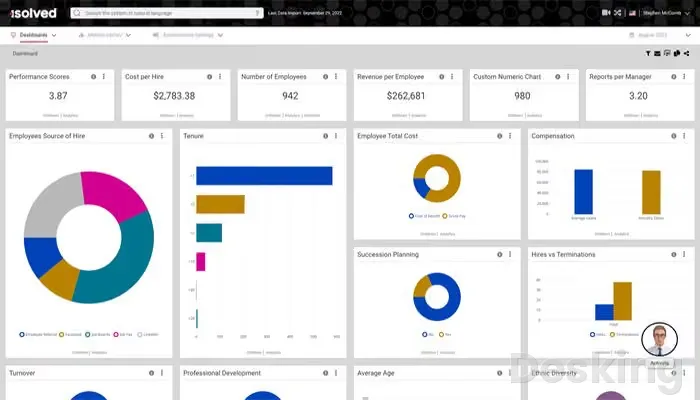
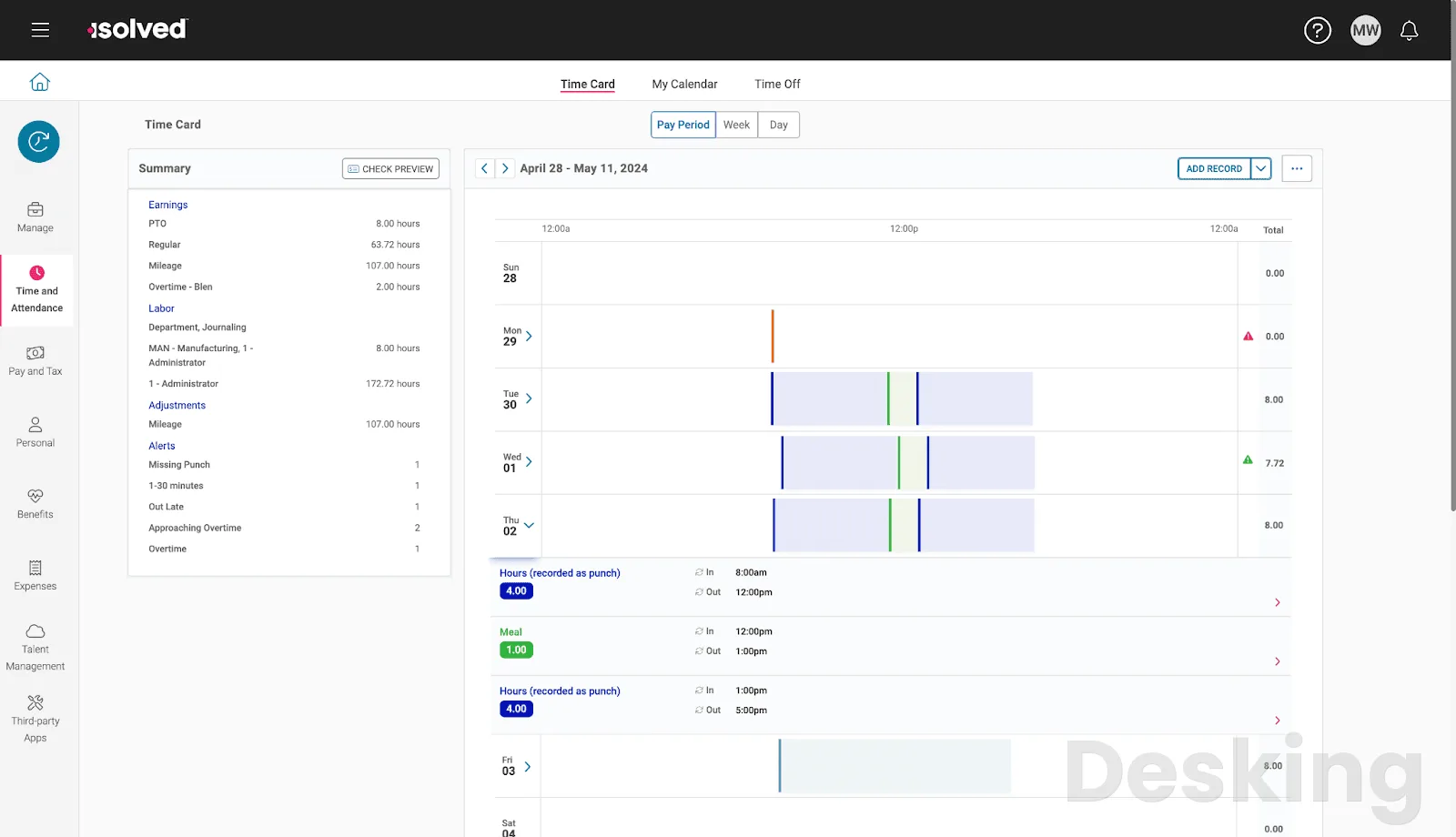
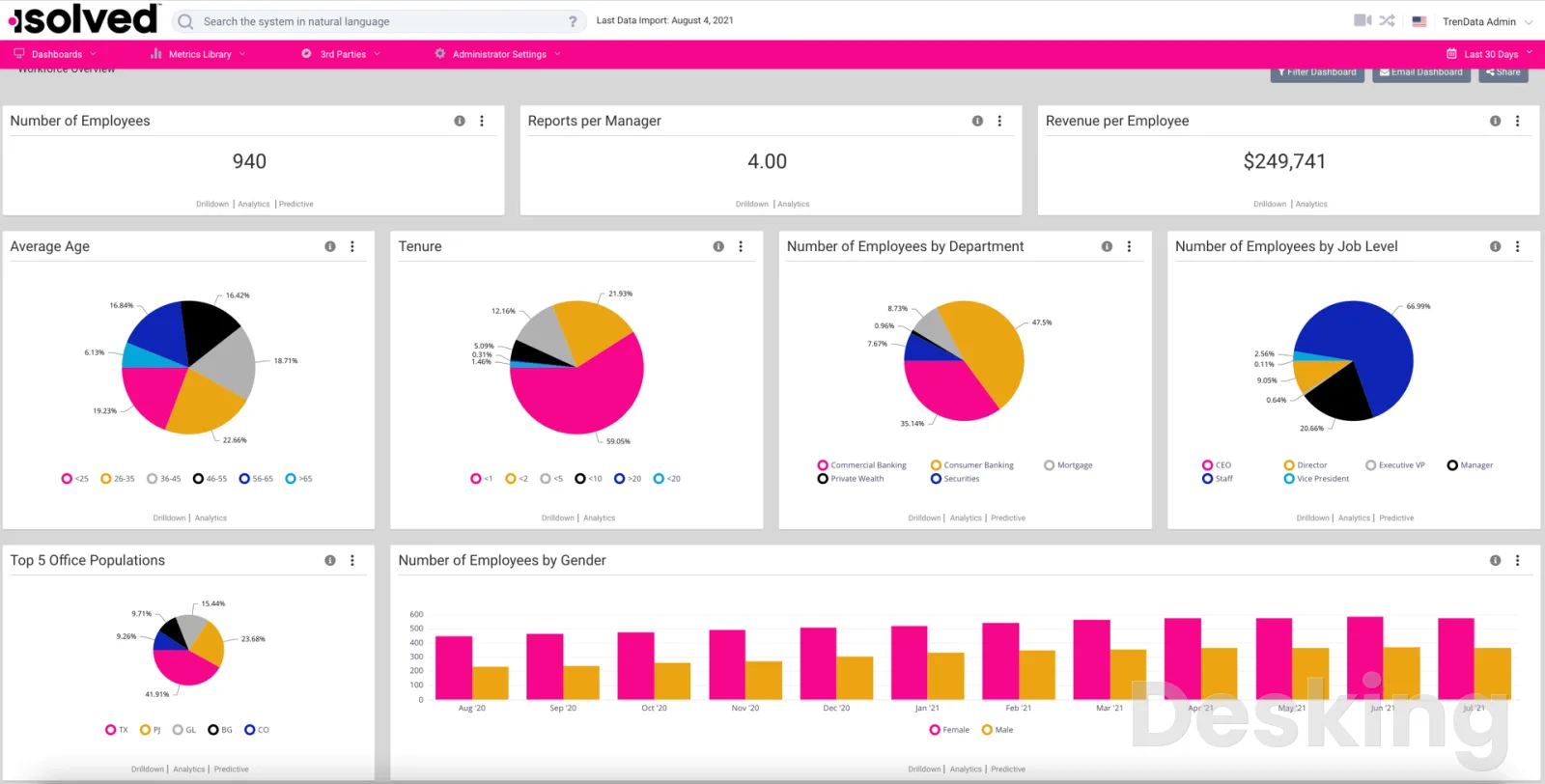
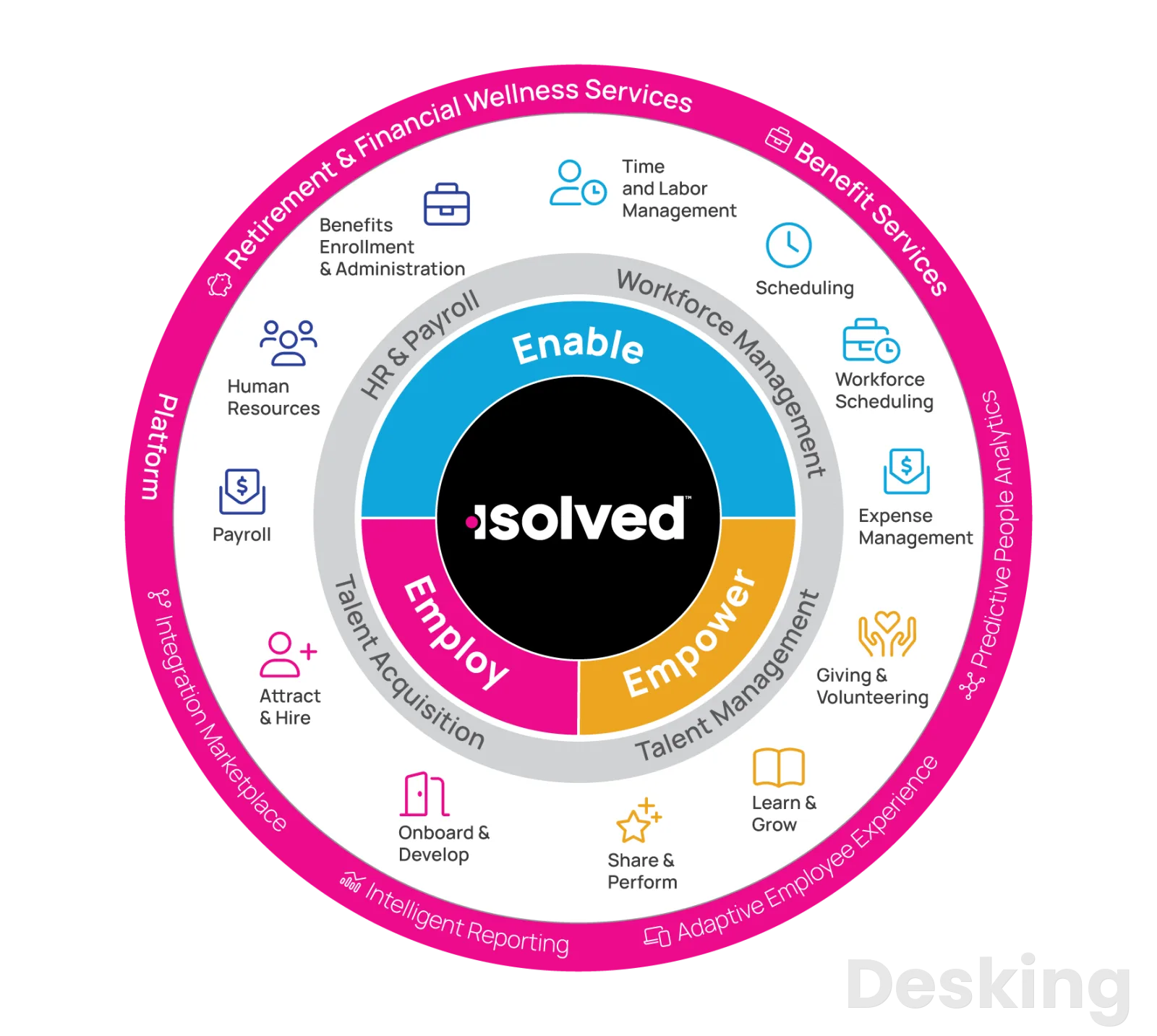
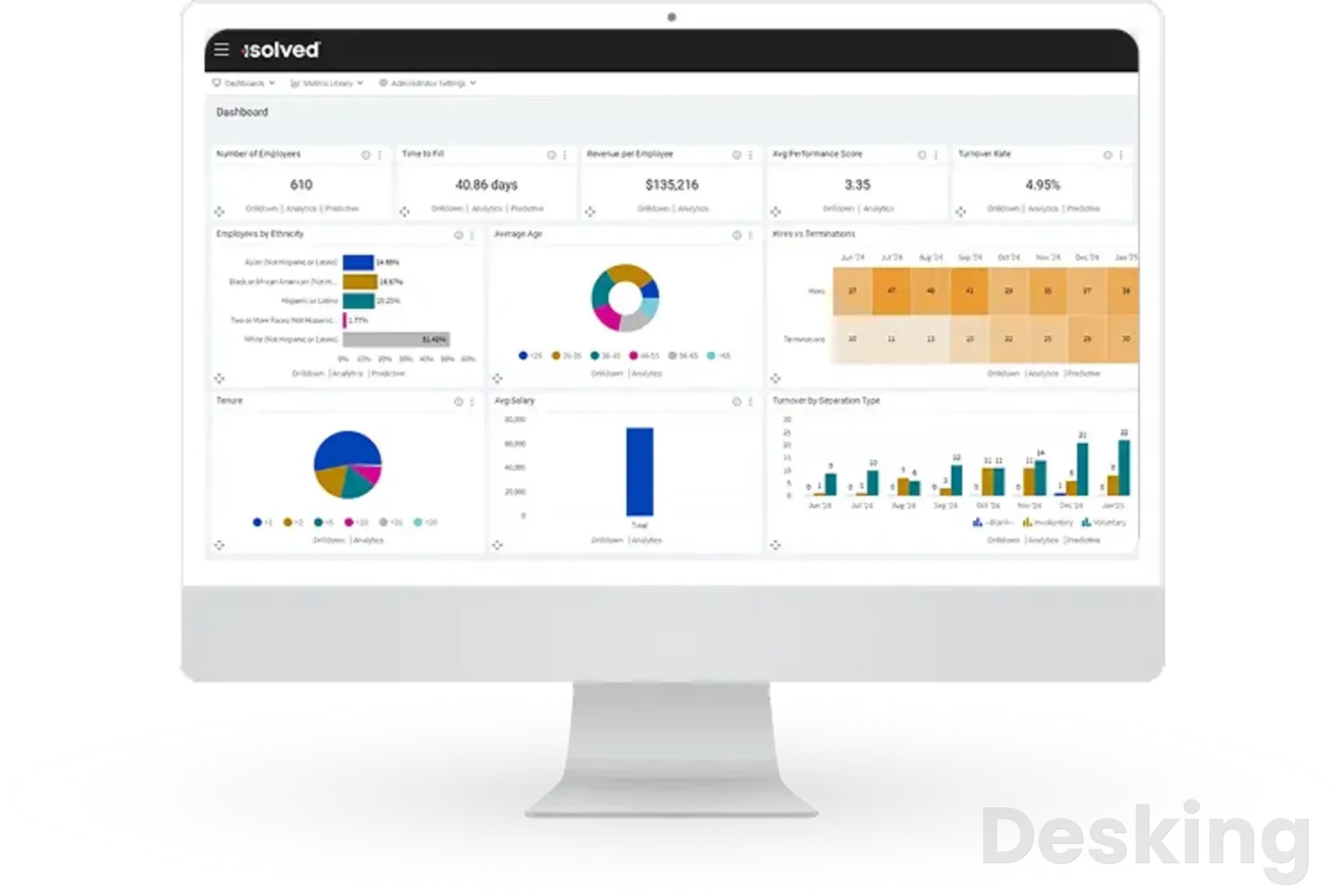
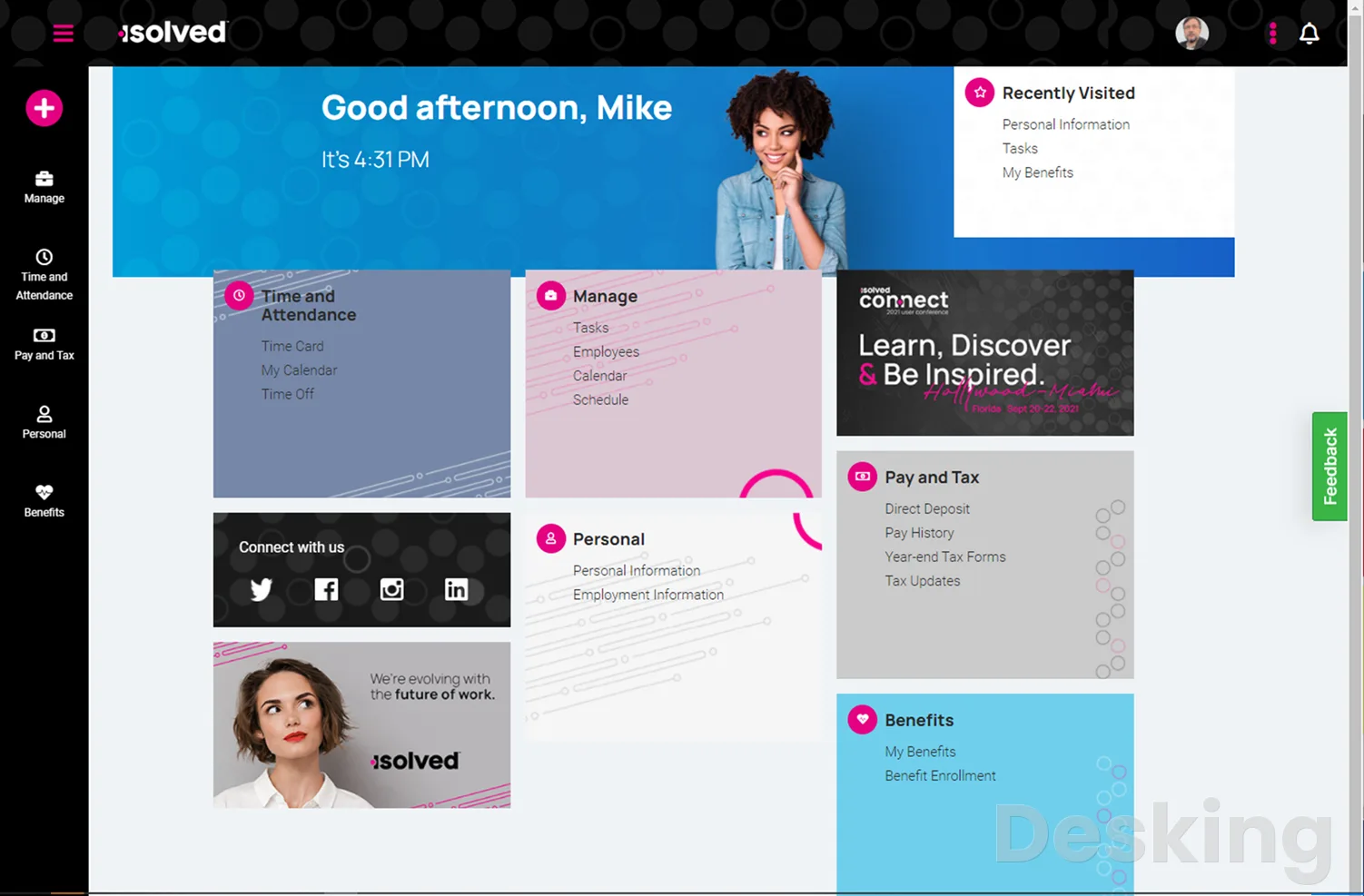
Table of contents
- 1. What is isolved People Cloud
- 2. How isolved works
- 3. isolved features
- 4. Pricing and plans
- 5. Integrations and connectivity
- 6. Employee experience and ease of use
- 7. Reporting and analytics
- 8. Security and compliance
- 9. Customer support
- 10. isolved alternatives
- 11. Implementation and migration
- 12. Pros and cons
- 13. Who should use isolved
- 14. Final buying assessment
- Frequently Asked Questions
isolved People Cloud is a human capital management (HCM) platform that connects payroll processing, employee administration, benefits, workforce management and talent operations in one system.
It is developed by isolved, Inc., a US software and HR services company headquartered in Charlotte, North Carolina.
The business traces its origins to 1986, when it began providing COBRA administration services, while its first HCM software platform launched in 2012.
Today, isolved reports serving more than 200,000 employers and approximately 9 million employees nationwide.
Its history includes growth through the HR services market, private equity investment and acquisitions, with Accel-KKR among its significant investors.
Its People Cloud platform targets small and medium sized businesses as well as midmarket organizations seeking to consolidate payroll and HR operations.
The distinction between isolved and a conventional payroll application is the breadth of its operating model.
Payroll is the financial foundation, but the platform also connects recruitment, employee onboarding, benefits enrollment, attendance, scheduling, learning, performance and workforce reporting.
This matters because employee information does not remain confined to the HR department.
Compensation changes affect payroll, approved leave affects time calculations, benefits elections affect deductions, and changes to employee status influence several administrative processes.
That interconnected structure is the main reason to consider isolved.
It can reduce the number of separate systems an organization needs to maintain, particularly when payroll, benefits and workforce management are currently handled through different applications.
However, breadth is not automatically an advantage.
A platform with many modules can become difficult to administer when implementation, permissions, reporting and support are not managed properly.
isolved's commercial model deserves equal attention.
Unlike software vendors that publish three standardized subscriptions, isolved primarily sells customized configurations.
Customers select the services required for their organization and receive a quotation based on their needs.
This approach allows a business to build a broader HCM environment over time, but it makes direct price comparisons difficult and places more responsibility on the buyer during procurement.
The central question is whether the integration between payroll, HR and benefits justifies the administrative complexity and customized commercial arrangement.
For businesses that need connected employee administration, the answer can be yes.
For organizations looking for inexpensive, straightforward payroll processing, simpler alternatives may be easier to justify.
1. What is isolved People Cloud
isolved People Cloud is the company's main HCM platform.
It covers the employee lifecycle, from recruitment and onboarding through payroll, benefits, attendance, performance and workforce development.
The platform is designed to give HR administrators, payroll professionals, managers and employees access to the information and workflows relevant to their responsibilities.
Its origins help explain its current structure. isolved began in 1986 as a provider of COBRA administration services, helping employers manage the continuation of health coverage after qualifying employment changes.
In 2012, the first version of its HCM platform entered the market with payroll and time clock capabilities.
The platform subsequently expanded into a wider collection of workforce services.
The company now reports supporting more than 200,000 employers and 9 million employees.
These figures establish a meaningful operating scale, although they should not be interpreted as the number of direct software subscriptions. isolved also serves customers through a partner network, and its broader business includes HR, insurance, financial wellness and benefits services.
The product is particularly relevant to organizations that have outgrown basic payroll software.
A business with multiple departments, different employee classifications, benefits arrangements and recurring time approval requirements may need a more connected system. isolved addresses these requirements through modules that share employee information.
Its customer profile is broad, but the platform's strongest use case is not an individual business owner who simply wants to issue monthly paychecks.
It is an organization with recurring HR administration and enough workforce complexity to benefit from centralized employee records.
2. How isolved works
The platform organizes employee information around a shared HCM environment.
Administrators maintain employee records, configure workflows and manage the relevant modules, while employees access personal information through self service tools.
The practical value appears when information moves between departments.
A new employee enters through recruitment and onboarding, completes the necessary documentation, receives an employee record and becomes part of the payroll process.
Benefits elections can then influence payroll deductions, while approved time records feed into payroll calculations.
This structure reduces repetitive data entry, provided that the relevant modules are properly configured.
Without that configuration, an organization can still encounter duplicate records, incomplete approvals or inconsistent employee information.
isolved also supports role based access.
Employees, supervisors, HR administrators and payroll specialists do not need identical permissions.
A supervisor may review attendance and approve time off, while payroll administrators manage pay runs and deductions.
HR professionals may have broader access to employee records and employment documentation.
The employee experience is centered on the People Cloud portal and mobile application.
Workers can access pay information, manage personal details, review benefits and complete selected HR tasks without submitting every request directly to an administrator.
For the organization, the advantage is a more consistent administrative process.
The disadvantage is that implementation quality becomes extremely important.
A poorly configured HCM platform can centralize confusion just as effectively as it centralizes useful information.
3. isolved features
The platform has six major solution areas: Talent Acquisition, HR and Payroll, Benefits, Workforce Management, Talent Management, and AI and Analytics.
These areas can be configured around an organization's operational requirements rather than forcing every customer into an identical software package.
Payroll processing
Payroll is the foundation of isolved People Cloud.
Administrators can process employee compensation, manage deductions, handle direct deposits and support payroll tax filing across multiple states.
The system brings together information from time tracking, paid leave and benefits administration.
This connection matters because payroll accuracy depends on more than calculating an employee's salary.
Hours, overtime, deductions, tax information and approved absences all influence the final payment.
isolved also promotes Perfect Payroll checks and The Guardian, its AI agent for payroll.
The Guardian analyzes payroll runs, identifies potential errors and prepares corrections for administrator approval.
This gives payroll professionals another layer of review before finalizing a pay run.
The important qualification is that AI assistance does not transfer payroll accountability away from the administrator.
Prepared corrections still require human approval, and organizations must maintain appropriate review procedures.
Human resources management
The HR module centralizes employee records, documents, policies and administrative workflows.
HR professionals can manage employee information, employment changes and onboarding activities through a shared system.
Employee self service reduces the number of routine requests that need direct HR intervention.
Employees can review their pay information, update permitted personal details and submit time off requests.
The platform also supports configurable workflows, approval routing and reminders.
These capabilities are useful for organizations with several levels of management, where employee changes and administrative requests require formal approval.
The quality of the experience depends on how administrators configure access and workflows.
A large organization with several legal entities or complicated reporting relationships should assess these requirements during implementation rather than assuming that every organizational structure will fit the default configuration.
Benefits administration
Benefits administration is another major part of the platform. isolved supports enrollment, plan comparisons, employee elections and benefit administration workflows.
The module is particularly useful during annual open enrollment, when employees must review available options and make decisions within a defined period.
Centralized enrollment can reduce paperwork and help administrators maintain consistent records.
Employee life events also matter.
Changes in family circumstances or employment status may affect benefit eligibility and enrollment requirements.
A connected benefits environment can help HR departments manage these changes without maintaining separate records in multiple applications.
isolved's benefits services also extend beyond the software itself.
Its broader business includes services connected to insurance, COBRA administration and employee benefits.
Workforce management
Workforce Management addresses attendance, time collection, scheduling and related labor administration.
The module can collect working hours through supported timekeeping methods, manage employee schedules and route time records for approval.
Approved information can then feed into payroll, reducing the need to transfer hours manually between separate systems.
This connection is particularly important for manufacturing, hospitality, retail and healthcare businesses, where employee schedules and actual working hours can differ substantially.
The platform also supports paid time off management and labor rule administration.
Managers can review attendance records and address exceptions before payroll is processed.
However, companies with highly specialized shift operations should examine the scheduling capabilities carefully.
Complex shift bidding, advanced workforce forecasting and specialized labor optimization may require functionality beyond the organization's basic timekeeping requirements.
Talent acquisition
Talent Acquisition covers the recruitment process, from attracting candidates to onboarding successful applicants.
The module includes applicant tracking, job posting management, candidate screening, assessments and onboarding workflows.
Its purpose is to reduce the separation between recruitment and the employee administration process that follows a successful hire.
This connection is useful because recruitment data often needs to be transferred into HR systems once a candidate accepts an offer.
A connected process can reduce repeated data entry and improve the transition from applicant to employee.
Companies should nevertheless evaluate the recruitment module against specialist applicant tracking systems.
Businesses with sophisticated recruitment operations may require advanced sourcing, candidate relationship management, recruitment marketing and analytics beyond the capabilities they need from an integrated HCM package.
Talent management
Talent Management focuses on employee development after recruitment.
Its capabilities include learning management, performance management, feedback and compensation planning.
The platform supports organizations that want employee development to be part of their HR administration rather than a completely separate activity.
Managers can connect performance processes with employee records and development activities.
Learning management is relevant to businesses with recurring training requirements, internal development programs and compliance related learning.
Performance management adds a structured way to review employee progress and establish development objectives.
The value depends on adoption.
A company can purchase performance and learning modules without achieving meaningful improvements if managers do not use them consistently or employees do not engage with the processes.
AI and analytics
AI and Analytics represent an important development in isolved's product direction.
The company is moving beyond traditional payroll and employee record administration toward AI assisted workflows and workforce insights.
The Guardian is its payroll focused AI agent.
It reviews payroll information, flags possible errors and prepares corrections for administrator approval. isolved also describes AI assistance for benefits enrollment, employee guidance and compliance risk identification.
Analytics provides dashboards and reports concerning workforce information, including headcount, retention, labor and performance.
HR administrators can use these insights to identify trends and monitor workforce activity.
The key question is how much of this functionality is included in the customer's contracted configuration.
Buyers should distinguish between platform capabilities, available modules and features that require additional services or licensing.
Mobile application
The isolved People Cloud mobile application extends selected HR and payroll activities to employees and managers.
Its documented capabilities include viewing pay history, accessing tax forms, managing personal information, submitting time off requests, reviewing schedules and interacting with benefits enrollment.
Managers can also access selected team management and approval functions.
Mobile access is useful for employees who do not work at a desk throughout the day.
Retail, hospitality, healthcare and manufacturing employees can benefit from access to timekeeping and payroll information through their mobile devices.
The application is not a substitute for the complete administrative experience.
Employers should confirm which functions are available to employees and managers under their specific configuration.
4. Pricing and plans
isolved uses customized pricing rather than a clearly published three tier subscription model.
Its pricing process asks prospective customers to describe their requirements so the company can prepare a quotation based on selected products, services and organizational needs.
This commercial structure has advantages and disadvantages.
Customers can avoid purchasing modules they do not need, but they cannot calculate the complete subscription cost from a public pricing table.
G2 has displayed an indicative starting price of $9 per employee per month for an entry level configuration aimed at organizations with at least 50 employees.
This should be treated as third party pricing information, not as a guaranteed vendor quotation or a universal starting price.
The following comparison describes three practical solution configurations, not three official standardized isolved subscriptions.
Their prices require a direct quotation.
| Configuration | Price | Main purpose | Pricing |
|---|---|---|---|
| Core HR and Payroll | Contact sales | Employee administration and payroll | Custom |
| Workforce Management | Contact sales | Time attendance and scheduling | Custom |
| Talent and Benefits | Contact sales | Recruitment benefits and development | Custom |
Core HR and Payroll
This configuration represents the foundation of an isolved deployment.
It centers on employee records, payroll administration, tax filing, employee self service and HR workflows.
It is the most relevant starting point for organizations replacing separate payroll and HR applications.
Businesses should establish whether payroll processing, tax services, implementation and employee self service are all included in the quotation.
Workforce Management
This configuration focuses on timekeeping, attendance, scheduling and related labor administration.
It is particularly relevant to organizations with hourly employees and recurring schedule changes.
The commercial value depends on workforce complexity.
A company with fixed monthly salaries may not need the same scheduling capabilities as a business operating several shifts across multiple locations.
Talent and Benefits
This configuration covers recruitment, onboarding, benefits administration, learning and performance management.
It is relevant to organizations that want to manage the employee lifecycle beyond payroll.
The buyer should confirm whether individual modules are licensed separately, whether there are implementation fees and whether the selected package includes the integrations required by existing benefit providers.
The following table identifies the major differences between these configurations.
| Capability | Core HR and Payroll | Workforce Management | Talent and Benefits |
|---|---|---|---|
| Employee records | Yes | Connected | Connected |
| Payroll processing | Yes | Payroll integration | Payroll integration |
| Tax administration | Yes | Limited | Limited |
| Time tracking | Optional | Yes | Optional |
| Scheduling | Optional | Yes | No |
| Applicant tracking | Optional | No | Yes |
| Benefits enrollment | Optional | No | Yes |
| Learning management | No | No | Yes |
| Performance management | Optional | No | Yes |
| Employee analytics | Available by configuration | Available by configuration | Available by configuration |
These configurations should not be mistaken for fixed plan entitlements.
The actual inclusion of each capability depends on the negotiated solution.
Additional costs to investigate
The most important procurement task is identifying charges that sit outside the headline software subscription.
Buyers should request a complete commercial breakdown covering:
- Implementation and configuration services.
- Historical payroll and employee data migration.
- Additional modules and licensed users.
- Tax filing and year end services.
- Timekeeping hardware and equipment.
- Benefits administration and carrier connections.
- Integration development and maintenance.
- Training and professional services.
- Contract renewal and termination conditions.
A quotation that appears inexpensive can become substantially more expensive when implementation, additional modules and services are included.
Buyers should compare the first year commitment with the recurring annual cost rather than focusing exclusively on the monthly employee rate.
5. Integrations and connectivity
An HCM platform becomes more valuable when it exchanges information with the applications already used by payroll, accounting, finance and HR departments. isolved approaches this through its integration capabilities and partner ecosystem.
The company supports connections with external systems, including applicant tracking systems, ERP applications and accounting software.
Its integration approach is intended to reduce duplicate employee records and repetitive administrative work.
This is especially important for businesses that already have an established financial environment.
Payroll information must eventually connect with accounting records, while employee changes may affect benefit providers and other external systems.
The isolved Network is also an important part of the business model.
It allows service providers, payroll professionals and technology partners to work with the platform and deliver services to their own customers.
This extends the company's reach beyond direct software sales.
However, integration availability should not be confused with universal compatibility.
Buyers should establish whether a required connection is native, partner supported, API based or dependent on custom development.
A useful procurement exercise is to prepare an integration inventory before requesting a quotation.
| Integration requirement | What to verify |
|---|---|
| Accounting systems | Payroll journal and general ledger exports |
| Benefits providers | Enrollment and deduction synchronization |
| Recruitment platforms | Candidate and employee data transfer |
| Timekeeping systems | Approved hours and payroll synchronization |
| ERP platforms | Employee and financial data exchange |
| Identity management | Authentication and user provisioning |
| Reporting systems | Data exports and reporting access |
The important issue is the direction and frequency of synchronization.
A system that exports employee information once per day is different from one that updates payroll records automatically after an approved employee change.
For businesses with strict financial controls, these details should be documented before implementation.
6. Employee experience and ease of use
isolved's employee experience is built around self service.
Employees can access information that would otherwise require communication with HR or payroll administrators.
Pay statements, tax documents, time off requests, personal information and benefits enrollment are among the most relevant activities.
This is particularly useful in organizations with employees working across different locations and schedules.
The mobile application adds convenience, but the broader platform experience receives mixed feedback.
Some users appreciate having payroll, benefits and employee records available in one environment, while others report difficulties with navigation, reporting and login procedures.
Capterra's published review data identifies an overall rating of 3.9 out of 5, with customer service rated 3.7.
Its reviews include both positive comments about payroll and benefits administration and criticism of the interface and reporting experience.
One verified reviewer describes the value of bringing several administrative activities together:
"Having payroll, benefits, and employee information in one place."
Verified reviewer on Capterra, Operations, October 2026
This is a meaningful strength because employees and administrators often interact with different parts of the same workforce record.
Centralization reduces the need to move between separate applications.
The other side of the experience is less favorable.
A reviewer identified difficulties with navigation and reporting:
"Finding specific information or customizing reports sometimes required extra steps."
Verified reviewer on Capterra, Operations, October 2026
This criticism matters most to HR and payroll administrators who regularly prepare reports, investigate discrepancies and manage employee changes.
An employee who checks a pay statement once a month may never encounter the same problems.
Another recurring concern is access and authentication.
TrustRadius reviewers have reported repeated login attempts, including problems accessing the desktop version.
Such friction is particularly problematic for hourly employees who depend on the application to clock in and out.
The platform therefore has a split user experience.
Its functional breadth is appreciated, but the quality of navigation and everyday access is not consistently praised.
7. Reporting and analytics
Reporting is one of the areas where the difference between a basic payroll product and a full HCM platform becomes apparent.
isolved supports workforce reporting and dashboards covering employee information, headcount, retention, labor and performance.
These capabilities give HR departments access to information that can support operational planning and workforce decisions.
Payroll reporting is especially important.
Organizations need to reconcile employee compensation, deductions, tax obligations and other payroll information with financial records.
Benefits administrators also require reliable reporting during enrollment periods and when employee circumstances change.
The challenge is not necessarily a lack of reports.
It is the ability to locate, understand and customize the information required for a specific business process.
User feedback on Capterra and TrustRadius identifies reporting complexity and limited customization as recurring concerns.
Some reviewers appreciate the availability of reports but describe difficulty finding the right output or adapting it to their requirements.
This is an important distinction for companies with sophisticated reporting requirements.
A platform may contain hundreds of predefined reports without supporting every specialized analysis a finance or HR department needs.
Before selecting isolved, buyers should demonstrate their most important reporting tasks during the sales process.
Request examples involving payroll reconciliation, labor cost analysis, employee turnover and benefits reporting.
Do not accept a generic demonstration showing that reports exist.
Ask the vendor to demonstrate the exact information the organization needs to retrieve and export.
8. Security and compliance
Payroll and HR applications process sensitive information, including employee identities, compensation, banking details, tax information and benefits records.
Security is therefore a fundamental procurement requirement.
isolved maintains a Trust Center describing its security and compliance practices.
Its technical security documentation identifies encryption, multifactor authentication, restricted administrative access, vulnerability scanning, independent security testing and centralized logging among its controls.
The company also describes a compliance program involving annual System and Organization Controls audits and policies addressing privacy, security and regulatory requirements.
Its compliance documentation references legislation including HIPAA, GLBA and the California Privacy Rights Act.
These measures are relevant because HCM systems hold information that can create financial and privacy risks if accessed improperly.
Access controls should be configured according to employee responsibilities, with payroll administrators and HR professionals receiving the permissions needed for their work.
Customers should request the applicable SOC reports and security documentation during procurement.
They should also establish how data is retained, how access is revoked when employees leave, what incident notification procedures apply and which third parties process customer information.
There is another consideration involving employee timekeeping equipment. isolved's contractual documentation specifically addresses time and attendance applications and raises the possibility that employers may have additional obligations when using particular devices.
Organizations considering biometric or other specialized attendance hardware should obtain legal guidance appropriate to their jurisdiction.
Security certifications and controls reduce risk, but they do not remove the employer's responsibility to configure the system properly.
9. Customer support
Customer support deserves particular attention because payroll software operates against strict deadlines.
A delayed response during an ordinary HR task may be inconvenient, but an unresolved payroll problem can affect an entire workforce.
isolved advertises support through its service organization and provides access to customer assistance, documentation and learning resources.
Its customer contact information also identifies telephone support arrangements and published support hours.
Customer feedback is mixed.
Some reviewers praise knowledgeable representatives and helpful assistance during payroll administration.
Others describe slow follow up, inconsistent communication and difficulty reaching the right support contact.
One TrustRadius reviewer summarized a positive experience:
"All of the representatives are very friendly and helpful."
Verified user on TrustRadius, payroll and HR administrator
However, the same review identified difficulties with enrollment management and reporting.
This illustrates an important point: good support does not necessarily mean that every part of the software is straightforward.
Capterra also contains criticism concerning response times:
"There are delayed responses or sometimes inconsistencies in responses from customer service."
Verified reviewer on Capterra, Payroll and Benefits Administrator, January 2026
The difference between these experiences may reflect the customer's service arrangement, the complexity of the issue or the support channel involved.
Nevertheless, inconsistent response times are a legitimate concern for organizations that depend on isolved for payroll processing.
The company should be evaluated on the support arrangement included in the actual proposal, not simply on a general promise of customer assistance.
Before signing, request written answers to the following operational questions:
- Who is the assigned customer support contact?
- Is payroll support handled by a specialized team?
- What are the escalation procedures for missed payroll deadlines?
- Are implementation and ongoing support handled by different teams?
- What response commitments apply to critical incidents?
- Are additional professional services charged separately?
For a payroll provider, support quality is part of the product itself.
10. isolved alternatives
isolved competes with established HCM and payroll providers serving small businesses and midmarket organizations.
The most relevant alternatives include ADP, Paylocity and Paychex.
The platforms overlap in payroll, employee administration and workforce management, but their commercial models and product structures differ.
The following comparison focuses on publicly available pricing information.
Where a provider uses customized quotations, no unsupported monthly price is assigned.
| Platform | Starting price | Free plan | Payroll | HR and workforce |
|---|---|---|---|---|
| isolved | Custom quote | No | Yes | Yes |
| ADP Workforce Now | Custom quote | No | Yes | Yes |
| Paylocity | Custom quote | No | Yes | Yes |
| Paychex Flex | Custom quote | No | Yes | Yes |
ADP Workforce Now
ADP Workforce Now is one of the most established competitors in the HCM market.
It serves organizations that need payroll, HR administration, workforce management and benefits related services.
ADP has a substantial advantage in its established payroll infrastructure and broad business services.
Its product portfolio is particularly relevant to organizations that require a mature payroll operation and a provider with a long operating history.
isolved competes through its integrated People Cloud environment and its combination of payroll, benefits and talent services.
The choice depends on the specific modules, support arrangements and implementation costs offered to the customer.
Companies with complicated payroll requirements should obtain proposals from both providers and compare the handling of tax filings, adjustments, reporting and year end administration.
Paylocity
Paylocity competes directly with isolved through its HR, payroll, benefits, talent and workforce management products.
Its platform also emphasizes employee experience, mobile access, integrations, reporting and automation.
Paylocity describes connections to hundreds of HR, finance and IT solution partners, giving it a significant integration proposition.
This is particularly relevant to organizations that want their HR system to connect with a broader business technology environment.
isolved has a strong argument for companies that value its established payroll and benefits administration background.
Paylocity becomes an attractive alternative when the buyer places greater emphasis on its wider integration ecosystem and employee experience capabilities.
Both providers use customized pricing, so a meaningful comparison requires equivalent module selections and implementation assumptions.
Paychex Flex
Paychex Flex is another major alternative for businesses that want payroll administration supported by HR services and workforce management.
Its appeal is closely connected to its payroll and small business service heritage.
Organizations that want payroll administration without immediately adopting an extensive HCM configuration may find its approach appropriate.
isolved is more attractive when the business wants to connect payroll with a broader collection of talent, benefits and employee management functions.
The decision should be based on operational requirements rather than the number of features listed in a sales presentation.
A business that primarily needs payroll and tax administration should avoid paying for a large HCM configuration it will not use.
11. Implementation and migration
Implementation is a major part of an isolved purchase.
Migrating payroll and HR operations involves more than transferring employee names and salary information.
The organization must prepare employee records, compensation data, tax information, benefits elections, leave balances, timekeeping rules and the relevant payroll history.
These records must be checked before the first live payroll run.
isolved describes implementation as a tailored process with migration assistance and a go live schedule aligned with customer requirements.
A responsible migration should include the following stages:
- Inventory the existing HR, payroll, timekeeping and benefits applications.
- Identify the employee records and historical payroll information that must be migrated.
- Review employee classifications, compensation structures, tax details and deduction rules.
- Define user roles and approval permissions for HR, managers and payroll administrators.
- Configure benefits enrollment, time off policies and workforce scheduling requirements.
- Establish integrations with accounting, recruitment and external benefits providers.
- Run parallel payroll calculations and compare results with the existing system.
- Obtain approval from payroll and HR leadership before the first production payroll.
- Train managers and employees on self service and timekeeping procedures.
- Establish a post launch review process for discrepancies and outstanding configuration issues.
Parallel payroll validation is particularly important.
A successful software login does not prove that the payroll calculation is correct.
Companies should also agree on responsibility for correcting migration errors.
The implementation contract should establish who validates historical information, who approves configuration changes and how additional migration work is priced.
A poor migration can undermine the value of an otherwise capable HCM platform.
12. Pros and cons
isolved has a strong functional proposition because it connects payroll with employee administration, benefits and workforce management.
Its history and operating scale also make it a credible option for organizations that want an established HR technology provider.
Its weaknesses are less about the absence of core HCM functions and more about the experience of administering a broad system.
Reporting complexity, navigation complaints, support inconsistency and customized pricing deserve serious consideration.
Advantages
- Four decades of business history
- Large established employer customer base
- Connected HR and payroll administration
- Integrated employee benefits management
- Broad talent management capabilities
- Payroll tax filing support
- AI assisted payroll error detection
- Employee self service access
- Mobile application for employees
- Workforce scheduling and timekeeping
- Recruitment and onboarding functionality
- Configurable HR approval workflows
- Established partner network
- Formal security management controls
Disadvantages
- No transparent standard subscription pricing
- Final implementation costs require clarification
- Reporting customization can be difficult
- Navigation receives mixed user feedback
- Login problems reported by users
- Customer support response times vary
- Extensive configuration requires administrator training
- Advanced modules may cost extra
- Integration scope requires individual verification
- Complex reporting may need workarounds
- Broad functionality can overwhelm smaller businesses
- Payroll migration requires careful validation
13. Who should use isolved
isolved is best suited to organizations that have developed beyond basic payroll administration and need a broader employee management environment.
Small and medium sized businesses can benefit when HR administration has become too fragmented across separate applications.
The platform is also relevant to midmarket organizations with multiple departments, employee classifications and benefits requirements.
The strongest customer profiles include:
- Growing businesses: Companies replacing separate payroll and HR applications with a connected HCM environment.
- Midmarket employers: Organizations managing larger employee populations and more complex workforce administration.
- Payroll departments: Teams that need employee time, deductions and payroll information connected.
- Healthcare businesses: Employers managing different employee classifications, schedules and benefits requirements.
- Manufacturing companies: Organizations that need attendance, timekeeping and labor administration.
- Professional services: Businesses that want connected employee records, payroll and talent development.
- HR service providers: Partners interested in delivering payroll and HR services through the isolved Network.
isolved is less compelling for very small organizations with uncomplicated payroll requirements.
Those businesses may find a simpler payroll platform easier to operate and less expensive to maintain.
It is also not automatically the best choice for large multinational corporations with complex global HR requirements.
Such buyers should compare its capabilities with enterprise HCM platforms and examine the specific geographic and integration requirements of their workforce.
14. Final buying assessment
isolved's strongest argument is the connection between payroll, employee records, benefits and workforce administration.
Its development from a COBRA services provider into a broad HCM business gives it a different commercial background from software companies that started with standalone HR applications.
The platform is particularly attractive when payroll is only one part of a larger administrative requirement.
Recruitment, onboarding, employee records, timekeeping and benefits can be managed within the same product environment, reducing the need to maintain disconnected systems.
The weakness is that an extensive platform requires effective administration.
Customer feedback concerning reporting, navigation and support suggests that buyers should pay as much attention to implementation and service arrangements as they do to the software demonstration.
The customized pricing model also makes procurement more demanding.
Organizations should obtain a complete quotation covering the modules they actually need, implementation, integrations and ongoing support.
isolved deserves a place on the shortlist for growing businesses and midmarket employers seeking connected HR and payroll administration.
It should not be purchased simply because it has a long feature list.
Buy it when the organization has the operational need and internal capacity to use its broader HCM environment.
Key features
- Payroll processing and tax filing
- Perfect Payroll automated error checks
- The Guardian AI payroll agent
- Employee record and document management
- Employee self service portal access
- Benefits enrollment and administration
- COBRA administration and compliance services
- Applicant tracking and candidate assessments
- Automated employee onboarding workflows
- Time tracking and attendance management
- Employee scheduling and labor administration
- Paid time off request management
- Learning management and development
- Performance reviews and employee feedback
- Compensation planning and administration
- Workforce analytics and reporting dashboards
- Employee mobile application access
- Configurable HR approval workflows
- Multi state payroll tax administration
- Benefits carrier integration capabilities
- Employee document and policy management
- Expense management and administration
- isolved Network partner ecosystem
- AI assisted benefits enrollment guidance
Pricing
- Centralized employee record administration
- Automated payroll processing and tax filing
- Employee self service portal access
- Payroll deductions and direct deposits
- HR workflows and employee documentation
- Time tracking and attendance management
- Employee scheduling and labor administration
- Time off approval workflows
- Workforce reporting and analytics
- Connected payroll time synchronization
- Applicant tracking and candidate assessments
- Automated recruitment and onboarding workflows
- Benefits enrollment and plan administration
- Employee learning and performance management
- Compensation planning and talent development
Pros & cons
Pros
- Four decades of operating history
- Large established employer customer base
- Connected HR and payroll administration
- Integrated employee benefits management
- Broad talent management capabilities
- Payroll tax filing support
- AI assisted payroll error detection
- Employee self service access
- Mobile application for employees
- Workforce scheduling and timekeeping
- Recruitment and onboarding functionality
- Configurable HR approval workflows
- Established partner network
- Formal security management controls
Cons
- No transparent standard subscription pricing
- Final implementation costs require clarification
- Reporting customization can be difficult
- Navigation receives mixed user feedback
- Login problems reported by users
- Customer support response times vary
- Extensive configuration requires administrator training
- Advanced modules may cost extra
- Integration scope requires individual verification
- Complex reporting may need workarounds
- Broad functionality can overwhelm smaller businesses
- Payroll migration requires careful validation
Who makes isolved
Desking App is an independent publication. We are not the developer or publisher of isolved and we never collect personal or payment details for it. Sign up and pay only on the official site.
isolved is available on
3 platformsisolved specs
- Platforms: Web browser and iOS and Android applications
- Free plan: No
- Starting price: Custom quote, third party indication from $9 per employee / month
- Integrations: Partner ecosystem and external system integrations
- Support: Phone support, help resources and customer assistance
- Best for: Small businesses and midmarket HCM administration
Our verdict
isolved is best suited to growing employers consolidating payroll, HR and benefits under one HCM platform. Choose its customized People Cloud configuration when connected administration justifies the investment. Consider Paylocity for a broader integration ecosystem or ADP for established payroll infrastructure. We rate it 8.2 out of 10. Request an itemized quotation and implementation commitment before signing.
Get StartedFrequently Asked Questions
What is isolved People Cloud used for?
How do employees access isolved?
How does The Guardian work in isolved?
Can isolved manage employee time and attendance?
How do I access my isolved pay stubs?
How does isolved handle benefits enrollment?
Does isolved support payroll tax filing?
How do I change my isolved login or multifactor authentication?
Sources6
- isolved on compliance management
- isolved on security controls
- isolved on customized pricing
- isolved on People Cloud solutions
- isolved on company history
- Capterra on isolved customer reviews
External pages are independent third-party sources. Desking App does not control or endorse their content and accepts no responsibility for it. Visiting them is at your own responsibility and risk.
Reader reviews
Be the first to review