
UnSpot Review 2026: Pricing, Workplace Features and Alternatives

By Nathan Cole & Eva Elekcha · Reviewed by Noura Mint Ely
UnSpot is a workplace management platform with an unusually broad booking model for its price positioning. Founded in 2020, it has grown to more than 12,000 active users and 130 clients. Its strongest proposition is connecting desk reservations, meeting rooms and office attendance without forcing smaller companies into a large enterprise procurement process.
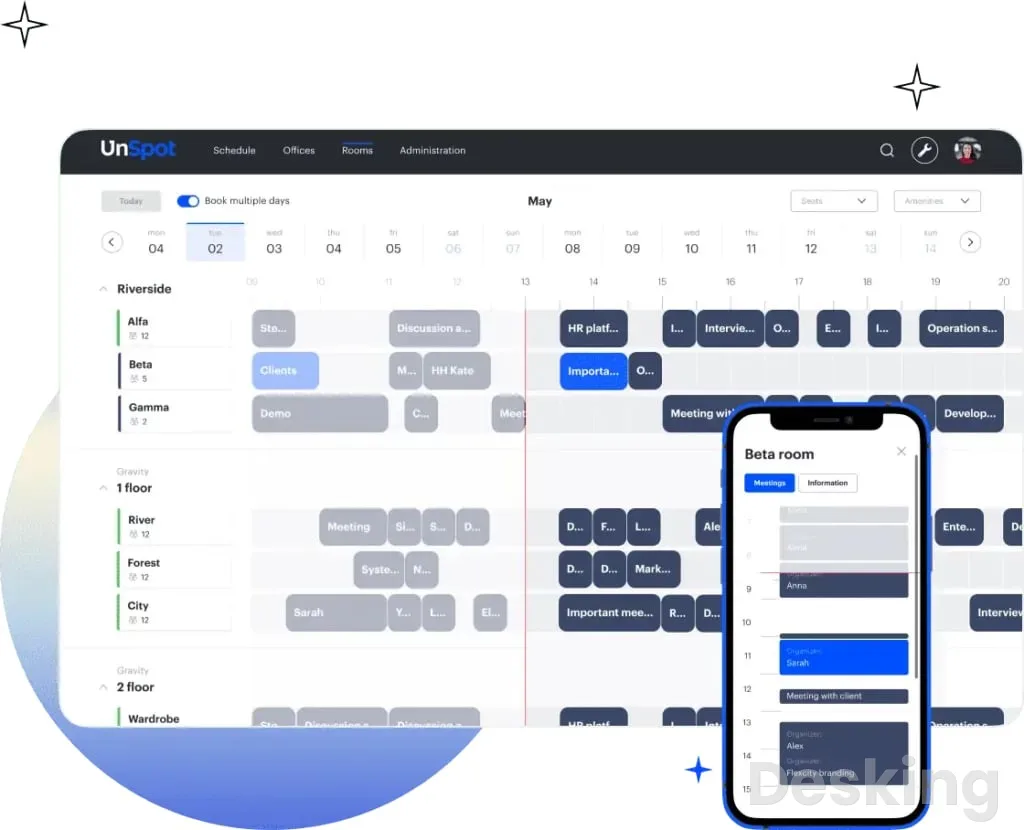
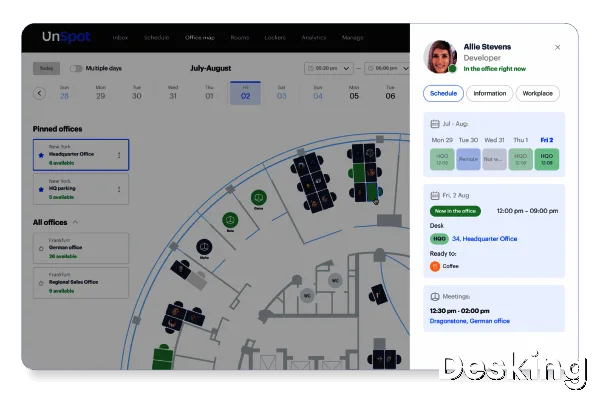
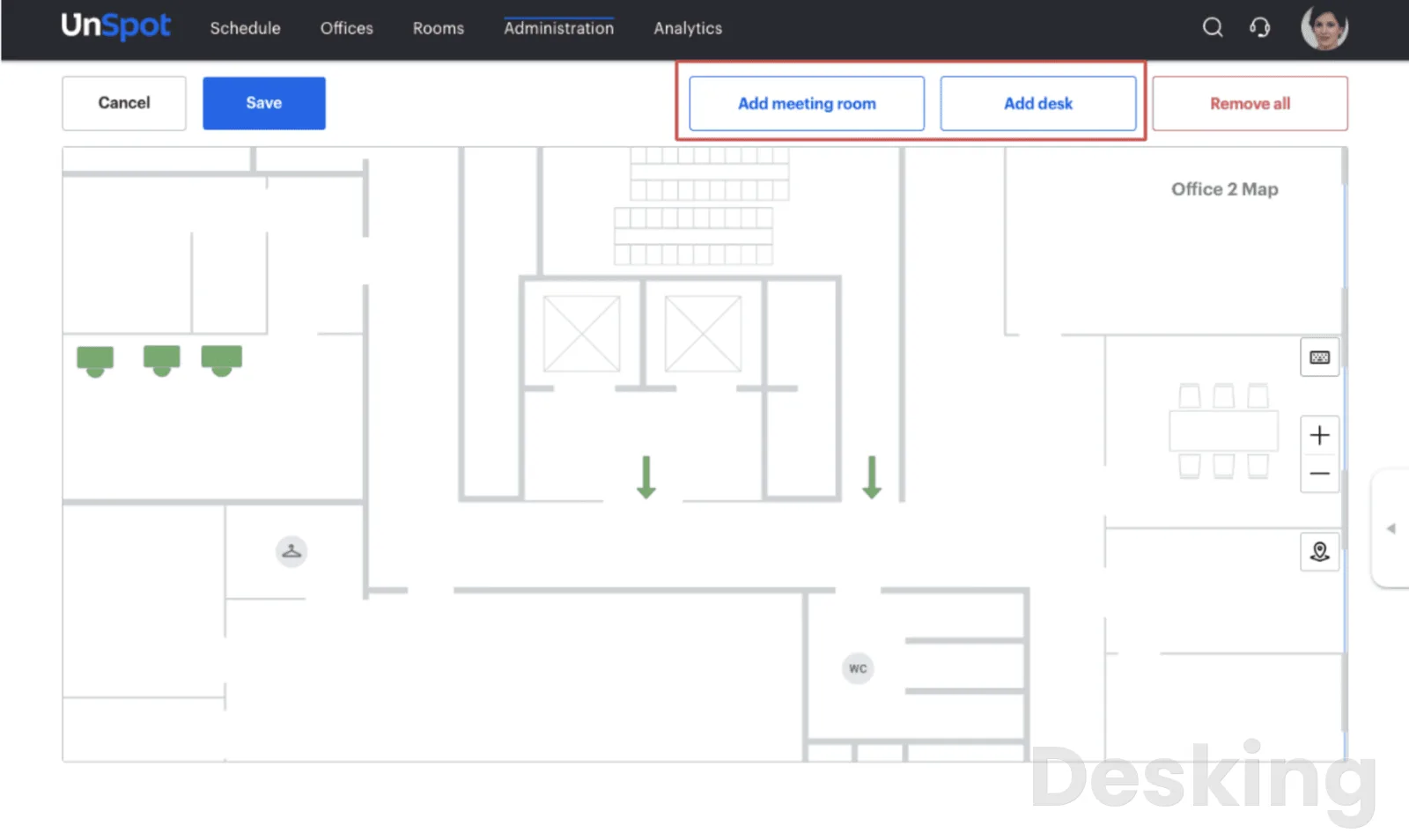
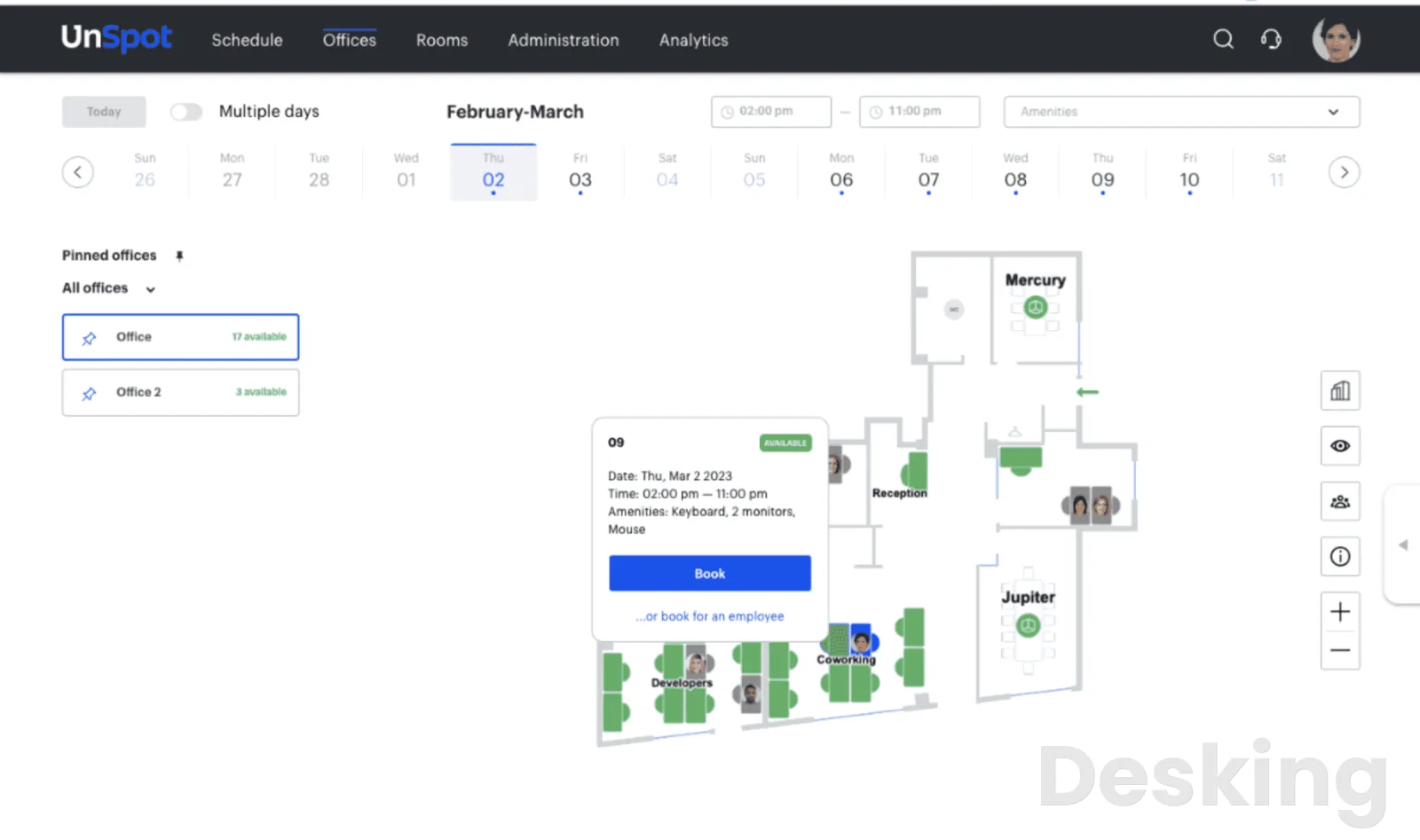
Table of contents
- 1. What is UnSpot
- 2. How UnSpot works
- 3. Key features
- 4. Integrations and compatibility
- 5. Mobile applications and supported platforms
- 6. Ease of use
- 7. Setup and implementation
- 8. Pricing plans and costs
- 9. Security and data protection
- 10. Customer reviews and support
- 11. UnSpot alternatives
- 12. Who should use UnSpot
- 13. Who should avoid UnSpot
- 14. Return on investment and workplace costs
- 15. Migration and switching platforms
- 16. Final verdict
- Frequently Asked Questions
1. What is UnSpot
UnSpot is a workplace management and desk booking platform developed by UnSpot, a software business founded in 2020 by Umbrella Group, an international business digitalization group.
The company reports more than 40 team members, 12,000 active users and 130 clients.
Its customer references include Accenture, DiDi, Discovery, Eurosport, Ak Bars Bank and Animal Planet.
The platform manages desk reservations, meeting rooms, office attendance, parking, lockers, interactive floorplans and workplace analytics through web and mobile applications.
It also connects with Microsoft 365, Exchange, Google Workspace, Slack, Microsoft Teams and other corporate systems.
UnSpot occupies an interesting position in the workplace software market.
It is young enough to have developed its product around hybrid work rather than adapting an older facilities management system, yet its feature coverage extends beyond the basic requirements of a desk booking application.
Its commercial model is particularly interesting because it separates employee based and resource based pricing, giving businesses different ways to pay for workplace capacity.
That pricing distinction deserves more attention than it usually receives.
A company with 50 employees and 40 bookable desks has a different cost structure from a company with 500 employees and 40 desks.
Charging by employee can make sense when the whole workforce actively uses the platform, but resource based pricing can be more attractive when only a limited number of physical assets need to be managed.
UnSpot addresses both situations, although its public pricing presentation requires careful interpretation before a purchase.
The strongest argument for UnSpot is that it connects three activities that are frequently managed separately: employee attendance planning, physical resource reservations and office utilization reporting.
Employees can indicate when they intend to work from an office, reserve a desk near colleagues and find a meeting room with the necessary equipment.
Administrators can then examine bookings and attendance information to understand how the workplace is being used.
There is a meaningful difference between having these functions available and operating them successfully.
UnSpot's value depends on accurate office maps, sensible booking policies and reliable synchronization with the organization's calendar and identity systems.
Its customer feedback also identifies weaknesses in check in rules, map responsiveness and changing reservations.
These are operational issues, not cosmetic complaints, because a booking platform becomes part of the daily office routine.
The central buying question is therefore not whether UnSpot can reserve a desk.
It clearly can.
The question is whether its combination of resource based pricing, office scheduling and administrative controls gives a company enough value to justify introducing another system into its IT environment.
For small and medium sized companies, the answer can be yes.
For large enterprises with complicated property portfolios, the answer depends on how well the platform handles the organization's specific administrative and integration requirements.
UnSpot is best understood as a hybrid workplace coordination system with resource booking at its center.
Its strongest appeal is to companies that want to replace manual office scheduling and fragmented reservation procedures without immediately purchasing a large enterprise facilities platform.
2. How UnSpot works
UnSpot uses a centralized workplace structure.
Administrators create the organization, add offices and configure the resources employees are allowed to reserve.
These resources can include desks, meeting rooms, parking spaces and lockers.
Each office can have its own working hours, time zone, booking policies and access groups.
The employee experience begins with a workplace schedule.
Employees can indicate the days they intend to work from the office, select a location and reserve an available resource.
Depending on the company's configuration, an employee can reserve a desk for one or several days, choose a workstation based on its equipment and identify where colleagues intend to sit.
This distinction between an office schedule and a desk reservation is important.
A schedule communicates an employee's intended work location, while a reservation allocates a physical resource.
UnSpot connects these activities so that an organization can coordinate attendance and resource availability rather than treating them as unrelated records.
Administrators can also establish rules governing how far ahead employees can book, which departments can use particular office zones and how many days per week employees may attend the office.
Managers can reserve resources on behalf of other colleagues, while designated administrators can manage bookings for their teams.
The employee booking process
The normal booking process follows a straightforward sequence.
- The employee signs in through the organization's configured authentication method and opens the workplace schedule.
- The employee selects the intended office and working date, then checks the availability of colleagues and resources.
- The employee opens the interactive office map or the relevant booking dashboard and identifies an available desk or meeting room.
- The employee applies the available filters to find a resource with the required location, capacity or equipment.
- The employee selects the resource, chooses the booking period and confirms the reservation.
- If the organization requires check in, the employee confirms attendance using the configured method before the reservation expires.
- The employee can review or manage the reservation through the supported application and notification channels.
The process is particularly useful when employees want to coordinate their attendance around colleagues.
Instead of sending messages asking who will be in the office, they can consult the workplace schedule and make their reservations accordingly.
The system also supports booking on behalf of other colleagues, subject to permissions and company policies.
This is useful for managers coordinating team attendance or office administrators arranging seating for visitors.
However, delegation must be configured carefully because unrestricted booking permissions can undermine the organization's resource allocation policies.
The administrator environment
The administrative environment determines how well UnSpot works in practice.
Administrators establish the office structure, configure access groups, upload floorplans and define which resources can be booked by each department.
The platform supports local access groups without requiring synchronization with an external directory.
It also supports integration with identity management systems, giving IT departments a choice between managing permissions directly and connecting existing corporate infrastructure.
Different office locations can have their own time zones and working hours.
This matters for multinational organizations because a reservation in one country should not inherit the opening hours of an office in another time zone.
Administrators can also configure booking confirmation policies at account level or separately for individual offices.
That flexibility is useful, but it creates a responsibility to document the rules.
Employees should not have to discover through failed reservations that different offices enforce different check in windows.
3. Key features
UnSpot's features are organized around office scheduling, resource reservations, meeting coordination and workplace reporting.
The distinction between its core booking functions and its administrative capabilities matters because the latter determine whether the platform remains manageable as more offices and departments are added.
The following table separates the principal capabilities by their practical role.
It is a functional overview rather than a claim that every feature is included in every commercial configuration.
| Feature | Employee use | Administrative value |
|---|---|---|
| Desk booking | Reserve shared workstations | Control desk allocation |
| Meeting room booking | Find and reserve rooms | Manage room availability |
| Office scheduling | Publish intended attendance | Coordinate office visits |
| Interactive maps | Locate colleagues and desks | Maintain resource layouts |
| Parking reservations | Reserve parking spaces | Manage parking allocation |
| Locker reservations | Book available lockers | Control shared storage |
| QR check in | Confirm physical presence | Reduce abandoned bookings |
| Calendar integration | Coordinate meetings | Synchronize room calendars |
| Office analytics | Understand workplace activity | Examine utilization patterns |
| Internal help desk | Submit workplace requests | Manage reported issues |
The important point is that UnSpot connects these functions through a shared office structure.
A desk is not simply a calendar entry: it has a location, availability status, assigned permissions and a relationship with the employee schedule.
This makes the platform more useful than a collection of unrelated reservation forms, provided administrators maintain the underlying information.
Desk booking
Desk booking is one of UnSpot's primary functions.
Employees can reserve flexible workstations, select desks near colleagues and search for workspaces according to available equipment.
The interactive map gives the booking process a physical context.
Employees can see where a desk is located and identify its current status instead of relying on resource names that may not mean much to someone unfamiliar with the office.
The system supports advance reservations for one or several days.
It also allows managers to assign desks to employees and make reservations on behalf of colleagues, subject to the configured permissions.
Desk booking can be organized around different workplace policies.
Administrators can establish which zones are available to particular departments, restrict the booking horizon and limit the number of days employees may work from the office.
These controls are especially relevant when an organization has a mixture of permanent and shared seating.
A company can maintain assigned workstations for employees who need them while allowing other desks to operate as flexible resources.
The strongest benefit is the connection between seating and colleague visibility.
Employees can identify where their coworkers plan to sit and choose a nearby desk when collaboration is the reason for attending the office.
One G2 reviewer from a mid market organization described this practical advantage:
I like that I can book my desk and see where my colleagues sit, it helps me to not stay alone.
Verified reviewer on G2, HR analyst, mid market company
That is a useful description of the difference between ordinary desk allocation and workplace coordination.
Employees are not simply trying to obtain a seat; they are trying to organize their office day around other people.
UnSpot makes that information accessible through its scheduling and map experience.
There is a qualification.
The platform's check in policies can cancel reservations when employees fail to confirm attendance within the required period.
This is useful for recovering unused desks, but the policy must reflect actual employee working patterns.
Organizations with shift workers or frequent last minute changes should test the process before enforcing it across the workforce.
Meeting room booking
Meeting room booking is another established part of UnSpot's product.
Employees can search for available rooms using capacity and equipment filters, then reserve a suitable space through the application or connected calendar environment.
The search criteria are useful because room capacity alone is rarely enough to determine whether a meeting space is appropriate.
A room may have sufficient seating but lack a display, projector, whiteboard or video conferencing equipment.
UnSpot's booking interface also allows administrators to control the duration of reservations and restrict specific rooms to designated employee groups.
For high demand spaces, an administrator can require approval before a reservation becomes confirmed.
Calendar synchronization is central to this feature.
UnSpot supports Microsoft 365, Microsoft Exchange and Google Calendar environments, allowing organizations to connect meeting room resources with their existing scheduling systems.
The platform also supports adding multiple meeting rooms to one event.
This is relevant for organizations arranging larger meetings across different spaces or coordinating events that require more than one room.
The system's approach to meeting confirmation deserves particular attention.
Where the feature is enabled, employees can be required to confirm their meeting shortly before it starts.
They can scan a QR code or use the room display, and an unconfirmed reservation can be released for another employee.
This helps recover rooms that would otherwise remain blocked by meetings that never happen.
However, it also means that administrators must select appropriate confirmation periods.
A short window may work well for a conventional office but create problems for employees who move between buildings or attend meetings with irregular schedules.
Office scheduling and attendance
Office scheduling gives employees a way to communicate when and where they intend to work.
They can choose their office days and use statuses such as Remote Work, Business Trip and Vacation to explain their availability.
The feature is valuable because desk booking and employee scheduling solve different problems.
A desk reservation identifies a physical resource, while the schedule communicates attendance intentions.
When both are visible, employees can coordinate their office days before they arrive.
Managers can also monitor attendance planning across teams and reserve desks for groups.
The system supports requests encouraging colleagues to complete their schedules, which can improve visibility when departments are trying to coordinate shared office days.
Administrators can set office opening hours and employee working hours.
Individual offices can have different schedules, making the system suitable for companies operating across multiple locations and time zones.
There is a distinction between planned attendance and verified physical presence.
An employee selecting an office day does not automatically prove that the person arrived.
The confirmation and check in features provide additional information, but organizations should avoid treating every scheduled visit as a verified attendance record.
Interactive office maps
The interactive office map is one of UnSpot's most recognizable features.
Employees can use the map to identify desks, meeting rooms and other workplace resources.
The map also displays colleagues' planned locations, making it easier to choose a workstation near a particular department or coworker.
Administrators can upload office maps and add or edit interactive objects without having to redraw the entire floorplan.
This is useful when a company changes individual desks or room assignments but does not fundamentally redesign the building.
The commercial details are important.
The pricing comparison identifies a free interactive map allocation of one map covering up to 500 square meters, approximately 5,300 square feet, in the relevant entry configuration.
Higher configurations show additional map capacity, including unlimited map area in the resource comparison.
This means buyers should establish exactly which map allowance applies to their chosen pricing model.
A company with one compact office may have no difficulty with the entry allocation, while a business operating several large floors needs to account for map capacity before purchasing.
The map is also the foundation of the employee experience.
If desks are incorrectly positioned or room details are outdated, employees may reserve resources that do not correspond to the physical workplace.
Maintaining the map is therefore an ongoing administrative responsibility rather than a one time implementation task.
Parking and locker management
UnSpot extends its resource booking model to parking spaces and lockers.
Parking reservations allow employees to secure a designated space before arriving at the office.
This is particularly useful in buildings where parking capacity is limited and employees cannot simply choose any available space.
Locker reservations follow a similar principle.
Employees can reserve shared storage resources instead of relying on informal arrangements or manual allocation by facilities staff.
These functions are important because they allow companies to manage several categories of physical assets through the same workplace system.
A business that needs desk booking and parking allocation does not necessarily need to maintain two separate reservation applications.
The platform also documents locker integrations with compatible lock systems and parking camera connections.
These integrations can extend resource management beyond a simple booking record, although the precise hardware requirements need to be established during implementation.
The financial distinction between employee based and resource based pricing is especially relevant here.
A company may have many employees but relatively few parking spaces or lockers.
Paying according to the resources actually managed can be more attractive than licensing every employee at the same rate.
QR code check in
UnSpot supports QR code confirmation for desks, parking spaces and meeting rooms.
Administrators can generate QR codes for workplace resources, print them and place them at the relevant locations.
Employees scan the code using their phone to confirm the reservation.
The advantage is straightforward: a code attached to a physical resource provides stronger evidence of presence than a confirmation performed remotely.
An employee cannot normally scan a code physically attached to a desk without being near that resource.
Meeting room displays can also show a confirmation control for scheduled meetings.
Employees can confirm their reservation at the entrance rather than searching for the relevant booking through the main application.
The check in process is configurable.
Organizations can choose which confirmation methods employees are allowed to use, including QR codes and supported office network detection.
The disadvantage is that mandatory confirmation introduces another task into the working day.
If the reminder is missed or the check in period is too short, an employee can lose a reservation despite having intended to use the desk.
G2 feedback makes this concern clear.
One reviewer described the frustration of losing a desk after forgetting to check in, even though the reservation had already been made.
This is not a reason to avoid the feature, but it is a reason to treat the confirmation policy as an operational decision rather than an arbitrary security setting.
Workplace analytics
Workplace analytics gives administrators information about resource demand and office activity.
UnSpot supports office visit reports, booking history reports, employee attendance summaries and heatmaps showing which areas are popular or underused.
Meeting room booking heatmaps help identify spaces that receive more or less demand.
These reports are useful for facilities planning.
An organization can examine which desks are regularly reserved, which meeting rooms remain underused and how attendance patterns differ between working days.
The platform also supports exporting reports to Excel.
This is useful for companies that want to combine workplace information with financial or operational reporting in existing spreadsheet workflows.
The strongest application is capacity planning.
A company considering whether to consolidate office space needs information about how much of its current capacity is being used.
Booking information and attendance records can help inform that decision.
However, buyers should understand the difference between bookings and occupancy.
A reservation records intended resource usage, while actual presence requires a confirmation or another reliable source of evidence.
Analytics built on incomplete check ins can overstate or understate the real utilization of the office.
The quality of the reports therefore depends on the quality of the operational process.
UnSpot can collect and organize workplace data, but administrators must establish consistent policies for employees to follow.
Internal help desk
UnSpot includes an internal help desk function for workplace requests and reported issues.
This allows employees to communicate problems involving office resources through a centralized environment.
Instead of sending individual messages to facilities staff, users can submit requests associated with workplace operations.
The feature is relevant to organizations that want to connect booking and office services.
A meeting room that has a faulty display, for example, creates a facilities issue that needs to be addressed before another meeting is scheduled.
Its value depends on the organization's service workflow.
Companies with an established IT service management platform may prefer to keep technical incidents in that system rather than introduce another ticketing environment.
The internal help desk should therefore be evaluated as a workplace service feature, not assumed to be a replacement for a full ITSM platform.
4. Integrations and compatibility
UnSpot's integration strategy covers the systems that control employee identity, calendar availability, workplace communication and resource access.
This is a sensible design because a reservation platform becomes difficult to maintain when employees must manage separate accounts, calendars and booking records.
Its integration catalogue includes Microsoft 365, Microsoft Exchange, Google Calendar, Google Workspace, Outlook, Slack, Telegram, Microsoft Teams, Zoom, Okta and supported identity services.
The platform also documents API connections and webhooks for organizations that need to exchange information with internal applications.
The following table separates the principal integrations by their operational purpose.
| Integration | Purpose | Main benefit |
|---|---|---|
| Microsoft 365 | Calendar synchronization | Coordinates room reservations |
| Microsoft Exchange | Corporate room calendars | Supports existing Exchange infrastructure |
| Google Calendar | Meeting scheduling | Synchronizes room availability |
| Google Workspace | Employee and group synchronization | Simplifies account administration |
| Microsoft Entra ID | Identity and user management | Connects corporate accounts |
| Active Directory | Directory synchronization | Supports existing IT infrastructure |
| Okta | Authentication | Centralizes employee access |
| Slack | Employee notifications | Brings booking updates into messaging |
| Microsoft Teams | Workplace communication | Connects scheduling with collaboration |
| Telegram | Booking notifications | Provides another notification channel |
| Zoom | Online meeting coordination | Connects supported conferencing workflows |
| External API | Booking data exchange | Supports custom business applications |
| Webhooks | Event notifications and automation | Connects external workflows |
The number of integration names is less important than the depth of the connections.
A calendar integration must correctly synchronize room availability, while identity integration must handle employee access and account changes.
Buyers should verify these individual workflows rather than assuming that every listed connection supports every operation.
Microsoft 365 and Exchange
Microsoft integration is one of the most relevant capabilities for companies using Outlook as their primary calendar.
UnSpot supports meeting room calendar synchronization with Microsoft 365 and Microsoft Exchange.
Administrators can connect room calendars so that meeting reservations remain associated with the organization's existing scheduling environment.
This reduces the risk of employees maintaining two unrelated meeting schedules.
It also allows organizations to preserve familiar Outlook workflows while using UnSpot for workplace maps and resource administration.
The distinction between Microsoft 365 and on premises Exchange is important for IT departments.
Companies still operating local Exchange infrastructure should confirm the required configuration and authentication arrangements before implementation.
Google Workspace and Google Calendar
Google integration follows a similar principle.
Organizations can connect Google Calendar to meeting room reservations and use Google Workspace for supported employee synchronization workflows.
This is particularly useful for companies that want to retain their existing calendar infrastructure rather than move all scheduling activities into a new application.
The important implementation task is ensuring that room calendars are correctly associated with the physical rooms in UnSpot.
If the mapping is inaccurate, employees may see inconsistent availability or reserve a room that is already occupied in another calendar environment.
Slack, Teams and Telegram
UnSpot supports several messaging integrations for notifications and workplace coordination.
Slack and Microsoft Teams are particularly relevant because employees already use them to communicate with colleagues and organize meetings.
Booking confirmations and reminders can be delivered through connected channels, depending on the organization's configuration.
Telegram is another documented option.
Its presence is useful for organizations that use it for internal communication, although enterprise buyers should evaluate their own security and communications policies before enabling it.
These integrations reduce the need for employees to monitor the booking application continuously.
However, notification frequency needs to be configured sensibly.
Too many reminders can become distracting, and Capterra feedback includes complaints about notifications arriving too frequently.
Identity management and SSO
UnSpot supports identity synchronization through Google Workspace, Microsoft Entra ID, Active Directory and other documented directory mechanisms.
Its integration documentation also describes SCIM 2.0, OpenID Connect, AD LDAP and OpenLDAP.
Authentication options include supported SSO providers, including Microsoft and Google environments.
This is particularly useful for companies with established IT administration procedures.
Rather than manually creating and removing every employee account, administrators can connect UnSpot to the identity systems already used by the organization.
The important consideration is permissions.
A user who can book a desk should not automatically receive administrative access to other employees' reservations or workplace configuration.
UnSpot's role structure separates these responsibilities, and IT departments should review the relevant privileges before deployment.
API and webhooks
The External API is an important capability for organizations with custom workplace workflows.
UnSpot documents an API endpoint for retrieving booking information, including desk, parking and meeting room reservations.
The endpoint returns booking dates, duration, office, employee information and the associated resource.
The documented bookings endpoint limits each requested date range to 92 days.
It also applies a rate limit of one request per ten seconds per workspace.
Organizations exporting longer histories must therefore divide the request into smaller periods and respect the documented rate limit.
This is a meaningful technical detail for developers.
A company building a business intelligence dashboard or connecting workplace information with another management system can retrieve booking data without relying exclusively on manual spreadsheet exports.
Webhooks provide another integration method.
They can send events out of UnSpot and receive supported events from external systems.
Together, the API and webhooks allow developers to build workflows that go beyond the standard integrations.
However, API availability should not be confused with unlimited access to every internal product function.
Buyers should identify the exact data and operations required for their project and confirm that the documented endpoints support them.
5. Mobile applications and supported platforms
UnSpot supports browser access and mobile applications for employees who need to manage their workplace reservations away from their desks.
The mobile experience is particularly relevant to desk booking.
Employees can check availability, select a resource and manage their office schedules without waiting to reach a computer.
The application also supports the wider coordination process.
Employees can see workplace information, consult colleagues' schedules and access relevant reservation details through the mobile environment.
The platform supports meeting room displays through applications designed for compatible iPad and Android touchscreen devices.
This gives organizations a choice between using supported tablets and purchasing specialized room scheduling equipment.
The desktop application and browser access provide additional ways to work with the system.
This is useful for office administrators who spend more time managing maps, employee groups and resource settings than making individual reservations.
There is, however, a distinction between platform availability and feature consistency.
A mobile application may support the essential booking process without offering the same level of administrative control as the browser environment.
G2 feedback includes complaints about editing reservations and changing locations through mobile devices.
One reviewer described the web version as easier to use for certain changes.
This matters for employees who regularly modify their office plans at short notice.
Organizations should include mobile booking changes in their evaluation rather than testing only the initial reservation process.
Employees need to know that they can correct a booking without contacting an administrator every time their plans change.
6. Ease of use
UnSpot's employee interface is one of its stronger characteristics.
The booking process is relatively easy to understand, and the interactive map gives users a clear visual reference for locating resources.
The product also avoids making every employee learn the administrative structure.
Employees can work through the schedule and reservation screens, while administrators control the underlying rules and resource configuration.
Capterra reports an overall rating of 4.9 out of 5 from 72 reviews, with ease of use rated 4.8 and customer service also rated 4.8.
G2 reports 320 reviews and an aggregate rating of 5.0 out of 5.
These are strong customer signals, although review platform ratings should not be treated as proof that every organization will have the same experience.
The feedback is particularly positive about desk reservations, room booking and the ability to see colleagues' office locations.
These are the activities employees perform repeatedly, so their simplicity matters more than the number of advanced administrative options available.
One Capterra reviewer from the telecommunications industry described the value of the floorplan and calendar connections:
The ability to view our floorplan and select desks near colleagues, coupled with the convenience of booking meeting rooms through MS Teams and Outlook, is exceptional.
Verified reviewer on Capterra, IP Core Network Engineer, telecommunications, 1,001 to 5,000 employees
This is a strong example of the product's intended experience.
The map and calendar integrations work together to reduce the distance between planning an office day and actually reserving the necessary resources.
Where the interface needs improvement
The positive feedback does not eliminate usability problems.
Some G2 reviewers report slow loading, particularly when using office maps.
Others describe difficulty changing reservations or locations after their original booking has been created.
Capterra also includes a complaint about changes made in connected systems taking too long to synchronize.
This is more serious than a minor interface inconvenience because employees rely on calendar availability to avoid double bookings.
The mobile application receives mixed feedback.
Employees appreciate being able to reserve resources remotely, but some find editing an existing reservation less convenient than making the original booking.
These complaints suggest that the basic workflow is stronger than some of the secondary management actions.
A company evaluating UnSpot should test the entire reservation lifecycle: create, modify, confirm, cancel and synchronize.
A good booking screen is only part of the employee experience.
Administrative usability
The administrative environment requires more attention than the employee application.
Administrators must configure the building structure, resource permissions, office schedules, check in policies and calendar connections.
These settings are necessary for the platform to behave correctly, but they create a learning requirement for the people responsible for workplace operations.
The role structure helps separate responsibilities.
UnSpot documents roles including Member, Manager, Office Manager, Offices Admin, Users Admin, Integrations Admin, Super Admin and Reception.
This is useful for organizations where facilities, HR and IT departments share responsibility for the platform.
Each group can receive the permissions relevant to its work rather than granting every administrator unrestricted control.
The risk is overcomplication.
A small organization may not need all these administrative roles, but a company operating multiple buildings can benefit from separating account management, user administration and integration responsibilities.
7. Setup and implementation
UnSpot is a cloud based platform, but its implementation still requires preparation.
The organization needs accurate floorplans, employee information, room calendars and resource inventories before the application can become a reliable workplace management system.
The platform's help center includes configuration guidance for office administration, integrations, displays, user management, booking confirmation and API connections.
It also documents training sessions for employees and administrators as part of the commercial support offering.
A sensible implementation should begin with one representative office.
This allows administrators to test the booking rules and integrations before introducing the system across several locations.
What to prepare
Before implementation, the organization should assemble the following information:
- Current office floorplans and the physical location of bookable resources.
- Employee names, email addresses, departments and reporting structures.
- A complete inventory of desks, meeting rooms, parking spaces and lockers.
- Office working hours, opening days and time zones.
- Booking rules, resource restrictions and employee attendance policies.
- Microsoft 365, Exchange or Google Workspace administrative access.
- Identity provider details and the required synchronization permissions.
- Hardware information for meeting room displays and compatible workplace devices.
The quality of this information determines how much administrative correction will be required after launch.
An incomplete employee directory or inaccurate floorplan can undermine the booking process even when the software itself is functioning correctly.
Implementation steps
The following sequence provides a practical deployment order.
- Create the company structure. Establish the organization and configure the relevant office locations, opening hours and time zones.
- Add the workplace floorplans. Upload the office maps and identify the physical areas that employees will be allowed to reserve.
- Create the resources. Add desks, meeting rooms, parking spaces and lockers, assigning each resource to its correct location.
- Configure access groups. Establish which departments and employees can reserve specific resources and office zones.
- Import employee information. Add the employee records and verify that email addresses and organizational details are correct.
- Connect the calendar system. Configure Microsoft 365, Exchange or Google Calendar and associate the relevant room calendars with the physical meeting rooms.
- Configure workplace schedules. Establish office opening hours, employee attendance policies and booking horizons.
- Set confirmation policies. Choose whether desk and room reservations require QR code, network based or another supported confirmation method.
- Connect messaging and displays. Configure supported notification channels and install the meeting room display application on compatible tablets.
- Run a controlled pilot. Ask a small employee group to reserve, modify, confirm and cancel resources before expanding access to the rest of the organization.
This sequence prevents a common implementation mistake: inviting employees before the physical workplace and booking policies are ready.
Employees should encounter a working office map and accurate availability from their first interaction with the platform.
Managing floorplan changes
Floorplan maintenance deserves special attention because it affects the accuracy of every resource reservation.
UnSpot documents the ability to upload maps and add, edit or delete interactive objects without redrawing the entire floorplan.
This is useful when desks move or room assignments change but the overall structure remains the same.
Nevertheless, major renovations and building redesigns require a more deliberate process.
Administrators must ensure that the new layout matches the physical workplace and that existing resource assignments remain correct.
One G2 reviewer described the difficulty of maintaining layouts when office arrangements change frequently:
Editing the office layout takes too long and requires help from UnSpot’s team, which is frustrating when we’re making changes.
Verified reviewer on G2, HR analyst, mid market company
This is an important limitation for companies with frequently changing offices.
A static workplace layout is easier to maintain than a floor where desks, departments and meeting spaces are regularly rearranged.
The practical recommendation is to ask UnSpot to demonstrate a complete floorplan change during procurement.
Buyers should establish which changes administrators can make independently and which require assistance from the vendor.
Employee rollout
Employee adoption should be treated as a workplace policy exercise, not simply an application installation.
Employees need clear instructions explaining how to reserve a desk, how far ahead they can book, when confirmation is required and what happens if they fail to check in.
The organization should also explain whether employees can reserve desks near colleagues, whether managers can make bookings on behalf of their teams and which office areas are restricted.
A short pilot can identify problems with these policies before they affect hundreds of employees.
It also allows facilities teams to determine whether the booking process is producing accurate utilization information.
The rollout should include a named administrative owner.
Without one, employees may report booking problems to different departments, and the responsibility for correcting floorplans or permissions can become unclear.
8. Pricing plans and costs
Pricing is one of UnSpot's most interesting commercial characteristics, but it also requires careful examination.
The vendor presents both per user and per resource pricing.
Its public pricing comparison identifies a Basic option starting at $50 per company, a Desk, Parking and Locker option starting at $10 per company, and a Meeting Room option starting at $30 per company.
It also advertises an Advanced option at $50, reduced from $100.
The pricing page states that the minimum rate includes payment for 50 users.
This is an important qualification because the advertised starting figure should not automatically be interpreted as the complete cost for every organization or every resource configuration.
Third party pricing records also identify an employee based rate of $2.50 per user per month for smaller and medium sized companies, with higher arrangements available through direct consultation.
TrustRadius records an Advanced employee rate of $5 per user per month and separate resource prices for desks, parking spaces and meeting rooms.
These different presentations make it necessary to distinguish the pricing model from the final commercial quote.
The organization should establish whether its proposal is based on employee licenses, bookable resources or a combination of both.
Pricing structure
The following table summarizes the commercial options identified in the vendor's pricing presentation.
The published starting amounts are not sufficient on their own to establish the full monthly invoice, particularly where minimum billing and resource quantities apply.
| Commercial option | Published starting price | Pricing basis | Main purpose |
|---|---|---|---|
| Basic | $50 | Company level | Workplace booking package |
| Desk, Parking and Locker | $10 | Company or resource configuration | Physical resource reservations |
| Meeting Room | $30 | Company or resource configuration | Meeting room reservations |
| Advanced | $50 promotional price | Company level | Expanded workplace management |
The vendor also identifies a minimum rate that includes payment for 50 users.
Buyers should ask for the exact quantity, billing period and included resources associated with each quotation.
This is especially important because the employee based and resource based options do not represent identical commercial arrangements.
Employee based pricing
The employee based model is useful when a company wants broad access across its workforce.
G2 and Capterra identify a starting price of $2.50 per user per month for the smaller and medium sized company offering.
This makes it easier to estimate the cost of a deployment than a quotation that is entirely dependent on a sales discussion.
For a company with 50 licensed users, that reference rate would represent $125 per month.
For 100 users, it would represent $250 per month.
For 500 users, it would represent $1,250 per month, before any additional charges or negotiated terms.
These calculations are illustrative applications of the third party published per user rate, not guaranteed vendor quotations.
The minimum billing terms and the final commercial configuration must be confirmed.
The important purchasing question is whether all employees need access.
If only a small proportion of the workforce books desks or rooms, an employee based subscription may be less attractive than resource based pricing.
Resource based pricing
The resource model is potentially more attractive for organizations with limited physical booking requirements.
UnSpot separates desks, parking spaces and lockers from meeting rooms in its pricing presentation.
TrustRadius identifies the resource based rates as $10 per desk or parking resource per month and $30 per meeting room per month.
This structure is particularly relevant for companies that have a large employee population but a smaller number of shared resources.
Consider an organization with 300 employees, 60 bookable desks and 8 meeting rooms.
The number of employees alone does not describe the actual resource demand.
A resource based proposal may be more suitable because the company is managing a defined inventory rather than licensing every employee for identical usage.
The buyer should nevertheless examine the minimum billing terms.
A minimum rate covering 50 users can change the apparent cost advantage for very small organizations.
Basic versus Advanced
The difference between Basic and Advanced needs to be examined at the feature level.
The pricing comparison associates Advanced with expanded administrative capabilities, additional support arrangements and more extensive workplace management options.
The feature comparison includes office map management, room scheduling, integrations, employee administration and reporting.
However, the public pricing presentation does not make every difference between Basic and Advanced immediately clear.
Some features appear across multiple configurations, while others are marked as available only in the higher arrangement.
This is where the sales proposal becomes important.
Buyers should request a written comparison showing each feature, the relevant resource allowance and the precise commercial terms.
The following table identifies the main categories that should be checked when comparing configurations.
| Capability | Basic configuration | Advanced configuration |
|---|---|---|
| Desk reservations | Included in relevant package | Included |
| Meeting room reservations | Depends on package | Included in expanded configuration |
| Interactive maps | Limited map allocation | Expanded map allowance |
| Office attendance scheduling | Configuration dependent | Expanded controls |
| Analytics reports | Core reporting | Expanded reporting |
| Calendar integrations | Supported configurations | Supported configurations |
| Identity integrations | Configuration dependent | Expanded administration |
| QR confirmation | Feature dependent | Advanced confirmation options |
| User administration | Core controls | Expanded controls |
| Personalized support | Help center | Personal support manager |
The distinction between a feature being supported and being included in a particular subscription is important.
The buyer should not accept a general statement that UnSpot supports an integration as confirmation that the integration is included in the proposed plan.
What should be included in the final quotation
The annual or monthly cost should be evaluated against the actual deployment.
The quotation should clearly identify:
- Number of licensed users and the applicable minimum.
- Number of desks, meeting rooms, parking spaces and lockers.
- Which pricing model applies to each resource.
- Number of buildings and interactive maps.
- Included reporting and analytics capabilities.
- Calendar and identity integration entitlements.
- Support and employee training arrangements.
- Hardware and display requirements.
- Any custom development or implementation charges.
- Billing period, renewal terms and cancellation conditions.
There is no reason to accept an ambiguous quotation for workplace software.
A buyer should be able to identify the cost of each component and understand what happens when the company adds another office or increases its resource inventory.
Is UnSpot affordable for small businesses?
UnSpot's pricing structure gives smaller companies a credible entry point, particularly when they need to manage a limited number of desks or meeting rooms.
However, the minimum billing requirement means that the lowest advertised price is not necessarily the actual cost of a very small deployment.
Companies should compare the effective cost per active employee or bookable resource rather than relying on the headline starting figure.
For a small business with a handful of desks and a single meeting room, a simpler product may still be cheaper.
For a growing business with several departments, shared parking and multiple office resources, UnSpot's broader functionality may justify the additional investment.
The best financial decision is to compare both billing models using the same resource inventory and employee population.
That will reveal whether the organization benefits more from paying for users or paying for the resources employees actually reserve.
9. Security and data protection
UnSpot handles information about employees, office schedules, reservations and workplace activity.
This information can reveal when employees attend an office, where they work and which resources they use.
Security and privacy therefore deserve the same attention as calendar synchronization and access management.
The company publishes a privacy policy that addresses GDPR principles for European residents and CCPA requirements for California consumers.
However, a privacy policy describing regulatory commitments should not be confused with an independently verified security certification.
For enterprise procurement, the relevant questions concern where customer information is hosted, how it is encrypted, which employees can access it, how long it is retained and how data is handled when an employee leaves the organization.
Identity and permissions
UnSpot's administrative roles provide a way to separate responsibilities across workplace operations.
The documented roles include Member, Manager, Office Manager, Offices Admin, Users Admin, Integrations Admin, Super Admin and Reception.
Each role has different permissions for managing bookings, users, office resources and integrations.
This is useful because the employee responsible for reception does not necessarily need permission to modify the company's identity configuration.
Likewise, an office manager may need to control resource reservations without receiving unrestricted access to every administrative function.
Companies should review the permissions associated with each role before inviting employees.
They should also establish which users can book on behalf of colleagues, manage guest reservations and modify restrictive booking policies.
Data privacy
Workplace presence information can be sensitive even when it does not contain conventional financial or medical records.
An employee's attendance schedule may reveal travel patterns, work arrangements and regular office locations.
Organizations should explain what information is visible to colleagues, what administrators can access and which records are retained.
The privacy review should include:
- Employee schedule visibility and access restrictions.
- Visitor and guest information handling.
- Retention of reservation and attendance records.
- Access to employee information through integrations.
- Data processing agreements and subprocessors.
- International data transfers and applicable regional requirements.
- Procedures for deleting or correcting employee information.
For companies operating in Europe, the data processing agreement and the allocation of controller and processor responsibilities should be examined before deployment.
The same applies to organizations subject to California privacy requirements.
Security procurement
The available public information does not establish a complete set of independently verified enterprise security certifications.
Buyers should therefore request the relevant security documentation rather than assume that GDPR language establishes compliance with every corporate security requirement.
The procurement team should request details about encryption, hosting locations, backup arrangements, incident notification, vulnerability management and penetration testing.
This is particularly important when UnSpot is connected to corporate identity systems and calendars.
The platform's integration permissions should be limited to the information required for its workplace functions.
My recommendation is to involve IT security before connecting the production employee directory.
A controlled pilot using a limited group of accounts is a safer way to evaluate permissions, data visibility and synchronization behavior.
10. Customer reviews and support
Customer feedback gives UnSpot a favorable overall reputation, particularly for its booking experience and customer assistance.
Capterra reports 4.9 out of 5 from 72 reviews, with 4.8 for ease of use and 4.8 for customer service.
G2 reports 5.0 out of 5 from 320 reviews.
These are unusually positive aggregate scores, but the individual complaints are more useful for identifying the operational risks a buyer should investigate.
The positive feedback repeatedly points to the same benefits: employees can book resources without asking an office administrator, meeting rooms become easier to coordinate and colleagues' schedules are more visible.
The negative feedback is more specific.
It concerns synchronization delays, check in policies, mobile reservation changes, notifications and floorplan maintenance.
What customers like
The most consistent positive theme is the reduction of manual office administration.
A Capterra reviewer working in human resources described the benefit of moving away from spreadsheet based seating arrangements:
transitioning away from cumbersome spreadsheet-based seat planning.
Verified reviewer on Capterra, HR, used the software for one to three years
The important part of this feedback is the change in the administrative process.
UnSpot replaces a manual allocation exercise with a system in which employees can reserve resources themselves.
That can reduce the amount of work required from office administrators, especially when several departments share the same facilities.
Another Capterra reviewer described the usefulness of the internal help desk and the wider workplace scheduling environment.
This suggests that customers are using UnSpot for more than a simple desk reservation function.
For a company with limited administrative resources, that broader coverage can be valuable.
It reduces the number of separate workplace tools employees need to learn and facilities managers need to maintain.
Where customers experience problems
Synchronization is one recurring concern.
A Capterra reviewer described delays when booking information was changed through connected systems:
Sometimes, the changes in booking information made from parallel systems are not synchronized fast enough inside the system
Verified reviewer on Capterra, consulting executive, information technology and services, 11 to 50 employees
This complaint matters because calendar synchronization is one of the reasons companies purchase workplace booking software in the first place.
A delay can create uncertainty about whether a room is actually available.
The issue should be tested with the organization's own calendar infrastructure.
Buyers should create, modify and cancel reservations through both environments and confirm how quickly the changes become visible.
Check in is another source of frustration.
G2 reviewers describe reservations being cancelled when employees forget to confirm attendance.
This is an intended consequence of the booking policy, but the experience becomes frustrating when the confirmation window is too short or reminders are insufficient.
The correct response is not necessarily to disable abandoned reservation protection.
It is to configure a realistic confirmation period and ensure employees understand the process.
Customer support
Customer support is one of the more encouraging areas in the feedback.
Capterra includes a review describing quick responses and proactive assistance from the support team.
The platform's pricing information also identifies user and administrator training, a Help Center and personal support management in the relevant higher configurations.
This is important for companies implementing workplace software across several offices.
Floorplan preparation, calendar synchronization and access policies can require assistance beyond ordinary troubleshooting.
However, buyers should confirm exactly what support is included in their subscription.
They should establish whether they receive a named contact, which communication channels are available, how urgent issues are escalated and whether response commitments are documented.
Support should not be evaluated solely by the quality of an initial sales demonstration.
The real test is how the provider handles a synchronization problem or a workplace booking issue that affects employees during business hours.
11. UnSpot alternatives
UnSpot competes with products that address desk booking, office scheduling and workplace management from different commercial and technical directions.
The most useful comparisons are Skedda, Envoy, Robin and deskbird.
Each has a distinct purchasing proposition, and the right choice depends on how much of the workplace operation the company wants to manage in one system.
UnSpot vs Skedda
Skedda is one of the strongest alternatives when the primary requirement is managing bookable spaces.
Its pricing is based on bookable spaces, with regional plans that include different resource allocations.
In the United States and Canada, its Plus plan starts at $249 per month with 35 spaces included and annual billing.
In Europe, the Middle East and Asia Pacific, its Starter plan starts at $99 per month with 15 spaces included and annual billing.
The pricing structure is easier to understand than UnSpot's mixed employee and resource presentation.
Skedda also includes interactive floorplans, unlimited users and bookings in its published entry configurations.
UnSpot's advantage is the way it connects employee attendance schedules with desk and resource reservations.
It also supports parking and locker management, which gives it a broader workplace resource focus.
Skedda is the stronger choice when a company wants a space based booking system with clearly defined subscription limits.
UnSpot is more attractive when employee scheduling and the wider office resource inventory are equally important.
UnSpot vs Envoy
Envoy has a strong position in visitor management and workplace operations.
Its product range includes visitor registration, reservations, room scheduling, desk booking and other office services.
Its visitor management offering is particularly relevant to organizations with formal reception and security requirements.
Envoy's published Reservations price starts at $5 per bookable resource per month with annual billing, excluding its platform fee.
Its visitor product has a separate pricing structure, including a free Basic tier and a paid Premium option.
UnSpot has an advantage when the purchasing priority is coordinating employee schedules and office resource reservations.
Its work schedule planning, interactive maps and employee attendance features are closely connected.
Envoy is the better candidate when visitor registration, security workflows and reception operations dominate the project.
A company should not purchase UnSpot simply because it has visitor related capabilities if its actual requirement is a more specialized visitor management system.
UnSpot vs Robin
Robin targets workplace management with a strong emphasis on space utilization and enterprise administration.
Its platform connects desk booking, meeting room scheduling, visitor management and workplace analytics.
It is particularly relevant to organizations managing larger office portfolios and more complex facilities operations.
The commercial difference is substantial.
Robin uses a tailored annual subscription and does not publish a comparable fixed starting price for its current One Workplace Platform.
UnSpot is more accessible from a pricing perspective because it publishes resource and employee based starting figures.
It also gives smaller organizations a more straightforward route into desk and room booking.
Robin has a stronger enterprise oriented commercial proposition for organizations that need a broader workplace management environment.
UnSpot is the more attractive candidate for buyers who want connected booking and office scheduling without immediately entering a larger enterprise procurement process.
The choice should be based on the required administrative depth.
Companies replacing a few separate booking tools should compare both products carefully, while large organizations with substantial property portfolios should evaluate Robin's enterprise capabilities alongside UnSpot's integrations and reporting.
UnSpot vs deskbird
deskbird focuses on desk booking and hybrid workplace coordination.
Its platform supports desk and room reservations, office attendance planning, interactive maps and integrations with collaboration tools.
It is particularly relevant to companies that want to coordinate hybrid attendance without implementing a broader facilities management environment.
Its commercial presentation is based on employee licensing, with third party comparisons identifying a starting price around $3.75 per user per month.
The exact subscription and billing conditions should be checked against the relevant quotation.
UnSpot has an important distinction in its resource based pricing.
Companies that manage many employees but relatively few bookable resources may find the resource model more attractive.
deskbird can be the better purchase when the company values a focused hybrid work experience and wants a more employee centered approach.
UnSpot is more compelling when parking, lockers, internal help desk workflows and resource allocation are part of the same purchasing requirement.
Competitor comparison
The following table summarizes the commercial and functional differences that matter most when evaluating these products.
| Product | Starting price | Free plan | Desk booking | Office scheduling | Main strength |
|---|---|---|---|---|---|
| UnSpot | From $10 per company or resource based pricing | No | Yes | Yes | Employee and resource coordination |
| Skedda | $99 per month in EMEA and APAC | No | Yes | Limited | Space based booking |
| Envoy | $5 per resource per month plus platform fee | Visitors Basic | Yes | Yes | Visitor and workplace operations |
| Robin | Contact sales | No | Yes | Yes | Enterprise workplace management |
| deskbird | From approximately $3.75 per user per month | Plan dependent | Yes | Yes | Hybrid attendance coordination |
These figures use different billing units, so they are not directly interchangeable.
UnSpot's resource based prices cannot be compared with a per user subscription without knowing the number of resources and employees.
Likewise, Envoy's Reservations charge excludes its platform fee.
For a fair comparison, buyers should model the same office inventory across all shortlisted products.
The number of employees, bookable desks, meeting rooms and locations should remain constant when requesting quotations.
12. Who should use UnSpot
UnSpot is particularly suitable for organizations that have outgrown spreadsheets and informal office booking procedures but do not necessarily need an extensive enterprise facilities platform.
Its combination of employee schedules, resource reservations and reporting makes it relevant to several business profiles.
Small and medium sized companies
Smaller organizations can benefit from UnSpot when employees share desks, meeting rooms or parking spaces.
The employee and resource based pricing options give these companies different ways to structure the subscription.
A business with a limited number of physical resources should investigate the resource model before committing to per user licensing.
However, a small company with only one or two shared meeting rooms may find a simpler room booking product more economical.
Multisite businesses
Companies operating offices in different cities or countries can benefit from the ability to manage separate building schedules and time zones.
UnSpot supports office specific working hours and resource configurations.
This makes it possible to maintain different booking policies across locations while giving employees a common environment for planning their attendance.
The value increases when departments share resources across several offices or when employees regularly travel between company locations.
Human resources departments
HR departments can use office scheduling to coordinate employee attendance and communicate workplace policies.
The ability to see who plans to attend the office helps departments organize collaboration days and coordinate shared seating arrangements.
However, UnSpot should not be treated as a complete HR attendance or payroll system.
Its schedule and booking information should be connected to any formal attendance process only after the relevant data and legal requirements have been evaluated.
Facilities management
Facilities teams are among the strongest potential buyers.
The platform gives them control over desks, meeting rooms, parking, lockers and workplace maps.
Its reporting features also provide information about demand and resource utilization.
This is particularly useful when the facilities department wants to reduce manual reservations and understand which office areas are underused.
IT departments
IT departments benefit from directory synchronization, SSO, calendar connections, API access and webhooks.
These capabilities make UnSpot easier to integrate into an established corporate environment than a basic booking application without identity management.
The platform should nevertheless undergo an IT security and integration review before being connected to production systems.
13. Who should avoid UnSpot
UnSpot is not the right solution for every workplace.
A company with a fixed seating arrangement and little need for shared resources may gain very little from implementing a booking platform.
The administrative work of maintaining maps and policies may exceed the value of the reservations.
Organizations that need a highly specialized visitor security environment should also evaluate Envoy and other dedicated visitor management products.
UnSpot's visitor related and workplace capabilities should not be mistaken for a full security management system.
Companies with frequently changing office layouts should examine the floorplan maintenance process carefully.
The reported difficulty of editing layouts is particularly relevant when departments move regularly or buildings undergo repeated renovations.
There are also situations where a focused competitor is a better purchase.
Skedda makes sense when space based pricing and room booking are the main priorities. deskbird is a stronger candidate when the organization primarily wants to coordinate hybrid attendance.
Robin deserves attention when enterprise space utilization and larger workplace operations justify a more extensive commercial arrangement.
The absence of a permanent free plan is another limitation.
Smaller businesses that want to run a long term free deployment should look elsewhere.
UnSpot's free trial is useful for evaluation, but it is not a substitute for a continuing free subscription.
14. Return on investment and workplace costs
The financial case for UnSpot should be measured against the administrative work and physical resources it helps companies manage.
A workplace booking application does not automatically reduce property expenditure.
It gives management information that can support better decisions about space allocation, office attendance and resource demand.
Whether that information produces savings depends on what the company does with it.
Consider three areas where UnSpot can influence operating costs.
Reducing unused office capacity
A company may have more desks than employees who regularly attend the office.
Without reliable booking and utilization information, facilities managers can struggle to determine how much space is actually needed.
UnSpot's booking history, office visit reports and heatmaps can help identify differences between resource availability and demand.
A facilities manager can use these patterns to investigate whether certain areas are consistently underused.
The decision to reduce leased space should not be based on reservations alone.
The organization must consider actual attendance, departmental requirements, meeting room demand and the physical distribution of employees.
UnSpot supplies relevant information, but management remains responsible for the financial decision.
Reducing administrative workload
Manual desk allocation creates recurring work for office administrators.
Employees request seats, managers coordinate attendance and facilities teams resolve conflicting reservations.
When the number of employees increases, these activities can consume a substantial amount of administrative time.
UnSpot allows employees to make their own reservations and gives managers tools to coordinate team bookings.
This can reduce routine requests and leave office administrators with more time for workplace operations.
The internal help desk also creates a more organized channel for reporting office problems.
The financial benefit depends on whether the company uses the feature consistently and whether it replaces an existing process.
Improving resource allocation
Parking spaces, lockers and meeting rooms are physical assets with limited capacity.
UnSpot allows these resources to be reserved and managed through a common environment.
Administrators can apply access restrictions, booking limits and approval procedures to ensure that resources are allocated according to company policy.
This can be particularly valuable in offices where parking is expensive or meeting rooms are frequently overbooked.
Better allocation does not necessarily create new capacity, but it can reduce the time employees spend trying to find available resources.
Measuring the financial case
The following table identifies the operational measures a company should track before and after implementation.
| Business measure | Before implementation | After implementation |
|---|---|---|
| Desk allocation | Manual requests and spreadsheets | Centralized reservations |
| Room availability | Separate calendars | Connected room schedules |
| Parking allocation | Manual assignment | Resource booking |
| Office attendance | Informal reporting | Recorded workplace schedules |
| Space utilization | Periodic estimates | Booking and usage reports |
| Administrative requests | Email and messages | Centralized booking workflows |
| Workplace issues | Separate communication channels | Internal help desk |
A proper return on investment calculation should also include subscription costs, implementation time, employee training and hardware.
Companies should avoid presenting the platform as a property cost reduction tool before they have collected enough reliable utilization information to support that conclusion.
15. Migration and switching platforms
Organizations moving to UnSpot from another booking application should treat migration as a workplace data project.
The main information to preserve includes office locations, floorplans, employee records, meeting room calendars and resource assignments.
Existing booking policies also need to be reviewed because the new system may use different terminology or administrative controls.
The first step is to create an inventory of the resources currently managed by the old platform.
This should include desks, rooms, parking spaces and lockers, along with the permissions and restrictions associated with each resource.
The next step is to prepare the floorplans.
UnSpot's map environment should reflect the physical office before employees are invited to use it.
This avoids a situation where users find incorrect desk locations or reserve resources that no longer exist.
Employee records and identity
Employee records can be introduced through the supported user management and synchronization processes.
Companies using directory synchronization should connect their identity provider and verify that the relevant employee groups are being imported correctly.
The organization should also establish how employees who leave the company are removed from the booking environment.
This is particularly important for companies with frequent recruitment or staff turnover.
A workplace platform should not continue displaying former employees as active users or allow reservations to remain associated with accounts that should no longer have access.
Calendar transition
Calendar migration requires particular care.
Meeting room resources in the old system should be matched with their corresponding calendars in Microsoft 365, Exchange or Google Workspace.
Administrators should test whether existing reservations remain visible and whether new bookings are synchronized correctly.
Recurring meetings deserve separate attention.
A migration that works for individual appointments may still produce unexpected results when recurring room reservations are involved.
The organization should also decide when the previous platform will stop accepting new bookings.
Allowing two systems to control the same rooms without an agreed transition date creates a risk of double booking.
Running a pilot
A controlled pilot is the safest way to introduce UnSpot.
The pilot should include employees from different departments, at least one office manager and the IT administrator responsible for integrations.
They should perform the full booking lifecycle, including reservations, modifications, cancellations and check ins.
The pilot should also include at least one real workplace layout change.
This is important because floorplan maintenance is one of the areas where users have reported difficulties.
Only after these activities have been completed should the organization expand the platform to additional offices.
16. Final verdict
UnSpot is a credible workplace management product with a particularly attractive approach to resource booking and employee scheduling.
Its biggest advantage is the flexibility of its commercial model.
Organizations can evaluate employee based and resource based pricing according to the way their offices operate.
This is a more interesting proposition than charging every customer according to a single licensing unit, especially when the number of employees is much larger than the number of shared resources.
The feature set is also broader than that of a basic desk reservation application.
Meeting rooms, office schedules, parking, lockers, interactive maps, analytics and internal help desk capabilities give the product a practical role in everyday workplace operations.
The weakness is not the absence of core functionality.
It is the amount of configuration and policy management required to make the platform reliable.
Synchronization delays, strict check in rules, mobile editing limitations and floorplan maintenance deserve attention before an organization commits to a full rollout.
The pricing presentation also needs clarification.
The distinction between per user and per resource billing is attractive, but the buyer should insist on a written quotation that identifies minimum charges, resource quantities, included functionality and renewal terms.
For small and medium sized businesses, UnSpot is a strong candidate when several workplace resources need to be managed together.
For larger organizations, it deserves a pilot that includes identity integration, calendar synchronization and multiple office locations.
Our recommendation is to shortlist UnSpot alongside Skedda and deskbird for a conventional hybrid office deployment.
Bring Envoy into the comparison when visitor management is a major requirement, and Robin when enterprise space management is the primary objective.
Key features
- Interactive office floorplan booking
- Flexible desk reservation management
- Multi day desk reservations
- Employee office schedule planning
- Team attendance coordination
- Colleague location visibility
- Meeting room calendar synchronization
- Meeting room equipment filtering
- Parking space reservations
- Shared locker reservations
- QR code booking confirmation
- Automatic reservation release policies
- Office visit reporting
- Booking history analytics
- Workplace utilization heatmaps
- Excel report exports
- Internal workplace help desk
- Department based resource permissions
- Microsoft 365 calendar integration
- Google Workspace synchronization
- Slack and Teams notifications
- Active Directory synchronization
- SCIM 2.0 user provisioning
- External booking API access
- Incoming and outgoing webhooks
- Meeting room tablet displays
Pricing
- Core workplace resource reservations
- Desk and meeting room booking
- Office scheduling and attendance
- Interactive workplace map access
- Employee administration and reporting
- Desk resource reservation management
- Parking space booking administration
- Shared locker reservation management
- Workplace resource availability controls
- Employee resource allocation permissions
- Meeting room reservation management
- Room availability calendar synchronization
- Capacity and equipment search
- Meeting room display functionality
- Room booking confirmation policies
Pros & cons
Pros
- Flexible employee and resource pricing
- Interactive office floorplan reservations
- Easy colleague location visibility
- Multiple resource booking categories
- Microsoft and Google calendar synchronization
- QR code attendance confirmation
- Configurable office booking policies
- Multi location office management
- Detailed workplace utilization reports
- SCIM and directory synchronization
- External API and webhooks
- Internal workplace help desk
- Meeting room equipment filtering
- Employee schedule coordination
Cons
- No permanent free subscription
- Pricing presentation lacks clarity
- Minimum billing covers 50 users
- Mobile reservation editing limitations
- Strict check in policies
- Occasional calendar synchronization delays
- Office maps need maintenance
- Layout changes can require assistance
- Notification frequency needs adjustment
- Limited published security certification details
- Resource pricing requires clarification
- Analytics depend on accurate check ins
- Smaller offices may overpay
UnSpot specs
- Platforms: Web, Windows, macOS, iOS and Android
- Free plan: No, free trial available
- Starting price: From $2.50 per user / month, third party published reference
- Integrations: 10+ documented integrations and API connections
- Support: Help Center, training and personal support manager
- Best for: Hybrid offices managing shared workplace resources
Our verdict
UnSpot is a strong workplace booking platform for companies coordinating employees and shared physical resources. Its flexible pricing and scheduling capabilities make it attractive to growing businesses. We rate it 8.6 out of 10. Choose UnSpot after obtaining an itemized quotation; choose Skedda for simpler space booking.
Frequently Asked Questions
What is UnSpot used for?
How do I confirm a desk booking in UnSpot?
Why does UnSpot cancel a reservation automatically?
How do I connect Microsoft 365 to UnSpot?
Can UnSpot export booking information through its API?
How do I connect Slack or Microsoft Teams?
What is the difference between UnSpot's user and resource pricing?
How can I change an employee's UnSpot permissions?
Sources6
- G2 on UnSpot customer reviews
- TrustRadius on UnSpot pricing plans
- Software Advice on UnSpot user ratings
- MobilesTalk on UnSpot software features
- UnSpot on company background
- UnSpot on official subscription pricing
External pages are independent third-party sources. Desking App does not control or endorse their content and accepts no responsibility for it. Visiting them is at your own responsibility and risk.
Reader reviews
Be the first to review