
Robin Review 2026: Workplace Booking, Pricing and Alternatives
By Noura Mint Ely & Eva Elekcha · Reviewed by Evander Thorne
Robin is built for companies that need to understand, organize and control how their physical offices are used. Its strongest advantage is the connection between employee reservations and workplace planning, allowing facilities teams to make decisions using actual occupancy information. However, its enterprise positioning, quotation based pricing and administrative demands make it difficult to justify for smaller businesses.
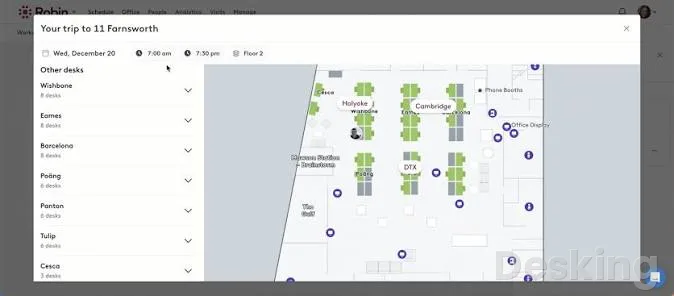
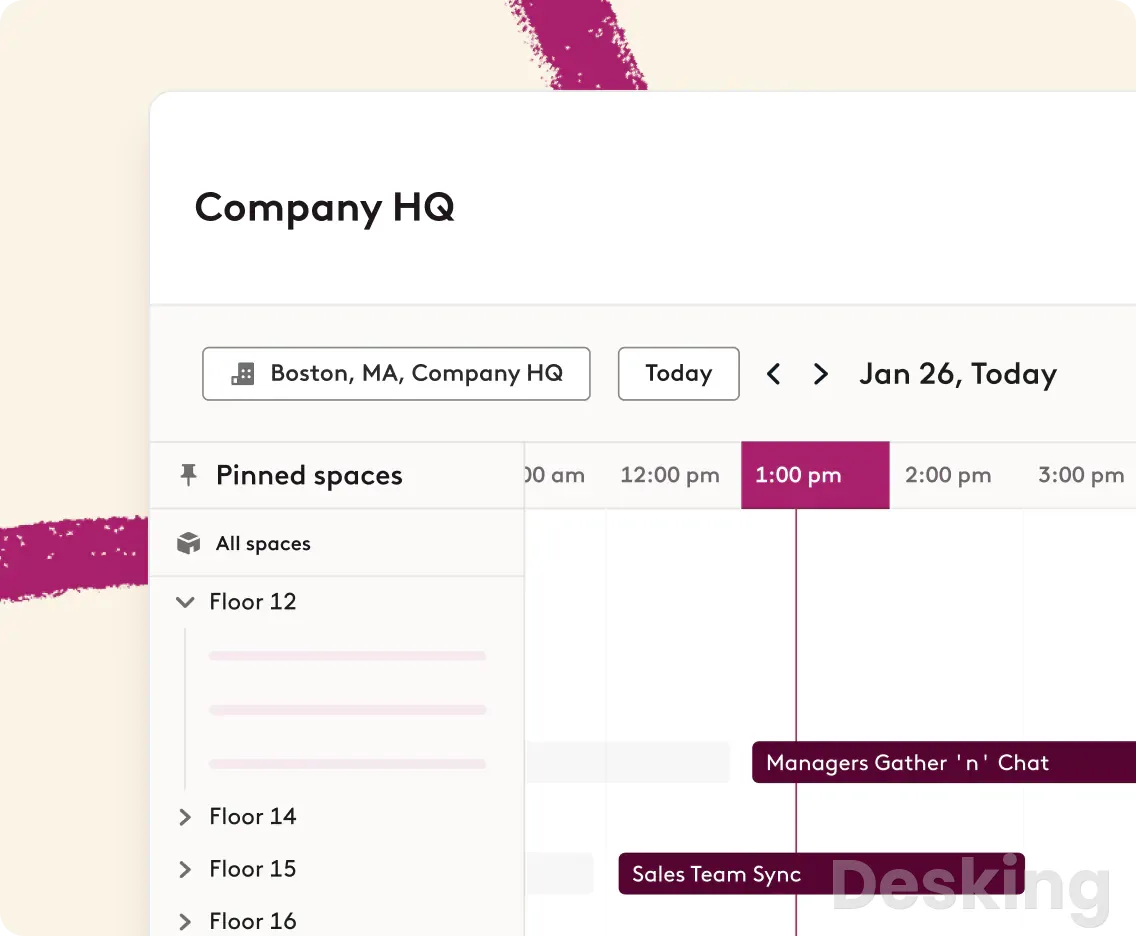
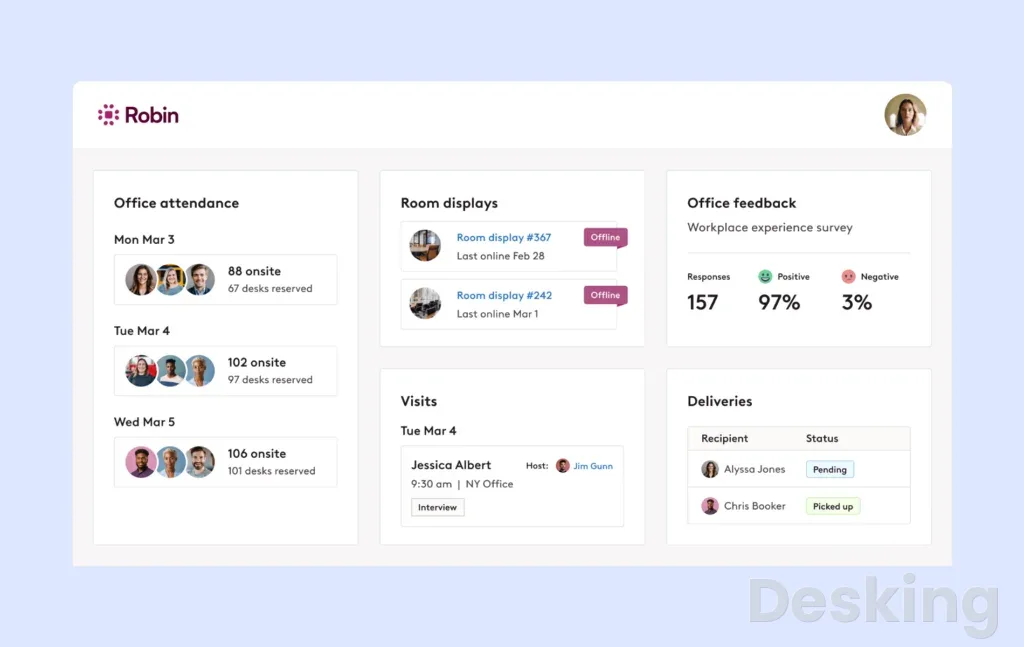
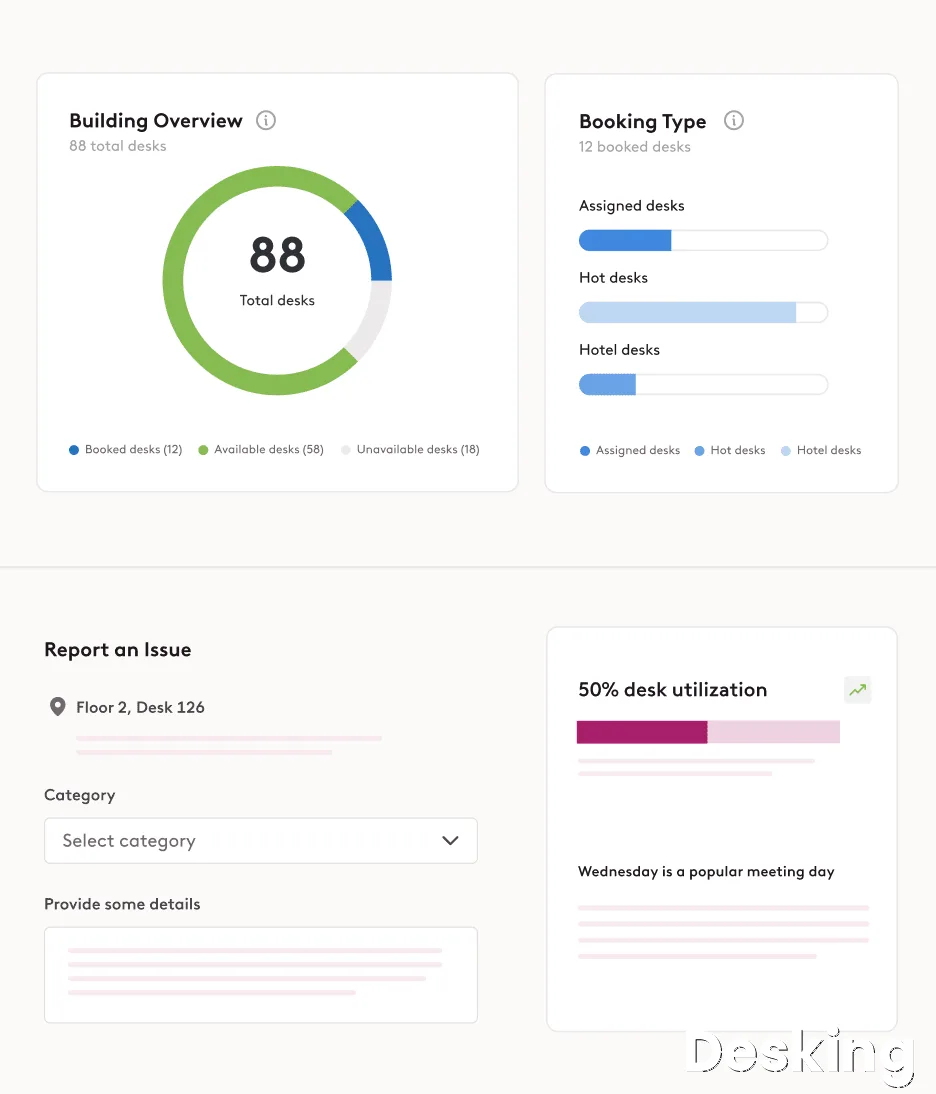
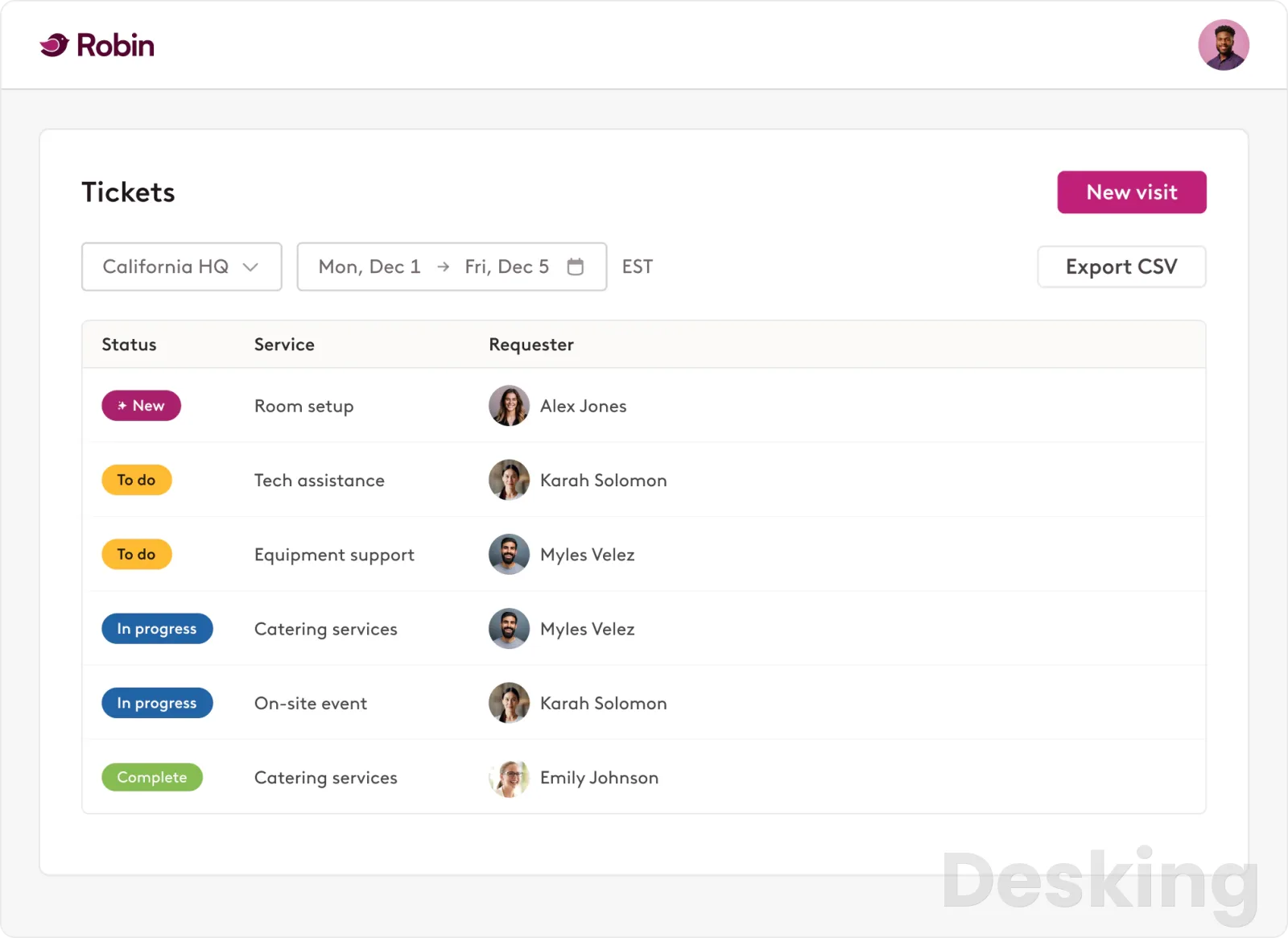
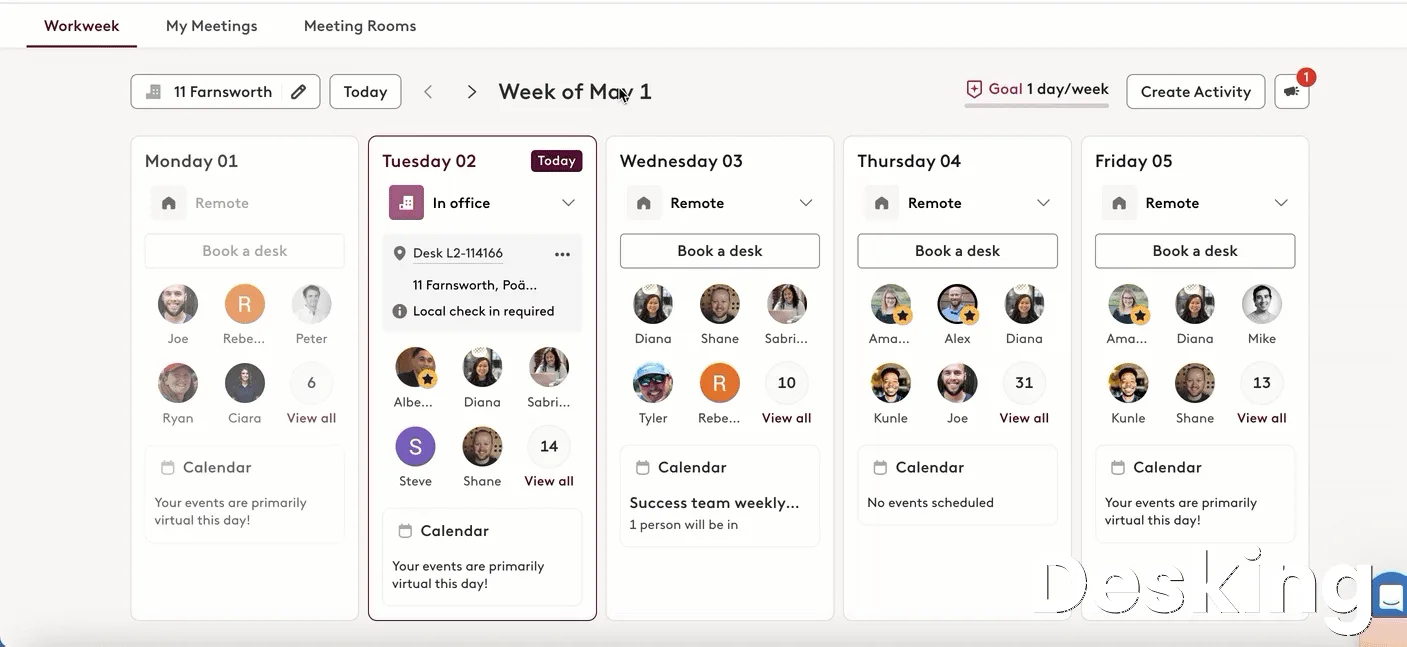
Table of contents
- 1. What is Robin
- 2. How Robin works
- 3. Key features
- 4. Employee experience and workplace services
- 5. Integrations and compatibility
- 6. Ease of use
- 7. Setup and implementation
- 8. Pricing and subscription costs
- 9. Security and data protection
- 10. Customer support and user feedback
- 11. Robin alternatives
- 12. Who should use Robin
- 13. Who should avoid Robin
- 14. Final buying recommendation
- 15. Migration and switching from another platform
- Frequently Asked Questions
1. What is Robin
An office can have hundreds of desks, dozens of meeting rooms and several floors, yet management may still struggle to answer a surprisingly basic question: how much of that space is actually being used?
Employees arrive without knowing where colleagues are sitting, meeting rooms remain reserved after their organizers have left, and facilities departments make expensive property decisions using incomplete information.
Robin, the workplace management platform developed by Robin Powered, addresses this problem by connecting office reservations, employee attendance, workplace resources and space utilization data in one administrative environment.
The software gives employees a way to find and reserve desks, meeting rooms, parking spaces and other shared resources.
At the same time, facilities managers and IT administrators receive information about how those resources are being used, which areas experience the greatest demand and where workplace policies need adjustment.
This connection between everyday reservations and longer term facilities decisions is the central reason to consider Robin.
It is designed to help companies manage the physical office as an operational resource rather than treating desks and meeting rooms as isolated calendar entries.
Robin began in 2014 as a workplace technology business emerging from One Mighty Roar, a Boston based digital agency.
Its original concept involved RFID, Bluetooth beacons and connected office environments, with the intention of making physical workplaces more responsive to the people using them.
The company initially concentrated on meeting room scheduling and connected office experiences before expanding into desk booking, interactive maps, visitor management and workplace analytics.
TechCrunch reported a $1.4 million seed investment in July 2014, followed by a $20 million Series B investment in May 2019 led by Tola Capital, with participation from existing investors and Allegion Ventures.
That history explains why Robin's product development has consistently emphasized the relationship between physical spaces and software.
It did not begin as a simple employee calendar application.
Its original focus was understanding how people interact with rooms, devices and office resources, and that approach remains visible in its current product architecture.
The business is privately held, with Boston remaining its headquarters, and its present commercial positioning is aimed particularly at organizations with substantial workplace operations.
The distinction between Robin and a basic desk reservation application is important.
A smaller booking product might allow employees to select an available desk and receive a confirmation.
Robin can use the resulting reservation and check in information to build a broader picture of workplace demand, connect employees with available resources and support decisions about office layouts.
This makes it relevant to facilities directors, workplace experience managers, IT departments and business leaders responsible for property utilization.
Robin is workplace management software for organizations that need to coordinate office attendance, reserve shared resources and understand how physical space is being used.
Employees use it to book desks, meeting rooms and other facilities, while administrators manage floorplans, permissions, visitor workflows and occupancy information.
Its strongest fit is a medium sized or large organization operating several floors or locations with a dedicated workplace management function.
There is an important qualification to that positioning.
Robin's own commercial guidance identifies companies with at least 500 employees and more than 150 hybrid employees regularly using office space as a particularly suitable audience.
It also identifies organizations managing multiple floors, offices or buildings as stronger candidates.
This is a much more specific target than the general hybrid work market, and buyers should take that distinction seriously.
2. How Robin works
Robin operates as a cloud subscription service.
Administrators establish the organization's workplace structure, add buildings and floors, configure resources and connect the systems used for scheduling and employee identity.
Once the environment is ready, employees can use the web dashboard, mobile application, calendar integrations and supported workplace displays to find and reserve available spaces.
The administrative structure begins with buildings and floors.
Each building has its own working hours, location information and workplace configuration.
Administrators then create desks, meeting rooms and other bookable resources, assigning them to appropriate areas of the floorplan.
These resources can have different booking policies, access restrictions and availability rules according to how the organization manages its offices.
Employees see the practical result of this configuration.
Available desks appear on an interactive office map, and users can select a resource, choose the relevant date and time, and confirm the reservation.
The same general process applies to meeting rooms and supported custom resources.
The experience is intended to reduce the uncertainty associated with arriving at an office without knowing which spaces are available.
The important part is what happens after a reservation.
Robin can require users to check in, release abandoned reservations and collect information about actual office usage.
This gives administrators a better basis for understanding occupancy than relying exclusively on the number of reservations created.
A desk reserved by an employee who never arrives should not be counted in the same way as a desk that is genuinely occupied throughout the working day.
Employee access
Employees can access Robin through several interfaces, depending on the configuration established by their organization.
The web dashboard provides access to workplace maps, schedules and reservations, while the mobile application supports booking and check in away from a computer.
The calendar integrations are particularly important because employees already use Outlook and Google Calendar to organize meetings.
Robin extends these environments with workplace information, allowing users to find suitable rooms and connect reservations with their existing scheduling activities.
This reduces the need to maintain separate booking procedures for every department.
Microsoft Teams and Slack integrations extend the same principle into workplace messaging.
Employees can receive notifications about upcoming reservations and, where the integration supports it, check in, cancel or manage bookings without opening the main application.
The objective is to make the reservation process part of an existing working routine rather than another administrative obligation.
Administrative control
Administrators manage resources, employees, locations and booking policies from the web dashboard.
They can establish groups, control permissions and determine which people are allowed to reserve particular resources.
These controls are particularly useful for companies where certain rooms, desks or facilities are reserved for specific departments.
Robin also supports priority booking policies for designated groups.
This allows organizations to give particular employees or teams different reservation privileges.
For example, a company can establish rules for executive spaces, departmental areas or other resources that should not be available to every employee.
Another important administrative function is abandoned reservation protection.
Administrators can configure rules that release desks or meeting rooms when users fail to check in within the permitted period.
This is one of the features that directly connects employee behavior with better space utilization, although the configuration needs to reflect the organization's actual working arrangements.
3. Key features
Robin's feature set is best understood through the workplace activities it manages.
Resource booking is the daily employee experience, space management gives facilities teams control over the physical environment, and workplace analytics provides information for future decisions.
Visitor management and workplace services extend the system into reception and office operations.
The distinction matters because not every company needs every capability.
A business purchasing Robin primarily for desk booking may not receive enough value from advanced space planning to justify the full commercial agreement.
Conversely, a company managing several buildings may find that the broader functionality is precisely what makes the platform attractive.
Desk booking
Desk booking is one of Robin's central capabilities.
Employees can view office maps, identify available workstations and reserve a suitable desk according to the rules established by their organization.
The system supports hot desks, hotel desks, assigned desks and shared assigned desks.
These distinctions are useful because office seating arrangements are rarely identical across every department.
Some employees may have permanent workstations, while others share desks according to their schedules.
Robin allows administrators to represent these arrangements within the same workplace environment.
The interactive map is particularly important.
Employees can identify the physical location of a workstation rather than selecting an anonymous resource from a list.
They can also use available filters to identify desks with relevant amenities and select different buildings or floors when the organization operates several locations.
A G2 reviewer working in software development at an enterprise with more than 1,000 employees described the practical benefit:
I use Robin mainly for booking desks at the office, and it has become part of my daily routine when I come in.
Verified reviewer on G2, software developer, enterprise company
This feedback identifies the type of recurring activity Robin is designed to simplify.
Employees can organize their office attendance before arriving, and facilities managers gain information about the demand for available workstations.
The benefit is strongest when the office has enough shared resources to make advance reservations useful.
Multi day reservations are also supported, although the exact booking experience depends on the desk configuration and administrative policies.
Employees should not assume that every resource can be reserved for any future date.
Administrators control how far ahead reservations can be made, which can produce confusion when users expect a longer booking window.
Meeting room scheduling
Meeting room scheduling connects Robin with the organization's calendar infrastructure.
Administrators pair meeting room resources with their corresponding calendar accounts, allowing availability to be synchronized with Microsoft 365, Google Workspace or supported Exchange environments.
Employees can find rooms according to availability and other relevant criteria.
The Outlook add in and Google Calendar extension bring booking information into the calendar environment, reducing the number of steps required to arrange a meeting.
Room Display is another useful part of the experience.
It runs on supported tablets, including compatible iPad and Android devices, and displays room availability outside meeting spaces.
Employees can check whether a room is occupied, make an ad hoc reservation and check in to meetings where the configuration supports it.
The meeting room functionality becomes more valuable when organizations implement abandoned meeting protection.
A reservation can be released when the organizer does not check in within the configured period.
This helps prevent unused rooms from remaining unavailable simply because an employee forgot to cancel a meeting.
However, the feature should not be configured without considering how employees work.
A company with several shifts, employees who move between buildings or meetings that begin outside conventional working hours needs appropriate check in windows.
An overly restrictive policy can release a room that is genuinely being used.
Interactive maps and wayfinding
Robin's interactive maps provide a visual representation of the workplace.
They allow employees to find desks, meeting rooms and other resources while helping administrators understand how different areas of the office are organized.
The maps are also useful for locating colleagues.
Subject to the organization's permissions, employees can see where coworkers are sitting and identify nearby resources.
This supports coordination between departments that do not necessarily share the same working schedule.
For facilities managers, the map editor provides tools for organizing layouts and allocating resources.
Robin supports floorplan uploads and CAD based workflows, alongside editing through its own map environment.
Administrators can group desks into neighborhoods and arrange workstations according to departmental or operational requirements.
This capability has a direct effect on workplace planning.
If a department moves to another floor, the administrator can update the relevant workplace configuration rather than maintaining separate seating charts.
The difficulty is that large physical changes can require considerable administrative work, particularly when resource assignments must be updated alongside the map.
A Capterra reviewer who used Robin for several years described an earlier floorplan limitation:
Importing floor plans is a real issue. In the event our facility underwent a renovation, you have to redo all the work you did in the first place.
Verified reviewer on Capterra, facility manager
That complaint deserves attention from companies with frequently changing office layouts.
A map that is easy to use for daily reservations can still create additional work when a building undergoes substantial renovation.
Buyers should demonstrate the full floorplan editing process during procurement rather than evaluating only the employee booking interface.
Check in and abandoned reservation protection
Check in is one of the most consequential features in Robin because it determines whether a reservation represents actual workplace usage.
Employees can check in manually through the web dashboard, mobile application, email notifications, Slack or Microsoft Teams.
QR codes and NFC stickers provide additional ways to confirm the use of a desk at the office.
Depending on the organization's configuration, Robin can also automate check ins through office Wi Fi or access control badge swipes.
Administrators can establish check in rules for different types of desks.
Hot and hotel desks can have their own remote check in windows, while assigned desks follow the configured office schedule and confirmation requirements.
Abandoned Desk Protection releases reservations when employees do not confirm their attendance within the required period.
The equivalent protection for meeting rooms helps recover spaces reserved for meetings that never take place.
The operational value is considerable, but it depends on sensible policies.
Employees arriving for evening shifts, working irregular hours or moving between buildings may not follow the same check in pattern as conventional office workers.
A system that automatically releases their reservations without accommodating these circumstances can create more problems than it solves.
Visitor management
Robin includes visitor management capabilities for organizations that need to coordinate guests entering their offices.
Administrators can register visitors, organize different visit types, prepare arrival displays and notify employees when their guests arrive.
Employees can add guests through the web dashboard, mobile application or Outlook add in.
This allows the host to prepare for an expected visit before the guest reaches reception.
The visitor workflow also creates a record of people expected at the workplace.
Reception staff can use this information to identify arrivals and coordinate the next steps.
Badge printing and delivery management extend the system into other activities commonly handled by office reception teams.
The feature is particularly relevant for businesses receiving external visitors frequently.
Consulting firms, financial institutions, corporate offices and organizations with multiple facilities can benefit from a consistent registration process.
There is an important distinction between visitor management and a complete physical security system.
Robin can coordinate registration and connect with supported access control systems, but companies must establish how visitor identity verification, building access, document handling and retention policies fit into their wider security arrangements.
Custom resource management
Robin supports more than desks and meeting rooms.
Organizations can configure bookable resources such as parking spaces, lockers and other custom objects.
This is an important extension because workplace resources often create scheduling problems that are not covered by conventional meeting room software.
Employees may need to reserve parking, specialist equipment or shared facilities before arriving at the office.
Custom resources can be organized with their own permissions and booking rules.
Administrators can control who has access and use workplace information to understand demand.
The capability also has implications for space planning.
A company that records parking reservations can identify usage patterns and determine whether the available allocation matches employee demand.
Similar information can be gathered for lockers and other resources.
Robin's Global Search extends this experience by allowing employees to find people, desks, spaces and custom resources through a common search interface.
This reduces the need to open separate areas of the application to locate different workplace assets.
Workplace analytics
Workplace analytics is one of the strongest reasons to consider Robin over a basic desk booking application.
The system provides dashboards and reporting tools that help organizations understand desk utilization, space usage and workplace activity.
Administrators can examine the information collected through reservations, check ins and connected systems.
This information is useful for decisions that have financial consequences.
Office leases, maintenance, cleaning, equipment and workplace services all represent operating costs.
Companies that do not understand how their space is being used risk paying for capacity that employees rarely need.
Robin's analytics can help identify underused meeting rooms, heavily occupied areas and differences in demand across working days.
The resulting information gives facilities managers a more defensible basis for recommending changes to office layouts and resource allocations.
Advanced Analytics also supports custom reports and data exports.
The distinction between standard reporting and advanced analytics should be clarified during procurement because certain capabilities are associated with optional additions to the commercial arrangement.
AI features and Robin Agent
Artificial intelligence is an increasingly important part of Robin's development.
Robin's AI capabilities include the Robin Agent, which allows employees to interact with workplace resources using natural language.
Employees can request recommendations for desks, parking and other resources, plan their working week and manage upcoming reservations.
The agent is designed to reduce the number of manual steps involved in arranging office attendance.
Instead of searching through several screens, an employee can describe the resource or reservation they need and review the suggested result before confirming it.
Robin also uses Gemini models for its own AI functionality.
Its documentation distinguishes these built in capabilities from external assistants such as Claude and ChatGPT that organizations may connect to Robin.
The Analytics AI Assistant addresses a different audience.
It allows administrators with the required Advanced Analytics access and Manage analytics permission to ask questions about workplace information using ordinary language.
For example, an administrator can ask which departments reserve the most desks in a particular building or which meeting rooms have had the fewest bookings during a specified period.
The assistant uses workplace data to generate its response.
There are sensible limitations.
The AI agent can make mistakes, and employees should review suggestions before confirming reservations.
The analytics assistant also depends on the quality of the underlying workplace information.
Inaccurate employee records, incomplete check ins and poorly configured resources will undermine the value of its answers.
Robin's AI integration with the Model Context Protocol is another development worth attention.
It allows supported external AI assistants to interact with Robin using the permissions associated with the employee's account.
This is a meaningful direction for organizations adopting AI assistants across their existing software environments.
4. Employee experience and workplace services
Robin's employee experience capabilities are intended to make the office easier to use beyond the basic reservation process.
Employees can access workplace announcements, coordinate office activities and receive information about the working environment.
These functions matter because a workplace application that employees open only when reserving a desk has a limited role in their daily activities.
The platform includes experience surveys, hybrid work policies, office announcements, team coordination and custom branding.
Administrators can use these capabilities to communicate information about office arrangements and gather feedback about the employee experience.
For organizations with several locations, this creates an additional communication channel between workplace management and employees.
Hybrid work policies
Hybrid work policies allow organizations to establish expectations around office attendance.
Administrators can communicate workplace arrangements and provide employees with visibility into their working schedules.
This is particularly useful when different departments have different attendance requirements.
A company may have employees who attend the office on specific days, while other departments operate with greater flexibility.
Robin can connect these arrangements with workplace reservations and the information employees see when planning their week.
The distinction between a published attendance policy and an enforced attendance requirement is important.
Buyers should establish exactly which policies are informational and which can be enforced through the platform's administrative controls.
A reservation system should not be mistaken for a complete HR attendance management application.
Office announcements and activities
Administrators can publish office announcements and organize workplace activities.
These functions give facilities and workplace experience departments a way to communicate changes, share information and coordinate activities across locations.
The practical advantage is that employees can receive information within the environment they already use for office reservations.
An announcement about a building closure, maintenance activity or workplace event can be distributed through the relevant employee experience channels.
However, Robin should not be evaluated as a replacement for a full enterprise intranet or employee communications system without examining the required publishing and content management capabilities.
Its strongest purpose remains workplace operations, and organizations with extensive internal communications requirements may need an additional specialized application.
Workplace services and issue reporting
Workplace services extend Robin into operational requests.
Employees can report issues affecting office facilities, including problems with rooms and equipment.
The platform supports issue reporting with photographs, real time issue maps and requests involving catering, audiovisual equipment and technical assistance.
This creates a connection between reservations and the services needed to make a meeting or office space usable.
A problem reported in a meeting room can be associated with the workplace environment rather than remaining in an unrelated email conversation.
For facilities departments, centralized requests can improve visibility into recurring issues.
Administrators can identify locations that generate repeated reports and examine whether the problem concerns equipment, maintenance or the way a space is being used.
The optional nature of some workplace services capabilities needs to be clarified in the commercial proposal.
Buyers should identify the modules included in their subscription and establish which operational workflows require additional licensing.
5. Integrations and compatibility
Robin's integration strategy is based on connecting workplace activities with the systems employees already use.
Calendar synchronization is particularly important because reservations must remain consistent with meeting schedules.
Identity integrations are equally relevant because access to desks, rooms and other resources should follow the organization's existing user management policies.
The platform supports Microsoft 365, Microsoft Exchange and Google calendar environments.
It also connects with Microsoft Teams, Slack, Okta and Microsoft Entra ID, alongside supported hardware, access control systems and its public API.
The following table summarizes the principal integration categories and their practical purpose.
| Integration | Main purpose | Business value |
|---|---|---|
| Microsoft 365 | Calendar and workplace scheduling | Connects reservations with corporate calendars |
| Microsoft Outlook | Desk and room booking | Adds workplace reservations to meeting workflows |
| Google Workspace | Calendar synchronization | Connects Google scheduling with office resources |
| Google Calendar | Room and desk scheduling | Keeps workplace bookings connected to calendars |
| Microsoft Teams | Booking notifications and management | Reduces application switching |
| Slack | Booking notifications and management | Supports workplace coordination through messaging |
| Okta | Identity and user provisioning | Centralizes access administration |
| Microsoft Entra ID | Identity and provisioning | Connects workplace accounts with corporate identity |
| Exchange | Calendar synchronization | Supports existing enterprise calendar infrastructure |
| Access control systems | Badge based check ins | Improves occupancy information |
| Robin API | Custom integrations | Supports organization specific workflows |
| Workplace hardware | Displays and sensors | Connects physical resources with software |
Microsoft 365 and Outlook
Microsoft integration is one of Robin's most relevant capabilities for enterprise buyers.
The Outlook add in allows employees to access Robin from the calendar environment they already use.
It can recommend suitable rooms for meetings and suggest desks for the same day as an in office meeting.
This is particularly useful for employees who organize their working day through Outlook.
Rather than switching between several applications, they can use the calendar workflow to identify a meeting space and coordinate their desk reservation.
The integration also supports meeting services.
Employees can submit requests such as catering for a scheduled meeting, allowing the relevant service providers to receive the request and coordinate the necessary arrangements.
However, administrators still need to configure the underlying calendar infrastructure correctly.
Each room must be associated with its corresponding resource calendar, and the permissions required for synchronization must be established.
Robin does not remove the need for proper Microsoft 365 administration.
Google Workspace
Google Workspace integration provides similar benefits for organizations using Google's calendar environment.
Administrators connect the relevant calendar accounts and associate meeting room resources with the corresponding workplace spaces.
Employees can then access scheduling information through supported Google calendar experiences.
This is important for companies that use Google Workspace across several locations.
A workplace reservation application should not create another independent calendar that employees must remember to maintain.
Slack and Microsoft Teams
Slack and Microsoft Teams integrations make workplace information accessible within enterprise messaging environments.
Employees can receive notifications about upcoming desk and room reservations and use supported actions to manage their bookings.
This is useful when employees coordinate their office days through group conversations.
The integrations also support the wider employee adoption strategy.
People are more likely to use a workplace application consistently when its essential activities are accessible through tools they already open every day.
Identity management and SSO
Robin supports SAML 2.0, Google SSO, ADFS and SCIM 2.0 provisioning.
These capabilities are important for organizations with established identity management procedures.
Single sign on reduces the need for employees to maintain separate credentials, while SCIM can automate user provisioning and deprovisioning.
The practical consequence is that administrators can connect workplace access with existing identity processes.
When an employee joins or leaves the organization, the relevant access changes can be managed through the connected identity environment.
IT departments should verify the precise configuration and permissions required for their identity provider before implementation.
The presence of an integration does not mean that every provisioning workflow is automatically configured.
Hardware and access control
Robin supports workplace displays, room panels and sensors from technology providers including Embrava, Logitech, Crestron, VergeSense and Neat.
These integrations are relevant because office occupancy cannot always be understood through reservations alone.
Badge swipes, Wi Fi information and compatible sensors can provide additional evidence about whether a space is being used.
Access control integration can also support automatic desk check ins.
Employees swipe their badges at supported access controlled doors, and Robin can use the resulting information to update their workplace presence.
Buyers should distinguish compatibility with a hardware manufacturer from guaranteed support for every device model.
The precise equipment, software versions and deployment requirements should be confirmed before hardware procurement.
Robin API and MCP
The public Robin API provides a way to connect the platform with organization specific systems.
This is particularly useful for companies with internal applications, custom reporting environments or existing workplace management workflows.
Developers can use documented endpoints to build integrations around supported operations.
Robin also documents limitations: not every function available in its applications is necessarily exposed through the public API.
This matters for organizations planning extensive automation because they should verify the required endpoints before committing to a custom development project.
The MCP connection extends this idea into AI assistants.
It allows supported assistants to interact with Robin through an established protocol, subject to the permissions of the connected account.
This is a meaningful development for enterprise IT departments.
It allows workplace reservations to become part of a wider AI assisted workflow without automatically granting the assistant unrestricted access to company resources.
6. Ease of use
Robin has a relatively clear distinction between the experience employees receive and the work administrators must perform.
For employees, the interactive map is one of its strongest usability features.
A person looking for a desk can see the available resources and select a physical location rather than interpreting a long list of workstation identifiers.
The mobile application and calendar integrations provide additional ways to access the same booking environment.
The employee interface also benefits from the ability to see colleagues and plan office attendance.
This is useful when the purpose of going to the office is to work with particular departments or attend meetings with colleagues who are otherwise remote.
The administrative experience is more demanding.
Administrators must understand building structures, resource groups, booking rules, user permissions, calendars and check in requirements.
These settings determine how the platform behaves, and incorrect configuration can create problems that employees may incorrectly attribute to the application itself.
G2 reviewers have identified occasional interface congestion and availability refresh delays during busy periods.
One enterprise software reviewer described the interface as crowded when several employees were booking desks and meeting rooms at the same time.
The same reviewer wanted clearer filters for finding particular resources.
That criticism is relevant because usability is not measured only by how attractive the interface appears.
A workplace application must remain predictable when hundreds of employees are trying to reserve spaces around the same time.
Capterra also contains feedback about employees struggling with some reservation workflows.
One reviewer wrote:
It took me a while to find the 'book multiple days' option.
Verified reviewer on Capterra, strategist
This is a relatively small usability issue, but it illustrates an important distinction.
Employees may understand how to book a desk for one day while finding more complicated reservation patterns less straightforward.
Organizations with frequent multi day bookings should evaluate this workflow during their pilot.
7. Setup and implementation
Robin requires an organized implementation process.
The company provides a structured onboarding sequence that covers workplace creation, floorplan configuration, resource placement, calendar connections, room displays and visitor management.
The official quick start documentation describes a six step setup process for its Essentials and Business plan customers.
It also provides a separate onboarding path for organizations using the One Workplace Platform.
The basic implementation can be completed relatively quickly when the organization has its workplace information ready.
However, the full deployment becomes more involved when several buildings, identity integrations, access control systems and hardware endpoints are included.
What administrators need before starting
The organization should prepare the following information before implementation:
- Office floorplans in supported PDF, JPG, PNG or DXF formats.
- Employee email addresses and the relevant organizational information.
- Building names, addresses, time zones and working hours.
- A list of desks, meeting rooms and other bookable resources.
- Microsoft 365 or Google Workspace administrative access where calendar integration is required.
- The workplace policies governing reservations, check ins and resource access.
- A hardware inventory for displays, kiosks and compatible sensors.
This preparation is more important than it might initially appear.
Robin's map is the foundation of the employee booking experience, and inaccurate workplace information will affect every reservation made through the platform.
Implementation process
A practical deployment follows this sequence.
- Create the organization and building structure. Open the Robin administrative environment, establish the building and add the relevant floors, addresses, time zones and working hours.
- Add the floorplan. Use a supported DXF file for automatic tracing, draw the map through the editor or submit a supported image or document for assistance from Robin's maps team.
- Place desks and resources. Open the Map page, select Edit floor and then Layout. Add desks, rooms and other bookable resources to their correct physical positions.
- Configure resource policies. Establish the booking rules, desk types, access permissions, user groups and reservation periods required by each department.
- Connect the calendar environment. Configure Microsoft 365, Google Workspace or Exchange and associate the relevant room calendars with the physical meeting spaces.
- Invite employees. Import employee information using the CSV template through Manage and the relevant user management section.
- Configure displays and check ins. Connect supported room displays, establish the required check in methods and configure abandoned reservation protection.
- Activate visitor management where required. Configure visit types, guest registration permissions and arrival displays.
- Run a controlled pilot. Test desk booking, room reservations, check ins, calendar synchronization and employee access before introducing the platform across the entire organization.
The sequence matters because each stage depends on the accuracy of the preceding configuration.
Adding employees before the floorplan and resources are ready creates unnecessary confusion.
Likewise, enabling automatic check ins before the relevant access control or network integration is operational can produce misleading attendance information.
Floorplan maintenance
The floorplan deserves particular attention because it affects both employee adoption and the quality of workplace analytics.
Robin supports uploading CAD floorplans and provides editing capabilities for administrators.
Its documentation also describes a service through which supported floorplan files can be submitted for the maps team to prepare.
The advantage is that organizations do not necessarily need to recreate every office layout manually.
The disadvantage is that major building changes can still require substantial work to reposition resources and maintain employee assignments.
A company that changes its office layout every few months should include floorplan maintenance in its implementation budget.
It should also clarify whether its subscription includes assistance with substantial layout changes.
Employee adoption
The rollout should begin with a controlled group of employees rather than an immediate company wide launch.
A pilot allows administrators to identify problems with resource availability, permissions and check in rules before the system becomes part of everyday office operations.
It also gives employees an opportunity to understand the reservation process.
The organization should communicate the booking rules clearly.
Employees need to know how far ahead they can reserve desks, whether check in is mandatory and what happens when a reservation is not confirmed.
Robin provides a launch email template and supporting onboarding documentation.
These materials can reduce the effort required to introduce the application, but the organization remains responsible for explaining its own workplace policies.
8. Pricing and subscription costs
Pricing is one of Robin's most important purchasing considerations.
Unlike products that publish a straightforward monthly price per employee or per desk, Robin's current commercial approach is based on a tailored annual subscription.
Prospective customers are directed to request a quotation for the One Workplace Platform.
This is consistent with its enterprise positioning.
The company is targeting organizations with larger employee populations, multiple office locations and more extensive workplace management requirements.
However, the lack of a public price makes it difficult for buyers to estimate the financial commitment before speaking with sales.
It also complicates comparisons with products such as Skedda and Envoy, which publish more accessible pricing information for certain subscriptions.
Robin's pricing page explicitly states that subscriptions are billed annually.
It also confirms that hardware is sold separately through equipment partners.
Current subscription structure
The current public pricing presentation identifies the One Workplace Platform as its commercial offering.
Robin does not provide a publicly accessible three tier price comparison with fixed USD amounts.
The following table separates the current commercial presentation from older plan references found in its documentation.
| Subscription or reference | Availability | Public price | Purchasing implication |
|---|---|---|---|
| One Workplace Platform | Current public offering | Contact sales | Tailored annual subscription |
| Essentials | Legacy plan documentation | Not published | Existing customer arrangements |
| Business | Legacy plan documentation | Not published | Existing customer arrangements |
| Free plan | Not offered as a permanent public tier | Not applicable | Not a free subscription option |
The distinction between the current platform and legacy subscriptions is important.
Robin's documentation identifies Essentials and Business as older subscription arrangements, and its legacy plan policy explains that retired subscriptions are no longer available to new customers.
Buyers should not treat those names as three current purchasing options.
What affects the final price
Robin's commercial proposal should be evaluated according to the actual workplace deployment rather than employee headcount alone.
The following elements deserve attention during procurement:
| Cost consideration | Why it matters | What to establish |
|---|---|---|
| Employee licensing | Determines the subscription scope | Number of billable employees |
| Workplace locations | Affects deployment complexity | Buildings and floors included |
| Resource booking | Determines the operational scope | Desks, rooms and custom resources |
| Visitor management | Adds reception workflows | Guest registration requirements |
| Advanced Analytics | Adds reporting capabilities | Required dashboards and reports |
| AI analytics | Depends on Advanced Analytics access | Optional add on entitlement |
| Hardware | Sold separately | Displays, kiosks and sensors |
| Professional services | May affect implementation costs | Floorplan and deployment assistance |
| Support arrangements | Affect operational assistance | Included support and response commitments |
| Integrations | May require additional configuration | Identity, calendar and access systems |
A buyer should request a quotation that separates these elements.
Without that breakdown, it becomes difficult to identify whether a higher proposal reflects more users, additional locations, optional modules or implementation services.
The real cost at different company sizes
The most important financial question is how the subscription behaves as the organization grows.
A company with 150 hybrid employees and a company with 1,500 employees may both need desk booking, but their operational requirements are unlikely to be identical.
The larger organization may need several buildings, additional administrators, more extensive identity management and advanced analytics.
Robin's published positioning makes the scale of the intended customer particularly clear.
Its pricing guidance points towards companies with at least 500 employees and more than 150 hybrid employees using office space regularly.
For a smaller business, this creates an immediate purchasing question.
If the organization only needs a desk booking application, it may be paying for a broader operational environment than it requires.
For a larger business, the financial calculation should include the cost of the existing systems that Robin might replace.
If it consolidates separate booking, visitor and space management applications, the subscription should be compared with the combined cost of those systems.
The following table illustrates the commercial evaluation required at different deployment sizes.
It does not assign invented Robin prices.
| Deployment profile | Main requirements | Financial evaluation |
|---|---|---|
| 150 to 250 hybrid employees | Desk and room reservations | Compare with focused booking subscriptions |
| 500 to 1,000 employees | Multiple departments and workplace policies | Include identity and administrative costs |
| 1,000 to 2,500 employees | Multiple floors and locations | Evaluate consolidated platform savings |
| More than 2,500 employees | Enterprise workplace operations | Include analytics, integrations and support |
The correct approach is to request a quotation based on actual requirements and then compare the total annual investment with the existing software and operational costs.
A low headline subscription price from a competitor does not necessarily represent the cost of implementing an equivalent set of workplace functions.
Hardware costs
Hardware is sold separately, which means the software subscription does not automatically include the physical equipment required for every deployment.
Organizations may need tablets for room displays, kiosks for visitor registration and other supported devices for workplace information.
They may also require compatible sensors or access control equipment to improve occupancy information.
This matters because hardware costs can become substantial when an organization deploys the platform across several floors.
The company should obtain a separate equipment estimate and establish who is responsible for purchasing, installing and maintaining each device.
A complete proposal should identify the software subscription, hardware expenditure, installation work and ongoing replacement responsibilities.
Otherwise, the original budget may underestimate the actual cost of the deployment.
9. Security and data protection
Robin handles information about employees, workplace attendance, reservations, visitors and physical office resources.
This makes security and data governance important considerations, particularly for organizations with several locations or employees working in regulated industries.
The company publishes information about its cloud architecture, encryption, authentication and access controls.
Its infrastructure uses Amazon Web Services, and its security documentation identifies hosting environments with ISO 27001 and SOC 2 certifications.
One useful feature is the choice between US and European data storage locations.
Organizations can select the relevant data center for their application servers and stored information, although the data may still be accessed internationally through the internet.
This is particularly relevant to multinational companies that need to consider regional data protection obligations.
Data residency should be examined alongside the organization's legal requirements rather than treated as automatic compliance with every applicable privacy regulation.
Authentication and access
Robin supports several authentication arrangements, including SAML 2.0, Google SSO and ADFS.
SCIM 2.0 provides automated user provisioning and deprovisioning.
These capabilities allow IT departments to connect workplace access with established identity management procedures.
Employees can authenticate through supported corporate identity systems, while administrators can manage access according to organizational requirements.
The platform also documents encryption for information in transit and at rest.
Its security documentation describes SSL and TLS protection for connections and encryption mechanisms for stored customer information.
Administrative access is another consideration.
Robin describes restrictions on employee access to customer data, security logging and the use of least privilege principles.
These controls are relevant because workplace information can reveal employee attendance patterns and organizational activity.
Data retention and privacy
Organizations should examine the treatment of employee and visitor information before implementation.
Robin's security documentation explains that customer specific calendar information can be removed upon request and that backups are retained for 30 days before becoming unavailable.
Anonymized derived information is treated differently because it cannot be linked back to the original source records.
This distinction deserves attention from privacy and compliance teams.
Deleting an employee account, removing identifiable calendar information and deleting anonymized statistical information are different operations.
Companies should also establish their own policies for visitor records, employee presence information and workplace analytics.
The platform's technical controls do not replace the organization's responsibility to determine what information it should collect and how long it should retain it.
For companies handling sensitive information, the procurement process should include a review of the applicable security documentation, data processing terms, subprocessors, incident notification procedures and regional data residency arrangements.
10. Customer support and user feedback
Robin receives generally favorable feedback on software review platforms, particularly for its booking experience and workplace maps.
G2 lists an overall rating of 4.4 out of 5 based on 212 reviews, while Capterra lists 4.7 out of 5 based on 79 reviews.
Gartner Peer Insights reports 4.9 out of 5 from 13 ratings.
These figures come from different platforms and review populations, so they should not be combined into a single score.
The pattern is more useful than any individual rating.
Employees generally appreciate the ability to see available desks, book rooms and plan office attendance.
Administrative reviewers are more likely to discuss floorplan changes, configuration difficulties, calendar synchronization and the cost of maintaining the platform.
What customers appreciate
The strongest positive feedback concerns the visual reservation experience.
A Capterra reviewer working at a global professional services organization described the benefit of managing several offices:
We are a global firm that has offices in over 10 countries. So having a centralized app to book meeting rooms, office/desk space is crucial.
Verified reviewer on Capterra, creative services director
This is a particularly relevant example because it reflects the kind of organization Robin is targeting.
Managing reservations across more than ten countries requires more than a simple room calendar.
A consistent workplace environment can reduce the administrative effort involved in coordinating office attendance across different locations.
Other positive feedback concerns abandoned meeting protection, recurring meeting rules and the ability to restrict resources to specific departments.
These are administrative functions that become more valuable as the number of rooms and employees increases.
What customers criticize
Pricing is one of the most serious recurring objections.
A verified G2 reviewer from the construction industry gave Robin a zero rating and wrote:
Way too expensive for what it does, and their customer support is abysmal.
Verified reviewer on G2, construction industry, mid market
This is a strongly negative experience and should not be treated as representative of every customer.
However, it exposes a purchasing risk that cannot be ignored.
When a company pays enterprise subscription rates for functionality that a smaller competitor can provide, the perceived value can deteriorate quickly.
The same review describes switching to a less expensive alternative for meeting room digital signage and reservations.
That is particularly relevant for organizations whose primary requirement is room booking rather than broader workplace management.
Another G2 reviewer, a facility manager at a mid market company, described configuration and scheduling problems:
Too many "small" mistakes.
Verified reviewer on G2, facility manager, mid market
The surrounding review identifies inconsistencies involving time formats, dashboard information and Outlook room access.
These are not necessarily fundamental product failures, but they can create additional administrative work when employees depend on the system for daily reservations.
Capterra also contains feedback about the check in process:
people coming in different shift miss to mark the check-in on time and their seats usually get released
Verified reviewer on Capterra, engineering manager
This criticism is particularly important for companies operating multiple shifts.
The automatic release of abandoned reservations is valuable only when the configured check in policy reflects the working patterns of the employees using it.
Support experience
Robin provides a help center containing setup documentation, product guides, configuration instructions and troubleshooting material.
Its support resources also include an assistance agent accessible through the support environment and the application.
Customer feedback suggests that the support experience can vary.
Some reviewers describe helpful account management and responsive assistance, while others report dissatisfaction with technical support.
A recent positive G2 review from a mid market organization specifically praised the account manager's assistance with questions and ongoing improvements.
This is encouraging for buyers who expect an ongoing relationship with the vendor rather than a purely self service subscription.
Nevertheless, organizations should establish their support entitlements in writing.
The commercial proposal should specify available channels, response commitments, escalation procedures and any additional support services.
For an enterprise workplace system, support is part of the operational investment.
A company with several buildings cannot rely exclusively on online documentation when a problem affects meeting room availability or employee reservations across multiple locations.
11. Robin alternatives
Robin competes in a market where several products provide desk booking and meeting room scheduling, but their commercial approaches and areas of specialization differ.
The most useful alternatives to examine are Skedda, Envoy and OfficeSpace.
Each addresses workplace management from a different direction, and the right choice depends on whether the organization prioritizes resource booking, visitor operations or broader facilities management.
Robin vs Skedda
Skedda is one of the strongest alternatives for organizations whose primary requirement is managing bookable spaces.
Its approach is centered on space scheduling, booking rules and interactive floorplans.
The platform supports desks, meeting rooms and other shared spaces, with an emphasis on controlling how resources are allocated.
The most important commercial difference is its pricing model.
Skedda publishes subscription prices based on bookable spaces rather than requiring every employee to be treated as the same pricing unit.
This can be attractive for organizations with a large employee population and a relatively small number of physical resources.
A company with 1,000 employees and 150 bookable spaces may find a per space model easier to justify than a subscription whose price increases with the number of employees.
Robin has a broader workplace operations proposition, particularly around visitor management, workplace services, AI assisted scheduling and space analytics.
Skedda is more attractive when the organization wants predictable space based pricing and configurable booking policies without purchasing a broader workplace environment.
The choice should be based on the scope of the project.
Companies replacing a basic reservation application should examine Skedda carefully.
Organizations trying to consolidate several workplace operations systems should give Robin a more detailed evaluation.
Robin vs Envoy
Envoy is particularly strong in visitor management and workplace operations.
Its platform covers visitor registration, employee workplace reservations and other office processes.
It is a relevant alternative for companies that want to coordinate reception, guest arrivals and employee access.
Envoy's commercial structure uses separately defined products and modules.
Its Workplace Standard pricing has been listed at $3 per active user per month, billed annually, while other products have separate pricing arrangements.
The full cost depends on the modules and locations included.
Robin's strength is its connection between space planning and everyday resource booking.
Its interactive maps, workplace analytics and reservation policies make it attractive to facilities departments that need to understand how office resources are being used.
Envoy deserves preference when visitor workflows and front desk operations are the main purchasing priorities.
Robin is a stronger candidate when the company wants to make workplace resource management and space utilization central to the project.
Robin vs OfficeSpace
OfficeSpace is another relevant enterprise competitor.
Its focus includes workplace management, office planning, desk reservations and facilities related operations.
It is particularly relevant to organizations with larger property portfolios and more complex administrative requirements.
Both products target companies that need more than basic desk booking.
Their value depends on how effectively they support facilities departments and provide information for office planning decisions.
Robin has a clear advantage in its emphasis on connecting reservations with the daily employee experience.
Its mobile application, calendar integrations and AI assisted booking capabilities are particularly relevant to hybrid office operations.
OfficeSpace deserves attention when the procurement project places greater emphasis on facilities management, enterprise space planning and broader property related workflows.
The comparison should not be reduced to a feature count.
Buyers should evaluate how each platform represents their buildings, handles resource changes and produces the operational reports required by facilities management.
Competitor comparison
The following comparison uses publicly available pricing information and documented product positioning.
Robin's subscription is quote based, while the other products provide different commercial models.
| Product | Starting price | Free plan | Main strength | Best suited to |
|---|---|---|---|---|
| Robin | Contact sales | No | Connected workplace operations | Large hybrid organizations |
| Skedda | $249 per month for Plus | Free trial | Space based booking | Resource scheduling |
| Envoy | $3 per active user per month for Workplace Standard | Free basic visitor tier | Visitor management | Reception and workplace operations |
| OfficeSpace | Contact sales | No | Enterprise workplace planning | Facilities departments |
Skedda's published Plus price applies to its stated allocation of 35 spaces under annual billing in the United States and Canada.
Envoy's listed Workplace Standard starting price also needs to be separated from the cost of its additional modules.
OfficeSpace uses a quotation based approach, so a direct numerical comparison with Robin is not possible without proposals from both companies.
The most important distinction is the pricing unit.
Skedda charges according to bookable spaces, Envoy separates products and workplace services, and Robin positions its offering as a tailored enterprise subscription.
A business should calculate the cost of its actual resource inventory and employee population before choosing a provider.
12. Who should use Robin
Robin is best suited to organizations where workplace management is an established operational responsibility rather than an occasional administrative task.
Its strongest customers are likely to have several buildings, substantial numbers of employees using shared resources and departments responsible for managing office occupancy.
Large and multinational companies
Large companies can benefit from a common workplace environment across different buildings and locations.
Robin supports the management of multiple floors, resources and employee groups, making it suitable for organizations that need consistent reservation policies across their physical offices.
The value increases when facilities teams need information about how different areas are used.
A company can examine resource demand and use the resulting data to support decisions about office capacity.
Financial services and professional services
Financial services organizations and professional services firms frequently operate offices where meeting room availability, visitor registration and employee coordination matter.
Robin's combination of room booking, desk reservations and workplace information can simplify these activities.
Its identity and access management capabilities are also relevant to companies with established IT security procedures.
However, buyers in regulated industries should evaluate the precise security and data processing arrangements before introducing employee presence and visitor information into the platform.
Universities and educational institutions
Universities manage several buildings, departments, meeting spaces and shared resources.
Robin can support room reservations, desk booking, visitor registration and space utilization across these environments.
Its visual maps can also help employees and other authorized users find the correct locations.
Educational institutions should request the specific pricing arrangements available to them.
Robin identifies special pricing for universities and campus environments, so the commercial proposal may differ from a conventional corporate deployment.
Facilities and IT departments
Facilities managers benefit from the ability to connect workplace maps, reservations and utilization information.
IT departments benefit from identity management, integrations and centralized workplace administration.
The platform is particularly suitable when both departments share responsibility for workplace technology.
A deployment owned exclusively by one department without input from the other risks leaving important operational requirements unresolved.
13. Who should avoid Robin
Robin is not the right purchase for every organization.
A small business with twenty employees and a few meeting rooms is unlikely to need the same workplace management environment as a multinational company with hundreds of shared resources.
The additional administrative capabilities may create unnecessary complexity and cost.
Companies that only need desk booking should compare more focused products such as Skedda or deskbird.
Organizations primarily concerned with visitor registration should evaluate Envoy.
Facilities departments with extensive property management requirements should include OfficeSpace in their shortlist.
There is also a case against Robin for companies with low office attendance.
If employees rarely use the physical workplace, the organization may not receive enough value from advanced resource management and occupancy analytics to justify an enterprise subscription.
The commercial uncertainty is another reason to be cautious.
Without a publicly displayed starting price, buyers need to engage with sales before determining whether the product fits their budget.
This is not necessarily a disadvantage for large enterprise procurement, but it makes initial evaluation less convenient.
Finally, organizations with frequently changing floorplans should evaluate the administrative effort involved in maintaining workplace maps.
The visual booking experience is excellent in concept, but its usefulness depends on accurate and continuously maintained office information.
14. Final buying recommendation
Robin deserves serious consideration when the organization wants to manage the office as a connected operational environment.
The product's most valuable characteristic is the relationship between reservations, check ins and workplace analytics.
It allows facilities departments to examine how resources are actually used instead of relying solely on booking records or informal employee surveys.
The recent expansion into AI assisted reservations and analytics adds another dimension to that proposition.
The Robin Agent can reduce the effort involved in coordinating workplace resources, while the Analytics AI Assistant can make utilization information easier to interpret.
However, the platform should be purchased according to its complete operational scope.
Companies that only need meeting room scheduling will struggle to justify the same investment as an organization replacing several disconnected workplace systems.
Before signing, buyers should complete five checks.
- Confirm the commercial proposal. Obtain the annual subscription price, included modules, employee licensing terms and any charges associated with additional locations or resources.
- Verify the integrations. Test Microsoft 365, Google Workspace, identity management and access control connections using the organization's actual infrastructure.
- Evaluate the floorplan process. Import a real office layout, change resource locations and establish how future renovations will be handled.
- Test the reservation policies. Confirm that check in windows, automatic releases and booking restrictions match the working schedules of employees.
- Calculate the total cost of ownership. Include hardware, implementation, optional analytics, support and the systems that Robin is expected to replace.
The most important mistake to avoid is comparing Robin against a simple desk booking application using a checklist of features.
That comparison misses the commercial reason Robin exists.
Its purpose is to connect physical resources, employee activity and workplace planning.
A company that needs those capabilities can obtain meaningful operational value from the platform.
A company that only needs a digital calendar for meeting rooms should spend its budget elsewhere.
15. Migration and switching from another platform
Switching workplace management software requires more preparation than moving employee accounts from one application to another.
The organization must preserve its building structure, resource inventory, booking rules and calendar connections while ensuring employees can continue using the office during the transition.
Robin's implementation approach supports the creation of new floorplans, employee imports and calendar connections.
Its team can also assist with floorplan preparation, which is relevant when the organization is moving from another booking system with an established office map.
Moving floorplans and resources
The first migration priority should be the physical workplace information.
Companies should prepare existing floorplans and identify the desks, meeting rooms, parking spaces and other resources that need to appear in Robin.
The organization should also establish which resources are permanently assigned and which are available for reservations.
Employee assignments require separate attention.
A desk that belongs to a particular department should not accidentally become available to everyone simply because the resource was recreated during migration.
The migration should include a reconciliation of the old and new resource inventories.
This is particularly important for organizations with several floors or buildings, where inaccurate resource names and locations can create confusion.
Employee and identity migration
Robin supports employee imports through CSV files.
The documented import process accepts up to five columns covering name, email, department, title and manager email, with email required.
This provides a straightforward starting point for establishing employee accounts.
Organizations should nevertheless verify the information before sending invitations, particularly when departments and reporting relationships are used to determine access or workplace analytics.
Identity management should be connected before the wider rollout where possible.
Microsoft Entra ID, Okta and supported provisioning standards can help maintain account consistency.
Calendar migration
Calendar connections should be tested before employees begin making reservations.
If the organization uses Outlook, administrators should verify that the relevant room resource calendars are correctly connected to their Robin counterparts.
Google Workspace organizations should perform the equivalent checks.
The migration should also include testing of existing recurring meetings, meeting room availability and any reservation policies that affect room allocation.
A calendar integration that appears to work for a single test meeting may still behave differently when several departments and resource calendars are involved.
Running both systems during transition
For a larger organization, it is sensible to introduce Robin through a controlled pilot before retiring the existing workplace booking application.
The old system can remain available during the transition for the departments that have not yet moved.
However, the organization should avoid allowing two systems to independently manage the same resources without a clearly defined transition policy.
Otherwise, employees may reserve the same desk or meeting room in different applications, creating the exact scheduling conflicts the migration is intended to eliminate.
The final transition should include employee communication, administrator training and a documented process for handling reservation problems during the first weeks of operation.
Key features
- Desk and room resource booking
- Hot desk and hotel booking
- Shared assigned desk management
- Priority resource booking policies
- Automatic desk check in
- Abandoned meeting protection
- Interactive office floorplan management
- Office neighborhoods and maps
- Office move scenario planning
- Meeting room display applications
- Outlook calendar booking add in
- Google Calendar booking extension
- Microsoft Teams booking notifications
- Slack reservation notifications
- Visitor pre registration workflows
- Guest arrival display management
- Custom parking and locker resources
- Workplace usage analytics dashboards
- Advanced analytics AI assistant
- Natural language Robin Agent
- SAML and SCIM provisioning
- Access control badge check ins
- Robin public API integrations
- MCP AI assistant connectivity
- Workplace services issue reporting
- Catering and AV service requests
- Employee experience surveys
- Hybrid work policy management
Pricing
- Desk and room resource booking
- Interactive maps and space management
- Visitor registration and workplace services
- Workplace analytics and AI capabilities
- Enterprise integrations and administration
Pros & cons
Pros
- Visual interactive workplace floorplans
- Centralized desk and room booking
- Multiple desk booking configurations
- Automatic abandoned reservation protection
- Flexible workplace booking policies
- Microsoft and Google calendar integrations
- Mobile and browser based access
- Visitor registration and notifications
- Custom resource booking capabilities
- Advanced workplace utilization analytics
- Natural language AI reservations
- Automated identity provisioning support
- Multiple office location management
- Access control system integrations
- AI assisted analytics queries
Cons
- No publicly disclosed subscription prices
- No permanent free subscription plan
- Annual subscription commitment required
- Hardware purchases require separate budgets
- Advanced analytics requires additional licensing
- Some administrative workflows need training
- Floorplan changes require careful maintenance
- Availability refresh delays reported by users
- Check in rules can frustrate employees
- Complex configurations increase implementation effort
- Public API coverage is incomplete
- Support experiences vary between customers
- Meeting room booking can duplicate calendars
- Limited pricing transparency for procurement
Robin specs
- Platforms: Web, iOS, Android and supported workplace displays
- Free plan: No
- Starting price: Contact sales, annual subscription
- Integrations: Microsoft 365, Google, Slack, Teams, Okta and APIs
- Support: Help center, support agent and email
- Best for: Large organizations managing multiple office locations
Our verdict
Robin is best suited to large organizations managing multiple offices, shared resources and workplace operations. Its One Workplace Platform deserves consideration when replacing several disconnected systems. Skedda is a better purchase for focused space booking, while Envoy suits visitor management. We rate it 8.7 out of 10. Request an itemized annual quotation before purchasing.
Contact SalesFrequently Asked Questions
What is Robin software used for?
How do I import a floorplan into Robin?
How do I enable automatic desk check in?
Why does Robin automatically cancel my desk reservation?
How can I connect Robin to Microsoft Outlook?
Can I use Robin with ChatGPT or Claude?
How do I import employees into Robin?
How do I set up visitor management in Robin?
Sources5
- G2 on Robin customer reviews
- Capterra on Robin customer experiences
- Software Advice on Robin reviews
- Robin on workplace platform capabilities
- Robin on security and data protection
External pages are independent third-party sources. Desking App does not control or endorse their content and accepts no responsibility for it. Visiting them is at your own responsibility and risk.
Reader reviews
Be the first to review