


Oracle Fusion Cloud HCM Review: A Closer Look at Enterprise HR
 Published byEvander ThorneSoftware ReviewerEvander ThorneSoftware Reviewer Verified authorEvander Thorne is a Software Reviewer and IT Management Specialist at Desking, specializing in enterprise software, IT service management, project management, and busine…Author Profile
Ad disclaimer For links on this page, DESKING APP may earn a commission from the provider. This supports our work and has no influence on our editorial rating.
Oracle Fusion Cloud HCM is an enterprise human capital management suite built for organizations with complex global workforces and demanding HR processes. Its strongest advantage is the combination of HR, talent, payroll, workforce management and AI within Oracle’s wider business application environment. The $15 per employee monthly base price is only the starting point: module selection and implementation determine the real investment.
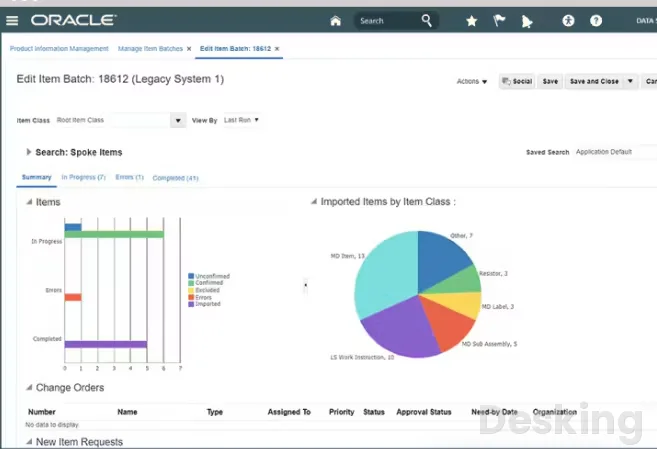
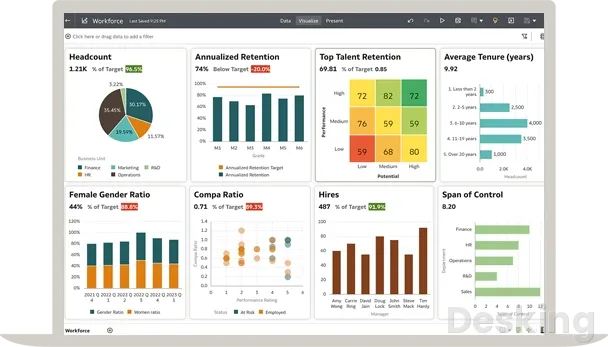
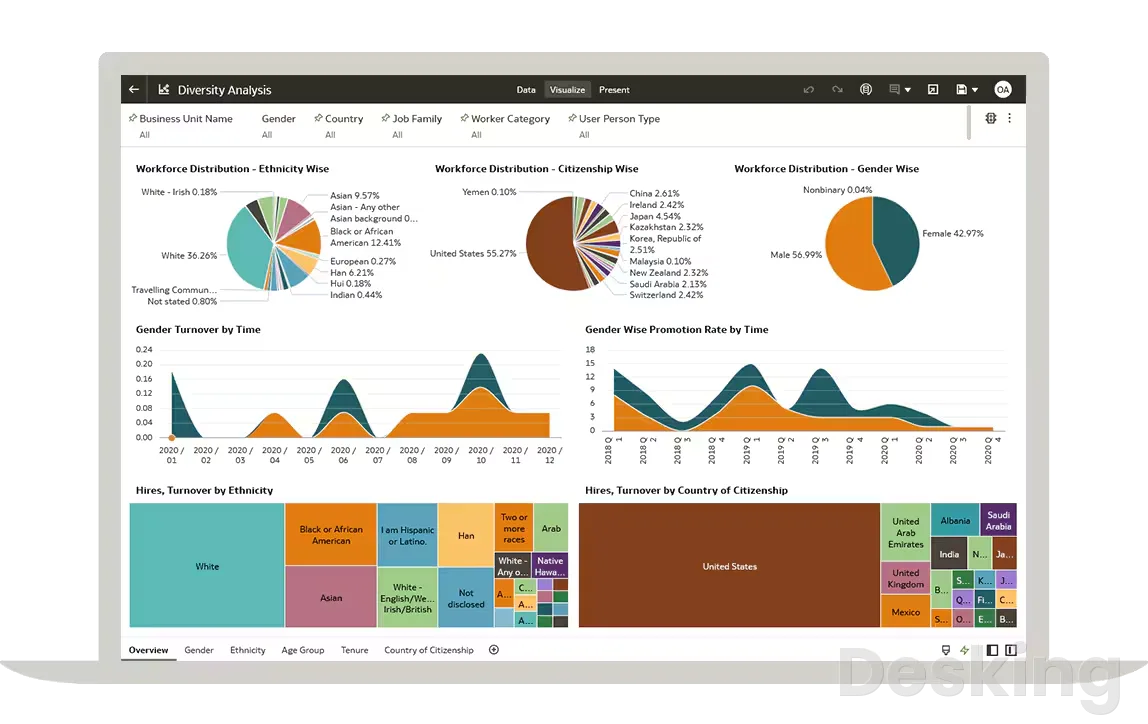
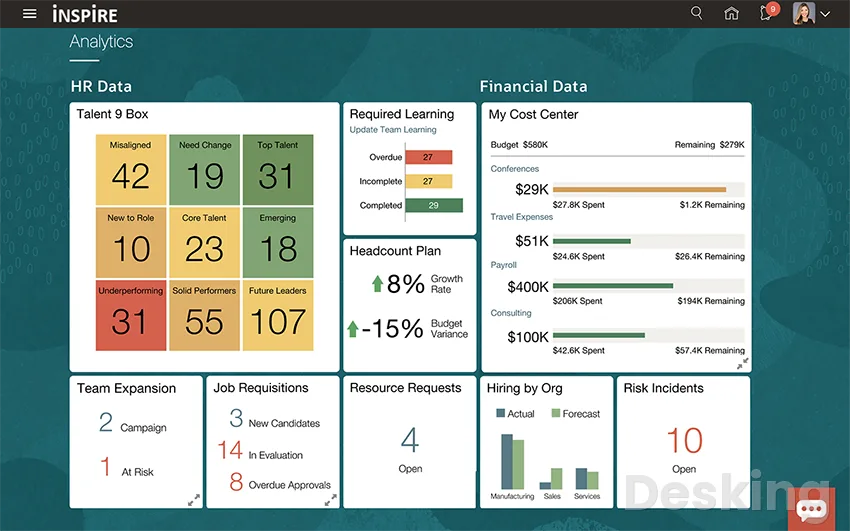
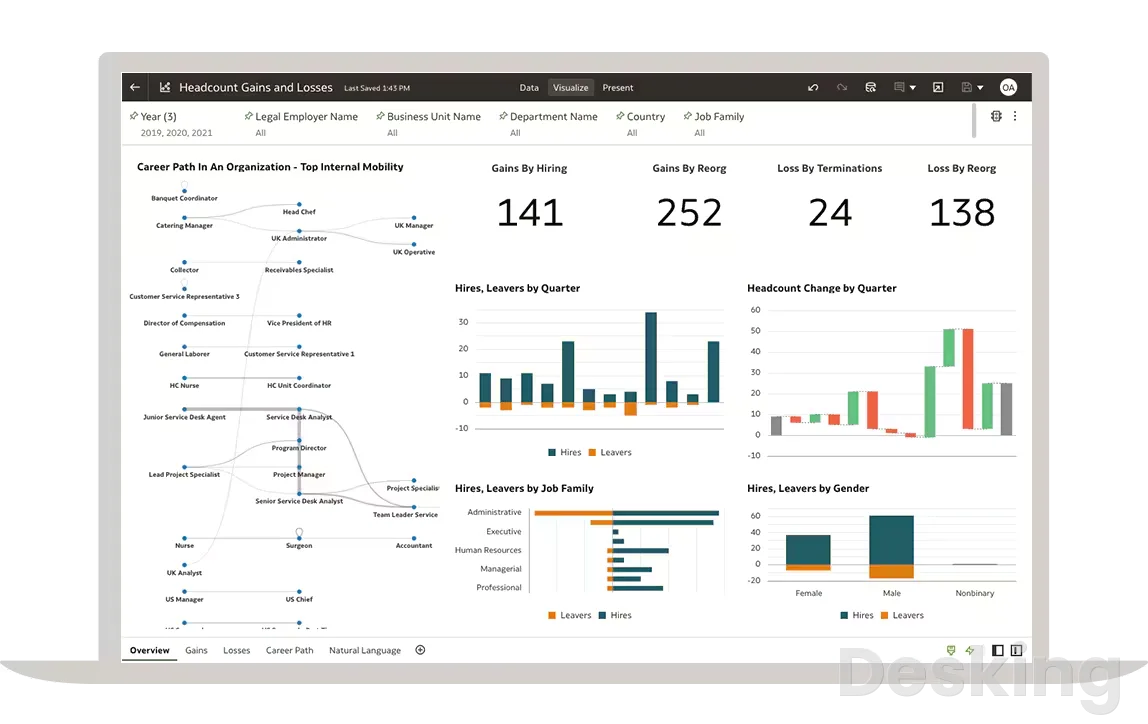
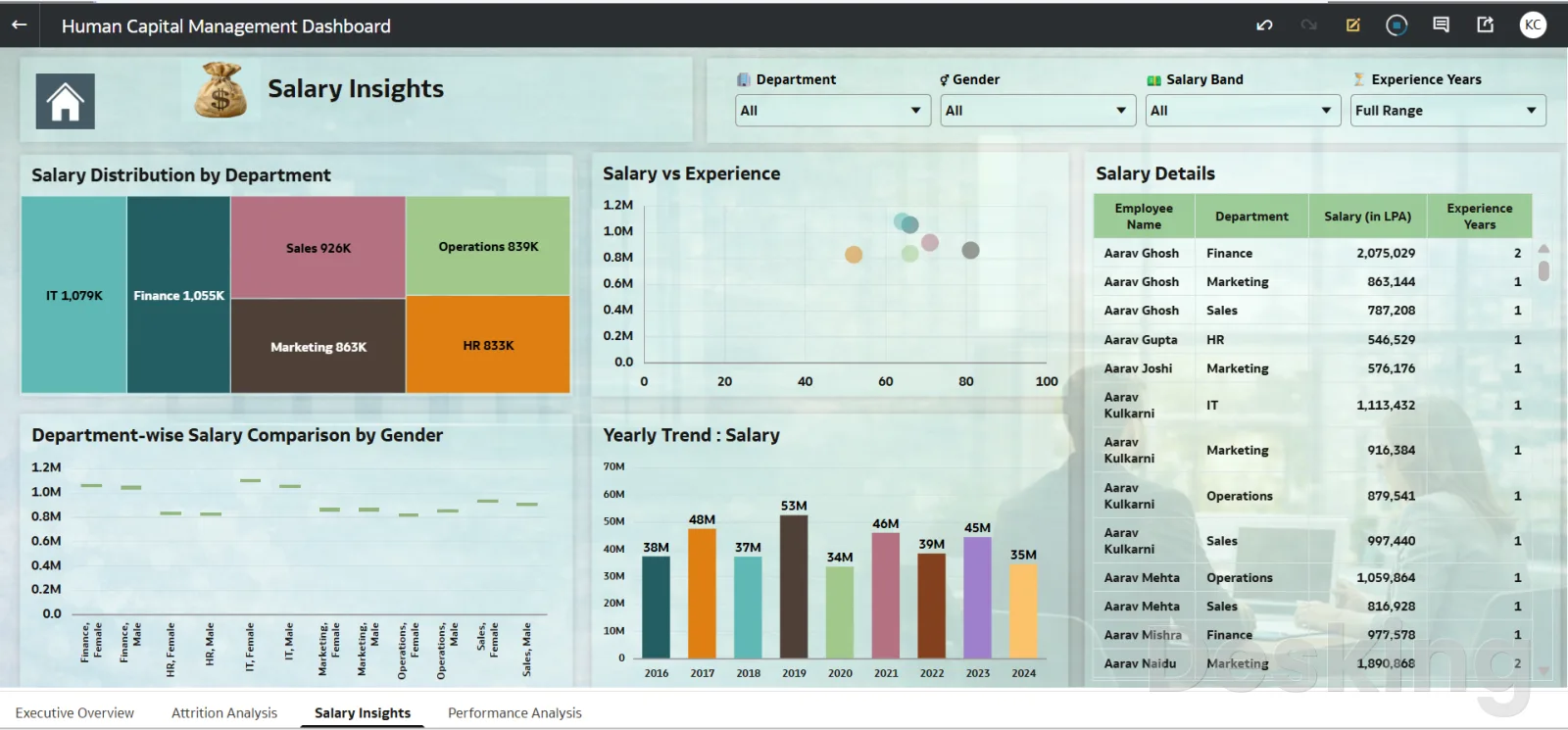
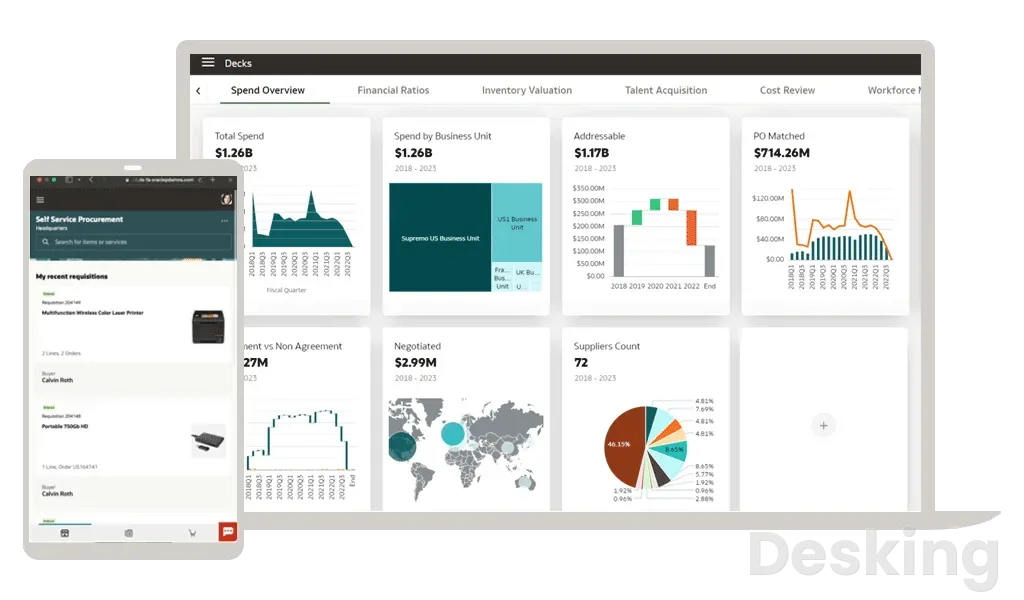
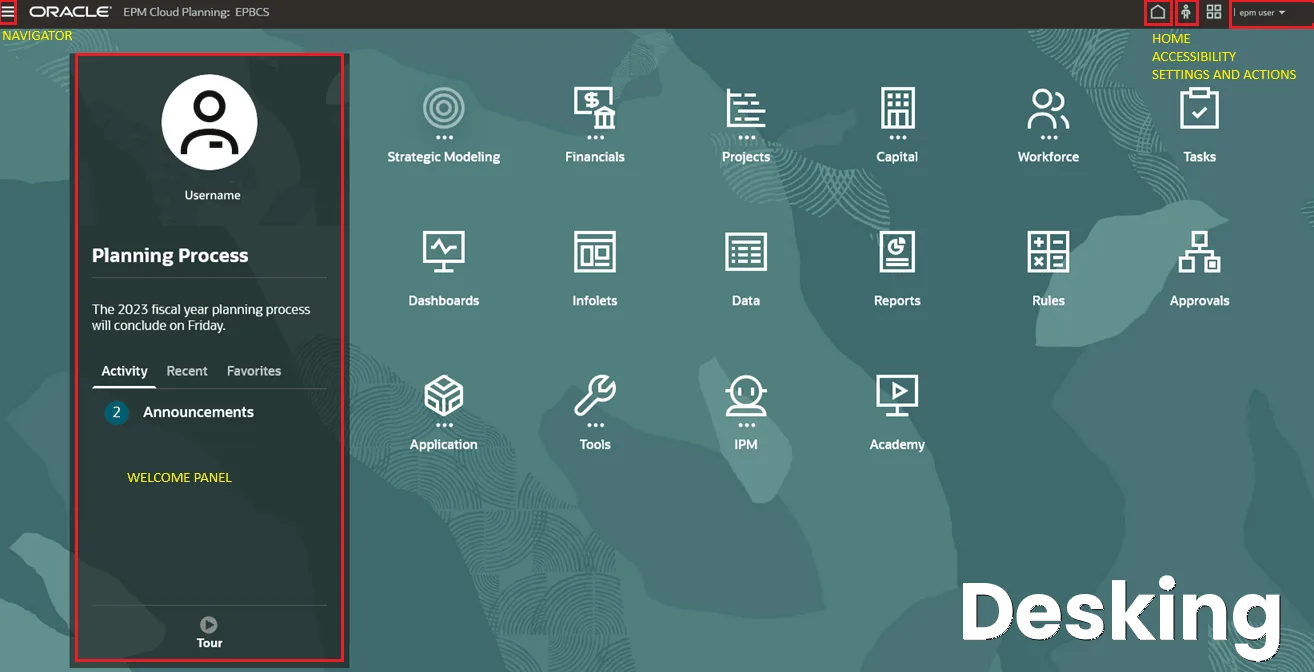
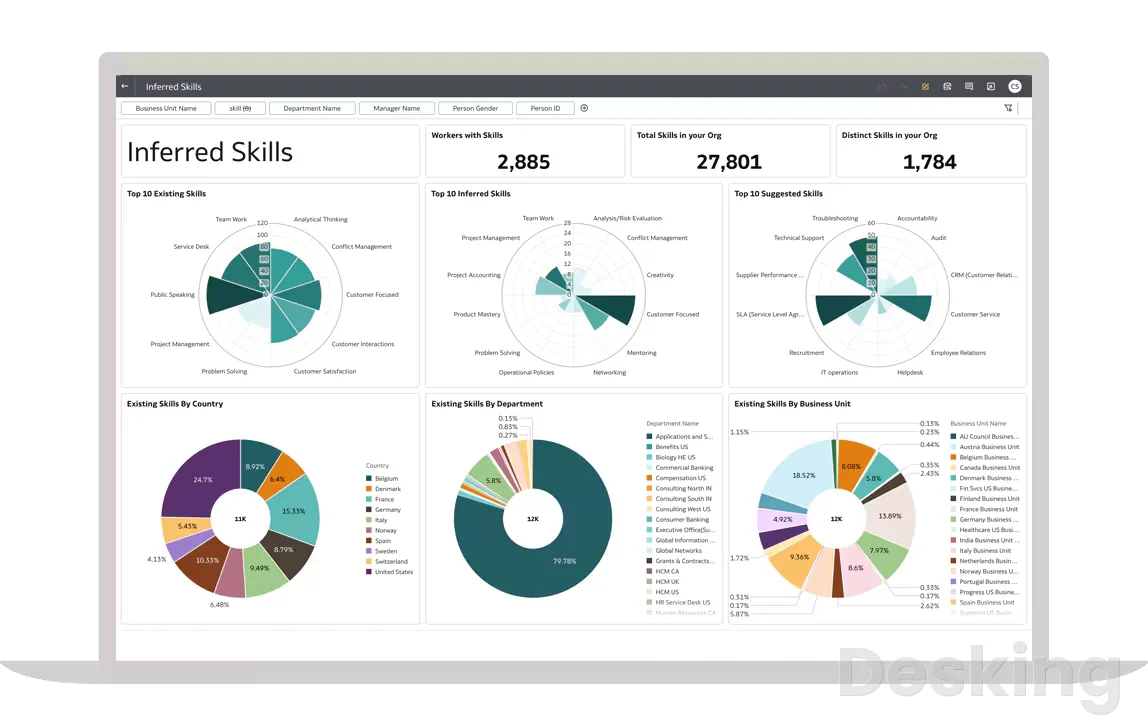
Table of contents
- 1. What the platform is built to do
- 2. Who should consider it
- 3. Key features
- 4. Employee experience
- 5. Implementation and deployment
- 6. Integrations and data management
- 7. Reporting and workforce analytics
- 8. Security and administration
- 9. Pricing and licensing
- 10. Oracle compared with alternatives
- 11. Customer feedback
- 12. Customer support
- 13. The real cost of ownership
- 14. Limitations buyers should understand
- 15. Final assessment
- Frequently Asked Questions
Oracle Fusion Cloud HCM is an enterprise human capital management platform that manages employee records, recruitment, payroll, talent development, workforce operations and HR administration through a shared cloud application environment.
Developed by Oracle Corporation, the product entered the market in 2011 as part of the company's Fusion Applications program.
Oracle was founded in 1977 and is headquartered in Austin, Texas.
Its fiscal 2026 revenue reached $67.36 billion, and it employed approximately 141,000 people at the end of that financial year.
This is a product backed by a major enterprise software manufacturer, with a long development history and a place in the highest tier of the global HCM market.
The distinction that matters to buyers is the platform's scope.
Oracle is selling more than an employee database or a payroll application.
Its HCM environment connects core HR, talent acquisition, performance, compensation, learning, benefits, time and labor, workforce scheduling, payroll, analytics and employee services.
Those capabilities can be adopted as part of a wider Oracle Fusion environment, where HR information can sit alongside finance, procurement and other enterprise processes.
The result can be a consistent operating model across departments, although the same breadth creates a larger implementation and administration commitment than a focused HR information system.
Oracle has a long history in enterprise databases and business applications, but the cloud HCM product has its own development story.
Fusion Applications began reaching customers in 2011, with Oracle presenting its HR applications as part of a wider cloud oriented business software strategy.
That launch matters because the product was developed as part of Oracle's broader application architecture rather than assembled entirely through a sequence of HR software acquisitions.
It gives the suite a consistent application foundation, but it also means buyers should assess the Oracle way of structuring data, permissions, workflows and configuration before assuming that existing HR processes will transfer without redesign.
The central argument in this review is straightforward: Oracle is at its best when an enterprise wants HR to operate as part of a larger business system, rather than as a separate collection of departmental applications.
It becomes harder to justify when the buyer needs a lightweight HR platform, a fast deployment, or extensive freedom to customize every process.
The decision is therefore less about the number of modules available and more about whether the organization can use the shared architecture to reduce fragmentation enough to justify the cost and operational effort.
1. What the platform is built to do
The product is designed around the employee lifecycle.
A person can enter the organization through recruiting, become an employee through onboarding, receive an assignment and compensation structure, complete performance and learning activities, request leave, record time, receive payroll payments and eventually leave the company.
Each stage can be represented through connected HR records and processes.
The value is not simply that all these functions appear in one menu.
It is that changes in one area can inform other processes without requiring HR administrators to maintain several unrelated employee records.
The shared model is particularly relevant to enterprises with multiple legal employers, business units, locations, departments and reporting relationships.
A company can define its workforce structure and connect it to positions, jobs, grades, assignments and supervisory relationships.
These structures affect approval routing, workforce reporting, access permissions and the way managers see their teams.
A change in organizational design is therefore not merely an update to a chart.
It can affect recruitment approvals, compensation budgets, payroll administration and the reporting hierarchy.
Oracle's architecture is also designed to support a wider enterprise environment.
Organizations already using Oracle Fusion Cloud ERP can benefit from a closer relationship between workforce and financial processes.
Headcount planning, compensation costs, departmental structures and employee assignments become more useful when HR and finance work from compatible enterprise information.
That does not remove the need for integration design or governance, but it gives Oracle an advantage when the company wants to standardize its application estate around one vendor.
The product is not limited to companies that already use Oracle ERP.
It can operate as an HCM platform in a mixed technology environment, with APIs, integration services and data loading tools supporting connections to other applications.
However, the implementation team must decide which system owns each important data element.
Employee identity, job assignments, cost centers, payroll results, time records and organizational structures cannot be allowed to drift between systems.
A unified HCM application can reduce duplication, but it cannot compensate for an unclear data ownership model.
Oracle is positioned particularly strongly in the enterprise market.
Gartner Peer Insights lists it in the HCM Suites for 1,000+ Employee Enterprises category and records a 4.8 out of 5 rating from 396 ratings on its product review page.
Workday and SAP SuccessFactors also appear among its direct alternatives.
Those figures indicate a strong level of user approval within the platform's enterprise market, but they should not be mistaken for proof that every deployment is successful.
A large organization can value the depth of the product while still facing substantial configuration, reporting and adoption work.
2. Who should consider it
The strongest buyer is an enterprise with a large or geographically distributed workforce, several legal entities, complex approval structures and a serious requirement to standardize HR processes.
Such an organization may have inherited different HR applications through acquisitions, maintained separate systems across countries or developed inconsistent employee processes between business units.
Oracle can give it a common framework for workforce data and employee services.
The business case becomes stronger when the company can retire existing applications and reduce the number of interfaces that must be maintained.
A second strong buyer is an organization already committed to Oracle's enterprise applications.
If finance, procurement and other departments use Oracle Fusion Cloud, the HCM suite deserves serious consideration because the company can plan around a shared application environment.
This does not mean every Oracle customer should automatically buy Oracle HCM.
A finance system and an HR system serve different operational needs, and an established Oracle relationship is not enough to prove product suitability.
The buyer should test the actual HR workflows, reporting requirements, country coverage and employee experience before committing.
Large employers with complicated workforce structures can also benefit from the depth of its organizational modeling.
Manufacturing groups, multinational service companies, financial institutions, telecommunications providers and public sector organizations often have several employee populations and different administrative rules.
They may need separate approval paths, job structures, compensation policies, working schedules and country specific processes.
A product with only basic employee records and simple leave management is unlikely to cover that operating model without extensive supplementary software.
Smaller businesses should approach the product more cautiously.
The public price list sets a minimum quantity of 500 hosted employees for the base HCM service.
That commercial threshold alone makes it difficult to recommend as a conventional HR system for a company with 50 or 100 employees.
A smaller organization might still have a specific enterprise requirement or a wider Oracle agreement that changes the economics, but it should not assume that the published entry price represents an accessible small business package.
The other buyer that should be careful is a company seeking an HR platform mainly to replace spreadsheets and basic personnel administration.
Oracle's breadth can become an expensive distraction if the business only needs employee records, time off requests, document storage and a simple approval process.
A more focused HRIS may be easier to introduce and maintain.
The buyer should not pay for enterprise workforce planning, global payroll architecture or complex talent processes simply because those modules are available.
3. Key features
The main capabilities are spread across core HR, talent, workforce management, payroll, employee experience and analytics.
The modules are related, but they solve different operational problems and should not be treated as interchangeable features in a single subscription.
The following sections focus on the capabilities that have the greatest effect on the daily work of HR administrators, managers, employees and payroll teams.
Global human resources
Oracle Human Resources Foundation manages employee information and the organizational structures that support the rest of the HCM environment.
HR administrators can maintain person records, employment information, assignments, jobs, positions, grades, departments and legal employer details.
These are not isolated fields.
They establish the context used by security rules, approvals, workforce reporting and downstream HR processes.
For an organization with multiple operating entities, the quality of this foundation has a direct effect on the accuracy of the entire suite.
The practical advantage is the ability to model different employment relationships without maintaining a separate employee database for every business unit.
An employee can have an assignment connected to a specific legal employer, department, location and manager.
HR can then use those relationships to manage transfers, promotions, changes in working arrangements and organizational restructuring.
The system's depth is useful when the business has complex employment rules, but it requires administrators to understand how Oracle's structures interact.
Incorrect setup can affect reporting and transactions well beyond the original record.
Recruiting
Fusion Recruiting supports recruitment activity from job requisition creation through candidate selection and hiring.
Recruiters can manage requisitions, candidate information, application stages, interviews and communication within the HCM environment.
Because recruiting is connected to the employee record model, a successful hiring process can feed the information needed for the person's transition into the organization.
This reduces the need to treat recruitment as a separate database that must be manually reconciled with HR after an offer is accepted.
The real benefit depends on process design.
A company with a consistent hiring framework can define how requisitions are approved, how candidates move through selection stages and which information must be collected before an offer is made.
A business with different recruitment practices across regions may need to define which steps are global standards and which are local variations.
Recruiters should also assess the candidate experience, job distribution requirements and external recruitment integrations during procurement.
A broad recruitment module is not automatically a replacement for every specialist applicant tracking system.
Onboarding and journeys
Oracle Journeys supports guided activities associated with employee lifecycle events.
Organizations can use journeys to coordinate tasks for new hires, transfers, promotions, leave related events and other HR processes.
A journey can present employees and managers with the tasks they need to complete, while HR administrators can define the activities, sequence and responsibilities that support the process.
The objective is to replace scattered instructions and manual follow ups with an organized set of activities.
The value becomes more visible when onboarding involves several departments.
HR may need to collect employment documents, IT may need to prepare access, managers may need to assign training, and employees may need to complete personal information.
A journey can make those responsibilities easier to track.
It does not eliminate dependencies between departments, however.
If the organization has no clear owner for a task or has not agreed on its onboarding policy, the software will simply make the existing confusion more visible.
Good journeys require a process owner and regular review.
Talent management
Fusion Talent Management supports performance, career development, succession planning and related talent activities.
Organizations can define performance processes, establish goals, review employee progress and connect development activity to workforce requirements.
Managers gain a structured way to participate in performance and talent discussions, while HR can manage the policies and cycles that govern those activities.
The product is particularly relevant to companies that want talent processes to reflect the same organizational structures used by core HR.
Performance management is more than a form that employees complete once a year.
The configuration needs to reflect how the company sets goals, evaluates performance, records feedback and handles approval.
A multinational organization may need a consistent performance framework with local adjustments for different business units or legal environments.
Oracle's strength is the ability to manage those processes within the wider employee record environment.
The trade off is that configuration decisions can become complicated when the organization has many review populations, rating models and approval conditions.
Compensation management
Fusion Workforce Compensation supports compensation planning and administration.
HR and compensation teams can manage salary changes, budgets, awards and related approval processes according to the organization's compensation policies.
The module is relevant to businesses that run formal annual or periodic compensation cycles and need managers to work within defined budget and eligibility rules.
It can also help connect compensation decisions to the employee's role, assignment and organizational position.
The module should be evaluated against the organization's real compensation process, not just a list of available functions.
Buyers should test how the system handles different employee populations, budget ownership, currency requirements, eligibility conditions and approval stages.
A compensation cycle that looks straightforward in a demonstration may become more demanding when it includes several countries, business units and employee categories.
The commercial price is also separate from the base HCM service, so compensation planning should be included in the licensing model from the beginning rather than added after implementation.
Learning management
Fusion Learning supports employee training and development.
Organizations can manage learning content, assign training, track completion and connect learning activity to employee development.
The capability is important for companies with formal training requirements, recurring compliance education or structured career development programs.
Learning records can be managed within the wider HCM environment, which makes it easier to relate training activity to employee roles and organizational responsibilities.
The distinction between managing learning and delivering learning content should be examined carefully.
A company may already use specialist learning content providers, external course libraries or a separate learning experience platform.
It needs to establish which content sources can be connected, how completion information is transferred and whether the available learning functions support the required learning model.
Oracle's published price list separates Fusion Learning from Learning Connect, so buyers should confirm the licensing and integration implications of their chosen setup.
Time and labor
Fusion Time and Labor supports the recording and management of working time.
Employees can submit time information, while managers and administrators can review and approve time entries according to the organization's rules.
The module is especially relevant where hours worked affect payroll, project costing, overtime, attendance or workforce reporting.
When time data is connected to employee assignments and payroll, the organization can reduce the manual transfer of working hours between separate systems.
Time management is one of the areas where a technically capable system can still create employee frustration.
A time entry process must be quick enough for employees to use consistently and clear enough for managers to approve without unnecessary correction.
Complex rules may be justified for shift workers, multiple assignments or regulated working hours, but they should not make routine time entry unnecessarily difficult.
Organizations should test the employee and manager experience using realistic timecards, exceptions, overtime rules and approval scenarios before accepting the module.
Workforce scheduling
Fusion Workforce Scheduling supports the creation and management of employee schedules.
It is designed for organizations that need to align staffing requirements with employee availability, working rules and operational demand.
Scheduling becomes particularly important in businesses where the number of employees available at a given time affects service delivery, production or customer coverage.
The module can be assessed alongside Time and Labor because scheduling and actual working time are closely related but serve different purposes.
The buyer should distinguish between basic scheduling and advanced workforce optimization.
A schedule that assigns shifts is not necessarily capable of solving every staffing problem.
Organizations should test how the product handles qualifications, employee availability, working restrictions, changes to shifts, absence and the operational rules used by managers.
The published price list separates Workforce Scheduling from Time and Labor and Workforce Labor Optimization.
That separation is commercially important because a company may need one capability without needing all three.
Payroll
Fusion Payroll manages payroll calculations and related payroll processes.
It uses employee, assignment, compensation, time, absence and deduction information maintained across the HCM environment.
Organizations can configure payroll rules to reflect their business and country requirements, including calculations and formulas.
Oracle also supports payroll operations through its own country localizations and partner supported coverage, with the vendor describing coverage across more than 60 countries.
Payroll should be treated as a country coverage and compliance decision, not simply as another feature in the suite.
The buyer needs to establish whether Oracle provides native payroll for every required country, whether a partner is involved, and how local statutory updates are handled.
The commercial price list identifies separate country payroll services, with different minimum quantities for certain markets.
For example, the published US payroll option has a minimum of 1,000 compensated individuals, while the China and France options have higher minimum quantities.
A multinational company should build a country by country payroll matrix before signing.
Benefits administration
Benefits Administration supports the management of employee benefit programs and related eligibility and enrollment processes.
The function is important in organizations with several benefit plans, employee categories and country specific policies.
HR teams need to define the available programs, the rules that determine eligibility and the employee information required to administer them.
Employees need a clear way to understand their available choices and complete the actions assigned to them.
Benefits should be tested against the company's actual policy structure.
A simple benefit package may require little more than enrollment and record keeping, while a multinational employer may need different plan rules for different legal entities and employee groups.
The buyer should also establish how benefits data connects to payroll deductions, employee communications and external benefit providers.
The value of having benefits in the same HCM environment is reduced duplication, but external providers and local arrangements still need reliable integration.
HR service delivery
Fusion Help Desk supports HR service requests and employee assistance processes.
It can provide a more structured route for employees to seek help and for HR teams to manage requests.
This is useful when the HR department receives a high volume of questions about employment records, benefits, payroll, policies and other employee matters.
A central service process can improve visibility into open cases and help managers understand where requests are waiting.
The module should not be mistaken for a substitute for a well managed HR service operation.
The organization still needs to define request categories, service ownership, escalation paths, response expectations and the information employees must provide.
A poorly designed help desk can become another queue that employees avoid.
Buyers should assess how cases are created, routed, prioritized and closed, and whether the system can connect the service process to the employee information needed to resolve the request.
HCM analytics
Fusion HCM Analytics supports workforce analysis and reporting.
Oracle's HCM environment also includes reporting capabilities that allow administrators and analysts to work with workforce data.
The distinction between operational reports and analytical reporting is important.
Operational reports answer questions about current records and transactions, while analytics is intended to support broader workforce decisions, trends and planning.
Organizations should define which reporting needs can be met through standard tools and which require more specialized data modeling.
The complexity of reporting is one of the recurring complaints in customer feedback.
Gartner Peer Insights includes an HRIS analyst who described a steep learning curve around reporting and analytics and difficulties with integration and customization.
That criticism deserves attention because reporting is not an optional extra in enterprise HR.
Executives need accurate headcount, turnover, compensation and workforce information, while HR administrators need reports that help identify incomplete records and process exceptions.
A company should include its most important reports in the proof of concept and confirm the skills required to maintain them.
AI agents and assistance
Oracle is expanding its use of AI across HCM, with capabilities that include content generation, recommendations, employee assistance and agents that can perform defined actions.
Its published AI feature catalog identifies agents across areas such as absence management, benefits, compensation, recruiting, HR administration and employee support.
The 2026 releases also include AI agent capabilities for guided journeys, document records, employment changes, job management and workforce analysis.
These functions are not one generic chatbot.
They are tied to specific HCM processes and tasks.
The difference between an AI assistant and an agent matters.
An assistant may help a user find information or prepare content, while an agent can be configured to perform defined tasks within an approved workflow.
Oracle's direction is toward coordinated agent activity, with permissions, policies and approval processes controlling what can happen.
This can reduce repetitive HR work, but it also creates a governance requirement.
Buyers should identify which actions can be performed automatically, which require approval and how administrators can audit what the agent has done.
AI should not be used as a reason to skip the normal HCM evaluation.
A company still needs accurate employee records, sound approval rules, controlled access and clear ownership of HR decisions.
An agent cannot reliably recommend a promotion or process an employee change if the underlying job, manager, compensation or eligibility data is wrong.
It also should not make sensitive employment decisions without appropriate human oversight.
The strongest use cases are the ones where an agent can remove repetitive administration while leaving consequential decisions with accountable managers and HR professionals.
4. Employee experience
Employee experience is one of the most important tests for a system with this much administrative depth.
HR professionals may spend hours in the application, but most employees interact with it only when they need to request leave, update information, review a payslip, complete a performance task or submit time.
Those interactions must be straightforward.
A product can have excellent configuration options and still lose employee confidence if routine tasks require too many screens or confusing navigation.
Oracle's Redwood user experience is intended to create a more consistent design across Fusion applications.
The company has continued to update HCM pages and workflows, including the redesign of the Transaction Console with embedded AI in the 26B release.
A consistent visual system can help users recognize common controls and move between tasks more easily.
However, the quality of the experience depends on which pages and processes have been updated, the configuration used by the employer and the way each employee population accesses the system.
Customer feedback is mixed rather than uniformly positive.
A Capterra reviewer working in talent acquisition gave the product a positive assessment and wrote:
"It helped me in tracking timesheets, attendance and also in processing payroll."
Talent Acquisition Officer, Capterra reviewer, three to five years of use
That comment points to the practical value of having operational HR tasks connected.
It is not evidence that every employee process is simple, but it reflects the benefit of consolidating functions that would otherwise be handled in separate tools.
Other reviews describe a more demanding experience, particularly for new users and administrators working with advanced configuration.
The product's broad functionality can be useful after users understand it, but the learning period should be treated as a real adoption cost.
A second Capterra reviewer described switching from Dayforce as easier than expected:
"Switching over from day force has been a lot less of a struggle than anticipated."
Ecom Manager, Capterra reviewer, one to three years of use
This is useful evidence, but it should not be generalized into a promise of easy migration.
A change from one HR platform to another depends on the quality of existing data, the number of integrations, the complexity of payroll and the extent to which old workflows are being redesigned.
The reviewer's experience suggests that a move can be manageable, not that every migration will follow the same path.
The negative evidence is equally important.
A Gartner Peer Insights reviewer identified the reporting and analytics learning curve as a major problem:
"There was a really steep learning curve to figure out the reporting and analytics."
HRIS analyst, healthcare and biotechnology, Gartner Peer Insights
This is a more serious concern for HR teams that depend on self service reporting or have limited internal technical resources.
If every important report requires specialist intervention, the business may become dependent on a small number of administrators or external consultants.
The buyer should test not only whether a report can be created, but also whether the HR team can maintain it after implementation.
5. Implementation and deployment
Implementation is where the commercial and operational realities of an enterprise HCM suite become visible.
Oracle's breadth means the project can involve core HR, recruiting, talent, payroll, benefits, time management, security, integrations, reporting and employee communications.
A company that attempts to introduce all those capabilities at once must coordinate several workstreams and manage a large volume of design decisions.
The product should therefore be implemented as a business transformation program with clear ownership, not treated as a software installation.
The first decision is the scope of the initial deployment.
Core HR is usually the foundation because employee records, legal employers, departments, jobs, positions and assignments are used by other modules.
Once those structures are stable, the organization can introduce additional capabilities according to business priority.
Payroll and time management may need to be part of the early scope if the existing environment is being replaced, while learning or advanced talent functions may be introduced later.
The correct sequence depends on the business, but the data model should be designed for the intended long term architecture.
A sensible implementation plan should address the following workstreams before configuration begins:
- Process ownership: Identify the HR, payroll, finance and IT owners responsible for each process and decision.
- Data design: Define the employee, assignment, job, position, legal employer and organizational structures that will be used.
- Country requirements: Document statutory, payroll, benefits and employment policy requirements for every country in scope.
- Security model: Define user roles, data access, approval responsibilities and segregation of duties.
- Integration design: Identify which systems exchange information with HCM and which application owns each data element.
- Reporting requirements: Agree on executive, operational, compliance and payroll reports before the build is complete.
- Testing ownership: Assign responsibility for scenario testing, payroll reconciliation, data validation and business acceptance.
- Adoption planning: Prepare communications, training, support materials and local change champions.
The organization should also decide whether to standardize processes or reproduce existing local practices.
This is one of the most expensive decisions in a large HCM deployment.
A company may have different approval rules, job structures and employee categories across acquired businesses.
Copying every existing variation into the new platform can preserve local familiarity but undermine the goal of standardization.
Replacing every variation with a global template can simplify administration but may ignore legitimate legal or operational differences.
The project team needs to separate genuine local requirements from historical habits.
A practical deployment sequence
A structured rollout can reduce the risk of attempting too much at once.
The following sequence is a planning framework, not a claim about a fixed Oracle implementation timeline.
- Confirm the business scope. Define the legal entities, countries, employee populations and HCM modules included in the first release. Record which existing applications will be retired and which will remain connected.
- Design the workforce model. Agree on legal employers, business units, departments, jobs, positions, grades, locations and reporting relationships. Confirm how the model will support future reorganizations.
- Define roles and access. Establish implementation users, HR specialist roles, manager access, employee self service and data security rules. Test access using representative user profiles before loading production data.
- Prepare employee data. Clean existing employee records, resolve duplicates and map legacy fields to the target data model. Define how historical information will be retained and which records need to be migrated.
- Configure priority processes. Set up hiring, employee changes, approvals, absence, compensation and other processes included in the first release. Keep the configuration aligned with approved business rules.
- Build integrations. Configure connections to payroll providers, identity systems, finance applications, time systems and other required services. Test both successful data transfers and failed transaction handling.
- Validate reports and controls. Reconcile headcount, payroll, organizational data and other key reports against the legacy environment. Confirm that users can identify errors and investigate exceptions.
- Run business acceptance testing. Test complete employee and manager journeys, not only individual screens. Include hires, transfers, promotions, leave, terminations, payroll corrections and organizational changes.
- Train each user group. Provide role specific training for employees, managers, HR specialists, payroll administrators and technical support staff. Use realistic tasks rather than generic product demonstrations.
- Release in controlled stages. Go live according to the agreed country and employee scope, monitor transaction failures and establish a clear escalation route for the first operating cycles.
The most important lesson is that data migration and process design must be treated as separate workstreams.
A company can successfully transfer employee records and still fail to reproduce the processes that depend on those records.
For example, a migrated employee may have a correct name, job title and department but an incorrect supervisory relationship or payroll eligibility status.
The resulting errors may appear in approval routing, manager reporting or payroll rather than in the original migration validation.
A realistic test program should include exceptional cases.
Standard hiring and leave requests are not enough.
Test employees with multiple assignments, international transfers, changes in legal employer, retroactive salary changes, absence corrections, terminations, rehires and changes to manager relationships.
Payroll testing should include the cases that produce the most expensive errors, such as tax changes, deductions, overtime, bonus payments and retroactive adjustments.
The objective is to prove that the complete process works, not simply that a form can be submitted.
The buyer should also budget for post launch administration.
Oracle's regular cloud updates introduce new capabilities and changes to existing functionality.
Those updates can be valuable, but the organization still needs to assess their impact on custom configurations, reports, integrations and training materials.
The HCM team should maintain a release review process and schedule regression testing for the workflows that matter most.
A cloud subscription does not remove the need for application governance.
6. Integrations and data management
Integrations determine whether HCM becomes the central employee platform or another application that requires constant manual reconciliation.
Oracle supports REST APIs and SOAP web services for HCM, alongside HCM Data Loader, HCM Extracts and integration tools.
Those options allow organizations to load data in bulk, extract information and connect external applications.
The documentation includes specific guidance for business objects and REST resources, giving technical teams a defined route for integration work.
HCM Data Loader is important for initial migration and recurring bulk maintenance.
It supports loading and maintaining HCM data, while HCM Extracts supports the extraction of information from the application.
These tools are relevant for organizations that need to exchange data with payroll providers, identity platforms, finance systems or other enterprise applications.
The implementation team should decide which method fits each integration rather than using a single approach for every data exchange.
REST APIs are useful for applications that need to read or manage HCM information through supported resources.
Oracle's documentation includes a dedicated REST API reference for Fusion Cloud HCM, with quick start material, use cases and resource descriptions.
SOAP web services are also documented for HCM integrations and extensions.
The presence of these interfaces is important, but it does not mean every integration is automatically simple.
Each connection still requires authentication, access permissions, data mapping, error handling and monitoring.
The integration model should be designed around data ownership.
A company may use HCM as the master for employee identity and assignments while another system remains responsible for payroll tax calculations in a particular country.
An identity provider may own authentication, while finance owns cost center structures.
The implementation must define which system can create, update and approve each record.
Without that agreement, integration jobs can overwrite valid information or create conflicting records.
Customer feedback supports this concern.
A TrustRadius reviewer working in HR at an organization with more than 10,000 employees identified HCM extracts, HCM Data Loader, core HR and reporting as strengths, but also raised concerns about the interface, performance and customization.
The reviewer also noted that multiple connected applications can increase overall design complexity and create data discrepancies when fields are not mapped correctly.
This is a useful warning for enterprises with many downstream systems: integration capability is not the same as integration simplicity.
"Too many clicks can be avoided to navigate."
Employee in Human Resources, organization with more than 10,000 employees, TrustRadius
The comment comes from a recruitment related use case, but it illustrates a broader point about process design.
Integration and workflow quality should be measured by the work employees must complete, not only by whether the technical connection succeeds.
If an employee needs to move through several screens to complete a routine task, the process may be technically correct but operationally inefficient.
The implementation team should review common employee and manager journeys as part of integration testing.
7. Reporting and workforce analytics
Reporting is one of the areas where the product's technical depth can create both value and friction.
HR leaders need reliable information about headcount, turnover, hiring, compensation, absence, learning and workforce costs.
Managers need information about their teams, open positions, employee changes and pending approvals.
Payroll administrators need detailed operational reports to reconcile calculations and investigate exceptions.
These are different reporting requirements, and they should not all be handled through one generic dashboard.
Oracle's reporting environment should be assessed according to the type of question the business needs to answer.
Standard operational reports are useful for regular administrative work, while more advanced reporting may require knowledge of data models and reporting tools.
HCM Analytics is a separate priced service in the public price list, so the buyer should not assume every analytical capability is included in the base HCM subscription.
The distinction between included reporting and separately licensed analytics needs to be documented in the commercial proposal.
The reporting model should be designed before implementation testing begins.
Buyers should prepare a list of mandatory reports and classify them by user, frequency, data source and business purpose.
The list should include executive workforce dashboards, operational HR reports, payroll reconciliation, compliance reporting and manager self service.
Each report should have an owner who can explain its purpose and confirm whether the data is accurate.
This prevents the project from reaching go live with a technically complete application but an incomplete management reporting environment.
The organization should also test whether its HR analysts can maintain reports without depending on the implementation partner for every change.
A system that requires specialist SQL or technical knowledge for routine reporting can create a long term support burden.
This may be acceptable for a large enterprise with a dedicated HR technology team, but it is less attractive for a company expecting HR business partners to create and modify reports independently.
The buyer should include report maintenance in the skills assessment and training plan.
8. Security and administration
Security is central to HCM because the system holds sensitive information about employees, compensation, performance, benefits and employment history.
Oracle provides role based security structures, data roles, privileges and policies.
Administrators can assign access according to the responsibilities of employees, managers, HR specialists and technical users.
The security model must control both what a user can do and which employee records the user can access.
This distinction is important in large organizations.
A manager should normally see the employees within the relevant reporting structure, while an HR specialist may need access to a wider employee population.
Payroll administrators may need access to compensation and payment information that should not be available to ordinary managers.
A global HR administrator may have a different scope from a local HR representative.
The system can support these distinctions, but the organization must design and maintain the roles carefully.
Security should be reviewed as part of the implementation and as a recurring administrative activity.
Role changes, reorganizations, temporary assignments and employee departures can all affect access requirements.
The business should define how access is requested, approved, reviewed and removed.
It should also test whether users can access information outside their intended population through reports, integrations or administrative functions.
A security design that works for the employee portal may still be incomplete if data exports or reporting permissions are not considered.
Oracle's HCM documentation includes security references for roles, role hierarchies, privileges and policies.
These references are useful for implementation teams because they provide a documented structure for access design.
However, the presence of security controls does not prove that a customer's configuration is correct.
The customer remains responsible for selecting appropriate roles, limiting privileges and reviewing access as the organization changes.
9. Pricing and licensing
Oracle's pricing model is modular rather than based on a simple set of three or four packaged plans.
The public US price list gives the Fusion Human Capital Management Base Cloud Service a monthly subscription price of $15 per hosted employee, with a minimum quantity of 500.
Oracle also states that the standard subscription term for its cloud services is three years.
This means the entry point for the base service is $7,500 per month before additional modules, implementation services and other project costs.
That minimum has a major effect on the buying decision.
A company with 500 hosted employees pays a base subscription of $7,500 per month, or $90,000 per year.
At 2,000 hosted employees, the base subscription reaches $30,000 per month, or $360,000 per year.
At 10,000 hosted employees, the same base service reaches $150,000 per month, or $1.8 million per year.
These calculations use the published monthly unit price and do not include additional modules, taxes, implementation, integration or support arrangements beyond the subscription.
The base price should not be mistaken for the total cost of the HCM environment.
Recruiting, talent management, learning, time and labor, workforce scheduling, compensation and payroll are separately priced services in Oracle's public price list.
Some are charged per hosted employee, others per named user, compensated individual or managed resource.
The metric matters because the number of people who use a module may differ from the number of employees recorded in the core HR system.
A buyer who compares only the per employee base price may underestimate the total subscription.
The following table summarizes the principal HCM services with published US monthly prices.
These are separate service options rather than conventional tiered packages.
The minimum quantity and billing metric must be considered alongside the price because a module can have a different commercial basis from the core HCM service.
| Billing detail | Base HCM | Recruiting | Recruiting Booster | Talent Management | Learning | Learning Connect | Time and Labor | Workforce Scheduling | Compensation | Help Desk | Communicate | US Payroll | Payroll Core |
|---|---|---|---|---|---|---|---|---|---|---|---|---|---|
| Monthly price | $15 | $8 | $3 | $7 | $5 | $2 | $3 | $7 | $4 | $4 | $2 | $7 | $5 |
| Billing metric | Hosted employee | Hosted employee | Hosted employee | Named user | Named user | Named user | Named user | Named user | Compensated individual | Hosted employee | Hosted employee | Compensated individual | Compensated individual |
| Minimum quantity | 500 | 500 | 500 | 500 | 500 | 500 | 500 | 500 | 500 | 500 | 500 | 1,000 | 500 |
| Standard term | 3 years | 3 years | 3 years | 3 years | 3 years | 3 years | 3 years | 3 years | 3 years | 3 years | 3 years | 3 years | 3 years |
| Free plan | No | No | No | No | No | No | No | No | No | No | No | No | No |
The table reveals why a module level bill of materials is essential.
An organization that needs only core HR and recruiting has a different cost structure from one that also needs talent management, learning, time tracking, scheduling and payroll.
The metrics also prevent a simple calculation from being applied blindly.
Recruiting and the base service use hosted employees, while some talent and workforce options use named users or compensated individuals.
The buyer must confirm the number of billable units for each service before comparing the proposal with another HCM vendor.
Additional HCM services
The public price list includes several additional options that can materially change the subscription.
Some support specific employee services, others extend payroll or workforce functionality, and some relate to analytics.
The following table separates those services from the principal module set to make the additional licensing requirements easier to identify.
| Service | Monthly price | Billing metric | Minimum quantity |
|---|---|---|---|
| Cybersecurity Assurance for HCM | $6 | Hosted employee | 500 |
| Workforce Health and Safety Incidents | $2 | Hosted employee | 500 |
| Touchpoints | $2 | Named user | 500 |
| Workforce Labor Optimization | $3 | Managed resource | 500 |
| HCM Analytics | $15 | Hosted employee | 1,000 |
| HCM Analytics alternative metric | $450 | Named user | 20 |
| Operational Analytics | $3 | Hosted employee | 1,200 |
| Operational Analytics alternative metric | $100 | Named user | 35 |
| Learning Connect | $2 | Named user | 500 |
| Recruiting Booster | $3 | Hosted employee | 500 |
Payroll is another area where the minimum quantities vary by country.
The price list includes country specific payroll services at $7 per compensated individual per month, but the minimum is not identical in every market.
Canada, the Gulf Cooperation Council, India, Ireland, Mexico and the United Kingdom have a published minimum of 500.
China and France have a minimum of 5,000, while the United States has a minimum of 1,000.
Payroll Core is listed separately at $5 per compensated individual with a minimum of 500.
A multinational buyer should therefore calculate the payroll cost by country rather than applying one global rate to the whole workforce.
Oracle also lists one time consulting services for certain HCM activities.
The price list includes a $10,000 HCM Base New Features Assessment, a $10,000 Talent Management New Features Assessment, a $10,000 Workforce Management New Features Assessment and a $10,000 New Features Implementation service.
These are specific consulting line items, not a published standard price for a full HCM implementation.
The overall deployment cost depends on scope, data migration, integrations, configuration, testing and the implementation partner or Oracle services involved.
What different company sizes pay
A useful budget should begin with the base service and then add only the modules the organization needs.
The following examples show the base subscription cost before modules and services.
They are not total ownership estimates, and they do not assume that every employee is billable under every module.
| Hosted employee count | Monthly base subscription | Annual base subscription | Three year base subscription |
|---|---|---|---|
| 500 | $7,500 | $90,000 | $270,000 |
| 1,000 | $15,000 | $180,000 | $540,000 |
| 2,000 | $30,000 | $360,000 | $1,080,000 |
| 5,000 | $75,000 | $900,000 | $2,700,000 |
| 10,000 | $150,000 | $1,800,000 | $5,400,000 |
These figures show why Oracle is not a casual purchase for a smaller company.
The base service alone represents a significant multi year commitment, and most enterprises evaluating a full HCM suite will need at least some additional modules.
The minimum quantity also means that the published unit price does not translate into a low entry cost for a business with a small workforce.
Buyers should request a commercial proposal that identifies the billable population, each licensed module, contract term, renewal conditions and any price protections.
The three year standard term deserves particular attention.
A long subscription can be commercially reasonable for an enterprise platform that requires a substantial implementation, but it reduces the buyer's flexibility if the scope changes or the project fails to deliver the expected value.
The contract should define what happens when employee counts change, when a country is added, when a module is removed and when the organization restructures.
The renewal process should also be reviewed before signature rather than left until the first contract anniversary.
What is included and what is extra
The most important commercial question is not simply whether a module exists.
It is whether that module is included in the subscription being proposed.
Oracle's list price separates the base HCM service from options such as Recruiting, Talent Management, Learning, Time and Labor, Workforce Scheduling, Compensation and payroll.
The buyer should therefore request a line by line schedule that maps each business requirement to the exact licensed service.
Implementation is another cost that must be handled separately.
The public price list contains certain fixed consulting services, but it does not establish one universal implementation fee for a full enterprise deployment.
A large project can require business process design, data migration, integration development, security configuration, testing, change management and specialist payroll work.
The cost depends on the number of countries, modules, legacy systems, employee populations and custom requirements.
A proposal that quotes only the subscription is not a complete project budget.
There is no conventional free plan for this enterprise service in the public price list.
Buyers should also avoid treating a demonstration or a limited evaluation environment as an ongoing free subscription.
The procurement team should confirm any evaluation access, test environment terms and associated charges directly in the commercial agreement.
For a platform with a multi year term, the difference between a demonstration and a production subscription must be clear.
10. Oracle compared with alternatives
The main competitors are Workday Human Capital Management, SAP SuccessFactors HCM and UKG Pro.
All compete in enterprise HR, but they do not approach the market in exactly the same way.
Oracle's strongest argument is the connection between HCM and the wider Fusion application environment.
Workday is a direct alternative for organizations seeking a unified enterprise HCM platform.
SAP SuccessFactors is particularly relevant to companies with an established SAP environment and complex multinational HR requirements.
UKG Pro is a strong candidate when workforce management and frontline operations are central to the buying decision.
The ratings in Gartner Peer Insights provide one useful comparison, although they are user ratings rather than a complete technical assessment.
Oracle's product page records 4.8 out of 5 from 396 ratings.
The same market review environment lists Workday Human Capital Management at 4.6 from 802 ratings, SAP SuccessFactors HCM at 4.6 from 1,215 ratings and UKG Pro at 4.3 from 607 ratings.
Those figures should be interpreted as one source of customer sentiment, not a definitive ranking of product quality.
| Product | Starting price | Free plan | Main strength | Main consideration |
|---|---|---|---|---|
| Oracle Fusion Cloud HCM | $15 per hosted employee monthly, 500 minimum | No | Shared Fusion application environment | Modular licensing and complex deployment |
| Workday Human Capital Management | Quote based | No | Unified enterprise HCM and workforce planning | Commercial proposal required |
| SAP SuccessFactors HCM | Quote based for enterprise configurations | No | Strong SAP ecosystem alignment | Module and implementation scope |
| UKG Pro | Quote based | No | Workforce management and frontline operations | Evaluate fit with broader enterprise architecture |
Workday Human Capital Management
Workday is the most direct alternative for many large enterprises.
It competes with Oracle on core HR, talent, workforce planning, analytics and employee experience.
A buyer comparing the two should focus on the business application environment, the data model, the quality of workforce planning, the available integrations and the operating model required after implementation.
The choice should not be made on the basis of a feature checklist alone because both products can support complex enterprise HR processes.
Oracle has a clear argument when the company already uses Fusion applications and wants HR to share a wider enterprise environment.
Workday deserves serious consideration when the organization prefers Workday's approach to HCM and workforce planning or is already committed to its application ecosystem.
The buyer should compare the exact reporting, security, payroll and integration requirements rather than assume one platform is automatically easier.
Both are substantial enterprise systems, and both require careful planning.
SAP SuccessFactors HCM
SAP SuccessFactors is a strong alternative for organizations that already operate SAP enterprise applications or have a multinational HR structure that aligns with its module model.
The product covers core HR, talent, recruiting, learning, payroll and workforce related processes.
Oracle's advantage is its own Fusion application environment and the ability to connect HCM with Oracle finance and other Fusion applications.
SAP's advantage becomes more relevant when the organization already depends on SAP systems, skills and implementation partners.
A buyer should compare the two systems using actual employee lifecycle scenarios.
Test how a worker is hired, assigned, transferred, promoted, paid, trained and moved between legal entities.
Compare the reporting model, the payroll country coverage, the employee experience and the level of technical effort required for integrations.
The product that best matches the company's existing enterprise architecture may offer a lower long term operating burden, even if its subscription price is not the lowest on the initial proposal.
UKG Pro
UKG Pro is relevant when workforce management is a major part of the HR requirement.
Organizations with large hourly workforces, complex scheduling needs and significant timekeeping requirements should evaluate UKG alongside Oracle.
Oracle offers time and labor and workforce scheduling as part of its wider HCM portfolio, but a company should still test the depth of those capabilities against its operational needs.
The right comparison includes shift planning, attendance, time entry, payroll dependencies and manager workflows.
Oracle is more compelling when the company wants workforce management connected to a broader enterprise HR and business application environment.
UKG deserves attention when the operational workforce and frontline scheduling requirements are the primary drivers.
A company should not assume that the largest suite is automatically the best workforce management product for every industry.
The buyer should run a scenario based evaluation with real schedules, overtime rules, absences and shift changes.
ADP Workforce Now
ADP Workforce Now is another alternative, particularly for companies that place payroll and HR administration at the center of the project.
It may be a more appropriate choice for organizations that do not need the full complexity of a large enterprise HCM suite.
Oracle has a stronger case when the buyer requires extensive organizational modeling, talent processes and integration with Oracle Fusion applications.
ADP should be evaluated when payroll operations, tax administration and the company's service requirements are more important than broad enterprise application alignment.
The decision should include the number of countries, payroll ownership, employee population and existing finance systems.
An organization with a small number of payroll jurisdictions may have different requirements from a multinational company that needs a consistent HR data model across dozens of countries.
Buyers should compare the full commercial proposal and the services attached to it, not simply the subscription line.
Implementation, payroll transition and support can materially affect the final cost.
11. Customer feedback
The customer feedback pattern is consistent in one important respect: users value the breadth of the platform, but the effort required to configure and operate it is a recurring concern.
Capterra records an overall rating of 4.0 out of 5 from 93 reviews, with ease of use and customer service both rated 3.8.
Software Advice reports the same overall rating and identifies multi step time entry, reporting complexity and performance under heavier workloads among the recurring negative themes.
These are not isolated complaints about one obscure function.
They concern everyday activities that affect employee adoption and HR administration.
A positive experience often appears when users have a defined role and a stable set of processes.
The employee who uses the system to track time, request leave or review employment information may find the system useful once the organization has configured the relevant workflows.
HR administrators and technical specialists face a different experience because they must understand data structures, security, reporting and integrations.
The product can therefore be easy enough for an employee to use while remaining demanding for the people who maintain it.
A Capterra reviewer described the value of centralization but also identified the learning curve:
"The platform has a steep learning curve, particularly for advanced configurations and reporting."
Software engineer, Capterra reviewer
That is an important distinction for procurement.
A business should not evaluate usability only through an employee self service demonstration.
It should also ask HR administrators to complete realistic configuration and reporting tasks.
If the vendor or implementation partner performs all the difficult work during the demonstration, the buyer may underestimate the internal skills required after go live.
TrustRadius reviews also show the tension between capability and complexity.
One reviewer described the platform's role in large organizations with frequent restructuring and warned that connections to multiple applications can increase design complexity.
Another reviewer highlighted the value of reporting and recruitment communication while criticizing navigation and certain bulk candidate management limitations.
These are older reviews and should not be treated as evidence of the exact state of every 2026 release, but they show that the same architectural strengths and user experience challenges have been part of the product's history.
Gartner's product ratings are more positive overall, with a 4.8 out of 5 score in the enterprise HCM market.
That score is encouraging, but the review page also contains direct criticism of reporting, analytics, integration and customization.
A high rating does not erase the operational concerns.
It suggests that many enterprise users consider the platform valuable despite the effort involved, which is a different conclusion from saying the product is simple or inexpensive.
The review evidence should be read in context.
Customer reviews are not controlled product tests, and the people writing them may use different modules, configurations and release versions.
The strongest evidence comes from repeated patterns across platforms rather than one dramatic comment.
In this case, the recurring pattern is clear: broad capability and strong enterprise coverage, balanced by a learning curve, administrative complexity and the need for technical support on advanced work.
12. Customer support
Support should be evaluated as part of the implementation and operating model.
Enterprise HCM systems are not ordinary desktop applications where a user can resolve every problem through a help article.
Payroll errors, employee data issues, security permissions and integration failures can affect business operations and employee confidence.
The buyer needs to know how support requests are prioritized, how serious incidents are escalated and what level of technical assistance is included in the commercial agreement.
Capterra lists email and help desk support, FAQs and forums, a knowledge base, phone support, chat and training resources that include in person and online sessions, webinars, documentation and videos.
Its customer service score is 3.8 out of 5 based on 72 reviews.
This suggests that support is available through several channels, but user experience is not uniformly strong.
The organization should confirm the exact support package, response commitments and service coverage in the contract.
A large implementation should also establish a clear division of responsibility between Oracle, the implementation partner and the customer's internal team.
Oracle may be responsible for the cloud service, the partner may manage configuration and integration work, and the customer remains responsible for data quality, policy decisions and internal process ownership.
If these responsibilities are not written down, support issues can be passed between parties while the business waits for a resolution.
Internal knowledge is especially important after the implementation partner leaves.
HR administrators should understand common configuration changes, data loading procedures, report maintenance, security reviews and release testing.
The company should not assume that a support contract can replace an internal application owner.
Oracle's depth makes it important to retain enough technical and functional knowledge to manage the platform between major projects.
13. The real cost of ownership
The subscription price is only one part of the financial decision.
The total cost of ownership includes module licenses, implementation, data migration, integrations, testing, training, internal administration, support and future changes.
A company moving from several disconnected HR applications may be able to retire some of those costs.
Another company that already has a well integrated HR environment may gain less from consolidation.
The financial case should therefore compare the cost of the proposed Oracle environment with the full cost of the systems and processes it will replace.
The most useful calculation begins with the existing application estate.
List every system that supports employee records, recruitment, payroll, learning, performance, timekeeping, benefits and reporting.
Record the annual subscription, maintenance and support cost for each one.
Then identify which systems can actually be retired after Oracle is live.
A system should not be counted as a saving if it must remain in place for a local payroll requirement, historical reporting or a process that the new platform does not replace.
The next step is to calculate the Oracle subscription by module and billing metric.
Use the hosted employee count for the base service and the correct population for each optional module.
Do not assume that all modules use the same number of billable employees.
Confirm whether the commercial proposal uses hosted employees, named users, compensated individuals or managed resources.
Also confirm whether inactive employees, contingent workers and other populations are included in the contract definition.
Implementation cost should be estimated separately.
A company with one country and a relatively standard HR model may have a smaller project than a multinational enterprise with many legal entities, multiple payroll providers and a long history of customized systems.
The project plan should include data cleansing, configuration, integration, testing, change management and post launch support.
If those activities are excluded from the initial estimate, the budget will not reflect the real investment.
There is also an opportunity cost associated with implementation.
HR, finance, payroll and IT specialists must spend time on design, testing and decision making.
Managers may need to participate in process validation and training.
The business may need temporary resources to maintain existing systems while the new environment is being introduced.
Those costs are rarely visible in a per employee subscription calculation, but they affect the overall business case.
A useful procurement model should include three financial scenarios.
The first is a minimum viable deployment with core HR and the modules required for immediate operational needs.
The second is the planned target environment with the full module set expected within the first two years.
The third is a growth scenario that includes additional countries, employee populations and modules.
This approach helps prevent a low initial quote from becoming an expensive project once the organization begins adding required capabilities.
14. Limitations buyers should understand
The first limitation is implementation complexity.
Oracle is designed for enterprises with substantial HR requirements, and its configuration options reflect that market.
The company needs people who understand its organizational structures, data model, security design, reporting and integration methods.
A buyer without an experienced HR technology team should include the cost of external expertise and long term administration in the decision.
The second limitation is the commercial model.
The base HCM service has a 500 hosted employee minimum and a three year standard term.
Additional modules have separate prices and billing metrics.
This can be reasonable for a large enterprise that needs a broad suite, but it makes the product difficult to justify for smaller companies or buyers that want a simple monthly subscription.
The procurement team should insist on a full module schedule and a clear definition of billable populations.
The third limitation is the employee and administrator learning curve.
A large suite will naturally have more configuration options than a small HRIS, but that does not make every complicated workflow acceptable.
The business should test the most common employee actions and the most important administrator tasks.
If time entry, absence requests, reporting or manager approvals require unnecessary steps, those issues can reduce adoption and increase support requests.
The fourth limitation is the complexity of reporting and customization.
The product supports extensive reporting and data management, but user feedback shows that advanced reporting can require specialist knowledge.
Companies that expect HR teams to build and maintain their own analytics should test that requirement directly.
If the business needs extensive bespoke reporting, it should budget for the relevant skills and confirm the exact reporting tools included in the proposed license.
The fifth limitation is the risk of overbuying.
Oracle's suite includes a broad range of capabilities, but not every organization needs all of them.
A company should not license advanced workforce optimization, multiple talent modules or specialized analytics without a defined business requirement.
The right approach is to map each module to a process, owner and measurable outcome.
Modules without a clear owner tend to create unnecessary cost and administrative work.
15. Final assessment
Oracle is a strong candidate for enterprises that want to manage HR as part of a wider business application environment.
Its combination of core HR, recruiting, talent, payroll, workforce management, analytics and AI is substantial.
The shared Fusion architecture is particularly attractive to organizations that already depend on Oracle applications and want to reduce fragmentation across HR and finance.
Its standing in Gartner's enterprise HCM market and the positive customer ratings support its position as a serious large enterprise option.
The product is less attractive when simplicity, a low entry cost or fast deployment is the main requirement.
The $15 monthly base price is not the full cost, and the 500 hosted employee minimum creates a significant financial threshold.
Implementation and ongoing administration also require technical and functional expertise.
The buyer should be comfortable with a three year subscription commitment and should have a realistic plan for data governance, integrations, reporting and user adoption.
The best purchasing approach is to start with the base HCM service and the modules required to run the first defined business processes.
Add Recruiting, Talent Management, Learning, Time and Labor, Scheduling, Compensation, Payroll and Analytics only when the organization has confirmed the requirement and the billable population.
Before signature, insist on a country coverage matrix, a complete three year cost model, a migration plan, a reporting proof of concept and a written support responsibility matrix.
Price as listed by the vendor when we checked. It can change, so confirm it on the official page.
Key features
- Global employee record management
- Legal employer and entity structures
- Jobs positions and grades management
- Employee assignment and transfer processing
- Oracle Fusion recruiting management
- Candidate screening and selection workflows
- Job requisition approval management
- Employee onboarding guided journeys
- Performance goals and review cycles
- Succession planning and talent pools
- Career development and talent profiles
- Workforce compensation planning cycles
- Employee learning assignment management
- Learning content and completion tracking
- Oracle Fusion payroll processing
- Country specific payroll configurations
- Time and labor recording
- Workforce scheduling and shift planning
- Benefits administration and enrollment
- HR service request management
- HCM analytics and reporting
- HCM Data Loader bulk imports
- HCM Extracts data exports
- REST API data management
- SOAP web service integrations
- Role based HCM data security
- Redwood user experience updates
- Embedded AI assistance and agents
- Employee lifecycle process automation
Pros & cons
Pros
- Extensive global HR functionality
- Shared Oracle Fusion architecture
- Broad employee lifecycle coverage
- Detailed organizational structure modeling
- Native Oracle ecosystem alignment
- Multiple payroll country options
- Configurable employee approval workflows
- Integrated talent management processes
- Advanced workforce scheduling options
- Documented REST and SOAP APIs
- Regular cloud application releases
- Growing portfolio of AI agents
- Strong enterprise market recognition
- Large scale workforce support
Cons
- High minimum employee subscription
- Three year standard subscription term
- Separate module licensing costs
- Complex implementation and configuration
- Advanced reporting requires specialist skills
- Steep administrator learning curve
- Customization can require external support
- Employee workflows can involve extra clicks
- Integration mapping requires careful governance
- Payroll country minimums vary
- No conventional free subscription plan
- Ongoing release testing is necessary
- Small businesses face high entry costs
- Full deployment requires significant planning
Who makes Oracle Fusion Cloud HCM
Desking App is an independent publication. We are not the developer or publisher of Oracle Fusion Cloud HCM and we never collect personal or payment details for it. Sign up and pay only on the official site.
Oracle Fusion Cloud HCM is available on
3 platformsOracle Fusion Cloud HCM specs
- Platforms: Web browser, Android and iOS access
- Free plan: No
- Starting price: $15 per hosted employee / month
- Integrations: REST APIs, SOAP, HCM Data Loader and HCM Extracts
- Support: Phone, chat, help desk and knowledge base
- Best for: Large enterprises with complex global HR operations
Our verdict
We rate it 8.7 out of 10. Oracle is strongest for large enterprises connecting global HR with wider Fusion applications. Start with Base HCM and essential modules, then expand by business need. Choose Workday for a different unified HCM model or UKG for frontline workforce priorities. Request a full three year cost schedule before signing.
Visit SiteFrequently Asked Questions
What is Oracle Fusion Cloud HCM used for?
How much does Oracle Fusion Cloud HCM cost?
Does Oracle Fusion Cloud HCM include payroll?
How does HCM Data Loader work?
Can Oracle Fusion Cloud HCM integrate with external applications?
Does Oracle Fusion Cloud HCM support AI agents?
Is Oracle Fusion Cloud HCM suitable for small businesses?
How difficult is it to implement Oracle Fusion Cloud HCM?
Sources6
- Oracle on HCM technical documentation
- Oracle on HCM AI capabilities
- Oracle on HCM service pricing
- SEC on Oracle fiscal 2026 annual report
- Fortune on Oracle company profile
- TechTarget on enterprise HR software
External pages are independent third-party sources. Desking App does not control or endorse their content and accepts no responsibility for it. Visiting them is at your own responsibility and risk.
Reader reviews
Be the first to review