


SAP SuccessFactors Review: Global HR and Payroll for Enterprises
 Published byEva ElekchaGrowth Strategy SpecialistEva ElekchaGrowth Strategy Specialist Verified authorEva Elekcha is a Digital Marketing and Growth Strategy Specialist at Desking, covering the strategies, technologies, and platforms that help businesses strengthen their …Author Profile

Ad disclaimer For links on this page, DESKING APP may earn a commission from the provider. This supports our work and has no influence on our editorial rating.
SAP SuccessFactors is an enterprise HCM suite whose strongest argument is its close relationship with SAP's wider business software ecosystem. Its modular structure suits multinational employers with complex HR and payroll requirements, particularly those already running SAP. However, implementation requires certified partners, specialist administration and careful integration planning, making it a poor choice for companies seeking a simple HR upgrade.
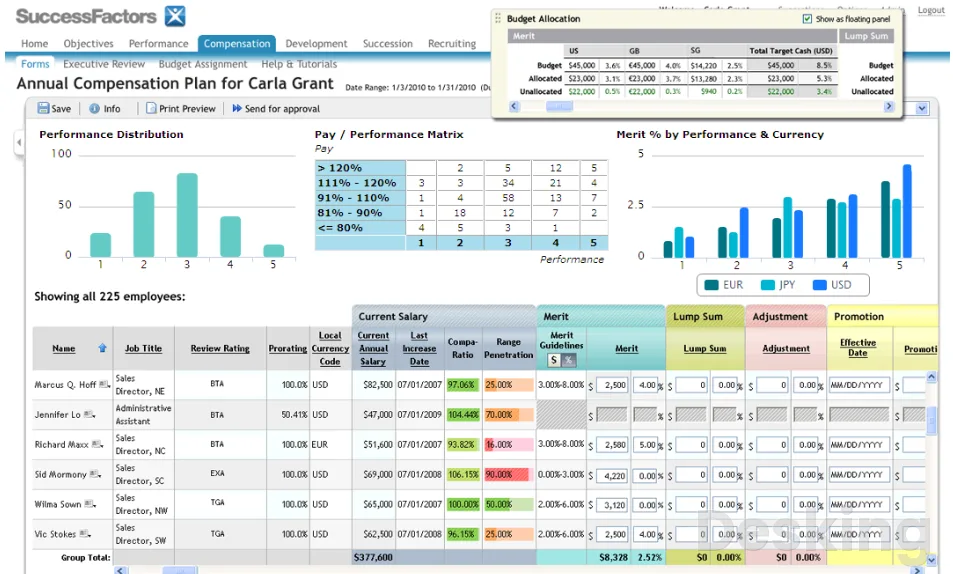
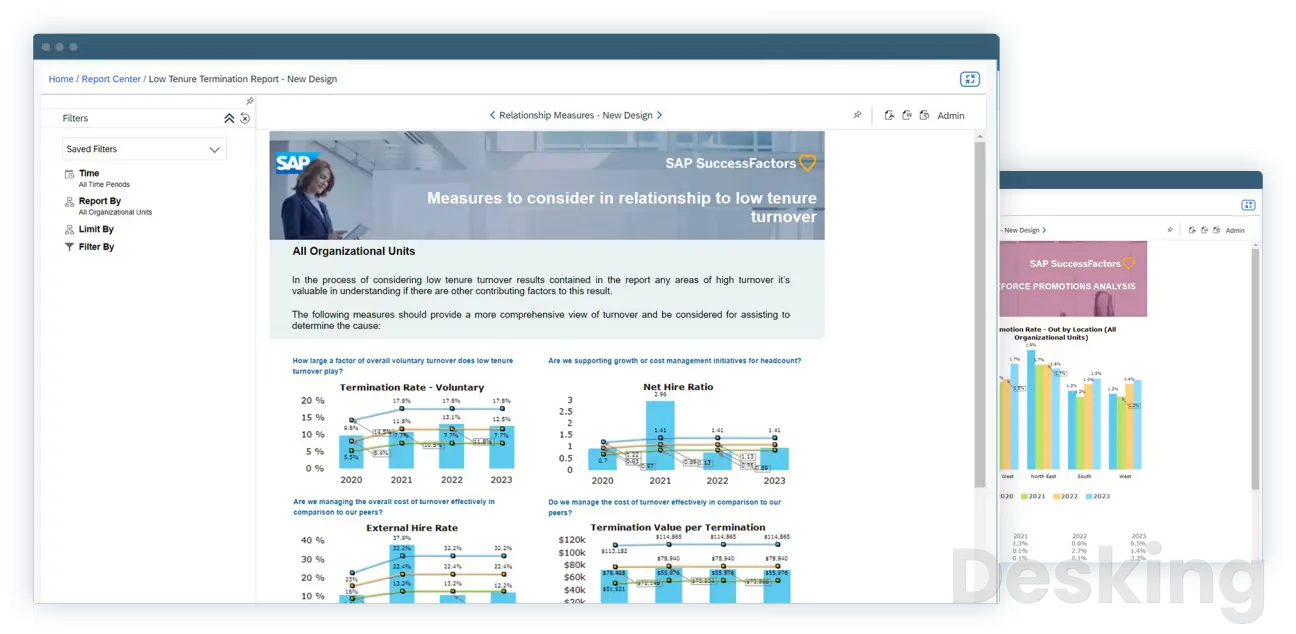
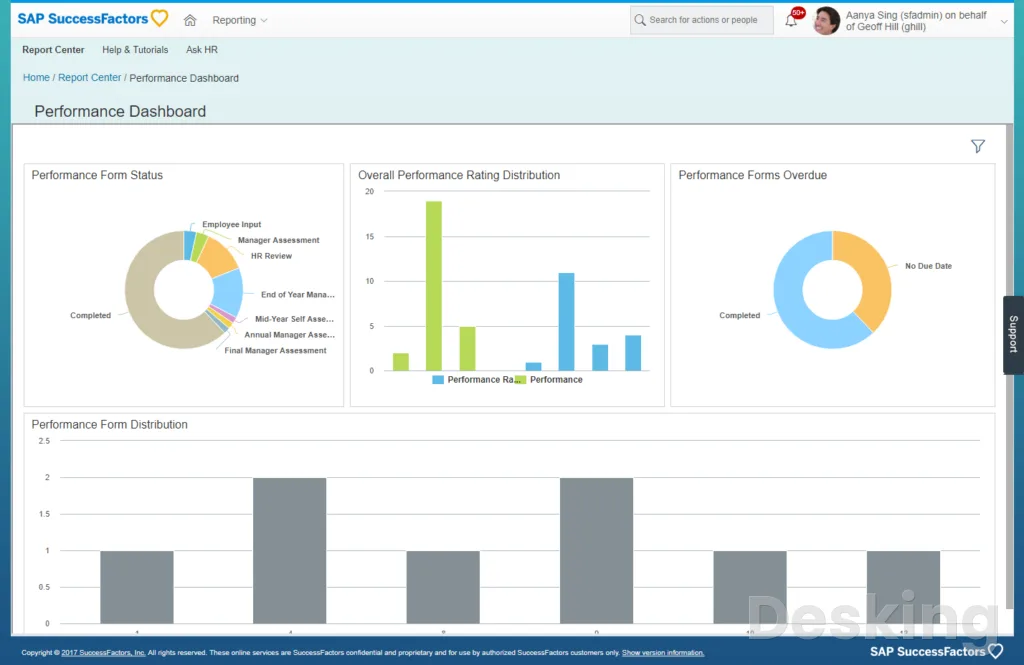
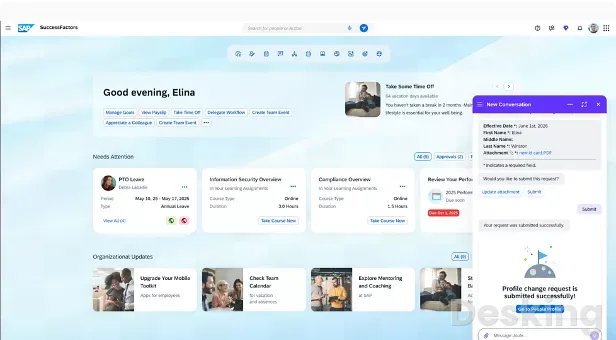
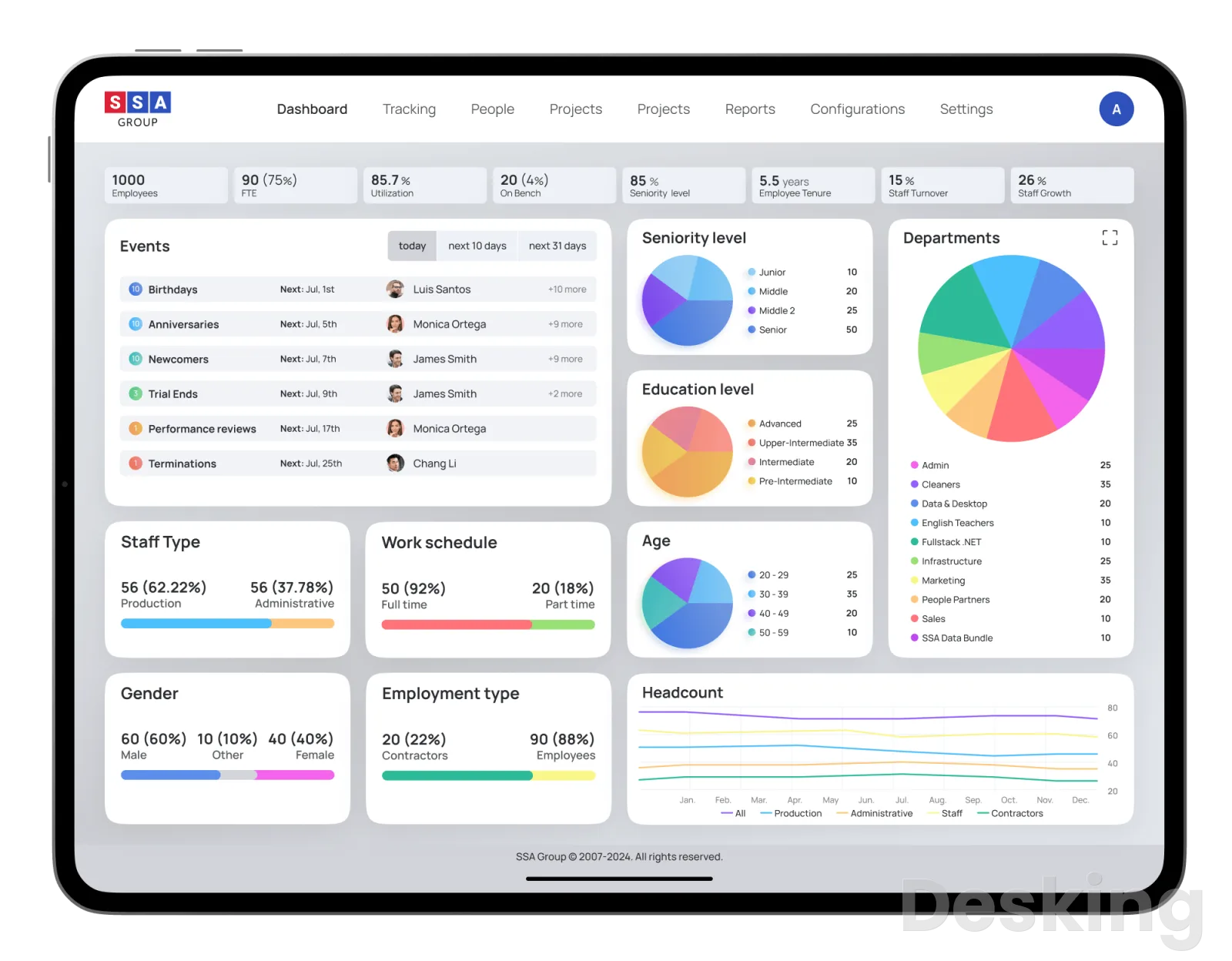
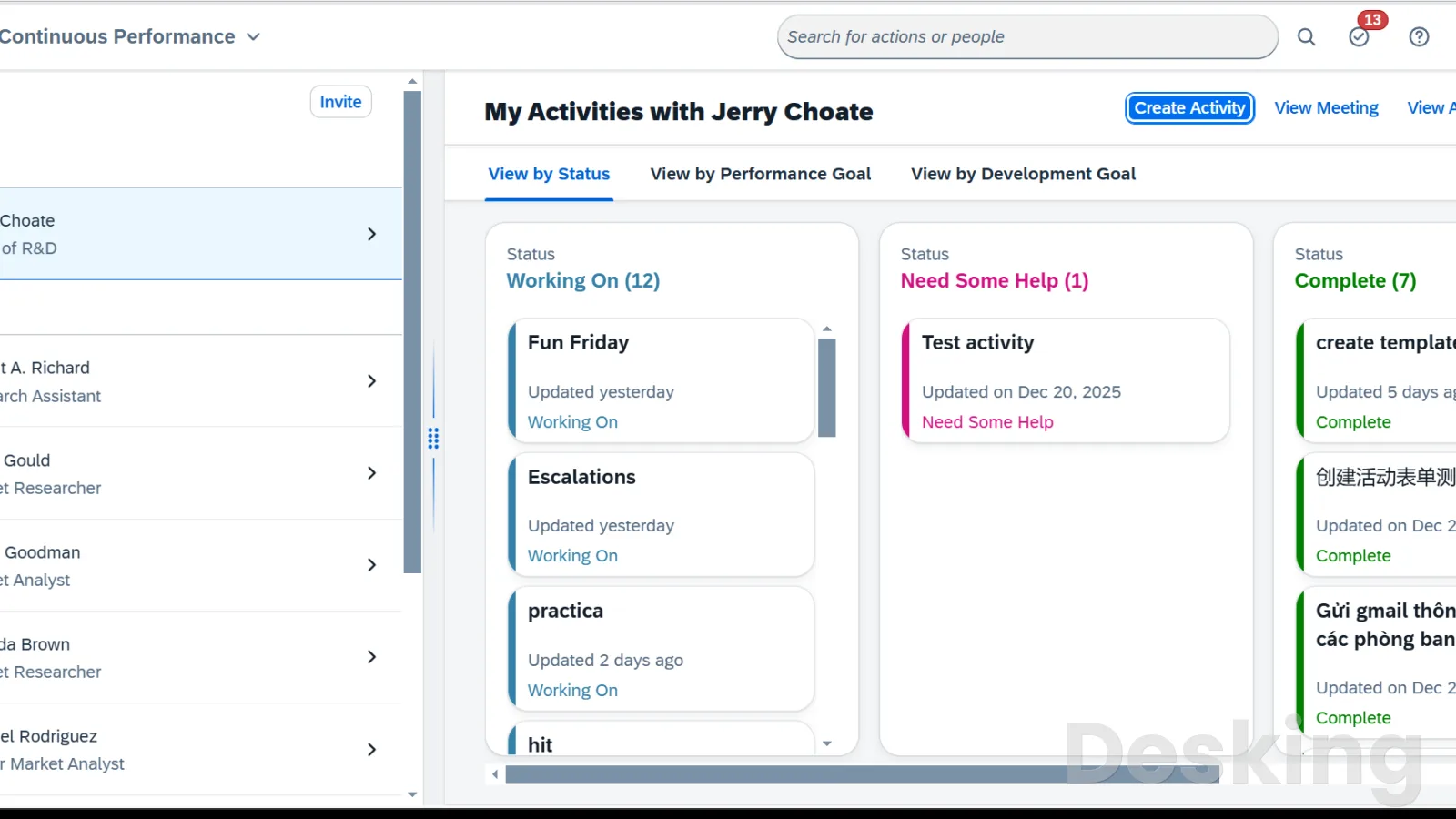
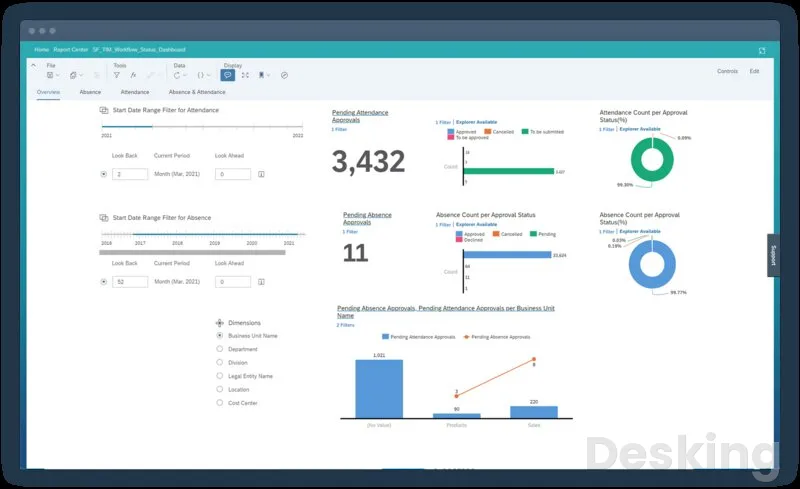
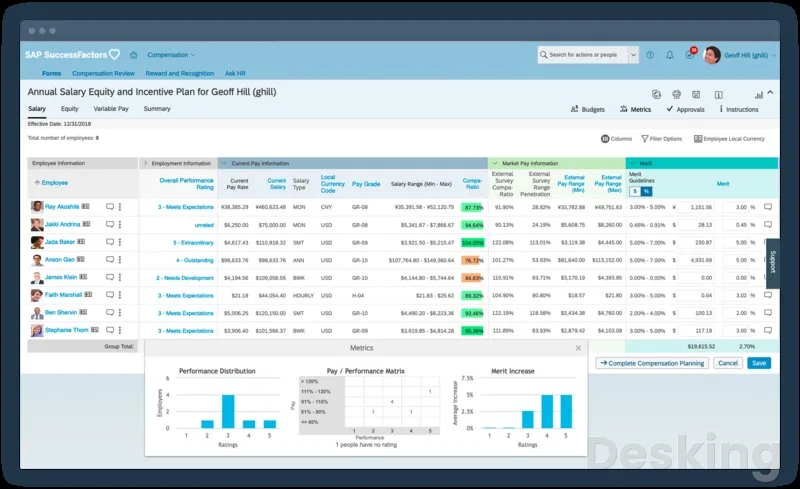
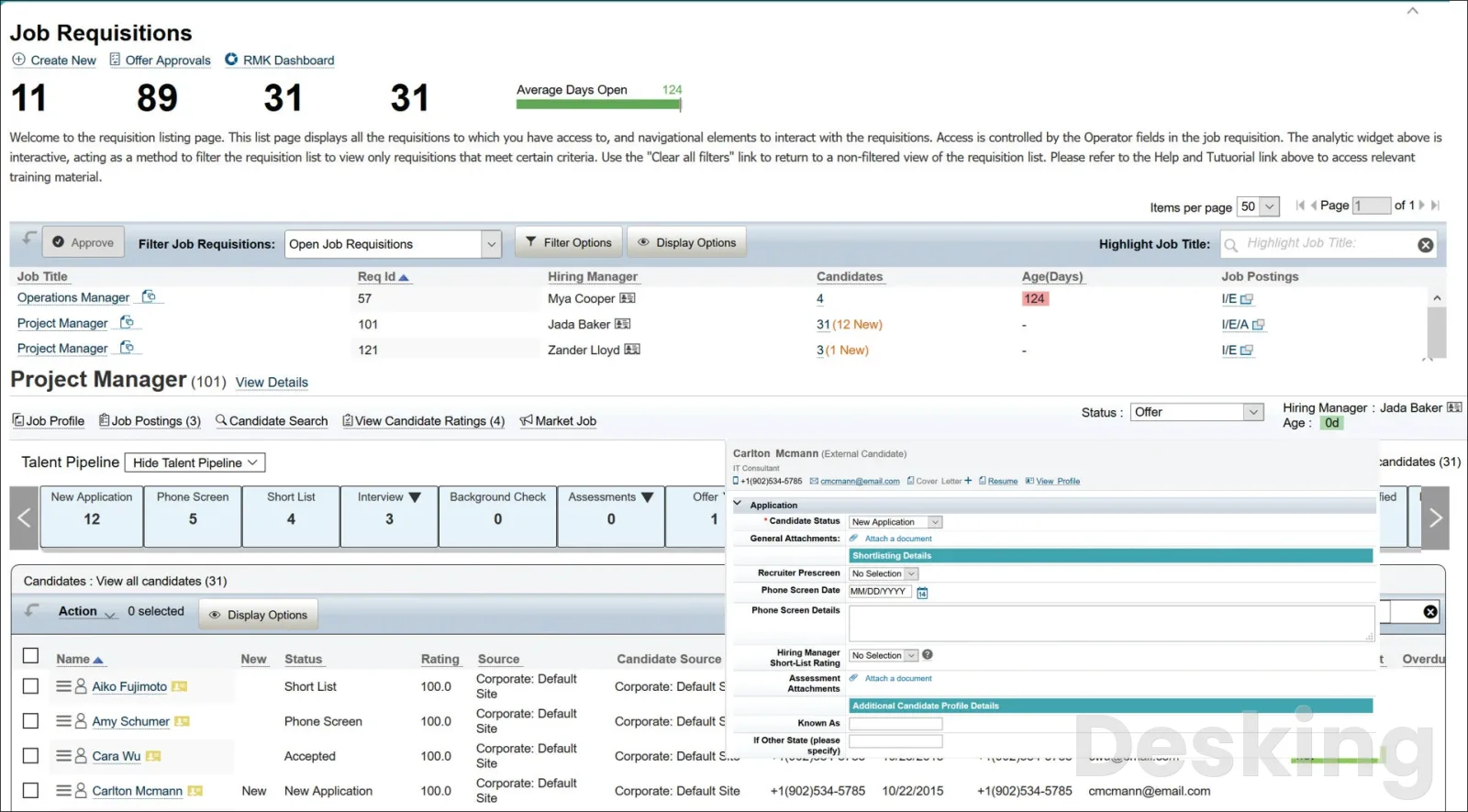
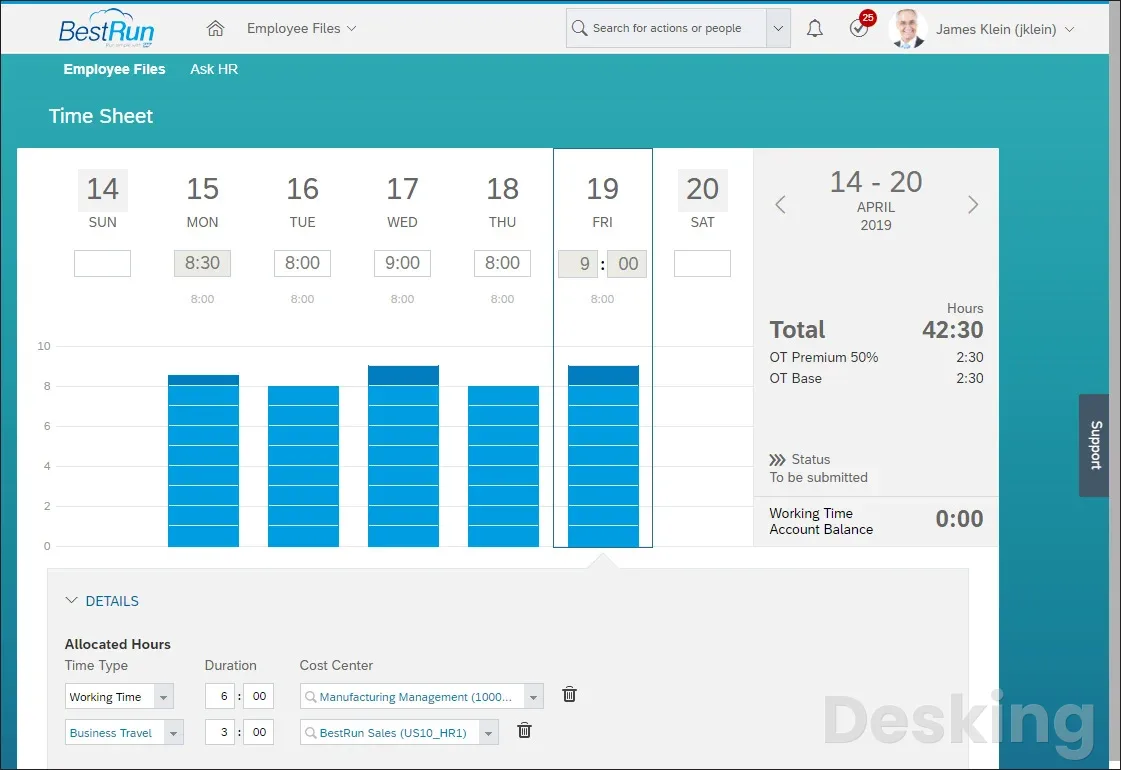
Table of contents
- 1. What SAP SuccessFactors does
- 2. SAP SuccessFactors features
- 3. How SAP SuccessFactors works
- 4. Ease of use and employee experience
- 5. Implementation and deployment
- 6. Integrations and SAP ecosystem
- 7. Security and administration
- 8. Pricing and licensing
- 9. Customer support
- 10. SAP SuccessFactors alternatives
- 11. Who should use SAP SuccessFactors
- 12. Pros and cons
- 13. Final assessment
- Frequently Asked Questions
SAP SuccessFactors is a cloud based human capital management platform that manages employee administration, recruitment, payroll, workforce development and talent processes across medium sized and large enterprises.
The software originated with SuccessFactors, a company founded in 2001 by Lars Dalgaard, and became part of SAP following an acquisition announced in December 2011 for approximately $3.4 billion.
Its parent company, SAP SE, was founded in 1972 and is headquartered in Walldorf, Germany.
SAP employs more than 111,000 people and operates a large enterprise software business spanning finance, procurement, supply chain, analytics and human resources.
The SuccessFactors portfolio has grown from its original cloud HR and performance management roots into a broad HCM suite covering core HR, payroll, recruitment, learning, compensation, workforce management, employee experience and analytics.
The most important buying consideration is its relationship with SAP's enterprise ecosystem.
SuccessFactors can be particularly attractive when employee information must connect with SAP ERP, SAP S/4HANA, payroll infrastructure and wider business processes.
This is a different proposition from choosing an independent HR application and integrating it with an existing finance system.
An organization already committed to SAP can benefit from a more coherent enterprise architecture, while a company with no SAP investment may find itself adopting an additional ecosystem simply to obtain HR capabilities that other platforms deliver through a more direct implementation.
The product also deserves attention because its development strategy is changing.
SAP is moving toward what it calls Autonomous HCM, a model in which AI assistants and specialized agents participate in HR activities across recruiting, payroll, employee administration and talent development.
The 2026 releases introduce a growing set of Joule based capabilities, including assistants for payroll, learning, onboarding and HR operations.
These developments are significant, but they should be assessed as a developing product direction rather than a reason to overlook the established strengths and weaknesses of the underlying platform.
The central argument is straightforward: SuccessFactors is a strategic enterprise HR investment, not an inexpensive replacement for a personnel database.
Its modular architecture allows businesses to select capabilities according to their requirements, but those modules still need a coherent implementation plan.
Companies that already use SAP and have the internal resources to manage the system have a compelling reason to consider it.
Buyers seeking simple administration, rapid deployment or transparent suite pricing should compare alternatives before committing.
1. What SAP SuccessFactors does
SAP SuccessFactors manages the employee lifecycle through a collection of cloud applications.
Its main areas include Core HR and Payroll, Talent Management, Talent Acquisition, Analytics and Planning, and Employee Experience Management.
Organizations can use these capabilities to manage employee information, hiring, onboarding, performance, learning, compensation, benefits, workforce planning and other HR responsibilities.
The platform is modular rather than a single fixed package.
Employee Central is the central HR component, while other products address specific activities such as recruiting, payroll, learning and performance management.
This structure allows procurement teams to select a particular combination of services, but it also makes product evaluation more demanding.
A demonstration of Employee Central alone does not establish that the complete HCM environment will satisfy the organization's payroll, recruitment or talent requirements.
Employee Central
Employee Central is the core HR component.
It manages employee information, employment relationships, organizational structures, job information and important workforce changes.
HR administrators can maintain employee records while employees and managers access the information and transactions permitted by their assigned roles.
Its importance comes from its position within the wider SuccessFactors architecture.
Other modules can use employee information maintained in Employee Central, reducing the need to maintain separate personnel records in every HR application.
This becomes particularly useful when recruitment, onboarding, compensation and workforce planning operate across the same employee population.
Employee Central also supports organizational management and employee self service.
The company can define reporting structures, employment information and relevant HR processes, while employees can perform selected administrative tasks without contacting HR for every request.
The quality of the result depends on the accuracy of the organizational model and the rules configured by administrators.
Global HR administration
Global HR administration is one of the main reasons large multinational companies consider SuccessFactors.
Employee Central supports country specific requirements through localization capabilities, allowing organizations to manage workforce information across different jurisdictions.
This matters when employment rules, statutory information and administrative requirements differ between countries.
A global deployment still requires local validation.
The organization must establish which country requirements are handled natively, which depend on configuration and which require an external payroll or compliance provider.
A company operating across Europe, Africa, Asia and North America should not approve the platform based on a demonstration limited to its headquarters.
The practical objective is to maintain consistent group level HR information without forcing every country into an identical administrative process.
That requires a balance between global governance and local requirements.
SuccessFactors gives the organization a framework for managing this balance, but implementation decisions determine how well it works.
Organizational management
Organizational management represents the structure of the business inside the HR system.
Departments, positions, reporting relationships and employment information can be maintained to support workforce administration and other HR activities.
This information has consequences beyond the organization chart.
It can affect recruitment approvals, manager responsibilities, employee reporting and other processes.
Incorrect organizational data can therefore create problems in several modules at once.
The organization needs clear ownership of its hierarchy and a controlled process for structural changes.
For companies that reorganize regularly, this is an important implementation area.
Administrators should define how departments are created, how positions are maintained and how employee transfers affect related information.
A platform can store a complex organizational structure, but it cannot compensate for unclear management responsibilities.
Employee self service
Employee self service allows workers to access permitted personal and employment information and perform selected HR transactions.
Depending on the licensed modules and configuration, employees can update information, request time off, view relevant employment details and interact with other HR services.
The benefit is visible in customer feedback.
A Sales Manager in Accounting at an organization with 1,001 to 5,000 employees described the employee portal as a practical improvement:
The employee self-service portal is a major efficiency booster, allowing staff to manage their own personal information and time-off requests without needing constant HR intervention.
Sales Manager, Accounting, 1,001 to 5,000 employees, Capterra
This is a meaningful advantage for organizations with large employee populations.
When employees can handle routine requests themselves, HR staff can spend less time processing basic administrative work.
The benefit is less significant if the portal is poorly configured or employees still need to contact HR to complete ordinary transactions.
Manager self service
Manager self service gives supervisors access to permitted team information and HR activities.
Managers can participate in processes such as employee changes, performance reviews, approvals and other workforce transactions, depending on the organization's configuration.
This is important because HR administration cannot scale if every manager decision must be processed manually by a central HR team.
The platform can distribute selected responsibilities while preserving approval rules and access restrictions.
A manager may be allowed to review team information and approve a change without receiving unrestricted access to sensitive employee records.
Organizations should decide which responsibilities belong to managers and which remain with HR specialists.
If the configuration is too restrictive, managers will continue to rely on HR for routine tasks.
If it is too permissive, sensitive information may become accessible to people who do not need it.
2. SAP SuccessFactors features
The product's value comes from the range of HR functions that can operate within its application portfolio.
However, buyers should distinguish between the existence of a module and the inclusion of that module in their contract.
A company evaluating the complete suite should request a detailed product schedule showing which applications, capabilities and integrations are included in its proposed subscription.
Talent acquisition
Talent acquisition supports recruitment processes, including candidate management, job applications and hiring workflows.
Recruiters can manage candidates and coordinate hiring activity while keeping recruitment connected to the broader HR environment.
SAP's acquisition of SmartRecruiters in September 2025 strengthened this area of its portfolio.
SmartRecruiters is being integrated into the SuccessFactors environment, with the aim of connecting recruitment, candidate assessment and onboarding.
The 2026 product direction includes Winston capabilities for candidate screening, matching and interview activity.
This development is important because recruiting has often been a separate application from core HR.
Connecting candidate activity with Employee Central and Onboarding can reduce the number of handoffs between recruitment and employee administration.
Buyers should nevertheless confirm which SmartRecruiters products and Winston capabilities are included in their proposed commercial arrangement.
SmartRecruiters integration
SmartRecruiters is now a particularly important part of SAP's recruitment strategy.
Its technology supports recruiting processes, while the integration with SuccessFactors connects recruitment activity to Employee Central and Onboarding.
The business case is strongest for companies with significant recruitment volumes.
They need visibility over vacancies, candidates, interviews and hiring decisions, followed by a reliable transition into employee administration.
A connected recruitment process can reduce repeated data entry and improve the continuity of candidate information.
There is a commercial consideration.
SmartRecruiters should not automatically be treated as an included feature of every SuccessFactors contract.
Buyers need to identify the exact SmartRecruiters products, licensing metrics and AI capabilities included in the proposal.
The acquisition strengthens SAP's portfolio, but procurement still needs to establish the contractual scope.
Onboarding
SAP SuccessFactors Onboarding manages activities associated with bringing new employees into an organization.
It supports the transition from recruitment to employment and coordinates tasks that may involve the new worker, HR administrators and managers.
A well designed onboarding process can reduce the administrative work involved in preparing employee records and completing required tasks.
The connection with Employee Central is especially important because employee information should not have to be recreated after the recruitment process has finished.
The 2026 development direction includes an Onboarding Assistant intended to help HR teams prioritize tasks and manage onboarding activities.
Buyers should evaluate the complete process, including document collection, approvals, employee information and local requirements.
The presence of an onboarding module does not automatically mean that every document management or identity provisioning requirement is covered.
Performance and Goals
Performance and Goals supports employee performance reviews, objectives, feedback and related talent processes.
Managers and employees can participate in performance activities while HR maintains oversight of the review structure and relevant processes.
The module is useful when performance management follows a defined company policy.
HR can coordinate review cycles, managers can evaluate employee progress and organizations can connect performance information with talent development.
The system also supports calibration activities, which help organizations review performance assessments across groups.
The limitation is that software cannot correct a poorly designed appraisal process.
If managers do not provide useful feedback or the company uses vague performance objectives, the platform will mainly digitize those weaknesses.
Buyers should define their performance methodology before implementation and test how the system handles different employee groups, review periods and approval responsibilities.
Compensation management
SAP SuccessFactors Compensation supports salary and compensation planning.
It can be used to manage compensation cycles, employee pay changes and related approval processes, with access governed by the organization's security configuration.
This is a sensitive area because compensation information must be restricted to authorized users.
HR teams may need to manage salary reviews, budgets and approval rules while preventing managers from viewing information outside their responsibility.
The system's value depends on the quality of its compensation structure and the accuracy of the underlying employee data.
Organizations should also examine how compensation information connects to payroll.
A salary adjustment is only useful when the approved change reaches the correct downstream process.
Buyers should test the complete transaction from manager recommendation through HR approval and payroll processing.
Learning management
SAP SuccessFactors Learning is a learning management system for assigning, delivering and tracking employee training.
It supports learning activities such as courses and other training items, with administrative controls for managing employee learning requirements.
The module is particularly relevant to organizations with mandatory training, professional development requirements or large internal learning programs.
HR and learning administrators can manage assignments and completion records while employees access the learning activities relevant to their roles.
Learning becomes more useful when it connects to skills and career development.
An organization can use training information to identify development needs and support internal mobility.
The quality of that information depends on the learning catalog, course relevance and the organization's ability to keep training records accurate.
Career and Talent Development
Career and Talent Development connects employee development with career goals, skills and potential internal opportunities.
The product supports career planning and personalized recommendations for skills, roles and learning activities.
This capability is important for companies that want to develop existing employees rather than rely exclusively on external recruitment.
HR can identify development priorities and help employees understand the skills associated with potential roles.
Managers can use this information when discussing career progression and workforce needs.
The product's value depends on credible skills information.
If job requirements are outdated or employee profiles are incomplete, recommendations may not reflect actual capability.
Organizations should establish how skills are defined, validated and maintained before using the module to guide major talent decisions.
Succession planning
Succession planning helps organizations identify employees who may be suitable for future leadership or specialist positions.
It supports talent reviews and the management of potential successors for important roles.
For companies with large management structures, succession information can help identify gaps before a key position becomes vacant.
HR can examine internal talent and development requirements rather than treating succession as a collection of informal management opinions.
However, the value of succession planning depends on how regularly the organization reviews its talent information.
A succession chart that is not updated can create false confidence.
Buyers should examine how the system handles talent pools, readiness assessments and development actions, then define who is responsible for keeping those records current.
Workforce analytics
Workforce analytics helps HR and business leaders examine employee information and workforce trends.
Reporting can support analysis of recruitment, turnover, performance, diversity and other workforce measures.
The advantage is the ability to use HR data in management decisions.
An organization can examine employee movement, identify changes in workforce composition and evaluate selected HR activities.
This is more useful than relying on isolated spreadsheets maintained by separate departments.
Reporting is also one of the areas where user feedback raises concerns.
TrustRadius reviews describe reporting functions as slow, complicated and difficult to navigate.
That criticism matters because enterprise HR decisions depend on reliable information.
Buyers should test their most important reports using realistic data volumes and actual reporting roles rather than relying on standard demonstrations.
Workforce planning
Workforce planning helps organizations examine current and future workforce requirements.
It can connect information about employees and skills with business planning, allowing leaders to identify potential gaps and consider how the workforce may need to change.
This is relevant when an organization is planning expansion, restructuring or changes in the skills required for its operations.
A business may need to understand whether it has enough employees with particular capabilities or whether recruitment and development activity must change.
Workforce planning should not be confused with a guaranteed forecast of future staffing needs.
The quality of the analysis depends on the assumptions and data supplied by the organization.
Buyers should identify which planning capabilities are included in the proposed SuccessFactors environment and which require additional SAP products or services.
Time tracking and attendance
Time tracking and attendance capabilities help organizations record working time and manage related workforce processes.
They are especially relevant to employers with hourly workers, shift patterns and attendance requirements.
This area is important for sectors such as manufacturing, healthcare, education and retail.
The platform can support the collection of time information that feeds workforce administration and payroll processes.
The exact scope depends on the products and configuration selected.
A Gartner Peer Insights reviewer working in human resources at an education organization described the value of connecting attendance and payroll processes:
The main reason this system stands out as a success is how beautifully it ties time tracking, payroll and core personnel operations together under one roof.
Associate Vice President of Human Resources, Education, Gartner Peer Insights
That is a strong example of the operational value the platform can deliver.
Organizations with large employee populations and complex schedules should still validate shift patterns, overtime calculations, attendance corrections and local labor requirements before selecting the system.
Employee Central Payroll
Employee Central Payroll supports payroll processing within the SuccessFactors portfolio.
It is designed to work with Employee Central and can support payroll administration for eligible organizations and countries.
Payroll deserves separate attention because its errors have direct consequences for employees and the business.
A buyer should validate statutory requirements, pay cycles, tax calculations, deductions, bank information, retroactive adjustments and payroll reconciliation.
The integration between HR data and payroll must be tested using real business scenarios.
SAP's published pricing structure identifies Employee Central Payroll as a separate product with a minimum purchase quantity of 1,000 units and a prerequisite of an existing Employee Central license.
That makes it particularly relevant to larger employers.
Smaller companies should compare the total subscription and implementation cost with payroll services from providers such as ADP or Dayforce.
Employee Experience Management
Employee Experience Management includes capabilities designed to support employee communication, feedback and engagement.
These functions help organizations gather information about employee experience and connect selected insights with HR activity.
Employee experience is not limited to an employee portal.
It includes how people obtain information, request services, receive feedback and interact with the organization.
A company may use employee feedback to identify issues that require management attention or changes to internal processes.
The buyer should examine the specific experience products included in its contract.
Some capabilities may be separate applications or part of a wider SAP portfolio.
The commercial proposal should make clear which tools are included and how they connect with the main HR environment.
Joule AI assistant
Joule is SAP's AI assistant, designed to provide conversational access to information and selected business tasks across SAP applications.
Within SuccessFactors, it can help employees and managers obtain HR information, request or approve time off and interact with relevant HR processes.
The important distinction is that Joule operates in the context of SAP's wider business software environment.
This creates an opportunity to connect HR questions with information from other SAP applications, subject to permissions and the capabilities available in the deployment.
Joule should be evaluated as an additional interaction layer rather than a replacement for the underlying HR configuration.
If employee data is inaccurate or business processes are poorly defined, conversational access will not resolve those problems.
The organization should also confirm which AI features are licensed, available in its region and permitted under its internal data governance policies.
AI agents and Autonomous HCM
SAP's 2026 product direction moves beyond a conversational assistant toward specialized agents that support activities across the employee lifecycle.
The October 2026 release describes capabilities for recruitment, onboarding, payroll, HR operations, learning and career development.
The Payroll Assistant is intended to help administrators identify anomalies and resolve payroll issues.
The HR Operations Assistant addresses workforce data problems, employee changes and position management.
The HR System Assistant focuses on system administration, while the Learning Assistant supports training and development activities.
These developments make the platform more interesting, but procurement teams should separate announced capabilities from features already included and operational in their own environment.
Availability, licensing, configuration and country support must be confirmed.
A company should evaluate each agent against a specific business process and define which actions require human approval.
Talent Intelligence Hub
Talent Intelligence Hub supports the management of skills information across the HR environment.
Its purpose is to create a consistent representation of employee skills and connect that information with talent activities.
The strategic value is the possibility of using skills rather than job titles alone when considering recruitment, development and internal movement.
A company can examine what capabilities exist within its workforce and where additional development may be required.
Skills governance is the difficult part.
Different departments may use different terminology for similar capabilities, and employees may have outdated or incomplete profiles.
SAP's 2026 development work includes stronger skills governance intended to improve consistency.
Organizations should establish ownership of skills definitions and validation before relying on the resulting information for workforce decisions.
3. How SAP SuccessFactors works
SuccessFactors operates through connected cloud applications, employee information and configurable HR processes.
The modules have their own functional responsibilities, but they can share relevant data through the platform's integration architecture.
This approach creates flexibility, particularly for organizations with different HR requirements across countries and business units.
It also means that implementation teams must understand how the applications interact.
A change made in Employee Central may affect recruitment, payroll, reporting or another connected process, depending on the configuration.
Employee data and transactions
Employee Central acts as the main employee data environment for organizations using it as their core HR system.
Administrators maintain employment records and organizational information, while authorized users initiate changes through the configured processes.
A transaction may involve several participants.
An employee can submit a request, a manager can review it and HR can approve or complete the action.
The system records the resulting change according to the configured workflow and permissions.
The organization must define the ownership of each data element.
If another HR or ERP system also maintains employee information, the integration architecture must establish which application is authoritative.
Otherwise, duplicate updates and inconsistent records can undermine the value of the shared platform.
Role based permissions
SuccessFactors uses role based permissions to control access to information and system functions.
Administrators can assign permissions according to responsibilities, allowing HR specialists, managers and employees to use different areas of the platform.
This is essential for sensitive information such as compensation, personal records and payroll data.
A manager should not automatically have the same access as a payroll administrator, and an employee should not be able to view another worker's private information.
The challenge is maintaining permissions as the organization changes.
New departments, management structures and job responsibilities can create access requirements that need review.
Companies should assign clear ownership of role definitions and include access testing in their implementation and ongoing governance processes.
Configuration and extensibility
SuccessFactors can be configured to reflect organizational requirements.
Administrators can manage relevant settings, workflows, permissions and data structures without treating every adjustment as a separate software development project.
For more specialized requirements, SAP's wider technology ecosystem supports integrations and extensions through SAP Business Technology Platform.
This can help organizations connect applications or develop additional functionality around their SuccessFactors environment.
Configuration should be controlled.
Excessive variations between departments can make the system harder to maintain and increase the effort required for future changes.
A company should document which processes are global standards, which require local variation and which genuinely justify an extension.
Integration Center
Integration Center supports the creation, scheduling and monitoring of certain integrations.
It can handle common import and export requirements through guided configuration and predefined templates.
Supported integration formats include CSV, TXT, XML and EDI or stacked formats, while web service based outbound integrations support SOAP and REST.
This is useful for organizations that need to exchange information with external applications without building every simple connection from scratch.
Integration Center also works with SuccessFactors APIs, including the OData API catalog for supported modules.
There are technical limitations.
Not every API version or integration scenario is supported by the same tool.
Some use cases require SAP Cloud Integration or other integration services.
IT teams should identify the required data flows and confirm the appropriate integration method before promising that Integration Center will handle the entire interface landscape.
4. Ease of use and employee experience
SuccessFactors presents a mixed user experience.
Its breadth is useful to HR departments, but the application can feel complicated to employees and administrators who only use selected functions.
This is a recurring theme in customer feedback and should be considered during product demonstrations.
The interface experience can also vary between modules.
A company using several applications may find that navigation and workflows do not feel identical throughout the suite.
This matters because employees often judge the HR system through a small number of frequent tasks, while administrators experience the complexity of the complete environment.
Employee navigation
Employees generally interact with the functions relevant to their employment, such as personal information, time off, learning and performance activities.
The self service model can reduce administrative requests when those functions are easy to find and complete.
However, some users report difficulty locating specific functions.
A Capterra reviewer with experience using the system for several years described this problem:
Some features can be difficult to navigate at first and the system can feel complex for new users.
Talent Acquisition, Capterra
This is a usability issue rather than a missing core capability.
It matters most to employees who use the system infrequently and to managers handling occasional approvals.
Organizations should test common tasks with ordinary employees and supervisors rather than allowing administrators to judge the interface on behalf of the workforce.
Administrator experience
Administrators work with a much wider set of responsibilities.
They may need to manage employee records, permissions, reporting, configuration, integrations and release changes.
The knowledge required is greater than that needed by an employee submitting a leave request.
A verified Capterra reviewer described the administrative burden in particularly direct terms:
It can feel complex and heavy to implement, customize, and maintain especially for organizations without a large HR tech team.
Verified reviewer on Capterra
This is a significant consideration for smaller HR departments.
A company without internal SuccessFactors expertise may depend heavily on implementation partners for configuration changes and troubleshooting.
That dependency should be included in the operating budget rather than treated as a temporary implementation expense.
Mobile access
SuccessFactors supports mobile access for employee and manager activities.
The mobile experience can be used for selected HR tasks, including accessing information and completing supported transactions.
The exact functions depend on the products, configuration and permissions available to the organization.
Mobile access is particularly relevant for employees who do not work at a desk.
Manufacturing, healthcare, retail and field operations can benefit when workers can access HR services without relying on a desktop computer.
Companies should test the mobile application with the devices and authentication methods used by their workforce.
They should also check the specific functions available to employees and managers.
Mobile availability does not mean every administrative function is equally practical on a smartphone.
Adoption and training
Adoption should be planned by user group.
Employees need guidance on routine tasks, managers need training on approvals and team responsibilities, and administrators need deeper knowledge of configuration and system maintenance.
The training effort should not end when the platform goes live.
New employees join, managers change roles and HR processes evolve.
Organizations should maintain internal documentation and a clear support process for questions that arise after implementation.
A useful adoption measurement is whether employees complete tasks without unnecessary HR intervention.
Companies should examine the volume of support requests, incomplete transactions, approval delays and repeated data corrections.
Those measures reveal whether the system is improving administration or simply moving the same workload into a different interface.
5. Implementation and deployment
Implementation is one of the most important parts of a SuccessFactors purchase.
SAP states that its SuccessFactors offerings require implementation by a certified partner.
This has a direct impact on the buyer's budget, project management and long term operating model.
The project is not simply a matter of loading employee data.
It can involve redesigning HR processes, configuring organizational structures, mapping permissions, integrating payroll, validating historical records and preparing employees for new workflows.
Companies with existing SAP systems may have an architectural advantage, but they still need to resolve data ownership and process design.
Certified implementation partners
SAP's partner model is a central part of the deployment approach.
Certified partners can support solution selection, configuration, implementation and ongoing services.
The buyer needs to choose a partner with experience in the modules, countries and industry requirements included in the project.
Partner selection deserves the same scrutiny as product selection.
A partner with strong Employee Central experience may not necessarily have equal depth in payroll, workforce management or complex talent processes.
Buyers should request evidence of relevant implementations and establish which consultants will actually work on the project.
The contract should also make responsibility clear.
SAP, the implementation partner and the customer may each own different parts of the delivery.
The company should document who is responsible for data migration, integrations, testing, training, defect resolution and post launch support.
Project preparation
A successful project starts with an accurate definition of the current HR environment.
The organization needs to identify employee populations, legal entities, countries, source systems, payroll arrangements and the processes that will be included in the initial deployment.
The following sequence is a practical implementation structure:
- Define the project scope by listing the SuccessFactors modules, countries, employee groups and legal entities included in the first deployment.
- Document the existing HR processes and identify which activities should be standardized before configuring the new platform.
- Map employee, organizational, job and compensation information from the source systems, then assign owners to each data category.
- Define the security model by identifying employee, manager, HR and administrator responsibilities.
- Configure Employee Central and validate hiring, transfers, promotions, termination and other essential employment transactions.
- Configure the selected talent, learning, recruitment and compensation modules according to the agreed scope.
- Design integrations with payroll, SAP ERP, SAP S/4HANA, identity systems and external HR providers.
- Migrate representative data and reconcile employee records, organizational relationships and historical information.
- Conduct functional, security, integration and payroll testing with the relevant business owners.
- Train employees, managers and administrators, then complete the go live readiness review and support plan.
The sequence is important because later stages depend on decisions made earlier.
For example, payroll testing cannot be considered reliable if employee information and compensation data are still changing without control.
Likewise, reporting should not be approved until the organization has confirmed that its employee and organizational records are accurate.
Data migration
Data migration can be particularly demanding for organizations moving from older SAP HR systems or several disconnected HR applications.
Employee information may exist in different formats, with inconsistent job codes, organizational structures and historical records.
The project should establish which records need to move into SuccessFactors and which can remain in an archive or legacy system.
Not every historical data item needs to be transferred into the new environment.
The decision should reflect operational requirements, reporting needs and legal retention obligations.
Companies should also define how migration errors will be resolved.
Duplicate employee records, inconsistent employment dates and incorrect reporting relationships can affect several modules.
Reconciliation must be signed off by the people responsible for the data, not only by the technical migration team.
Integration testing
Integration testing should cover every system that exchanges information with SuccessFactors.
For a company using SAP ERP or SAP S/4HANA, this may include employee data replication, organizational information and payroll related transactions.
SAP provides documented integration approaches for Employee Central and SAP ERP or SAP S/4HANA.
These integrations require appropriate technical users, API permissions and configuration.
A connection that transfers employee records successfully does not necessarily prove that every payroll or organizational process is correct.
Testing should include normal transactions and exceptions.
New hires, employee transfers, salary changes, terminations and corrections should be validated from the point of initiation through the receiving system.
The organization should also test what happens when an integration fails, how errors are identified and who is responsible for correcting them.
Change management
SuccessFactors can change the responsibilities of HR staff, managers and employees.
Routine tasks may move from HR administrators to employee self service, while managers may become responsible for approvals that were previously handled through email or manual forms.
This requires more than a training presentation.
The organization should communicate which processes are changing, who owns each task and where users should seek assistance.
Employees need simple guidance for frequent actions, while managers need to understand their approval responsibilities and the consequences of delayed decisions.
The internal HR team also needs a defined role after launch.
It should own system governance, process improvement, data quality and the relationship with the implementation partner.
Without that ownership, the company can become dependent on external specialists for routine administration.
6. Integrations and SAP ecosystem
The SAP ecosystem is one of the strongest reasons to select SuccessFactors.
Organizations that already use SAP applications may be able to connect HR data with finance, enterprise resource planning and other business processes through established integration methods.
However, an SAP environment does not mean every connection is automatic.
The company must identify which system owns each data element, how often information is replicated and which integration service is responsible for the transfer.
Poorly defined data ownership can produce duplicate updates and inconsistent employee records.
SAP S/4HANA integration
Employee Central can integrate with SAP S/4HANA to replicate employee and organizational information between systems.
This is relevant for companies that want cloud HR administration while retaining other SAP applications for finance and enterprise operations.
The integration design must establish the direction of data movement.
Some organizations may migrate information from an existing SAP ERP Human Capital Management environment into Employee Central, while others may need ongoing replication between systems.
The appropriate approach depends on the existing architecture and the intended operating model.
A buyer should confirm whether it is using SAP S/4HANA Cloud Public Edition, SAP S/4HANA Cloud Private Edition or an on premise environment.
These differences affect the integration approach and technical responsibilities.
The implementation partner should provide a documented architecture rather than a general promise of SAP compatibility.
SAP Cloud Integration
SAP Cloud Integration can support more advanced integration scenarios between SuccessFactors and other enterprise applications.
It is relevant when the organization needs more control over data transformation, routing and connections between multiple systems.
The additional flexibility also creates technical responsibilities.
Integration flows need monitoring, authentication management and error handling.
IT teams should establish who owns the middleware environment and how integration failures are escalated.
Companies should avoid creating unnecessary connections.
Every interface adds another dependency that can fail or require maintenance.
A sound integration design uses the smallest practical number of interfaces while meeting the organization's data and process requirements.
Third party integrations
SuccessFactors can connect with external applications through supported APIs, integration tools and partner solutions.
Common integration requirements include payroll providers, identity management, document systems, learning content and reporting applications.
The important question is what information each connection exchanges.
A recruitment system may transfer candidate information, while a payroll provider receives employee and compensation data.
Those are different integration requirements and need different testing procedures.
IT teams should maintain an integration inventory containing the application owner, data exchanged, frequency, authentication method and failure procedure.
This makes it easier to assess the impact of changes to external systems and prevents integrations from becoming undocumented dependencies.
7. Security and administration
SuccessFactors is designed for enterprise HR information, so access control and administrative governance are important parts of the platform.
Employee records, compensation information and payroll data require different permission levels, and organizations must define which users can view or change each category.
The system's role based permission approach supports this separation.
Administrators can assign access according to responsibilities rather than giving every user broad access to the complete HR environment.
The challenge is maintaining the permission model as the organization changes.
Role based permissions
Role based permissions allow administrators to control access to application functions and employee information.
The organization can distinguish between employees, managers, HR specialists and technical administrators, assigning each group the permissions needed for its responsibilities.
This is particularly important for compensation and payroll.
A manager may need to review team information and participate in a performance cycle, but that does not mean the manager should have unrestricted access to salary information across the business.
The organization should review permissions regularly.
Changes in job responsibilities, department structures and employment status can create access that is no longer appropriate.
Access reviews should be included in the company's security governance process, with particular attention to privileged accounts and technical integration users.
Audit and administration
Administrative governance includes maintaining configuration, reviewing permissions and managing system changes.
These responsibilities become more demanding as the company adopts additional modules and introduces new integrations.
A well governed environment should have documented configuration decisions and a process for approving changes.
Administrators should know which settings affect employee transactions, reporting and integrations.
This is especially important when the organization operates across several countries with different employment requirements.
The company should also establish a release management process.
SuccessFactors evolves through regular product releases, and changes can affect workflows, integrations and user experiences.
HR and IT teams should review release information, assess relevant changes and test important business processes before they affect employees.
Data protection
Employee information is sensitive, and organizations should assess the platform against their legal and internal security requirements.
The procurement process should include review of applicable security documentation, data processing terms, hosting arrangements and subcontractor responsibilities.
The buyer should also consider data protection across connected systems.
An employee record may move between SuccessFactors, payroll providers, identity systems and other enterprise applications.
The security of the overall process depends on the controls applied to every system involved.
Security assessment should therefore cover the complete architecture rather than the HR application alone.
Companies should verify access controls, authentication, integration credentials, audit capabilities and incident procedures.
They should also confirm which contractual obligations apply to the specific services being purchased.
8. Pricing and licensing
SAP SuccessFactors uses modular subscription pricing.
Some individual product prices are publicly displayed in US dollars per user per month, while other products require a quote.
The complete HCM suite does not have one universal public price because the commercial scope depends on the applications selected and the contract.
This is a meaningful distinction for buyers.
Employee Central has a published price of $6.30 per user per month, while Employee Central Payroll is listed at $11.00 per user per month with a minimum purchase quantity of 1,000 units and an existing Employee Central license requirement.
Other individual modules have their own pricing arrangements.
A buyer should not interpret the lowest module price as the cost of the complete HCM suite.
The following table shows selected published US subscription prices.
These are individual product prices, not a complete enterprise package.
They do not include implementation services, and a final commercial proposal may include additional products and contractual conditions.
| Product | Monthly price per user | Billing metric | Contract conditions |
|---|---|---|---|
| Employee Central Core HR | $6.30 | Per user | 1 to 5 years |
| Employee Central Payroll | $11.00 | Per user | 3 to 60 months |
| Performance and Goals | $3.72 | Per user | 1 to 3 years |
| Compensation | $1.96 | Per user | 1 to 3 years |
| Learning | $1.85 | Per user | 1 to 3 years |
| SmartRecruiters | $4.66 | Per user | 1 to 3 years |
| Onboarding | Quote based | Per user | Contract on request |
The table makes one point clear: SuccessFactors pricing must be evaluated at module level.
A company purchasing Employee Central alone has a different subscription commitment from one adding payroll, recruiting, performance and learning.
The actual price also depends on the employee population and contract structure.
Buyers should request a consolidated quote rather than adding individual online prices and assuming that the result represents their final commercial agreement.
Employee Central pricing
Employee Central Core HR has a published price of $6.30 per user per month.
The pricing metric counts individuals authorized to access the cloud service, with an active profile whose data is processed by the service.
The published contract duration ranges from one to five years.
This is a useful reference point for organizations evaluating core HR independently.
It is not the price of the entire SuccessFactors portfolio.
Companies should confirm whether their proposed subscription includes the required localization, employee self service, organizational management and other capabilities.
Employee Central Payroll pricing
Employee Central Payroll has a published price of $11.00 per user per month.
It requires an existing Employee Central license and has a minimum purchase quantity of 1,000 units.
That minimum makes the module more relevant to large organizations than smaller employers.
A company with fewer than 1,000 employees should clarify the applicable commercial requirements and compare the total cost with alternative payroll arrangements.
Payroll pricing should also be considered alongside implementation and country requirements.
A subscription does not remove the need to configure payroll, validate statutory calculations and test the complete process.
The buyer should obtain a clear statement of the services included in the deployment.
Talent and performance module pricing
Several talent products have separately published subscription prices.
Performance and Goals is listed at $3.72 per user per month, Compensation at $1.96 and Learning at $1.85.
SmartRecruiters for SAP SuccessFactors is listed at $4.66 per user per month.
These prices provide useful reference points, but they do not establish the complete cost of a talent management deployment.
Organizations may need additional products, integration work or implementation services.
They should also confirm whether the employee population used for each module's billing metric is the same.
Additional costs
Implementation is a separate financial consideration.
SAP requires SuccessFactors offerings to be implemented by certified partners, so the buyer must account for consulting and project services in addition to subscription fees.
The table below identifies the main cost areas that should be included in procurement planning.
Where SAP does not publish a universal amount, the cost is project or contract specific and should be confirmed in the commercial proposal.
| Cost area | Published price | Applies to |
|---|---|---|
| Employee Central implementation | Partner quote | Employee Central deployments |
| Payroll implementation | Partner quote | Employee Central Payroll |
| Data migration | Project specific | Legacy HR and payroll systems |
| Integration development | Project specific | SAP and third party connections |
| SmartRecruiters Winston | $500 per 100 annual hire transactions per month | Winston transaction package |
| Additional consulting | Partner quote | Configuration and specialist work |
| Training and change management | Project specific | Employee, manager and administrator adoption |
| Ongoing administration | Internal or partner cost | All deployed modules |
The SmartRecruiters Winston pricing metric deserves particular attention because it is not the same as ordinary per user licensing.
Its listed price is $500 per month for blocks of 100 hire transactions per year.
Organizations should confirm the exact transaction definition and usage requirements before budgeting for the service.
The distinction between user based subscriptions and transaction based charges can materially affect recruitment costs.
Total cost of ownership
The subscription fee is only one part of the investment.
Companies should include implementation, migration, integrations, training, internal HRIS staffing and ongoing administration when calculating the total cost of ownership.
A large company may find that consolidating several HR systems justifies the additional investment.
A smaller employer with basic HR requirements may not.
The financial case should identify which applications will be retired, which systems will remain connected and what ongoing costs will continue after deployment.
A five year cost model is more useful than comparing the first year subscription alone.
It should include contract renewal assumptions, employee population changes, additional module requirements and support arrangements.
Buyers should also request clarity on the cost of adding new countries or employee groups after the initial deployment.
9. Customer support
Support is important because SuccessFactors requires specialist knowledge for configuration, integrations and administration.
The support experience can involve SAP and the certified implementation partner, depending on the contract and the nature of the problem.
Customers should establish the support model before signing.
They need to know how incidents are logged, which team owns functional questions, how technical problems are escalated and what response commitments apply.
The availability of a partner does not automatically guarantee that the same consultants who implemented the platform will remain available after go live.
Customer reviews show that support experiences vary.
Some users value the assistance available through SAP and its partners, while others describe difficulty resolving technical or reporting issues.
Companies should request clear support responsibilities and include post implementation assistance in the procurement discussion.
Partner dependency
The certified partner model can be useful when the company lacks internal expertise.
A capable partner can help with implementation, configuration and complex technical work.
It can also provide access to specialists who understand the platform's modules and integration requirements.
The disadvantage is potential dependency.
If the organization cannot manage routine configuration or reporting changes internally, it may need external support for tasks that occur throughout the year.
This can increase costs and slow down the response to business requirements.
The buyer should therefore ask the partner to provide a knowledge transfer plan.
Internal administrators need sufficient training to manage ordinary changes, understand the configuration and recognize when specialist intervention is necessary.
A successful implementation should leave the customer capable of operating the system rather than dependent on the original project team.
10. SAP SuccessFactors alternatives
SuccessFactors competes with enterprise HCM platforms that address similar HR requirements but have different strengths.
Workday, Oracle Fusion Cloud HCM, UKG Pro and Dayforce are important alternatives.
The correct choice depends on existing enterprise applications, payroll requirements, workforce structure and implementation capacity.
The table compares their commercial positioning and the main reasons buyers shortlist each platform.
Enterprise pricing is generally negotiated, so the comparison does not assign unsupported starting prices to competitors.
| Platform | Starting price | Free plan | Main strength | Buyer consideration |
|---|---|---|---|---|
| SAP SuccessFactors | Module based pricing | No permanent free plan | SAP ecosystem and global HR | Certified partner implementation |
| Workday HCM | Custom quote | No | Unified HCM and workforce planning | Enterprise implementation effort |
| Oracle Fusion Cloud HCM | Custom quote | No | Oracle enterprise application alignment | Broad suite complexity |
| UKG Pro | Custom quote | No | Payroll and workforce management | Different enterprise architecture |
| Dayforce | Custom quote | No | Payroll and workforce compliance | Strong payroll focus |
The table should be treated as a shortlist guide rather than a ranking.
The platforms differ in how they organize their products and deliver payroll, talent and workforce management.
Buyers should test the same business scenarios across the finalists and compare the complete implementation and operating costs.
Workday HCM
Workday is one of the closest alternatives.
It is particularly attractive to organizations that want a connected HCM environment with workforce analytics and planning.
Its shared data model and broad HR capabilities make it a strong competitor for companies evaluating a major enterprise HR transformation.
SuccessFactors has a stronger strategic argument for companies already committed to SAP applications.
It can fit more naturally into an SAP enterprise architecture, particularly when Employee Central needs to connect with SAP ERP or SAP S/4HANA.
Workday may be more attractive to organizations that want a dedicated HCM platform without making the wider SAP ecosystem a central part of the decision.
A buyer should compare the two systems using its actual integration inventory.
If SAP finance and ERP are already deeply embedded, SuccessFactors deserves serious consideration.
If the company prioritizes workforce planning and a more unified HCM experience independent of its ERP vendor, Workday should receive equal attention.
Oracle Fusion Cloud HCM
Oracle Fusion Cloud HCM is a strong alternative for organizations already using Oracle enterprise applications.
Its HR portfolio is designed to operate within the wider Oracle Cloud environment, which can be attractive when the company wants its enterprise systems aligned under one vendor.
SuccessFactors may be the better fit for an organization with established SAP infrastructure.
Oracle may be the more natural choice where finance, ERP and other applications already depend on Oracle.
Both platforms require substantial implementation planning, so buyers should compare their data models, integrations and administrative requirements.
UKG Pro
UKG Pro is particularly relevant to companies with substantial frontline workforces.
Payroll, timekeeping, scheduling and workforce management are important reasons to evaluate the platform.
SuccessFactors has a broader connection to SAP's enterprise application ecosystem and talent management portfolio.
UKG may be more attractive when operational workforce requirements are the main priority and the organization wants a specialist focus on employee scheduling and payroll.
Companies in retail, healthcare and manufacturing should test both products using real shift patterns and payroll scenarios.
The evaluation should include overtime, attendance corrections, leave, employee availability and payroll exceptions.
Those details matter more than a general comparison of module lists.
Dayforce
Dayforce is another important competitor, particularly for payroll and workforce compliance.
Its approach is attractive to organizations that want payroll and workforce management to play a central role in their HR platform.
SuccessFactors may be preferable when the company is already invested in SAP and wants its HR environment connected with its broader enterprise applications.
Dayforce should receive serious attention when payroll accuracy, workforce management and compliance are the leading purchase criteria.
The choice should depend on the company's operating model.
A multinational organization with established SAP systems may find SuccessFactors easier to align with its existing architecture, while a company primarily replacing payroll and workforce tools may find Dayforce more relevant.
Choosing the right alternative
The following decision rules provide a practical starting point:
- Choose SuccessFactors when SAP integration, global HR administration and modular enterprise capabilities are central to the project.
- Choose Workday when workforce analytics, planning and a connected HCM environment are the main priorities.
- Choose Oracle Fusion Cloud HCM when the organization already depends on Oracle enterprise applications.
- Choose UKG Pro when scheduling, timekeeping and frontline workforce administration dominate the requirements.
- Choose Dayforce when payroll and workforce compliance are the primary drivers.
A serious procurement process should shortlist no more than three platforms for detailed evaluation.
Each vendor should receive the same requirements for employee data, payroll, reporting, security and integrations.
The company should then score the results against implementation effort, operating cost and long term architectural fit.
11. Who should use SAP SuccessFactors
SuccessFactors is best suited to medium sized and large enterprises with structured HR processes and the resources to manage a broad cloud HR environment.
Its strongest use cases involve multinational workforce administration, SAP integration, talent management and payroll requirements that justify a modular enterprise platform.
It is not automatically the right choice for every business that wants to digitize HR.
Smaller companies may find the implementation model and administration requirements excessive.
The commercial and technical commitment makes more sense when the organization intends to use several modules and has a clear plan for governing them.
SAP customers
Organizations already using SAP ERP or SAP S/4HANA have a strong reason to evaluate SuccessFactors.
Employee Central can integrate with these environments, allowing employee and organizational information to move between systems.
The benefit depends on the existing architecture.
Companies should identify which system owns employee information, which application handles payroll and how finance consumes workforce data.
If those responsibilities are already well defined, SuccessFactors may fit the enterprise environment more naturally than an unrelated HR platform.
Multinational employers
Multinational organizations can benefit from SuccessFactors' global HR capabilities and modular portfolio.
Companies operating across several countries need to manage local employment information while maintaining group level oversight.
However, global coverage requires detailed validation.
Payroll availability, statutory requirements and regional configuration must be checked for every relevant country.
A business should not assume that a single deployment automatically covers every payroll obligation.
Large HR departments
Organizations with established HR and IT functions are better positioned to manage the product.
They can assign responsibilities for Employee Central, payroll, integrations, reporting, security and release management.
These companies can also benefit from a structured partner relationship.
External specialists can support complex implementation work while internal administrators retain ownership of routine operations.
This model is more sustainable than depending entirely on consultants for everyday system changes.
Companies with complex payroll
Payroll complexity can justify the investment, especially for organizations that need to coordinate employee information with enterprise HR and payroll processes.
Employee Central Payroll has a published minimum purchase quantity of 1,000 units and requires an Employee Central license.
Companies should compare this model with their existing payroll providers.
The evaluation should cover statutory requirements, payroll cycles, integration costs and support responsibilities.
If the company operates in countries where partner payroll services are required, those arrangements must be included in the commercial and technical design.
Smaller businesses
Smaller businesses should be more cautious.
A company with straightforward employee administration may not need the breadth of SuccessFactors.
Its implementation requirements and specialist administration can be difficult to justify if the business only needs employee records, leave management and basic payroll coordination.
A smaller business may still have a reason to adopt the platform if it belongs to a larger SAP environment or has unusually complex workforce requirements.
The decision should be based on the expected use of the modules and the internal resources available to maintain them.
Brand recognition alone is not a sufficient reason to purchase an enterprise HCM suite.
12. Pros and cons
SuccessFactors has a strong position in enterprise HR because of its modular design, SAP ecosystem connections and broad functional coverage.
Its disadvantages are mainly associated with complexity, administration, integration work and the difficulty of estimating the complete cost before the commercial scope is defined.
Pros
- Strong SAP ecosystem integration
- Extensive global HR capabilities
- Employee Central core administration
- Modular enterprise HCM architecture
- Broad talent management coverage
- Employee self service capabilities
- Manager approval workflows
- Dedicated payroll product availability
- Integrated recruitment and onboarding
- Performance and goals management
- Learning management system functionality
- Workforce analytics and planning
- Joule AI assistant integration
- Expanding AI agent capabilities
- Certified implementation partner ecosystem
Cons
- Complex implementation and configuration
- Certified partner implementation required
- Significant administrator training requirements
- Reporting can be difficult
- Navigation frustrates some employees
- Integration setup takes time
- Module licensing increases total cost
- Payroll minimum purchase requirements
- Partner dependency can increase costs
- User experience varies across modules
- Data migration can be demanding
- AI capabilities require validation
- Enterprise administration requires specialist knowledge
- Complete suite pricing lacks simplicity
13. Final assessment
SuccessFactors should be evaluated as an enterprise architecture decision rather than a simple HR software purchase.
Its modular structure allows organizations to select capabilities for core HR, payroll, recruitment, performance and learning.
The connection with SAP ERP and SAP S/4HANA can make it particularly attractive for companies that already depend on SAP applications.
The biggest concern is the operational commitment.
Certified partner implementation, data migration, integration work and specialist administration all affect the cost of ownership.
Customer feedback also identifies navigation, reporting and configuration complexity as recurring concerns.
Those weaknesses are manageable in a large organization with proper HRIS resources, but they become more significant when the business lacks dedicated administrators.
The 2026 AI developments are a reason to monitor the platform closely.
Joule and its specialized assistants point toward a more automated HR environment, but buyers should assess the actual availability and licensing of each capability.
The underlying HR data and processes must be reliable before AI can deliver meaningful operational value.
For a multinational company already operating within SAP, SuccessFactors belongs on the shortlist.
For a company seeking a simpler HR platform or a more direct payroll solution, Workday, UKG Pro or Dayforce may be better suited to the requirement.
The sensible decision is to request a module by module proposal, validate the integration architecture and obtain a complete five year cost model before signing.
Price as listed by the vendor when we checked. It can change, so confirm it on the official page.
Key features
- Employee Central core HR administration
- Global employee data management
- Organizational structure and position management
- Employee self service portal
- Manager self service workflows
- SAP Employee Central Payroll
- SAP SuccessFactors Time Tracking
- SAP SuccessFactors Global Benefits
- SmartRecruiters talent acquisition integration
- SAP SuccessFactors Onboarding management
- Performance and Goals administration
- Compensation planning and management
- SAP SuccessFactors Learning management
- Career and Talent Development
- Talent Intelligence Hub skills governance
- Succession planning and talent reviews
- Workforce analytics and planning
- Employee Experience Management capabilities
- Joule conversational AI assistant
- HR Operations Assistant automation
- Payroll Assistant anomaly resolution
- Learning Assistant development recommendations
- SAP Integration Center workflows
- SAP Cloud Integration connectivity
- OData API integration support
- SAP Business Technology Platform extensions
- Role based permission administration
Pros & cons
Pros
- Strong SAP ecosystem integration
- Extensive global HR capabilities
- Employee Central core administration
- Modular enterprise HCM architecture
- Broad talent management coverage
- Employee self service capabilities
- Manager approval workflows
- Dedicated payroll product availability
- Integrated recruitment and onboarding
- Performance and goals management
- Learning management system functionality
- Workforce analytics and planning
- Joule AI assistant integration
- Expanding AI agent capabilities
- Certified implementation partner ecosystem
Cons
- Complex implementation and configuration
- Certified partner implementation required
- Significant administrator training requirements
- Reporting can be difficult
- Navigation frustrates some employees
- Integration setup takes time
- Module licensing increases total cost
- Payroll minimum purchase requirements
- Partner dependency can increase costs
- User experience varies across modules
- Data migration can be demanding
- AI capabilities require validation
- Enterprise administration requires specialist knowledge
- Complete suite pricing lacks simplicity
Who makes SAP SuccessFactors
Desking App is an independent publication. We are not the developer or publisher of SAP SuccessFactors and we never collect personal or payment details for it. Sign up and pay only on the official site.
SAP SuccessFactors is available on
3 platformsSAP SuccessFactors specs
- Platforms: Web browser, iOS and Android
- Free plan: No permanent free plan
- Starting price: $1.85 per user / month
- Integrations: SAP APIs and partner integrations
- Support: SAP and certified implementation partners
- Best for: Large SAP oriented enterprises
Our verdict
SAP SuccessFactors earns 8.6 out of 10 for enterprises already invested in SAP and managing complex HR operations. Employee Central with the modules your business needs is the sensible starting scope. Workday suits buyers prioritizing unified HCM planning, while UKG Pro better serves frontline workforce needs. Request a full implementation quote before committing.
Get StartedFrequently Asked Questions
What is SAP SuccessFactors used for?
What is the difference between Employee Central and Employee Central Payroll?
How do I connect Employee Central to SAP S/4HANA?
What is SAP SuccessFactors Integration Center?
Why does Employee Central Payroll require Employee Central?
How does Joule work in SAP SuccessFactors?
What are SAP SuccessFactors AI agents?
Does SAP SuccessFactors require an implementation partner?
Sources4
- SAP on SuccessFactors 2026 release
- SAP on Employee Central Payroll pricing
- SAP on Employee Central pricing
- PeerSpot on SuccessFactors alternatives
External pages are independent third-party sources. Desking App does not control or endorse their content and accepts no responsibility for it. Visiting them is at your own responsibility and risk.
Reader reviews
Be the first to review