


Table of contents
- How a VPS turns shared hardware into a private server
- 1. Understand the architecture
- 2. Follow the virtualization process
- 3. Examine the hypervisor
- 4. Trace the resource allocation
- 5. Understand isolation and privacy
- 6. Examine real performance
- 7. Follow the network path
- 8. Manage the virtual server
- 9. Understand availability and recovery
- 10. Compare hosting models
- 11. Decide when a VPS fits
- 12. Evaluate the provider
- Frequently Asked Questions
How a VPS turns shared hardware into a private server
A virtual private server runs its own operating system and applications while sharing a physical machine with other virtual servers.
The hypervisor controls how each virtual machine accesses the host processor, memory, storage, and network interfaces.
I consider that division of responsibility the key to understanding VPS hosting: the customer receives a separate server environment, while the provider retains control of the physical infrastructure beneath it.
The distinction matters when you assess performance, security, and reliability.
A VPS can have its own administrator account, IP address, filesystem, and software configuration, yet still depend on shared hardware.
Its actual behavior depends on how the provider allocates resources, how the virtualization platform enforces isolation, and how much capacity remains available when workloads become busy.
I would examine those details before treating a VPS plan's advertised specifications as a complete description of its performance.
1. Understand the architecture
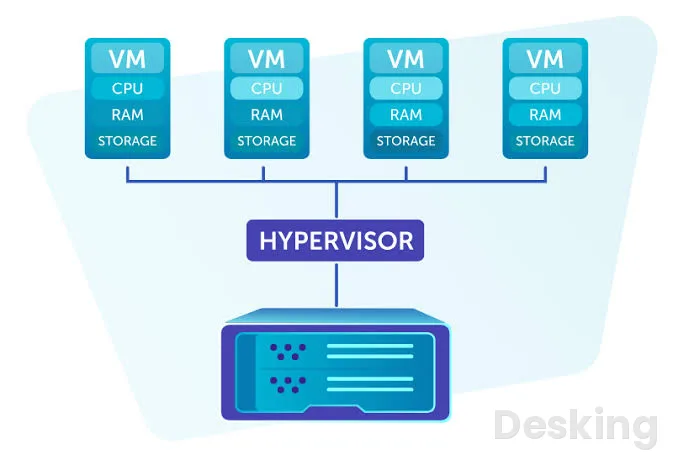
A VPS is a virtual machine supplied as a hosting service.
A hosting company operates a physical server, installs a virtualization platform, and creates separate virtual environments for customers.
Each environment receives virtual processors, memory, storage, and network connectivity, then boots an operating system such as Linux or Windows Server.
The customer connects remotely and manages the services installed inside that environment.
I find it useful to separate the arrangement into three layers.
The physical layer contains the real server and its hardware.
The virtualization layer divides and controls access to that hardware.
The guest layer is the operating system and applications that the customer sees and administers.
This separation explains why a customer can restart a VPS without restarting every other virtual server on the same physical machine, while a fault in the underlying host can still affect several customers.
1.1 Physical host
The physical host is the actual computer installed in a data center.
It contains one or more processors, physical RAM modules, storage devices, network interfaces, and power and cooling systems.
Unlike a desktop computer, a hosting server is designed for continuous operation, remote administration, and service workloads that may run for long periods without direct human interaction.
The provider selects and maintains this hardware.
Its processor generation, memory capacity, storage architecture, network connectivity, and redundancy influence the number and type of virtual machines it can support.
I would pay particular attention to the storage subsystem and processor generation because two hosts with similar advertised core counts can behave differently under sustained database or application workloads.
The virtual server inherits the capabilities and limitations of the physical system beneath it.
1.2 Virtualization layer
The virtualization layer creates the virtual machines and controls their access to physical resources.
Its central component is the hypervisor, which presents virtual hardware to each guest operating system and coordinates the use of the host's processor, memory, storage, and network devices.
The guest operating system behaves as if it has a computer of its own, even though its virtual devices ultimately depend on the physical host.
The National Institute of Standards and Technology describes how full virtualization separates guest operating systems and presents virtual hardware to each one.
This separation allows multiple operating systems to run on a single physical computer.
I would distinguish the hypervisor from the management software around it: the hypervisor provides the virtualization mechanism, while management tools help administrators create, configure, monitor, migrate, and remove virtual machines.
Those functions may be integrated into a provider's platform.
1.3 Guest environment
The guest environment is the virtual server that the customer rents.
It has its own operating system installation, users, processes, services, files, and network configuration.
A Linux VPS can run a web server, database, application runtime, mail service, or other supported software, while a Windows VPS can run compatible Windows applications and server roles.
The guest operating system does not normally have direct control over the physical host.
It works with the virtual devices presented by the virtualization platform.
When an application requests memory or writes to a virtual disk, the guest operating system handles the request within its own environment, and the virtualization layer coordinates the underlying hardware access.
This is why the VPS can be administered much like a physical server without giving the customer access to the host itself.
2. Follow the virtualization process
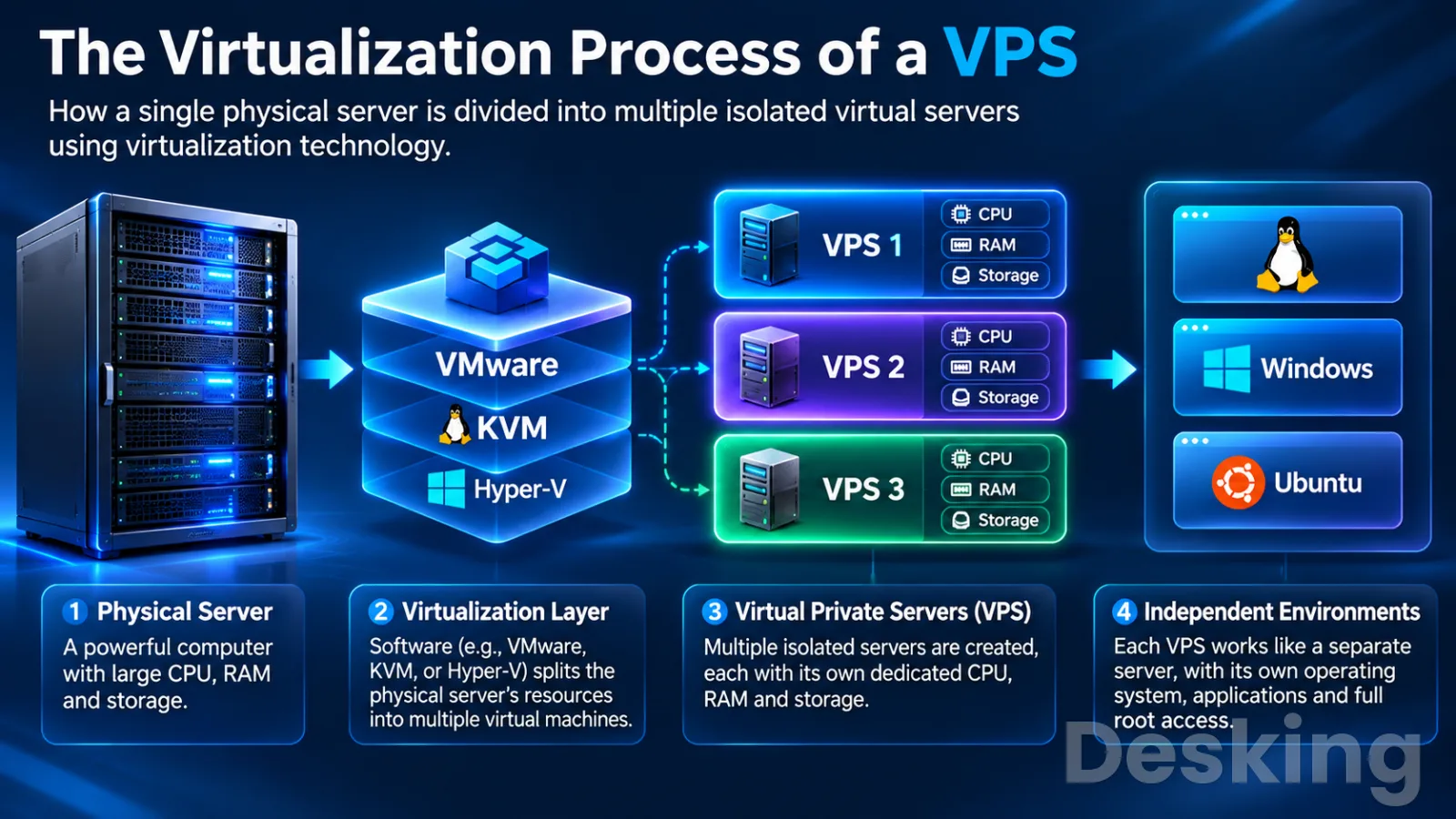
The provider first prepares a physical server and its virtualization platform.
It then defines a virtual machine with a selected operating system, processor allocation, memory capacity, storage, and network configuration.
When the virtual machine starts, the hypervisor supplies the virtual hardware and launches the guest operating system.
The customer can then connect to the machine and install the software required by the workload.
I would describe this as a sequence of provisioning, allocation, boot, and operation.
Provisioning creates the virtual machine's configuration.
Allocation defines the resources it can use.
Boot starts the guest operating system.
Operation is the continuous exchange of instructions and data between the guest, the virtualization layer, and the physical hardware.
These stages are managed by the provider's platform, although the customer may control some actions through a hosting dashboard or API.
2.1 Create the machine
A provider begins with a physical server that supports virtualization.
The virtualization platform is installed and configured, and the administrator defines the resources and settings for each virtual machine.
A new VPS may be created from an operating system image, a prepared template, or a previously saved machine image.
The provider's control panel can automate this process, so a customer may receive a working server shortly after selecting a plan.
The configuration normally includes a guest operating system, virtual CPU allocation, memory, disk capacity, network interface, and access credentials or SSH key.
Some providers also assign a public IP address and configure network rules before the machine is delivered.
I would check whether the selected image includes only the operating system or also a control panel and additional software, because those choices affect the initial state, licensing, and maintenance responsibilities.
2.2 Allocate resources
The virtualization platform presents a defined hardware profile to the guest operating system.
A plan might specify virtual CPUs, a memory limit, a storage capacity, and a network transfer allowance.
These figures describe the resources made available to the VPS under the provider's allocation policy.
They do not necessarily mean that the customer has exclusive ownership of the corresponding physical components.
The distinction is especially important for processor access.
A virtual CPU represents processing capacity that the hypervisor schedules on physical processor cores.
Several virtual machines may have virtual CPUs that use the same physical processor at different times.
The provider controls that scheduling and may apply limits or priorities to manage demand.
I would therefore ask whether CPU resources are shared, guaranteed, or dedicated before comparing plans based only on the number of vCPUs.
2.3 Boot the system
When the customer starts a VPS, the virtualization platform creates or resumes the virtual machine's execution environment.
The guest firmware and boot process initialize the virtual devices, load the operating system kernel, mount the filesystem, and start configured services.
From the customer's perspective, this resembles starting a physical server, although the underlying machine is controlled by the provider.
Once the operating system has started, remote administration becomes available through the configured access method.
Linux servers commonly use Secure Shell, while Windows servers may use Remote Desktop Protocol or other supported administration tools.
The customer can then create accounts, install updates, configure a firewall, and deploy applications.
I would verify that the server is reachable and that the expected operating system and network settings are present before placing a production workload on it.
2.4 Run applications
Applications execute inside the guest operating system and use its allocated resources.
A web server accepts incoming requests, a database processes queries, and an application runtime executes business logic.
The guest operating system schedules processes and manages memory from the perspective of that VPS.
The virtualization platform remains responsible for coordinating the guest's access to the host hardware.
This arrangement lets different customers run different operating systems and software stacks on one physical server.
One VPS may host a WordPress website, another may run a Windows application, and another may support a database service.
Their operating environments remain logically separated, although their performance can still depend on shared physical components.
I would assess each workload by its actual CPU, memory, storage, and network behavior rather than assuming that every application benefits equally from the same VPS configuration.
3. Examine the hypervisor
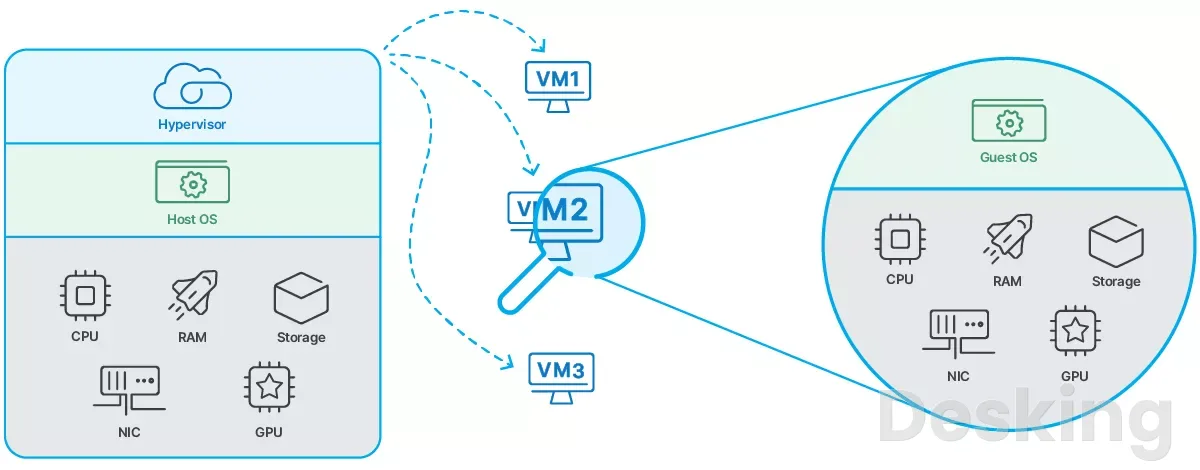
The hypervisor is the software layer that makes server virtualization possible.
It manages virtual machines and controls how their virtual hardware maps to the host's physical resources.
It also helps maintain boundaries between guests, so one customer's operating system does not normally access another customer's memory or files.
The design and configuration of this layer influence isolation, performance, and the provider's ability to manage virtual machines at scale.
There are two broad hypervisor categories: Type 1 and Type 2.
Type 1 hypervisors run directly on the physical hardware, while Type 2 hypervisors run above a conventional host operating system.
Server virtualization commonly uses a Type 1 architecture because it is designed for centralized infrastructure and multiple guest systems.
I would not assume that a provider uses a particular hypervisor merely because its product is called a VPS; the provider's technical documentation should identify the platform where that information matters.
3.1 Type 1 hypervisors
A Type 1 hypervisor runs directly on the server hardware and manages the virtual machines above it.
It does not depend on a general purpose desktop operating system as its underlying host layer.
This design is common in data centers because the virtualization platform can manage processor time, memory, storage access, and networking for many guest systems from a central point.
KVM, Microsoft Hyper V, and VMware ESXi are examples associated with server virtualization.
KVM is integrated into the Linux kernel and allows a Linux system to host virtual machines.
The exact architecture differs between platforms, but the central function is similar: provide virtual hardware to guest systems and coordinate access to physical resources.

Hostinger VPS
Hostinger VPS delivers KVM virtualization, NVMe storage and full root access at prices that undercut most competing cloud providers.
- Strong price to specification ratio overall
- NVMe storage included on every tier
- Renewal rates climb steeply after promo
- Self managed means security is your job
I would regard the hypervisor as a fundamental part of a VPS provider's infrastructure, even though customers rarely interact with it directly.
3.2 Type 2 hypervisors
A Type 2 hypervisor runs as an application or software layer on a conventional operating system.
The host operating system manages the physical hardware, while the hypervisor creates virtual machines that run above it.
This arrangement is common on personal computers, where a user may run another operating system inside a window for testing, development, or compatibility.
Oracle VirtualBox and VMware Workstation are familiar examples of desktop virtualization software.
They can run guest systems on a workstation, but they are not the same thing as the server infrastructure normally used to sell VPS hosting.
I would avoid confusing a virtual machine created on a laptop with a hosted VPS: both use virtualization, but their availability, network environment, administration model, and intended workloads are different.
3.3 KVM and QEMU
KVM stands for Kernel based Virtual Machine.
It is a virtualization technology integrated into the Linux kernel, allowing Linux to function as a hypervisor.
A KVM environment commonly works with QEMU, which provides device emulation and other user space functions required by virtual machines.
Management software such as libvirt can provide tools for defining and controlling those machines.
The distinction between these components is useful because KVM is not, by itself, a complete hosting control panel.
KVM provides core virtualization support, QEMU helps present the virtual machine's devices, and management tools coordinate operations such as creation, startup, shutdown, and configuration.
I would treat a provider's statement that it uses KVM as useful technical information, but not as proof of superior performance.
Hardware quality, resource policies, storage design, network capacity, and operational discipline still matter.
3.4 Hardware virtualization
Modern processors include features that help virtualization software execute guest operating system instructions efficiently.
On x86 systems, Intel VT x and AMD V are examples of processor virtualization extensions.
These features support the separation and management of guest execution, reducing the need for a hypervisor to emulate every processor operation in software.
The guest operating system can therefore run many ordinary instructions directly on the physical processor under the control of the virtualization platform.
Operations that require privileged access or interaction with virtual devices are handled through the relevant virtualization mechanisms.
I would not describe this as the VPS having a physical processor of its own.
The guest receives virtual processor capacity, while the host processor performs the actual work and the hypervisor schedules access.
4. Trace the resource allocation
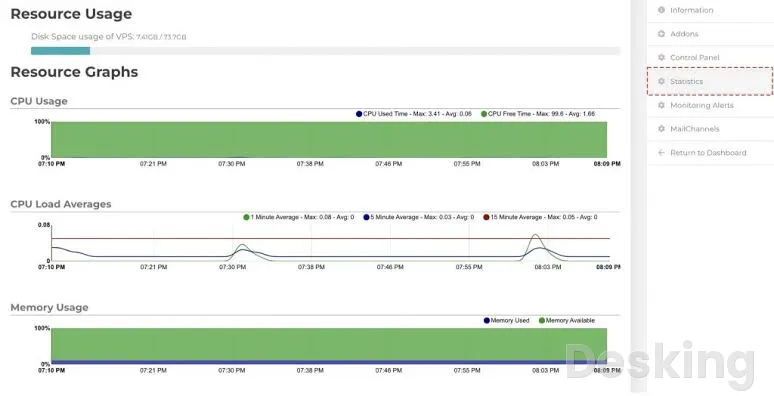
A VPS depends on four main resource groups: CPU, memory, storage, and networking.
The virtualization platform presents each group to the guest operating system through virtual devices or resource limits.
The guest sees a computer with a defined configuration, but the provider determines how those virtual resources map to the physical infrastructure.
That mapping is where advertised specifications meet actual performance.
The National Institute of Standards and Technology explains that virtualization can use physical or logical resource partitioning.
Physical partitioning assigns separate hardware resources, while logical partitioning allows guests to share physical components under the control of the virtualization layer.
I consider this distinction essential when reading a VPS plan.
A storage capacity, a virtual CPU count, and a network transfer allowance are different kinds of allocation, and none should be assumed to guarantee exclusive access to an entire physical device.
4.1 Virtual processors
A virtual CPU, often abbreviated as vCPU, is a virtual processor presented to the guest operating system.
The guest schedules its processes across the vCPUs it can see, much as it would schedule work across processors in a physical server.
The hypervisor then schedules the virtual processor's execution time on the physical CPU resources available to the host.
A plan with four vCPUs does not necessarily reserve four physical cores exclusively for one customer.
Depending on the provider, the vCPUs may share physical cores with other virtual machines, and the provider may allow more virtual CPUs to be allocated than there are physical cores.
This practice is known as overcommitment.
I would look for clear information about CPU limits, dedicated cores, and fair use policies, especially for workloads that run continuously or perform frequent calculations.
4.2 Memory allocation
Random access memory stores the data and instructions that the operating system and applications need while they run.
A VPS receives a defined memory allocation, which the guest operating system uses for active processes, filesystem cache, database buffers, and other operations.
If the workload exceeds available memory, the operating system may terminate processes or use swap space, depending on its configuration.
The provider's memory policy matters because virtual memory allocation can be implemented in different ways.
Some plans provide a fixed allocation, while others may use memory overcommitment or additional limits.
A VPS with insufficient RAM can become slow even when CPU usage appears low, because the operating system may spend time managing memory pressure or moving data between RAM and storage.
I would size memory around the peak workload, not only the average consumption reported by a quiet server.
4.3 Virtual storage
A VPS usually sees one or more virtual disks that appear to the guest operating system as storage devices.
Those virtual disks are backed by physical storage in the provider's infrastructure.
The backing storage may use local solid state drives, NVMe devices, network attached storage, or a distributed storage system.
The guest manages partitions and filesystems within the capacity assigned to it.
Storage capacity is only one part of storage performance.
Applications can also depend on input and output operations per second, throughput, and latency.
A database that performs many small reads and writes may respond poorly when storage latency is high, even if the disk has plenty of unused capacity.
I would check whether the provider specifies the storage type and any performance limits, because the label SSD alone does not reveal the complete storage architecture.
4.4 Network interfaces
The VPS receives a virtual network interface that connects it to the provider's network.
The guest operating system configures this interface with the relevant IP settings and uses it to send and receive packets.
The virtualization platform connects the virtual interface to virtual switches, physical network adapters, routing infrastructure, and the provider's upstream connectivity.
A public IP address allows services on the VPS to communicate with systems on the internet, subject to firewall rules and routing.
Some providers also offer private networking between virtual machines, additional IP addresses, or virtual private cloud networks.
I would distinguish the VPS network interface from the provider's internet connection: a virtual interface may be configured correctly while an upstream network issue still prevents external access.
Network transfer limits, bandwidth caps, latency, and routing quality should all be checked separately.
4.5 Resource overcommitment
Overcommitment occurs when the total virtual resources assigned to guest systems exceed the physical capacity available at a particular moment.
Providers may allocate more virtual CPUs than physical cores because not every virtual machine uses its full allocation continuously.
Memory and storage can also involve different allocation strategies, depending on the platform and provider policy.
Overcommitment is not automatically a sign of poor service.
It can improve hardware utilization when workloads have different usage patterns.
The risk appears when too many guests demand the same limited resources at the same time.
CPU scheduling delays, memory pressure, storage congestion, and network contention can then affect performance.
I would ask providers how they manage capacity and whether they publish resource limits, rather than treating a high vCPU count as evidence that the physical host has matching spare capacity.
5. Understand isolation and privacy
The word private refers to the separation of the virtual server's operating environment.
Each VPS normally has its own guest operating system, process space, filesystem, user accounts, and network configuration.
The virtualization platform restricts access between guests and mediates their use of shared hardware.
This separation allows customers to administer their own servers without receiving access to the provider's host operating system or other customers' virtual machines.
Isolation is a technical boundary, not a guarantee that every component is physically separate.
The guests may share processors, memory channels, storage systems, network adapters, and data center infrastructure.
The strength of the separation depends on the virtualization technology, its configuration, and the security controls around it.
I would therefore read the provider's use of the word private as a description of the virtual machine boundary, unless the plan explicitly promises dedicated physical hardware.
5.1 Guest separation
A guest operating system normally sees its own virtual devices and its own filesystem.
It cannot simply browse another customer's directories or inspect that customer's processes.
The hypervisor controls access to physical memory and devices, while the guest operating system enforces its own permissions for users and applications.
This gives each customer an independent administration environment.
The separation also affects routine operations.
Restarting one guest does not normally restart the other virtual machines on the host, and installing an application inside one guest does not install it inside another.
A misconfigured service inside a VPS can still expose that customer's data or create a security problem, but it does not automatically grant access to other guests.
I would treat this separation as a useful security control, not a substitute for system updates, account protection, and application security.
5.2 Hypervisor security
The hypervisor is a high value component because it mediates access between guest systems and the physical host.
A vulnerability or configuration error in this layer can undermine the isolation that makes virtualization useful.
NIST's guidance on full virtualization technologies discusses the need to protect the hypervisor, manage guest access, and reduce risks associated with virtualized infrastructure.
A customer usually cannot inspect or configure the provider's hypervisor.
That responsibility belongs to the hosting company, which should maintain the virtualization platform, restrict administrative access, apply security updates, and monitor the underlying host.
I would look for evidence of a provider's security practices, incident handling, and infrastructure maintenance, particularly when the VPS stores business records or customer information.
A virtual machine's separate operating system does not remove the provider's responsibility for the host layer.
5.3 Shared hardware risks
Shared hardware introduces a form of dependency that is easy to overlook.
A guest may have its own operating system and allocated resources, but it still relies on physical devices that serve other guests.
Heavy activity elsewhere on the host can affect shared storage or network capacity, and processor scheduling can become more competitive during periods of high demand.
Research into virtual machine performance interference has examined how co located workloads can affect one another through contention for underlying resources.
The effect depends on the workload and the resource being shared.
A CPU intensive application may be sensitive to processor contention, while a database may be more affected by storage latency.
I would not assume that isolation guarantees identical performance at every hour; I would monitor the workload and ask the provider how it handles noisy neighbor problems.
5.4 VPS and containers
A virtual machine and a container provide different forms of isolation.
A traditional hardware virtual machine runs its own guest operating system kernel on virtualized hardware.
A container shares the host operating system kernel while isolating application processes and their associated resources through operating system mechanisms.
This difference affects how each environment starts, uses resources, and supports different operating systems.
A VPS based on KVM generally provides a separate guest kernel, while container based hosting may use technologies such as Linux containers.
Containers are often lighter and can start quickly because they do not need to boot a separate guest kernel.
A virtual machine provides a more complete hardware abstraction and can run a different supported guest operating system.
I would choose based on the required isolation, operating system compatibility, administrative control, and workload rather than assuming one technology is always superior.
6. Examine real performance
A VPS plan's specifications describe its configured resources, but actual application performance depends on the full infrastructure and the workload.
Processor architecture, scheduling policy, memory pressure, storage latency, network routing, and software configuration all contribute to the result.
Two plans with the same vCPU count and memory capacity can therefore deliver different results.
I would evaluate performance from the application outward.
A website that responds slowly may be limited by PHP execution, database queries, disk access, network latency, or a remote API.
Increasing the VPS size without identifying the bottleneck can raise the bill without solving the problem.
A useful assessment begins with monitoring and repeatable workload tests, then compares the results against the service's actual requirements.
6.1 Processor contention
Processor contention occurs when several virtual machines need physical CPU time at the same time.
The hypervisor schedules their virtual processors according to its policies and the resources available.
If demand exceeds the host's capacity, a guest may wait before its work can run.
That delay can increase application response times, particularly for workloads that need frequent CPU execution.
The number of vCPUs alone does not reveal how much physical processor time a VPS receives under load.
Providers may apply CPU quotas, shares, priorities, or dedicated core policies.
A plan that advertises dedicated CPU resources should explain what dedicated means in its service terms.
I would also distinguish a short burst allowance from sustained CPU capacity, since a workload that needs continuous processing has different requirements from one that uses the processor only occasionally.
6.2 Memory pressure
Memory pressure occurs when active workloads need more RAM than the VPS can use comfortably.
The guest operating system may reclaim cache, use swap space, or terminate processes when memory becomes scarce.
Swap can prevent some failures, but it uses storage and is much slower than physical RAM.
A database or application under sustained memory pressure may therefore show higher latency and reduced throughput.
Monitoring should include memory usage, swap activity, and application level indicators.
A high memory usage figure is not always a problem because Linux can use otherwise free memory for filesystem cache.
I would look for persistent pressure, frequent swapping, out of memory events, and application errors before deciding that the VPS needs more RAM.
The goal is to identify whether the working set fits within the available memory during normal peaks.
6.3 Storage latency
Storage performance affects more than file transfers.
Operating system logs, application files, database transactions, caches, and temporary data all rely on disk access.
A virtual disk may have sufficient capacity while still being limited by throughput or input and output operations.
The backing device and the provider's storage architecture determine how quickly requests can be completed.
For a database driven website, slow storage can delay queries and increase page generation time.
A backup job can also compete with normal application activity if it reads or writes large amounts of data.
I would schedule intensive maintenance outside busy periods where possible and monitor disk latency during normal traffic.
When selecting a plan, the storage technology and any performance limits deserve as much attention as the advertised capacity.
6.4 Network latency
Network performance depends on the path between the VPS and the systems communicating with it.
The data center's location, upstream providers, routing decisions, congestion, and the destination network can all affect latency.
A server may have a high bandwidth allowance yet still experience slow connections to a particular region or service.
For websites and applications serving users in several countries, network distance can affect the time required to establish connections and transfer data.
A content delivery network can cache suitable content closer to visitors, reducing the number of requests that must reach the VPS.
I would still measure the network path to the intended users and external services.
A bandwidth figure in a hosting plan does not tell the full story about latency or routing quality.
6.5 Workload differences
Different applications place different demands on virtual hardware.
A static website may use little CPU and memory, while a database server may depend heavily on RAM and storage latency.
A video processing workload can consume substantial CPU capacity, and a busy API may need a balance of processor time, memory, and network throughput.
A development environment may have irregular demand and tolerate occasional performance variation.
I would map the application's behavior to the resource most likely to constrain it.
For a database, examine memory and disk activity.
For a web application, measure request time, CPU use, and database response.
For file services, check storage throughput and network transfer.
This approach avoids buying a larger plan based on a single headline specification when the real bottleneck may be elsewhere.
7. Follow the network path
A VPS communicates through a virtual network interface connected to the provider's networking infrastructure.
The guest operating system sends packets through that interface, and the virtualization platform passes them to the relevant virtual switch or network layer.
From there, traffic may reach other virtual machines, the provider's internal network, or the public internet through physical network equipment and upstream connections.
The public IP address is the most visible part of this arrangement, but it is not the whole network configuration.
Providers may offer private addresses, private networks, firewalls, routing controls, load balancers, and additional IP allocation.
I would check which features are included in the plan and which require separate configuration or payment, especially when a VPS must communicate with databases, application servers, or office networks.
7.1 Public addresses
A public IP address makes a VPS reachable over the internet when the provider's routing and firewall rules permit the traffic.
It allows customers to publish websites, APIs, remote access services, and other network applications.
The address may be assigned automatically or selected from a provider's available address pool.
Not every service needs to be exposed publicly.
Hostinger VPS
Hostinger VPS delivers KVM virtualization, NVMe storage and full root access at prices that undercut most competing cloud providers.
- Strong price to specification ratio overall
- NVMe storage included on every tier
- Renewal rates climb steeply after promo
- Self managed means security is your job
A database can often remain on a private network while only the web application accepts public connections.
I would expose only the ports required by the workload and restrict administrative access to trusted addresses or a secure private connection.
The public IP identifies the server's network endpoint; it does not automatically secure the services listening behind it.
7.2 Private networking
Private networking allows virtual machines or other infrastructure components to communicate over an internal network that is not directly exposed as public internet traffic.
A provider may offer private subnets, virtual private clouds, or isolated network segments for this purpose.
The customer can use them to separate application tiers, database services, and administration traffic.
A common architecture places a public web server in front of an application server and a private database.
The web server receives visitor requests, the application server processes them, and the database accepts connections only from approved internal systems.
I would prefer this separation for business applications because it reduces the number of services directly reachable from the internet.
The exact controls depend on the provider's network features and the customer's configuration.
7.3 Firewalls and ports
A firewall controls which network connections are allowed to reach or leave the VPS.
Rules can restrict traffic by protocol, port, IP address, or network range.
The provider may offer a firewall outside the virtual machine, while the guest operating system may also run its own firewall.
These controls can work together, but they must be configured consistently.
A web server typically needs public access to the relevant HTTP and HTTPS ports, while SSH or Remote Desktop should be restricted to trusted administrators where practical.
Database ports should not be open to the entire internet if the database is intended for internal use.
I would review both the provider's network firewall and the guest firewall, because a rule in one layer does not necessarily override a restriction in the other.
Misconfigured access rules are a common cause of services that are either unreachable or unnecessarily exposed.
8. Manage the virtual server
The provider and customer have different responsibilities in a VPS arrangement.
The provider operates the physical server, data center connectivity, and virtualization platform.
The customer usually manages the guest operating system, installed applications, users, access controls, and data.
The precise division depends on whether the service is unmanaged, managed, or sold with additional administration services.
I would clarify this boundary before moving a business application onto a VPS.
Renting a virtual machine does not automatically include operating system maintenance, application support, security monitoring, or recovery assistance.
A managed plan may include some of those services, but the scope varies.
The service agreement should identify what the provider monitors, which updates it applies, how backups work, and who responds when an application stops.
8.1 Provider responsibilities
The provider maintains the physical infrastructure that supports the virtual machine.
This normally includes the host server, physical storage, network equipment, power, cooling, and the virtualization platform.
The provider also manages the systems that create and control virtual machines, along with the data center facilities where the equipment operates.
The provider may also supply a control panel for starting, stopping, reinstalling, resizing, or rebuilding a VPS.
Some platforms include monitoring, snapshots, backup services, firewall controls, and automated recovery options.
I would not assume that a dashboard feature is included in every plan or that a snapshot is equivalent to a full backup.
The provider's documentation should explain the scope, retention, recovery process, and any additional charges.
8.2 Customer responsibilities
The customer normally manages the guest operating system and the applications installed inside it.
That includes applying operating system updates, configuring users, securing remote access, setting firewall rules, maintaining web and database services, and monitoring application health.
The customer is also responsible for understanding which services are exposed to the network and whether the server stores sensitive information.
A self managed VPS can provide considerable freedom, but it also transfers operational work to the customer.
An outdated package, weak administrator password, exposed database port, or failed backup can create problems that the hosting provider may not be responsible for resolving.
I would assign clear ownership for updates, access reviews, monitoring, and recovery.
If no one can take those tasks reliably, a managed service may be the safer operational choice.
8.3 Managed hosting
A managed VPS includes administration services from the provider, according to the selected service level.
These may include operating system updates, security configuration, monitoring, backup management, control panel support, and assistance with server problems.
The term managed does not have one universal definition, so customers should verify the included tasks rather than rely on the product label.
Some providers manage the operating system but leave application code, database tuning, and website troubleshooting to the customer.
Others offer broader administration or specialist support at an additional cost.
I would request a written list of included and excluded tasks, response times, support hours, and escalation procedures.
For a company without dedicated server administrators, the quality of that agreement can matter as much as the virtual machine's hardware specification.
8.4 Monitoring and maintenance
A VPS needs regular monitoring because resource consumption and service behavior change over time.
Useful indicators include CPU utilization, memory use, disk capacity, storage latency, network traffic, uptime, and application response times.
Operating system logs and service logs can help identify failed processes, authentication attempts, and configuration errors.
Monitoring should alert someone who can act on the information.
A dashboard that records a full disk but sends no alert may not prevent an outage.
I would configure warnings for low disk space, sustained memory pressure, repeated service failures, and unusual network activity.
Maintenance should also include testing updates, reviewing administrator access, checking certificates, and confirming that backups complete successfully.
The exact schedule depends on the system's risk and operational requirements.
9. Understand availability and recovery
A VPS can run continuously, but its availability depends on the physical host, virtualization platform, storage, network, power, and the guest operating system.
A problem in any of these layers can interrupt the service.
The customer may be able to restart a guest after an application failure, but cannot independently repair a failed physical host unless the provider offers the necessary infrastructure controls.
I would separate server uptime from application availability.
A VPS may respond to network checks while its website or database is unavailable.
Conversely, an application may be healthy inside the guest while an upstream network issue prevents visitors from reaching it.
Recovery planning should therefore cover the entire service, from the application and its data to the virtual machine and the provider's infrastructure.
9.1 Host failure
A physical host failure can affect every virtual machine that depends on that machine.
The consequences depend on the provider's architecture and recovery arrangements.
Some providers may restart affected virtual machines on another host, while others may require intervention or restoration from a backup.
The presence of virtualization alone does not guarantee automatic failover.
A provider may use clustered infrastructure, replicated storage, or other mechanisms to reduce the impact of hardware failure.
Those capabilities should be distinguished from a single VPS running on one host.
I would ask what happens if the physical server fails, how long recovery is expected to take, and whether the service includes automatic restart on another host.
A documented process is more useful than a general claim of high availability.
9.2 Snapshots and backups
A snapshot records the state of a virtual machine or its storage at a particular point.
It can help an administrator return to an earlier state after a failed update or configuration change.
A backup is intended to preserve recoverable copies of data, often with retention and storage arrangements that are separate from the live VPS.
The two should not be treated as interchangeable.
A snapshot may remain on the same underlying storage system as the original virtual machine, so a failure affecting that storage can affect both.
A backup stored separately can provide another recovery path, depending on its design and integrity.
I would verify backup frequency, retention, storage location, encryption, and restoration procedures.
A backup that has never been restored in a test is an assumption, not a proven recovery plan.
9.3 Migration between hosts
Virtual machine migration moves a guest from one physical host to another.
Some virtualization platforms support live migration, which can transfer a running virtual machine while reducing interruption.
The process depends on compatibility between hosts, storage access, network configuration, and the provider's platform.
Not every VPS service exposes migration controls to customers.
A provider may migrate virtual machines for maintenance, capacity management, or hardware replacement.
The customer may see a brief interruption or no noticeable change, depending on the method and workload.
I would still maintain application level recovery plans because migration does not protect against every failure.
It also does not replace backups: moving a running server to another host does not create an independent historical copy of its data.
9.4 Service continuity
Business continuity depends on more than keeping one virtual machine powered on.
Applications may need a second server, replicated database, external backup, load balancer, or documented restoration procedure.
The appropriate design depends on the cost of downtime, the amount of data the business can afford to lose, and the time required to restore service.
I would define two recovery targets before selecting infrastructure.
The recovery time objective describes how quickly a service should return after an incident.
The recovery point objective describes how much recent data loss the business can tolerate.
These targets help determine backup frequency and whether a single VPS is sufficient.
A small informational website may accept a slower recovery, while a business application that handles daily transactions may need a more structured arrangement.
10. Compare hosting models
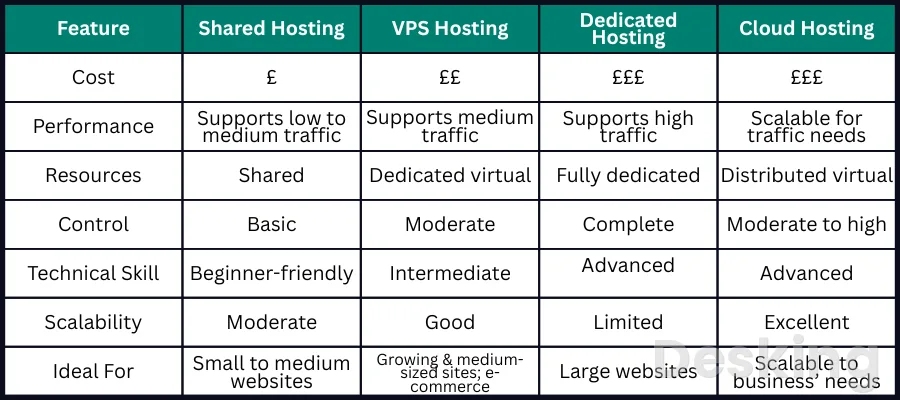
A VPS sits between shared hosting and dedicated server hosting in terms of control and physical resource access.
Shared hosting places multiple customers within a provider managed hosting environment, while a VPS gives the customer a separately configurable virtual machine.
Dedicated hosting assigns a physical server to one customer, providing greater hardware exclusivity and direct control over the machine.
Cloud hosting is a broader category, and a cloud virtual machine may itself be a VPS in technical terms.
Providers use different product names and service models, so the label alone does not determine the architecture.
I would compare the actual resource allocation, administration responsibilities, scaling options, resilience, and billing model before choosing.
The following table describes common arrangements rather than guaranteeing how every provider implements them.
| Hosting model | Environment | Resource access | Main trade off |
|---|---|---|---|
| Shared hosting | Provider managed account on a shared server | Resources are pooled under provider policies | Less administration, limited server control |
| VPS hosting | Separate virtual machine on a physical host | Defined virtual resources, with possible shared hardware | More control, more administration |
| Dedicated server | Physical machine assigned to one customer | Greater hardware exclusivity | Higher cost and hardware responsibility |
| Cloud virtual machine | Virtual machine in a cloud infrastructure platform | Configurable resources and provider specific services | Flexible infrastructure, more design choices |
10.1 Shared hosting
Shared hosting is designed for customers who need a website hosting account without administering a complete operating system.
The provider manages the server software and offers a control panel for common tasks such as creating websites, databases, email accounts, and backups.
Customers generally have fewer system level permissions than they would receive on a VPS.
This model can be suitable for smaller websites and standard content management systems.
The customer avoids much of the operating system maintenance, but has less freedom to install server software or change system configuration.
I would choose shared hosting when the application fits the provider's supported environment and the reduced administration burden is more valuable than root access.
A move to a VPS makes sense when the project needs control or resources that the shared plan cannot provide.
10.2 Dedicated servers
A dedicated server gives one customer use of a physical machine.
The customer may have more control over the hardware configuration and does not share that server's physical processor and memory with other tenants.
This can suit workloads with sustained resource requirements, specialized hardware needs, or strict infrastructure separation requirements.
The trade off is cost and operational responsibility.
The customer may need to manage more of the hardware lifecycle, capacity planning, operating system, and redundancy design, depending on the service agreement.
I would consider dedicated hosting when a workload consistently needs the machine's capacity or when physical tenancy is a requirement.
A VPS is often easier to resize and can be more economical when the workload does not justify an entire server.
10.3 Cloud virtual machines
A cloud virtual machine is a virtual server provisioned from a cloud provider's infrastructure.
It may offer configurable CPU and memory, attached storage, virtual networks, identity controls, monitoring, and integration with other cloud services.
The virtual machine still uses virtualization, but the surrounding platform may provide a wider range of infrastructure services than a traditional VPS hosting product.
The term cloud does not automatically mean that an application is resilient or distributed.
A single cloud virtual machine can remain a single failure point if the application and data depend on that one instance.
I would assess the provider's availability zones, storage options, networking, backup services, and scaling features separately.
The most useful distinction is the full service model around the virtual machine, not simply whether the provider calls it cloud hosting.
11. Decide when a VPS fits

A VPS is useful when a project needs a persistent server environment, administrative control, and resources that can be configured independently of other customers' software.
It can host websites, APIs, databases, internal tools, development environments, and other services that need to remain online.
The decision should account for the workload, the technical skills available, and the cost of maintaining the server after deployment.
I would not choose a VPS solely because a project has outgrown a basic hosting plan.
The reason for the change should be specific: a need for custom software, system level configuration, persistent background processes, more predictable resource allocation, or control over the operating environment.
If the application can run reliably on a managed platform, moving to a VPS may add maintenance work without delivering a meaningful benefit.
11.1 Website hosting
A VPS can host one or more websites using software such as Nginx, Apache, PHP, and a database server.
The customer controls the web server configuration, PHP version, installed extensions, caching, and other system components.
This can be useful when a website needs settings that are unavailable in shared hosting or when several sites need to operate within a single server environment.
The administrator must also manage the web stack.
That includes security updates, virtual host configuration, TLS certificates, database maintenance, backups, and monitoring.
I would consider a VPS for a website when the required configuration justifies that responsibility and the team can maintain it.
A managed WordPress service or conventional shared hosting may remain the better choice for a site that needs only standard publishing features.
11.2 Application hosting
A VPS can run application servers, APIs, background workers, and other persistent processes.
Developers can install the required runtime, configure environment variables, manage process supervisors, and connect the application to databases or external services.
This flexibility is useful when an application needs a custom software stack or long running processes that are not supported by a basic hosting account.
The application still depends on the guest operating system and the VPS resources.
A memory leak, failed process, or exhausted disk can interrupt service even when the physical host remains healthy.
I would use process supervision, application logs, health checks, and resource monitoring as part of the deployment.
The server should be treated as an operational system with maintenance needs, not merely as a place to copy application files.
11.3 Database hosting
A VPS can host database software such as MySQL, MariaDB, or PostgreSQL.
The administrator controls database versions, configuration, access permissions, storage location, and maintenance schedules.
This can be useful for applications that need a dedicated database environment or specific configuration options.
Database workloads are sensitive to memory availability, storage latency, and the pattern of queries.
A small VPS may be sufficient for a low traffic application, but a busy database can need more memory and faster storage than the plan initially suggests.
I would also consider whether the database should run on the same VPS as the application.
Separating the two can improve resource control and security, but it adds network configuration, operational complexity, and potentially higher cost.
11.4 Development environments
A VPS can provide a remote development or testing environment that remains available independently of a developer's workstation.
Teams can install a supported operating system, runtime, database, and development tools, then grant controlled access to authorized users.
This can help when a project needs a consistent server environment for integration tests or demonstrations.
Development servers still need access controls and lifecycle management.
Test data should not be treated as harmless if it contains personal or business information, and temporary environments should not remain exposed indefinitely.
I would separate development and production systems, restrict access, and remove unused instances.
A VPS used for testing should have a clear owner and a defined purpose, just like a production server.
11.5 Internal services
Organizations can use VPS instances for internal applications, monitoring tools, automation, private APIs, or services that support office operations.
A private network can connect these systems to other infrastructure without exposing every service to the public internet.
The arrangement may be useful when a company needs more control than a hosted application service provides.
Hostinger VPS
Hostinger VPS delivers KVM virtualization, NVMe storage and full root access at prices that undercut most competing cloud providers.
- Strong price to specification ratio overall
- NVMe storage included on every tier
- Renewal rates climb steeply after promo
- Self managed means security is your job
The design should account for identity, network access, backups, and the consequences of a service failure.
An internal service can still be business critical if employees rely on it for daily operations.
I would document its dependencies, restrict administrative access, and define how it will be restored.
A VPS is an infrastructure choice; it does not remove the need for normal IT service management.
12. Evaluate the provider
The quality of a VPS depends on the provider's infrastructure and operating practices as well as the virtual machine configuration.
Hardware specifications are useful, but they do not describe capacity planning, support quality, network routing, backup arrangements, or incident response.
Two providers can sell similar plans while delivering different service experiences because the systems behind those plans are not identical.
I would compare providers using documented technical details and the service agreement.
Look for clarity about CPU allocation, memory policy, storage performance, bandwidth limits, IP address rules, backups, support, and migration.
If a provider cannot explain a resource limit or recovery procedure, I would treat that uncertainty as part of the purchasing decision rather than assume the most favorable interpretation.
12.1 Resource policies
A provider should explain whether CPU resources are shared or dedicated, how memory is allocated, and whether storage performance is limited.
It should also describe bandwidth or transfer allowances, network port speeds, and any fair use restrictions.
These details help establish what the plan actually promises under normal and peak demand.
I would be cautious about comparing plans by vCPU count alone.
A plan with fewer vCPUs and a clearer allocation policy may be more suitable for a sustained workload than a plan with a larger advertised number and unclear limits.
The same principle applies to storage: capacity does not reveal latency or input and output limits.
A provider's resource policy is part of the technical specification.
12.2 Data center location
The physical location of the data center affects network latency, data residency considerations, and the path between the server and its users.
A server located closer to the main audience may reduce network delay, although routing and upstream connectivity also influence the result.
The nearest data center is not automatically the fastest if its network path is poorly connected to the users or services that matter.
I would choose a location based on where users, staff, and dependent services are located.
If most visitors are in one region, test connectivity from that region rather than relying only on a provider's published location map.
For business data, review applicable contractual and regulatory requirements before choosing where information will be stored.
The hosting location is an infrastructure decision with both technical and operational consequences.
12.3 Backup and support
Backup terms should state what is copied, how frequently copies are created, how long they are retained, and how restoration works.
Some providers sell snapshots or backup services as optional features, while others include a basic backup allowance.
The customer should also know whether backups cover only the virtual machine disk or include additional volumes and external services.
Support should be evaluated with the same care.
A provider may support the physical infrastructure but decline to troubleshoot customer applications on an unmanaged plan.
I would check support hours, response targets, escalation methods, and the boundary between infrastructure support and operating system support.
A low monthly price can become expensive if a business has no internal capacity to diagnose problems outside the provider's remit.
12.4 Scaling options
Scaling changes the resources available to a virtual machine or moves the workload to a different infrastructure arrangement.
Some providers let customers increase CPU, memory, and storage through a control panel.
Others require a shutdown, a migration, or a new server to change the configuration.
Storage may have different expansion rules from CPU and memory.
I would check the upgrade path before committing to a plan.
A simple resize may be enough for a growing website, but a larger application may need separate database capacity, a load balancer, or multiple application instances.
Scaling a single VPS does not automatically create high availability.
It increases the capacity of one virtual machine, while resilience requires additional design and infrastructure.
12.5 Contract and costs
The monthly VPS fee is only one part of the total cost.
Additional expenses may include backups, extra storage, public IP addresses, control panels, operating system licenses, managed support, bandwidth overages, and monitoring services.
Administrative time also has a cost, especially when the customer is responsible for patching, troubleshooting, and recovery.
I would compare the total cost of operating the service, not just the advertised starting price.
A managed VPS may cost more but reduce the amount of internal administration required.
An unmanaged server may be economical for a team with the right skills, but expensive if every incident requires outside assistance.
The correct comparison includes the people, services, and recovery arrangements needed to keep the workload running.