

How to learn computer programming from scratch with free resources
By Eva Elekcha · November 19, 2026
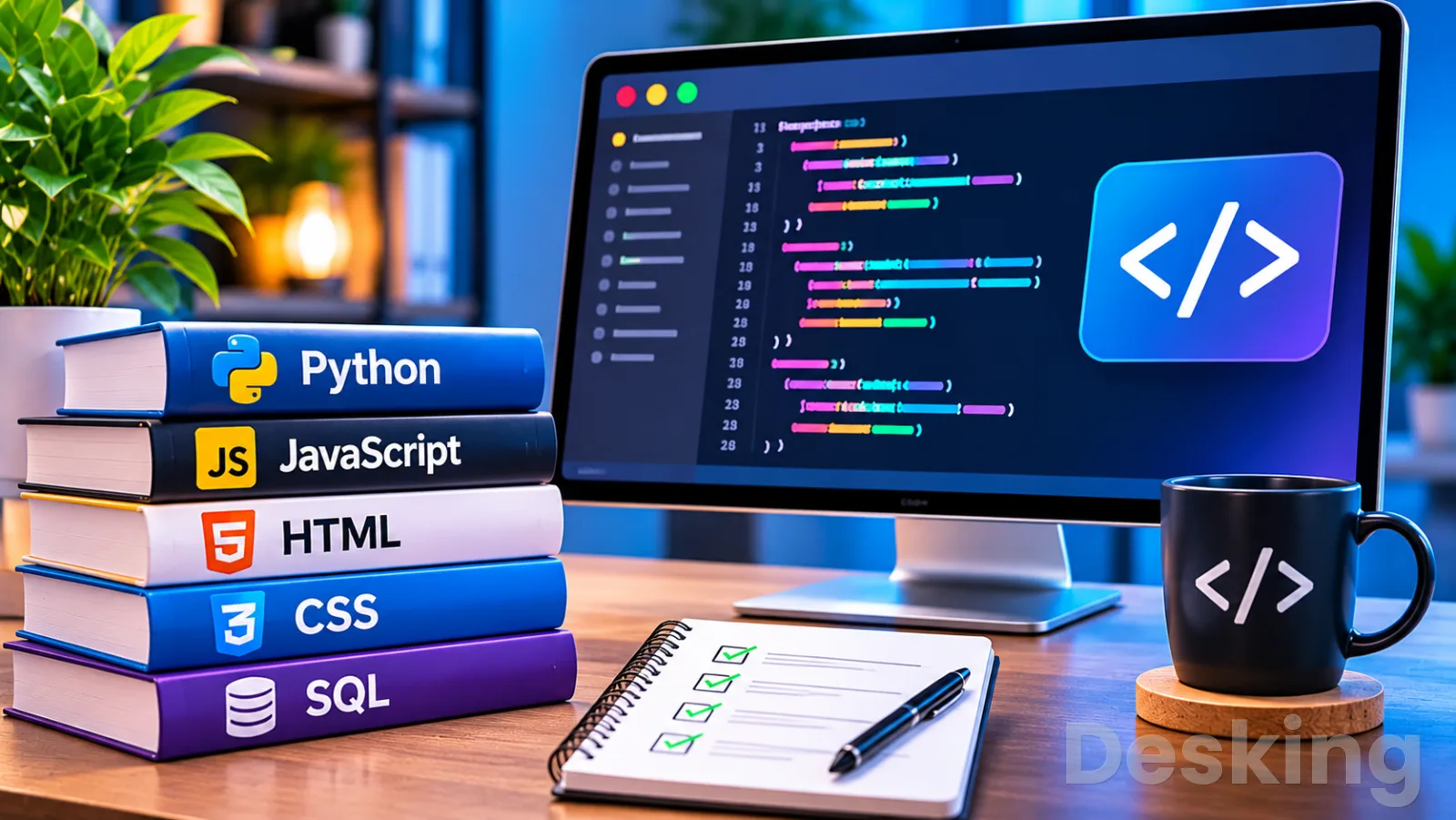
Table of contents
- 1. Start with programming
- 2. Choose a first language
- 3. Learn step by step
- 4. Study independently
- 5. Find free resources
- 6. Learn online effectively
- 7. Study from home
- 8. Connect coding concepts
- 9. Build practical projects
- 10. Measure your progress
- 11. Keep learning consistently
- 12. Choose your next direction
- Frequently Asked Questions
A beginner can start programming with an ordinary computer, a free code editor, an internet connection, and a clear learning plan.
I would put the emphasis on learning how to solve problems before collecting programming languages or installing a long list of development tools.
The first objective is modest: understand how instructions, data, decisions, and repetition work, then use those ideas to create a small program.
Once that foundation is in place, choosing a specialization becomes easier because you can judge languages and frameworks by what they help you build.
Programming is the process of writing instructions that a computer can execute.
Those instructions can process information, display a website, automate a repetitive task, manage a database, or control part of an application.
Coding is often used as another name for programming, although programming also includes planning, testing, debugging, and maintaining the software.
I consider that distinction useful for beginners because writing valid syntax is only one part of producing a program that works reliably.
You do not need a university degree to begin, and you do not need to pay for your first course.
Free curricula from Harvard, freeCodeCamp, Mozilla, and other education providers cover the foundations, while communities and documentation offer support when a lesson becomes difficult.
The harder part is building a consistent routine and resisting the temptation to switch courses every time a new language or tool becomes popular.
This guide sets out a practical route from the first concepts to independent projects, with advice on studying online, at home, and without a tutor.
1. Start with programming
Understand the basics
A computer program follows instructions written in a form the computer can interpret.
A simple program might ask for a person's name, store the answer, and display a greeting.
A more advanced program can validate a payment, search thousands of records, or exchange information with another service.
The scale changes, but the underlying work still involves describing a problem clearly and expressing a sequence of operations that produces the required result.
I recommend that beginners learn a small set of ideas before worrying about professional tools.
These concepts appear in nearly every general purpose programming language, although the syntax and terminology can differ.
Variables hold information, data types describe the kind of information, conditions let a program make decisions, loops repeat instructions, and functions group operations into reusable units.
Understanding these ideas makes it easier to move from a first language to another later.
The first practical exercise should be simple enough that you can explain every line.
A program that asks for two numbers and displays their sum introduces input, variables, arithmetic, and output.
You can then change it to calculate a difference or display a message when the result passes a chosen threshold.
The point is to connect each instruction with an observable result, rather than copy a long example whose behavior you cannot explain.
Learn problem solving
Programming starts with a problem that needs a precise solution.
Before writing code, describe what the program must receive, what it must do with that information, and what result it should produce.
This habit is often called computational thinking, and it helps prevent beginners from treating code as a collection of commands to memorize.
I would rather see a learner explain a simple solution in plain language than reproduce a complex example without understanding its logic.
A useful method is to break a large task into smaller operations.
Suppose you want to create a program that records expenses.
It may need to request an amount, ask for a category, store the entry, calculate a total, and display the result.
Each operation can be developed and checked separately.
This makes errors easier to locate and gives you a way to decide what to build first when a project contains several features.
You should also become comfortable with the idea that a first solution may be incomplete.
A program can produce the correct result for one input and fail when the user enters a blank value, a negative number, or text where a number is expected.
Testing different inputs helps reveal those weaknesses.
I treat debugging as part of learning rather than evidence that someone lacks ability, because identifying and correcting mistakes is a normal part of software development.
2. Choose a first language
Match language to goals
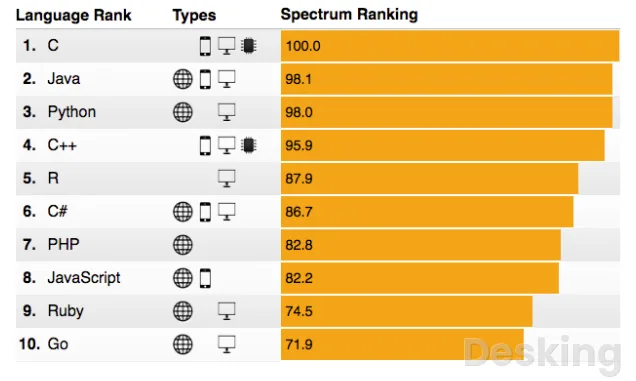
The best first programming language depends on what you want to create.
Python is a common starting point for general programming, automation, data analysis, and introductory artificial intelligence work.
JavaScript is the practical choice for interactive websites and many web applications, usually alongside HTML and CSS.
Java, C#, C, C++, Swift, Kotlin, and other languages serve different development environments and technical requirements.
I would choose Python if you have no clear specialization yet and want to understand programming fundamentals with relatively readable syntax.
If your main interest is building websites, I would start with HTML and CSS before moving into JavaScript.
HTML describes the structure of a page, CSS controls its presentation, and JavaScript adds behavior such as form validation, interactive menus, and dynamic content.
That sequence gives a beginner visible results while introducing concepts in a sensible order.
The language should follow the kind of work you want to do, not a popularity ranking.
A person interested in Android development may eventually study Kotlin, while someone building iPhone applications may need Swift.
C and C++ are relevant to systems software, embedded development, and performance sensitive applications.
SQL is used to query and manage relational databases, but it is not a general purpose replacement for Python or JavaScript.
The distinction matters because learning a language without a goal can lead to months of disconnected exercises.
Compare beginner options
The following comparison focuses on the type of work each language supports and the kind of learner who may benefit from it.
| Language or technology | Common use | Suitable starting point |
|---|---|---|
| Python | Automation, data analysis, scripting, AI foundations | General programming beginners |
| JavaScript | Websites and web applications | Learners interested in web development |
| HTML and CSS | Page structure and visual presentation | People creating their first websites |
| Java | Enterprise applications and Android related development | Learners interested in object oriented programming |
| C and C++ | Systems, embedded software, performance intensive applications | Learners interested in lower level computing |
| C# | .NET applications and game development with Unity | Windows and application development learners |
| Swift | Apple platform applications | Learners focused on iPhone and macOS software |
| SQL | Relational database queries | Anyone working with structured data |
This table is a starting point, not a permanent decision.
The fundamentals of variables, conditions, loops, functions, and data structures transfer between languages, so the first choice does not lock you into one career.
I would avoid studying Python, JavaScript, Java, and C# at the same time.
Learn one language well enough to complete small projects, then add another when a real project or career direction gives you a reason.
Avoid language hopping
Language hopping happens when a beginner repeatedly starts a new course without completing the previous one.
A new language can look attractive because its examples promise quick results, but the learner may end up knowing fragments of several syntaxes and little about how to structure a program.
I recommend setting a clear milestone before changing direction, such as completing a basic course, building two small applications, and learning how to debug common errors.
There are legitimate reasons to change your first language.
You may discover that your interests are in web development rather than data analysis, or that a course is too advanced for your current level.
In that case, review what you have already learned and identify the concepts that transfer.
Variables, loops, conditions, functions, and problem decomposition remain useful even if the syntax changes.
Starting again does not mean losing everything.
A beginner should also distinguish a programming language from a framework or library.
Python is a language; Django and Flask are web frameworks built around it.
JavaScript is a language; React is a library used to build user interfaces.
Learning a framework before understanding the language can make errors harder to diagnose because you are dealing with several layers at once.
I would learn the language fundamentals first, then introduce the tools that solve a specific problem.
3. Learn step by step
Follow a learning sequence
A structured sequence prevents gaps in your knowledge.
I recommend starting with the programming environment and basic syntax, then progressing through variables, data types, input and output, conditions, loops, functions, collections, files, and debugging.
After that, learn how to organize a small project and use version control.
This order gives each new topic a foundation, and it makes it easier to understand why a particular technique is useful.
The following sequence can guide your first months of study.
The time required depends on your previous experience, the language you choose, and how many hours you can devote to practice.
Treat the stages as learning milestones rather than deadlines that every beginner must meet.
- Prepare your workspace. Choose one language, install a suitable editor or use a browser based environment, and learn how to run a basic program. Confirm that you can save your work and find it again.
- Learn basic syntax. Study variables, data types, operators, input, and output. Write short programs that display information and respond to user input.
- Add decisions and repetition. Practice conditions and loops with exercises such as checking a password length, calculating totals, or repeating a menu until the user exits.
- Create reusable functions. Divide a program into named operations, pass information into functions, and return results. This helps you avoid repeating the same instructions.
- Work with collections and files. Learn lists, dictionaries or equivalent structures, and basic file operations. Use them to store and retrieve information.
- Build and debug projects. Combine the concepts in small applications, test different inputs, read error messages, and correct the problems you find.
- Learn version control. Use Git to record changes and return to an earlier working version when an experiment causes a problem.
I would not move to the next stage simply because you have watched the relevant lessons.
Write a small program that uses the concept without following a tutorial line by line.
If you cannot explain what the code does or modify it safely, revisit the lesson and try another exercise.
This approach takes longer than passive video consumption, but it gives you evidence that you can apply what you have studied.
Practice every concept
Practice should begin during the first lesson, not after you finish a course.
When you learn variables, write a program that stores a name, age, or product price.
When you study conditions, create a program that responds differently to two or more inputs.
When you learn loops, use them to repeat a menu or process a list of records.
Each exercise should be small enough to finish, but meaningful enough to show why the concept exists.
I recommend a learning cycle that alternates between reading, predicting, running, changing, and creating.
First, read a short example and predict what it will do.
Run it and compare the result with your prediction.
Change one part, run it again, and explain why the output changed.
Finally, close the example and create a similar program from memory.
This process makes you reason about the code instead of treating the tutorial as a script to copy.
Keep a record of mistakes that took time to solve.
Write down the error message, the cause, the correction, and the lesson you learned.
After a few weeks, those notes become a personal reference that is more useful than a folder full of unfinished courses.
They also help you recognize repeated problems, such as incorrect variable names, missing brackets, unexpected data types, or mistakes in program logic.
Build before feeling ready
Small projects reveal whether you can combine individual concepts.
A calculator, a unit converter, a task list, a contact directory, or a simple expense tracker can provide useful practice without requiring advanced mathematics.
I recommend choosing a project connected to an activity you understand, because you can judge whether its result makes sense.
A familiar problem also gives you a clear way to test the program.
Start with the smallest version that performs one useful task.
An expense tracker might initially accept one amount and display it.
The next version could accept several entries, calculate a total, and group expenses by category.
Later, you could save the information to a file and add a way to edit or delete an entry.
Each addition introduces a new programming concept and gives you a reason to study it.
Do not measure a project by the number of features.
A small application with clear logic, sensible names, basic validation, and a working result can demonstrate more understanding than a large project assembled from copied code.
Keep the first version simple, write down what it should do, and test it before adding new functionality.
That discipline helps you learn how software is developed in manageable stages.
4. Study independently
Build your own routine
You can learn programming by yourself if you have a structured plan, suitable learning material, and a way to check your progress.
A teacher can explain a difficult concept and identify mistakes, but independent learners can use course exercises, documentation, discussion forums, and project reviews to obtain much of the same feedback.

Appspace
Appspace earns its strongest case when a company needs one operating environment for employee communications, digital signage and physical workplace management…
- Centralized workplace communications management
- Extensive digital signage capabilities
- Paid subscription prices require quotations
- Administrative interface can feel complex
I would begin with one main course and one supplementary reference, rather than subscribe to several platforms and try to follow all of them at once.
Set a realistic study schedule that fits your existing responsibilities.
An hour of focused practice on five days each week can be more useful than a long session once every few weeks, because regular contact with the concepts makes it easier to remember what you learned.
If you have less time, use shorter sessions and keep a written note of the next exercise.
The important point is to return to the same project and continue from a known position.
Your plan should include specific outcomes.
"Study Python" is too broad to guide a session, while "write a program that asks for three expenses and calculates their total" gives you a task with a clear result.
I recommend dividing each week between lessons, exercises, project work, and review.
This prevents the common problem of spending all available study time watching tutorials without producing anything of your own.
Work without a tutor
Independent study requires you to become good at finding answers.
When a program fails, read the full error message, identify the line involved, and check the values that reach that part of the program.
Search for the exact error text when necessary, but compare the suggested solution with the language documentation and the code you have written.
A solution that fixes one symptom may create another problem if you do not understand the cause.
Ask questions with enough detail for another person to reproduce the issue.
Explain what you expected, what happened, what you already tried, and include the smallest relevant part of the code when sharing it publicly.
Avoid posting passwords, access tokens, private customer information, or other confidential data.
Communities such as Stack Overflow and language specific forums can be useful, but clear questions and evidence of your own effort make it easier for others to help.
I would also learn to use official documentation early.
Tutorials are useful because they arrange topics in a teaching sequence, while documentation explains the language, functions, and tools in greater detail.
You do not need to understand every page at the beginning.
Learn how to find the reference for a feature you are using, read a simple example, and check the supported arguments and expected behavior.
This habit becomes increasingly important when you move beyond beginner courses.
Review your progress
A course completion badge is not enough to prove that you can program independently.
Test yourself by creating a small project without following a step by step video, explaining the purpose of each function, and changing the program when requirements change.
If you can complete those tasks, you have stronger evidence of understanding than a record of how many lessons you watched.
Keep a simple learning log.
Record the topics studied, exercises completed, problems that remain unresolved, and the next task you intend to attempt.
At the end of each week, choose one earlier exercise and solve it again without looking at the original answer.
If you can now explain the solution more clearly or improve its structure, you have made progress that can be observed.
Do not treat a difficult week as proof that programming is not for you.
Some concepts take longer because they require a different way of thinking, and the same problem may become clearer after you have practiced related ideas.
I would first reduce the size of the exercise, revisit the prerequisite concept, and ask a precise question.
If you remain stuck, take a short break and return with a specific objective rather than abandoning the whole learning plan.
5. Find free resources
Choose a complete course
You can learn programming for free through structured online courses, documentation, open educational material, and practice platforms.
The strongest starting resource depends on the language and the level of structure you need.
Some courses teach computer science fundamentals, while others focus on building websites or learning Python.
I recommend choosing one curriculum that matches your objective and completing its core material before adding more resources.
Harvard's CS50x introduces computer science and programming through lectures, problem sets, and practical assignments.
It is suitable for learners who want a broad foundation and are prepared to work through challenging exercises.
The course introduces several areas of computing, so it can help you understand how programming relates to algorithms, data, and software systems.
It is a demanding starting point for some absolute beginners, and learners who prefer a gentler first experience may want to begin with a more focused course.
freeCodeCamp offers free lessons, projects, and certifications across areas that include web development, JavaScript, Python, and databases.
Its project based approach gives learners opportunities to apply concepts as they progress.
I would recommend it to someone who wants a guided path with practical work and does not want to pay for the learning material.
The organization states that its courses, projects, and certifications are free, although learners should still check the current curriculum and requirements for the certification they intend to complete.
Use language resources
Python's official website provides documentation and a beginner's guide, while the Python tutorial explains the language's main features.
The official tutorial is useful as a reference, but some absolute beginners may find it easier to start with a course designed for people who have never programmed.
I would use the official documentation alongside a beginner course, returning to it when you need to understand a particular function or language feature.
Mozilla's MDN Learn Web Development material is a useful route for people who want to create websites.
It covers the foundations of HTML, CSS, and JavaScript and organizes the material into learning modules.
The distinction between these technologies matters: HTML provides structure, CSS controls presentation, and JavaScript adds interaction.
Someone who wants to build web pages should understand how the three work together instead of treating them as interchangeable programming languages.
The Odin Project is another option for web development learners who prefer a curriculum built around projects and a local development environment.
Its path includes practical work and introduces tools used in web development.
This approach can require more preparation than a browser based course because you may need to configure software on your computer.
I would choose it when the objective is to learn web development through sustained project work and you are prepared to follow setup instructions carefully.
Compare free platforms
The following resources have different teaching styles, so the best choice depends on your current knowledge and learning objective.
| Resource | Main focus | Best fit |
|---|---|---|
| Harvard CS50x | Computer science and programming foundations | Learners who want a challenging broad introduction |
| freeCodeCamp | Programming lessons, projects, and certifications | Beginners who prefer guided practical exercises |
| MDN Learn | HTML, CSS, and JavaScript | People focused on web development |
| The Odin Project | Project based web development | Learners who want to build a web development portfolio |
| Python.org | Python documentation and learning references | Learners studying Python who need an official reference |
| Exercism | Practice exercises across programming languages | Learners who already know basic syntax and need practice |
A free course may not include every service offered by a paid program.
Instructor feedback, live classes, formal assessment, career support, or an accredited qualification may have separate conditions.
Check the details before assuming that a free course includes a certificate or university credit.
For learning the fundamentals, however, a paid subscription is not a prerequisite.
The quality of your practice and the projects you complete matter more than the number of platforms you join.
Avoid collecting courses
Free access can create a different problem: too many choices.
A learner may save dozens of courses, compare their syllabuses, watch introductory videos, and make little progress in any of them.
I recommend choosing one primary curriculum and keeping a second resource only for explanations or reference.
If the first course is too difficult, identify the missing prerequisite and fill that gap instead of restarting with a completely different language.
Before committing, inspect the course structure.
Check whether it assumes previous programming knowledge, whether it includes exercises, whether projects are required, and whether the material is still maintained.
A course that explains a concept but never asks you to use it may be insufficient as your only resource.
A course with practical assignments gives you a way to check whether you can apply what you have learned.
A useful rule is to complete a defined portion of a course before evaluating alternatives.
For example, finish the first major module and its exercises, then decide whether the pace and teaching style suit you.
Do not change resources because another course has a more attractive interface or a longer list of technologies.
Change only when there is a clear reason, such as missing content, outdated instructions, or a mismatch with your learning goal.
6. Learn online effectively
Choose online lessons
Online learning gives you access to courses, lectures, documentation, exercises, and communities without requiring attendance at a physical classroom.
You can study at your own pace and return to a difficult lesson whenever necessary.
The quality of the experience depends on how actively you use the material.
I would choose courses that include exercises and projects, because programming requires you to produce and test code rather than only recognize correct answers.
A useful online course should explain concepts in a logical order and give you opportunities to apply them.
Look for lessons that show the reasoning behind a solution, discuss common errors, and gradually increase the difficulty.
Video lessons can help you understand a new topic, but pause regularly and reproduce the example yourself.
If you watch an entire course without opening an editor or solving exercises, you may remember the explanation without being able to write a program.
You should also check the date and maintenance status of technical material.
Programming languages and development tools change, and an old tutorial may refer to menus, commands, or library versions that no longer match the current release.
The underlying concept may remain valid, but setup instructions can fail.
When a tutorial conflicts with current documentation, verify the feature against the official reference before changing your environment.
Practice in a browser
Browser based coding environments let beginners write and run programs without installing a complete development setup.
They can be useful when you have limited permissions on a computer, want to test a short example, or are studying on a shared device.
Some educational platforms include an editor, instructions, and automated checks in the same interface.
That reduces setup work and lets you focus on the lesson.
There are limits to this approach.
A browser editor may not provide the same control over files, packages, terminals, debugging tools, and local applications as a development environment installed on your computer.
The differences become more noticeable when you build larger projects or need to work with databases and external services.
I would use a browser environment for the first exercises, then learn to run programs locally when the course introduces that skill.
Do not confuse an online editor with a complete programming education.
The editor executes your instructions, but it does not automatically teach you how to design a solution, organize a project, or investigate a failure.
You still need to understand the concepts and review the result.
Use the convenience of the browser to reduce friction, not as a reason to avoid learning the tools that developers use.
Use AI as a tutor
AI assistants can explain programming concepts, suggest exercises, interpret error messages, and review code.
They can be useful when a course explanation is unclear or when you need another example of a concept.
I recommend using an assistant to ask why a piece of code behaves in a particular way, rather than requesting a complete solution before attempting the exercise yourself.
The explanation should help you make the next decision independently.
AI generated code can contain errors, insecure patterns, outdated methods, or assumptions that do not match your project.
A beginner may struggle to recognize these problems because the output can look convincing.
Ask for a short explanation of each important part, then verify unfamiliar functions against documentation and test the program with different inputs.
If you cannot explain what a suggested line does, do not treat it as a finished solution.
A useful learning request is to ask for a hint rather than the answer.
You can describe the problem, show the relevant code, and ask which concept you should review.
You can also ask for a simpler explanation, a small practice exercise, or a review of your reasoning.
This keeps you responsible for writing and understanding the program.
I would avoid submitting private business data, credentials, proprietary code, or personal information to tools unless you have checked their privacy and data handling terms.
7. Study from home

Prepare a workspace
You can learn programming at home with a basic computer and a reliable way to access lessons and documentation.
A high end workstation is not necessary for introductory Python, HTML, CSS, or JavaScript exercises.
A laptop or desktop with a keyboard is more practical than a phone because writing, editing, and debugging code require frequent text input.
If you only have access to a mobile device, browser based lessons can help you begin, but plan to use a computer for more substantial projects.
Keep your workspace simple.
Use one folder for learning projects, separate folders for exercises and finished work, and clear names that tell you what each file contains.
Save your work regularly and keep a copy of important projects in a second location.
As you progress, learn Git so you can record changes and recover earlier versions.
A tidy workspace reduces the time spent looking for files and makes it easier to return to an unfinished exercise.
Choose a time and place where you can concentrate.
Programming often requires sustained attention because a small change can affect several parts of a program.
Turn off unnecessary notifications, keep the lesson and editor accessible, and decide what you intend to complete before the session begins.
I would rather see a learner complete one focused exercise than spend an entire evening switching between videos, discussion threads, and unrelated tools.
Manage internet access
An internet connection helps you access online courses, download software, read documentation, and ask questions.
It does not need to be continuously available for every programming task.
Some editors and language runtimes work locally, so you can write and run code after the initial setup.
Download course materials or documentation for offline use where the provider permits it, and keep a record of the lessons that require an internet connection.
If your connection is unreliable or expensive, plan your sessions around the resources that consume the least data.
Text based documentation and written tutorials are often more economical than streaming video.
You can also download permitted course materials while connected and complete exercises offline.
Avoid downloading software from unknown websites simply because they offer a smaller package or promise a faster installation.
For learners using a shared or public computer, check whether you are allowed to install development tools and save files locally.
Do not store passwords or personal tokens on a machine that other people can access.
If you cannot install software, use a reputable browser based environment until you have access to a computer where you can work with local files.
The goal is to maintain a safe and repeatable learning setup.
Protect study time
A home study plan must account for work, family, school, and other responsibilities.
Set a weekly target that you can sustain instead of copying a schedule designed for a full time student.
You might reserve several short sessions for lessons and exercises, with a longer session for project work.
The exact number of hours is less important than whether you return consistently and complete the tasks you planned.
Give each session a specific purpose.
One day may focus on understanding functions, another on solving exercises, and another on improving a small project.
At the end, write down the next action so that you do not have to spend the next session remembering where you stopped.
This is especially useful when your study time is interrupted or spread across several days.
Measure progress by completed work rather than hours alone.
Record the programs you have written, concepts you can explain, and problems you can now solve without help.
If you study for ten hours but cannot write a basic program independently, review how you are using that time.
If you complete a small project and understand its logic, the time has produced a practical result.
8. Connect coding concepts
Understand coding and programming
The terms coding and programming are often used interchangeably in beginner material.
Coding usually refers to writing instructions in a programming language, while programming includes the wider process of understanding a problem, planning a solution, writing code, testing it, and maintaining the result.
Both are part of the same skill set, and you will encounter the two terms throughout courses, documentation, job descriptions, and developer communities.
I recommend learning the full process from the beginning.
Before writing code, describe the expected behavior in plain language.
Then identify the information the program needs, the operations it must perform, and the result it should produce.
After writing the first version, test it and correct the problems.
This routine helps you understand why software development involves planning and verification as well as syntax.
A beginner who learns only to copy code may be able to reproduce a tutorial but struggle when a requirement changes.
For example, a program that calculates a total may work with three fixed values but fail when the user enters an unexpected value.
Understanding the logic allows you to adjust the program safely.
That ability is what turns familiarity with a language into practical programming skill.
Learn data structures
Data structures organize information so a program can store, retrieve, and modify it.
Beginners usually encounter arrays or lists, dictionaries or maps, sets, and objects, depending on the language.
A list can hold several values in order, while a dictionary can associate a name or key with a value.
These structures help you manage information without creating a separate variable for every item.
Start with examples that relate to your projects.
A list can store several expense amounts, while a dictionary can associate each expense with a category.
You can then loop through the collection to calculate totals or find a particular entry.
This makes it easier to understand why data structures matter: they allow a program to handle groups of related information in a consistent way.
You do not need to memorize every data structure before building a project.
Learn the structures that solve the problem in front of you, then compare alternatives as your requirements become more complex.
A list may be suitable for an ordered collection, while a dictionary may be better when you need to retrieve information by a key.
I would focus on understanding the behavior and trade offs of each structure rather than learning definitions without context.
Learn algorithms
An algorithm is a sequence of steps used to solve a problem.
A sorting algorithm arranges information in a particular order, while a search algorithm finds an item within a collection.
Beginners often encounter algorithms through simple exercises, such as finding the largest number in a list or checking whether a word appears in a collection.
These exercises develop the habit of describing a solution before translating it into code.
Start by writing the steps in plain language.
If you need to find the largest value in a list, you can begin by treating the first value as the largest, compare each remaining value with it, and replace the stored value whenever you find a larger one.
After that, translate the steps into your chosen language and test the program with different lists.
This approach helps you separate the problem solving process from the syntax.
As you progress, learn why efficiency matters.
An algorithm that works well with ten records may become slow when it processes millions of records.
You do not need advanced mathematics to begin understanding this issue, but you should learn to compare how much work different solutions require.
I would introduce algorithm analysis gradually, after you are comfortable writing and testing basic programs.
Learn debugging and testing
Debugging is the process of finding and correcting defects in software.
A program may fail because of a syntax error, an incorrect data type, a wrong assumption, or a logical mistake that produces an unexpected result.
Read the error message carefully and identify the first point where the program behaves differently from what you expected.
Changing several lines at once makes it harder to understand which change solved the problem.
Testing helps you check whether the program behaves as intended.
Begin with ordinary inputs, then try empty values, unusually large values, invalid text, and boundary cases that may expose weaknesses.
If a program accepts an expense amount, test whether it handles zero, a negative number, and a value with decimal places according to your requirements.
Appspace
Appspace earns its strongest case when a company needs one operating environment for employee communications, digital signage and physical workplace management…
- Centralized workplace communications management
- Extensive digital signage capabilities
- Paid subscription prices require quotations
- Administrative interface can feel complex
You should decide what the program ought to do before you judge whether the result is correct.
I recommend learning basic automated testing after you understand functions.
A test can call a function with a known input and check whether the returned result matches the expected value.
This makes it easier to detect regressions when you change a project.
You do not need a large testing framework for your first exercises, but you should develop the habit of checking your work rather than assuming that a program is correct because it runs.
9. Build practical projects

Choose beginner projects
Projects give your learning a purpose and reveal which concepts you understand.
The first project should be small enough to finish, with a clear input, process, and output.
I would choose something that solves a familiar problem rather than attempt to build a complete social network or business application as a first exercise.
A finished small program gives you a foundation for the next one.
Consider these project ideas as you progress:
- Simple calculator: Accept two numbers and perform basic arithmetic operations, with checks for invalid input.
- Task list: Allow a user to add tasks, display them, and mark completed items.
- Expense tracker: Record amounts and categories, then calculate totals for a chosen period.
- Contact directory: Store names and contact details, then search for a record by name.
- Unit converter: Convert values between common units and display a clear result.
- Personal website: Use HTML for structure, CSS for presentation, and JavaScript for a small interactive feature.
The first version should solve only the central problem.
Once it works, add features one at a time and test each change.
This keeps the project manageable and makes it easier to identify the concept behind every new feature.
A task list, for example, can begin with adding and displaying tasks before you introduce editing, deletion, storage, or user accounts.
Create a project portfolio
A portfolio is a collection of projects that shows what you can build and how you approach technical problems.
It can be useful when applying for internships, junior roles, freelance work, or collaborative projects.
I would rather see a small number of complete, clearly explained projects than a long list of unfinished tutorials.
Each project should demonstrate a different skill or a more advanced application of concepts you already know.
For each project, explain the problem it solves, the technologies used, the main features, and any limitations.
Include instructions that allow another person to run it, along with examples of expected behavior.
If you used a tutorial or external library, acknowledge it and explain which parts you implemented or adapted yourself.
This makes your work easier to evaluate and avoids suggesting that you created something entirely independently when you did not.
GitHub is commonly used to store and share source code through Git repositories.
You can use it to publish project files, record changes, and provide a public view of your work.
Learn the basic Git operations first, including creating a repository, adding changes, committing them, and pushing the work to a remote repository.
A portfolio is stronger when the project history and documentation show a clear progression rather than a single upload of copied code.
Improve projects gradually
After a project works, review its structure.
Check whether variable and function names describe their purpose, whether repeated instructions can be grouped into functions, and whether the program handles invalid input.
Remove unused code and add comments only where they clarify a decision that may not be obvious.
This review teaches you to think about readability and maintenance, not just the immediate output.
Ask someone to review your code when possible.
A peer, mentor, teacher, or developer community may identify confusing names, duplicated logic, missing tests, or a simpler approach.
When you receive feedback, try to understand the reason behind each suggestion before changing the program.
Not every recommendation will apply to your project, so evaluate it against the requirements and explain your decision.
You should also revisit older projects after learning new concepts.
A calculator written during your first week may be improved with functions, input validation, and tests.
An expense tracker may gain file storage or a database after you study persistence.
Revisiting earlier work makes progress visible and gives you a practical way to apply new knowledge without starting from zero every time.
10. Measure your progress
Set realistic milestones
Learning programming does not follow one universal timetable.
The time required depends on your starting point, the complexity of your goal, the quality of your practice, and the amount of time you can study.
You may understand basic syntax relatively quickly, but building reliable applications requires more experience with data, debugging, software design, and tools.
I would avoid promises that a fixed number of days or weeks will make every beginner job ready.
Use milestones that describe what you can do.
An early milestone is writing and running a simple program without copying every line.
Another is solving exercises with conditions, loops, and functions.
Later milestones may include building a small application, storing information, using Git, writing tests, and explaining the decisions behind your code.
These outcomes provide a more useful measure than counting the number of lessons completed.
A learner who studies for a few hours each week will progress at a different pace from someone who can practice every day.
That difference is normal.
If progress slows, check whether the current exercises are too difficult, whether you are spending too much time watching lessons, or whether you have moved to advanced tools before learning the fundamentals.
Adjust the plan to the obstacle rather than assuming that you need a different language.
Understand the role of mathematics
You do not need advanced mathematics to begin learning most forms of programming.
Basic arithmetic, logical reasoning, and the ability to follow a sequence of steps are enough for many introductory projects.
Web development, basic automation, and simple business applications can be learned without advanced calculus.
More specialized fields, including machine learning, graphics, scientific computing, and some engineering applications, may require stronger mathematical foundations.
I would not delay learning programming because you are worried about mathematics.
Start with practical exercises and strengthen the relevant mathematical skills when a project requires them.
For example, a simple expense tracker needs arithmetic and basic comparisons, while a data analysis project may involve statistics.
Learning the mathematics in context can make it easier to understand why a particular concept is useful.
Logical reasoning is especially important because programs must handle different conditions and possible outcomes.
You can develop this skill by breaking tasks into steps, tracing how information moves through a program, and testing what happens when inputs change.
These activities do not require advanced mathematics, but they do require patience and careful thinking.
That is why small exercises are valuable even when they appear simple.
Decide when to specialize
Once you can write small programs and understand the fundamentals, choose a direction for deeper study.
Web development, mobile applications, data analysis, automation, game development, cybersecurity, and systems programming require different tools and knowledge.
I recommend selecting a direction based on the problems you enjoy solving and the type of work you want to pursue.
A specialization gives your next learning steps a clearer purpose.
For web development, learn HTML, CSS, JavaScript, browser behavior, APIs, and a framework when you are ready.
For data work, build on Python with SQL, data handling, statistics, and visualization.
For mobile development, study the language and platform associated with your target devices.
For systems programming, explore C or C++ and learn more about memory, operating systems, and computer architecture.
Do not specialize too early by collecting frameworks.
A beginner who has not yet learned functions, data structures, and debugging may find it difficult to understand what a framework is doing.
Learn enough fundamentals to recognize the problems that frameworks solve.
Then select one tool, build a project with it, and understand its role before adding another.
Prepare for professional work
If your goal is employment, programming knowledge is only one part of the preparation.
Employers may also expect problem solving, communication, collaboration, version control, testing, and the ability to explain technical decisions.
The specific requirements vary by role and organization.
Review actual job descriptions in the field you want to enter and use them to identify skills that should guide your next projects.
A self taught learner can demonstrate ability through a portfolio, contributions to open source projects, practical freelance work, internships, or other relevant experience.
A degree may be required or preferred for some positions, while other employers place more emphasis on demonstrated skills and experience.
Coursera's beginner guidance describes several routes into coding, including formal education, bootcamps, self directed learning, and project work.
The route you choose should reflect your circumstances and the requirements of the roles you intend to pursue.
I would not present a beginner certificate as proof of professional readiness.
A certificate can show that you completed a course, but a working project gives a reviewer more information about how you apply the material.
Be prepared to explain the code, discuss a problem you encountered, and describe how you would improve the project.
That ability is a stronger indication that you understand the work behind the result.
11. Keep learning consistently
Avoid common mistakes
Beginners often lose time by changing languages too frequently, following several courses at once, or relying on videos without writing code.
These habits create the impression of progress while leaving important gaps.
I recommend keeping one main learning path, completing its exercises, and building projects that use the concepts from each stage.
Add a new resource only when it solves a specific problem in your current plan.
Another common mistake is copying code without understanding it.
Copying a short example can be useful when you are learning syntax, but you should then change the example and explain the effect.
If you cannot describe why a line exists, look up the concept and test a simpler version.
The objective is to become able to write and modify code without depending on a tutorial for every decision.
Avoid comparing your first projects with the work of experienced developers.
Mature software often contains years of design decisions, testing, maintenance, and collaboration.
Compare your current work with what you could do a month ago.
If you can now solve a problem independently, explain an error, or structure a program more clearly, that is meaningful progress.
Join a developer community
A programming community can provide feedback, explanations, project ideas, and exposure to how other people solve problems.
You can participate through forums, local technology groups, online study communities, and open source projects.
I recommend joining a community related to your chosen language or specialization rather than joining every general programming group you find.
Focused communities make it easier to ask relevant questions and follow discussions at your current level.
Read existing discussions before posting a question.
Someone may already have encountered the same error, and the discussion may explain both the cause and the solution.
If you do ask for help, include the programming language, relevant environment details, the error message, and a minimal example.
Do not expect another person to debug an entire project from a vague description.
Open source projects can become useful learning material when you are ready to read code written by others.
Begin by reviewing documentation, identifying a small issue, or correcting a minor documentation error.
Later, you may be able to fix a bug or add a small feature.
The purpose at the beginning is to understand how real projects are organized and how developers communicate about changes.
Use feedback constructively
Feedback can reveal problems that you may not notice in your own code.
Ask reviewers to focus on a specific area, such as readability, function design, error handling, or tests.
A broad request to review everything can be difficult to answer, especially when the project is large.
A focused review gives you something concrete to improve.
Do not treat every criticism as a personal judgement.
Code review is about the quality and maintainability of the work, and experienced developers also receive suggestions and corrections.
Ask why a change is recommended and compare it with the project's requirements.
You will learn more from understanding a review than from applying edits without considering their purpose.
Keep a record of feedback that appears repeatedly.
If several reviewers mention unclear variable names, duplicated code, or missing validation, those are areas to practice in your next project.
Over time, you should begin to notice the same issues before someone else points them out.
That is a useful sign that your programming judgement is developing.
Create a twelve week plan
A twelve week plan can give independent learners a useful structure, provided they treat it as a guide rather than a promise of professional competence.
The aim is to establish programming fundamentals, complete a first project, and develop the habits needed for continued study.
I would use one language throughout the plan and choose a project that can grow as new concepts are introduced.
The schedule below assumes part time study, so adjust the pace if your available hours are limited.
During the first two weeks, choose a language and complete the initial lessons on syntax, variables, data types, input, and output.
Write small programs after each lesson and keep notes on errors that you had to correct.
In weeks three and four, study conditions, loops, and functions.
Use exercises that require you to make decisions, repeat operations, and divide a task into smaller functions.
By the end of this stage, you should be able to write a small program without copying the complete solution from a tutorial.
In weeks five and six, study collections, files, and basic error handling.
Use these concepts to extend a small project, such as a task list or expense tracker.
In weeks seven and eight, work on a project that combines the topics you have studied.
Write down the requirements, build the simplest working version, and test it with different inputs.
If you are studying web development, this is a suitable point to create a small website with a few pages and an interactive feature.
During weeks nine and ten, learn Git and basic testing.
Save your project in a repository, record meaningful changes, and add tests for important functions.
Review the code and correct problems that affect readability or reliability.
In weeks eleven and twelve, finish the project documentation and ask someone to review the work.
You should be able to explain the purpose of the application, describe how it works, and identify what you would improve next.
The plan should end with a working result, not simply a completed calendar.
If you need more than twelve weeks to understand a topic, extend the schedule.
The objective is to build a reliable foundation that supports the next stage of learning.
A learner who finishes a small project and understands it has achieved more than someone who rushes through every lesson without being able to apply the material.
Know when to seek help
Independent learning does not mean refusing assistance.
If you have spent a reasonable amount of time investigating an error and still cannot identify its cause, ask for help with the smallest reproducible example.
A good explanation from another developer can save hours and teach you how to approach similar problems in the future.
The important point is to understand the answer rather than paste it into your project without review.
You may benefit from a mentor or structured class when you need regular feedback, have difficulty organizing your study, or are preparing for a specific professional objective.
A mentor can help identify gaps and suggest projects that match your current level.
A course with instructor feedback can also be useful when you need someone to assess assignments.
These services may cost money, but they are optional additions rather than requirements for starting.
I would consider paying for training only after identifying what free resources cannot provide.
You may need structured feedback, a formal qualification, access to specialist instruction, or a learning environment with deadlines.
Compare the curriculum, instructor support, assessment method, total cost, and any certificate conditions before enrolling.
Do not pay simply because a course promises that you will become a developer in a fixed number of weeks.
Keep your learning focused
The programming field changes, and new tools appear regularly.
That can make beginners feel that they must study every new framework, language, or artificial intelligence product.
You do not.
A strong foundation in programming logic, data structures, debugging, testing, and version control remains useful across many technologies.
I would keep the focus on these transferable skills while following developments that directly relate to your chosen specialization.
When you encounter a new tool, ask what problem it solves and whether that problem exists in your current work.
A framework may simplify application development, a database may help store structured information, and a testing tool may help detect defects.
Learn a tool when you have a reason to use it, then build a small example that demonstrates its purpose.
This approach keeps your study connected to practical work.
The same principle applies to artificial intelligence.
AI coding assistants can help explain unfamiliar syntax and suggest ways to investigate a problem, but they do not remove the need to understand software.
You remain responsible for checking the output, protecting data, testing behavior, and deciding whether a proposed solution fits the requirements.
The more programming knowledge you develop, the better equipped you are to judge the quality of AI generated code.
12. Choose your next direction
Explore web development
Web development is a practical route for beginners who want to create websites and browser based applications.
Start with HTML to structure content, CSS to control layout and presentation, and JavaScript to add interaction.
Learn how browsers interpret these technologies and how a page communicates with a server.
After you understand the basics, build a small website that includes navigation, forms, and a feature that responds to user input.
The next stage may include responsive design, accessibility, browser developer tools, APIs, and a JavaScript framework.
Do not rush into a framework because it appears in job advertisements.
First learn how a normal web page works, how to inspect errors in the browser, and how to organize your files.
Those fundamentals make framework documentation easier to understand and help you identify whether a problem comes from your own code or from a library.
MDN's learning material is useful for this path because it organizes web development topics into modules and reference material.
The Odin Project offers a more project oriented route for learners who want to build a larger web development foundation.
I would choose one as the main curriculum and use the other as a reference only when you need a different explanation or an additional exercise.
Explore automation
Automation is a good direction if you want to use programming to reduce repetitive work.
Python is commonly used for scripts that process files, organize information, work with spreadsheets, or communicate with web services.
Start with simple tasks that have a clear input and output, such as renaming a group of files or extracting information from a text document.
Learn how to handle errors and avoid changing important data until you have tested the script on copies.
As you progress, study file handling, libraries, APIs, and scheduling.
A script that works on one file may need additional checks before it can process an entire folder safely.
You should understand what the program will change, where it will save results, and how it behaves when a file is missing or has an unexpected format.
I recommend keeping a backup of important data and testing automation on noncritical files first.
Automation projects can also help you understand how software interacts with an operating system.
Appspace
Appspace earns its strongest case when a company needs one operating environment for employee communications, digital signage and physical workplace management…
- Centralized workplace communications management
- Extensive digital signage capabilities
- Paid subscription prices require quotations
- Administrative interface can feel complex
You will learn about paths, permissions, file formats, and the way applications exchange information.
These skills can be useful in IT support, system administration, data work, and general business operations.
They also provide a practical way to see the value of programming without needing to build a large application.
Explore data work
Data related programming involves collecting, cleaning, transforming, analyzing, and presenting information.
Python and SQL are useful starting points, although the right tools depend on the type of data and the work you intend to do.
Begin with basic Python and learn how to read structured files, select records, calculate summaries, and identify missing or inconsistent values.
Then introduce SQL to query information stored in relational databases.
A beginner project could analyze a public dataset and answer a small number of clearly defined questions.
Start by checking the columns and data types, then identify missing values and decide how to handle them.
Calculate a few summaries and explain what they show.
Do not assume that a chart or a calculated average automatically proves a conclusion; understand the source, quality, and limitations of the data.
As you gain experience, study statistics and data visualization.
These subjects help you interpret results and communicate findings accurately.
If you later move toward machine learning, you will need additional mathematics and a stronger understanding of data preparation and model evaluation.
I would build a foundation in programming and data analysis before attempting advanced artificial intelligence projects.
Explore application development
Application development covers software for desktop computers, mobile devices, and other platforms.
The language and tools depend on the target environment.
Swift is used for Apple's platforms, Kotlin is associated with Android development, and C# is used in many .NET applications and game development workflows.
JavaScript and frameworks such as React Native can also be used to create mobile applications.
Choose a platform before selecting the language.
If you want to create applications for iPhone and iPad, study the Apple development environment and Swift.
If your target is Android, review the current Android development recommendations and the role of Kotlin.
If you want to create desktop software, consider the operating system and the users who will run the application.
These decisions affect the tools, testing process, and distribution method.
Your first application should have a limited purpose.
It might store a short list, display information, or perform one calculation.
Learn how the application receives input, handles errors, saves information, and presents results.
Once the basic version works, study the platform's interface guidelines and security requirements.
A small application that works reliably is a better learning project than a large concept that never reaches a usable state.
Explore systems programming
Systems programming focuses on software that interacts closely with operating systems, hardware, memory, and other low level components.
C and C++ are important languages in this area, while other languages are used for specific systems and infrastructure tasks.
This path can involve more demanding concepts, including memory management, pointers, concurrency, and operating system behavior.
It is a reasonable specialization for learners who are interested in how computers work beneath the application layer.
I would not recommend beginning with systems programming simply because it is considered difficult or prestigious.
First learn programming fundamentals and become comfortable with functions, data structures, debugging, and basic algorithms.
Then study C or another language that fits your intended area.
Understanding how a program uses memory and communicates with the operating system becomes easier when you already know how to write and test smaller applications.
A practical early project might process text files, manipulate data structures, or implement a small command line utility.
As you progress, study compilers, operating systems, networking, and computer architecture.
These topics explain how software interacts with the machine and provide the foundation for more advanced systems work.
The route is longer, but it can be rewarding for learners who enjoy technical detail.
Adapt the plan to your level
If you have never written code, begin with the basic concepts and avoid advanced project requirements.
If you already understand variables, conditions, and loops, spend less time repeating introductory lessons and move toward functions, data structures, and practical applications.
The phrase "from scratch" can describe very different starting points: someone who has never used a code editor needs a different first week from someone who understands computers but has never programmed.
People searching for how to learn computer programming for beginners usually need a clear first language, a course that explains concepts in order, and exercises that do not assume previous experience.
Those looking for how to learn computer programming from scratch should also learn how to run a program, save files, and read basic error messages.
I would treat these as separate milestones because knowing how to use a computer does not automatically mean knowing how to work in a programming environment.
If your main concern is how to learn computer programming for free, start with a free curriculum and use documentation and community support as supplementary resources.
If you want to learn computer programming online, choose a course with exercises and projects rather than relying on videos alone.
Learners who want to study at home should create a routine that fits their responsibilities and gives them regular time to write code.
These are different study conditions, but they all depend on the same foundation: practice, feedback, and completed work.
People who want to learn computer programming by yourself should build the habit of investigating errors and asking precise questions.
Those who want to learn computer programming step by step should follow a sequence of concepts and test each one before moving forward.
If your goal is to learn a computer programming language, choose one that matches the type of software you want to create.
And if you are trying to understand how to learn computer programming and coding as a complete skill, remember to include problem solving, debugging, testing, and project maintenance in your study plan.
Frequently Asked Questions
Can I learn programming with no experience?
Which programming language is easiest for beginners?
How many hours should I study programming each day?
Can I learn computer programming using only my phone?
Do I need a degree to become a programmer?
Is artificial intelligence replacing beginner programmers?
What should I build after learning the basics?
Sources5
- Python.org on getting started with Python
- Harvard CS50 on computer science
- freeCodeCamp on free coding courses
- LearnPrompt on beginner coding
- Coursera on beginner coding education
External pages are independent third-party sources. Desking App does not control or endorse their content and accepts no responsibility for it. Visiting them is at your own responsibility and risk.